







Python OpenCV Utilities
Python OpenCV Utilities provides useful extensions for OpenCV
and can be used as a drop-in replacement for cv2.
import cv2u as cv # instead of: import cv2 as cv
| PyPI package | python-opencv-utils |
| Import name | cv2u |
| Python | 3.11 – 3.15 |
| OpenCV | 5.0+ (OpenCV 4 is not supported) |
| NumPy | 2.0+ |
| Documentation | https://076923.github.io/cv2-utils/ |
Installation
pip install python-opencv-utils
pip install "python-opencv-utils[cluster]"  # also installs scikit-learn (meanShiftColors, DBSCAN, clusterPoints)
Dependencies (installed automatically): opencv-python>=5, numpy>=2, pillow.
The optional cluster extra adds scikit-learn for meanShiftColors, DBSCAN and clusterPoints.
dominantColors, colorQuantize and kmeansColors work without it (they use cv.kmeans).
Usage
The official OpenCV Python tutorials import the module as
import cv2 as cv. Use the same pattern with cv2u: every OpenCV function and constant keeps working,
and the extensions below are available alongside them.
import cv2u as cv

src = cv.imread("image.jpg")  # plain OpenCV
dst = cv.rotateEx(src, 45)  # cv2u extension
If a name exists in both, the cv2u version wins. You can always reach the original module with import cv2.
cv is only a name, so import cv2u as cv2 also works if you prefer it.
Type checkers and IDEs see OpenCV's own signatures through cv2u, so autocompletion and type checking for
cv.imread and friends keep working. Names added in OpenCV releases newer than 5.0 are typed as Any.
Everyday helpers
import cv2u as cv

src = cv.imreadEx("C:/사진/고양이.jpg")  # cv.imread fails on non-ASCII paths on Windows
small = cv.resizeEx(src, width=640)  # keeps the aspect ratio
boxed, scale, (left, top) = cv.letterbox(src, (640, 640))  # fit + pad, e.g. for a model input
logo = cv.imread("logo.png", cv.IMREAD_UNCHANGED)  # BGRA with transparency
stamped = cv.overlayImage(small, logo, org=(10, 10), opacity=0.8)
cv.imwriteEx("C:/사진/비교.png", cv.hconcatEx([small, stamped], gap=8))
Video and notebooks
import cv2u as cv

print(cv.videoInfo("input.mp4"))  # VideoInfo(width=1920, height=1080, fps=30.0, frameCount=900)
edges = (cv.autoCanny(frame) for frame in cv.readFrames("input.mp4", step=2))  # every 2nd frame
cv.writeVideo("edges.mp4", edges, fps=15)  # codec, size and color mode are detected

corners = [[120, 80], [980, 140], [940, 760], [90, 700]]  # e.g. from cv.approxPolyDP, in any order
page = cv.fourPointTransform(cv.imread("photo.jpg"), corners)
cv.imshowInline(page)  # in Jupyter, with the correct colors
Detection and web results
import cv2u as cv

img = cv.imread("street.jpg")
detections = [((40, 60, 120, 200), "person", 0.94), ((200, 90, 160, 110), "자동차", 0.88)]
crops = []
for box, name, score in detections:
    crops.append(cv.cropEx(img, box, margin=10, fill=0))  # safe even at the image border
    cv.drawLabel(img, box, f"{name} {score:.2f}", (0, 200, 255), fontPath="C:/Windows/Fonts/malgun.ttf")

hsv = cv.cvtColor(img, cv.COLOR_BGR2HSV)
red = cv.inRangeEx(hsv, (170, 80, 80), (10, 255, 255))  # red wraps around hue 0
cv.imwrite("result.png", cv.montage([img, cv.overlayMask(img, red, (255, 0, 255)), *crops], gap=8))

payload = {"image": cv.imencodeBase64(img, ".jpg", dataUri=True)}  # for a JSON API or an HTML <img>
rotateEx
Rotates an image without cropping its corners. The canvas grows to fit the result.
import cv2u as cv

src = cv.imread("image.jpg")
dst = cv.rotateEx(src, 45)

cv.imshow("src", src)
cv.imshow("dst", dst)
cv.waitKey()
| src | dst |
|---|---|
 |
 |
Masks, contours and templates
import cv2u as cv

scan = cv.cropToContent(cv.imread("scan.png"), tolerance=10)  # drop the white margin
mask = cv.inRange(cv.toGray(scan), 0, 100)  # dark ink; toGray works whatever the input is
mask = cv.fillHoles(cv.removeSmallObjects(mask, minArea=30))
for contour in cv.findContoursEx(mask, minArea=500)[:3]:  # the 3 largest shapes
    cv.drawLabel(scan, cv.boundingRect(contour), f"{cv.contourArea(contour):.0f} px", (0, 160, 255))

for x, y, w, h, score in cv.findTemplate(scan, cv.imread("logo.png"), threshold=0.9):
    print(f"logo at ({x}, {y}), score {score:.2f}")
cv.imwriteEx("out/annotated.png", scan, makeDirs=True)  # cv.imwrite would return False: no "out" folder
Color clustering
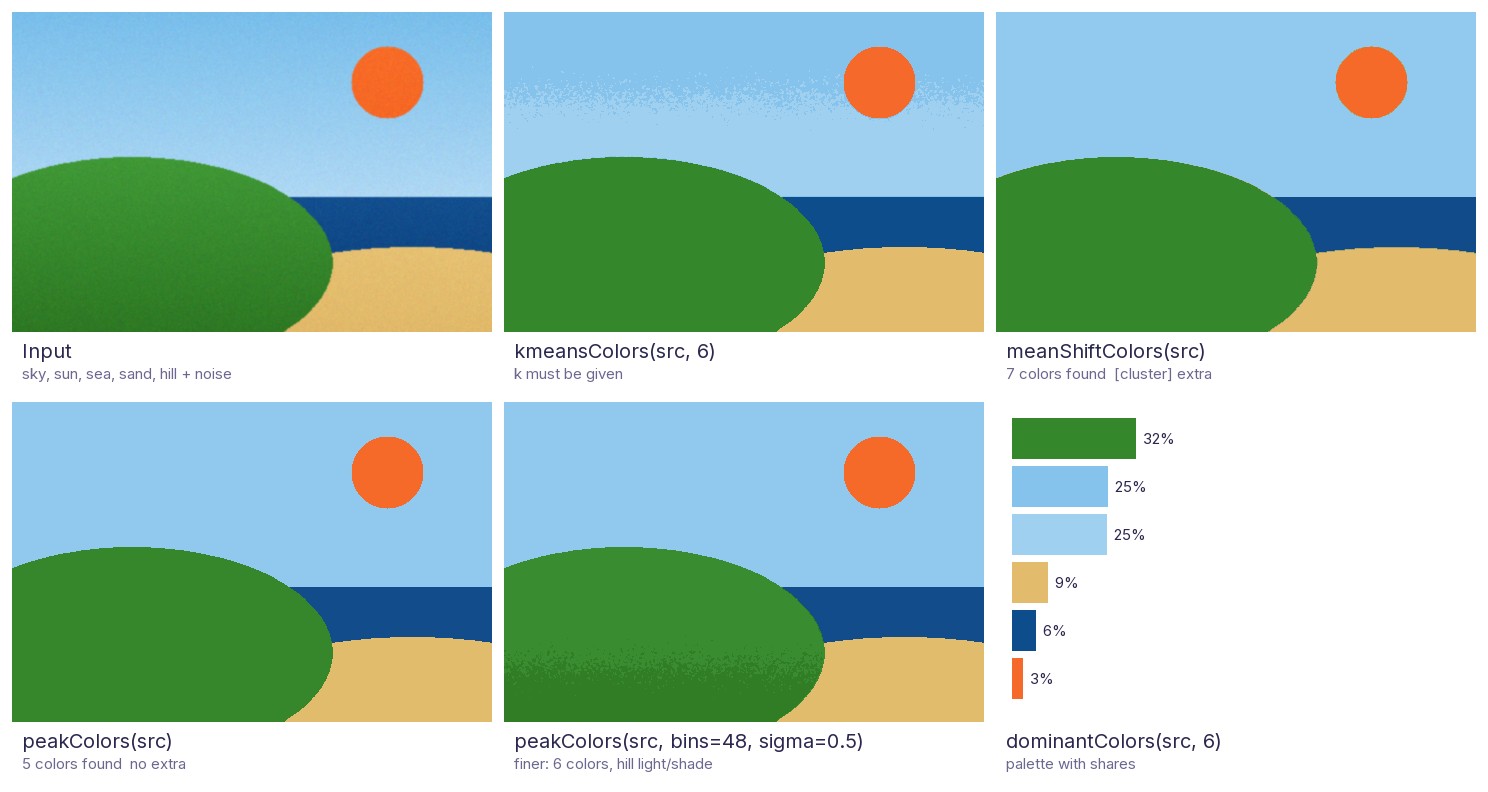
Every color clustering returns (maps, centers): a label image and one color per label, so centers[maps] paints
the result. They differ in how the number of colors is chosen:
kmeansColors |
meanShiftColors |
peakColors |
|
|---|---|---|---|
| Number of colors | You give k |
Found automatically | Found automatically |
Needs the [cluster] extra |
No | Yes | No |
| Deterministic | Yes (seed) |
Yes (seed) |
Yes (no randomness at all) |
| Pixels used to fit | A sample | A sample | Every pixel |
| 1 MP / 12 MP image | 0.25 s / 3.0 s | 0.53 s / 2.7 s | 0.13 s / 1.5 s |
Timings: the scene above at 1200x800 and 4200x2800, best of 3 runs, on one Windows PC with Python 3.14; use them to compare the methods, not as absolute numbers.
peakColors is cv2u's own method: it counts the pixels in a 3-D Lab color histogram, smooths it, and follows every
histogram cell uphill to its peak; each peak becomes one color. Identical colors, which are very common in 8-bit
images, simply add up, so it neither needs a sample nor splits flat colors apart. In the comparison it found the
5 regions of the scene, where kmeansColors (with a fixed k=6) cut the sky gradient with a noisy band, and
meanShiftColors added two clusters of 421 and 79 pixels. bins and sigma make it finer or coarser, and
minRegion absorbs small speckles into the surrounding region.
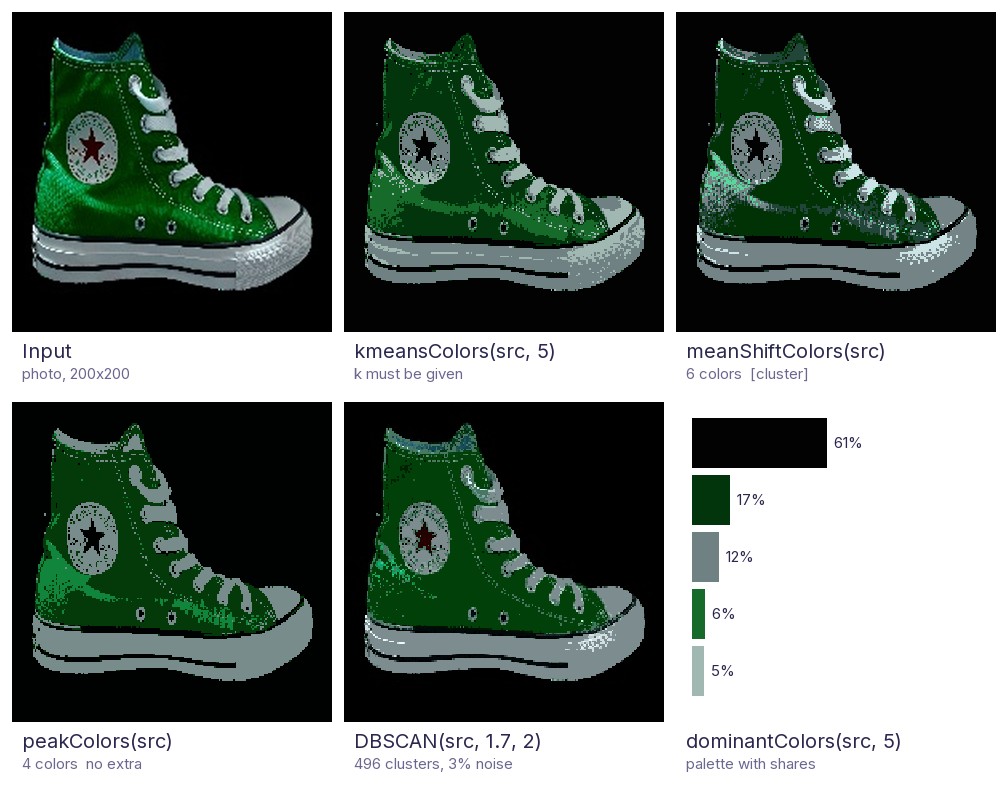
On a real photo of a sneaker, peakColors separates background, the dark and bright
greens and the white parts into 4 clean regions. meanShiftColors finds 6 colors but leaves the surface
speckled, and DBSCAN with eps=1.7 splits the image into 496 tiny clusters, which mostly reproduces the input.
Note that the dark-red star (15 pixels, 0.04% of the image, almost black) merges into the background with every
color clustering except that very fine DBSCAN; details this small are below what a palette can keep.
import cv2u as cv

img = cv.imread("photo.jpg")
maps, centers = cv.peakColors(img)  # number of colors found automatically, no extra needed
print(len(centers), "colors")
segmented = centers[maps]

for (b, g, r), share in cv.dominantColors(img, k=5):  # a palette
    print(f"#{r:02x}{g:02x}{b:02x} {share:.0%}")
poster = cv.colorQuantize(img, 8)
Named flags
import cv2u as cv

src = cv.imread("image.jpg")
mirrored = cv.flip(src, cv.FLIP_MODE_Y)  # instead of cv.flip(src, 1)
edges = cv.Sobel(src, cv.DDEPTH_SAME, 1, 0)  # instead of ddepth=-1
gray = cv.cvtColor(src, cv.COLOR_BGR2GRAY)
contours, _ = cv.findContours(cv.Canny(gray, 100, 200), cv.RETR_EXTERNAL, cv.CHAIN_APPROX_SIMPLE)
cv.drawContours(src, contours, cv.ALL_CONTOURS, (0, 255, 0), cv.FILLED)  # instead of contourIdx=-1

cv.imshow("mirrored", mirrored)
while cv.waitKey(cv.WAIT_FOREVER) != cv.KEY_ESC:  # instead of waitKey(0) != 27
    pass
Design principles
cv2u is what you wish OpenCV had, in the place you would look for it:
- Fill the gaps in OpenCV: only add what OpenCV lacks or makes you write boilerplate for.
- Look like OpenCV: same module names, camelCase,
Exfor extended versions,srcfirst, BGR, OpenCV parameter names. - Never shadow OpenCV: no extension has the same name as anything in
cv2. - Stay light: heavier dependencies are optional extras.
- Typed and validated: type hints everywhere, clear
ValueErrors for bad input. - Change carefully: after a release, renames get deprecated aliases and new behavior goes behind new parameters.
Details: https://076923.github.io/cv2-utils/principles/
API
Full reference with parameters and exceptions: https://076923.github.io/cv2-utils/api/
core
| Function | Description |
|---|---|
rotateEx(src, angle, scale=1.0, flags=None, borderMode=None, borderValue=None) |
Rotate around the center without cropping. Extra arguments go to cv.warpAffine. |
centerPoint(contour) |
Centroid (x, y) of a contour. Raises ValueError for zero area. |
isInside(p, polygon) |
Point-in-polygon test. polygon is (N, 1, 2) or (N, 2). |
cartesianToPolar(x, y, angleInDegrees=False) |
Returns (theta, rho) for scalars or arrays. Note: cv.cartToPolar returns (magnitude, angle). |
polarToCartesian(theta, rho, angleInDegrees=False) |
Returns (x, y) for scalars or arrays. |
imcolor(shape, color, dtype=np.uint8) |
Image filled with color. |
imcolorLike(src, color, dtype=None) |
Image with the shape (and dtype) of src, filled with color. |
makeGradient(shape, start, end, direction="horizontal") |
Linear gradient image. direction is "horizontal", "vertical" or "raster". |
gammaCorrection(src, gamma=1.0) |
Gamma correction for 8-bit images through a lookup table. |
DHEdge(src) |
Edge enhancement for single-channel 8-bit images. |
dominantColors(src, k=5) |
The k most common colors with their share, most common first (a palette). |
colorQuantize(src, k) |
Reduce the image to k colors. |
kmeansColors(src, k, seed=0) |
Deterministic color k-means in Lab space. Returns (maps, centers). |
peakColors(src, bins=32, sigma=0.75, minShare=0.01, minRegion=0) |
Finds the number of colors itself from the peaks of the color histogram. Fast, deterministic, no extra. |
meanShiftColors(src, bandwidth=None) |
Like kmeansColors, but finds the number of colors itself. Needs [cluster]. |
DBSCAN(src, eps, minSamples) |
Cluster BGR pixels in Lab space. Returns (maps, labels). Noise is 0. Needs [cluster]. |
drawDBSCAN(src, maps, labels) |
Paint each cluster with its mean color. |
clusterPoints(points, eps, minSamples=2) |
Group nearby points (keypoints, detections, ...) with DBSCAN. Needs [cluster]. |
hconcatEx(images, color=0, gap=0) |
Side by side, for images of different heights and channels. |
vconcatEx(images, color=0, gap=0) |
Stacked vertically, for images of different widths and channels. |
overlayImage(src, overlay, org=(0, 0), opacity=1.0) |
Alpha-blend a (transparent) image onto another, clipped at the borders. |
montage(images, cols=None, gap=0, color=0, cellSize=None) |
Arrange images in a grid. |
cropEx(src, rect, margin=0, fill=None) |
Crop safely when the box extends outside the image (clip, or pad with fill). |
inRangeEx(src, lowerb, upperb) |
cv.inRange for HSV hue ranges that wrap around, such as red (170 to 10). |
cropToContent(src, background=None, tolerance=0, margin=0) |
Trim a uniform border (scan margins, black bars). |
padToMultiple(src, multiple, color=0), padToSize(src, size, color=0) |
Pad to a multiple (e.g. 32 for networks) or to an exact size, without scaling. |
splitTiles(src, tileSize, overlap=0), mergeTiles(tiles, size) |
Split a large image into full-size tiles and merge processed tiles back (overlaps averaged). |
imgcodecs
| Function | Description |
|---|---|
imreadEx(filename, flags=cv.IMREAD_COLOR) |
cv.imread that also works with non-ASCII (e.g. Korean) paths on Windows. |
imwriteEx(filename, img, params=(), makeDirs=False) |
cv.imwrite that also works with non-ASCII paths on Windows, and can create missing folders. |
urlread(url, flags=cv.IMREAD_UNCHANGED, timeout=None, headers=None) |
Read an image from a URL. Returns None if decoding fails, like cv.imread. |
toPillow(src), fromPillow(image) |
Convert to/from Pillow with the right channel order (also palette, CMYK and transparent images). |
imencodeBase64(img, ext=".png", dataUri=False), imdecodeBase64(data) |
Images as base64 text or data URIs, e.g. for web APIs. |
imgproc
| Function | Description |
|---|---|
adjustBrightnessContrast(src, brightness=0, contrast=1.0) |
Brightness/contrast like a photo editor (contrast pivots around mid-gray). |
adjustHSV(src, hue=0, saturation=1.0, value=1.0) |
Rotate the hue (degrees) and scale saturation/brightness. |
autoContrast(src, clip=0.01), whiteBalance(src) |
Auto levels that ignore outliers; remove a color cast. |
sharpnessScore(src), ssim(a, b), diffMask(a, b, threshold=25) |
Blur detection, structural similarity, changed pixels. |
translate(src, dx, dy) |
Shift an image, keeping its size. |
drawDashedLine(img, pt1, pt2, color), drawDashedRectangle(img, rect, color) |
Dashed lines and boxes, in place. |
drawHistogram(src, size=(512, 200)) |
Plot the histogram as an image. |
largestComponent(mask), skeletonize(mask), cutout(src, mask, feather=0) |
Keep the main object, thin to 1-pixel lines, cut out with transparency. |
hexToBGR("#ff8800"), bgrToHex(color) |
Convert between hex colors and BGR tuples. |
toGray(src), toBGR(src), toBGRA(src, alpha=None) |
Convert from any channel count; no error when the image is already in that format. |
findContoursEx(image, mode=cv.RETR_EXTERNAL, method=cv.CHAIN_APPROX_SIMPLE, minArea=0, sort=True) |
cv.findContours for any image, largest first, small ones dropped. |
fillHoles(mask, maxHoleArea=None), removeSmallObjects(mask, minArea) |
Mask clean-up. |
findTemplate(src, templ, threshold=0.8, maxCount=None) |
cv.matchTemplate as a list of non-overlapping matches (x, y, w, h, score). |
resizeEx(src, width=None, height=None, interpolation=None) |
Resize keeping the aspect ratio; picks INTER_AREA/INTER_LINEAR automatically. |
letterbox(src, size, color=0, interpolation=None) |
Fit into (width, height) keeping the aspect ratio and pad. Returns (dst, scale, (left, top)). |
fourPointTransform(src, pts, size=None) |
Warp a quadrilateral (corners in any order) to an upright rectangle, e.g. a photographed document. |
autoCanny(src, sigma=0.33) |
cv.Canny with thresholds chosen from the median brightness. |
equalizeHistEx(src, clahe=False) |
cv.equalizeHist for color images too (on the Lab lightness), optionally CLAHE. |
unsharpMask(src, sigma=1.0, amount=1.0, threshold=0) |
Unsharp-mask sharpening. |
drawLabel(img, rect, text, color, fontPath=None) |
Draw a box with a label tag, in place like cv.rectangle. Unicode labels with fontPath. |
overlayMask(src, mask, color=(0, 0, 255), alpha=0.5) |
Tint the masked pixels, e.g. to show a segmentation. |
putTextEx(src, text, org, fontPath, fontSize, color) |
Draw Unicode text (e.g. Korean) with a TrueType font. org is the top-left corner. |
videoio
| Function | Description |
|---|---|
readFrames(source, step=1, start=0) |
Iterate over the frames of a file, stream or camera; the capture is released automatically. |
writeVideo(filename, frames, fps, fourcc=None) |
Write frames; size, color mode and codec (from the extension) are detected. Returns the frame count. |
readFrameAt(source, index=None, seconds=None) |
Read one frame by number or time, e.g. for a thumbnail. |
videoInfo(source) |
VideoInfo(width, height, fps, frameCount) with a duration property. |
highgui
| Function | Description |
|---|---|
imshowInline(img, maxSize=None) |
Show an image in a Jupyter notebook, in its real colors (no BGR/RGB mix-up). |
imshowEx(winname, img, maxSize=(1280, 720)) |
cv.imshow that shrinks images larger than the screen. |
flag
Named constants for magic numbers that OpenCV takes without a constant of its own.
| Constant | Value | Use |
|---|---|---|
FLIP_MODE_X, FLIP_MODE_Y, FLIP_MODE_XY |
0, 1, -1 |
cv.flip(src, flipCode) |
DDEPTH_SAME |
-1 |
ddepth of cv.filter2D, cv.Sobel, ...: same depth as the source |
ALL_CONTOURS |
-1 |
contourIdx of cv.drawContours |
REDUCE_TO_ROW, REDUCE_TO_COL |
0, 1 |
dim of cv.reduce |
WAIT_FOREVER |
0 |
delay of cv.waitKey |
KEY_ESC, KEY_ENTER, KEY_SPACE, KEY_TAB, KEY_BACKSPACE |
27, 13, 32, 9, 8 |
Return value of cv.waitKey |
Development
See CONTRIBUTING.md. Release notes are in CHANGELOG.md. Please follow the Code of Conduct, and report security issues as described in SECURITY.md. To cite this project, use CITATION.cff (GitHub shows a "Cite this repository" button).
Authors
Daehee Yun (s076923@gmail.com)
License
1 maintainer

Metadata
1 maintainer
Release files for python-opencv-utils 0.1.0
For a detailed explanation of source distributions (sdists) and built distributions (wheels), please see the package formats documentation.
Source distribution (sdist)
| File | Size | Uploaded | Provenance | Actions |
|---|---|---|---|---|
| python_opencv_utils-0.1.0.tar.gz | 171.7 kB | With provenance | Details for python_opencv_utils-0.1.0.tar.gz |
Built distribution (wheel)
| File | Interpreter | ABI | Platform | Actions Reset |
|---|---|---|---|---|
| python_opencv_utils-0.1.0-py3-none-any.whl | Python 3 | none | any | Details for python_opencv_utils-0.1.0-py3-none-any.whl |
Total release size: 273.1 kB
Release files / python_opencv_utils-0.1.0.tar.gz
| Download URL | python_opencv_utils-0.1.0.tar.gz |
|---|---|
| Size | 171.7 kB |
| Tags | Source |
|
SHA-256 checksum How to use checksums |
746ce847ddfc32d192fff718e02f80787adf7404f935450d8ff4050e3e1865d6
|
|
BLAKE2b-256 checksum How to use checksums |
e885355c17cfe837239f9fa2b12bc1d814994323faea133549ec6ca1a188232c
|
| Upload date | |
|
Uploaded using Trusted Publishing? What is trusted publishing? |
Yes |
| Uploaded via |
twine/7.0.0 CPython/3.13.16
|
Provenance
Provenance describes where a file came from. On PyPI, provenance is shared via attestations, which provide a verifiable record of the build or publishing details. View details, limitations and caveats.


PyPI Publish Attestation
PyPI verified that this artifact, at this checksum, originated from the publisher listed below.
Signed by GitHub Actions, verified by PyPI on Nov 4, 2026.
Transparency logRelease files / python_opencv_utils-0.1.0-py3-none-any.whl
| Download URL | python_opencv_utils-0.1.0-py3-none-any.whl |
|---|---|
| Size | 101.5 kB |
| Tags | Python 3 |
|
SHA-256 checksum How to use checksums |
ac60bbafcc9a483228241d32a5ecb9783ede357c5186c5758e2f7dd294fc8a86
|
|
BLAKE2b-256 checksum How to use checksums |
a506175dde91b32f1bbf495f67062933a5d4ef5e5f8da08f44042a83d25abdfb
|
| Upload date | |
|
Uploaded using Trusted Publishing? What is trusted publishing? |
Yes |
| Uploaded via |
twine/7.0.0 CPython/3.13.16
|
Provenance
Provenance describes where a file came from. On PyPI, provenance is shared via attestations, which provide a verifiable record of the build or publishing details. View details, limitations and caveats.
PyPI Publish Attestation
PyPI verified that this artifact, at this checksum, originated from the publisher listed below.
Signed by GitHub Actions, verified by PyPI on Nov 4, 2026.
Transparency logSecurity for python-opencv-utils 0.1.0
Provenance
Provenance describes where a file came from. On PyPI, provenance is shared via attestations, which provide a verifiable record of the build or publishing details. View details, limitations and caveats.
Full provenance
Both files in this release have been uploaded with provenance metadata.
Attestation for python_opencv_utils-0.1.0.tar.gz
PyPI Publish Attestation
PyPI verified that this artifact, at this checksum, originated from the publisher listed below.
Signed by GitHub Actions, verified by PyPI on Nov 4, 2026.
Transparency logA note on package security
PyPI is a repository for distributing packages, not a service for auditing them. While third-party security researchers and our staff do their best to detect and remove malicious packages, PyPI cannot guarantee the quality, security or suitability of any given package.
To learn more about protecting yourself from malicious actors, visit our package security documentation.














