
Python Protocol Gateway reads data via Modbus RTU or other protocols and translates the data for MQTT. In the long run, Python Protocol Gateway will become a general purpose protocol gateway to translate between more than just modbus and mqtt.

Project description






For advanced configuration help, please checkout the documentation :) https://github.com/HotNoob/PythonProtocolGateway/tree/main/documentation
Python Protocol Gateway
Python Protocol Gateway is a python-based service that reads data via Modbus RTU or other protocols and translates the data for MQTT. Configuration is handled via a small config files. In the long run, Python Protocol Gateway will become a general purpose protocol gateway to translate between more than just modbus and mqtt.
For specific device installation instructions please checkout the documentation: Growatt, EG4, Sigineer, SOK, PACE-BMS https://github.com/HotNoob/PythonProtocolGateway/tree/main/documentation
General Installation
Connect the USB port on the inverter into your computer / device. This port is essentially modbus usb adapter. When connected, the device will show up as a serial port.
Alternatively, connect a usb adapter to your rs485 / can port with appropriate wiring.
install as homeassistant add-on
checkout: https://github.com/felipecrs/python-protocol-gateway-hass-addon/tree/master
install requirements
apt install pip python3 -y
pip install -r requirements.txt
python 3.9 or greater. python 3.10+ for best compatability.
Config file (config.cfg) - copy .example.cfg to .cfg
Edit configuration.
cp config.example.cfg  config.cfg
nano config.cfg
inverters / protocols
manually select protocol in .cfg protocol_version = {{version}}
v0.14 = growatt inverters 2020+
sigineer_v0.11 = sigineer inverters
growatt_2020_v1.24 = alt protocol for large growatt inverters - currently untested
srne_v3.9 = SRNE inverters - confirmed working-ish
victron_gx_3.3 = Victron GX Devices - Untested
solark_v1.1 = SolarArk 8/12K Inverters - Untested
hdhk_16ch_ac_module = some chinese current monitoring device :P
srne_2021_v1.96 = SRNE inverters 2021+ (tested at ASF48100S200-H, ok-ish for HF2430U60-100 )

eg4_v58 = eg4 inverters ( EG4-6000XP ) - confirmed working
eg4_3000ehv_v1 = eg4 inverters ( EG4_3000EHV )
more details on these protocols can be found in the documentation: https://github.com/HotNoob/PythonProtocolGateway/tree/main/documentation
run as script
python3 -u protocol_gateway.py
or
python3 -u protocol_gateway.py config.cfg
install as service
ppg can be used as a shorter service name ;)
cp protocol_gateway.example.service  /etc/systemd/system/protocol_gateway.service
nano /etc/systemd/system/protocol_gateway.service
edit working directory in service file to wherever you put the files
nano /etc/systemd/system/protocol_gateway.service
reload daemon, enable and start service
sudo systemctl daemon-reload
sudo systemctl enable protocol_gateway.service
sudo systemctl start protocol_gateway.service
systemctl status protocol_gateway.service
install mqtt on home assistant
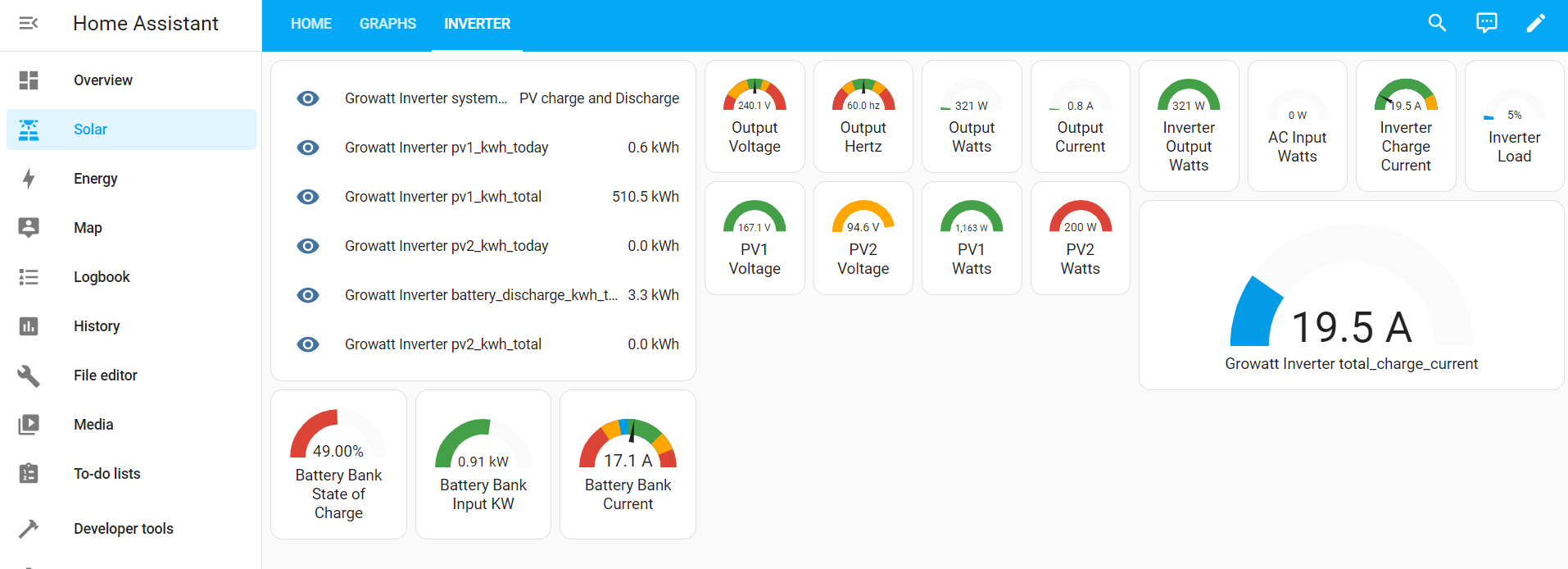
Settings -> Add-Ons -> Add-On Store -> Mosquitto broker
setup Mosquitto broker
Settings -> People -> Users -> Add User -> Can only log in from the local network -> Fill Details
once installed; the device should show up on home assistant under mqtt
Settings -> Devices & Services -> MQTT
more docs on setting up mqtt here: https://www.home-assistant.io/integrations/mqtt i probably might have missed something. ha is new to me.
general update procedure
update files and restart script / service
git pull
systemctl restart protocol_gateway.service
**if you installed this when it was called growatt2mqtt-hotnoob or invertermodbustomqtt, you'll need to reinstall if you want to update. **
Unknown Status MQTT Home Assistant
If all values appear as "Unknown" This is a bug with home assistant's discovery that some times happens when adding for the first time. just restart the service / script and it will fix itself.
variable names
variable names have been modified for greater readability. if it's confusing you can change them via protocols/{version}_input_registry_map.csv you can also find the original documented variable names there; to use the original names, empty the variable name column the csvs are using ";" as the delimeter, because that is what open office uses.
variable_mask.txt
if you want to only send/get specific variables, put them in variable_mask.txt file. one variable per line. if list is empty all variables will be sent
variable1
variable2
variable_screen.txt
if you want to exclude specific variables, put them in the variable_screen.txt file. one variable per line.
variable_to_exclude
variable_to_exclude2
Any ModBus RTU Device
As i dive deeper into solar monitoring and general automation, i've come to the realization that ModBus RTU is the "standard" and basically... everything uses it. With how this is setup, it can be used with basically anything running ModBus RTU so long as you have the documentation.
So... don't mind me as i may add other devices such as battery bms' and... i have a home energy monitor on the way! so i'll be adding that when it arrives.
Rebranding Again... last time.
if you installed this when it was called growatt2mqtt-hotnoob or InverterModBusToMQTT, you'll need to reinstall if you want to update.
donate
this took me a while to make; and i had to make it because there werent any working solutions.
donations would be appreciated.

(btc) bc1qh394vazcguedkw2rlklnuhapdq7qgpnnz9c3t0
Use Docker - untested
docker build . -t protocol_gatewaydocker run --device=/dev/ttyUSB0 protocol_gateway
Release history Release notifications | RSS feed


Download files
Download the file for your platform. If you're not sure which to choose, learn more about installing packages.
Source Distribution
Built Distribution
Filter files by name, interpreter, ABI, and platform.
If you're not sure about the file name format, learn more about wheel file names.
Copy a direct link to the current filters
File details
Details for the file python_protocol_gateway-1.1.9.tar.gz.
File metadata
- Download URL: python_protocol_gateway-1.1.9.tar.gz
- Upload date:
- Size: 11.1 kB
- Tags: Source
- Uploaded using Trusted Publishing? No
- Uploaded via: twine/6.1.0 CPython/3.9.18
File hashes
| Algorithm | Hash digest | |
|---|---|---|
| SHA256 |
8e2db9512628dea18cef9a0bb8366fead7240e469ef73abe4fb9bd55012f2375
|
|
| MD5 |
453ad65e6753ff85c419dcc58aaffb3b
|
|
| BLAKE2b-256 |
b4fb9b92b393f99ab6331db2231863ef5daac3e0373b942a759072bba6574537
|
File details
Details for the file python_protocol_gateway-1.1.9-py3-none-any.whl.
File metadata
- Download URL: python_protocol_gateway-1.1.9-py3-none-any.whl
- Upload date:
- Size: 11.0 kB
- Tags: Python 3
- Uploaded using Trusted Publishing? No
- Uploaded via: twine/6.1.0 CPython/3.9.18
File hashes
| Algorithm | Hash digest | |
|---|---|---|
| SHA256 |
194e885b3af3b9d956aaf9097ba21a90768e46064dadbc1ad2574854a597bdfd
|
|
| MD5 |
4ea1f7fab18e5c1a27cf2b1b36d9d288
|
|
| BLAKE2b-256 |
e3c7da561b30b59176d03ed977ec0843eba994858501e6f84852a22010615b2d
|






