

PyTM - A CLI time tracker for projects with invoice generation






Goals
Project time management, billing, and invoice generation.
Preview

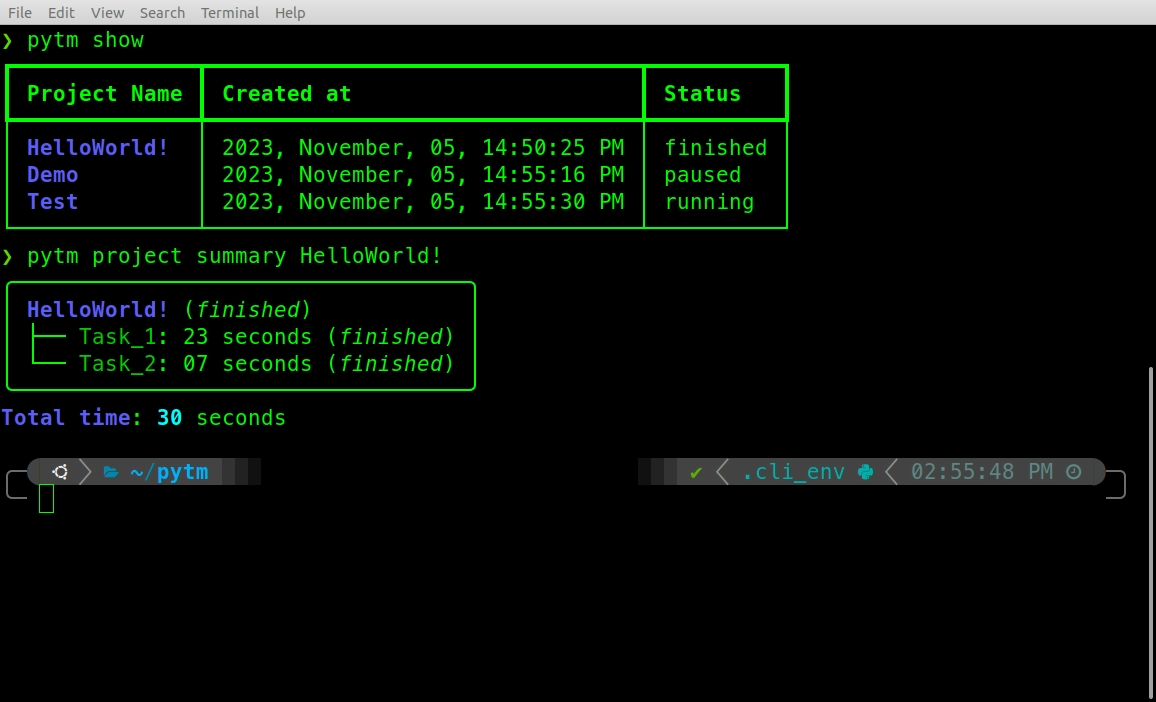
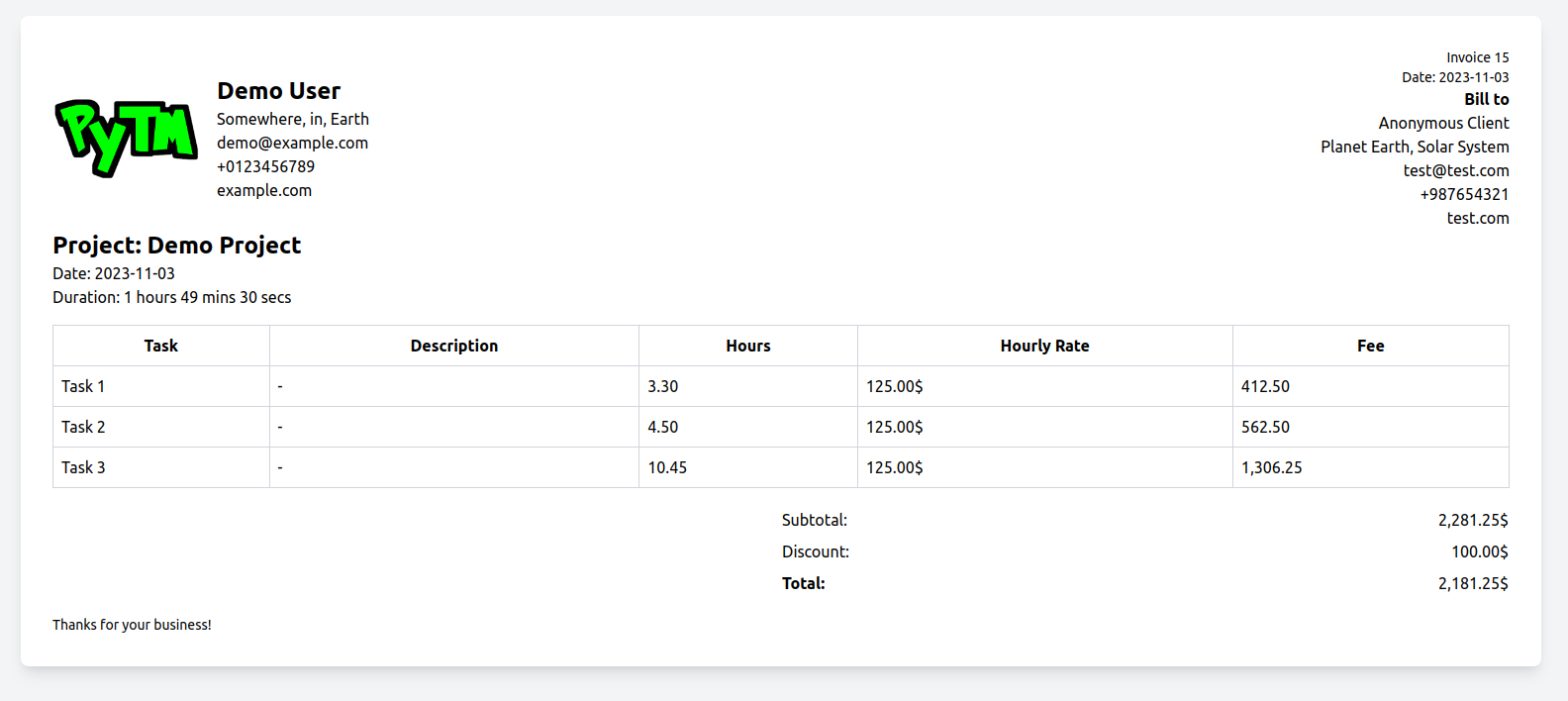
Screenshots
Installing PyTM
First download and install pyenv. Use the command:
curl https://pyenv.run | bash
Next, install Python 3.12 using the command:
pyenv install 3.12.0
Alternatively, you can skip pyenv installation and download python 3.12 or above from the official website and setup a virtualenv as well.
Next, install PyTM from PyPI using
pip:python -m pip install python-pytm
Check the version by typing the following in your terminal.:
pytm --version
Basic commands
To see the available commands type:
pytm --help
Others
Configure project, user and invoice info:
pytm config project PROJECT_NAME
pytm config user
pytm config invoice
Generate Invoice:
pytm invoice auto PROJECT_NAME
pytm invoice manual
Check version:
pytm --version
pytm -v
Check summary of all the projects:
pytm summary
For a list of all the available commands try:
pytm --help
Running the tests
Clone this repository
Install dependencies:
pip install -r requirements.txt
run the tests:
py.test
Notes
License - see the LICENSE file.
Contributing - see CONTRIBUTING.rst for detail. You can also help by creating issues.
Version - see the tags on this repository.
Acknowledgments - bootstrapped using this cookiecutter package.
Built With :heart: using Python.
Documentation
The full documentation is at http://PyTM.rtfd.org.
History
0.0.1 (2018-10-23)
First release on PyPI.
0.0.2 (2018-11-09)
Second release on PyPI.
Created Skeleton of the command line Interface.
0.0.3 (2023-10-18)
Implemented data store in home directory.
Made project commands functional.
0.0.4 (2023-10-28)
Implemented state.
Improved project commands.
0.0.5 (2023-10-30)
Made task commands functional.
Improved project summary.
Project summary now shows total duration of the project.
0.0.6 (2023-10-31)
bug fix
readme and doc update
Improved Command line interface outputs.
0.0.7 (2023-11-01)
Added show sub command for project.
Added json sub command for project.
refactored project and task commands output messages.
fixed bugs in project sub commands.
0.0.8 (2023-11-01)
Added config sub command.
added command to save default user information.
refactored project and task commands.
fixed bugs.
added config command to configure project meta data such as title, billable? etc.
0.0.9 (2023-11-02)
Added config invoice command for configuring default invoice texts and logo.
Added invoice sub command.
Added invoice manual command to generate manual invoice using prompts.
Added invoice auto <Project> command to generate invoice from existing projects.
invoice manual and auto command generates HTML invoices using Tailwind CSS and opens it in a Browser.
0.0.10 (2023-11-03)
open invoices using python’s standard library.
code refactor
bug fix
0.0.11 (2023-11-03)
Major bug fix.
0.0.12 (2023-11-04)
Bug fix.
0.0.13 (2023-11-07)
Made the init command optional.
0.0.14 (2023-11-07)
config invoice command bug fix.
copy logo instead of moving it permanently when configuring invoice.
fixed f strings quote issue.
made init command hidden.
improved doc strings and help texts.
0.0.15 (2023-11-08)
added new command rename for renaming existing projects.
added new command rename for renaming existing tasks.
updated show command to show active task and project when available.
Simplified project start command.
New projects can be started without project name.
Project started without a name will now have a default name which can be renamed later.
Simplified task start command.
New tasks can be started without task name.
Task started without a name will have a default name which can be renamed later at ease.
Bug fix
0.0.16 (2023-11-11)
added new command summary.
fixed bug and refactored invoice handler.
added tests for project handler.
added tests for task handler.
added tests for invoice handler.
updated make command to update README coverage percentage while testing.
0.0.17 (unreleased)
Billing fix: invoice generation converted task duration to hours using /360 instead of /3600, billing every invoice at 10x the correct amount. If you generated an invoice with a prior version, please regenerate and re-check it before sending.
fixed a crash in project summary (TypeError: ‘Group’ object is not subscriptable).
fixed a crash in invoice auto (KeyError: ‘meta’) for any project that was never configured via config project.
fixed task rename silently overwriting the active task pointer when renaming a task that wasn’t the active one.
data.json/state.json writes are now atomic (crash-safe) and file-locked (concurrency-safe).
save_data no longer silently drops writes of an empty/falsy store (e.g. removing the last project now actually persists).
added –non-interactive support (with per-field flags) to config user, config invoice, config project, invoice auto, and invoice manual, so invoices and config can be scripted.
corrected a boundary bug in duration formatting where exactly 1 hour or exactly 24 hours displayed as e.g. “60 mins” instead of rolling over.
fixed pytm project/task/config/invoice (no subcommand) exiting with different codes depending on the installed Click version (exit 0 on Click 8.1.x, exit 2 on Click 8.2+); behavior is now pinned to “print help, exit 0” regardless of Click version.
1 maintainer

Download files
Download the file for your platform. If you're not sure which to choose, learn more about installing packages.
Source Distribution
Built Distribution
Filter files by name, interpreter, ABI, and platform.
If you're not sure about the file name format, learn more about wheel file names.
Copy a direct link to the current filters
File details
Details for the file python_pytm-0.0.17.tar.gz.
File metadata
- Download URL: python_pytm-0.0.17.tar.gz
- Upload date:
- Size: 22.1 kB
- Tags: Source
- Uploaded using Trusted Publishing? No
- Uploaded via:
twine/6.2.0 CPython/3.9.25
File hashes
| Algorithm | Hash digest | |
|---|---|---|
| SHA256 |
be72c0f1f8529e2532478a7af3650f3a46a3dddcd296d424f99c7c3cc7a302a4
|
|
| MD5 |
81ee9015c34326e7ab6142bdc41ce1ed
|
|
| BLAKE2b-256 |
e4df1523d5e5d02b7b301942360dabc8d49f8732259f2e428ac46d2e07bc71d8
|
File details
Details for the file python_pytm-0.0.17-py2.py3-none-any.whl.
File metadata
- Download URL: python_pytm-0.0.17-py2.py3-none-any.whl
- Upload date:
- Size: 19.7 kB
- Tags: Python 2, Python 3
- Uploaded using Trusted Publishing? No
- Uploaded via:
twine/6.2.0 CPython/3.9.25
File hashes
| Algorithm | Hash digest | |
|---|---|---|
| SHA256 |
fb0ae1f4b5eb01a24587abe76454786f857ac19d7c24b97b30719a764e1d17a7
|
|
| MD5 |
72d3478b28091b35abb4da82f00e7ef3
|
|
| BLAKE2b-256 |
40ff048b5ad8a9e21d7647aeccde58e17f3036f50a03b4e76b12b1dc9a848f8b
|







