

PyTM - A CLI time tracker for projects with invoice generation






Goals
Project time management, billing, and invoice generation.
Preview

Screenshots
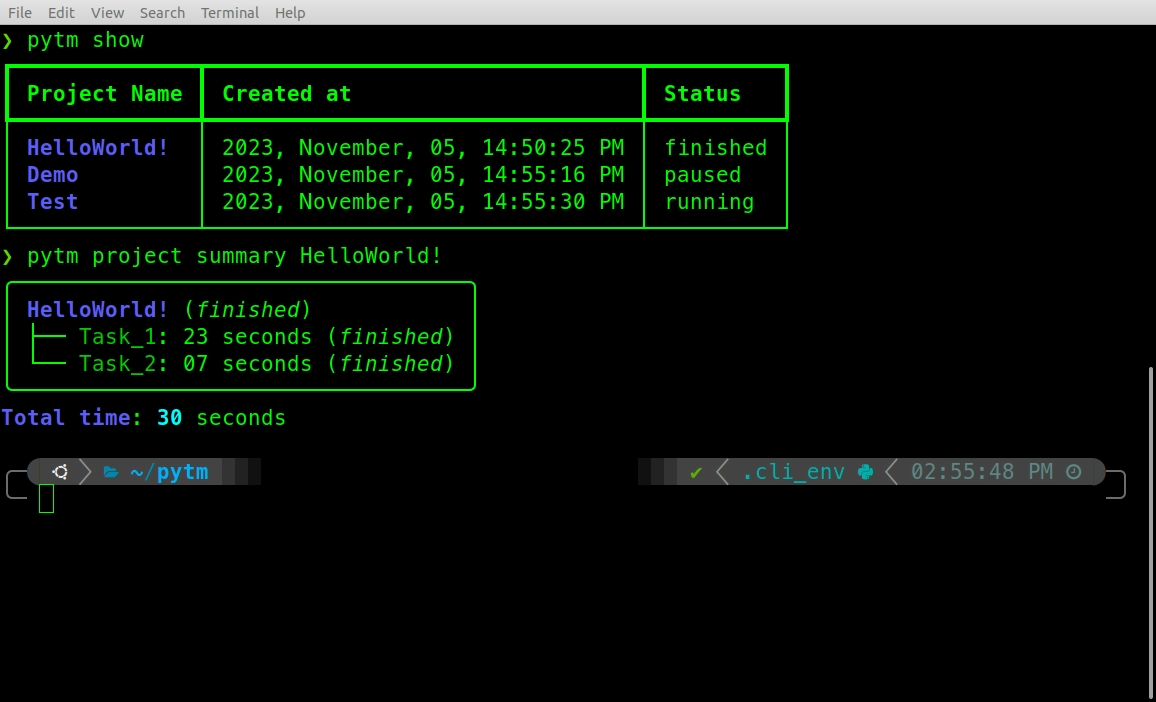
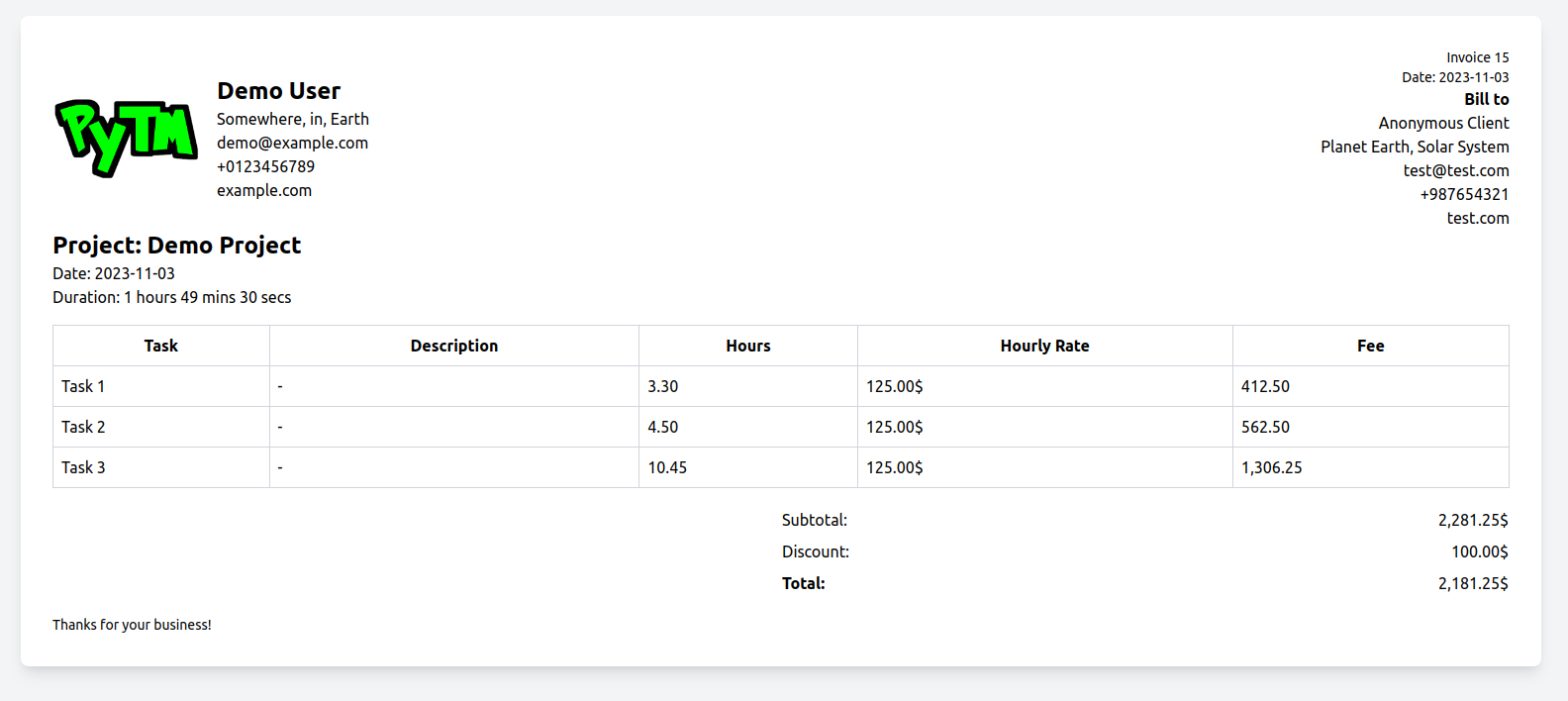
Installing PyTM
PyTM is installed with uv, a fast, single-binary Python package manager. It takes care of getting a suitable Python version for you too, so there’s nothing else to install first.
Install uv (skip this if you already have it):
curl -LsSf https://astral.sh/uv/install.sh | sh
Windows, and other install options, are covered in the uv installation docs.
Install PyTM as a standalone command-line tool:
uv tool install python-pytm
This puts a pytm command on your PATH, isolated in its own environment, without touching any other Python project on your machine.
Prefer not to install anything permanently? Try it in one shot instead:
uvx python-pytm --help
Check the version by typing the following in your terminal.:
pytm --version
Basic commands
To see the available commands type:
pytm --help
Time digests
Time logged today, across all projects:
pytm todayTime logged this week, across all projects:
pytm weekThe week’s start day (default Saturday) is configurable:
pytm config user --week-start monday
Ambient tracking (shell hooks)
Automatically start/switch tasks based on the directory you cd into and the git branch you’re on — opt-in, per directory, no auto-detection.
Link a directory (and its subdirectories) to a project:
cd ~/code/my-client-project
pytm hook link my-client-project
Enable the hook in your shell rc file (~/.bashrc or ~/.zshrc):
eval "$(pytm hook init bash)" # or: pytm hook init zsh
From then on, cd-ing into a linked directory (or any of its subdirectories) starts/resumes its project, and switching git branch there switches to a task named after the branch. Directories that were never linked are left untouched — nothing is inferred automatically.
Manage links:
pytm hook list,pytm hook unlinkSee what a directory would resolve to without applying it:
pytm hook resolve
Others
Configure project, user and invoice info:
pytm config project PROJECT_NAME
pytm config user
pytm config invoice
Generate Invoice:
pytm invoice auto PROJECT_NAME
pytm invoice manual
Check version:
pytm --version
pytm -v
Check summary of all the projects:
pytm summary
For a list of all the available commands try:
pytm --help
Running the tests
This is for working on PyTM itself, not for just using it — if you only want the pytm command, see Installing PyTM above instead.
Clone this repository and cd into it:
git clone https://github.com/wasi0013/PyTM.git
cd PyTM
Create a virtual environment (uv downloads a matching Python for you if needed) and install dependencies into it:
uv venv
uv pip install -r requirements.txt
Run the tests:
uv run pytest
uv run finds the .venv created above automatically, so there’s no need to manually activate it first.
Notes
License - see the LICENSE file.
Contributing - see CONTRIBUTING.rst for detail. You can also help by creating issues.
Version - see the tags on this repository.
Acknowledgments - bootstrapped using this cookiecutter package.
Built With :heart: using Python.
Documentation
The full documentation is at http://PyTM.rtfd.org.
History
0.0.1 (2018-10-23)
First release on PyPI.
0.0.2 (2018-11-09)
Second release on PyPI.
Created Skeleton of the command line Interface.
0.0.3 (2023-10-18)
Implemented data store in home directory.
Made project commands functional.
0.0.4 (2023-10-28)
Implemented state.
Improved project commands.
0.0.5 (2023-10-30)
Made task commands functional.
Improved project summary.
Project summary now shows total duration of the project.
0.0.6 (2023-10-31)
bug fix
readme and doc update
Improved Command line interface outputs.
0.0.7 (2023-11-01)
Added show sub command for project.
Added json sub command for project.
refactored project and task commands output messages.
fixed bugs in project sub commands.
0.0.8 (2023-11-01)
Added config sub command.
added command to save default user information.
refactored project and task commands.
fixed bugs.
added config command to configure project meta data such as title, billable? etc.
0.0.9 (2023-11-02)
Added config invoice command for configuring default invoice texts and logo.
Added invoice sub command.
Added invoice manual command to generate manual invoice using prompts.
Added invoice auto <Project> command to generate invoice from existing projects.
invoice manual and auto command generates HTML invoices using Tailwind CSS and opens it in a Browser.
0.0.10 (2023-11-03)
open invoices using python’s standard library.
code refactor
bug fix
0.0.11 (2023-11-03)
Major bug fix.
0.0.12 (2023-11-04)
Bug fix.
0.0.13 (2023-11-07)
Made the init command optional.
0.0.14 (2023-11-07)
config invoice command bug fix.
copy logo instead of moving it permanently when configuring invoice.
fixed f strings quote issue.
made init command hidden.
improved doc strings and help texts.
0.0.15 (2023-11-08)
added new command rename for renaming existing projects.
added new command rename for renaming existing tasks.
updated show command to show active task and project when available.
Simplified project start command.
New projects can be started without project name.
Project started without a name will now have a default name which can be renamed later.
Simplified task start command.
New tasks can be started without task name.
Task started without a name will have a default name which can be renamed later at ease.
Bug fix
0.0.16 (2023-11-11)
added new command summary.
fixed bug and refactored invoice handler.
added tests for project handler.
added tests for task handler.
added tests for invoice handler.
updated make command to update README coverage percentage while testing.
0.0.18 (unreleased)
`pytm task switch NAME`: atomically pauses the active task (if any) and starts/resumes NAME in a single locked operation, closing the gap where switching used to be two separate, independently-locked commands.
`pytm task edit NAME –duration HOURS`: manually corrects a task’s recorded duration (e.g. after a hook mis-tracked it). Recorded as a dated adjustment so today/week stay consistent with the correction.
`pytm today` / `pytm week`: digests of time logged today / this week, aggregated per project and task from the new per-task session log. Tasks recorded before this release (no session log) are shown with a best-effort “(legacy, approximate)” attribution bucketed on their finish date. pytm week’s start day defaults to Saturday and is configurable via pytm config user –week-start DAY.
`pytm hook`: opt-in ambient tracking. pytm hook link PROJECT (run inside a directory) tracks that directory (and its subdirectories) against PROJECT; pytm hook init bash|zsh prints a shell snippet (eval “$(pytm hook init zsh)”) that switches the active project/task automatically on cd and git branch changes, based only on directories you’ve explicitly linked. Never auto-creates a project from an unlinked directory.
fixed a crash (ValueError: Invalid isoformat string) when task pause/task finish/task abort were called on a task that wasn’t currently running (e.g. called twice in a row) — these are now no-ops on a task that isn’t in the relevant state, instead of raising. This matters more now that ambient hooks can call them redundantly.
fixed task abort silently discarding the time logged since the task was last resumed instead of folding it into duration.
fixed task start/task switch on an already-running task resetting its start time, which used to silently drop the time already accrued.
task_handler.switch (and so pytm task switch and pytm hook resolve –apply) now pauses every running task in the project before starting the target task, not just the one state happens to be tracking — closes a gap where a task left running in the project you’re switching into (started manually, or by an earlier hook resolve that didn’t get to update state) could end up running alongside the new one, both simultaneously marked “running”.
fixed pytm today/pytm week rendering a downward task edit correction (one that outweighs other time logged that day) as a misleadingly small or zero duration instead of a real negative value.
fixed task edit on a task recorded before per-session tracking existed silently dropping its original duration from today/week the moment it was corrected, instead of preserving that original day’s total and dating the correction itself on the day it was made.
pytm hook resolve –apply’s state updates are now held under one lock for its whole read-modify-write sequence, instead of several separate load/save round trips — this runs automatically and frequently (every shell prompt, potentially from several terminals at once), so two invocations racing could otherwise silently clobber each other’s state update.
minor: pytm hook’s directory matching no longer re-normalizes every linked path (a stat syscall each) on every cd/branch check — only the current directory needs it, since linked paths are already normalized when they’re stored.
0.0.17 (2026-08-12)
Billing fix: invoice generation converted task duration to hours using /360 instead of /3600, billing every invoice at 10x the correct amount. If you generated an invoice with a prior version, please regenerate and re-check it before sending.
fixed a crash in project summary (TypeError: ‘Group’ object is not subscriptable).
fixed a crash in invoice auto (KeyError: ‘meta’) for any project that was never configured via config project.
fixed task rename silently overwriting the active task pointer when renaming a task that wasn’t the active one.
data.json/state.json writes are now atomic (crash-safe) and file-locked (concurrency-safe).
save_data no longer silently drops writes of an empty/falsy store (e.g. removing the last project now actually persists).
added –non-interactive support (with per-field flags) to config user, config invoice, config project, invoice auto, and invoice manual, so invoices and config can be scripted.
corrected a boundary bug in duration formatting where exactly 1 hour or exactly 24 hours displayed as e.g. “60 mins” instead of rolling over.
fixed pytm project/task/config/invoice (no subcommand) exiting with different codes depending on the installed Click version (exit 0 on Click 8.1.x, exit 2 on Click 8.2+); behavior is now pinned to “print help, exit 0” regardless of Click version.
1 maintainer

Download files
Download the file for your platform. If you're not sure which to choose, learn more about installing packages.
Source Distribution
Built Distribution
Filter files by name, interpreter, ABI, and platform.
If you're not sure about the file name format, learn more about wheel file names.
Copy a direct link to the current filters
File details
Details for the file python_pytm-0.0.18.tar.gz.
File metadata
- Download URL: python_pytm-0.0.18.tar.gz
- Upload date:
- Size: 37.3 kB
- Tags: Source
- Uploaded using Trusted Publishing? No
- Uploaded via:
twine/6.2.0 CPython/3.9.25
File hashes
| Algorithm | Hash digest | |
|---|---|---|
| SHA256 |
632399b56d8a0cf7b3acbfd03acaf821f7de9c04579070ba076148d882370ab5
|
|
| MD5 |
dee3205a9973c9dcc48ec89e5fff6844
|
|
| BLAKE2b-256 |
a27b6c8f77ae554f55a42e91cd4d45635362678e764e92f962af08607a2d90de
|
File details
Details for the file python_pytm-0.0.18-py2.py3-none-any.whl.
File metadata
- Download URL: python_pytm-0.0.18-py2.py3-none-any.whl
- Upload date:
- Size: 31.1 kB
- Tags: Python 2, Python 3
- Uploaded using Trusted Publishing? No
- Uploaded via:
twine/6.2.0 CPython/3.9.25
File hashes
| Algorithm | Hash digest | |
|---|---|---|
| SHA256 |
7b1603a2cbd7ef79f02cf737264bc7d29b8459b218f2157faddf402428a32bb4
|
|
| MD5 |
362906f37a2cebbb7111532e406b83a1
|
|
| BLAKE2b-256 |
5e0844820a1cd4fb16b8bf639fe0a96baa520e3bc13a68a586d6c37e989d9090
|







