
Python Script Runner
A production-grade Python script execution engine with comprehensive monitoring, alerting, analytics, real-time visualization, and a full REST API dashboard.












Features
- Script execution with timeout, retry, and environment management
- Real-time visualization of the full execution pipeline
- DAG-based workflow orchestration with parallel execution
- Metrics collection — CPU, memory, I/O, timing per run
- Alert management — rule-based triggers via Slack, email, webhooks with deduplication
- History & trend analysis — SQLite persistence with anomaly detection (IQR, Z-score, MAD)
- CI/CD integration — JUnit XML, TAP output, performance gates, baseline comparison
- Remote execution — SSH, Docker, Kubernetes
- Web API & dashboard — FastAPI REST API with interactive HTML dashboard, script library, scheduler, and analytics
- Security scanning — code analysis, secret detection, dependency vulnerability scanning, HashiCorp Vault / AWS Secrets Manager integration
- Task scheduler — cron and interval-based scheduling with dependency chains
- Analytics API — trends, anomalies, benchmarks, regression detection, and data export (JSON/CSV)
- Cloud cost tracking — AWS/Azure/GCP resource usage cost estimation during execution
- OpenTelemetry tracing — distributed tracing with Jaeger/Zipkin/OTLP exporters and sampling strategies
- Script templates — pre-built scaffolding for ETL pipelines, API integrations, file processing, and data transformations
- Performance profiling — overhead measurement, load testing, and benchmarking
- Dry-run mode — validate and preview execution plan without running the script
Visualization
Run any script with real-time orchestration visualization using the --visualize flag:
python runner.py my_script.py --visualize
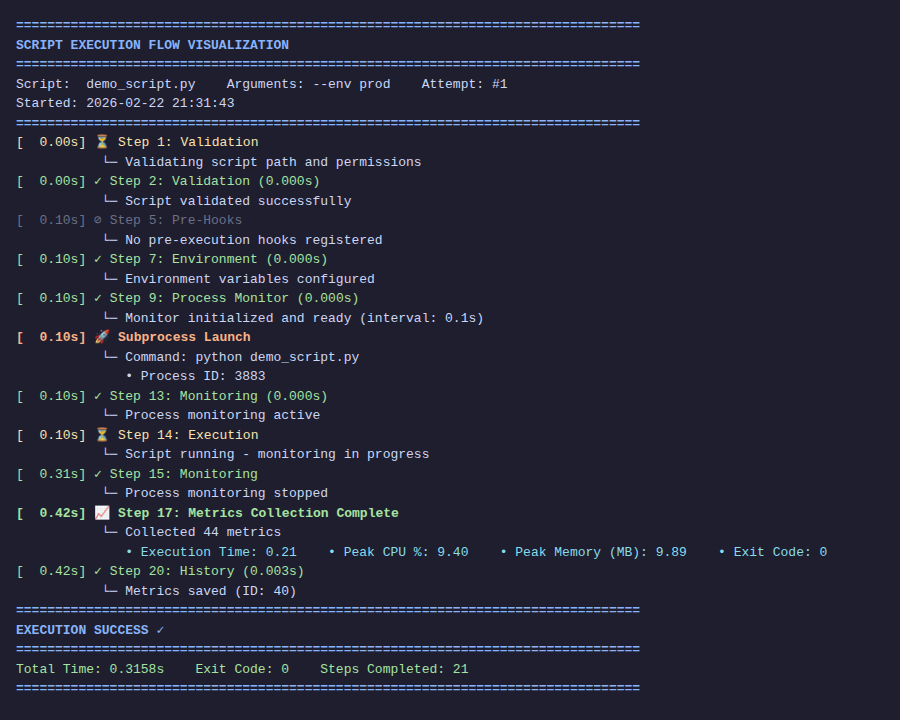
Each step of the pipeline is displayed with elapsed time and per-step duration (e.g. (0.101s)). Status symbols:
| Symbol | Meaning |
|---|---|
⏳ |
Running |
✓ |
Done |
⊘ |
Skipped |
✗ |
Error |
🚀 |
Subprocess launched |
Output file
Write a clean (ANSI-free) copy to disk:
python runner.py my_script.py --visualize --visualize-output run.log
JSON output format
Machine-readable structured output for CI pipelines and integrations:
python runner.py my_script.py --visualize --visualize-format json
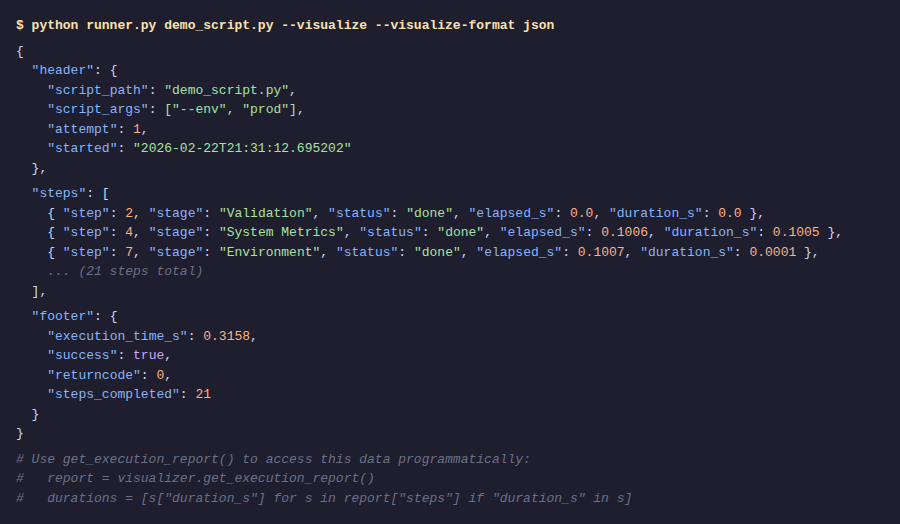
The JSON document contains a header, a steps list with per-step elapsed_s and duration_s, and a footer. Access it programmatically with get_execution_report():
from runner import ExecutionVisualizer

v = ExecutionVisualizer(enabled=True, output_format="json", output_file="run.log")
v.show_header("pipeline.py")
# ... steps recorded automatically during runner.run_script() ...
v.show_footer(1.23, success=True)

report = v.get_execution_report()
slow_steps = [s for s in report["steps"] if s.get("duration_s", 0) > 0.5]
Workflow Orchestration
Execute multiple scripts as a DAG with optional parallelism:
from runner import ScriptWorkflow

wf = ScriptWorkflow(
    name="data_pipeline",
    max_parallel=2,          # run up to 2 scripts concurrently
    stop_on_failure=True,    # abort if any script fails
    on_step_callback=lambda name, status, result: print(f"{name}: {status}"),
)

wf.add_script("fetch",     "fetch.py")
wf.add_script("transform", "transform.py", dependencies=["fetch"])
wf.add_script("validate",  "validate.py",  dependencies=["fetch"])
wf.add_script("load_db",   "load_db.py",   dependencies=["transform", "validate"])

# Visualize the DAG before running
print(wf.visualize_dag())

result = wf.execute()
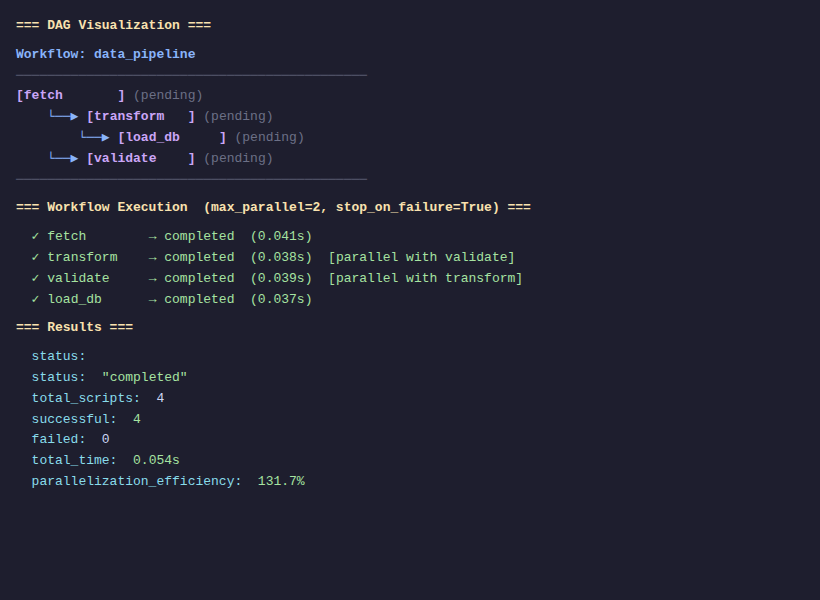
visualize_dag()
Prints an ASCII-art dependency graph showing node names, dependency arrows, and live execution status:
Workflow: data_pipeline
─────────────────────────────────────────────
[fetch       ] (pending)
    └──▶ [transform   ] (pending)
        └──▶ [load_db     ] (pending)
    └──▶ [validate    ] (pending)
─────────────────────────────────────────────
execute() result
{
    "status": "completed",   # or "aborted" if stop_on_failure triggered
    "total_scripts": 4,
    "successful": 4,
    "failed": 0,
    "total_time": 0.054,
    "results": { ... }       # per-script exit codes, timings, success flags
}
Web API & Dashboard
A full-featured FastAPI service lives in the WEBAPI/ directory. Start it with:
cd WEBAPI
uvicorn api:app --host 0.0.0.0 --port 8000 --reload
# or simply:
bash serve.sh
Then open http://localhost:8000 in your browser.
Dashboard
Runner Tab — launch scripts, view real-time stats (total runs, last 24 h, success rate), inspect per-run logs, events, and visualization reports.
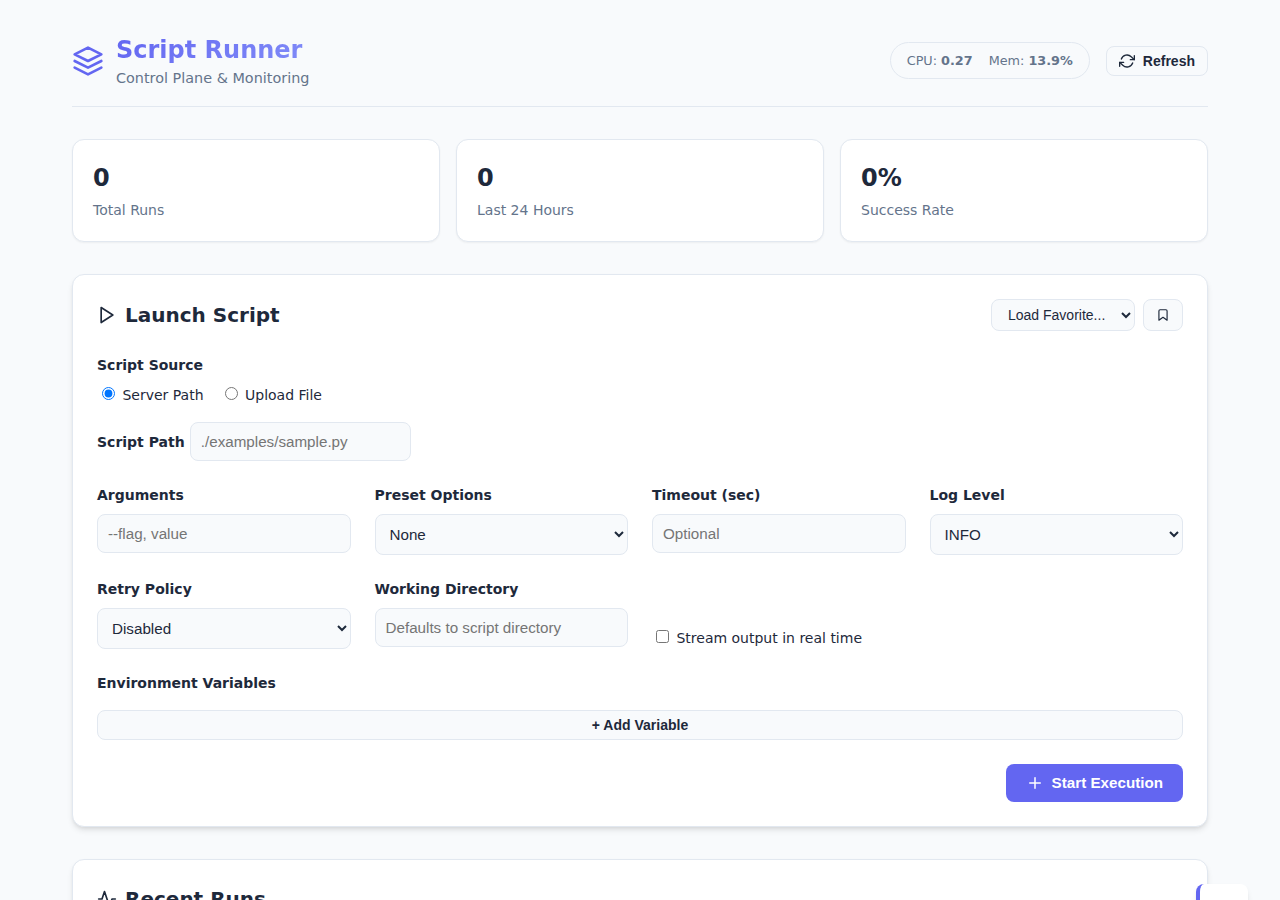
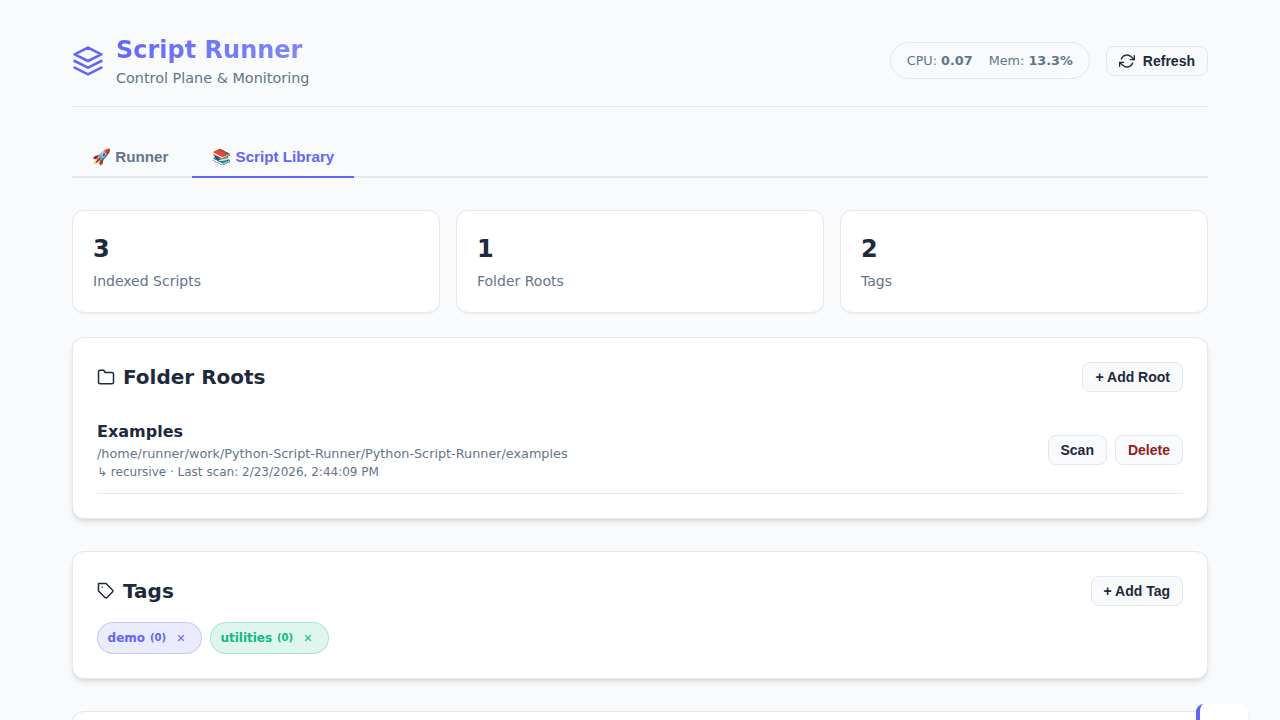
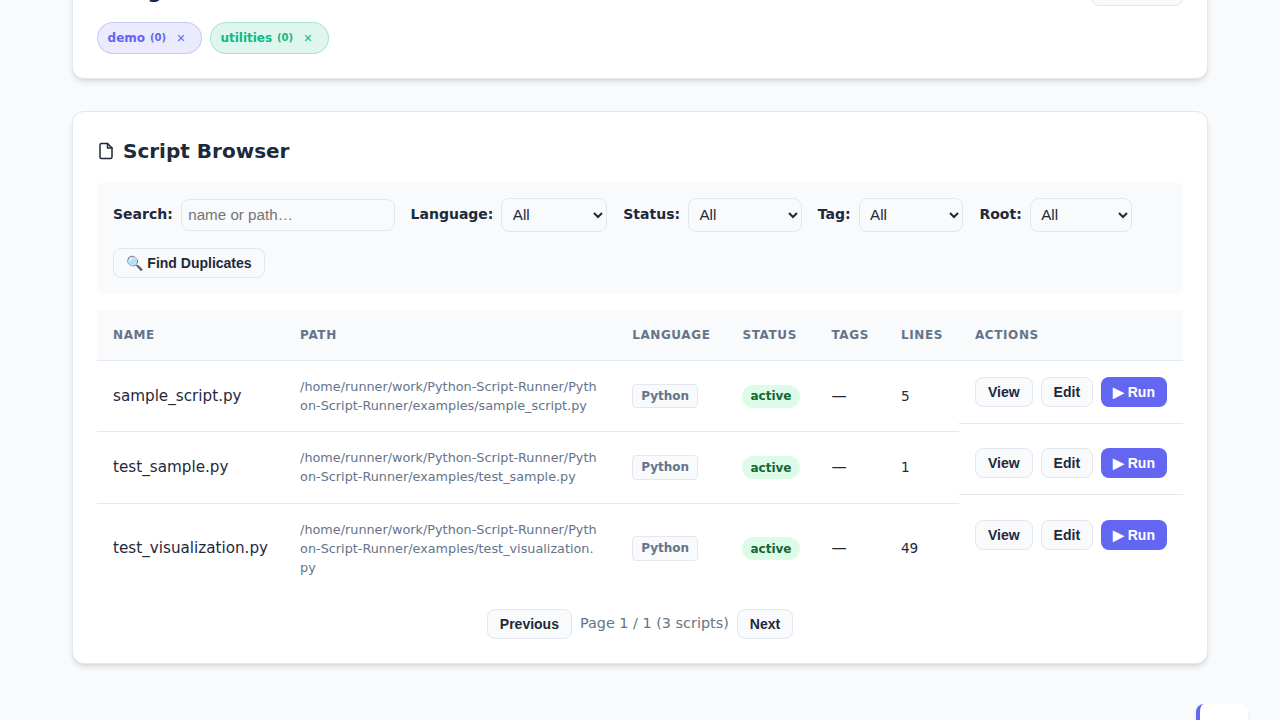
Script Library Tab — index folder roots, browse/search scripts by language/status/tag, preview file content, manage lifecycle (active, draft, deprecated, archived), and launch any script directly.
Core API endpoints
| Method | Endpoint | Description |
|---|---|---|
GET |
/api/health |
Liveness check — returns {"status":"ok"} |
GET |
/api/system/status |
CPU load averages and memory usage |
GET |
/api/stats |
Total / 24 h / by-status aggregates |
GET |
/ |
Interactive HTML dashboard |
Run lifecycle
| Method | Endpoint | Description |
|---|---|---|
POST |
/api/run |
Queue a script execution |
POST |
/api/run/upload |
Upload a .py file and queue execution |
GET |
/api/runs |
List runs with pagination and status filter |
GET |
/api/runs/{id} |
Full run record including correlation ID and error summary |
POST |
/api/runs/{id}/cancel |
Graceful cancellation |
POST |
/api/runs/{id}/stop |
Graceful stop via runner.stop() |
POST |
/api/runs/{id}/kill |
Force kill |
POST |
/api/runs/{id}/restart |
Cancel active run and requeue |
GET |
/api/runs/{id}/logs |
Captured stdout/stderr |
GET |
/api/runs/{id}/events |
Structured execution events |
GET |
/api/runs/{id}/visualization |
Per-step timing report |
DELETE |
/api/runs/{id} |
Delete a run record |
Analytics
| Method | Endpoint | Description |
|---|---|---|
GET |
/api/analytics/history |
Execution history (filter by script, days, limit) |
GET |
/api/analytics/history/stats |
Database statistics |
GET |
/api/analytics/trends |
Linear regression on a metric |
GET |
/api/analytics/anomalies |
Anomaly detection (iqr / zscore / mad) |
GET |
/api/analytics/baseline |
Performance baseline calculation |
POST |
/api/analytics/export |
Download metrics as JSON or CSV |
GET |
/api/analytics/benchmarks |
List benchmark snapshots |
POST |
/api/analytics/benchmarks |
Create a benchmark snapshot |
GET |
/api/analytics/benchmarks/{name}/regressions |
Detect regressions |
DELETE |
/api/analytics/cleanup |
Delete history older than N days |
Script Library
| Method | Endpoint | Description |
|---|---|---|
GET |
/api/library/folder-roots |
List registered folder roots |
POST |
/api/library/folder-roots |
Register a folder root |
POST |
/api/library/folder-roots/{id}/scan |
Trigger background scan |
GET |
/api/library/scripts |
List/search scripts |
GET |
/api/library/scripts/{id}/content |
Raw file content |
PUT |
/api/library/scripts/{id}/status |
Update lifecycle status/owner/notes |
GET |
/api/library/tags |
List tags |
POST |
/api/library/tags |
Create a tag |
GET |
/api/library/duplicates |
Find duplicate scripts |
GET |
/api/library/stats |
Library aggregate statistics |
Scheduler
| Method | Endpoint | Description |
|---|---|---|
GET |
/api/scheduler/tasks |
List all scheduled tasks |
POST |
/api/scheduler/tasks |
Create a scheduled task |
DELETE |
/api/scheduler/tasks/{id} |
Remove a task |
POST |
/api/scheduler/tasks/{id}/run |
Run a task immediately |
GET |
/api/scheduler/due |
List tasks currently due for execution |
CLI Reference
usage: runner.py [-h] [--timeout TIMEOUT] [--visualize]
                 [--visualize-format {text,json}]
                 [--visualize-output FILE]
                 [--retry N] [--retry-strategy {linear,exponential,fibonacci,exponential_jitter}]
                 [--monitor-interval SECONDS]
                 [--show-history] [--analyze-trend]
                 [--dashboard] [--dry-run]
                 [--enable-code-analysis] [--enable-secret-scanning]
                 [--enable-dependency-scanning]
                 script [script_args ...]
Key flags:
| Flag | Description |
|---|---|
--visualize |
Show real-time execution flow |
--visualize-format {text,json} |
Output format (default: text) |
--visualize-output FILE |
Also write visualization to a file |
--retry N |
Retry on failure up to N times |
--retry-strategy |
linear, exponential, fibonacci, exponential_jitter |
--timeout SECONDS |
Kill script after N seconds |
--monitor-interval S |
Metric sampling interval (default: 0.1s) |
--show-history |
Print recent execution history |
--analyze-trend |
Run trend analysis on metric history |
--dashboard |
Start the web dashboard |
--dry-run |
Validate and show execution plan without running the script |
--enable-code-analysis |
Run static code analysis before execution |
--enable-secret-scanning |
Scan script for hardcoded secrets before execution |
--enable-dependency-scanning |
Scan requirements.txt for known vulnerabilities |
Security Scanning
Pre-execution security checks protect against common risks before a script ever runs:
from runner import ScriptRunner

runner = ScriptRunner("my_script.py")
runner.enable_code_analysis = True       # Static analysis / linting
runner.enable_secret_scanning = True     # Detect hardcoded credentials
runner.enable_dependency_scanning = True # Audit requirements.txt for CVEs
result = runner.run_script()
All findings are surfaced in the execution result and, if alerts are configured, dispatched through the alert pipeline.
HashiCorp Vault & AWS Secrets Manager
Integrate with secret vaults to retrieve credentials at runtime instead of hardcoding them:
from runners.security.secret_scanner import SecretScanner

# AWS Secrets Manager
scanner = SecretScanner(vault_type='aws_secrets_manager')

# HashiCorp Vault
scanner = SecretScanner(vault_type='vault', vault_address='http://vault:8200')
Task Scheduler
Schedule scripts with cron expressions or plain-English intervals. Tasks can declare dependencies on other tasks to form execution chains:
from runner import TaskScheduler

scheduler = TaskScheduler()

# Interval-based
scheduler.add_scheduled_task(
    task_id="refresh_data",
    script_path="fetch.py",
    schedule="every 5 minutes",
)

# Cron-based with dependency
scheduler.add_scheduled_task(
    task_id="daily_report",
    script_path="report.py",
    cron_expr="0 8 * * *",          # 08:00 every day
    dependencies=["refresh_data"],  # wait for refresh_data to complete first
)

# Run all tasks that are currently due
for task in scheduler.get_due_tasks():
    task.run()
Analytics & Benchmarks
Query historical execution data, detect regressions, and export metrics:
from runner import HistoryManager, TrendAnalyzer, BenchmarkManager

hm = HistoryManager()

# Trend analysis on execution time over the last 30 days
history = hm.get_execution_history(script_path="etl.py", days=30)
values  = [e["metrics"]["execution_time_seconds"] for e in history]

ta     = TrendAnalyzer()
trend  = ta.calculate_linear_regression(values)
anomalies = ta.detect_anomalies(values, method="iqr")   # or "zscore", "mad"

# Performance benchmarks & regression detection
bm = BenchmarkManager()
bm.create_benchmark("nightly_etl", script_path="etl.py")
regressions = bm.detect_regressions("nightly_etl", regression_threshold=10.0)

# Export to CSV or JSON
from runner import DataExporter
exporter = DataExporter(hm)
exporter.export_to_csv("metrics.csv", script_path="etl.py")
Performance Gates & Baseline
Fail CI runs automatically when a metric exceeds a threshold:
from runner import ScriptRunner, CICDIntegration, PerformanceGate

runner = ScriptRunner("pipeline.py")
result = runner.run_script()

cicd = CICDIntegration(runner)
cicd.add_performance_gate(PerformanceGate(metric="cpu_max",       max_value=85.0))
cicd.add_performance_gate(PerformanceGate(metric="memory_max_mb", max_value=512.0))
gate_result = cicd.check_performance_gates(result)
cicd.generate_junit_xml(result, "test-results.xml")
Cloud Cost Tracking
Estimate AWS, Azure, and GCP resource costs incurred during script execution:
from runners.integrations.cloud_cost_tracker import CloudCostTracker, CloudProvider

tracker = CloudCostTracker(provider=CloudProvider.AWS, region="us-east-1")
tracker.start_tracking()

# ... run your script ...

report = tracker.stop_tracking()
print(f"Estimated cost: ${report.total_cost_usd:.4f}")
print(f"Recommendations: {report.recommendations}")
Supports budget alerting and multi-cloud cost attribution tagging.
OpenTelemetry Tracing
Instrument script executions with distributed tracing for observability pipelines:
from runners.tracers.otel_manager import TracingManager, TracingConfig, ExporterType

config = TracingConfig(
    service_name="my-pipeline",
    exporter_type=ExporterType.JAEGER,
    jaeger_host="localhost",
    jaeger_port=6831,
    sampling_rate=1.0,   # 100% sample rate
)

manager = TracingManager(config)
manager.initialize()

with manager.start_span("execute_etl") as span:
    span.set_attribute("script.path", "etl.py")
    # ... run script ...
Supports Jaeger, Zipkin, and OTLP exporters with configurable sampling strategies (always_on, probability, tail_based).
Script Templates
Bootstrap new scripts from built-in templates to follow best practices from the start:
from runners.templates.template_manager import TemplateManager

tm = TemplateManager()

# List available templates
for tpl in tm.list_templates():
    print(f"{tpl.name} ({tpl.category}) — {tpl.description}")

# Scaffold a new script from a template
tm.create_from_template("etl_pipeline", output_dir="my_project/")
Built-in templates:
| Template | Category | Description |
|---|---|---|
etl_pipeline |
ETL | Extract/Transform/Load pipeline with error handling and logging |
api_integration |
API | REST API client with rate limiting and retry logic |
file_processing |
Files | File batch processing with validation |
data_transformation |
Data | Data transformation and aggregation patterns |
Performance Profiling
Measure the overhead of individual runner features and run load tests:
from runners.profilers.performance_profiler import AdvancedProfiler, LoadTestRunner

profiler = AdvancedProfiler()
profiler.measure_baseline(duration_seconds=5)

def my_feature():
    # ... code to profile ...
    pass

metrics = profiler.profile_feature("my_feature", my_feature)
print(f"Execution time: {metrics.execution_time_ms:.1f} ms")
print(f"CPU overhead: {metrics.cpu_overhead_percent:.2f}%")
print(f"Memory overhead: {metrics.memory_overhead_mb:.2f} MB")

# Load test with concurrent workers
runner = LoadTestRunner(max_workers=10)
report = runner.run_load_test(my_feature, duration_seconds=30)
print(f"Throughput: {report.requests_per_second:.1f} req/s")
Installation
pip install python-script-runner
Or from source:
git clone https://github.com/jomardyan/Python-Script-Runner
cd Python-Script-Runner
pip install -e .
Development setup
pip install -r requirements-dev.txt
pytest tests/unit/ -v
👨💻 Author
Hayk Jomardyan
- 🌐 Website: lolino.pl
- 📧 Email: hayk.jomardyan@outlook.com
- 💼 GitHub: @jomardyan
License
MIT License - See LICENSE file for details
1 maintainer

Download files
Download the file for your platform. If you're not sure which to choose, learn more about installing packages.
Source Distribution
Built Distribution
Filter files by name, interpreter, ABI, and platform.
If you're not sure about the file name format, learn more about wheel file names.
Copy a direct link to the current filters
File details
Details for the file python_script_runner-7.5.0.tar.gz.
File metadata
- Download URL: python_script_runner-7.5.0.tar.gz
- Upload date:
- Size: 147.7 kB
- Tags: Source
- Uploaded using Trusted Publishing? No
- Uploaded via:
twine/6.2.0 CPython/3.11.14
File hashes
| Algorithm | Hash digest | |
|---|---|---|
| SHA256 |
1ca26e8c2df098dad681877938efc11d55ec1df592b39822df509308f2cf6be8
|
|
| MD5 |
03c95044dabc515663fcfb72dc03cf7c
|
|
| BLAKE2b-256 |
bcb3aa0e8b3267495df7ac81e75bad47c01e964594259a1e4e68659471b04a21
|
File details
Details for the file python_script_runner-7.5.0-py3-none-any.whl.
File metadata
- Download URL: python_script_runner-7.5.0-py3-none-any.whl
- Upload date:
- Size: 148.5 kB
- Tags: Python 3
- Uploaded using Trusted Publishing? No
- Uploaded via:
twine/6.2.0 CPython/3.11.14
File hashes
| Algorithm | Hash digest | |
|---|---|---|
| SHA256 |
82ed33563f4d7bd1d64aec55fbe0b744560cd5d6cd07a7840281401b58b241a1
|
|
| MD5 |
31c5c9134d0ff869ef77a3a99574412b
|
|
| BLAKE2b-256 |
9969695bada8de7b805ad240709f8b2780775563736b9c507050859f7da49acb
|














