
Production-grade Python script execution engine with comprehensive monitoring, alerting, analytics, and enterprise integrations

Project description
Python Script Runner
A production-grade Python script execution engine with comprehensive monitoring, alerting, analytics, and real-time visualization.












Features
- Script execution with timeout, retry, and environment management
- Real-time visualization of the full execution pipeline
- DAG-based workflow orchestration with parallel execution
- Metrics collection — CPU, memory, I/O, timing per run
- Alert management — rule-based triggers via Slack, email, webhooks with deduplication
- History & trend analysis — SQLite persistence with anomaly detection (IQR, Z-score, MAD)
- CI/CD integration — JUnit XML, TAP output, performance gates, baseline comparison
- Remote execution — SSH, Docker, Kubernetes
- Web dashboard — FastAPI REST API with interactive HTML dashboard
- Security scanning — code analysis, secret detection, dependency vulnerability scanning
- Task scheduler — cron and interval-based scheduling with dependency chains
- Analytics API — trends, anomalies, benchmarks, and data export (JSON/CSV)
- Cloud cost tracking — resource usage cost estimation during execution
- Dry-run mode — validate and preview execution plan without running the script
Visualization
Run any script with real-time orchestration visualization using the --visualize flag:
python runner.py my_script.py --visualize
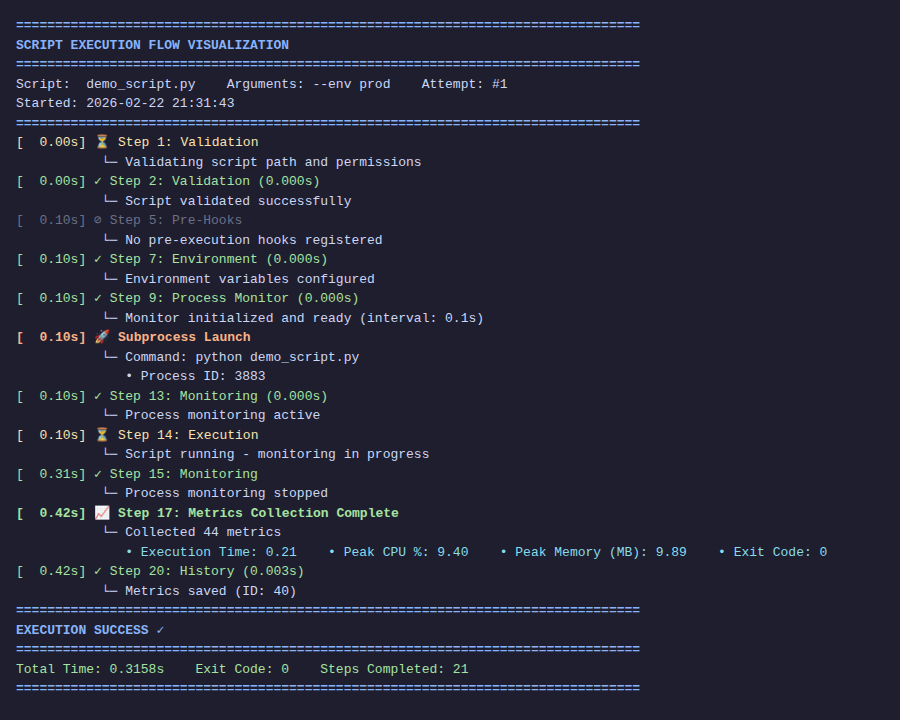
Each step of the pipeline is displayed with elapsed time and per-step duration (e.g. (0.101s)). Status symbols:
| Symbol | Meaning |
|---|---|
⏳ |
Running |
✓ |
Done |
⊘ |
Skipped |
✗ |
Error |
🚀 |
Subprocess launched |
Output file
Write a clean (ANSI-free) copy to disk:
python runner.py my_script.py --visualize --visualize-output run.log
JSON output format
Machine-readable structured output for CI pipelines and integrations:
python runner.py my_script.py --visualize --visualize-format json
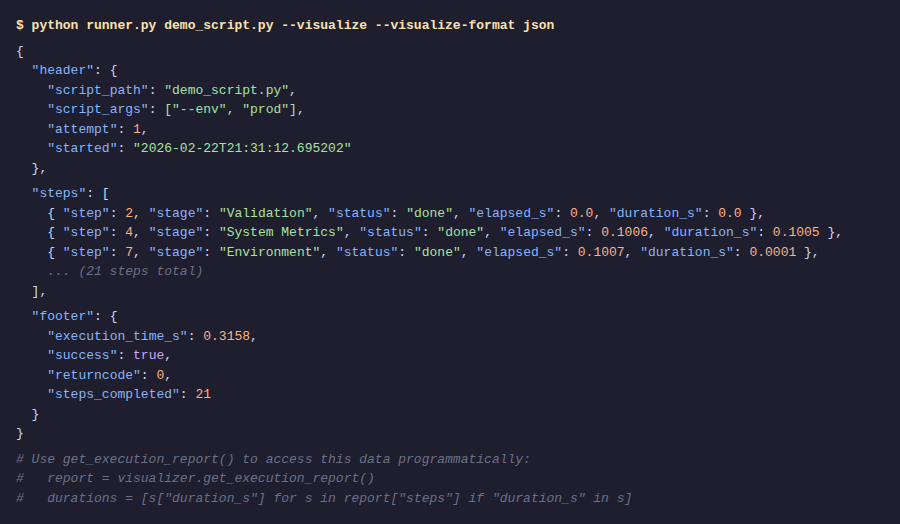
The JSON document contains a header, a steps list with per-step elapsed_s and duration_s, and a footer. Access it programmatically with get_execution_report():
from runner import ExecutionVisualizer

v = ExecutionVisualizer(enabled=True, output_format="json", output_file="run.log")
v.show_header("pipeline.py")
# ... steps recorded automatically during runner.run_script() ...
v.show_footer(1.23, success=True)

report = v.get_execution_report()
slow_steps = [s for s in report["steps"] if s.get("duration_s", 0) > 0.5]
Workflow Orchestration
Execute multiple scripts as a DAG with optional parallelism:
from runner import ScriptWorkflow

wf = ScriptWorkflow(
    name="data_pipeline",
    max_parallel=2,          # run up to 2 scripts concurrently
    stop_on_failure=True,    # abort if any script fails
    on_step_callback=lambda name, status, result: print(f"{name}: {status}"),
)

wf.add_script("fetch",     "fetch.py")
wf.add_script("transform", "transform.py", dependencies=["fetch"])
wf.add_script("validate",  "validate.py",  dependencies=["fetch"])
wf.add_script("load_db",   "load_db.py",   dependencies=["transform", "validate"])

# Visualize the DAG before running
print(wf.visualize_dag())

result = wf.execute()
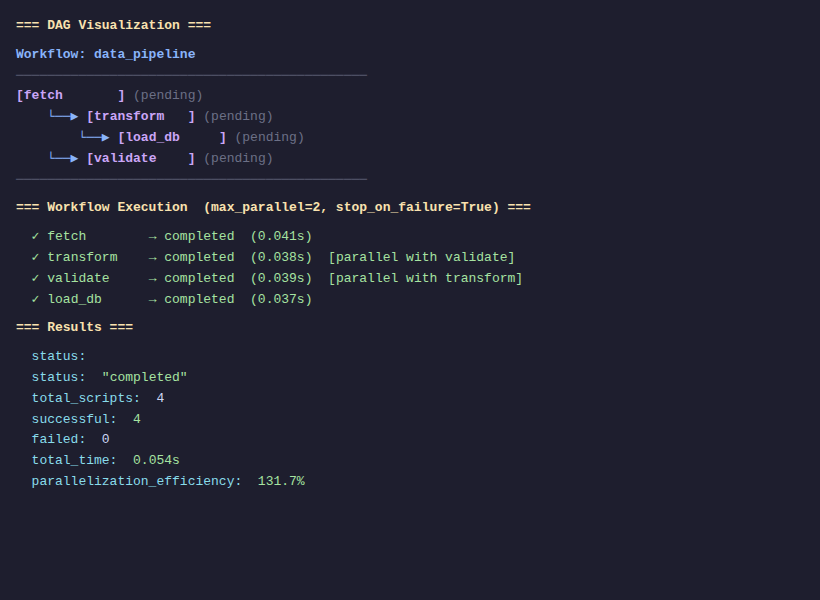
visualize_dag()
Prints an ASCII-art dependency graph showing node names, dependency arrows, and live execution status:
Workflow: data_pipeline
─────────────────────────────────────────────
[fetch       ] (pending)
    └──▶ [transform   ] (pending)
        └──▶ [load_db     ] (pending)
    └──▶ [validate    ] (pending)
─────────────────────────────────────────────
execute() result
{
    "status": "completed",   # or "aborted" if stop_on_failure triggered
    "total_scripts": 4,
    "successful": 4,
    "failed": 0,
    "total_time": 0.054,
    "results": { ... }       # per-script exit codes, timings, success flags
}
CLI Reference
usage: runner.py [-h] [--timeout TIMEOUT] [--visualize]
                 [--visualize-format {text,json}]
                 [--visualize-output FILE]
                 [--retry N] [--retry-strategy {linear,exponential,fibonacci,exponential_jitter}]
                 [--monitor-interval SECONDS]
                 [--show-history] [--analyze-trend]
                 [--dashboard] [--dry-run]
                 [--enable-code-analysis] [--enable-secret-scanning]
                 [--enable-dependency-scanning]
                 script [script_args ...]
Key flags:
| Flag | Description |
|---|---|
--visualize |
Show real-time execution flow |
--visualize-format {text,json} |
Output format (default: text) |
--visualize-output FILE |
Also write visualization to a file |
--retry N |
Retry on failure up to N times |
--retry-strategy |
linear, exponential, fibonacci, exponential_jitter |
--timeout SECONDS |
Kill script after N seconds |
--monitor-interval S |
Metric sampling interval (default: 0.1s) |
--show-history |
Print recent execution history |
--analyze-trend |
Run trend analysis on metric history |
--dashboard |
Start the web dashboard |
--dry-run |
Validate and show execution plan without running the script |
--enable-code-analysis |
Run static code analysis before execution |
--enable-secret-scanning |
Scan script for hardcoded secrets before execution |
--enable-dependency-scanning |
Scan requirements.txt for known vulnerabilities |
Security Scanning
Pre-execution security checks protect against common risks before a script ever runs:
from runner import ScriptRunner

runner = ScriptRunner("my_script.py")
runner.enable_code_analysis = True       # Static analysis / linting
runner.enable_secret_scanning = True     # Detect hardcoded credentials
runner.enable_dependency_scanning = True # Audit requirements.txt for CVEs
result = runner.run_script()
All findings are surfaced in the execution result and, if alerts are configured, dispatched through the alert pipeline.
Task Scheduler
Schedule scripts with cron expressions or plain-English intervals. Tasks can declare dependencies on other tasks to form execution chains:
from runner import TaskScheduler

scheduler = TaskScheduler()

# Interval-based
scheduler.add_scheduled_task(
    task_id="refresh_data",
    script_path="fetch.py",
    schedule="every 5 minutes",
)

# Cron-based with dependency
scheduler.add_scheduled_task(
    task_id="daily_report",
    script_path="report.py",
    cron_expr="0 8 * * *",          # 08:00 every day
    dependencies=["refresh_data"],  # wait for refresh_data to complete first
)

# Run all tasks that are currently due
for task in scheduler.get_due_tasks():
    task.run()
Analytics & Benchmarks
Query historical execution data, detect regressions, and export metrics:
from runner import HistoryManager, TrendAnalyzer, BenchmarkManager

hm = HistoryManager()

# Trend analysis on execution time over the last 30 days
history = hm.get_execution_history(script_path="etl.py", days=30)
values  = [e["metrics"]["execution_time_seconds"] for e in history]

ta     = TrendAnalyzer()
trend  = ta.calculate_linear_regression(values)
anomalies = ta.detect_anomalies(values, method="iqr")   # or "zscore", "mad"

# Performance benchmarks & regression detection
bm = BenchmarkManager()
bm.create_benchmark("nightly_etl", script_path="etl.py")
regressions = bm.detect_regressions("nightly_etl", regression_threshold=10.0)

# Export to CSV or JSON
from runner import DataExporter
exporter = DataExporter(hm)
exporter.export_to_csv("metrics.csv", script_path="etl.py")
Performance Gates & Baseline
Fail CI runs automatically when a metric exceeds a threshold:
from runner import ScriptRunner, CICDIntegration, PerformanceGate

runner = ScriptRunner("pipeline.py")
result = runner.run_script()

cicd = CICDIntegration(runner)
cicd.add_performance_gate(PerformanceGate(metric="cpu_max",       max_value=85.0))
cicd.add_performance_gate(PerformanceGate(metric="memory_max_mb", max_value=512.0))
gate_result = cicd.check_performance_gates(result)
cicd.generate_junit_xml(result, "test-results.xml")
Installation
pip install python-script-runner
Or from source:
git clone https://github.com/jomardyan/Python-Script-Runner
cd Python-Script-Runner
pip install -e .
👨💻 Author
Hayk Jomardyan
- 🌐 Website: lolino.pl
- 📧 Email: hayk.jomardyan@outlook.com
- 💼 GitHub: @jomardyan
License
MIT License - See LICENSE file for details
Release history Release notifications | RSS feed


Download files
Download the file for your platform. If you're not sure which to choose, learn more about installing packages.
Source Distribution
Built Distribution
Filter files by name, interpreter, ABI, and platform.
If you're not sure about the file name format, learn more about wheel file names.
Copy a direct link to the current filters
File details
Details for the file python_script_runner-7.4.5.tar.gz.
File metadata
- Download URL: python_script_runner-7.4.5.tar.gz
- Upload date:
- Size: 168.4 kB
- Tags: Source
- Uploaded using Trusted Publishing? No
- Uploaded via: twine/6.2.0 CPython/3.11.14
File hashes
| Algorithm | Hash digest | |
|---|---|---|
| SHA256 |
5906029fe411971061a6efefdca7d93cec8101b1d4d605054f6790237badd826
|
|
| MD5 |
ed36e2bd88cad9e5110a16f8c8f3a346
|
|
| BLAKE2b-256 |
3a388776c8064fc77a8585e54382c7a04514a392af928aad98c7ce69be5502d0
|
File details
Details for the file python_script_runner-7.4.5-py3-none-any.whl.
File metadata
- Download URL: python_script_runner-7.4.5-py3-none-any.whl
- Upload date:
- Size: 185.4 kB
- Tags: Python 3
- Uploaded using Trusted Publishing? No
- Uploaded via: twine/6.2.0 CPython/3.11.14
File hashes
| Algorithm | Hash digest | |
|---|---|---|
| SHA256 |
23d0fc23063dec783666e3e3abb7feeaa13f87ed7d5f251438f8704b96e7c8fd
|
|
| MD5 |
b70103a7789fd3b75c7e5db7bd2ec219
|
|
| BLAKE2b-256 |
8d9535cd72cf553d7474830f1db57e675fc42a43c3b6616c2b3de8bb64e05e71
|






