
python-slack-agents




A simple Python framework for running AI agents in Slack. Each agent is a YAML config and a system prompt — pick your LLM, connect some MCP tools, and slack-agents run. Everything you need is included: streaming responses, file handling, conversation persistence, and a plugin system when you need to extend things. Built on Bolt for Python.
What You Get
Each agent is a directory with two files: a config.yaml and a system_prompt.txt. Point it at your LLM, give it some tools, and run it.
LLM providers — Anthropic and OpenAI built in, plus any OpenAI-compatible API (Mistral, Groq, Together, Ollama, vLLM). Extend to any other provider by implementing a simple base class.
Tool calling with MCP — Connect any MCP server over HTTP. Tools are discovered automatically, executed in parallel, and filtered with regex patterns. No tool registration boilerplate. OAuth-protected MCP servers are supported with per-Slack-user tokens — see docs/oauth.md.
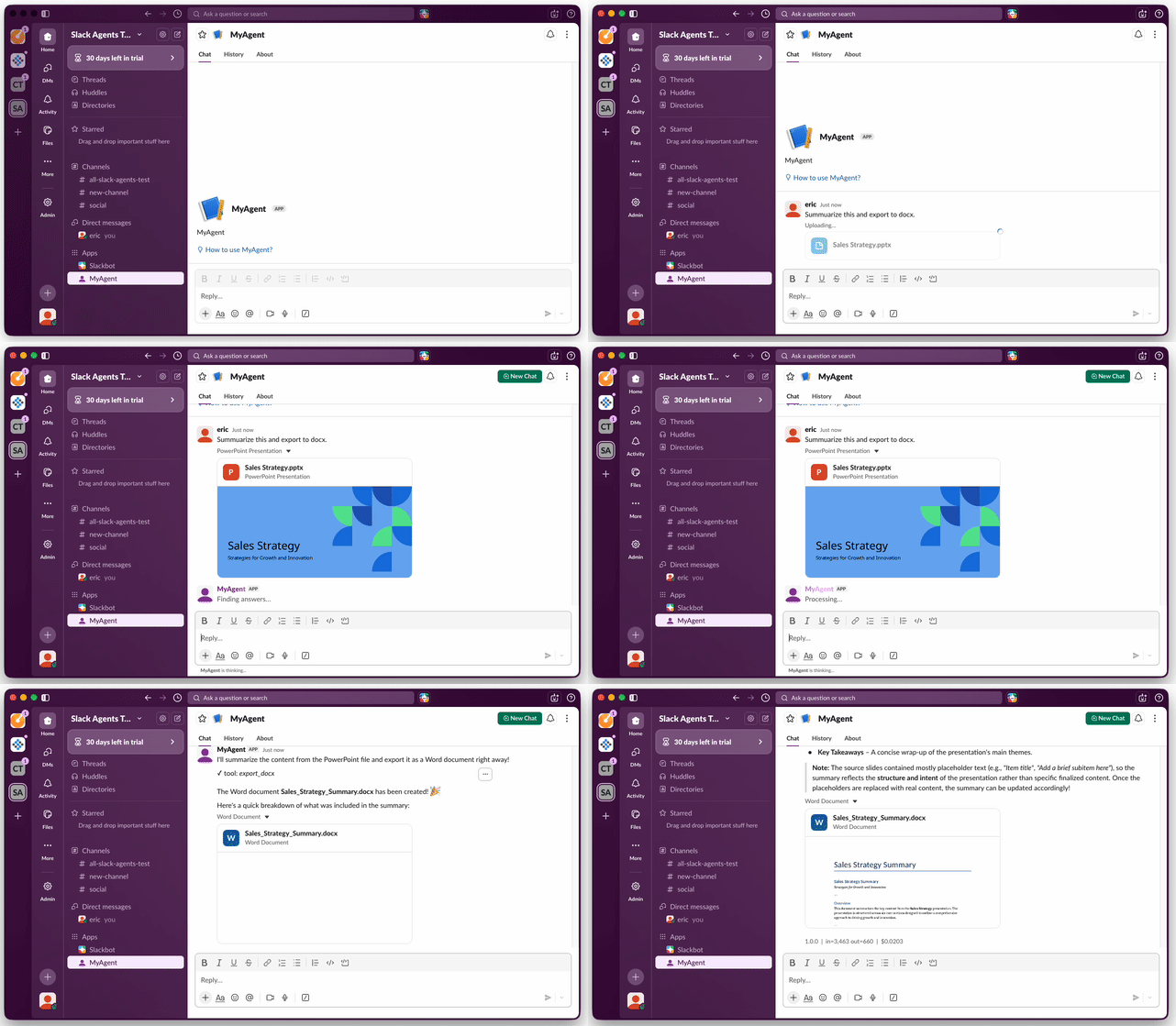
File handling — Agents can read files your users upload (PDF, DOCX, XLSX, PPTX, CSV, images) and generate documents back (PDF, DOCX, XLSX, CSV, PPTX). All built in, no extra setup.
Streaming — Responses stream token-by-token to Slack. Markdown tables are detected and rendered as native Slack tables, not code blocks.
Conversation persistence — SQLite for development, PostgreSQL for production. Conversations survive restarts, and you can export them to HTML or CSV.
Access control — Allow everyone, restrict to a list of Slack user IDs, or write a custom provider (LDAP, OAuth, whatever you need).
Observability — OpenTelemetry tracing out of the box. Send traces to Langfuse, Jaeger, Datadog, Grafana Tempo, or any OTLP-compatible backend.
Docker — Build per-agent Docker images with a single CLI command. Each agent is its own image with its own config.
Plugin architecture — LLM, storage, tools, and access control are all pluggable. Same pattern everywhere: a type field pointing to a Python module, and a simple Provider class in that module.
Quick Start
mkdir my-agents && cd my-agents
python3 -m venv .venv
source .venv/bin/activate
pip install python-slack-agents

# Scaffold the project
slack-agents init my-agents

# Add your tokens and install framework + deps
cp .env.example .env                 # add your Slack and LLM tokens
pip install -r requirements.txt

# Run the hello-world agent
slack-agents run agents/hello-world
See Setup for creating a Slack app and getting your tokens.
How It Works
An agent is a directory with two files:
agents/my-agent/
├── config.yaml          # LLM, tools, storage, access control
└── system_prompt.txt    # what the agent should do
config.yaml
version: "1.0.0"                     # shown in Slack usage footer, used as Docker image tag
schema: "slack-agents/v1"

slack:
  bot_token: "{SLACK_BOT_TOKEN}"
  app_token: "{SLACK_APP_TOKEN}"

llm:
  type: slack_agents.llm.anthropic
  model: claude-sonnet-4-6
  api_key: "{ANTHROPIC_API_KEY}"
  max_tokens: 4096
  max_input_tokens: 200000

storage:
  type: slack_agents.storage.sqlite
  path: ":memory:"

access:
  type: slack_agents.access.allow_all

tools:
  # Connect any MCP server — tools are auto-discovered
  web-search:
    type: slack_agents.tools.mcp_http
    url: "https://mcp.deepwiki.com/mcp"
    allowed_functions: [".*"]

  # Read uploaded files (PDF, DOCX, XLSX, PPTX, images, text)
  import-files:
    type: slack_agents.tools.file_importer
    allowed_functions: [".*"]

  # Generate and export documents (PDF, DOCX, XLSX, CSV, PPTX)
  export-documents:
    type: slack_agents.tools.file_exporter
    allowed_functions: ["export_pdf", "export_docx"]

  # Create, read, edit, and share Slack canvases
  canvas:
    type: slack_agents.tools.canvas
    bot_token: "{SLACK_BOT_TOKEN}"
    allowed_functions: [".*"]

  # Remember user preferences across conversations in a user-editable slack canvas
  user-context:
    type: slack_agents.tools.user_context
    bot_token: "{SLACK_BOT_TOKEN}"
    max_tokens: 1000
    allowed_functions: [".*"]
All secrets in {ENV_VAR} are resolved from environment variables at startup.
system_prompt.txt — plain text or markdown, as long or short as you need.
CLI
slack-agents init <project-name>                    # scaffold a new project
slack-agents run agents/<name>                      # start an agent
slack-agents healthcheck agents/<name>              # liveness probe (for k8s)
slack-agents export-conversations agents/<name> \   # export conversation history
  --format html --output ./conversations
slack-agents export-usage agents/<name>  \          # export usage metrics to CSV
  --format csv --output ./usage.csv
slack-agents build-docker agents/<name>             # build a Docker image
slack-agents build-docker agents/<name> \           # custom image name
  --image-name my-bot
slack-agents build-docker agents/<name> \           # build and push to a registry
  --push registry.example.com
Built-in Tools
File Import
Users can upload files to the conversation. The agent automatically reads them:
| Format | What's extracted |
|---|---|
| Full text with layout preserved (via PyMuPDF) | |
| DOCX | Text, headings, tables, lists |
| XLSX | Cell values across all sheets |
| PPTX | Slide text, speaker notes, tables |
| CSV, Markdown, plain text | Raw content |
| Images (PNG, JPEG, GIF, WebP) | Sent as vision input to the LLM |
Document Export
The agent can generate and upload files to the conversation:
| Format | Capabilities |
|---|---|
| Rich text, tables, headings, bullets, Unicode support | |
| DOCX | Styled documents with tables and lists |
| XLSX | Multi-sheet spreadsheets |
| CSV | Tabular data export |
| PPTX | Slide decks with tables and speaker notes |
Slack Canvases
Canvases are collaborative documents embedded in Slack — think Google Docs, but native to your workspace. Multiple users and agents can read and write the same canvas, making them a shared surface for collaboration between people and AI. Agents can create, read, update, and manage canvases, which is useful for generating reports, maintaining living documents, or publishing structured content directly where your team works.
See Canvas tool docs for the full tool reference and setup.
User Context (Optional Per-User Memory)
Each user can get a personal Slack canvas that stores their preferences and context across conversations. The agent loads it at the start of every conversation and offers to save important context when users share preferences or corrections. Users can also edit their canvas directly in Slack.
See User context docs for setup and configuration.
MCP Servers
Connect any MCP server over HTTP. Tools are auto-discovered and can be filtered:
tools:
  my-mcp-server:
    type: slack_agents.tools.mcp_http
    url: "https://my-server.example.com/mcp"
    headers:
      Authorization: "Bearer {MCP_API_TOKEN}"
    allowed_functions:
      - "search_.*"       # regex — only tools matching this pattern
      - "get_document"    # exact match works too
For MCP servers that require OAuth 2.1 (per-user authentication), use mcp_http_oauth — same auto-discovery, with each Slack user authenticating separately to the upstream service:
tools:
  my-oauth-mcp:
    type: slack_agents.tools.mcp_http_oauth
    url: "https://my-server.example.com/mcp"
    allowed_functions: [".*"]
Tokens are persisted per Slack user, refresh tokens are AES-GCM-encrypted at rest, and an in-process callback listener handles the OAuth dance alongside the Slack Bolt connection. See docs/oauth.md for setup (env vars, tunnel for local dev, scope handling, troubleshooting).
Project Structure
Your overlay is a plain git repo — not a Python package. You edit configs, commit, and run; there's no install-the-overlay-as-a-package step. A typical layout looks like:
my-agents/
├── requirements.txt        # pins python-slack-agents (and any extra deps)
├── .env.example
├── .gitignore
├── agents/
│   └── my-agent/
│       ├── config.yaml
│       └── system_prompt.txt
└── src/                    # optional — only if you add custom providers
    └── my_agents/
        └── __init__.py
Two conventions to know:
src/holds custom Python. Onslack-agents run, the framework walks up from the agent directory, finds the nearestsrc/sibling, and prepends it tosys.path. Anything undersrc/<pkg>/...is importable as<pkg>.…with no install step.requirements.txtpins your framework version and any extra Python deps.pip install -r requirements.txtis the only install command you ever run.
slack-agents init scaffolds this for you. See Organizing agents for details.
Extending
Every pluggable component follows the same pattern. Add a new LLM provider, storage backend, tool, or access policy by creating a module with a Provider class in src/:
# In config.yaml
llm:
  type: my_agents.my_llm_provider
  model: my-model
  api_key: "{MY_API_KEY}"
# In src/my_agents/my_llm_provider.py
from slack_agents.llm.base import BaseLLMProvider

class Provider(BaseLLMProvider):
    def __init__(self, model, api_key, **kwargs):
        ...
After you drop a module under src/, it's picked up automatically on the next slack-agents run —
the framework prepends ./src to sys.path at startup. The same mechanism works inside Docker:
the bundled Dockerfile installs dependencies from requirements.txt and copies your src/ into the
image, so custom providers resolve in production too.
See the docs for the full interface for each component:
Slack Compatibility
python-slack-agents uses Socket Mode, which connects to Slack over WebSocket. This means:
- No public URL required — works behind firewalls, on your laptop, in a private cluster (eg, k8s)
- All Slack plans supported — free, Pro, Business+, and Enterprise Grid
- One process per agent — Socket Mode requires a single WebSocket connection per app
Agents respond to @mentions in channels, direct messages, and thread replies. File uploads are automatically processed by file importer tools.
To create a Slack app, use the manifest in docs/slack-app-manifest.json — it has all the required scopes and event subscriptions pre-configured.
Requirements
- Python 3.12+
- A Slack app with Socket Mode enabled (setup guide)
- An API key for at least one LLM provider
Documentation
- Setup — installation and Slack app creation
- Agents — creating and configuring agents
- Tools — MCP servers and custom tool providers
- OAuth-protected MCP servers — per-Slack-user OAuth for MCP servers requiring authentication
- LLM — supported providers and adding your own
- Storage — SQLite, PostgreSQL, and custom backends
- Access control — controlling who can use an agent
- Canvases — creating and managing Slack canvases
- User context — per-user memory across conversations
- Observability — OpenTelemetry tracing
- Deployment — Docker, docker-compose, and Kubernetes
- CLI — command reference
- Organizing agents — in-repo, separate directory, or private repository
For AI Agents
If you're an AI agent or coding assistant, see llms-full.txt for a complete, single-file reference to the config schema, all providers, and the plugin system. After pip install, the reference is available locally inside the package at slack_agents/llms-full.txt.
Related Projects
Other projects in this space:
- Bolt for Python — The official Slack SDK. python-slack-agents uses it internally. Use Bolt directly if you want full control over Slack interactions without an agent abstraction.
- bolt-python-ai-chatbot — Official Slack sample app for AI chatbots. A starting point if you want to build from scratch rather than use a framework.
- bolt-python-assistant-template — Official Slack template for building Agents & Assistants with Bolt and OpenAI.
- langgraph-messaging-integrations — Connects LangGraph agents to Slack and other messaging platforms.
- slack-mcp-client — A Go application bridging Slack and MCP servers. Deployed app rather than a library.
Disclaimer
This is an independent open-source project and is not affiliated with, endorsed by, or sponsored by Slack Technologies, LLC or Salesforce, Inc.
License
Apache 2.0 — see LICENSE.
1 maintainer

Metadata
1 maintainer
Release files for python-slack-agents 0.9.3
For a detailed explanation of source distributions (sdists) and built distributions (wheels), please see the package formats documentation.
Source distribution (sdist)
| File | Size | Uploaded | |
|---|---|---|---|
| python_slack_agents-0.9.3.tar.gz | 1.5 MB | Details |
Built distribution (wheel)
| File | Interpreter | ABI | Platform | Reset |
|---|---|---|---|---|
| python_slack_agents-0.9.3-py3-none-any.whl | Python 3 | none | any | Details |
Total release size: 1.7 MB
Release files / python_slack_agents-0.9.3.tar.gz
| Download URL | python_slack_agents-0.9.3.tar.gz |
|---|---|
| Size | 1.5 MB |
| Tags | Source |
|
SHA-256 checksum How to use checksums |
92684c9df7dc3c8f5987f469e14e04da37dc7db266576797f8dbf98bad587906
|
|
BLAKE2b-256 checksum How to use checksums |
d997727df6bfd93ebee9487d3ce5a05157cf24d125c235462663c4b80111fdbd
|
| Upload date | |
|
Uploaded using Trusted Publishing? What is trusted publishing? |
Yes |
| Uploaded via |
twine/6.1.0 CPython/3.13.12
|
Provenance
Provenance describes where a file came from. On PyPI, provenance is shared via attestations, which provide a verifiable record of the build or publishing details. View details, limitations and caveats.


PyPI Publish Attestation
PyPI verified that this artifact, at this checksum, originated from the publisher listed below.
Signed by GitHub Actions, verified by PyPI on Jul 8, 2026.
Transparency logRelease files / python_slack_agents-0.9.3-py3-none-any.whl
| Download URL | python_slack_agents-0.9.3-py3-none-any.whl |
|---|---|
| Size | 178.8 kB |
| Tags | Python 3 |
|
SHA-256 checksum How to use checksums |
c5bd52d40b313ab214e71cd5385bc6e5e4c01440f7962d9e3b976fffb4f07692
|
|
BLAKE2b-256 checksum How to use checksums |
539b7cf6c104f973895af68a637474adb6eefdfa8636e07dca6753dee7d8d2ec
|
| Upload date | |
|
Uploaded using Trusted Publishing? What is trusted publishing? |
Yes |
| Uploaded via |
twine/6.1.0 CPython/3.13.12
|
Provenance
Provenance describes where a file came from. On PyPI, provenance is shared via attestations, which provide a verifiable record of the build or publishing details. View details, limitations and caveats.
PyPI Publish Attestation
PyPI verified that this artifact, at this checksum, originated from the publisher listed below.
Signed by GitHub Actions, verified by PyPI on Jul 8, 2026.
Transparency log













