
A Python framework for deploying AI agents as Slack bots
Verified details
These details have been verified by PyPIProject links
GitHub Statistics
Maintainers

Project description
python-slack-agents




A simple Python framework for running AI agents in Slack. Each agent is a YAML config and a system prompt — pick your LLM, connect some MCP tools, and slack-agents run. Everything you need is included: streaming responses, file handling, conversation persistence, and a plugin system when you need to extend things. Built on Bolt for Python.
What You Get
Each agent is a directory with two files: a config.yaml and a system_prompt.txt. Point it at your LLM, give it some tools, and run it.
LLM providers — Anthropic and OpenAI built in, plus any OpenAI-compatible API (Mistral, Groq, Together, Ollama, vLLM). Extend to any other provider by implementing a simple base class.
Tool calling with MCP — Connect any MCP server over HTTP. Tools are discovered automatically, executed in parallel, and filtered with regex patterns. No tool registration boilerplate.
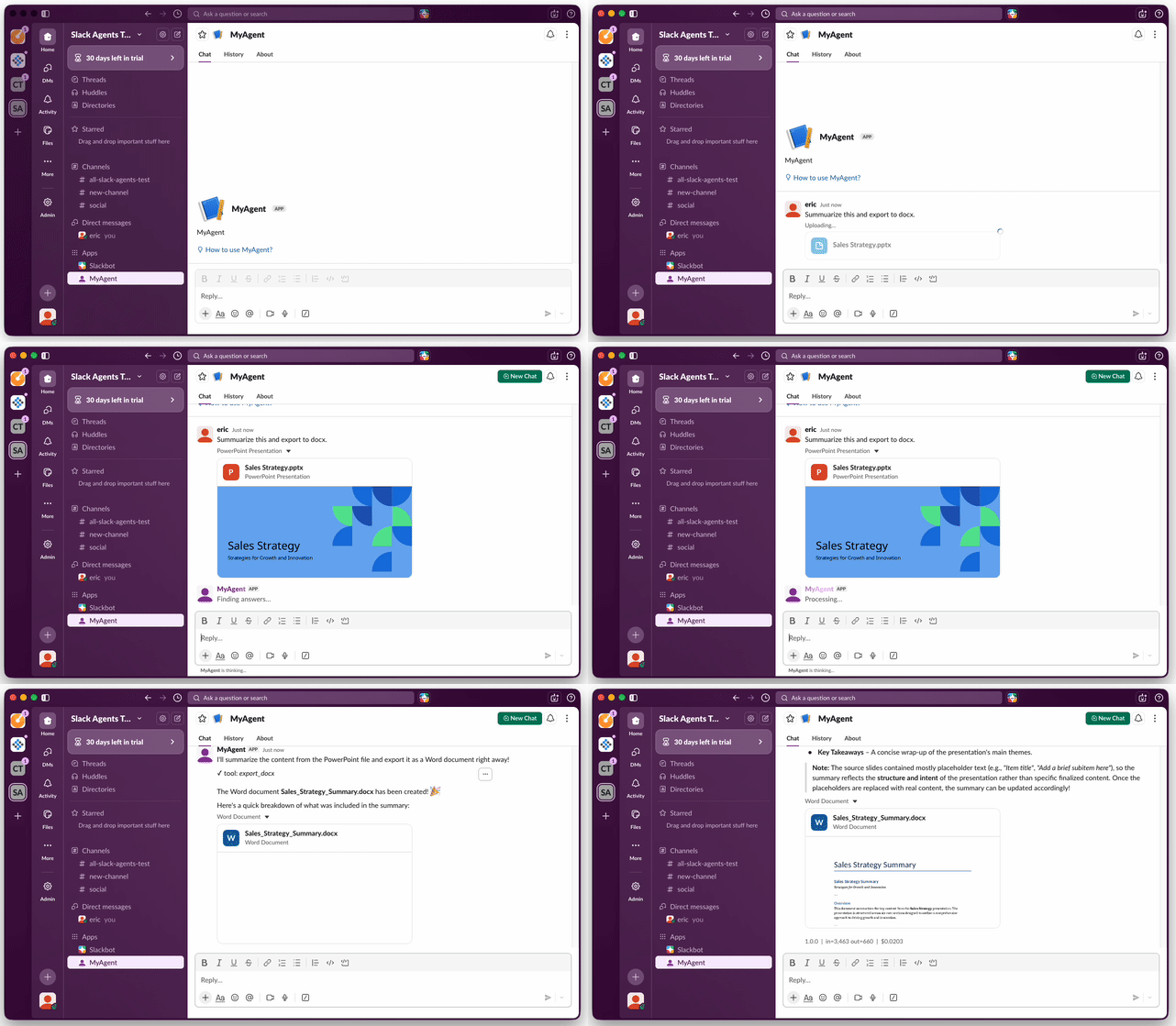
File handling — Agents can read files your users upload (PDF, DOCX, XLSX, PPTX, CSV, images) and generate documents back (PDF, DOCX, XLSX, CSV, PPTX). All built in, no extra setup.
Streaming — Responses stream token-by-token to Slack. Markdown tables are detected and rendered as native Slack tables, not code blocks.
Conversation persistence — SQLite for development, PostgreSQL for production. Conversations survive restarts, and you can export them to HTML or CSV.
Access control — Allow everyone, restrict to a list of Slack user IDs, or write a custom provider (LDAP, OAuth, whatever you need).
Observability — OpenTelemetry tracing out of the box. Send traces to Langfuse, Jaeger, Datadog, Grafana Tempo, or any OTLP-compatible backend.
Docker — Build per-agent Docker images with a single CLI command. Each agent is its own image with its own config.
Plugin architecture — LLM, storage, tools, and access control are all pluggable. Same pattern everywhere: a type field pointing to a Python module, and a simple Provider class in that module.
Quick Start
pip install python-slack-agents

# Scaffold a new project
mkdir my-agents && cd my-agents
slack-agents init my-agents

# Add your tokens
cp .env.example .env
# Edit .env: SLACK_BOT_TOKEN, SLACK_APP_TOKEN, ANTHROPIC_API_KEY

# Install for development (makes custom providers importable)
pip install -e .

# Run the hello-world agent
slack-agents run agents/hello-world
See Setup for creating a Slack app and getting your tokens.
How It Works
An agent is a directory with two files:
agents/my-agent/
├── config.yaml          # LLM, tools, storage, access control
└── system_prompt.txt    # what the agent should do
config.yaml
version: "1.0.0"                     # shown in Slack usage footer, used as Docker image tag
schema: "slack-agents/v1"

slack:
  bot_token: "{SLACK_BOT_TOKEN}"
  app_token: "{SLACK_APP_TOKEN}"

llm:
  type: slack_agents.llm.anthropic
  model: claude-sonnet-4-6
  api_key: "{ANTHROPIC_API_KEY}"
  max_tokens: 4096
  max_input_tokens: 200000

storage:
  type: slack_agents.storage.sqlite
  path: ":memory:"

access:
  type: slack_agents.access.allow_all

tools:
  # Connect any MCP server — tools are auto-discovered
  web-search:
    type: slack_agents.tools.mcp_http
    url: "https://mcp.deepwiki.com/mcp"
    allowed_functions: [".*"]

  # Read uploaded files (PDF, DOCX, XLSX, PPTX, images, text)
  import-files:
    type: slack_agents.tools.file_importer
    allowed_functions: [".*"]

  # Generate and export documents (PDF, DOCX, XLSX, CSV, PPTX)
  export-documents:
    type: slack_agents.tools.file_exporter
    allowed_functions: ["export_pdf", "export_docx"]

  # Create, read, edit, and share Slack canvases
  canvas:
    type: slack_agents.tools.canvas
    bot_token: "{SLACK_BOT_TOKEN}"
    allowed_functions: [".*"]

  # Remember user preferences across conversations in a user-editable slack canvas
  user-context:
    type: slack_agents.tools.user_context
    bot_token: "{SLACK_BOT_TOKEN}"
    max_tokens: 1000
    allowed_functions: [".*"]
All secrets in {ENV_VAR} are resolved from environment variables at startup.
system_prompt.txt — plain text or markdown, as long or short as you need.
CLI
slack-agents init <project-name>                    # scaffold a new project
slack-agents run agents/<name>                      # start an agent
slack-agents healthcheck agents/<name>              # liveness probe (for k8s)
slack-agents export-conversations agents/<name> \   # export conversation history
  --format html --output ./conversations
slack-agents export-usage agents/<name>  \          # export usage metrics to CSV
  --format csv --output ./usage.csv
slack-agents build-docker agents/<name>             # build a Docker image
slack-agents build-docker agents/<name> \           # custom image name
  --image-name my-bot
slack-agents build-docker agents/<name> \           # build and push to a registry
  --push registry.example.com
Built-in Tools
File Import
Users can upload files to the conversation. The agent automatically reads them:
| Format | What's extracted |
|---|---|
| Full text with layout preserved (via PyMuPDF) | |
| DOCX | Text, headings, tables, lists |
| XLSX | Cell values across all sheets |
| PPTX | Slide text, speaker notes, tables |
| CSV, Markdown, plain text | Raw content |
| Images (PNG, JPEG, GIF, WebP) | Sent as vision input to the LLM |
Document Export
The agent can generate and upload files to the conversation:
| Format | Capabilities |
|---|---|
| Rich text, tables, headings, bullets, Unicode support | |
| DOCX | Styled documents with tables and lists |
| XLSX | Multi-sheet spreadsheets |
| CSV | Tabular data export |
| PPTX | Slide decks with tables and speaker notes |
Slack Canvases
Canvases are collaborative documents embedded in Slack — think Google Docs, but native to your workspace. Multiple users and agents can read and write the same canvas, making them a shared surface for collaboration between people and AI. Agents can create, read, update, and manage canvases, which is useful for generating reports, maintaining living documents, or publishing structured content directly where your team works.
See Canvas tool docs for the full tool reference and setup.
User Context (Optional Per-User Memory)
Each user can get a personal Slack canvas that stores their preferences and context across conversations. The agent loads it at the start of every conversation and offers to save important context when users share preferences or corrections. Users can also edit their canvas directly in Slack.
See User context docs for setup and configuration.
MCP Servers
Connect any MCP server over HTTP. Tools are auto-discovered and can be filtered:
tools:
  my-mcp-server:
    type: slack_agents.tools.mcp_http
    url: "https://my-server.example.com/mcp"
    headers:
      Authorization: "Bearer {MCP_API_TOKEN}"
    allowed_functions:
      - "search_.*"       # regex — only tools matching this pattern
      - "get_document"    # exact match works too
Project Structure
When you add custom providers (tools, LLM, storage, or access control), your project needs a pyproject.toml and a src/ directory so that pip install -e . makes your code importable and slack-agents build-docker works:
my-agents/
├── pyproject.toml          # declares python-slack-agents as dependency
├── src/
│   └── my_agents/          # your custom providers go here
│       └── __init__.py
├── agents/
│   └── my-agent/
│       ├── config.yaml
│       └── system_prompt.txt
└── .env
slack-agents init scaffolds this for you. See Organizing agents for details.
Extending
Every pluggable component follows the same pattern. Add a new LLM provider, storage backend, tool, or access policy by creating a module with a Provider class in src/:
# In config.yaml
llm:
  type: my_agents.my_llm_provider
  model: my-model
  api_key: "{MY_API_KEY}"
# In src/my_agents/my_llm_provider.py
from slack_agents.llm.base import BaseLLMProvider

class Provider(BaseLLMProvider):
    def __init__(self, model, api_key, **kwargs):
        ...
After pip install -e ., your providers are importable and the type field in config resolves them. This also works with slack-agents build-docker — the bundled Dockerfile runs pip install . automatically.
See the docs for the full interface for each component:
Slack Compatibility
python-slack-agents uses Socket Mode, which connects to Slack over WebSocket. This means:
- No public URL required — works behind firewalls, on your laptop, in a private cluster (eg, k8s)
- All Slack plans supported — free, Pro, Business+, and Enterprise Grid
- One process per agent — Socket Mode requires a single WebSocket connection per app
Agents respond to @mentions in channels, direct messages, and thread replies. File uploads are automatically processed by file importer tools.
To create a Slack app, use the manifest in docs/slack-app-manifest.json — it has all the required scopes and event subscriptions pre-configured.
Requirements
- Python 3.12+
- A Slack app with Socket Mode enabled (setup guide)
- An API key for at least one LLM provider
Documentation
- Setup — installation and Slack app creation
- Agents — creating and configuring agents
- Tools — MCP servers and custom tool providers
- LLM — supported providers and adding your own
- Storage — SQLite, PostgreSQL, and custom backends
- Access control — controlling who can use an agent
- Canvases — creating and managing Slack canvases
- User context — per-user memory across conversations
- Observability — OpenTelemetry tracing
- Deployment — Docker, docker-compose, and Kubernetes
- CLI — command reference
- Organizing agents — in-repo, separate directory, or private repository
For AI Agents
If you're an AI agent or coding assistant, see llms-full.txt for a complete, single-file reference to the config schema, all providers, and the plugin system. After pip install, the reference is available locally inside the package at slack_agents/llms-full.txt.
Related Projects
If this framework isn't the right fit, here are some good alternatives:
- Bolt for Python — The official Slack SDK. python-slack-agents uses it internally. Use Bolt directly if you want full control over Slack interactions without an agent abstraction.
- Slack Machine — A mature Slack bot framework with a great plugin system for traditional chatops. No AI/LLM layer, but solid if you don't need agents.
- bolt-python-ai-chatbot — Official Slack sample app for AI chatbots. Good starting point if you want to build from scratch rather than use a framework.
- OpenAI Agents SDK, Pydantic AI, MCP Agent — Powerful general-purpose agent frameworks. None include Slack integration, but if you already use one and want to wire it up to Slack yourself, they're excellent.
- slack-mcp-client — A Go application bridging Slack and MCP servers. Deployed app rather than a library, but well-built if you prefer Go.
Disclaimer
This is an independent open-source project and is not affiliated with, endorsed by, or sponsored by Slack Technologies, LLC or Salesforce, Inc.
License
Apache 2.0 — see LICENSE.
Project details
Verified details
These details have been verified by PyPIProject links
GitHub Statistics
Maintainers


Download files
Download the file for your platform. If you're not sure which to choose, learn more about installing packages.
Source Distribution
Built Distribution
Filter files by name, interpreter, ABI, and platform.
If you're not sure about the file name format, learn more about wheel file names.
Copy a direct link to the current filters
File details
Details for the file python_slack_agents-0.6.0.tar.gz.
File metadata
- Download URL: python_slack_agents-0.6.0.tar.gz
- Upload date:
- Size: 1.4 MB
- Tags: Source
- Uploaded using Trusted Publishing? Yes
- Uploaded via: twine/6.1.0 CPython/3.13.7
File hashes
| Algorithm | Hash digest | |
|---|---|---|
| SHA256 |
f9ce6b1d35586068cc1511a0c7f79151d8cfc9cbf373c9beadc5dcb509144365
|
|
| MD5 |
a0f4b5f15bafe742ed406686fcf54de1
|
|
| BLAKE2b-256 |
4fff06128695b6190ce6e72d24350a28d86ffc0e15a0ee3d7200ce690a26dd39
|
Provenance
The following attestation bundles were made for python_slack_agents-0.6.0.tar.gz:
Publisher:
publish.yml on CompareNetworks/python-slack-agents
-
Statement:
-
Statement type:
https://in-toto.io/Statement/v1 -
Predicate type:
https://docs.pypi.org/attestations/publish/v1 -
Subject name:
python_slack_agents-0.6.0.tar.gz -
Subject digest:
f9ce6b1d35586068cc1511a0c7f79151d8cfc9cbf373c9beadc5dcb509144365 - Sigstore transparency entry: 1127777544
- Sigstore integration time:
-
Permalink:
CompareNetworks/python-slack-agents@69f013c21c40eb15edc54c8b6129bf40a489ad23 -
Branch / Tag:
refs/tags/v0.6.0 - Owner: https://github.com/CompareNetworks
-
Access:
public
-
Token Issuer:
https://token.actions.githubusercontent.com -
Runner Environment:
github-hosted -
Publication workflow:
publish.yml@69f013c21c40eb15edc54c8b6129bf40a489ad23 -
Trigger Event:
release
-
Statement type:
File details
Details for the file python_slack_agents-0.6.0-py3-none-any.whl.
File metadata
- Download URL: python_slack_agents-0.6.0-py3-none-any.whl
- Upload date:
- Size: 104.7 kB
- Tags: Python 3
- Uploaded using Trusted Publishing? Yes
- Uploaded via: twine/6.1.0 CPython/3.13.7
File hashes
| Algorithm | Hash digest | |
|---|---|---|
| SHA256 |
ca32a0142a510577893825ddc85118c96980ca375c92962917b4748f796698d6
|
|
| MD5 |
29fc52e4d42abdd4ea4bbcb5a85d279f
|
|
| BLAKE2b-256 |
a953463d5c838c5eba4210f13eb3972a380fe3b485a4522c012a3a9a206e4d26
|
Provenance
The following attestation bundles were made for python_slack_agents-0.6.0-py3-none-any.whl:
Publisher:
publish.yml on CompareNetworks/python-slack-agents
-
Statement:
-
Statement type:
https://in-toto.io/Statement/v1 -
Predicate type:
https://docs.pypi.org/attestations/publish/v1 -
Subject name:
python_slack_agents-0.6.0-py3-none-any.whl -
Subject digest:
ca32a0142a510577893825ddc85118c96980ca375c92962917b4748f796698d6 - Sigstore transparency entry: 1127777602
- Sigstore integration time:
-
Permalink:
CompareNetworks/python-slack-agents@69f013c21c40eb15edc54c8b6129bf40a489ad23 -
Branch / Tag:
refs/tags/v0.6.0 - Owner: https://github.com/CompareNetworks
-
Access:
public
-
Token Issuer:
https://token.actions.githubusercontent.com -
Runner Environment:
github-hosted -
Publication workflow:
publish.yml@69f013c21c40eb15edc54c8b6129bf40a489ad23 -
Trigger Event:
release
-
Statement type:






