
PythonHere






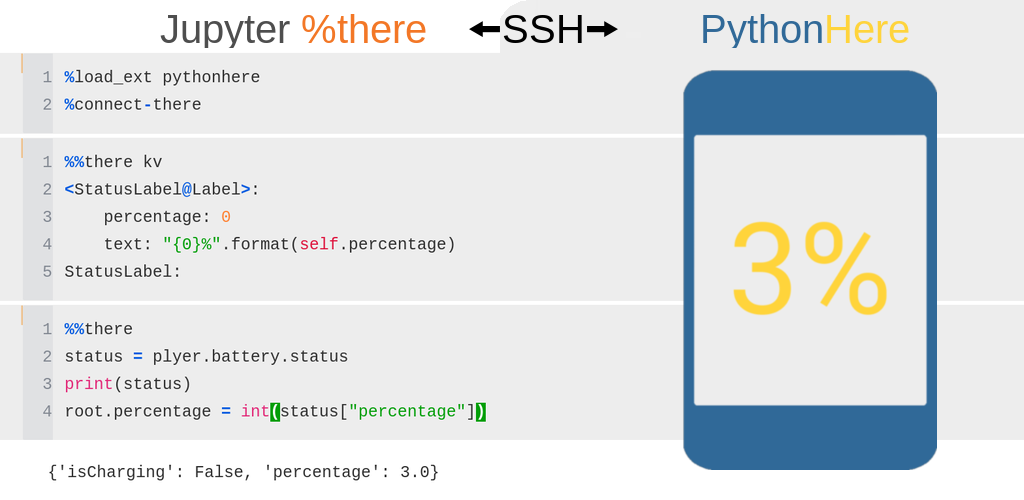
PythonHere lets you run Python code from a local Jupyter notebook inside a remote Kivy app.
PythonHere has two parts:
Here is the remote/server side. It runs a Python environment with a Kivy GUI, for example on Android, Raspberry Pi, or another machine.
%there is the local/client side. It is a Jupyter magic command for running code interactively in the remote PythonHere environment.
This makes PythonHere useful as a live Python/Kivy playground, and as a way to inspect or control a Python app running remotely.
Project documentation: https://herethere.me/pythonhere
Install the Android app
Install PythonHere with Obtainium to receive updates from GitHub Releases.
Ready-to-use PythonHere APKs are available from the GitHub Releases page.
For APK provenance and signing checks, see Android APK verification. For a list of Python packages included in the Android build, see buildozer.spec.
Start a local Jupyter environment with Docker
The Docker image is based on Jupyter Docker Stacks and includes PythonHere with usage examples.
Example command to start the Docker container:
docker run \
       --rm \
       -p 8888:8888 \
       --user root \
       -e CHOWN_EXTRA=/home/jovyan/work \
       -e CHOWN_EXTRA_OPTS='-R' \
       -v "$(pwd)/work":/home/jovyan/work \
       herethere/pythonhere:latest
The command exposes the Jupyter server on host port 8888. Jupyter logs are printed in the terminal and include a URL such as http://127.0.0.1:8888/?token=.... Open this URL in a browser to use the local Jupyter environment.
Files in /home/jovyan/work inside the container are stored in the local work directory.
Run a local Jupyter environment without Docker
Commands to run locally:
pip install pythonhere jupyter
jupyter notebook
Coding agents
PythonHere includes agent skills for working with the live app through the there command-line interface. See Coding agent skills for skill setup and practical examples.
Build Android app
To build with Buildozer, run in the source directory:
buildozer android debug
1 maintainer

Metadata
1 maintainer
Release files for pythonhere 0.4.1
For a detailed explanation of source distributions (sdists) and built distributions (wheels), please see the package formats documentation.
Source distribution (sdist)
| File | Size | Uploaded | |
|---|---|---|---|
| pythonhere-0.4.1.tar.gz | 142.4 kB | Details |
Built distribution (wheel)
| File | Interpreter | ABI | Platform | Reset |
|---|---|---|---|---|
| pythonhere-0.4.1-py3-none-any.whl | Python 3 | none | any | Details |
Total release size: 284.6 kB
Release files / pythonhere-0.4.1.tar.gz
| Download URL | pythonhere-0.4.1.tar.gz |
|---|---|
| Size | 142.4 kB |
| Tags | Source |
|
SHA-256 checksum How to use checksums |
a9a8b39f986b5f8efb12fde7fc452d4ff173a435135f3eb3bad5f8842b7184d1
|
|
BLAKE2b-256 checksum How to use checksums |
d52aee2cc1eedb717b1b8f434c1eab463c809588419508f46b96f3ccc08bd27f
|
| Upload date | |
|
Uploaded using Trusted Publishing? What is trusted publishing? |
No |
| Uploaded via |
twine/7.0.0 CPython/3.10.22
|
Release files / pythonhere-0.4.1-py3-none-any.whl
| Download URL | pythonhere-0.4.1-py3-none-any.whl |
|---|---|
| Size | 142.2 kB |
| Tags | Python 3 |
|
SHA-256 checksum How to use checksums |
aa7ea6743caa48551ce2f2fe8e47df26f8d7896c052265821f7b79d9bcf5bf60
|
|
BLAKE2b-256 checksum How to use checksums |
e1723816faabc4912ce3068bd133b4e9a52dd34a041f08ddd42b686196d40219
|
| Upload date | |
|
Uploaded using Trusted Publishing? What is trusted publishing? |
No |
| Uploaded via |
twine/7.0.0 CPython/3.10.22
|














