
Gestures wrapper for iOS

Project description
gestures
Gestures wrapper for iOS
Gestures for the Pythonista iOS app
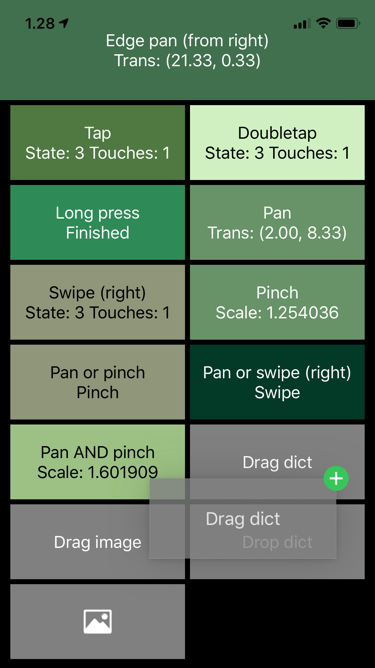
This is a convenience class for enabling gestures in Pythonista UI applications, including built-in views. Main intent here has been to make them Python friendly, hiding all the Objective-C stuff. All gestures correspond to the standard Apple gestures.
Run the file on its own to see a demo of the supported gestures.
Installation
Copy from GitHub, or
pip install pythonista-gestures
with stash.
Usage
For example, do something when user swipes left on a Label:
import gestures

def swipe_handler(data):
    print(f‘I was swiped left, starting from {data.location}')

label = ui.Label()
gestures.swipe(label, swipe_handler, direction=gestures.LEFT)
Your handler method gets one data argument that always contains the
attributes described below. Individual gestures may provide more
information; see the API documentation for the methods used to add different
gestures.
recognizer- (ObjC) recognizer objectview- (Pythonista) view that was gestured atlocation- Location of the gesture as aui.Pointwithxandyattributesstate- State of gesture recognition; one ofgestures.POSSIBLE/BEGAN/RECOGNIZED/CHANGED/ENDED/CANCELLED/FAILEDbegan,changed,ended,failed- convenience boolean properties to check for these statesnumber_of_touches- Number of touches recognized
For continuous gestures, check for data.began or data.ended in the handler
if you are just interested that a pinch or a force press happened.
All of the gesture-adding methods return an object that can be used
to remove or disable the gesture as needed, see the API. You can also remove
all gestures from a view with remove_all_gestures(view).
API
Class: Data
Simple class that contains all the data about the gesture. See the Usage
section and individual gestures for information on the data included.
Also provides convenience state-specific properties (began etc.).
Methods
Properties
began (get)
changed (get)
ended (get)
failed (get)
Functions
is_objc_type(objc_instance, objc_class)
gestureAction(_self, _cmd)
gestureRecognizer_shouldRecognizeSimultaneouslyWithGestureRecognizer_( _self, _sel, _gr, _other_gr)
tap(view, action, number_of_taps_required=None, number_of_touches_required=None)
Call action when a tap gesture is recognized for the view.
Additional parameters:
number_of_taps_required- Set if more than one tap is required for the gesture to be recognized.number_of_touches_required- Set if more than one finger is required for the gesture to be recognized.
doubletap(view, action, number_of_touches_required=None)
Convenience method that calls tap with a 2-tap requirement.
long_press(view, action, number_of_taps_required=None, number_of_touches_required=None, minimum_press_duration=None, allowable_movement=None)
Call action when a long press gesture is recognized for the
view. Note that this is a continuous gesture; you might want to
check for data.changed or data.ended to get the desired results.
Additional parameters:
number_of_taps_required- Set if more than one tap is required for the gesture to be recognized.number_of_touches_required- Set if more than one finger is required for the gesture to be recognized.minimum_press_duration- Set to change the default 0.5-second recognition treshold.allowable_movement- Set to change the default 10 point maximum distance allowed for the gesture to be recognized.
pan(view, action, minimum_number_of_touches=None, maximum_number_of_touches=None)
Call action when a pan gesture is recognized for the view.
This is a continuous gesture.
Additional parameters:
minimum_number_of_touches- Set to control the gesture recognition.maximum_number_of_touches- Set to control the gesture recognition.
Handler action receives the following gesture-specific attributes
in the data argument:
translation- Translation from the starting point of the gesture as aui.Pointwithxandyattributes.velocity- Current velocity of the pan gesture as points per second (aui.Pointwithxandyattributes).
edge_pan(view, action, edges)
Call action when a pan gesture starting from the edge is
recognized for the view. This is a continuous gesture.
edges must be set to one of
gestures.EDGE_NONE/EDGE_TOP/EDGE_LEFT/EDGE_BOTTOM/EDGE_RIGHT /EDGE_ALL. If you want to recognize pans from different edges,
you have to set up separate recognizers with separate calls to this
method.
Handler action receives the same gesture-specific attributes in
the data argument as pan gestures, see pan.
pinch(view, action)
Call action when a pinch gesture is recognized for the view.
This is a continuous gesture.
Handler action receives the following gesture-specific attributes
in the data argument:
scale- Relative to the distance of the fingers as opposed to when the touch first started.velocity- Current velocity of the pinch gesture as scale per second.
rotation(view, action)
Call action when a rotation gesture is recognized for the view.
This is a continuous gesture.
Handler action receives the following gesture-specific attributes
in the data argument:
rotation- Rotation in radians, relative to the position of the fingers when the touch first started.velocity- Current velocity of the rotation gesture as radians per second.
swipe(view, action, direction=None, number_of_touches_required=None, min_distance=None, max_distance=None)
Call action when a swipe gesture is recognized for the view.
Additional parameters:
direction- Direction of the swipe to be recognized. Either one ofgestures.RIGHT/LEFT/UP/DOWN, or a list of multiple directions.number_of_touches_required- Set if you need to change the minimum number of touches required.min_distance- Minimum distance the swipe gesture must travel in order to be recognized. Default is 50. This uses an undocumented recognizer attribute.max_distance- Maximum distance the swipe gesture can travel in order to still be recognized. Default is a very large number. This uses an undocumented recognizer attribute.
If set to recognize swipes to multiple directions, the handler does not receive any indication of the direction of the swipe. Add multiple recognizers if you need to differentiate between the directions.
disable(handler)
Disable a recognizer temporarily.
enable(handler)
Enable a disabled gesture recognizer. There is no error if the recognizer is already enabled.
remove(view, handler)
Remove the recognizer from the view permanently.
remove_all_gestures(view)
Remove all gesture recognizers from a view.
disable_swipe_to_close(view)
Utility class method that will disable the two-finger-swipe-down
gesture used in Pythonista to end the program when in full screen
view (hide_title_bar set to True).
Returns a tuple of the actual ObjC view and dismiss target.
replace_close_gesture(view, recognizer_class)
Fine-tuning gesture recognition
By default only one gesture recognizer will be successful. You can prioritize
one over the other by using the before method of the returned object.
For example, the following ensures that the swipe always has a chance to happen
first:
panner = pan(view, pan_handler)
swiper = swipe(view, swipe_handler, direction=RIGHT)
swiper.before(panner)
(For your convenience, there is also a similar after method.)
You can also allow gestures to be recognized simultaneously using the
together_with method. For example, the following enables simultaneous panning
and zooming (pinching):
panner = pan(view, pan_handler)
pincher = pinch(view, pinch_handler)
panner.together_with(pincher)
Using lambdas
If there in existing method that you just want to trigger with a gesture,
often you do not need to create an extra handler function.
This works best with the discrete tap and swipe gestures where we do not
need to worry with the state of the gesture.
tap(label, lambda _: setattr(label, 'text', 'Tapped'))
The example below triggers some kind of a database refresh when a long press is detected on a button. Anything more complicated than this is probably worth creating a separate function.
long_press(button, lambda data: db.refresh() if data.began else None)
Pythonista app-closing gesture
When you use the hide_title_bar=True attribute with present, you close
the app with the 2-finger-swipe-down gesture. This gesture can be
disabled with:
gestures.disable_swipe_to_close(view)
where the view must be the one you present.
You can also replace the close gesture with another, by providing the
"magic" close string as the gesture handler. For example,
if you feel that tapping with two thumbs is more convenient in two-handed
phone use:
gestures.tap(view, 'close', number_of_touches_required=2)
Other details
- Adding a gesture to a view automatically sets
touch_enabled=Truefor that view, to avoid counter-intuitive situations where adding a gesture recognizer to e.g. ui.Label produces no results. - It can be hard to add gestures to ui.ScrollView, ui.TextView and the like, because they have complex multi-view structures and gestures already in place.
Versions:
- 1.1 - Adds distance parameters to swipe gestures.
- 1.0 - First version released to PyPi. Breaks backwards compatibility in syntax, adds multi-recognizer coordination, and removes force press support.


Download files
Download the file for your platform. If you're not sure which to choose, learn more about installing packages.
Source Distribution
Built Distribution
Filter files by name, interpreter, ABI, and platform.
If you're not sure about the file name format, learn more about wheel file names.
Copy a direct link to the current filters
File details
Details for the file pythonista-gestures-1.1.tar.gz.
File metadata
- Download URL: pythonista-gestures-1.1.tar.gz
- Upload date:
- Size: 113.4 kB
- Tags: Source
- Uploaded using Trusted Publishing? No
- Uploaded via: python-requests/2.22.0
File hashes
| Algorithm | Hash digest | |
|---|---|---|
| SHA256 |
1469d655e1c569479229be8ffdf65e78141f2cf954614af1497412a8f573462d
|
|
| MD5 |
ac27ad1f36471dddd6218ba0d15cfc3d
|
|
| BLAKE2b-256 |
f334b743c3e527d1a822f719969c0abce582f9f4ccb68d33256eee49aa3f4748
|
File details
Details for the file pythonista_gestures-1.1-py2.py3-none-any.whl.
File metadata
- Download URL: pythonista_gestures-1.1-py2.py3-none-any.whl
- Upload date:
- Size: 11.2 kB
- Tags: Python 2, Python 3
- Uploaded using Trusted Publishing? No
- Uploaded via: python-requests/2.22.0
File hashes
| Algorithm | Hash digest | |
|---|---|---|
| SHA256 |
4f708d7da3eba48b2069a17e819a86086fec24bc20da2e36cf6727de3e6cc2cd
|
|
| MD5 |
d512a81fe914bcfd4cf87a48721e3f53
|
|
| BLAKE2b-256 |
4c70e82eefbc9aef53b0e8b13173443bb25e4683be8c9280f7019b728c4b0494
|






