
PyTorch-BSF








Fit smooth, high-dimensional manifolds to your data — from a single GPU to a multi-node cluster.
pytorch-bsf brings Bézier Simploid Fitting (BSF) to PyTorch. A Bézier simplex is a high-dimensional generalization of the Bézier curve: where a curve models a 1-D path, a Bézier simplex can model an arbitrarily complex point cloud as a smooth parametric hyper-surface in any number of dimensions. Bézier simploids go further: they are tensor products of Bézier simplices defined on products of simplices such as prisms and cubes, and simploidal sets glue such cells along common faces. This makes them a natural tool for representing Pareto fronts in multi-objective optimization, interpolating scattered observations, and fitting geometric structures in high-dimensional spaces.
Key features:
- Simple, Pythonic API — fit a model in one line with
torch_bsf.fit(), which solves the least-squares problem exactly by default, call it like any PyTorch module, and persist control points in.pt,.csv,.tsv,.json, or.yamlformats. - Scalable Training — fully vectorized
forwardpass, and an optional PyTorch Lightning trainer (solver="trainer", installed withpip install "pytorch-bsf[lightning]") for seamless scaling from a single CPU to multi-GPU, multi-node clusters. - Robust & Automatic Fitting — built-in smoothness regularization tames noisy data, and automatic degree selection via k-fold cross-validation removes guesswork.
- Rich ML Ecosystem — scikit-learn-compatible
BezierSimploidRegressorfor use inPipelineandGridSearchCV; MLflow experiment tracking for the CLI (optional, installed withpip install "pytorch-bsf[mlflow]"); active learning; and advanced sampling strategies (Dirichlet, Sobol). - Beyond Simplices — the same
torch_bsf.fit()fits Bézier simploids (e.g.,simploid_type=(2, 1)for a prism), andtorch_bsf.simploidalfits simploidal sets, when a single simplex is not the right parameter domain. - Ready to Run — CLI entry points, a pre-built Docker image, and a Conda/MLflow project so you can run
pytorch-bsfwithout installing it into your local environment.
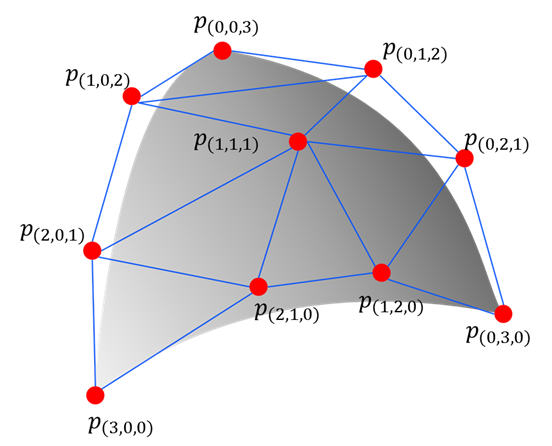
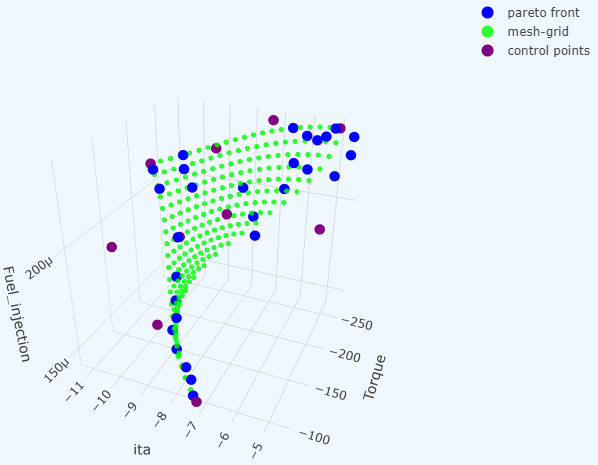
BSF formerly stood for Bézier Simplex Fitting, which remains the special case where the parameter domain is a single simplex.
See Full Documentation and the following papers for technical details.
- Kobayashi, K., Hamada, N., Sannai, A., Tanaka, A., Bannai, K., & Sugiyama, M. (2019). Bézier Simplex Fitting: Describing Pareto Fronts of Simplicial Problems with Small Samples in Multi-Objective Optimization. Proceedings of the AAAI Conference on Artificial Intelligence, 33(01), 2304-2313. https://doi.org/10.1609/aaai.v33i01.33012304
- Tanaka, A., Sannai, A., Kobayashi, K., & Hamada, N. (2020). Asymptotic Risk of Bézier Simplex Fitting. Proceedings of the AAAI Conference on Artificial Intelligence, 34(03), 2416-2424. https://doi.org/10.1609/aaai.v34i03.5622
Quickstart
Requirements: For local installation and CLI/library usage, Python >=3.10. For Docker-only usage, only Docker is required.
Optional extras: Lightning (solver="trainer"), MLflow (CLI experiment tracking), SciPy, scikit-learn and matplotlib are optional; install them with extras, e.g. pip install "pytorch-bsf[lightning,mlflow]". See Installation for the list of extras and the features each one enables, and for upgrading from a version that installed Lightning and MLflow by default.
First, prepare your data:
cat <<EOS > params.csv
1.00, 0.00
0.75, 0.25
0.50, 0.50
0.25, 0.75
0.00, 1.00
EOS
cat <<EOS > values.csv
0.00, 1.00
3.00, 2.00
4.00, 5.00
7.00, 6.00
8.00, 9.00
EOS
1. via Docker (No Installation Required)
Prerequisites: Docker.
A pre-built image is available on GHCR, built on condaforge/miniforge3 with PyTorch (CPU build) installed from the conda-forge channel:
docker run --rm \
  --user "$(id -u)":"$(id -g)" \
  -v "$(pwd)":/workspace \
  ghcr.io/opthub-org/pytorch-bsf \
  python -m torch_bsf \
  --params=params.csv \
  --values=values.csv \
  --degree=3
2. via MLflow (No Installation Required)
Prerequisites: Miniforge, and pip install mlflow. Another conda installation also works, but conda 26.7 and later still add the channels in your .condarc to the environment (conda/conda#16816), so remove defaults there (conda config --remove channels defaults) to keep it out.
MLflow creates a conda environment from the project's environment.yml, which installs PyTorch and the other dependencies from the conda-forge channel only:
mlflow run https://github.com/opthub-org/pytorch-bsf \
  -P params=params.csv \
  -P values=values.csv \
  -P degree=3
3. via CLI (After Installation)
This method is suitable when you do not need experiment tracking. If you prefer to install the package, you can run it via the command line interface.
Installation:
pip install pytorch-bsf
MLflow is optional. To log the parameters, metrics and models of the CLI runs to MLflow (see loglevel below), install the mlflow extra (or all); without it, the CLI fits and saves the model but logs nothing:
pip install "pytorch-bsf[mlflow]"
Execution:
python -m torch_bsf \
  --params=params.csv \
  --values=values.csv \
  --degree=3
Click to see all MLflow / CLI parameters
The MLflow main entry point exposes params, values, meshgrid, degree, simploid_type (an empty string, the default, fits a Bézier simplex), solver, ridge, smoothness_weight, normalize, split_ratio and max_epochs; the CLI accepts all of the following.
| Parameter | Type | Default | Description |
|---|---|---|---|
| params | path | required | The parameter data file, which contains input observations for training a Bézier simplex (or simploid). The file must be a CSV (.csv) or TSV (.tsv) file. Each line in the file represents an input observation, corresponding to an output observation in the same line in the value data file. |
| values | path | required | The value data file, which contains output observations for training a Bézier simplex (or simploid). The file must be a CSV (.csv) or TSV (.tsv) file. Each line in the file represents an output observation, corresponding to an input observation in the same line in the parameter data file. |
| meshgrid | path | None |
The meshgrid data file used for prediction after training. The file format is the same as params. If omitted, params is used as the meshgrid. |
| degree | int $(x \ge 0)$ | None |
The degree of the Bézier simplex, or of every factor of the Bézier simploid. Either this option or --init must be specified, but not both. |
| init | path | None |
Initialize from a model file saved by --save or torch_bsf.simploidal.save (.pt, .csv, .tsv, .json, .yml or .yaml); its type and degree are used. Either this option or --degree must be specified, but not both. CLI only. |
| simploid-type | comma-separated ints $(a_i \ge 1)$ | see desc. | Fit a Bézier simploid of type $(a_1, \ldots, a_n)$, i.e., a tensor product of Bézier simplices (e.g., 2,1 for a prism). The params file must then have $\sum_i (a_i + 1)$ columns, one block of barycentric coordinates per factor. Defaults to the type of --init, else a Bézier simplex of dimension (the number of params columns) $- 1$. See Simploidal Sets. |
| freeze | list of indices | None |
Indices of control points to keep at their values in --init. An index of a Bézier simplex is a list of integers summing to the degree (e.g., [[3,0],[0,3]]), and that of a Bézier simploid is a list of such lists, one per factor. Requires --init. CLI only. |
| header | int $(x \ge 0)$ | 0 |
The number of header lines in params/values files. |
| normalize | "none", "max", "std", "quantile" |
"none" |
The normalization of values while fitting; the fitted model predicts in the original scale. "max" scales each value such that the minimum is 0 and the maximum is 1, suitable for uniformly distributed data; "std" does so such that the mean is 0 and the standard deviation is 1, suitable for non-uniformly distributed data; "quantile" does so such that the 5-percentile is 0 and the 95-percentile is 1, suitable for data containing outliers; "none" does not perform any scaling, suitable for pre-normalized data. |
| solver | "lstsq", "trainer" |
"lstsq" |
How to fit: "lstsq" solves the least-squares problem exactly (in double precision on the CPU); "trainer" trains with PyTorch Lightning and the trainer options below. |
| ridge | float $(x \ge 0)$ | 0.0 |
The ridge (Tikhonov) penalty weight of the "lstsq" solver. |
| smoothness_weight | float $(x \ge 0)$ | 0.0 |
The weight of smoothness penalty. Adding a small weight (e.g., 0.1) helps produce a smooth, stable manifold when fitting noisy datasets. |
| split_ratio | float $(0 < x \le 1)$ | 1.0 |
The ratio of training data against validation data. The validation error is logged as val_mse and val_mae. When set to 1.0 (the default), all data is used for training. |
| seed | int | None |
The random seed for splitting the data and for training. |
| save | path | see desc. | The file to save the control points of the fitted model to (.csv, .tsv, .json, .yml, .yaml or .pt). Defaults to <params>,<values>,control_points,t_<a_1-...-a_n>,d_<degree>.csv. CLI only. |
| loglevel | int $(0 \le x \le 2)$ | 2 |
What objects to be logged to MLflow. 0: nothing; 1: metrics; 2: metrics and models. The CLI requires the mlflow extra (pip install "pytorch-bsf[mlflow]") to log; without it, a warning is printed and nothing is logged. |
| batch_size | int $(x \ge 1)$ | None |
The size of minibatch for --solver=trainer. The default (None) uses all records in a single batch. |
| max_epochs | int $(x \ge 1)$ | 2 |
The number of epochs to stop training for --solver=trainer. |
| accelerator | "auto", "cpu", "gpu", etc. |
"auto" |
Accelerator to use for --solver=trainer. See PyTorch Lightning documentation. |
| strategy | "auto", "dp", "ddp", etc. |
"auto" |
Distributed strategy for --solver=trainer. See PyTorch Lightning documentation. |
| devices | int $(x \ge -1)$ | "auto" |
The number of accelerators to use for --solver=trainer. By default, use all available devices. See PyTorch Lightning documentation. |
| num_nodes | int $(x \ge 1)$ | 1 |
The number of compute nodes to use for --solver=trainer. See PyTorch Lightning documentation. |
| precision | "64-true", "32-true", "16-mixed", "bf16-mixed", etc. |
"32-true" |
The precision of floating point numbers for --solver=trainer. |
| enable_checkpointing | flag | False |
With this flag, model files will be stored every epoch during training with --solver=trainer. |
| log_every_n_steps | int $(x \ge 1)$ | 1 |
The interval of training steps when training loss is logged with --solver=trainer. |
4. via Python Script
This is the most flexible method. Fit a model using the Python API fit(), and call the resulting model to predict.
import torch
import torch_bsf

# Prepare training data
ts = torch.tensor(  # parameters on a simplex
    [
        [8 / 8, 0 / 8],
        [7 / 8, 1 / 8],
        [6 / 8, 2 / 8],
        [5 / 8, 3 / 8],
        [4 / 8, 4 / 8],
        [3 / 8, 5 / 8],
        [2 / 8, 6 / 8],
        [1 / 8, 7 / 8],
        [0 / 8, 8 / 8],
    ]
)
xs = 1 - ts * ts  # values corresponding to the parameters

# Fit a model (exact least squares; pass solver="trainer" and Lightning options to train instead)
bs = torch_bsf.fit(params=ts, values=xs, degree=3)

# Predict with the trained model
t = [
    [0.2, 0.8],
    [0.7, 0.3],
]
x = bs(t)
print(f"{t} -> {x}")
Saving and Loading Models
Save a trained model and reload it later:
import torch_bsf
from torch_bsf.simploidal import save, load

# Train
bs = torch_bsf.fit(params=ts, values=xs, degree=3)

# Save (supported formats: .pt, .csv, .tsv, .json, .yml/.yaml)
save("model.pt", bs)

# Load
bs = load("model.pt")
K-Fold Cross-Validation
Run k-fold cross-validation via the CLI:
python -m torch_bsf.model_selection.kfold \
  --params=params.csv \
  --values=values.csv \
  --degree=3 \
  --num_folds=5
Additional parameters for k-fold (all standard parameters except split_ratio and save are also accepted):
| Parameter | Type | Default | Description |
|---|---|---|---|
| num_folds | int | 5 |
Number of folds. |
| shuffle | bool | True |
Whether to shuffle data before splitting (--no-shuffle to disable). |
| seed | int | None |
Random seed for shuffling (and for training). |
The command prints the errors of each fold model on its held-out fold (val_mse and val_mae) and their means, which are also logged to MLflow (unless --loglevel=0, and if the mlflow extra is installed).
It saves per-fold meshgrid predictions as well as an ensemble mean:
{params},{values},{num_folds}fold,meshgrid,t_{type},d_{degree},{k}.csv(per fold){params},{values},{num_folds}fold,meshgrid,t_{type},d_{degree}.csv(mean over folds)
Here {type} is the simploid type joined by - (e.g., 2 for a triangle, 2-1 for a prism), and {degree} is the degree, joined by - if the factors have different degrees.
In Python, torch_bsf.fit_kfold(params, values, degree=3, n_folds=5) returns the models of the folds.
Elastic Net Grid Search
Generate a grid of 3D parameter points on the standard 2-simplex for elastic net hyperparameter search:
python -m torch_bsf.model_selection.elastic_net_grid \
  --n_lambdas=102 \
  --n_alphas=12 \
  --n_vertex_copies=10 \
  --base=10
| Parameter | Type | Default | Description |
|---|---|---|---|
| n_lambdas | int | 102 |
Number of samples along the lambda axis (log scale). |
| n_alphas | int | 12 |
Number of samples along the alpha axis (linear scale). |
| n_vertex_copies | int | 10 |
Number of duplicated samples at each vertex (useful for k-fold cross-validation). |
| base | float | 10 |
Base of the log space. |
The output is printed to stdout as CSV with three columns (one row per grid point).
Advanced Topics
The library includes several capabilities beyond basic fitting. Full documentation for each topic is linked below.
| Topic | Summary |
|---|---|
| Visualization | Plot fitted 2D curves and 3D surfaces with a single call. |
| Advanced Sampling | Generate simplex parameter points via Dirichlet random sampling or quasi-random Sobol sequences, in addition to the default uniform grid, and sample simploids with sample_simploid. |
| Automatic Degree Selection | Automatically pick the best polynomial degree using k-fold cross-validation. |
| Scikit-learn Integration | BezierSimploidRegressor exposes a standard fit / predict / score API compatible with Pipeline and GridSearchCV. |
| Active Learning | Suggest the most informative next sampling points using Query-By-Committee or density-based strategies. |
Author
OptHub Inc. and FUJITSU LIMITED
License
MIT
1 maintainer

Metadata
1 maintainer
Release files for pytorch-bsf 0.20.0
For a detailed explanation of source distributions (sdists) and built distributions (wheels), please see the package formats documentation.
Source distribution (sdist)
| File | Size | Uploaded | Provenance | |
|---|---|---|---|---|
| pytorch_bsf-0.20.0.tar.gz | 198.8 kB | Without provenance | Details |
Built distribution (wheel)
| File | Interpreter | ABI | Platform | Reset |
|---|---|---|---|---|
| pytorch_bsf-0.20.0-py3-none-any.whl | Python 3 | none | any | Details |
Total release size: 411.2 kB
Release files / pytorch_bsf-0.20.0.tar.gz
| Download URL | pytorch_bsf-0.20.0.tar.gz |
|---|---|
| Size | 198.8 kB |
| Tags | Source |
|
SHA-256 checksum How to use checksums |
4bfcfe0dc60d22cef733dadeeb765bc1d7efbd6e5729434e08a09e066ae49886
|
|
BLAKE2b-256 checksum How to use checksums |
228c6280e16a3cb892be9c2cc61b71af6808df2ac510857b859bd2b671a72f1c
|
| Upload date | |
|
Uploaded using Trusted Publishing? What is trusted publishing? |
No |
| Uploaded via |
twine/6.2.0 CPython/3.9.25
|
Release files / pytorch_bsf-0.20.0-py3-none-any.whl
| Download URL | pytorch_bsf-0.20.0-py3-none-any.whl |
|---|---|
| Size | 212.4 kB |
| Tags | Python 3 |
|
SHA-256 checksum How to use checksums |
c6be2d7ac6eb74934ada2d142bbb90779e9ca8328b0d8c05b30e073d98fa1837
|
|
BLAKE2b-256 checksum How to use checksums |
e5cc73f65943414b6db295168861476a2ede372c16b23eecd627955744ec071a
|
| Upload date | |
|
Uploaded using Trusted Publishing? What is trusted publishing? |
No |
| Uploaded via |
twine/6.2.0 CPython/3.9.25
|
Security for pytorch-bsf 0.20.0
Provenance
Provenance describes where a file came from. On PyPI, provenance is shared via attestations, which provide a verifiable record of the build or publishing details. View details, limitations and caveats.
No provenance found
None of the files in this release were uploaded with provenance metadata.
A note on package security
PyPI is a repository for distributing packages, not a service for auditing them. While third-party security researchers and our staff do their best to detect and remove malicious packages, PyPI cannot guarantee the quality, security or suitability of any given package.














