
pyveil
Redact PII and secrets before sending Python data to an LLM.





Quickstart · OpenAI Agents / LiteLLM · Manual · Detection reference · Security
Keep email addresses, phone numbers, and supported credentials out of model requests, tool results, MCP resources, memory, logs, and traces. pyveil runs locally, preserves JSON-shaped payloads, and needs no model, API key, or runtime dependency. You call it before each boundary you want to protect; installing it does not automatically intercept SDK calls.
Quickstart
Requires Python 3.8+. In your Python environment:
python -m pip install pyveil
Run this complete example. It makes no provider request:
import secrets

from pyveil import Channel, Veil

veil = Veil.high(secret=secrets.token_bytes(32), scope="support/session-42")
messages = [
    {"role": "user", "content": "Email alice@example.com about ticket 42."},
]
safe = veil.redact_data(messages, channel=Channel.PROMPT_INPUT)
print(safe.data[0]["content"])
Output shape (the 12-hex suffix depends on your key and scope):
Email [EMAIL:...] about ticket 42.
Pass safe.data, not messages, to your SDK. The original input is unchanged;
message roles and ticket 42 are preserved. For plain strings use
veil.redact_text(text).text.
This example creates a random key once per run. Reuse the same Veil within a
session; load a private, stable secret from your environment or secret manager
when placeholders must survive restarts. Never reuse a documentation secret
with real data. Key and scope guidance
Start With Your Integration
| Your stack | Start here | What runs locally |
|---|---|---|
| OpenAI Agents SDK | Runner wrapper and setup | Redacts initial input before Runner.run; keyless checkout example |
| LiteLLM SDK / Proxy | SDK wrapper and Proxy hook | Redacts completion messages before dispatch; keyless checkout example |
| OpenAI Responses API | Installable helper | python -m pyveil.integrations.openai --dry-run |
| Anthropic / Claude | Installable helper | python -m pyveil.integrations.anthropic --dry-run |
| Azure OpenAI | Env / YAML setup | python -m pyveil.integrations.azure_openai --dry-run |
| Ollama | Local model guide | python -m pyveil.integrations.ollama --dry-run |
| MCP, logs, memory, FastAPI | Cookbook | Explicit wrappers at your application's boundaries |
Provider dry-runs require PYVEIL_SECRET; the linked guides cover configuration
and optional SDK dependencies for live calls. Dry-runs are not model responses.
OpenAI Agents input guardrails validate or block; they do not replace the input,
so the example redacts before dispatch. The LiteLLM Proxy hook covers
list-valued messages, not every endpoint or payload field.
Examples vs installed modules: pyveil.integrations.* ships in the wheel.
examples/*.py does not. To run the OpenAI Agents and LiteLLM recipes without
either SDK or a provider key, start from a checkout:
git clone https://github.com/hyeonsangjeon/pyveil.git
cd pyveil
python -m pip install .
python examples/openai_agents_guardrail.py
python examples/litellm_proxy_filter.py
Use a virtual environment for installation. See the comparison guide for macOS/Linux and Windows setup, expected output, and bypass risks.
What Gets Redacted?
HIGH replaces supported findings with [TYPE:12hex] HMAC placeholders. The same
value, type, key, and scope produce the same placeholder, so repeated references
remain linkable within your chosen scope.
| Type | Supported shapes |
|---|---|
EMAIL |
Email addresses |
PHONE |
Korean, separated international, and compact E.164 shapes |
CREDIT_CARD |
Candidate card numbers that pass Luhn validation |
JWT |
Compact JSON Web Tokens |
AUTH_HEADER |
Bearer and Basic authorization headers |
PRIVATE_KEY |
PEM private-key blocks |
API_KEY |
Supported OpenAI, GitHub, Slack, Google, and AWS-style patterns |
URL_QUERY_SECRET |
Supported secret-bearing URL query parameters |
KV_SECRET |
Sensitive key-value pairs, including passwords and tokens |
| Custom rules | Exact known values and trusted application regexes |
Unknown names, addresses, images, and documents are not automatically
detected. Use CustomRule.exact(...) for known values, or add a separate semantic
detection layer. The detection board
shows inputs, HIGH/LOW outputs, validation rules, and limits.
Use HIGH for model-facing data. LOW is a human-facing preview, such as
al***@e******.com; it deliberately retains identifying shape. Credentials stay
aggressively hidden in both levels. pyveil is not a compliance guarantee,
prompt-injection firewall, DLP suite, or reversible vault.
Protect More Than Prompts
| Task | Channel | Example |
|---|---|---|
| Prepare model input / output | prompt.input, prompt.output |
Provider-neutral boundary |
| Block credentials in tool arguments | tool.call.arguments |
Blocking recipe |
| Redact tool results / MCP resources | tool.call.result, mcp.resource.content |
MCP wrapper |
| Redact before embedding or persistence | memory.write |
Memory example |
| Redact before telemetry export | log.record, trace.span.attributes |
Logging / tracing |
The default policy raises BlockedSensitiveData for credential-like findings in
tool.call.arguments. On failure, do not dispatch the original payload.
Findings omit raw sensitive values by default; your application's original
objects still exist in memory. Policy and failure handling
Process A File
From an empty working directory after installation:
python -m pyveil init --example
python -m pyveil run
This creates synthetic input, pyveil.json, and a random private .pyveil.key,
then writes real redacted output and a receipt under .pyveil-runs/<run-id>/.
No model is called. Run twice with unchanged input, config, key, and version for
identical output bytes in separate directories.
For your own file, use the following instead of init --example:
python -m pyveil init --input /path/to/request.json --input-format json
Keep keys and outputs out of Git; redacted output is not automatically safe to publish. Configuration, Windows commands, error codes, and migration
Verify Before You Integrate
One installed command exercises six synthetic agent boundaries without keys:
python -m pyveil replay --format markdown
The current regression expectation is 6/6 passing cases, 10 findings, and 0 surviving labeled synthetic markers. It checks benign fields, structure, and a second redaction pass. It is not a real-world PII recall benchmark. Replay methodology and limits
CI tests Python 3.8 through 3.14, installs built wheels in clean environments, executes the quickstart above, and verifies file runs. Separate offline tests inspect official OpenAI and Anthropic SDK request bodies through local mock transports; they do not claim live paid API validation.
Test runs · 39-case detector corpus · Protection-surface contract
Watch the synthetic redaction demo
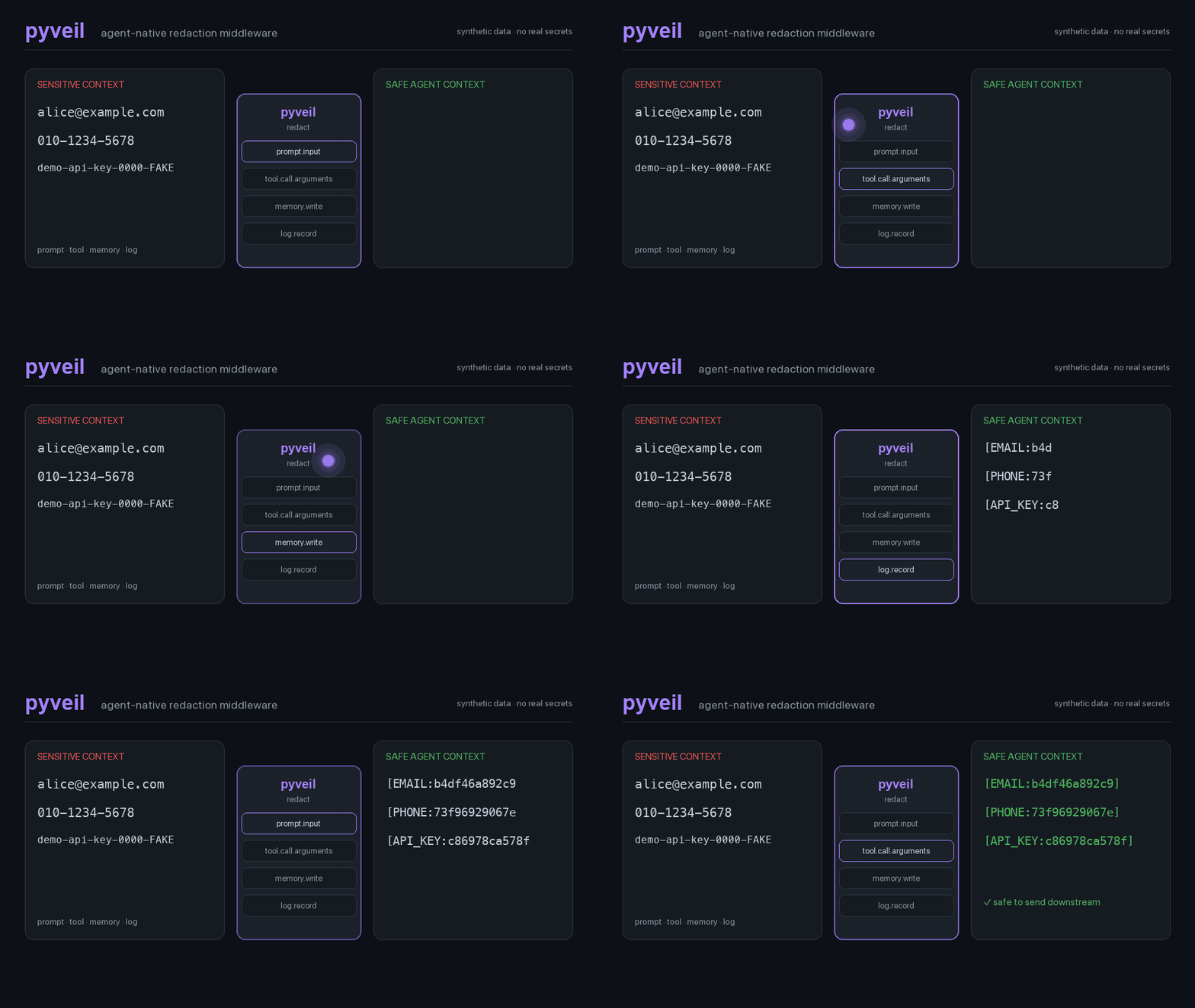
English video · Korean video (v0.1.2 walkthroughs; current CLI setup is in the manual).
Documentation And Support
- Manual, cookbook, and troubleshooting
- Threat model, known limitations, and security policy
- pyveil vs Presidio / NER / DLP
- Ask an integration question or report a bug. Share synthetic inputs, not real PII or credentials.
- AGENTS.md and llms.txt for coding agents
Development
uv run --extra dev ruff check .
uv run --extra dev mypy pyveil tests
uv run --extra test pytest
uv run --extra test python evaluation/evaluate.py --check
1 maintainer

Metadata
1 maintainer
Release files for pyveil 0.3.1
For a detailed explanation of source distributions (sdists) and built distributions (wheels), please see the package formats documentation.
Source distribution (sdist)
| File | Size | Uploaded | |
|---|---|---|---|
| pyveil-0.3.1.tar.gz | 1.0 MB | Details |
Built distribution (wheel)
| File | Interpreter | ABI | Platform | Reset |
|---|---|---|---|---|
| pyveil-0.3.1-py3-none-any.whl | Python 3 | none | any | Details |
Total release size: 1.1 MB
Release files / pyveil-0.3.1.tar.gz
| Download URL | pyveil-0.3.1.tar.gz |
|---|---|
| Size | 1.0 MB |
| Tags | Source |
|
SHA-256 checksum How to use checksums |
faa20336572c3f0d94277d88a883e5efd3bfd9781363ad7af024c90033ece39b
|
|
BLAKE2b-256 checksum How to use checksums |
4476b0c2fa3eb5755c8cbfcd7e5b9fbbd130142d5bb9f08fb0ce5f8f1dd43630
|
| Upload date | |
|
Uploaded using Trusted Publishing? What is trusted publishing? |
Yes |
| Uploaded via |
twine/6.1.0 CPython/3.13.14
|
Provenance
Provenance describes where a file came from. On PyPI, provenance is shared via attestations, which provide a verifiable record of the build or publishing details. View details, limitations and caveats.


PyPI Publish Attestation
PyPI verified that this artifact, at this checksum, originated from the publisher listed below.
Signed by GitHub Actions, verified by PyPI on Oct 2, 2026.
Transparency logRelease files / pyveil-0.3.1-py3-none-any.whl
| Download URL | pyveil-0.3.1-py3-none-any.whl |
|---|---|
| Size | 54.8 kB |
| Tags | Python 3 |
|
SHA-256 checksum How to use checksums |
cbef415fd5c99cb830cfcf55d8f1f86687c5e32b8b0fccdfffafe4142d93874a
|
|
BLAKE2b-256 checksum How to use checksums |
3d5dfaecab501c7ea0f4131fd2d0b239e28a94948e0ee5bd9683bed78941dc48
|
| Upload date | |
|
Uploaded using Trusted Publishing? What is trusted publishing? |
Yes |
| Uploaded via |
twine/6.1.0 CPython/3.13.14
|
Provenance
Provenance describes where a file came from. On PyPI, provenance is shared via attestations, which provide a verifiable record of the build or publishing details. View details, limitations and caveats.
PyPI Publish Attestation
PyPI verified that this artifact, at this checksum, originated from the publisher listed below.
Signed by GitHub Actions, verified by PyPI on Oct 2, 2026.
Transparency log













