
pyveil: PII and secret redaction for Python AI agents
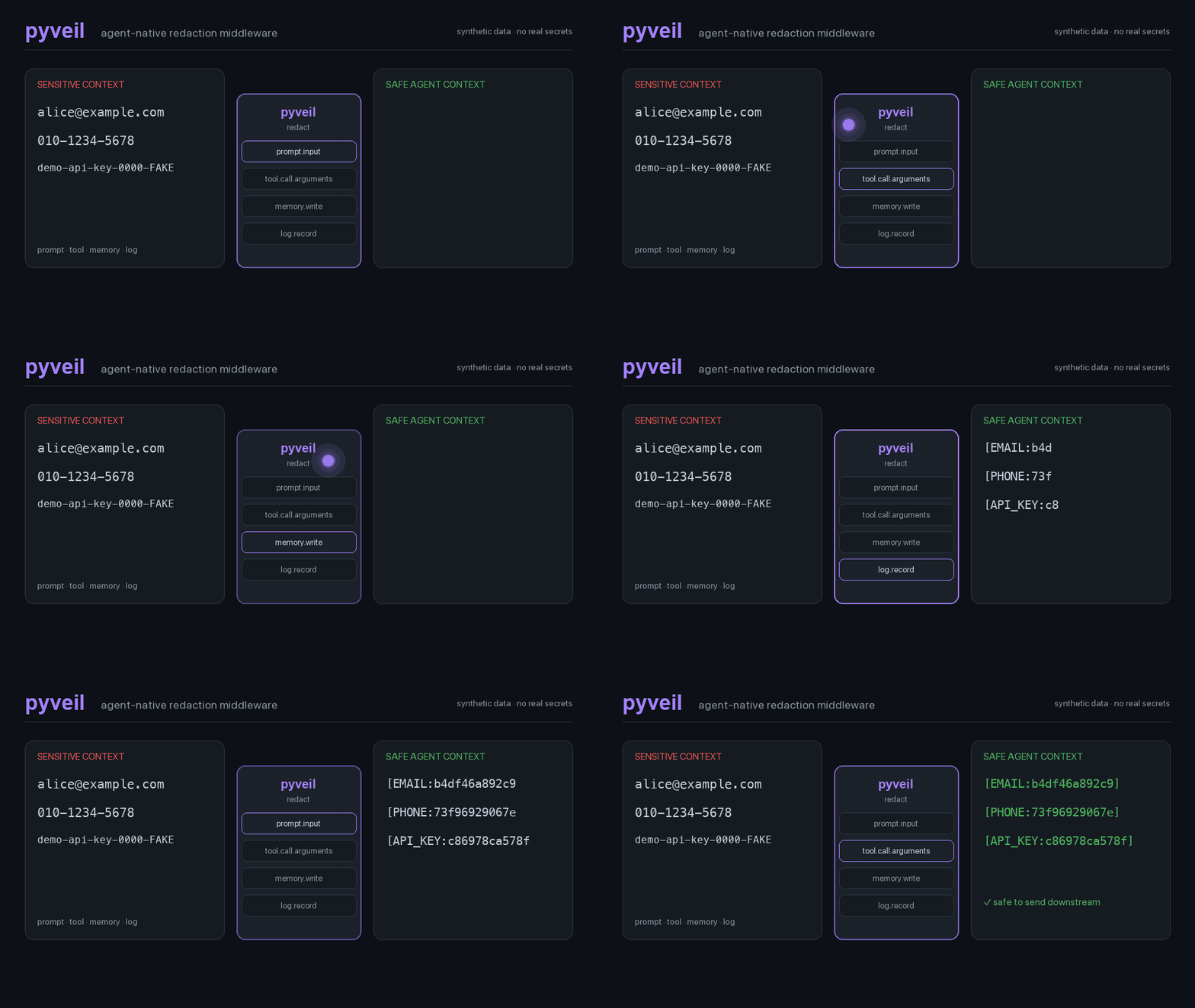
Stop sensitive data before it reaches an LLM, tool, MCP resource, memory store, log, or trace.







Documentation · Guides · Evaluation · PyPI · Cookbook · Detection reference · Support · Security
pyveil is local, dependency-free redaction middleware for LLM applications and
AI agents. It replaces high-confidence PII and credentials with deterministic,
scoped HMAC placeholders before data crosses an application boundary.
| Raw application context | Context sent to the model |
|---|---|
Email alice@example.com |
Email [EMAIL:a13f7c91b0d2] |
api_key: sk-proj-... |
api_key: [API_KEY:38ded98a17e7] |
Authorization: Bearer ... |
[AUTH_HEADER:4fe2926b7d20] |
No network calls. No reversible vault. No raw values in findings by default.
Try It
pip install pyveil
pyveil demo
# or: python -m pyveil demo
Or run the synthetic demo in an isolated environment:
uvx pyveil demo
before: Email alice@example.com, call 010-1234-5678, and use API key sk-proj-...
after:  Email [EMAIL:...], call [PHONE:...], and use API key [API_KEY:...]
found:  API_KEY, EMAIL, PHONE
Protect An LLM Call
Put pyveil immediately before the provider call. The same code works with
OpenAI, Azure OpenAI, Anthropic, Gemini, LiteLLM, or an internal gateway.
from pyveil import Channel, Veil

veil = Veil.high(
    secret=b"tenant-or-run-secret",
    scope="tenant/session",
)

messages = [
    {"role": "user", "content": "Email alice@example.com about my account."},
]

safe = veil.redact_data(messages, channel=Channel.PROMPT_INPUT)
response = call_llm(safe.data)  # Your provider SDK call
The provider receives the same list and dictionary shape, with sensitive values replaced before serialization or transmission.
OpenAI And Claude: Keyless Contract-Tested Templates
Install provider-specific templates without adding either SDK to pyveil's zero-dependency core:
pip install "pyveil[openai]"     # OpenAI Responses API
pip install "pyveil[anthropic]"  # Claude Messages API
Both integrations redact locally at the final SDK boundary and return the exact provider input for inspection:
from pyveil.integrations.openai import ask_openai, load_settings

settings = load_settings()
result = ask_openai(
    "Write a follow-up for alice@example.com or 010-1234-5678.",
    settings,
)

print(result.redacted_input)  # exact client.responses.create(...) input
print(result.output_text)
from pyveil.integrations.anthropic import ask_anthropic, load_settings

settings = load_settings()
result = ask_anthropic(
    "Write a follow-up for alice@example.com or 010-1234-5678.",
    settings,
)

print(result.redacted_input)  # exact client.messages.create(...) content
print(result.output_text)
No API key is needed to prove either boundary:
PYVEIL_SECRET=docs-demo-secret OPENAI_MODEL=gpt-5.6-luna \
  python -m pyveil.integrations.openai --dry-run

PYVEIL_SECRET=docs-demo-secret ANTHROPIC_MODEL=claude-haiku-4-5 \
  python -m pyveil.integrations.anthropic --dry-run
sent-to-openai:    ... [EMAIL:17c25f8a4fe3] ... [PHONE:3f6dc5a3c9f3].
sent-to-anthropic: ... [EMAIL:0b77abd1b26b] ... [PHONE:ec56e2456ba2].
provider-response: skipped (--dry-run)
The repository also exercises the real official SDKs through local mock HTTP
transports and asserts against the serialized /v1/responses and /v1/messages
JSON bodies. These tests use no credentials, make no network requests, and
cannot incur provider spend. A live paid API call has not been claimed.
Historical provider models are not a free fallback and may be retired; keep the
model ID configurable and use dry-run or mock contracts for cost-free checks.
Current OpenAI and Anthropic SDKs require Python 3.9+. The pyveil core and both keyless dry-run paths remain compatible with Python 3.8 through 3.14. Use the checked-in OpenAI guide and Anthropic / Claude guide for configuration, offline verification, and boundary notes.
Ollama: Local End To End
Run a local model behind the same redaction boundary. The optional integration
uses Ollama's official Python client and defaults to qwen3.5:4b, a Q4_K_M
4.7B model that fits comfortably on a 16GB Apple silicon Mac with a 4K context:
pip install "pyveil[ollama]"
ollama pull qwen3.5:4b
from pyveil.integrations.ollama import ask_ollama, load_settings

settings = load_settings()  # OLLAMA_* + PYVEIL_* environment variables
result = ask_ollama(
    "Write a follow-up for alice@example.com or 010-1234-5678.",
    settings,
)

print(result.redacted_input)  # The exact prompt sent to Ollama
print(result.output_text)     # The local model response
Prove the boundary without loading a model:
PYVEIL_SECRET=docs-demo-secret \
  python -m pyveil.integrations.ollama --dry-run
mode: dry-run
model: qwen3.5:4b
host: http://127.0.0.1:11434
sent-to-ollama: Write a one-sentence support follow-up for [EMAIL:71c6727a7fa2] or [PHONE:b4b889df07ce].
findings: EMAIL=1, PHONE=1
ollama-response: skipped (--dry-run)
For a live local call, set PYVEIL_SECRET and run the module. Configuration
priority is process environment, .env, YAML, then defaults:
PYVEIL_SECRET=a-long-random-hmac-secret \
  python -m pyveil.integrations.ollama

python -m pyveil.integrations.ollama \
  --config examples/ollama.example.yaml --env-file .env
The checked-in .env template and
YAML template expose model, host, context,
output length, temperature, timeout, and keep-alive. pyveil caps the default
context at 4096 and uses keep_alive=0, so one-shot calls release model memory;
set OLLAMA_KEEP_ALIVE=5m for faster repeated calls.
Observed on this project's M1 Mac mini with 16GB memory and Ollama 0.31.2:
qwen3.5:4b used about 3.2GB at a 4096-token context, a cold request took
8.1 seconds, and a warm request took 1.3 seconds. These are local measurements,
not portable performance guarantees. See the
Ollama integration guide for the full setup and
memory trade-offs.
Azure OpenAI: End To End
Install the optional Azure example dependencies, then load configuration from
environment variables, .env, or YAML:
pip install "pyveil[azure-openai]"
from pyveil.integrations.azure_openai import ask_azure_openai, load_settings

settings = load_settings()  # AZURE_OPENAI_* + PYVEIL_* environment variables
result = ask_azure_openai(
    "Write a follow-up for alice@example.com or 010-1234-5678.",
    settings,
)

print(result.redacted_input)  # The exact text sent to Azure OpenAI
print(result.output_text)     # The model response
The integration uses Azure OpenAI's v1 endpoint and Responses API. The
deployment name is passed as model; pyveil redacts the prompt before
client.responses.create(...) runs.
Prove the boundary without an Azure request:
PYVEIL_SECRET=docs-demo-secret \
  python -m pyveil.integrations.azure_openai --dry-run
mode: dry-run
deployment: not configured
sent-to-azure: Write a one-sentence support follow-up for [EMAIL:347ab11285a3] or [PHONE:548017338f6f].
findings: EMAIL=1, PHONE=1
azure-response: skipped (--dry-run)
For a live call, either export AZURE_OPENAI_ENDPOINT,
AZURE_OPENAI_DEPLOYMENT, AZURE_OPENAI_API_KEY, PYVEIL_SECRET, and
optionally PYVEIL_SCOPE, or use the checked-in
.env template
and YAML template:
python -m pyveil.integrations.azure_openai --env-file .env
python -m pyveil.integrations.azure_openai \
  --config examples/azure_openai.example.yaml --env-file .env
Process environment variables override .env, which overrides non-secret YAML
settings. API keys and the pyveil HMAC secret are rejected if placed directly
in YAML; YAML names the environment variables that contain them.
Why pyveil
| Need | What pyveil provides |
|---|---|
| Keep data local | Standard-library core, zero required dependencies, zero network calls |
| Preserve references | Stable [TYPE:12hex] placeholders from HMAC-SHA256 |
| Isolate tenants and runs | Caller-defined scope changes placeholders across boundaries |
| Redact real agent payloads | Recursive dictionaries, lists, tuples, and JSON strings |
| Cover more than prompts | Policy channels for tools, MCP, memory, logs, traces, input, and output |
| Stop credentials in tool calls | Auth headers, private keys, API keys, JWTs, and tokens block by default |
| Cover app-specific data | Exact known-value and trusted custom-regex rules |
| Audit without leaking | Findings contain type, rule, path, placeholder, and fingerprint, not raw values |
| Verify supported behavior | Public 39-case synthetic regression corpus, evaluator, and CI gate |
Reproducible Evidence
The repository ships a public synthetic detector corpus and a standard-library evaluator:
python evaluation/evaluate.py --check
For corpus v1, pyveil 0.2.4 matches all 36 expected findings across 39 cases
(33 positive, 6 negative), with no corpus false positives, false negatives,
labeled-value leaks, or non-empty Finding.raw values.
These numbers describe documented supported shapes only. They are not a real-world PII recall benchmark and do not cover unknown names, addresses, languages, documents, or images. Read the methodology and limits.
Known Names And Domain IDs
Regex cannot discover arbitrary names or addresses. When your application
already knows a value is sensitive, teach that value to pyveil without adding
an NER model:
from pyveil import CustomRule, Veil

rules = [
    CustomRule.exact("PERSON", ["Alice Kim", "Hong Gildong"]),
    CustomRule("CUSTOMER_ID", r"\bCUS-[A-Z0-9]{8}\b", rule_id="customer_id"),
]

veil = Veil.high(
    secret=b"tenant-secret",
    scope="tenant/session",
    rules=rules,
)

result = veil.redact_text("Alice Kim owns CUS-A1B2C3D4.")
print(result.text)
# [PERSON:...] owns [CUSTOMER_ID:...].
Custom patterns are trusted application code. Keep them narrow and test them against realistic positive and negative samples.
Agent Boundaries
Classic masking often stops at text input. Agents move data across several surfaces, so channels are first-class policy inputs:
| Channel | Redact before |
|---|---|
prompt.input |
User, RAG, or application context reaches a model |
prompt.output |
Model output is displayed or chained |
tool.call.arguments |
A model-controlled tool executes |
tool.call.result |
Tool output returns to a model |
mcp.resource.content |
MCP resource content enters context |
memory.write |
Text is embedded or persisted |
trace.span.attributes |
Attributes leave through telemetry |
log.record |
Records reach handlers or external sinks |
user / retrieval / tool / resource data
                    |
                  pyveil
                    |
model / tool / MCP / memory / trace / log boundary
Detection Board
Core detection is intentionally conservative and high precision:
| Type | Examples | HIGH output |
|---|---|---|
EMAIL |
Email addresses | [EMAIL:12hex] |
PHONE |
Korean, separated international, and compact E.164 phone shapes | [PHONE:12hex] |
CREDIT_CARD |
Card numbers that pass Luhn validation | [CREDIT_CARD:12hex] |
JWT |
Compact JSON Web Tokens | [JWT:12hex] |
AUTH_HEADER |
Bearer and Basic authorization headers | [AUTH_HEADER:12hex] |
PRIVATE_KEY |
PEM private-key blocks | [PRIVATE_KEY:12hex] |
API_KEY |
OpenAI, GitHub, Slack, Google, and AWS-style keys | [API_KEY:12hex] |
URL_QUERY_SECRET |
Token, key, secret, code, and auth query values | [URL_QUERY_SECRET:12hex] |
KV_SECRET |
Password, cookie, secret, and token key-value pairs | [KV_SECRET:12hex] |
| Custom | Known values and application regex rules | [YOUR_TYPE:12hex] |
See the full redaction reference for examples, validation rules, LOW masking output, and limitations.
HIGH And LOW
Use HIGH at model, agent, tool, MCP, memory, trace, and external log
boundaries. It produces stable HMAC placeholders such as
[EMAIL:a13f7c91b0d2].
Use LOW only for human-facing previews where preserving shape is useful:
alice@example.com  -> al***@e******.com
010-1234-5678      -> 010-****-5678
4242 4242 4242 4242 -> **** **** **** 4242
Credential-like values remain aggressively hidden in both levels.
Policy
The default high policy redacts supported findings and blocks credentials in
tool.call.arguments:
from pyveil import Action, Channel, Entity, Policy, Veil

policy = Policy.default_high().override(
    Channel.PROMPT_INPUT,
    Entity.EMAIL,
    Action.PASS,
)

veil = Veil.high(secret=b"tenant-secret", policy=policy)
When both policy and level are supplied, the explicit policy decides channel
levels and actions. Build one Veil per tenant, session, or run and reuse it.
CLI
Use stdin for shell pipelines, files for preflight checks, and JSON output for structured automation:
export PYVEIL_SECRET="tenant-or-run-secret"
export PYVEIL_SCOPE="tenant/session"

printf 'Email alice@example.com' | pyveil redact -
pyveil redact request.json --channel tool.call.result --format json
pyveil scan prompt.txt --format json
pyveil init
pyveil test-config pyveil.yaml
scan emits finding metadata without raw sensitive values. JSON-shaped input
is parsed and traversed structurally.
Integration Recipes
| Stack or boundary | Copy-paste example |
|---|---|
| Any LLM provider | Provider-neutral client wrapper |
| OpenAI Agents SDK | Input guardrail example |
| OpenAI Responses API | Installable integration and keyless contract guide |
| Anthropic / Claude | Installable integration and keyless contract guide |
| Azure OpenAI | Runnable env/YAML integration and short example |
| LiteLLM | Proxy filter example |
| FastAPI | Request middleware example |
| MCP | Server wrapper and integration guide |
| Python logging | Logging filter example |
| Agent memory | Before-embedding example |
The cookbook covers prompts, tools, MCP, memory, logging, tracing, JSON, and CLI workflows.
Pick The Right Tool
Choose pyveil when you want a small local boundary filter for structured PII,
credentials, known values, and domain identifiers across agent context flows.
Choose Presidio, GLiNER, or another NER-backed system when you need broad semantic discovery of unknown people, organizations, locations, or addresses. Choose an enterprise DLP product when you need managed policy, document/image coverage, incident workflows, or compliance reporting.
These tools can be layered. pyveil does not claim perfect recall.
See the full pyveil vs Presidio, NER, guardrails, and DLP decision guide.
Safety Contract
- Raw sensitive values are not stored in
Findingobjects by default. - Placeholders use HMAC-SHA256 with a caller-provided secret and scope.
- Credential-like values can be blocked before model-controlled tools execute.
max_input_charsbounds work performed on text and structured payloads.- The core makes no network calls and has no required third-party dependency.
- pyveil has no reversible vault or unmasking API.
pyveil is not a compliance guarantee, enterprise DLP system, secret-scanning
replacement, or prompt-injection firewall. Read the
threat model,
known limitations,
and security policy
before production use.
Guides
- Complete manual
- Python LLM PII redaction guide
- MCP PII redaction guide
- pyveil vs Presidio / NER / DLP
- Reproducible detector evaluation
- English video guide
- Korean video guide
- AGENTS.md for coding agents
- llms.txt for LLM-readable navigation
- Contributing
Development
uv run --extra dev ruff check .
uv run --extra dev mypy pyveil tests
uv run --extra test pytest
uv run --extra test python evaluation/evaluate.py --check
CI runs the test suite on Python 3.8 through 3.14. The core remains typed,
dependency-free, and MIT licensed.
1 maintainer

Download files
Download the file for your platform. If you're not sure which to choose, learn more about installing packages.
Source Distribution
Built Distribution
Filter files by name, interpreter, ABI, and platform.
If you're not sure about the file name format, learn more about wheel file names.
Copy a direct link to the current filters
File details
Details for the file pyveil-0.2.4.tar.gz.
File metadata
- Download URL: pyveil-0.2.4.tar.gz
- Upload date:
- Size: 969.3 kB
- Tags: Source
- Uploaded using Trusted Publishing? Yes
- Uploaded via:
twine/6.1.0 CPython/3.13.12
File hashes
| Algorithm | Hash digest | |
|---|---|---|
| SHA256 |
8486ab14b01775d3ba04388d25ebacf9a70cb8971acb345cf5211a7a0f9019b9
|
|
| MD5 |
edded8d7bf66ff0fb69d7131907c4cb1
|
|
| BLAKE2b-256 |
176ba4b154f20f16e7fdb97c5c5c9bc5b02556e3a43db9c864184cd985b025e4
|
Provenance
The following attestation bundles were made for pyveil-0.2.4.tar.gz:
Publisher:
release.yml on hyeonsangjeon/pyveil
-
Statement:
-
Statement type:
https://in-toto.io/Statement/v1 -
Predicate type:
https://docs.pypi.org/attestations/publish/v1 -
Subject name:
pyveil-0.2.4.tar.gz -
Subject digest:
8486ab14b01775d3ba04388d25ebacf9a70cb8971acb345cf5211a7a0f9019b9 - Sigstore transparency entry: 2178833690
- Sigstore integration time:
-
Permalink:
hyeonsangjeon/pyveil@20cead6cee23c67ef5d7b6071ce8ec7d531b80a6 -
Branch / Tag:
refs/tags/v0.2.4 - Owner: https://github.com/hyeonsangjeon
-
Access:
public
-
Token Issuer:
https://token.actions.githubusercontent.com -
Runner Environment:
github-hosted -
Publication workflow:
release.yml@20cead6cee23c67ef5d7b6071ce8ec7d531b80a6 -
Trigger Event:
release
-
Statement type:
File details
Details for the file pyveil-0.2.4-py3-none-any.whl.
File metadata
- Download URL: pyveil-0.2.4-py3-none-any.whl
- Upload date:
- Size: 45.2 kB
- Tags: Python 3
- Uploaded using Trusted Publishing? Yes
- Uploaded via:
twine/6.1.0 CPython/3.13.12
File hashes
| Algorithm | Hash digest | |
|---|---|---|
| SHA256 |
1a7af5e66ee7ef29a87f5aca440a59218c704c90a61952b52a7ee3b70cb71296
|
|
| MD5 |
b3cc83c01bb37c79fe8c96c92b85ff49
|
|
| BLAKE2b-256 |
afcc6428f094addb95676fabc9b2f495401c01ce39029816bfe221e75892d733
|
Provenance
The following attestation bundles were made for pyveil-0.2.4-py3-none-any.whl:
Publisher:
release.yml on hyeonsangjeon/pyveil
-
Statement:
-
Statement type:
https://in-toto.io/Statement/v1 -
Predicate type:
https://docs.pypi.org/attestations/publish/v1 -
Subject name:
pyveil-0.2.4-py3-none-any.whl -
Subject digest:
1a7af5e66ee7ef29a87f5aca440a59218c704c90a61952b52a7ee3b70cb71296 - Sigstore transparency entry: 2178833727
- Sigstore integration time:
-
Permalink:
hyeonsangjeon/pyveil@20cead6cee23c67ef5d7b6071ce8ec7d531b80a6 -
Branch / Tag:
refs/tags/v0.2.4 - Owner: https://github.com/hyeonsangjeon
-
Access:
public
-
Token Issuer:
https://token.actions.githubusercontent.com -
Runner Environment:
github-hosted -
Publication workflow:
release.yml@20cead6cee23c67ef5d7b6071ce8ec7d531b80a6 -
Trigger Event:
release
-
Statement type:







