
"A lightweight open-source Python library for exact view-factor computations on polygonal meshes"

Project description
PyViewFactor
pyViewFactoris a lightweight open-source Python library for exact view-factor computations on polygonal meshes. It provides robust tools for:
- geometric visibility analysis,
- obstruction detection,
- accurate view factor computation.
Full documentation available here.
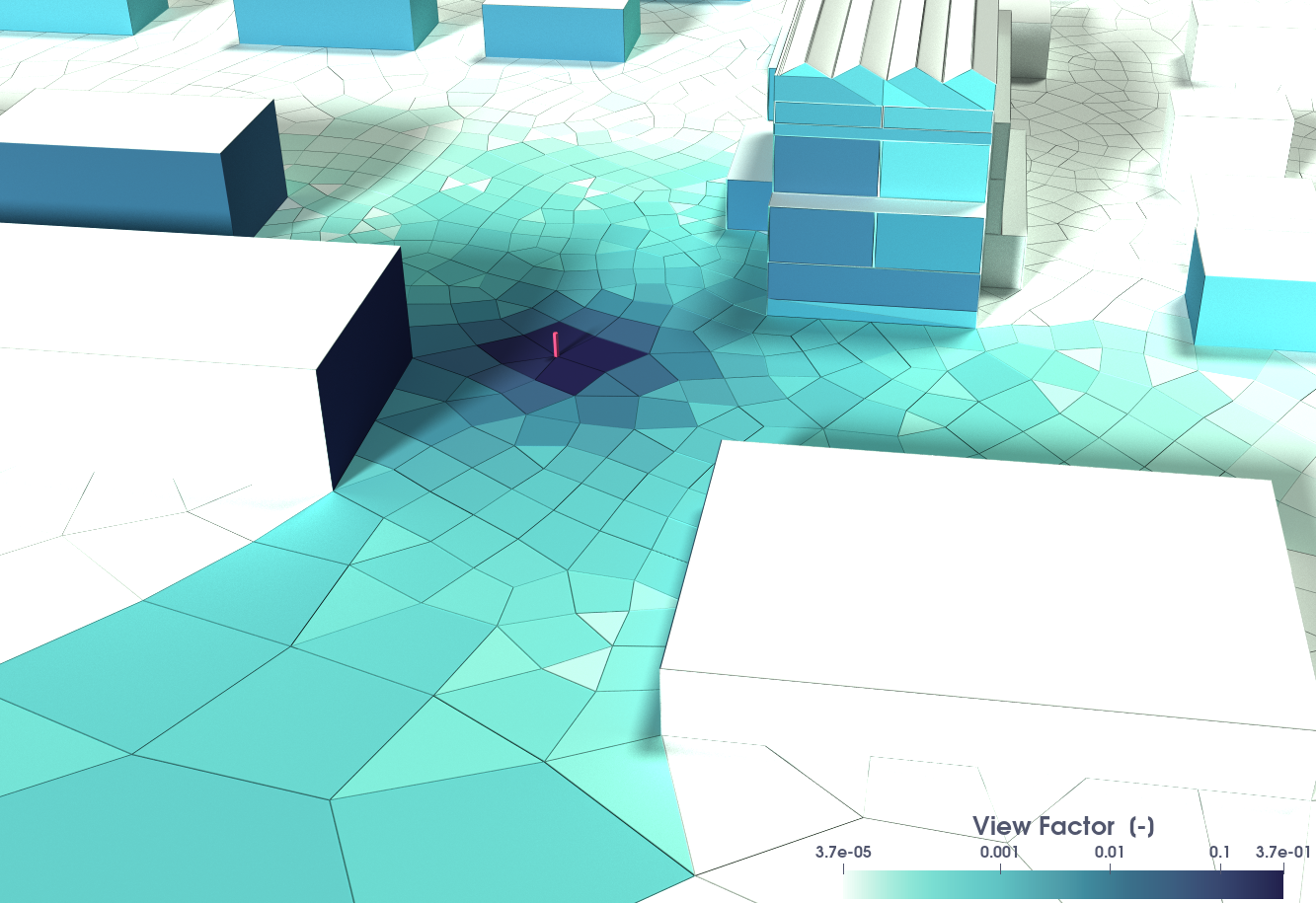






Features
- This library enables the computation of radiation view factors between planar polygons using an accurate double‐contour integration method described in (Mazumder and Ravishankar 2012) with insights from (Schmid 2016).
- It uses the handy
Pyvistapackage to deal with geometry imports (*.stl,*.vtk,*.obj, ...), geometry creations, and some other mesh functionalities under the hood. - It enables:
- 🔺 View factor computation between planar polygons
- 👁️ Visibility checks based on face orientation
- 🚧 Obstruction detection using ray-triangle intersection
- ⚙️ Strict / non-strict modes for robustness control
- ⚡ Optimized full matrix computation with caching
- 📦 Built on
numpy,scipy,pyvista,numba
Installation
pyViewFactor can be installed from PyPi
using pip on Python >= 3.10:
pip install pyviewfactor
You can also visit PyPi or Gitlab to download the sources.
Requirements:
numpy==1.26.4
pyvista==0.45
scipy==1.11.4
numba==0.61.2
joblib==1.2.0
tqdm==4.65.0
The code will probably work with lower versions of the required packages, however this has not been tested.
[!NOTE] If you are alergic to
numba, you maypip install pyviewfactor==0.0.10that works (and give up the times 3+ speed-up in view factor computation).
Quick Start
Suppose we want to compute the radiation view factor between a triangle and a rectangle facing each other:
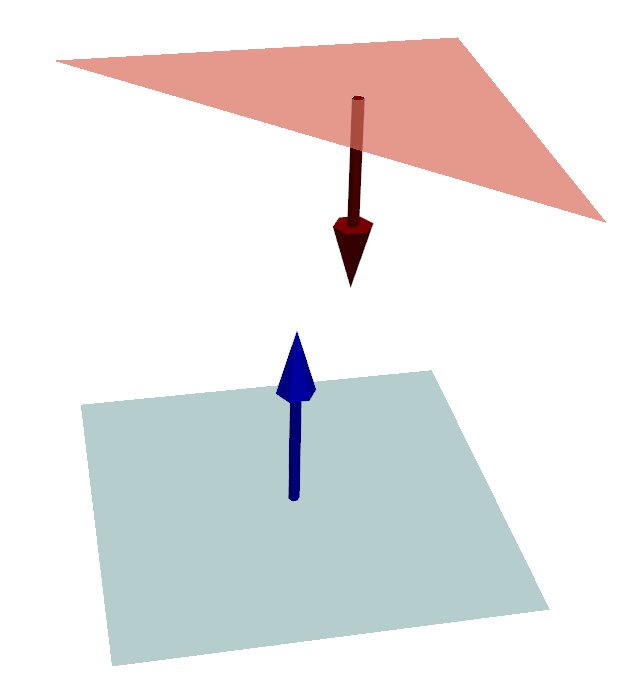
You are few lines of code away from your first view factor computation:
import pyvista as pv
import pyviewfactor as pvf

# Create a rectangle and a triangle facing each other
pointa1 = [0.0, 0.0, 0.0]
pointb1 = [1.0, 0.0, 0.0]
pointc1 = [0.0, 1.0, 0.0]
rectangle = pv.Rectangle([pointa1, pointb1, pointc1])

pointa2 = [0.0, 0.0, 1.0]
pointb2 = [0.0, 1.0, 1.0]
pointc2 = [1.0, 1.0, 1.0]
triangle = pv.Triangle([pointa2, pointb2, pointc2])

if pvf.get_visibility(rectangle, triangle)[0]:
    F = pvf.compute_viewfactor(triangle, rectangle)
    print("VF from rectangle to triangle :", F)
else:
    print("Not facing each other")

pl = pv.Plotter()
pl.add_mesh(rectangle, color="lightblue", opacity=0.7)
pl.add_mesh(triangle, color="salmon", opacity=0.7)

# compute and glyph normals for mesh1
n1 = rectangle.compute_normals(cell_normals=True, point_normals=False)
arrows1 = n1.glyph(orient="Normals", factor=0.1)
pl.add_mesh(arrows1, color="blue")
# similarly for mesh2
n2 = triangle.compute_normals(cell_normals=True, point_normals=False)
arrows2 = n2.glyph(orient="Normals", factor=0.1)
pl.add_mesh(arrows2, color="darkred")

pl.show()
You usually get your geometry from a different format?
(*.dat, *.idf, ...)
Check pyvista's documentation on how to generate a PolyData facet from points.
Example 1 : View factors of an individual with a wall
For comfort computations, it may be useful to determine heat transfer between an individual and a wall. We will use here PyVista's doorman example as a basis for the human geometry.
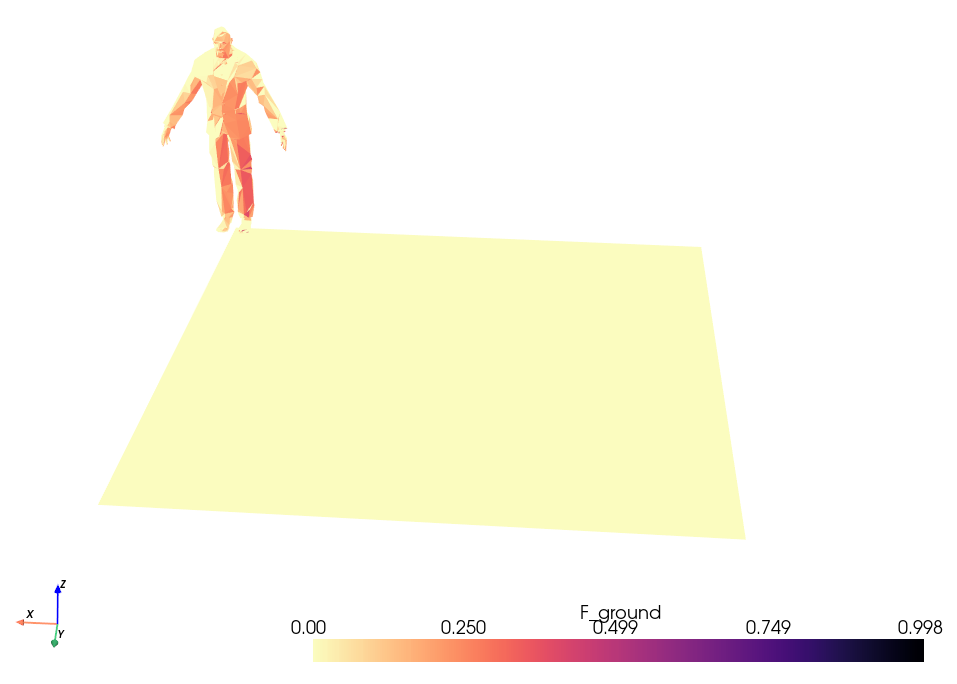
The following code and .vtk file of the doorman example are available in
the ./examples/ folder.
from tqdm import tqdm
import numpy as np
import pyvista as pv
import pyviewfactor as pvf

def fc_Fwall(nom_vtk):
    # This function is bit more generic than this specific use case,
    # so it can be reused for other applications
    mesh = pv.read(nom_vtk)

    # find all types of walls : in this example only a ground
    wall_types = list(np.unique(mesh["geom_id"]))
    # remove the individual from the list (still named "cylinder"...)
    wall_types.remove("doorman")
    # where is the doorman in the list?
    index_doorman = np.where(mesh["geom_id"] == "doorman")[0]
    # prepare storage for the different walls in a dict
    dict_F = {}
    # loop over wall types
    for type_wall in wall_types:
        # prepare for storing doorman to wall view factor
        F = np.zeros(mesh.n_cells)
        # get the indices of this type of wall
        indices = np.where(mesh["geom_id"] == type_wall)[0]
        # loop over
        for i in indices:
            wall = mesh.extract_cells(i)
            wall = pvf.fc_unstruc2poly(wall)  # convert for normals
            # ... for each facet of the individual
            for idx in tqdm(index_doorman):
                face = mesh.extract_cells(idx)
                face = pvf.fc_unstruc2poly(face)  # convert for normals
                # check if faces can "see" each other
                if pvf.get_visibility(wall, face):
                    # compute face2wall view factor
                    Ffp = pvf.compute_viewfactor(wall, face)
                else:
                    Ffp = 0
                F[idx] = Ffp
        # store array F in e.g. dict_F["F_ceiling"]
        dict_F["F_" + type_wall.replace("\r", "")] = F
    return dict_F

# You can get the  doorman geomtry it directly from here:
# https://gitlab.com/arep-dev/pyViewFactor/-/blob/main/examples/example_doorman_clean.vtk
# ... or get it from this repository's examples
file = "./src_data/example_doorman_clean.vtk"

# compute the VFs for the doorman to the different wall types in the scene
dict_F = fc_Fwall(file)

# re-read and store
mesh = pv.read(file)
# loop over what is in the dictionary of view factors
for elt in dict_F.keys():
    mesh[elt.replace("\r", "")] = dict_F[elt]  # name the field
mesh.save("./src_data/example_doorman_VFground.vtk")  # store in the intial VTK

# have a look without paraview with fancy colors
mesh.plot(cmap="magma_r", lighting=False)
More details and view factors abacuses can be found here.
Example 2 : Urban Scene
For building simulation purposes, it may prove to be useful to compute the ground and sky view factors of a given wall, or the view factor of the wall to other walls in the built environment. In following example (available in the /examples/ folder), we compute the view factors of the environment of the purple wall depicted below.
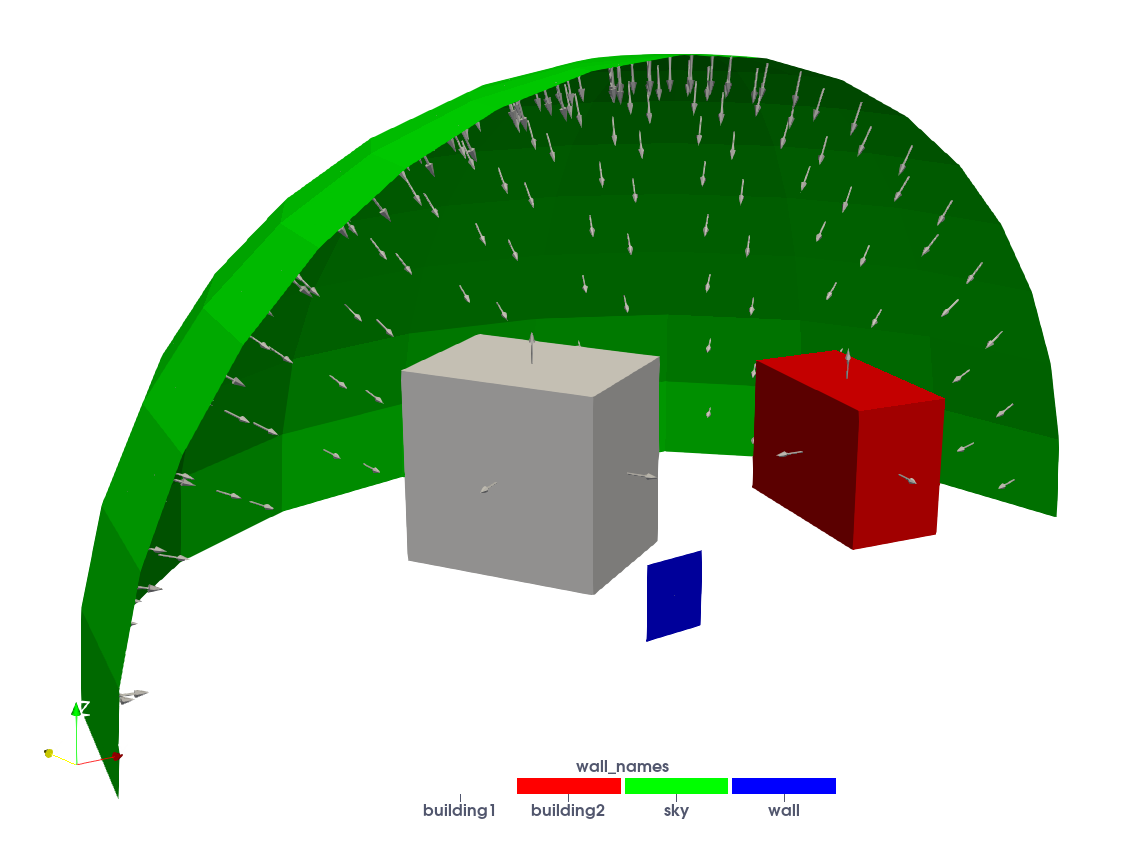
import numpy as np
import pyvista as pv
import pyviewfactor as pvf

# -------------------------
# Load geometry
# -------------------------
mesh = pv.read("./src_data/built_envmt.vtk")
meshpoly = pvf.fc_unstruc2poly(mesh)

# Identify groups
i_wall = np.where(mesh["wall_names"] == "wall")[0]
i_sky = np.where(mesh["wall_names"] == "sky")[0]
i_building1 = np.where(mesh["wall_names"] == "building1")[0]
i_building2 = np.where(mesh["wall_names"] == "building2")[0]

# Extract wall
wall = mesh.extract_cells(i_wall).extract_surface()

# Parameters
strict_visibility = False
strict_obstruction = False
rounding_decimal = 5

# -------------------------
# Wall → Sky
# -------------------------
Fsky = 0.0
print("> Computation F_wall>sky")

for patch in i_sky:
    sky = mesh.extract_cells(patch).extract_surface()

    if pvf.get_visibility(sky, wall,
                          strict=strict_visibility,
                          rounding_decimal=rounding_decimal)[0]:

        if pvf.get_obstruction(sky, wall, meshpoly,
                               strict=strict_obstruction,
                               rounding_decimal=rounding_decimal)[0]:

            Fsky += pvf.compute_viewfactor(sky, wall)

# -------------------------
# Wall → Building 1
# -------------------------
Fbuilding1 = 0.0
print("> Computation F_wall>building1")

for patch in i_building1:
    bld = pvf.fc_unstruc2poly(mesh.extract_cells(patch))

    if pvf.get_visibility(bld, wall,
                          strict=strict_visibility,
                          rounding_decimal=rounding_decimal)[0]:

        if pvf.get_obstruction(bld, wall, meshpoly,
                               strict=strict_obstruction,
                               rounding_decimal=rounding_decimal)[0]:

            Fbuilding1 += pvf.compute_viewfactor(bld, wall)

# -------------------------
# Wall → Building 2
# -------------------------
Fbuilding2 = 0.0
print("> Computation F_wall>building2")

for patch in i_building2:
    bld = pvf.fc_unstruc2poly(mesh.extract_cells(patch))

    if pvf.get_visibility(bld, wall,
                          strict=strict_visibility,
                          rounding_decimal=rounding_decimal)[0]:

        if pvf.get_obstruction(bld, wall, meshpoly,
                               strict=strict_obstruction,
                               rounding_decimal=rounding_decimal)[0]:

            Fbuilding2 += pvf.compute_viewfactor(bld, wall)

# -------------------------
# Ground by complementarity
# -------------------------
Fground = 1.0 - Fsky - Fbuilding1 - Fbuilding2

# -------------------------
# Results
# -------------------------
print("\n--- View Factors ---")
print(f"Sky        : {Fsky:.4f}")
print(f"Building 1 : {Fbuilding1:.4f}")
print(f"Building 2 : {Fbuilding2:.4f}")
print(f"Ground     : {Fground:.4f}")
The code yields following view factors :
F_{\text{sky}} = 0.3173 \\
F_{\text{ground}} = 0.4009 \\
F_{\text{building1}} = 0.2506 \\
F_{\text{building2}} = 0.0312 \\
Documentation
For detailed explanations and advanced usage, see:
https://arep-dev.gitlab.io/pyViewFactor/pyviewfactor.html
The documentation includes:
- visibility and obstruction semantics,
- strict vs non-strict modes,
- geometry preprocessing utilities,
- numerical robustness guidelines,
- extended examples (that can also be found in the
examples/folder).
Citation & Acknowledgments
- Main contributors:
- Mateusz BOGDAN,
- Edouard WALTHER.
- Acknowledgment: The authors would like to acknowledge M. Alecian for his initial work on the quadrature code and M. Chapon for her contribution to the code validation.
There is even a conference paper, showing analytical validations.
So if you use pyViewFactor in your work, please cite:
[!IMPORTANT] Citation: Mateusz BOGDAN, Edouard WALTHER, Marc ALECIAN and Mina CHAPON. Calcul des facteurs de forme entre polygones - Application à la thermique urbaine et aux études de confort. IBPSA France 2022, Châlons-en-Champagne.
Bibtex entry:
@inproceedings{pyViewFactor22bogdan,
  authors      = "Mateusz BOGDAN and Edouard WALTHER and Marc ALECIAN and Mina CHAPON",
  title        = "Calcul des facteurs de forme entre polygones - Application à la thermique urbaine et aux études de confort",
  year         = "2022",
  organization = "IBPSA France",
  venue        = "Châlons-en-Champagne, France"
  note         = "IBPSA France 2022",
}
License
MIT License - Copyright (c) AREP 2025
Release history Release notifications | RSS feed


Download files
Download the file for your platform. If you're not sure which to choose, learn more about installing packages.
Source Distribution
Built Distribution
Filter files by name, interpreter, ABI, and platform.
If you're not sure about the file name format, learn more about wheel file names.
Copy a direct link to the current filters
File details
Details for the file pyviewfactor-1.0.2.tar.gz.
File metadata
- Download URL: pyviewfactor-1.0.2.tar.gz
- Upload date:
- Size: 33.7 kB
- Tags: Source
- Uploaded using Trusted Publishing? No
- Uploaded via: twine/3.8.0 colorama/0.4.4 importlib-metadata/4.6.4 keyring/23.5.0 pkginfo/1.8.2 readme-renderer/34.0 requests-toolbelt/0.9.1 requests/2.25.1 rfc3986/1.5.0 tqdm/4.57.0 urllib3/1.26.5 CPython/3.10.12
File hashes
| Algorithm | Hash digest | |
|---|---|---|
| SHA256 |
58454358168b4864b377400a4396ab6bab417018e1f39c987f349a479eec0f74
|
|
| MD5 |
df040830ec553acf6d131ba58849ebce
|
|
| BLAKE2b-256 |
7d2e4fc36dc388d482e47b8d499e7ecc3165af9f881f07055b2c3a88e442402f
|
File details
Details for the file pyviewfactor-1.0.2-py3-none-any.whl.
File metadata
- Download URL: pyviewfactor-1.0.2-py3-none-any.whl
- Upload date:
- Size: 178.1 kB
- Tags: Python 3
- Uploaded using Trusted Publishing? No
- Uploaded via: twine/3.8.0 colorama/0.4.4 importlib-metadata/4.6.4 keyring/23.5.0 pkginfo/1.8.2 readme-renderer/34.0 requests-toolbelt/0.9.1 requests/2.25.1 rfc3986/1.5.0 tqdm/4.57.0 urllib3/1.26.5 CPython/3.10.12
File hashes
| Algorithm | Hash digest | |
|---|---|---|
| SHA256 |
fd481219ef6c037583e3d62978af38178853e6ab9036866c2a8220d98f2b1c33
|
|
| MD5 |
bd65fa2591186e3d3234c41bd502d237
|
|
| BLAKE2b-256 |
cddc036b19a43a7a8e40076d98b93179b4eb6c9dff28c67d4fd6e5855c610cfe
|






