
pyvista-cad


CAD format reading, writing, and CAD-style plotting for PyVista.
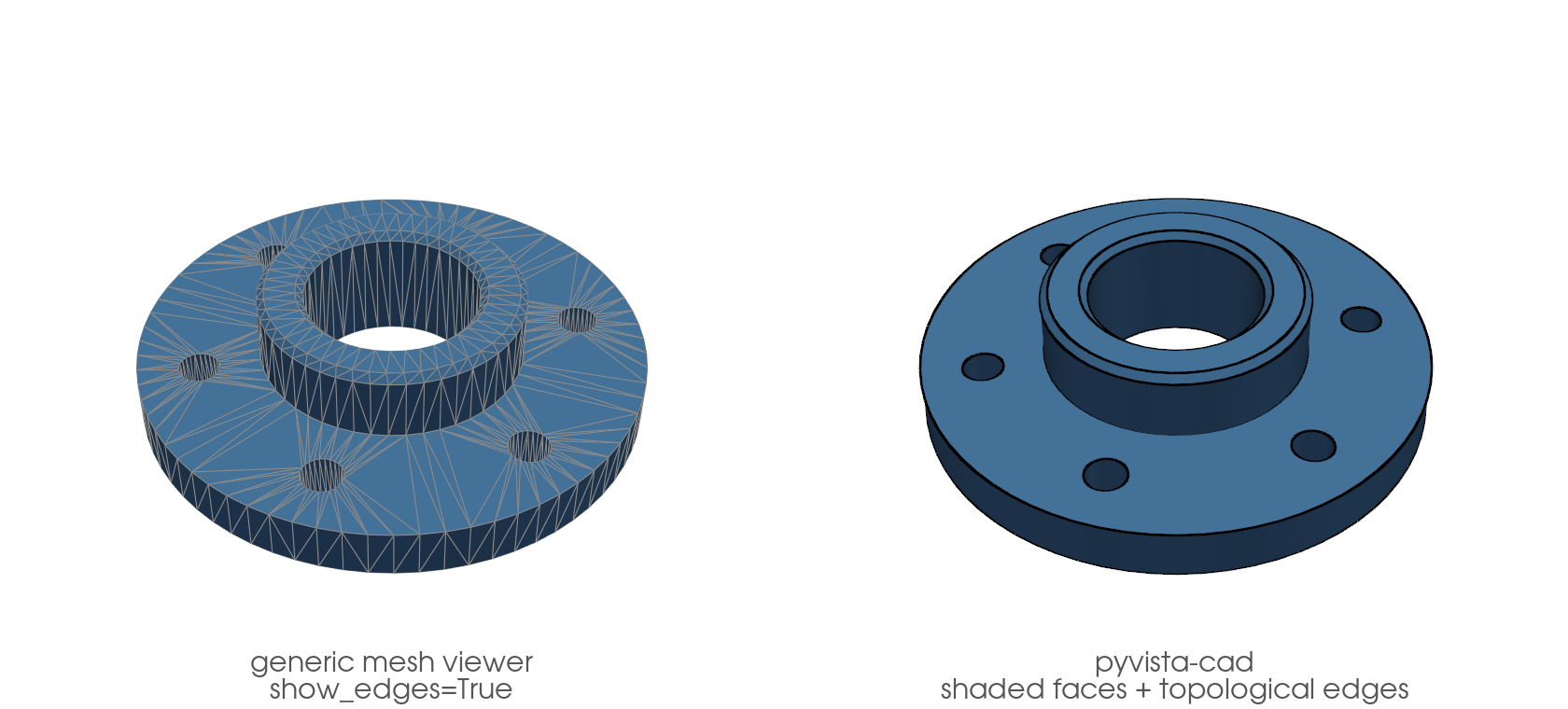
pyvista-cad adds CAD-format support to PyVista: STEP, IGES, BREP, DXF, 3MF, IFC, FreeCAD .fcstd, OpenSCAD .scad, and glTF. It registers a .cad accessor on every pv.DataSet / pv.MultiBlock and wires reader entries into pv.read(...). It also adds CAD-style rendering: smoothly shaded faces with the model's topological B-rep edges instead of triangle-mesh noise, via .cad.plot() and a plotter.cad component. No monkey-patching, no forks, no direct VTK calls.
Install matrix
| Extra | Adds | Formats unlocked |
|---|---|---|
| (base) | ezdxf | DXF read + write, glTF read + write |
[step] |
build123d, cadquery-ocp | STEP, BREP, FCStd, IGES (ocp backend), build123d bridge |
[step-light] |
cascadio | STEP (read-only, faster, no colors) |
[3mf] |
lib3mf | 3MF read + write |
[ifc] |
ifcopenshell | IFC read (with property sets) |
[iges] |
pyiges[full] | IGES read (pyiges backend, default) |
[openscad] |
(uses openscad CLI) |
SCAD read |
[all] |
all of the above | every supported format |
[full] is kept as an alias of [all], so existing installs and pinned requirement files keep resolving.
Python support: 3.10 – 3.14.
trimesh interop is provided by pyvista core (pyvista.from_trimesh, pyvista.to_trimesh) and the pyvista-trimesh package's .trimesh accessor (install pyvista-cad[trimesh]); pyvista-cad does not duplicate it.
FEA meshing via gmsh is intentionally out of scope. gmsh is GPLv2+ and would virally license any closed-source product that linked it, so pyvista-cad's dependency set stays fully permissive (MIT / BSD / Apache, plus LGPL-with-exception for the OpenCascade and IFC backends). For CAD-to-tet workflows, drive gmsh directly and read the resulting .msh file back with pv.read (PyVista routes .msh through meshio); the scikit-gmsh package wraps the live-model API if you prefer that.
pip install pyvista-cad           # DXF and glTF only
pip install pyvista-cad[step]     # add STEP, BREP, FCStd
pip install pyvista-cad[all]      # everything
Quick start
import pyvista as pv
import pyvista_cad  # registers the .cad accessor and reader entries

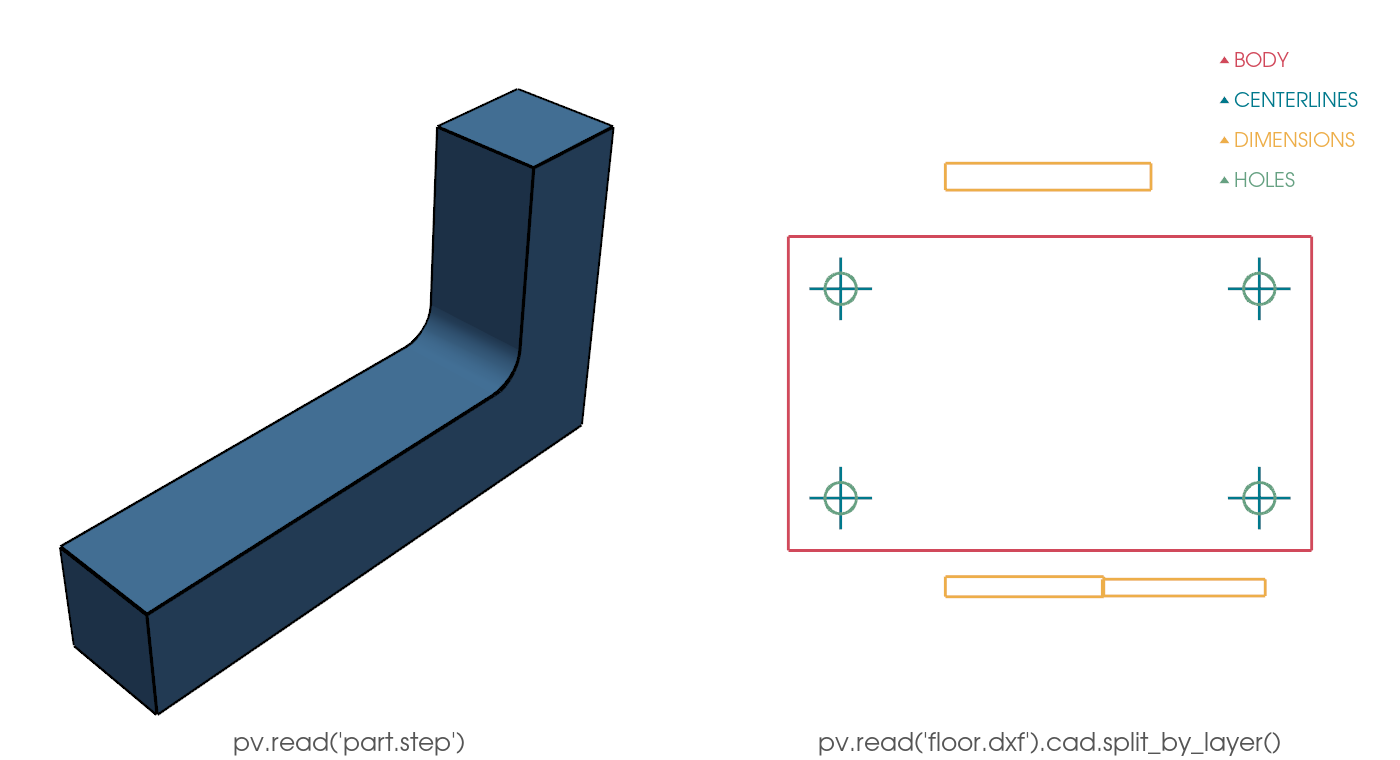
mesh = pv.read('part.step')  # MultiBlock of parts with cad.color, cad.label
mesh.plot(show_edges=True)

floorplan = pv.read('floor.dxf')  # PolyData with Layer cell data
layers = floorplan.cad.split_by_layer()  # MultiBlock keyed on layer
CAD-friendly plotting
A generic mesh viewer draws the triangulation. With show_edges=True you see every facet edge, an artifact of the tessellation tolerance. A CAD application instead shows smoothly shaded faces with the model's topological edges (the B-rep feature curves) on top. pyvista-cad reproduces that: analytic surface normals so a coarse mesh still shades round, topological edges recovered from the cached B-rep, triangle edges hidden.
import pyvista as pv
import pyvista_cad
from pyvista_cad.examples import downloads

mb = pyvista_cad.read_step(downloads.step_part_path())  # NIST AM Bench specimen

mb.cad.plot()  # shaded faces + topological edges

# Or compose it into a scene, color faces by a scalar, keep the edges:
part = mb[0]  # a cached block keeps its B-rep
part['height'] = part.points[:, 2]
pl = pv.Plotter()
pl.cad.add(part, scalars='height', cmap='viridis')
pl.show()
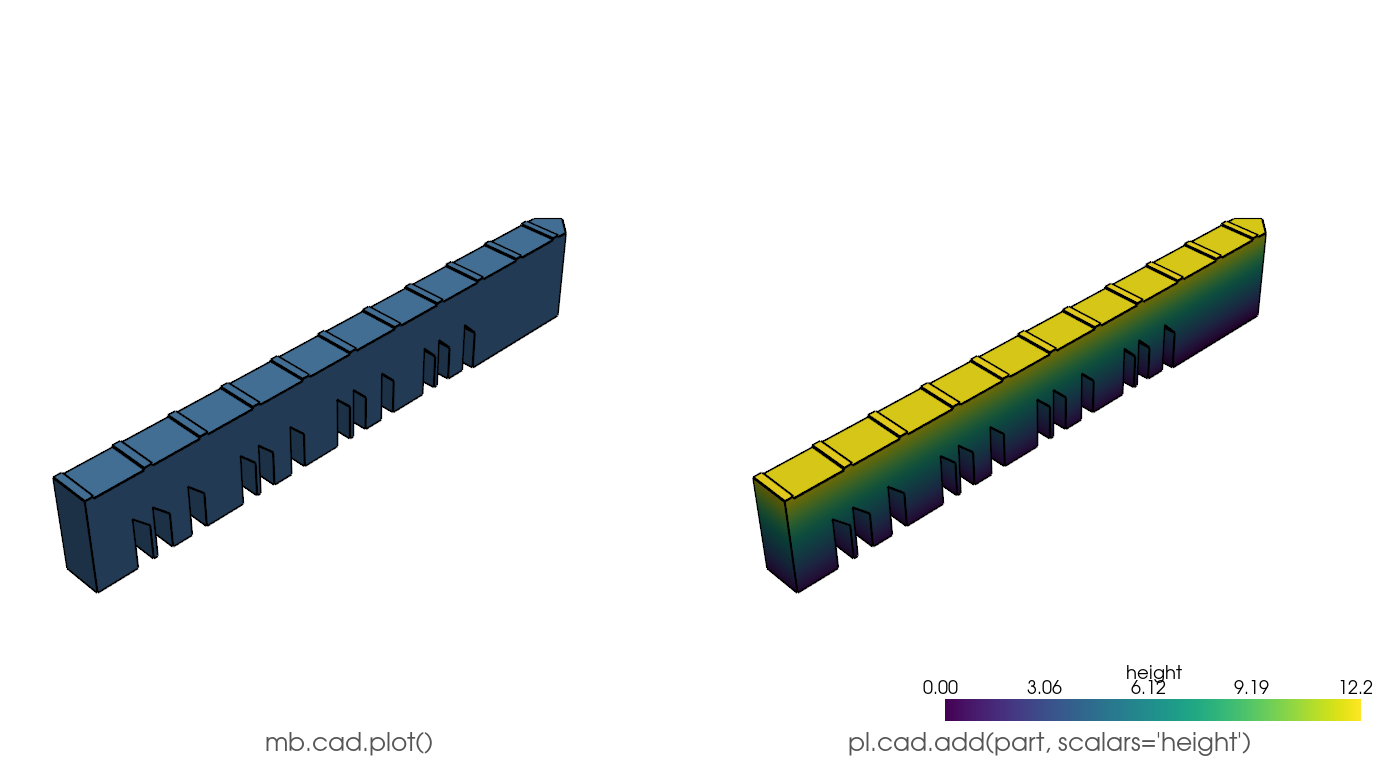
.cad.plot() and the plotter.cad component accept a MultiBlock, PolyData, raw TopoDS, or a build123d / cadquery object; a plain mesh with no B-rep origin degrades to crease feature edges.
Real-world workflow
Load a STEP assembly, locate a part, drive it through gmsh to a
tetrahedral FEA mesh, then clip to expose the interior. pv.read
handles the resulting .msh file natively via meshio, so no extra
PyVista dependency is needed.
import gmsh
import pyvista as pv
import pyvista_cad
from pyvista_cad.examples import downloads

assembly = pv.read(downloads.step_assembly_path())  # 3-part NIST build assembly
print(assembly.cad.assembly_tree())  # nested dict of block names
matches = assembly.cad.find('*PartCAD')  # glob -> list of (path, block)
path, part = matches[0]

gmsh.initialize()
try:
    gmsh.model.occ.importShapes(downloads.step_part_path())
    gmsh.model.occ.synchronize()
    gmsh.option.setNumber('Mesh.MeshSizeMax', 2.0)
    gmsh.model.mesh.generate(3)
    gmsh.write('part.msh')
finally:
    gmsh.finalize()

grid = pv.read('part.msh')  # via meshio
grid = grid.extract_cells(grid.celltypes == 10)  # keep VTK_TETRA
clip = grid.clip(normal='x', crinkle=True)
clip.save('part_tets.vtu')  # full tet mesh round-trips
The Quick start uses bundled offline fixtures (bracket_step_path(), a parametric L-bracket committed as STEP; drawing_dxf_path(), a layered 2D drawing). The other examples pull real, openly licensed parts from pyvista_cad.examples.downloads (cached on first fetch) — the NIST AM Bench LPBF specimen and its 3-part build assembly.
Common tasks
| Task | How |
|---|---|
| Read a STEP assembly with per-part colors | pv.read('a.step') returns a MultiBlock; each block has cad.color and cad.label |
| Split a DXF by layer | pv.read('a.dxf').cad.split_by_layer() |
| Round-trip a 3MF print | pyvista_cad.write_three_mf(mb, 'b.3mf') (object color + units kept) |
| Load an IFC building and filter walls | mb = pv.read('b.ifc'); walls = mb.cad.find(ifc_type='IfcWall') |
| Read IFC property sets | json.loads(block.field_data['cad.psets'][0]) returns the source Pset_* / Qto_* dict |
| Convert build123d to PyVista | pyvista_cad.from_build123d(part) (preserves color, label, transform) |
| Mesh a STEP for FEA in gmsh | Drive gmsh directly, gmsh.write('out.msh'), then pv.read('out.msh') (uses meshio) |
| Generate a signed distance field from CAD | see examples/05_workflows/cad_to_signed_distance.py |
Licensing
pyvista-cad is MIT. Every runtime dependency is either permissive
(MIT / BSD / Apache) or LGPL with the OpenCascade exception. No
GPL code is pulled in by any extra, which makes the package safe to
use in closed-source / proprietary products subject to the standard
LGPL dynamic-link obligations. See LICENSES.md for the
full dependency-by-dependency breakdown, the LGPL compliance notes, and the rationale for not depending on
gmsh.
IGES backends
read_iges has two readers behind it.
backend= |
Needs | Trimmed surfaces | IGES level metadata |
|---|---|---|---|
'pyiges' (default) |
[iges] |
Ignored | cad.level / cad.levels |
'ocp' |
[step] |
Clipped to the trimming curves | none |
import pyvista_cad

mesh = pyvista_cad.read_iges('scan.igs', backend='ocp', linear_deflection=0.1)
mesh.cad.plot()
The default is unchanged, so pv.read('part.igs') still goes through
pyiges. pv.read accepts no reader keywords, so selecting the OCCT
backend means calling read_iges directly.
Speed
pyiges parses and evaluates surfaces in Python; OCCT does both in C++.
Best of three warm runs on pyvista_cad.examples.downloads.iges_impeller_path()
(4.0 MB, 4615 entities, a SolidWorks export):
| Reader | Setting | Cells | Time |
|---|---|---|---|
| pyiges | delta=0.025 (default) |
753,716 | 19.9 s |
| ocp | linear_deflection=0.1 (default) |
20,195 | 0.5 s |
| ocp | linear_deflection=0.005 |
122,335 | 0.8 s |
| ocp | linear_deflection=0.0005 |
716,465 | 4.0 s |
The two defaults are not the same mesh density, so the 36x at defaults is partly a coarser mesh. Matched at roughly equal cell count the gap is about 5x, and it grows with file size because the Python-side cost scales with entity count. Numbers are from one machine; treat the ratios as the signal, not the absolute times.
Trimmed surfaces
pyiges dispatches IGES type 128 (rational B-spline surface) and has no handler for type 144 (trimmed parametric surface), so it tessellates the full underlying surface and ignores the trimming curves. OCCT applies them. On the impeller above that shows up in the extent:
| Reader | X bounds |
|---|---|
| pyiges | -50.5 to 49.5 |
| ocp | -42.7 to 42.5 |
Files whose trimming curves follow the natural surface boundary read the
same either way, which is why the small tests/data/impeller.iges
fixture agrees between backends.
Reach for 'ocp' on anything from a scanner or a CMM. Use 'pyiges'
when you need the per-entity level numbers.
Fidelity and limitations
Round-trip fidelity varies by format. Tessellated formats (STEP, IGES, BREP, FCStd) discretize analytic surfaces on read; the originating B-rep is cached so tessellate() can refine it. DXF and 3MF round-trip geometry and metadata within documented tolerances. IGES and SCAD are read-only.
Metadata
Release files for pyvista-cad 0.0.5
For a detailed explanation of source distributions (sdists) and built distributions (wheels), please see the package formats documentation.
Source distribution (sdist)
| File | Size | Uploaded | |
|---|---|---|---|
| pyvista_cad-0.0.5.tar.gz | 1.0 MB | Details |
Built distribution (wheel)
| File | Interpreter | ABI | Platform | Reset |
|---|---|---|---|---|
| pyvista_cad-0.0.5-py3-none-any.whl | Python 3 | none | any | Details |
Total release size: 1.2 MB
Release files / pyvista_cad-0.0.5.tar.gz
| Download URL | pyvista_cad-0.0.5.tar.gz |
|---|---|
| Size | 1.0 MB |
| Tags | Source |
|
SHA-256 checksum How to use checksums |
a36c49dabc6681506c35a8be9bdfa1f9bf565fd479345c8cdd0b0d1d9e7cb6cd
|
|
BLAKE2b-256 checksum How to use checksums |
f802fe19699ecda6ae16c2faeb93a3b718fa64b55c00ccc469333df74caf4f37
|
| Upload date | |
|
Uploaded using Trusted Publishing? What is trusted publishing? |
Yes |
| Uploaded via |
twine/7.0.0 CPython/3.13.14
|
Provenance
Provenance describes where a file came from. On PyPI, provenance is shared via attestations, which provide a verifiable record of the build or publishing details. View details, limitations and caveats.


PyPI Publish Attestation
PyPI verified that this artifact, at this checksum, originated from the publisher listed below.
Signed by GitHub Actions, verified by PyPI on Aug 20, 2026.
Transparency logRelease files / pyvista_cad-0.0.5-py3-none-any.whl
| Download URL | pyvista_cad-0.0.5-py3-none-any.whl |
|---|---|
| Size | 139.5 kB |
| Tags | Python 3 |
|
SHA-256 checksum How to use checksums |
809275385a318a91cd27812f193886e4a907fd2d6770e9901452a6fd965e21c5
|
|
BLAKE2b-256 checksum How to use checksums |
48f7da0061fac8c7ee74d44ba02f792b2ba3f666079a83520243b6b0b9a96eb3
|
| Upload date | |
|
Uploaded using Trusted Publishing? What is trusted publishing? |
Yes |
| Uploaded via |
twine/7.0.0 CPython/3.13.14
|
Provenance
Provenance describes where a file came from. On PyPI, provenance is shared via attestations, which provide a verifiable record of the build or publishing details. View details, limitations and caveats.
PyPI Publish Attestation
PyPI verified that this artifact, at this checksum, originated from the publisher listed below.
Signed by GitHub Actions, verified by PyPI on Aug 20, 2026.
Transparency log













