
PyVista accessor and reader-registry plugin for CAD formats (STEP, IGES, BREP, DXF, 3MF, IFC, FCStd) and bridges to build123d, cadquery, OCP, and gmsh.
Project description
pyvista-cad


CAD format reading, writing, and CAD-style plotting for PyVista.
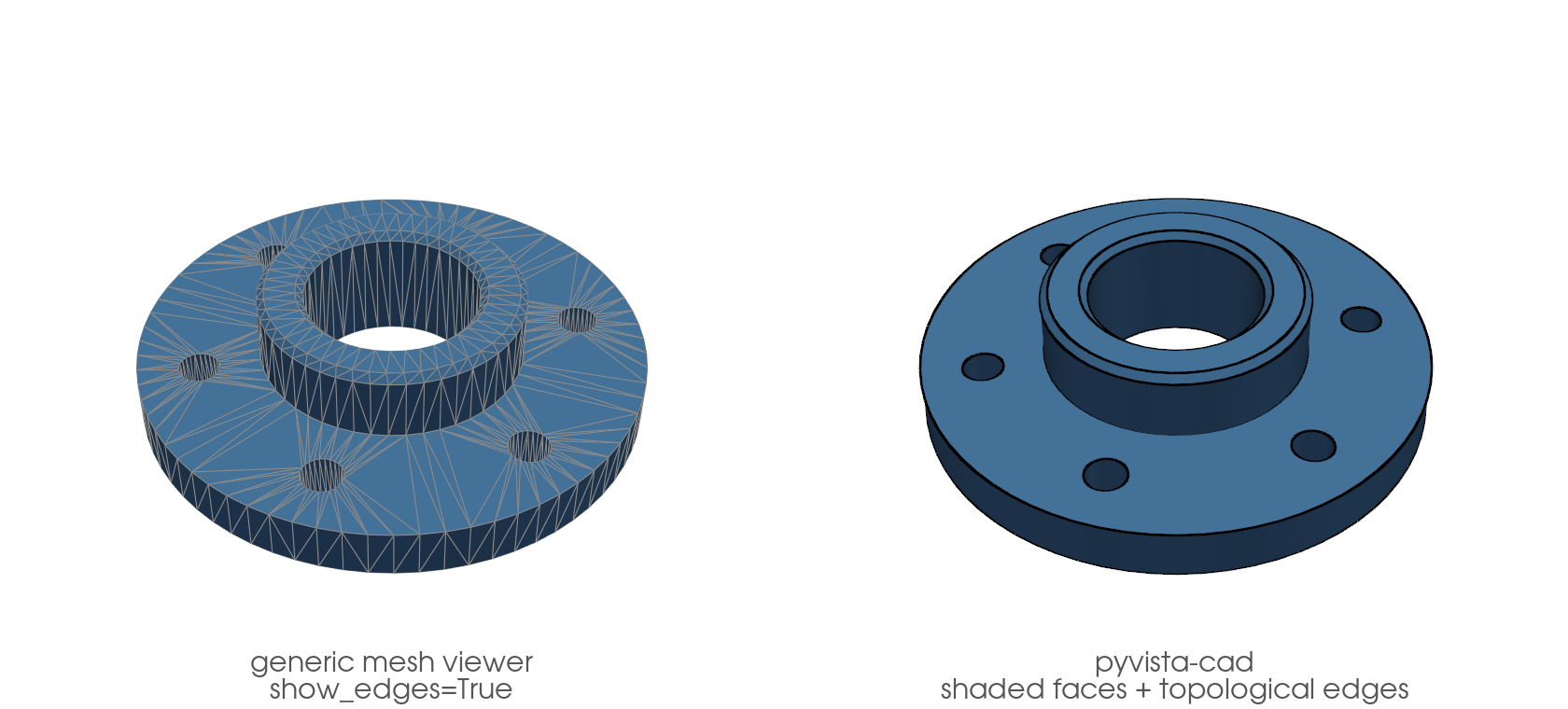
pyvista-cad adds CAD-format support to PyVista: STEP, IGES, BREP, DXF, 3MF, IFC, FreeCAD .fcstd, OpenSCAD .scad, and glTF. It registers a .cad accessor on every pv.DataSet / pv.MultiBlock and wires reader entries into pv.read(...). It also adds CAD-style rendering: smoothly shaded faces with the model's topological B-rep edges instead of triangle-mesh noise, via .cad.plot() and a plotter.cad component. No monkey-patching, no forks, no direct VTK calls.
Install matrix
| Extra | Adds | Formats unlocked |
|---|---|---|
| (base) | ezdxf | DXF read + write, glTF read + write |
[step] |
build123d, cadquery-ocp | STEP, BREP, FCStd, build123d bridge |
[step-light] |
cascadio | STEP (read-only, faster, no colors) |
[3mf] |
lib3mf | 3MF read + write |
[ifc] |
ifcopenshell | IFC read (with property sets) |
[iges] |
pyiges[full] | IGES read |
[gmsh] |
gmsh | gmsh bridge for FEA meshing |
[openscad] |
(uses openscad CLI) |
SCAD read |
[full] |
all of the above | every supported format |
Python support: 3.10 – 3.13. Python 3.14 is not yet supported: the
[step]/[full] extras depend on cadquery-ocp, which publishes no
cp314 wheels for any platform. 3.14 will be added once those wheels ship.
trimesh interop is provided by pyvista core (pyvista.from_trimesh, pyvista.to_trimesh) and the pyvista-trimesh package's .trimesh accessor (install pyvista-cad[trimesh]); pyvista-cad does not duplicate it.
pip install pyvista-cad           # DXF and glTF only
pip install pyvista-cad[step]     # add STEP, BREP, FCStd
pip install pyvista-cad[full]     # everything
Quick start
import pyvista as pv
import pyvista_cad  # registers the .cad accessor and reader entries

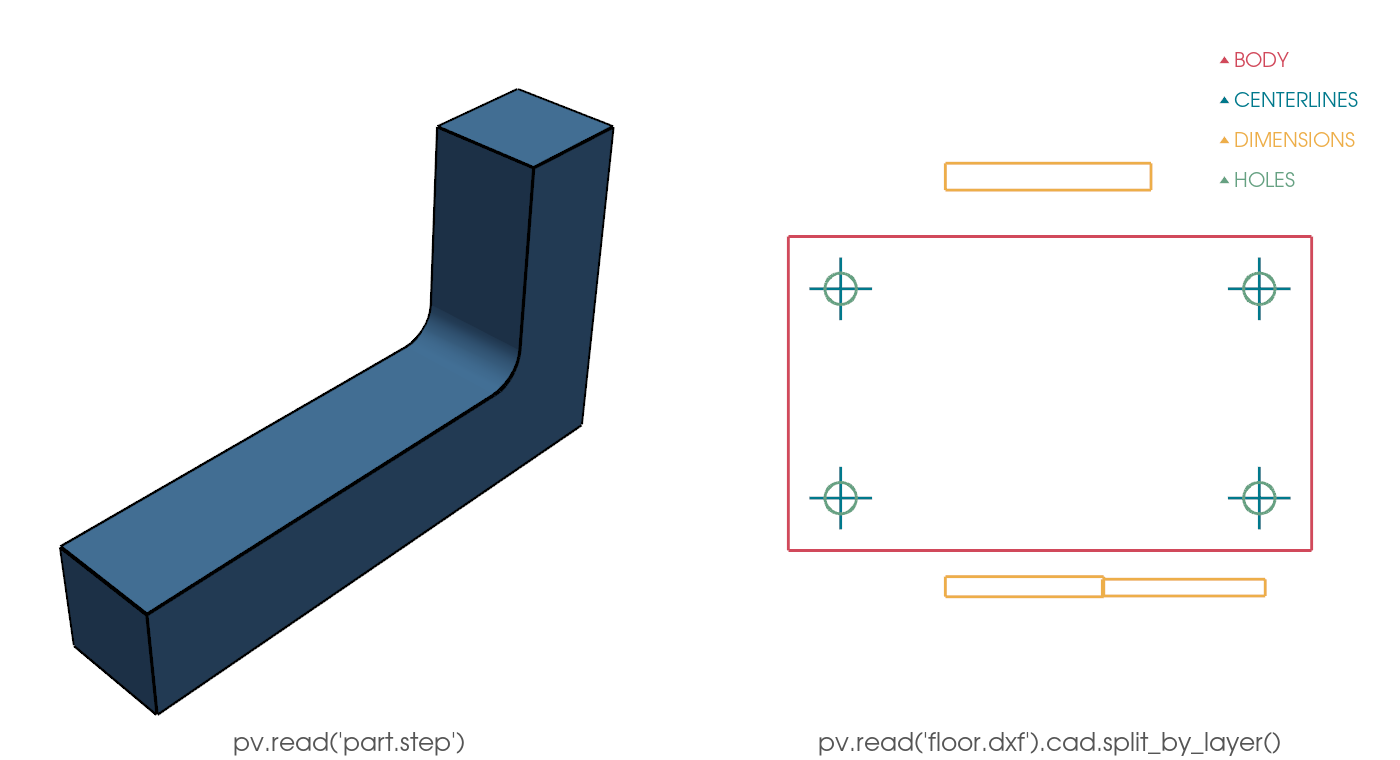
mesh = pv.read('part.step')              # MultiBlock of parts with cad.color, cad.label
mesh.plot(show_edges=True)

floorplan = pv.read('floor.dxf')         # PolyData with Layer cell data
layers = floorplan.cad.split_by_layer()  # MultiBlock keyed on layer
CAD-friendly plotting
A generic mesh viewer draws the triangulation. With show_edges=True you see every facet edge, an artifact of the tessellation tolerance. A CAD application instead shows smoothly shaded faces with the model's topological edges (the B-rep feature curves) on top. pyvista-cad reproduces that: analytic surface normals so a coarse mesh still shades round, topological edges recovered from the cached B-rep, triangle edges hidden.
import pyvista as pv
import pyvista_cad
from pyvista_cad.examples import downloads

mb = pyvista_cad.read_step(downloads.step_part_path())  # NIST AM Bench specimen

mb.cad.plot()                       # shaded faces + topological edges

# Or compose it into a scene, color faces by a scalar, keep the edges:
part = mb[0]                        # a cached block keeps its B-rep
part['height'] = part.points[:, 2]
pl = pv.Plotter()
pl.cad.add(part, scalars='height', cmap='viridis')
pl.show()
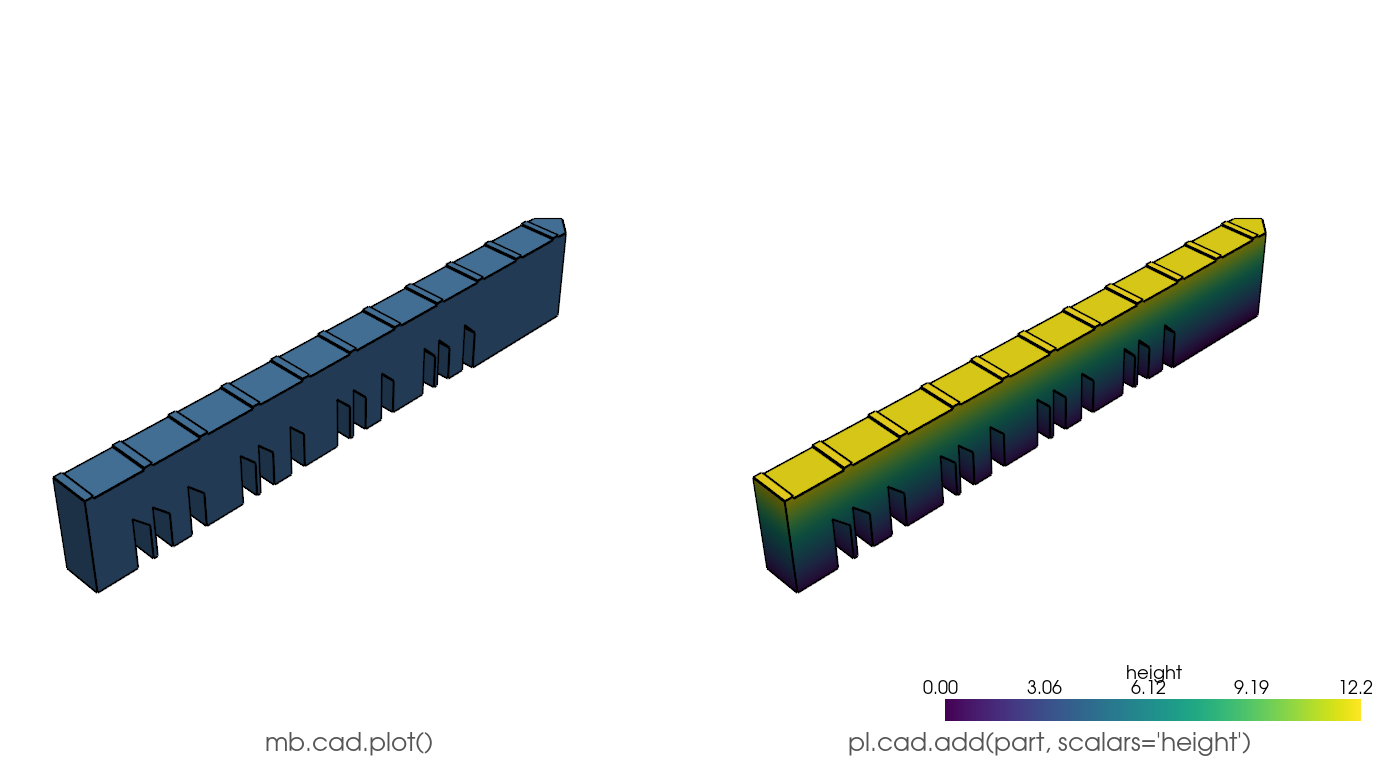
.cad.plot() and the plotter.cad component accept a MultiBlock, PolyData, raw TopoDS, or a build123d / cadquery object; a plain mesh with no B-rep origin degrades to crease feature edges.
Real-world workflow
Load a STEP assembly, locate a part, drive it through gmsh to a
tetrahedral FEA mesh, then clip to expose the interior. Needs the
[gmsh] extra.
import gmsh
import pyvista as pv
import pyvista_cad
from pyvista_cad.examples import downloads

assembly = pv.read(downloads.step_assembly_path())  # 3-part NIST build assembly
print(assembly.cad.assembly_tree())                 # nested dict of block names
matches = assembly.cad.find('*PartCAD')             # glob -> list of (path, block)
path, part = matches[0]

gmsh.initialize()
try:
    gmsh.model.occ.importShapes(downloads.step_part_path())
    gmsh.model.occ.synchronize()
    gmsh.option.setNumber('Mesh.MeshSizeMax', 2.0)
    gmsh.model.mesh.generate(3)
    grid = pyvista_cad.from_gmsh()
finally:
    gmsh.finalize()

grid = grid.extract_cells(grid.celltypes == 10)     # keep VTK_TETRA
clip = grid.clip(normal='x', crinkle=True)
clip.save('part_tets.vtu')                           # full tet mesh round-trips
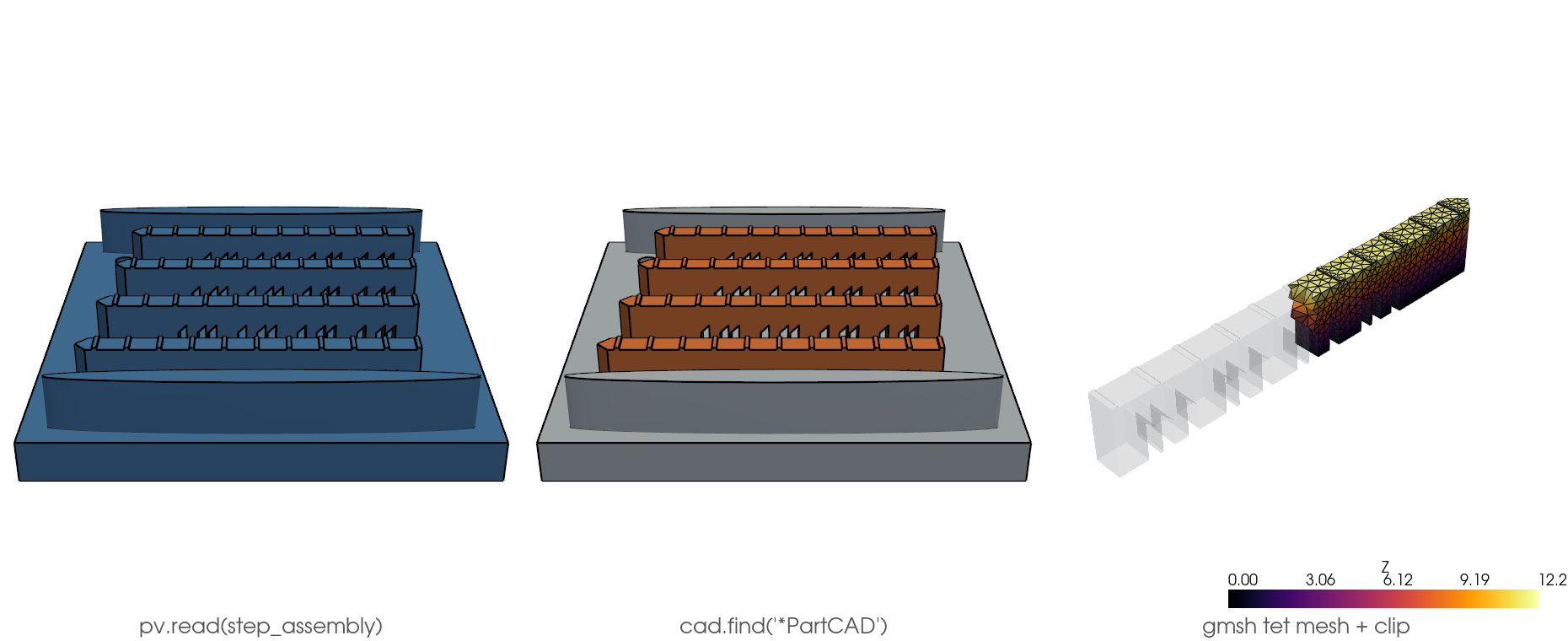
The Quick start uses bundled offline fixtures (bracket_step_path(), a parametric L-bracket committed as STEP; drawing_dxf_path(), a layered 2D drawing). The other examples pull real, openly licensed parts from pyvista_cad.examples.downloads (cached on first fetch) — the NIST AM Bench LPBF specimen and its 3-part build assembly.
Common tasks
| Task | How |
|---|---|
| Read a STEP assembly with per-part colors | pv.read('a.step') returns a MultiBlock; each block has cad.color and cad.label |
| Split a DXF by layer | pv.read('a.dxf').cad.split_by_layer() |
| Round-trip a 3MF print | pyvista_cad.write_three_mf(mb, 'b.3mf') (object color + units kept) |
| Load an IFC building and filter walls | mb = pv.read('b.ifc'); walls = mb.cad.find(ifc_type='IfcWall') |
| Read IFC property sets | json.loads(block.field_data['cad.psets'][0]) returns the source Pset_* / Qto_* dict |
| Convert build123d to PyVista | pyvista_cad.from_build123d(part) (preserves color, label, transform) |
| Mesh a STEP for FEA in gmsh | pyvista_cad.to_gmsh(...) then gmsh; see examples/05_workflows/cad_to_fea_tet_mesh.py |
| Generate a signed distance field from CAD | see examples/05_workflows/cad_to_signed_distance.py |
Fidelity and limitations
Round-trip fidelity varies by format. Tessellated formats (STEP, IGES, BREP, FCStd) discretize analytic surfaces on read; the originating B-rep is cached so tessellate() can refine it. DXF and 3MF round-trip geometry and metadata within documented tolerances. IGES and SCAD are read-only.
Project details


Download files
Download the file for your platform. If you're not sure which to choose, learn more about installing packages.
Source Distribution
Built Distribution
Filter files by name, interpreter, ABI, and platform.
If you're not sure about the file name format, learn more about wheel file names.
Copy a direct link to the current filters
File details
Details for the file pyvista_cad-0.0.1.tar.gz.
File metadata
- Download URL: pyvista_cad-0.0.1.tar.gz
- Upload date:
- Size: 1.0 MB
- Tags: Source
- Uploaded using Trusted Publishing? Yes
- Uploaded via: twine/6.1.0 CPython/3.13.12
File hashes
| Algorithm | Hash digest | |
|---|---|---|
| SHA256 |
3be234d15a35811aa47ba4fe2266acff08accd5056e058fe1d10458c2a62634d
|
|
| MD5 |
87ab6b4b6402927b450e1553e4673345
|
|
| BLAKE2b-256 |
7d38b6bcad57adedec377ac84bec3e9627988c770b7ec40c35f54cee4d159ff5
|
Provenance
The following attestation bundles were made for pyvista_cad-0.0.1.tar.gz:
Publisher:
ci.yml on pyvista/pyvista-cad
-
Statement:
-
Statement type:
https://in-toto.io/Statement/v1 -
Predicate type:
https://docs.pypi.org/attestations/publish/v1 -
Subject name:
pyvista_cad-0.0.1.tar.gz -
Subject digest:
3be234d15a35811aa47ba4fe2266acff08accd5056e058fe1d10458c2a62634d - Sigstore transparency entry: 1566376500
- Sigstore integration time:
-
Permalink:
pyvista/pyvista-cad@9ea89ac69fb29e04d689218fca277cd940d6acb2 -
Branch / Tag:
refs/tags/v0.0.1 - Owner: https://github.com/pyvista
-
Access:
public
-
Token Issuer:
https://token.actions.githubusercontent.com -
Runner Environment:
github-hosted -
Publication workflow:
ci.yml@9ea89ac69fb29e04d689218fca277cd940d6acb2 -
Trigger Event:
push
-
Statement type:
File details
Details for the file pyvista_cad-0.0.1-py3-none-any.whl.
File metadata
- Download URL: pyvista_cad-0.0.1-py3-none-any.whl
- Upload date:
- Size: 135.1 kB
- Tags: Python 3
- Uploaded using Trusted Publishing? Yes
- Uploaded via: twine/6.1.0 CPython/3.13.12
File hashes
| Algorithm | Hash digest | |
|---|---|---|
| SHA256 |
671f44b1cb5c39406da7acb321160ffe4aab22c86f6f31f74d2e3608d9aea4d6
|
|
| MD5 |
b8fb602a192ee4afc35beae1eaa05efe
|
|
| BLAKE2b-256 |
1367f2d24824ad48d9d477e2ab5f3f6191c958bf330360719e53d936c48fa023
|
Provenance
The following attestation bundles were made for pyvista_cad-0.0.1-py3-none-any.whl:
Publisher:
ci.yml on pyvista/pyvista-cad
-
Statement:
-
Statement type:
https://in-toto.io/Statement/v1 -
Predicate type:
https://docs.pypi.org/attestations/publish/v1 -
Subject name:
pyvista_cad-0.0.1-py3-none-any.whl -
Subject digest:
671f44b1cb5c39406da7acb321160ffe4aab22c86f6f31f74d2e3608d9aea4d6 - Sigstore transparency entry: 1566376538
- Sigstore integration time:
-
Permalink:
pyvista/pyvista-cad@9ea89ac69fb29e04d689218fca277cd940d6acb2 -
Branch / Tag:
refs/tags/v0.0.1 - Owner: https://github.com/pyvista
-
Access:
public
-
Token Issuer:
https://token.actions.githubusercontent.com -
Runner Environment:
github-hosted -
Publication workflow:
ci.yml@9ea89ac69fb29e04d689218fca277cd940d6acb2 -
Trigger Event:
push
-
Statement type:






