
This release has been yanked by its maintainers, and will be ignored by installers, except when explicitly specified.
Consider using release 0.5.0 instead.
Reason given by maintainers: Need to bump file version
pyvista-zstd



Seamlessly compress VTK datasets using Zstandard.
Partial reads over HTTPS
Install pyvista-zstd[network] to read an individual field array from a remote container. The producer exports a small sidecar with build_range_index. Serve the container with HTTP byte-range support and the sidecar’s matching ETag.
from pyvista_zstd.network import build_range_index, HTTPRangeReader
import httpx

# Producer: export JSON metadata without decompressing result payloads.
index = build_range_index("results.pv")

# Consumer: the index travels separately; only this field's frames are read.
with httpx.Client() as client:
    reader = HTTPRangeReader(
        "https://results.example/results.pv", index, client=client
    )
    displacement = reader.read_array("displacement_000003")
Reads require a 206 response, an exact Content-Range, and the indexed ETag. Servers that ignore ranges are refused before the response body is read. Refreshing a file after an append requires a new sidecar. TLS verification uses the caller’s HTTP client configuration and is enabled by default in httpx.
Read in VTK datasets 37x faster, write 14x faster, all while using 28% less space versus VTK’s modern XML format.
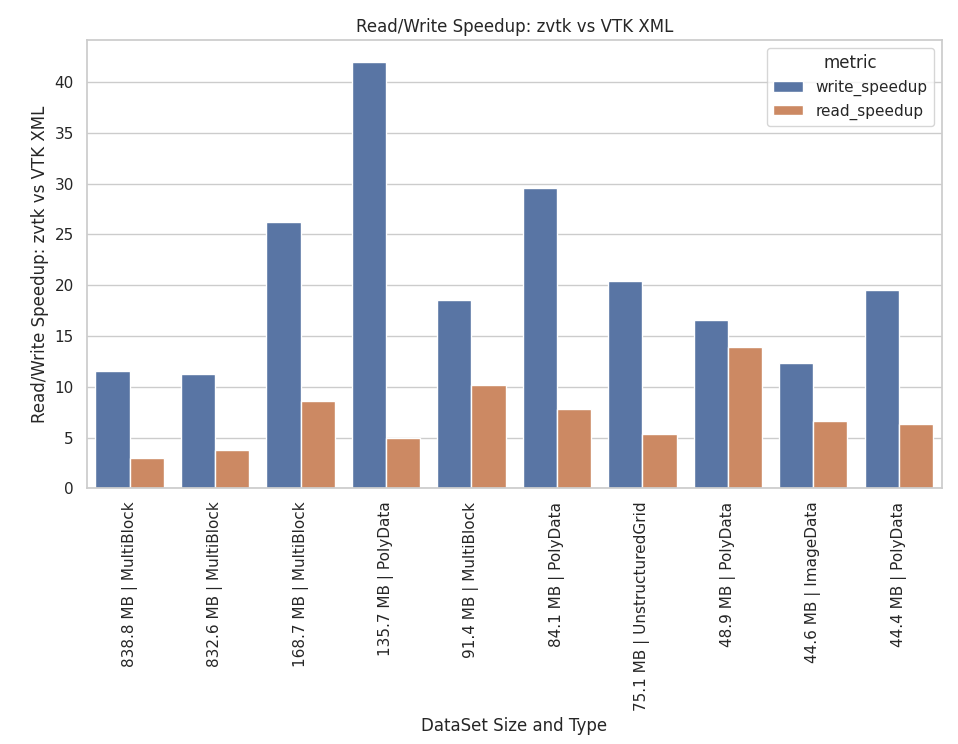
Read/Write Speedup and Compression Ratios
File Type / Method |
Write Speed |
Compression Ratio |
Notes |
|---|---|---|---|
Legacy VTK (.vtk) |
465 MB/s |
0.88 |
Significant overhead |
VTK XML, none |
256 MB/s |
0.70 |
Significant overhead |
VTK XML, zlib |
105 MB/s |
2.52 |
VTK Default |
VTK XML, lz4 |
401 MB/s |
1.47 |
|
VTK XML, lzma |
9.93 MB/s |
3.10 |
|
VTK HDF (.vtkhdf), lvl0 |
1733 MB/s |
0.93 |
No compression |
VTK HDF (.vtkhdf), lvl4 |
137 MB/s |
2.37 |
Default compression |
pyvista-zstd (.pv), lvl3 |
711 MB/s |
3.02 |
Threads = 0 |
pyvista-zstd (.pv), lvl3 |
1845 MB/s |
3.02 |
Threads = 4 |
pyvista-zstd (.pv), lvl22 |
15.8 MB/s |
3.79 |
All threads (-1) |
Usage
Install with:
pip install pyvista-zstdThe package is a C++ library with a Python wrapper around it, so an install is either a prebuilt wheel or a compile. Wheels are published for:
Linux |
x86_64 and aarch64 (manylinux2014 and manylinux_2_28) |
macOS |
x86_64 and arm64 |
Windows |
AMD64 |
Everywhere else – musl-based Linux, Windows on ARM – pip falls back to the source distribution and builds the core during the install, which needs a C++17 compiler on the machine. CMake does not: it comes from the build requirements. A machine without a compiler fails the install rather than producing a package that imports and cannot read anything.
Compatible with all VTK dataset types. Uses PyVista under the hood.
import pyvista_zstd

# create and write out
ds = pv.Sphere()
pyvista_zstd.write(ds, "dataset.pv")

# read in and show these are identical
ds_in = pyvista_zstd.read("dataset.pv")
assert ds == ds_in
For cell arrays where every cell contains the same number of points, pyvista-zstd stores the common cell width in the dataset metadata and omits the redundant offsets array. This applies to triangles, quads, tetrahedra, and any other fixed-width cell topology. Mixed-width cell arrays retain their explicit offsets.
Alternative VTK example
import vtk
import pyvista_zstd

# create dataset using VTK source
sphere_source = vtk.vtkSphereSource()
sphere_source.SetRadius(1.0)
sphere_source.SetThetaResolution(32)
sphere_source.SetPhiResolution(32)
sphere_source.Update()

vtk_ds = sphere_source.GetOutput()

# read back
pyvista_zstd.write(vtk_ds, "sphere.pv")
ds_in = pyvista_zstd.read("sphere.pv")
PyVista Integration
When pyvista-zstd is installed, it automatically registers with PyVista’s reader registry. This means pv.read() handles .pv files directly:
import pyvista as pv

mesh = pv.read("dataset.pv")
No additional imports needed. This works via PyVista’s pyvista.readers entry point group, so the registration happens at install time.
The C library
The reader and writer are a C++ core with a pure C ABI, pvzstd, declared in cpp/include/pvzstd/pvzstd.h. The Python package is one consumer of it, bound with ctypes; a C or C++ consumer – or a WebAssembly build – can link the same library directly, and it depends on nothing but zstd.
find_package(pvzstd CONFIG REQUIRED)
target_link_libraries(my_app PRIVATE pvzstd::pvzstd)
See The C library for the build options, both ways of consuming the CMake package, the ABI-version contract, and a worked example. The on-disk format is specified in doc/format/container-v2.md.
Rational
VTK’s XML writer is flexible and supports most datasets, but its compression is limited to a single thread, has only a subset of compression algorithms, and the XML format adds significant overhead.
To demonstrate this, the following example writes out a single file without compression. This example requires pyvista>=0.47.0 for the compression parameter.
>>> import numpy as np
>>> import pyvista as pv
>>> ugrid = pv.ImageData(dimensions=(200, 200, 200)).to_tetrahedra()
>>> ugrid["pdata"] = np.random.random(ugrid.n_points)
>>> ugrid["cdata"] = np.random.random(ugrid.n_cells)
>>> nbytes = (
...     ugrid.points.nbytes
...     + ugrid.cell_connectivity.nbytes
...     + ugrid.offset.nbytes
...     + ugrid.celltypes.nbytes
...     + ugrid["pdata"].nbytes
...     + ugrid["cdata"].nbytes
... )
>>> print(f"Size in memory: {nbytes / 1024**2:.2f} MB")

Size in memory: 1993.89 MB
Save using VTK XML format
>>> from pathlib import Path
>>> import time
>>> tmp_path = Path("/tmp/ds.vtu")
>>> tstart = time.time()
>>> ugrid.save(tmp_path, compression=None)
>>> print(f"Written without compression in {time.time() - tstart:.2f} seconds")
>>> nbytes_disk = tmp_path.stat().st_size
>>> print(f" File size: {nbytes_disk / 1024**2:.2f} MB")
>>> print(f" Compression Ratio: {nbytes / nbytes_disk}")
>>> print()
Written without compression in 7.93 seconds
File size: 2858.94 MB
Compression Ratio: 0.6974239255525742This amounts to around a 43% overhead using VTK’s XML writer. Using the default compression we can get the file size down to 791 MB, but it takes 19 seconds to compress.
>>> tstart = time.time()
>>> ugrid.save(tmp_path, compression='zlib')  # default
>>> print(f"Compressed in {time.time() - tstart:.2f} seconds")
>>> nbytes_disk = tmp_path.stat().st_size
>>> print(f"  File size:            {nbytes_disk / 1024**2:.2f} MB")
>>> print(f"  Compression Ratio:    {nbytes / nbytes_disk}")
>>> print()

Compressed in 18.83 seconds
File size:            791.05 MB
Compression Ratio:    2.5205590295735663
Clearly there’s room for improvement here as this amounts to a compression rate of 105.89 MB/s.
VTK Compression with Zstandard: pyvista-zstd
This library, pyvista-zstd, writes out VTK datasets with minimal overhead and uses Zstandard for compression. Moreover, it’s been implemented with multi-threading support for both read and write operations.
Let’s compress that file again but this time using pyvista-zstd:
>>> import pyvista_zstd
>>> tmp_path = Path("/tmp/ds.pv")
>>> tstart = time.time()
>>> pyvista_zstd.write(ugrid, tmp_path)
>>> print(f"Compressed pyvista_zstd in {time.time() - tstart:.2f} seconds")
>>> nbytes_disk = tmp_path.stat().st_size
>>> print(f"  File size:            {nbytes_disk / 1024**2:.2f} MB")
>>> print(f"  Compression Ratio:    {nbytes / nbytes_disk}")

Compressed pyvista_zstd in 0.92 seconds
Threads:              -1
File size:            660.41 MB
Compression Ratio:    3.019175309922273
This gives us a write performance of 2167 MB/s using the default number of threads and compression level, resulting in a 20x speedup in write performance versus VTK’s XML writer. This speedup is most noticeable for larger files:
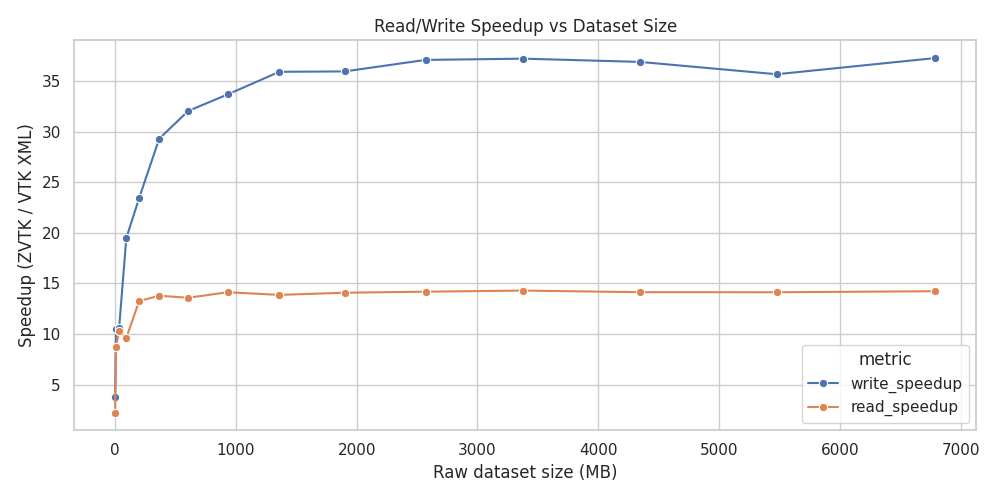
Speedup versus VTK’s XML
Even when disabling multi-threading we can still achieve excellent performance:
>>> tstart = time.time()
>>> pyvista_zstd.write(ugrid, tmp_path, n_threads=0)
>>> print(f"Compressed pyvista_zstd in {time.time() - tstart:.2f} seconds")
>>> nbytes_disk = tmp_path.stat().st_size
>>> print(f"  File size:            {nbytes_disk / 1024**2:.2f} MB")
>>> print(f"  Compression Ratio:    {nbytes / nbytes_disk}")

Compressed pyvista_zstd in 2.91 seconds
Threads:              0
File size:            660.47 MB
Compression Ratio:    3.0188911592355683
This amounts to a single-core compression rate of 685.18 MB/s, which is in agreement with Zstandard’s benchmarks.
Note that the benefit of threading drops off rapidly past 8 threads, though part of this is due to the performance versus efficiency cores of the CPU used for benchmarking (see below).
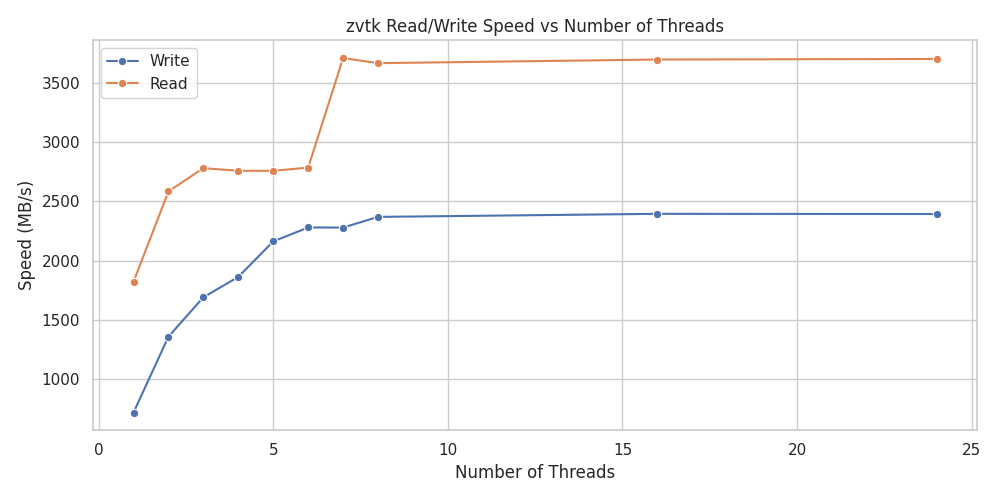
Read/Write Speed versus Number of Threads
Reading in the dataset is also fast. Comparing with VTK’s XML reader using defaults:
Read VTK XML

>>> print(f"Read VTK XML:")
>>> timeit pv.read("/tmp/ds.vtu")
6.22 s ± 9.21 ms per loop (mean ± std. dev. of 7 runs, 1 loop each)

Read zstd

>>> print(f"Read zstd:")
>>> timeit pyvista_zstd.read("/tmp/ds.pv")
563 ms ± 7.96 ms per loop (mean ± std. dev. of 7 runs, 1 loop each)
This is an 11x speedup for this dataset versus VTK’s XML, and it’s still fast even with multi-threading disabled:
>>> timeit pyvista_zstd.read("/tmp/ds.pv", n_threads=0)
1.11 s ± 4.51 ms per loop (mean ± std. dev. of 7 runs, 1 loop each)
This amounts to 1796 MB/s for a single core, which is also in agreement with Zstandard’s benchmarks.
Additionally, you can control Zstandard’s compression level by setting level=. A quick benchmark for this dataset indicates the defaults give a reasonable performance versus size tradeoff:
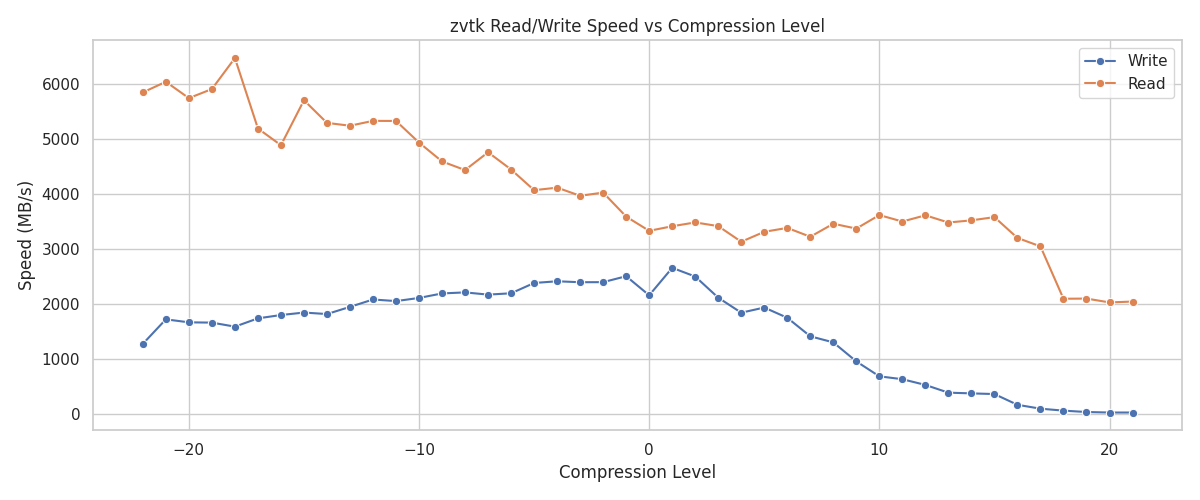
Read/Write Speed versus Compression Level
Note that both pyvista-zstd and VTK’s XML default compression give relatively constant compression ratios for this dataset across varying file sizes:
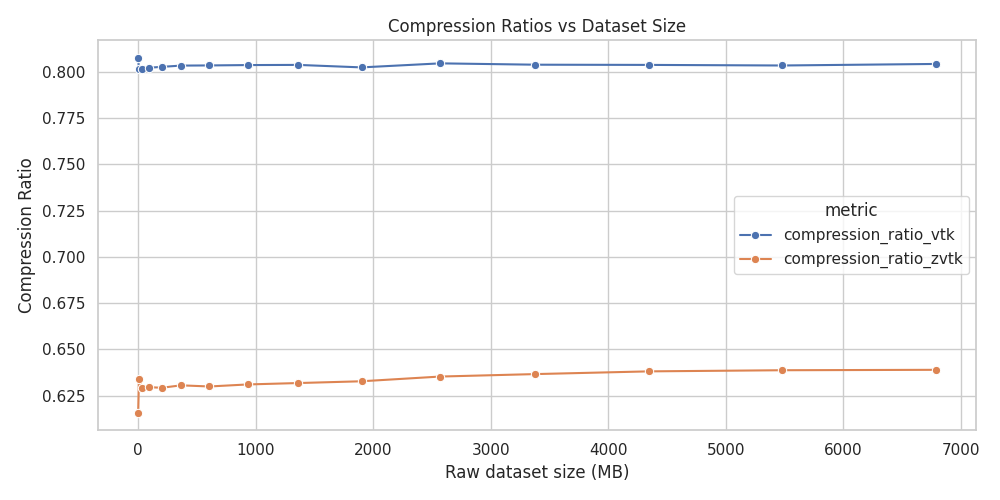
Compression Ratio versus VTK’s XML
These benchmarks were performed on an i9-14900KF running the Linux kernel 6.12.41 using zstandard==0.24.0 from PyPI. Storage was a 2TB Samsung 990 Pro without LUKS mounted at /tmp.
Additional Information
The benchmarks/ directory contains additional benchmarks using many datasets, including all applicable datasets in pyvista.examples (see PyVista Dataset Gallery).
Metadata
Release files for pyvista-zstd 0.6.0
For a detailed explanation of source distributions (sdists) and built distributions (wheels), please see the package formats documentation.
Source distribution (sdist)
| File | Size | Uploaded | |
|---|---|---|---|
| pyvista_zstd-0.6.0.tar.gz | 1.2 MB | Details |
Built distributions (wheels)
| File | Reset | |||
|---|---|---|---|---|
| pyvista_zstd-0.6.0-py3-none-win_amd64.whl | Python 3 | none | Windows x86-64 | Details |
| pyvista_zstd-0.6.0-py3-none-manylinux_2_24_x86_64.manylinux_2_28_x86_64.whl | Python 3 | none | Linux glibc 2.28+ x86-64, Linux glibc 2.24+ x86-64 | Details |
| pyvista_zstd-0.6.0-py3-none-manylinux_2_24_aarch64.manylinux_2_28_aarch64.whl | Python 3 | none | Linux glibc 2.24+ ARM64, Linux glibc 2.28+ ARM64 | Details |
| pyvista_zstd-0.6.0-py3-none-manylinux2014_x86_64.manylinux_2_17_x86_64.whl | Python 3 | none | Linux glibc 2.17+ x86-64 | Details |
| pyvista_zstd-0.6.0-py3-none-manylinux2014_aarch64.manylinux_2_17_aarch64.whl | Python 3 | none | Linux glibc 2.17+ ARM64 | Details |
| pyvista_zstd-0.6.0-py3-none-macosx_11_0_arm64.whl | Python 3 | none | macOS 11.0+ ARM64 | Details |
| pyvista_zstd-0.6.0-py3-none-macosx_10_15_x86_64.whl | Python 3 | none | macOS 10.15+ x86-64 | Details |
Total release size: 4.0 MB
Release files / pyvista_zstd-0.6.0.tar.gz
| Download URL | pyvista_zstd-0.6.0.tar.gz |
|---|---|
| Size | 1.2 MB |
| Tags | Source |
|
SHA-256 checksum How to use checksums |
5aac2a052119d2e55543c14ecbaec5b05d9a0180152e9d582d6db57812ead8da
|
|
BLAKE2b-256 checksum How to use checksums |
e1d107feb617221a7bea17d7ce9401fe40c7c8041561b0259ceba94a479f743d
|
| Upload date | |
|
Uploaded using Trusted Publishing? What is trusted publishing? |
Yes |
| Uploaded via |
twine/7.0.0 CPython/3.13.14
|
Provenance
Provenance describes where a file came from. On PyPI, provenance is shared via attestations, which provide a verifiable record of the build or publishing details. View details, limitations and caveats.


PyPI Publish Attestation
PyPI verified that this artifact, at this checksum, originated from the publisher listed below.
Signed by GitHub Actions, verified by PyPI on Oct 18, 2026.
Transparency logRelease files / pyvista_zstd-0.6.0-py3-none-win_amd64.whl
| Download URL | pyvista_zstd-0.6.0-py3-none-win_amd64.whl |
|---|---|
| Size | 280.2 kB |
| Tags | Python 3 Windows x86-64 |
|
SHA-256 checksum How to use checksums |
ff13309bae8e44c260f3c83b8476b4a53fa57493184e54c3a66c7564eba30345
|
|
BLAKE2b-256 checksum How to use checksums |
dd6b6fba5c965e61c1a5aed00f54c229273237dc69a7ddbbeaa98b1b229c603b
|
| Upload date | |
|
Uploaded using Trusted Publishing? What is trusted publishing? |
Yes |
| Uploaded via |
twine/7.0.0 CPython/3.13.14
|
Provenance
Provenance describes where a file came from. On PyPI, provenance is shared via attestations, which provide a verifiable record of the build or publishing details. View details, limitations and caveats.
PyPI Publish Attestation
PyPI verified that this artifact, at this checksum, originated from the publisher listed below.
Signed by GitHub Actions, verified by PyPI on Oct 18, 2026.
Transparency logRelease files / pyvista_zstd-0.6.0-py3-none-manylinux_2_24_x86_64.manylinux_2_28_x86_64.whl
| Download URL | pyvista_zstd-0.6.0-py3-none-manylinux_2_24_x86_64.manylinux_2_28_x86_64.whl |
|---|---|
| Size | 450.5 kB |
| Tags | Linux glibc 2.24+ x86-64 Linux glibc 2.28+ x86-64 Python 3 |
|
SHA-256 checksum How to use checksums |
6ce94b5a5b4c4c487a11c6b0c178c31d4b7154136dc8e1b439792828164bb1f3
|
|
BLAKE2b-256 checksum How to use checksums |
62f23fa432a21f584f37c39e5a23f68b0fa987b9491bd106bfb5db2d140a4b00
|
| Upload date | |
|
Uploaded using Trusted Publishing? What is trusted publishing? |
Yes |
| Uploaded via |
twine/7.0.0 CPython/3.13.14
|
Provenance
Provenance describes where a file came from. On PyPI, provenance is shared via attestations, which provide a verifiable record of the build or publishing details. View details, limitations and caveats.
PyPI Publish Attestation
PyPI verified that this artifact, at this checksum, originated from the publisher listed below.
Signed by GitHub Actions, verified by PyPI on Oct 18, 2026.
Transparency logRelease files / pyvista_zstd-0.6.0-py3-none-manylinux_2_24_aarch64.manylinux_2_28_aarch64.whl
| Download URL | pyvista_zstd-0.6.0-py3-none-manylinux_2_24_aarch64.manylinux_2_28_aarch64.whl |
|---|---|
| Size | 436.0 kB |
| Tags | Linux glibc 2.24+ ARM64 Linux glibc 2.28+ ARM64 Python 3 |
|
SHA-256 checksum How to use checksums |
6ce5a519ef000df07776272aa98d995bb7d9a2a34119a4275a08e09faac8cfd9
|
|
BLAKE2b-256 checksum How to use checksums |
732389618f67457a6104ace2819c01f4e8de303ba5ba0c68e33e819a0dce67c8
|
| Upload date | |
|
Uploaded using Trusted Publishing? What is trusted publishing? |
Yes |
| Uploaded via |
twine/7.0.0 CPython/3.13.14
|
Provenance
Provenance describes where a file came from. On PyPI, provenance is shared via attestations, which provide a verifiable record of the build or publishing details. View details, limitations and caveats.
PyPI Publish Attestation
PyPI verified that this artifact, at this checksum, originated from the publisher listed below.
Signed by GitHub Actions, verified by PyPI on Oct 18, 2026.
Transparency logRelease files / pyvista_zstd-0.6.0-py3-none-manylinux2014_x86_64.manylinux_2_17_x86_64.whl
| Download URL | pyvista_zstd-0.6.0-py3-none-manylinux2014_x86_64.manylinux_2_17_x86_64.whl |
|---|---|
| Size | 467.9 kB |
| Tags | Linux glibc 2.17+ x86-64 Python 3 |
|
SHA-256 checksum How to use checksums |
0641f1d5281b33ee76e5a6c88b7c5bb946c2e4c7f7227f33f07c776e5483e543
|
|
BLAKE2b-256 checksum How to use checksums |
4c152d3833b2a8051dfc1703d940df138332fa4fe8d42756e69dacb171855b44
|
| Upload date | |
|
Uploaded using Trusted Publishing? What is trusted publishing? |
Yes |
| Uploaded via |
twine/7.0.0 CPython/3.13.14
|
Provenance
Provenance describes where a file came from. On PyPI, provenance is shared via attestations, which provide a verifiable record of the build or publishing details. View details, limitations and caveats.
PyPI Publish Attestation
PyPI verified that this artifact, at this checksum, originated from the publisher listed below.
Signed by GitHub Actions, verified by PyPI on Oct 18, 2026.
Transparency logRelease files / pyvista_zstd-0.6.0-py3-none-manylinux2014_aarch64.manylinux_2_17_aarch64.whl
| Download URL | pyvista_zstd-0.6.0-py3-none-manylinux2014_aarch64.manylinux_2_17_aarch64.whl |
|---|---|
| Size | 459.4 kB |
| Tags | Linux glibc 2.17+ ARM64 Python 3 |
|
SHA-256 checksum How to use checksums |
9e528b3b2ff3f84ff0a9fb76b41934a4a8df719eea1346432a2268520b2b11f3
|
|
BLAKE2b-256 checksum How to use checksums |
718c4841dfc1cc7b9e58fe63b0efb3d9bd774b9100dfb9ae1a258d0aa85d4d4d
|
| Upload date | |
|
Uploaded using Trusted Publishing? What is trusted publishing? |
Yes |
| Uploaded via |
twine/7.0.0 CPython/3.13.14
|
Provenance
Provenance describes where a file came from. On PyPI, provenance is shared via attestations, which provide a verifiable record of the build or publishing details. View details, limitations and caveats.
PyPI Publish Attestation
PyPI verified that this artifact, at this checksum, originated from the publisher listed below.
Signed by GitHub Actions, verified by PyPI on Oct 18, 2026.
Transparency logRelease files / pyvista_zstd-0.6.0-py3-none-macosx_11_0_arm64.whl
| Download URL | pyvista_zstd-0.6.0-py3-none-macosx_11_0_arm64.whl |
|---|---|
| Size | 317.6 kB |
| Tags | Python 3 macOS 11.0+ ARM64 |
|
SHA-256 checksum How to use checksums |
174cd16340f0d0223426a2965108260879edf483b14771c459513e916705b0bf
|
|
BLAKE2b-256 checksum How to use checksums |
de040a8b4a0af71c0c441ce6711619840a437bdcf9917bc4b44ef8abc37f869c
|
| Upload date | |
|
Uploaded using Trusted Publishing? What is trusted publishing? |
Yes |
| Uploaded via |
twine/7.0.0 CPython/3.13.14
|
Provenance
Provenance describes where a file came from. On PyPI, provenance is shared via attestations, which provide a verifiable record of the build or publishing details. View details, limitations and caveats.
PyPI Publish Attestation
PyPI verified that this artifact, at this checksum, originated from the publisher listed below.
Signed by GitHub Actions, verified by PyPI on Oct 18, 2026.
Transparency logRelease files / pyvista_zstd-0.6.0-py3-none-macosx_10_15_x86_64.whl
| Download URL | pyvista_zstd-0.6.0-py3-none-macosx_10_15_x86_64.whl |
|---|---|
| Size | 384.6 kB |
| Tags | Python 3 macOS 10.15+ x86-64 |
|
SHA-256 checksum How to use checksums |
dddd3e64a76888db358db5a1233aa65c0b967367a048125d853d2e2f8fa1e61d
|
|
BLAKE2b-256 checksum How to use checksums |
77ba689f6debdb48ea98fdbc3ea9a5951c16a9ffb81fe4f816657189ee1c4afc
|
| Upload date | |
|
Uploaded using Trusted Publishing? What is trusted publishing? |
Yes |
| Uploaded via |
twine/7.0.0 CPython/3.13.14
|
Provenance
Provenance describes where a file came from. On PyPI, provenance is shared via attestations, which provide a verifiable record of the build or publishing details. View details, limitations and caveats.
PyPI Publish Attestation
PyPI verified that this artifact, at this checksum, originated from the publisher listed below.
Signed by GitHub Actions, verified by PyPI on Oct 18, 2026.
Transparency log













