
pywboard
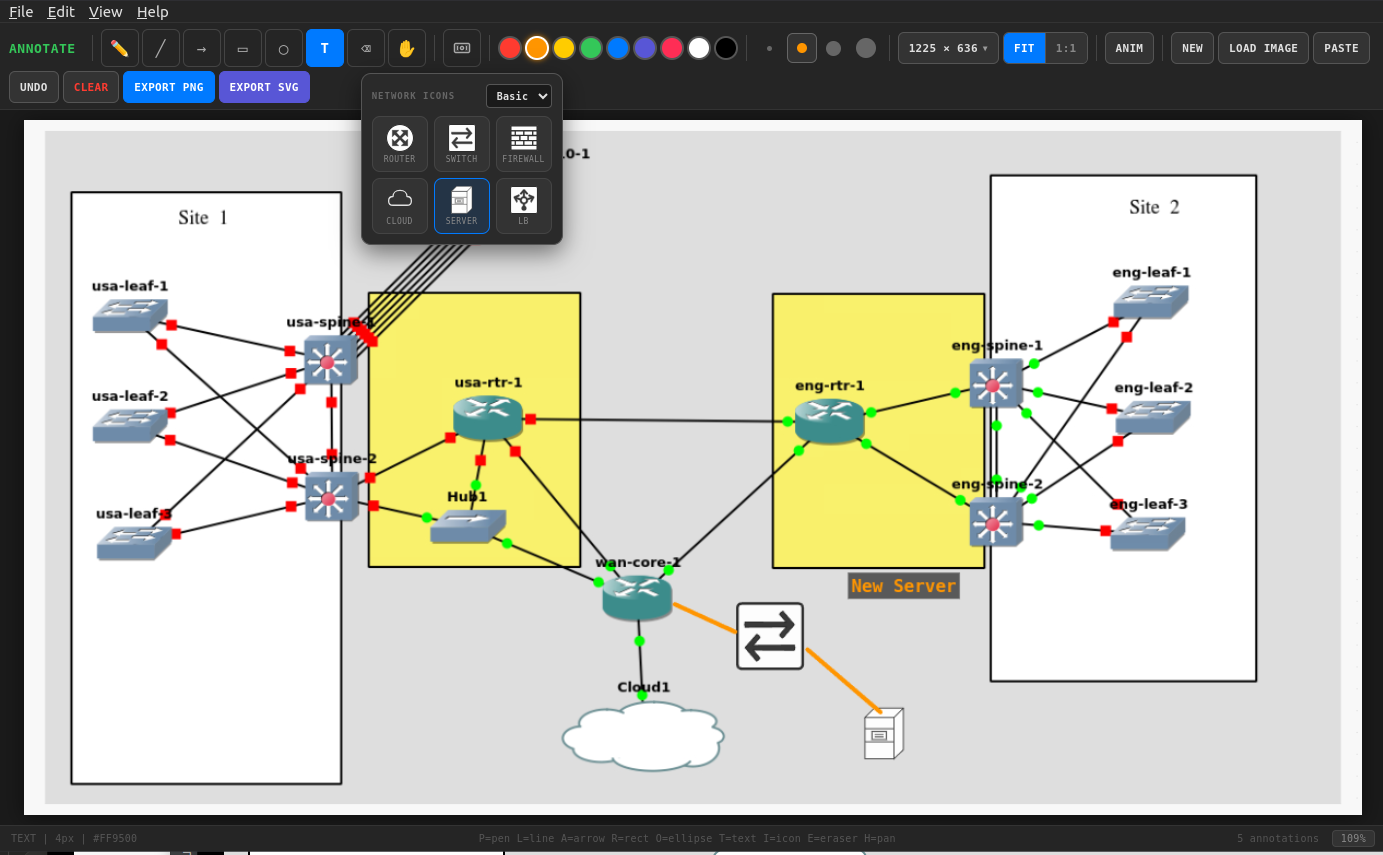
Network Annotation Whiteboard — a lightweight desktop tool for annotating network topology diagrams and screenshots with pen, lines, arrows, shapes, text labels, and drag-and-drop network icons.
Built with PyQt6 + QWebEngine. Zero CDN dependencies. Fully offline.
Install
pip install pywboard
Or from source:
git clone https://github.com/scottpeterman/pywboard.git
cd pywboard
pip install -e .
Requirements
- Python 3.9+
- PyQt6 >= 6.5
- PyQt6-WebEngine >= 6.5
Usage
# Launch empty canvas
pywboard

# Open with a topology image
pywboard topology.png

# Module execution
python -m pywboard
python -m pywboard screenshot.png
Features
Drawing Tools
| Tool | Key | Description |
|---|---|---|
| Pen | P |
Freehand drawing |
| Line | L |
Straight lines |
| Arrow | A |
Directional arrows |
| Rectangle | R |
Rectangles and boxes |
| Ellipse | O |
Ellipses and circles |
| Text | T |
Click to place text labels |
| Icon | I |
Place network device icons |
| Eraser | E |
Remove annotations |
| Pan | H |
Move the background image |
Network Icons
Place standard network device icons directly onto the canvas. Select an icon type from the palette, then click to place it. Icons can be selected, dragged, resized, copied, and deleted.
Icon Sets — switch between icon sets using the dropdown in the icon palette:
- Basic — simple geometric icons (router, switch, firewall, cloud, server, LB)
- Cisco — classic Cisco-style topology icons (router, L2 switch, L3 switch, firewall, cloud, server, LB)
Icon manipulation:
- Click on an existing icon to select it
- Drag a selected icon to reposition
- Corner handle to resize (visible grab handle on the bottom-right corner)
Ctrl+C/Ctrl+Vto copy and paste icons (pastes with a diagonal offset for rapid duplication)Deleteto remove the selected icon
Animation
Select an icon and click ANIM to assign an animation effect. Animations are embedded in SVG exports.
| Animation | Effect |
|---|---|
| Pulse | Smooth scale breathing |
| Rotate | Continuous 360° rotation |
| Blink | Opacity fade in/out |
| Traffic Flow | Horizontal slide loop |
Export
- Export PNG — full-resolution rasterized output with all annotations composited onto the background
- Export SVG — vector output with embedded CSS animations, suitable for embedding in documentation or web pages
Canvas Sizes
Preset sizes from the toolbar dropdown:
- XGA — 1024 × 768
- Full HD — 1920 × 1080
- QHD — 2560 × 1440
- 4K UHD — 3840 × 2160
- Large Topo — 2400 × 1600
- XL Topo — 3200 × 2400
- XXL Topo — 4000 × 3000
- Custom — up to 8000 × 8000
View Modes
- FIT — scales canvas to fit the window (default)
- 1:1 — actual pixel size with scroll navigation
Toggle with F key, or Ctrl+0 (fit) / Ctrl+1 (actual size).
Keyboard Shortcuts
| Shortcut | Action |
|---|---|
Ctrl+C |
Copy selected annotation |
Ctrl+V |
Paste annotation / paste image from clipboard |
Ctrl+Z |
Undo last annotation |
Ctrl+N |
New canvas (reset all) |
Ctrl+O |
Open image (native dialog) |
Ctrl+Shift+S |
Export PNG (native save dialog) |
Ctrl+Q |
Quit |
Ctrl+0 |
Fit to window |
Ctrl+1 |
Actual size (1:1) |
Delete |
Remove selected icon |
F |
Toggle FIT / 1:1 |
Other Features
- Drag & drop images onto the canvas
- 12 colors with 4 stroke widths
- Native file dialogs for open/save (via PyQt6 bridge)
- Dark theme throughout — toolbar, menus, scrollbars
Extending Icon Sets
Icon sets are self-contained JavaScript files that register with window.registerIconSet(). Each icon is a function returning an SVG string:
window.registerIconSet("myvendor", "My Vendor", {
  router: {
    label: "Router",
    svg: function(color, size) {
      return '<svg xmlns="http://www.w3.org/2000/svg" viewBox="0 0 64 64">...</svg>';
    }
  }
});
Place icon set .js files in pywboard/assets/icons/ and they are loaded automatically. Internal SVG id attributes should be namespaced per icon to prevent DOM collisions when multiple icons are rendered on the same page.
Architecture
pywboard/
├── pyproject.toml
├── README.md
├── LICENSE
└── pywboard/
    ├── __init__.py
    ├── __main__.py          # python -m pywboard
    ├── app.py               # PyQt6 QWebEngineView wrapper
    └── assets/
        ├── annotate.html    # Self-contained HTML/CSS/JS canvas app
        └── icons/
            ├── basic.js     # Basic geometric icon set
            └── cisco.js     # Cisco-style topology icons
The HTML annotation engine is entirely self-contained — no external fonts, no CDN JavaScript, no build step. The PyQt6 wrapper adds native file dialogs, menu bar, CLI image loading, and dark window chrome via a QWebChannel bridge.
The HTML also works standalone in any browser for quick use without Python.
License
GPLv3
1 maintainer

Metadata
1 maintainer
Release files for pywboard 0.2.1
For a detailed explanation of source distributions (sdists) and built distributions (wheels), please see the package formats documentation.
Source distribution (sdist)
| File | Size | Uploaded | |
|---|---|---|---|
| pywboard-0.2.1.tar.gz | 44.7 kB | Details |
Built distribution (wheel)
| File | Interpreter | ABI | Platform | Reset |
|---|---|---|---|---|
| pywboard-0.2.1-py3-none-any.whl | Python 3 | none | any | Details |
Total release size: 88.7 kB
Release files / pywboard-0.2.1.tar.gz
| Download URL | pywboard-0.2.1.tar.gz |
|---|---|
| Size | 44.7 kB |
| Tags | Source |
|
SHA-256 checksum How to use checksums |
972b0e8c03055adcd1160d34dcca27cf6c4f21969fa20294215c953c2565eff8
|
|
BLAKE2b-256 checksum How to use checksums |
033034e5614337a5c73e7c50a42fa029f3c002854e5a385e7841d57142e4dcc3
|
| Upload date | |
|
Uploaded using Trusted Publishing? What is trusted publishing? |
No |
| Uploaded via |
twine/6.2.0 CPython/3.10.12
|
Release files / pywboard-0.2.1-py3-none-any.whl
| Download URL | pywboard-0.2.1-py3-none-any.whl |
|---|---|
| Size | 44.0 kB |
| Tags | Python 3 |
|
SHA-256 checksum How to use checksums |
03b8654ceaf1c238642b814a9092c505fcb0a2f4a4f0fcdf9c85dfaffd4db715
|
|
BLAKE2b-256 checksum How to use checksums |
456e7388a2d19c72f6e81b511ba0b63d7f7045c3fc64442c943915bfdfa47615
|
| Upload date | |
|
Uploaded using Trusted Publishing? What is trusted publishing? |
No |
| Uploaded via |
twine/6.2.0 CPython/3.10.12
|














