
Simple Annotation Whiteboard — pen, line, arrow, and text annotation for topology diagrams

Project description
pywboard
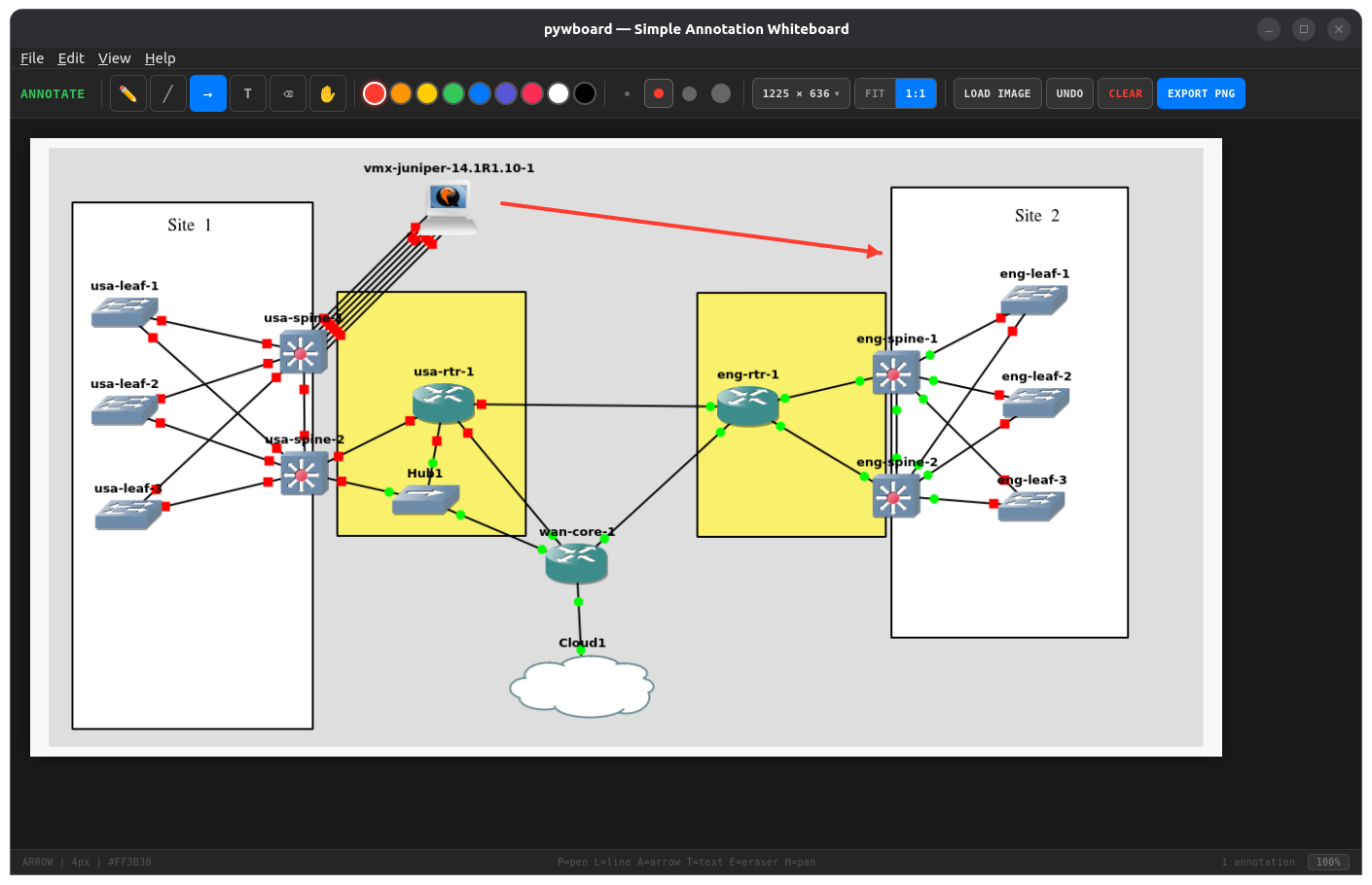
Simple Annotation Whiteboard — a lightweight desktop tool for annotating network topology diagrams and screenshots with pen, lines, arrows, and text labels.
Built with PyQt6 + QWebEngine. Zero CDN dependencies. Fully offline.
Install
pip install pywboard
Or from source:
git clone https://github.com/scottpeterman/pywboard.git
cd pywboard
pip install -e .
Requirements
- Python 3.9+
- PyQt6 >= 6.5
- PyQt6-WebEngine >= 6.5
Usage
# Launch empty canvas
pywboard

# Open with a topology image
pywboard topology.png

# Module execution
python -m pywboard
python -m pywboard screenshot.png
Features
Drawing Tools
| Tool | Key | Description |
|---|---|---|
| Pen | P |
Freehand drawing |
| Line | L |
Straight lines |
| Arrow | A |
Directional arrows |
| Text | T |
Click to place text labels |
| Eraser | E |
Remove annotations |
| Pan | H |
Move the background image |
Canvas Sizes
Preset sizes from the toolbar dropdown:
- XGA — 1024 × 768
- Full HD — 1920 × 1080
- QHD — 2560 × 1440
- 4K UHD — 3840 × 2160
- Large Topo — 2400 × 1600
- XL Topo — 3200 × 2400
- XXL Topo — 4000 × 3000
- Custom — up to 8000 × 8000
View Modes
- FIT — scales canvas to fit the window (default)
- 1:1 — actual pixel size with scroll navigation
Toggle with F key, or Ctrl+0 (fit) / Ctrl+1 (actual size).
Keyboard Shortcuts
| Shortcut | Action |
|---|---|
Ctrl+O |
Open image (native dialog) |
Ctrl+Shift+S |
Export PNG (native save dialog) |
Ctrl+Z |
Undo last annotation |
Ctrl+Q |
Quit |
Ctrl+0 |
Fit to window |
Ctrl+1 |
Actual size (1:1) |
F |
Toggle FIT / 1:1 |
Other Features
- Drag & drop images onto the canvas
- 9 colors with 4 stroke widths
- Native file dialogs for open/save (via PyQt6 bridge)
- Dark theme throughout — toolbar, menus, scrollbars
- Export full-resolution annotated PNG
Architecture
pywboard/
├── pyproject.toml
├── README.md
├── LICENSE
└── pywboard/
    ├── __init__.py
    ├── __main__.py          # python -m pywboard
    ├── app.py               # PyQt6 QWebEngineView wrapper
    └── assets/
        └── annotate.html    # Self-contained HTML/CSS/JS canvas app
The HTML annotation engine is entirely self-contained — no external fonts, no CDN JavaScript, no build step. The PyQt6 wrapper adds native file dialogs, menu bar, CLI image loading, and dark window chrome via a QWebChannel bridge.
The HTML also works standalone in any browser for quick use without Python.
License
MIT


Download files
Download the file for your platform. If you're not sure which to choose, learn more about installing packages.
Source Distribution
Built Distribution
Filter files by name, interpreter, ABI, and platform.
If you're not sure about the file name format, learn more about wheel file names.
Copy a direct link to the current filters
File details
Details for the file pywboard-0.1.1.tar.gz.
File metadata
- Download URL: pywboard-0.1.1.tar.gz
- Upload date:
- Size: 17.5 kB
- Tags: Source
- Uploaded using Trusted Publishing? No
- Uploaded via: twine/6.2.0 CPython/3.10.12
File hashes
| Algorithm | Hash digest | |
|---|---|---|
| SHA256 |
519ea4c5abf211fbe0076f8e864b78115e967cc5aebee86bbbf97699b830756e
|
|
| MD5 |
63c74fb5066e376c3acf1fba7ef7c235
|
|
| BLAKE2b-256 |
d4c20a0f081be0f3f3a3f76b3ddbb07b27cf8440586b2b088751ca1bbc8cabc8
|
File details
Details for the file pywboard-0.1.1-py3-none-any.whl.
File metadata
- Download URL: pywboard-0.1.1-py3-none-any.whl
- Upload date:
- Size: 16.7 kB
- Tags: Python 3
- Uploaded using Trusted Publishing? No
- Uploaded via: twine/6.2.0 CPython/3.10.12
File hashes
| Algorithm | Hash digest | |
|---|---|---|
| SHA256 |
1b621c268d53feed84480362fa5f6e0198178122896cb933e377fb907141867e
|
|
| MD5 |
9208a89fc88c17f5298b38751573bfcf
|
|
| BLAKE2b-256 |
7a2d520c42413dc44816a1038ca35a16048296c9545d6e58cca9773997a5e064
|






