
pywget




A robust, resumable, multi-connection command-line downloader and Python library.
A drop-in-style wget alternative with zero third-party dependencies.
Features
| Area | What you get |
|---|---|
| Speed | Parallel segmented download (-n 1..32), automatic single-stream fallback |
| Reliability | Crash-safe resume, retries with exponential backoff + jitter, Retry-After, atomic rename |
| Integrity | --checksum sha256:..., size verification, disk-space pre-check |
| Security | http/https only, credentials stripped on cross-origin redirects, path-traversal-proof filenames, TLS verification on by default |
| Control | Bandwidth limit, custom headers, basic auth, proxy, custom CA, timeouts |
| Automation | Batch input (-i), --json output, stable exit codes, SIGINT/SIGTERM-safe |
| Server mode | pywget serve: persistent queue, HTTP/JSON API, SSE events, web UI, token auth |
| Agent mode | pywget agent / --server: send links from anywhere; offline-tolerant relay to a server |
| Library | Typed API, progress callbacks, cancel support, legacy wget.download() kept |
| Portability | Python 3.8+, Windows / Linux / macOS, no dependencies |
Installation
pip install pywget
v2 note: Python 2 is no longer supported. Python 3.8+ is required. The CLI and
wget.download(url, dir)keep working as before.
Quick start
# simple download into a directory (same as before)
pywget "https://example.com/file.iso" -p ~/Downloads

# 8 parallel connections, 2 MiB/s cap, verify checksum
pywget https://example.com/file.iso -n 8 --limit-rate 2M --checksum sha256:<hex>

# many URLs from a file (or stdin with -i -), JSON report
pywget -i urls.txt -p downloads --json

# auth + custom header
pywget https://api.example.com/export.zip --user me -H "Accept: application/zip"
# download manager mode: run a server, push links to it (see "Server mode and agent")
pywget serve --root ~/Downloads/pywget &
pywget send https://example.com/file.iso -r https://example.com/ --wait
pywget jobs list
pywget jobs watch                     # live status (polling)
Interrupted (Ctrl+C, crash, network loss)? Run the same command again - it resumes.
CLI reference
| Option | Description |
|---|---|
URL ... |
http(s) URLs, c = read links from the clipboard, or a text file of links |
-i, --input-file FILE |
Read URLs from file (- = stdin); # comments allowed |
-p, -P, --path DIR |
Download directory (default .) |
-O, --output NAME |
Output file name (single URL) |
-n, --connections N |
Parallel connections per file, 1-32 (default 4) |
-t, --retries N |
Retries per request/segment (default 5) |
-r, --referrer URL |
Referer header (many sites require it) |
-C, --cookie STR |
Cookie string a=b; c=d or JSON object |
-T, --timeout SEC |
Network timeout (default 30) |
--limit-rate RATE |
Total speed cap, e.g. 500k, 2M |
-H, --header 'K: V' |
Extra header (repeatable) |
-U, -ua, --user-agent UA |
Custom User-Agent |
--user, --password |
Basic auth (password also from PYWGET_PASSWORD or prompt) |
--proxy URL |
Proxy (default: environment) |
--no-check-certificate |
Disable TLS verification (not recommended) |
--ca-cert FILE |
Custom CA bundle |
--checksum ALGO:HEX |
Verify result (md5, sha1, sha256, sha512, ...) |
--overwrite |
Replace existing file and restart |
--no-resume |
Never resume partial files |
--no-mtime |
Do not copy Last-Modified to the file |
-q, -v |
Quiet / debug logging |
--json |
Machine-readable results on stdout |
-c |
Accepted for wget compatibility (resume is default) |
-s, --server URL |
Send the links to a pywget server/agent instead of downloading locally |
--token TOKEN |
API token for --server (default: $PYWGET_TOKEN or token file) |
-a, --add-only |
With --server: queue paused, do not start (like IDM's add) |
--wait |
With --server: wait for the jobs to finish |
Exit codes
| Code | Meaning |
|---|---|
| 0 | Success |
| 1 | Unexpected error |
| 2 | Bad usage / invalid URL |
| 3 | Network error |
| 4 | HTTP error status (404, 403, ...) |
| 5 | Checksum mismatch |
| 6 | Storage / I/O error (disk full, permissions) |
| 7 | Server / agent error (unreachable, 401, 409, ...) |
| 130 | Interrupted (partial data kept for resume) |
Python API
import pywget

path = pywget.download(
    "https://example.com/file.iso",
    "/data/downloads",
    progress=True,          # terminal bar
    connections=8,
    limit_rate="5M",
    checksum="sha256:ab12...",
)
print(path)
Full control:
from pywget import Downloader, Options, ProgressInfo

def on_progress(p: ProgressInfo) -> None:
    print(f"{p.filename}: {p.percent or 0:.1f}%  {p.speed/1e6:.1f} MB/s  ETA {p.eta}")

dl = Downloader(Options(output_dir="out", retries=8, progress=on_progress,
                        headers={"Authorization": "Bearer TOKEN"}))
result = dl.fetch("https://example.com/big.bin")
print(result.path, result.size, result.resumed, result.connections)

# from another thread: dl.cancel()  -> partial state is kept for resume
Talk to a server / agent, or embed one:
from pywget import ServerClient, ServerConfig, ServerHandle

client = ServerClient("http://127.0.0.1:8765")      # token: $PYWGET_TOKEN or token file
job = client.submit({"url": "https://example.com/f.iso", "path": "isos"})[0]
print(client.wait(job["id"])["status"])

cfg = ServerConfig(port=0, token="secret-token", root="/srv/dl", state_dir="/var/lib/pywget")
with ServerHandle(cfg) as server:                    # background server (tests, embedding)
    print(server.url)
Legacy API (unchanged):
from pywget import wget

wget.download("http://www.test.com/test.tar.gz", "/home/root/Downloads")
Errors derive from pywget.PywgetError (InvalidURLError, NetworkError,
HTTPStatusError, ChecksumError, StorageError, DownloadCancelled).
A Downloader runs one download at a time - use one instance per thread.
Configuration and API token
Config file (optional)
There is no config file unless you create one; every option also has a command-line flag.
pywget config path     # where it lives
pywget config init     # write a fully commented template there (mode 0600)
pywget config show
| OS | Default location |
|---|---|
| Windows | %APPDATA%\pywget\config.ini |
| Linux / macOS | ~/.config/pywget/config.ini ($XDG_CONFIG_HOME respected) |
Override the directory with PYWGET_CONFIG_DIR or the file with PYWGET_CONFIG.
Precedence: command line > environment > config file > built-in defaults.
Sections: [download], [client], [serve], [agent] (the generated template lists every key).
Unknown keys or bad values are reported with the file path and exit code 2.
[serve]
root = C:\DOWNLOADS
max_jobs = 3
connections = 2

[client]
server = http://127.0.0.1:8765
Job queue state lives in <config dir>/server/jobs.json (agent/ for an agent); change it with state_dir.
API token
The server and agent always require a token.
- Default: on the first
pywget serve/pywget agenta random 256-bit token is generated and saved to<config dir>/token(mode 0600). It is reused on every start, and localsend/jobscommands read it automatically. - Show / create / set:
pywget token show            # print the current token and where it comes from
pywget token new             # generate and save a new one (restart the server afterwards)
pywget token set "my-own-secret-123"   # or: echo -n ... | pywget token set -
pywget token path
- Override order:
--token>$PYWGET_TOKEN> token file. - Format: not arbitrary text - 16 to 256 characters from
A-Z a-z 0-9 . _ ~ + / = -(safe inside an HTTP header). Weak or malformed tokens are rejected at startup. - Remote clients: copy the token to the other machine (
pywget token set -there, orexport PYWGET_TOKEN=...).
Server mode and agent
Run pywget as a long-lived download manager and push links to it from anywhere - the same idea as handing a link to IDM, but over a small authenticated HTTP API.
# 1. start the server (jobs may only write below --root)
pywget serve --root ~/Downloads/pywget            # http://127.0.0.1:8765, token auto-created

# 2. send links (token is read from the token file on the same machine)
pywget send https://example.com/a.iso -p isos -r https://example.com/ --wait
pywget https://example.com/b.zip --server http://127.0.0.1:8765      # same, legacy form
pywget send c                      # links found in the clipboard
pywget send links.txt -a           # a text file of links, queued paused (add only)

# 3. manage
pywget jobs list
pywget jobs pause|resume|cancel|retry|remove <id>
Open http://127.0.0.1:8765/ for the web UI (paste the token once).
Agent (relay)
An agent is a tiny server that does not download: it accepts links on a local port and forwards them to an upstream server, keeping them in a persistent outbox when the upstream is offline and mirroring progress back. Put it on the machine where links appear (laptop, browser helper script) and let a server/NAS do the downloading.
# on the download box
pywget serve --host 0.0.0.0 --root /srv/downloads --tls-cert c.pem --tls-key k.pem

# on your workstation
pywget agent --upstream https://nas:8765 --upstream-token <TOKEN> --port 8766
pywget send https://example.com/file.iso --server http://127.0.0.1:8766 --wait
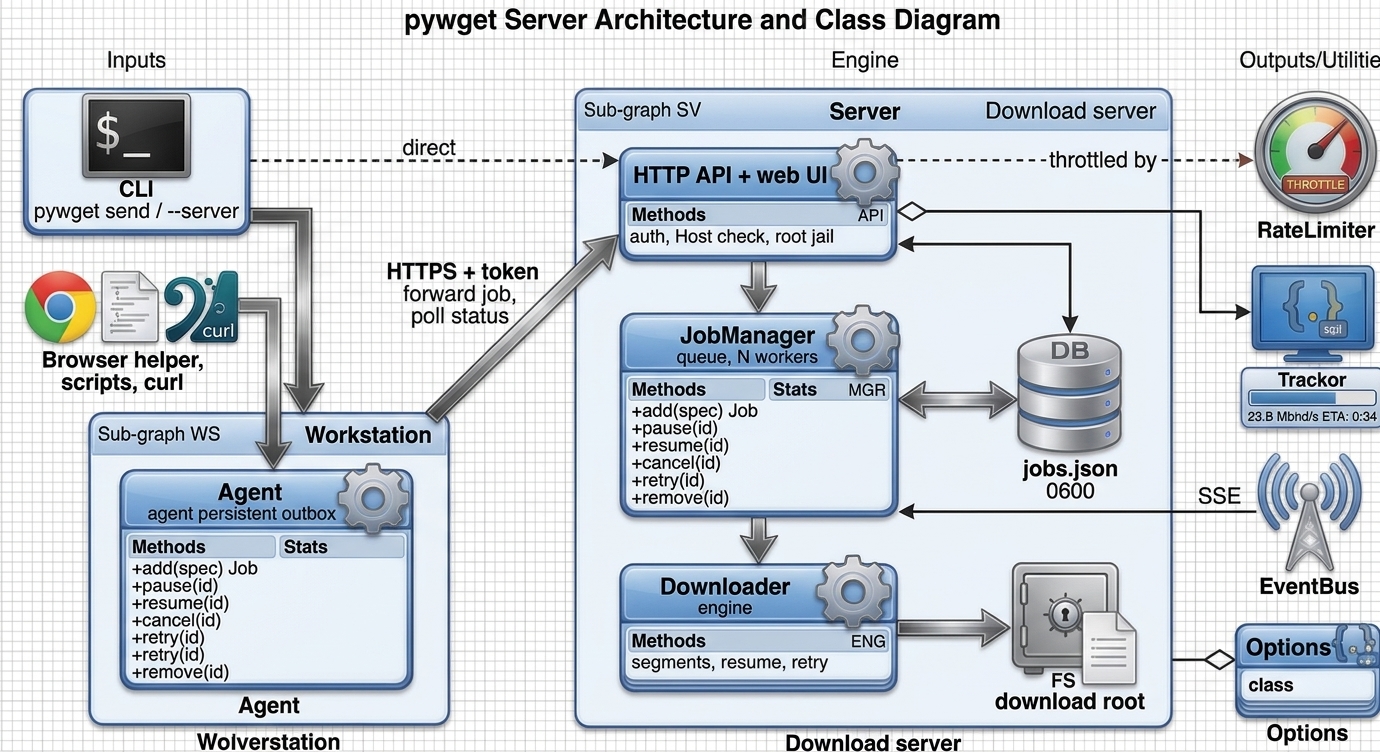
System overview
flowchart LR
    CLI["pywget send / --server"] --> AG
    BR["Browser helper,<br/>scripts, curl"] --> AG
    subgraph WS["Workstation"]
        AG["Agent<br/>pywget agent<br/>persistent outbox"]
    end
    AG -- "HTTPS + token<br/>forward job, poll status" --> API
    CLI -. "direct" .-> API
    subgraph SV["Download server"]
        API["HTTP API + web UI<br/>auth, Host check, root jail"] --> MGR["JobManager<br/>queue, N workers"]
        MGR --> ENG["Downloader engine<br/>segments, resume, retry"]
        MGR <--> ST[("jobs.json<br/>0600")]
        ENG --> FS[("download root")]
    end
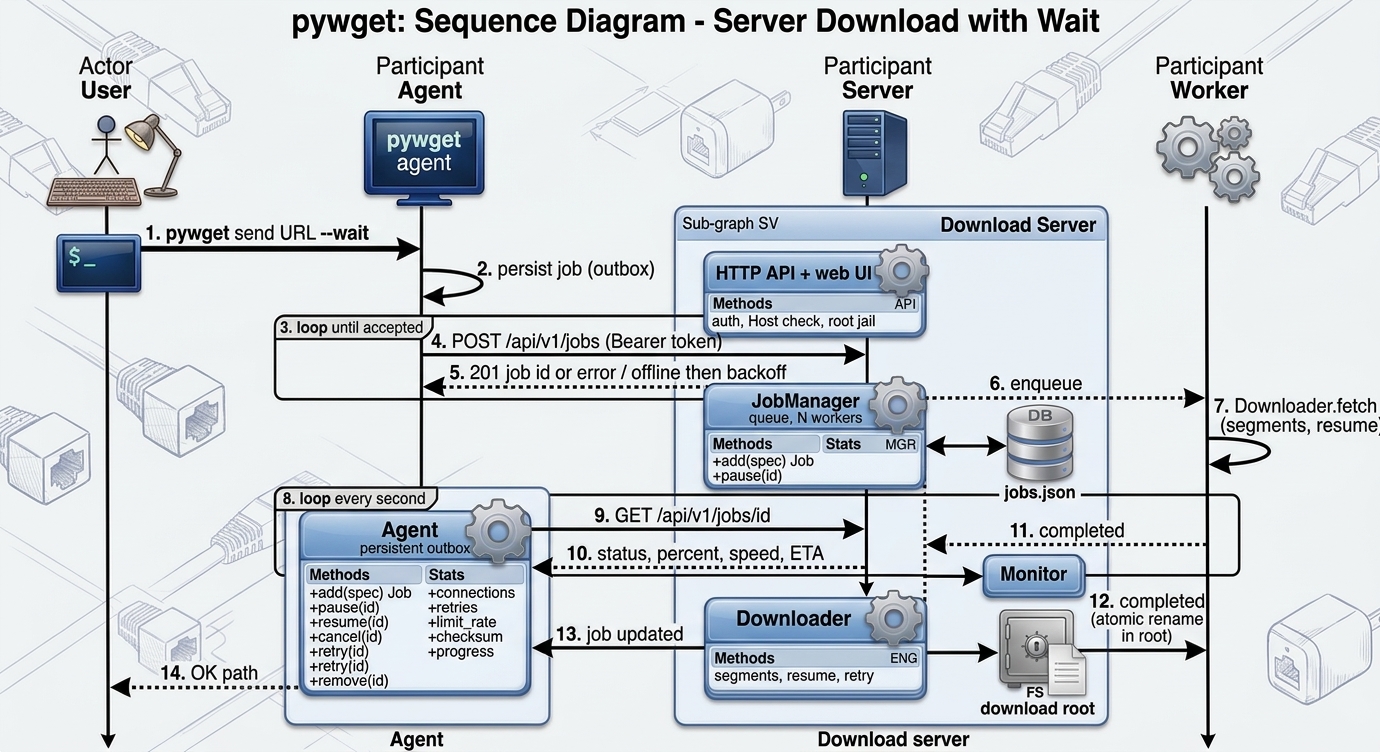
Job flow
sequenceDiagram
    autonumber
    actor U as User
    participant A as Agent
    participant S as Server
    participant W as Worker
    U->>A: pywget send URL --wait
    A->>A: persist job (outbox)
    loop until accepted
        A->>S: POST /api/v1/jobs (Bearer token)
        S-->>A: 201 job id or error / offline then backoff
    end
    S->>W: enqueue
    W->>W: Downloader.fetch (segments, resume)
    loop every second
        A->>S: GET /api/v1/jobs/id
        S-->>A: status, percent, speed, ETA
    end
    W-->>S: completed (atomic rename in root)
    A-->>U: OK path
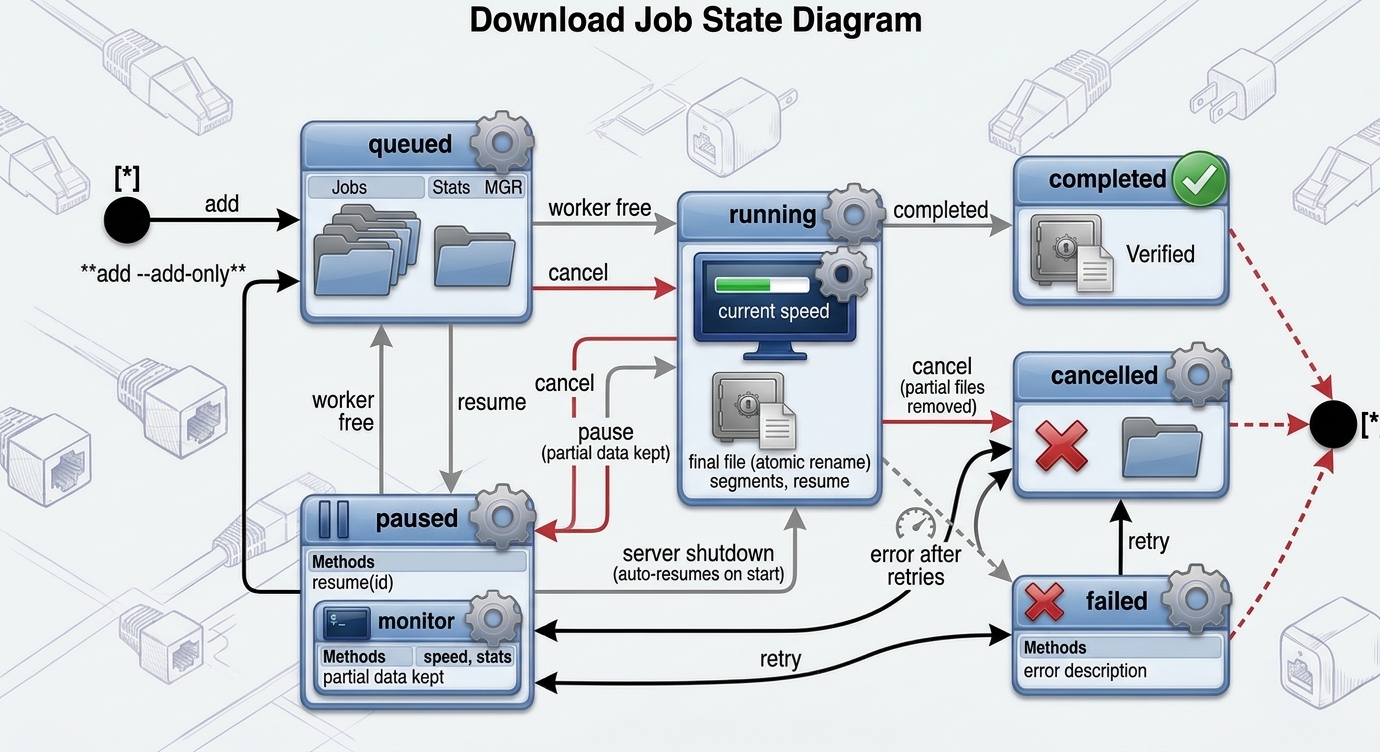
Job states
stateDiagram-v2
    [*] --> queued: add
    [*] --> paused: add --add-only
    queued --> running: worker free
    running --> paused: pause (partial data kept)
    paused --> queued: resume
    running --> completed
    running --> failed: error after retries
    running --> cancelled: cancel (partial files removed)
    queued --> cancelled
    paused --> cancelled
    failed --> queued: retry
    cancelled --> queued: retry
    running --> queued: server shutdown (auto-resumes on start)
    completed --> [*]: remove
    failed --> [*]: remove
    cancelled --> [*]: remove
HTTP API
All /api/v1/* calls need Authorization: Bearer <token> (or X-Pywget-Token).
| Method and path | Purpose |
|---|---|
GET /health |
Liveness, version, mode (no auth) |
GET / |
Web UI (no auth, token entered in the page) |
POST /api/v1/jobs |
Create job(s): a job object, {"urls": [...], ...common} or {"jobs": [...]} |
GET /api/v1/jobs[?status=] |
List jobs |
GET /api/v1/jobs/{id} |
One job (secrets are never returned) |
POST /api/v1/jobs/{id}/pause|resume|cancel|retry |
Control a job |
DELETE /api/v1/jobs/{id} |
Remove a finished job record |
GET /api/v1/stats |
Counts, total speed |
GET /api/v1/events |
Server-sent events (event: job) |
Job fields: url, filename, path (folder below the root), referrer, cookie
(string or object), headers, user_agent, username, password, connections,
checksum, limit_rate, overwrite, add_only.
curl -s -H "Authorization: Bearer $(cat ~/.config/pywget/token)" \
     -d '{"url":"https://example.com/f.iso","path":"isos","referrer":"https://example.com/"}' \
     http://127.0.0.1:8765/api/v1/jobs
Polling job status
A job moves queued -> running -> completed | failed | cancelled (or paused). There are four ways to follow it:
| Method | Use it when |
|---|---|
pywget send ... --wait |
one-off: send and block until done |
pywget jobs watch [ID ...] |
live view in a terminal (--json = one JSON object per line, exit code 1 if any job failed) |
ServerClient.wait / wait_all / watch |
Python code that polls for you |
GET /api/v1/jobs/{id} in a loop |
any language / curl |
ServerClient.events() or GET /api/v1/events |
push (server-sent events) instead of polling |
pywget jobs watch                      # all jobs, ends when nothing is queued or running
pywget jobs watch 78e2a219f26f --interval 0.5 --timeout 3600
Python (library):
from pywget import ServerClient

client = ServerClient("http://127.0.0.1:8765")      # token: $PYWGET_TOKEN or the token file
job = client.submit({"url": "https://example.com/big.iso", "path": "isos"})[0]

# 1) live progress - yields whenever status / percent / error changes
for j in client.watch([job["id"]], interval=0.5):
    print(f'{j["status"]:<9} {j["percent"] or 0:5.1f}%  {j["speed"] / 1e6:4.1f} MB/s  ETA {j["eta"]}')

# 2) block until one job is finished (raises ServerError on timeout)
final = client.wait(job["id"], interval=1.0, timeout=3600)
print(final["status"], final["result_path"])

# 3) many jobs at once
jobs = client.submit({"urls": ["https://example.com/a.iso", "https://example.com/b.iso"], "path": "isos"})
finals = client.wait_all([j["id"] for j in jobs], interval=1.0)
print("failed:", [j["name"] for j in finals if j["status"] != "completed"])
Plain polling with only the standard library (the same loop works in any language):
import json, time, urllib.request

BASE, TOKEN = "http://127.0.0.1:8765", open("/path/to/token").read().strip()

def call(method, path, body=None):
    request = urllib.request.Request(
        BASE + path, method=method,
        data=json.dumps(body).encode() if body is not None else None,
        headers={"Authorization": f"Bearer {TOKEN}", "Content-Type": "application/json"},
    )
    with urllib.request.urlopen(request, timeout=10) as response:
        return json.load(response)

job = call("POST", "/api/v1/jobs", {"url": "https://example.com/big.iso"})["jobs"][0]
deadline = time.monotonic() + 600
while True:
    job = call("GET", f"/api/v1/jobs/{job['id']}")
    print(job["status"], job["percent"])
    if job["status"] in ("completed", "failed", "cancelled"):
        break
    if time.monotonic() > deadline:
        raise TimeoutError("job still running")
    time.sleep(1)
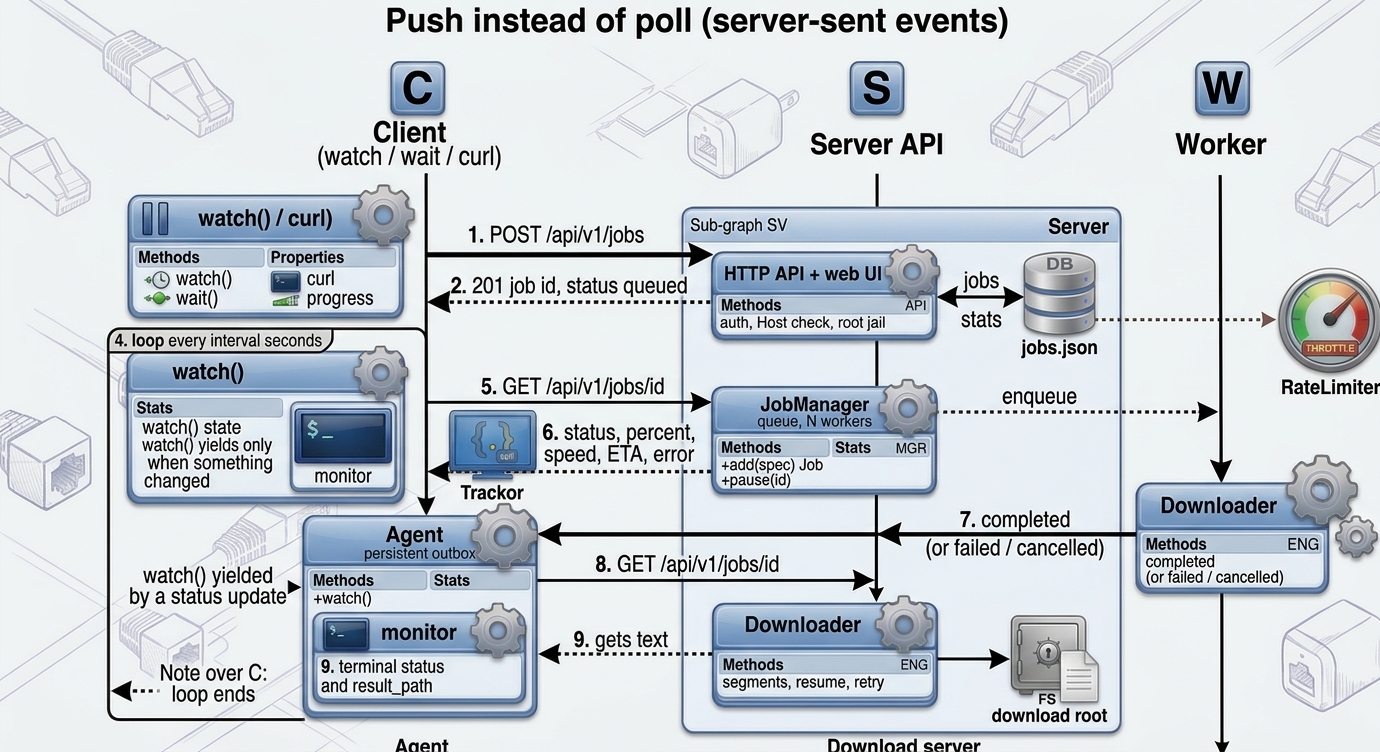
Push instead of poll (server-sent events):
for event in client.events():                       # {"event": "job", "job": {...}}
    job = event["event"] == "job" and event["job"]
    if job and job["status"] in ("completed", "failed", "cancelled"):
        print(job["name"], job["status"])
        break
sequenceDiagram
    autonumber
    participant C as Client (watch / wait / curl)
    participant S as Server API
    participant W as Worker
    C->>S: POST /api/v1/jobs
    S-->>C: 201 job id, status queued
    S->>W: enqueue
    loop every interval seconds
        C->>S: GET /api/v1/jobs/id
        S-->>C: status, percent, speed, ETA, error
        Note over C: watch() yields only when something changed
    end
    W-->>S: completed (or failed / cancelled)
    C->>S: GET /api/v1/jobs/id
    S-->>C: terminal status and result_path
    Note over C: loop ends
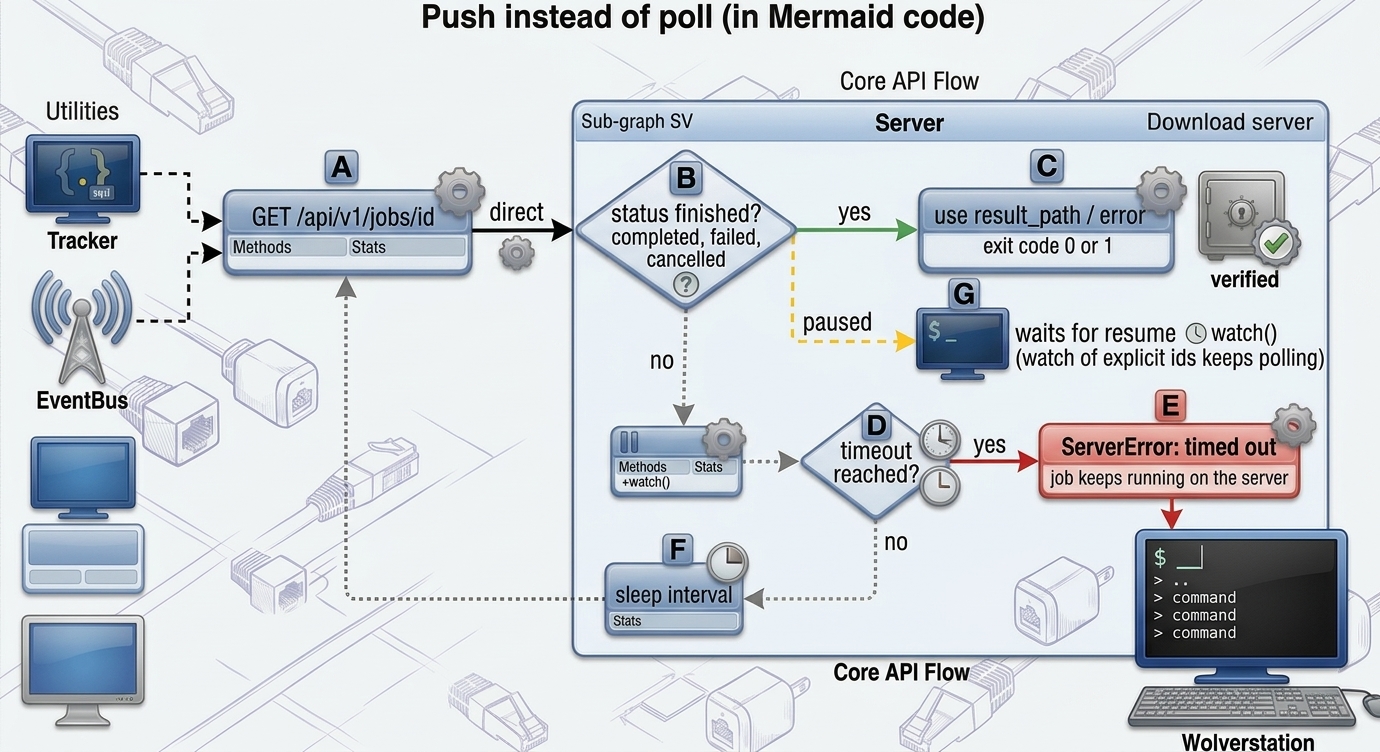
flowchart TD
    A["GET /api/v1/jobs/id"] --> B{"status finished?<br/>completed, failed, cancelled"}
    B -- yes --> C["use result_path / error<br/>exit code 0 or 1"]
    B -- no --> D{"timeout reached?"}
    D -- yes --> E["ServerError: timed out<br/>job keeps running on the server"]
    D -- no --> F["sleep interval"]
    F --> A
    B -- "paused" --> G["waits for resume<br/>(watch of explicit ids keeps polling)"]
    G --> D
Security model
- Token required for every API call; generated once (
tokenfile, mode 0600) or given via--token/$PYWGET_TOKEN; compared in constant time. - Loopback by default. Binding elsewhere prints a warning; use
--tls-cert/--tls-keyor an HTTPS reverse proxy. - Root jail: job
pathcan never leave--root(absolute paths and..are rejected, symlinks resolved). - No CORS and a
Hostheader allow-list (--allowed-host) against DNS-rebinding and drive-by browser requests. --deny-private-networksrefuses URLs resolving to private/loopback/link-local addresses (SSRF guard for exposed servers).- Request bodies capped at 1 MiB; headers checked for CR/LF injection; credentials and cookies are stored in
jobs.json(0600) and never returned by the API. - Not supported: POST-body downloads (IDM
post data), FTP.
How it works
Download engine
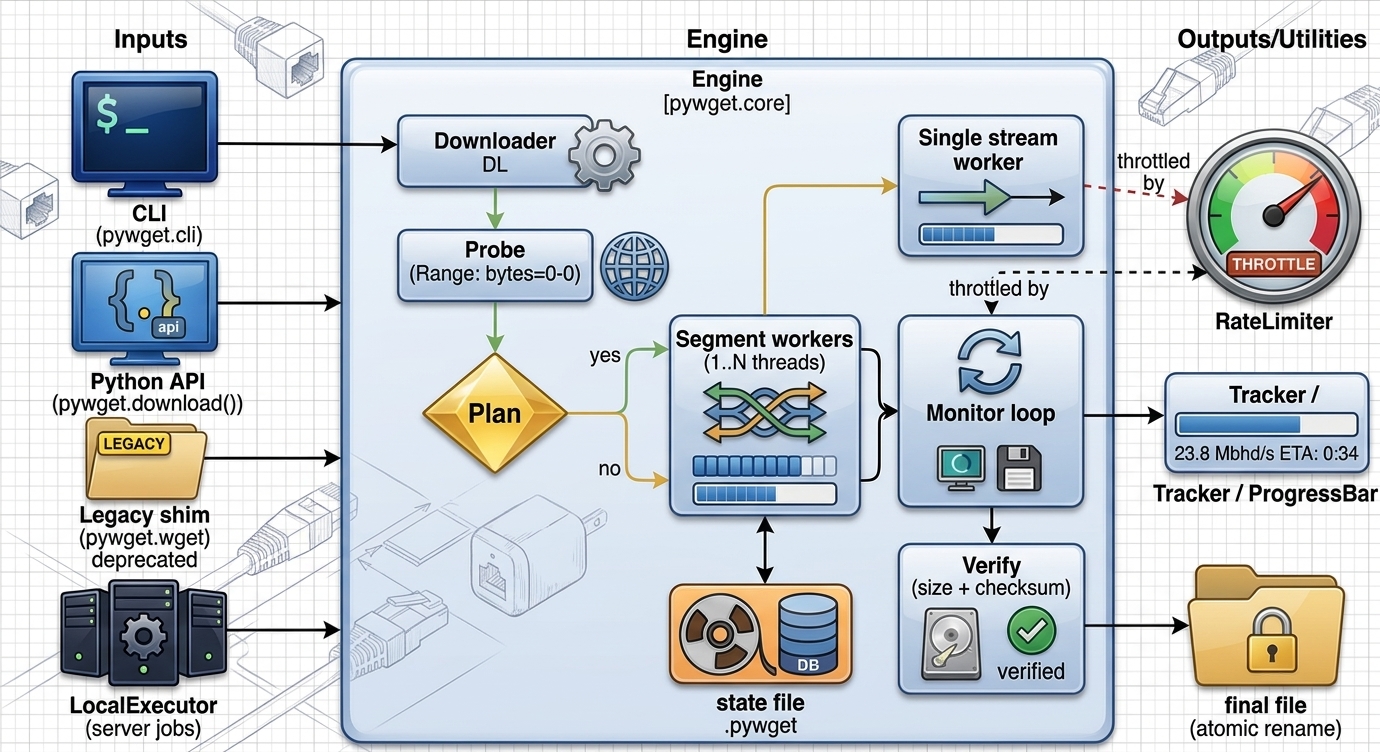
flowchart LR
    CLI["CLI<br/>pywget.cli"] --> DL
    API["Python API<br/>pywget.download()"] --> DL
    LEG["Legacy shim<br/>pywget.wget"] --> DL
    JOB["LocalExecutor<br/>(server jobs)"] --> DL

    subgraph Engine["pywget.core"]
        DL["Downloader"] --> PROBE["Probe<br/>Range: bytes=0-0"]
        PROBE --> PLAN{"Size known and<br/>ranges supported?"}
        PLAN -- yes --> SEG["Segment workers<br/>1..N threads"]
        PLAN -- no --> STR["Single stream<br/>worker"]
        SEG --> MON["Monitor loop<br/>progress + state save"]
        STR --> MON
        MON --> VER["Verify<br/>size + checksum"]
    end

    SEG -. throttled by .-> RL["RateLimiter"]
    STR -. throttled by .-> RL
    MON --> TR["Tracker / ProgressBar"]
    SEG <--> ST[("state file<br/>.pywget")]
    VER --> OUT[("final file<br/>atomic rename")]
Download sequence
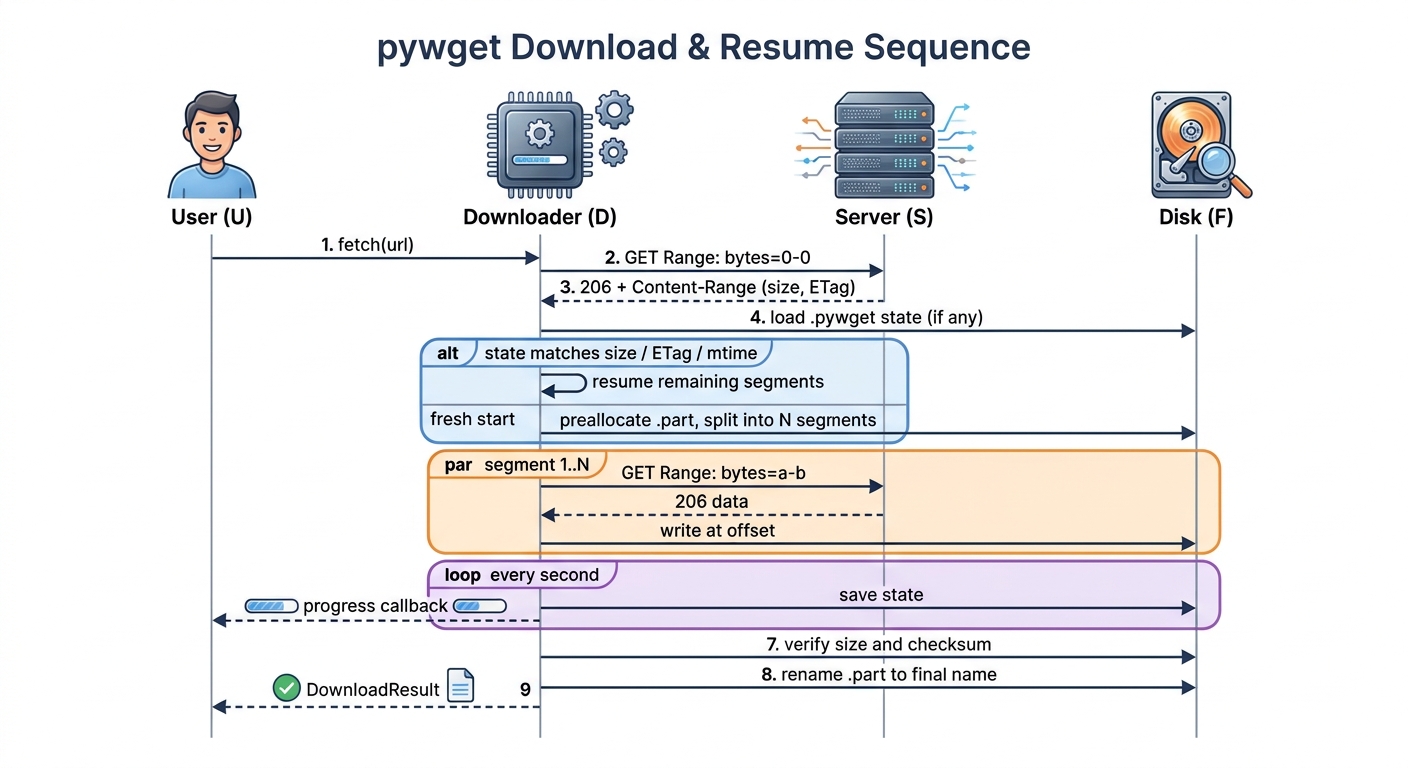
sequenceDiagram
    autonumber
    actor U as User
    participant D as Downloader
    participant S as Server
    participant F as Disk

    U->>D: fetch(url)
    D->>S: GET Range: bytes=0-0
    S-->>D: 206 + Content-Range (size, ETag)
    D->>F: load .pywget state (if any)
    alt state matches size / ETag / mtime
        D->>D: resume remaining segments
    else fresh start
        D->>F: preallocate .part, split into N segments
    end
    par segment 1..N
        D->>S: GET Range: bytes=a-b
        S-->>D: 206 data
        D->>F: write at offset
    end
    loop every second
        D->>F: save state
        D-->>U: progress callback
    end
    D->>F: verify size and checksum
    D->>F: rename .part to final name
    D-->>U: DownloadResult
Segment lifecycle and retries
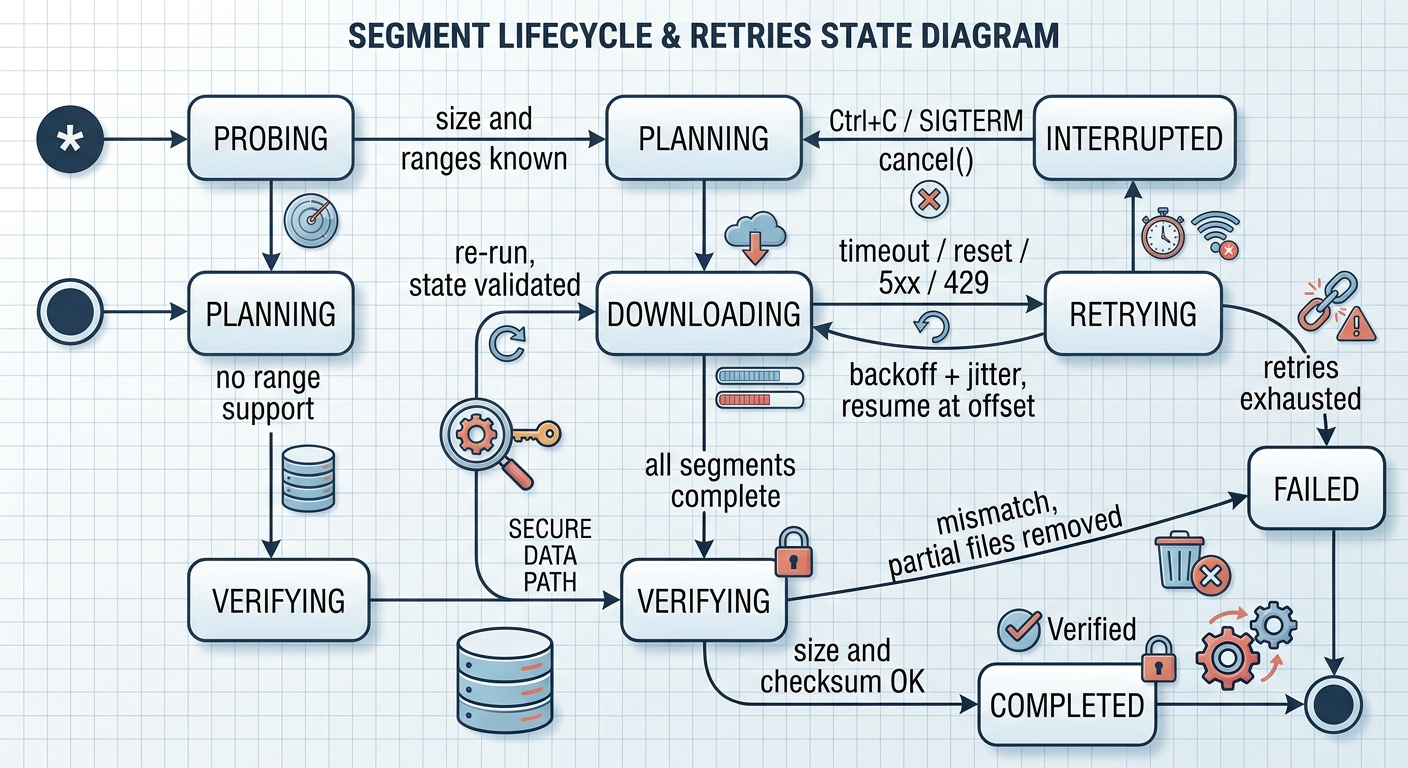
stateDiagram-v2
    [*] --> Probing
    Probing --> Planning: size and ranges known
    Probing --> Streaming: no range support
    Planning --> Downloading
    Streaming --> Verifying
    Downloading --> Retrying: timeout / reset / 5xx / 429
    Retrying --> Downloading: backoff + jitter, resume at offset
    Retrying --> Failed: retries exhausted
    Downloading --> Interrupted: Ctrl+C / SIGTERM / cancel()
    Interrupted --> Planning: re-run, state validated
    Downloading --> Verifying: all segments complete
    Verifying --> Completed: size and checksum OK
    Verifying --> Failed: mismatch, partial files removed
    Completed --> [*]
    Failed --> [*]
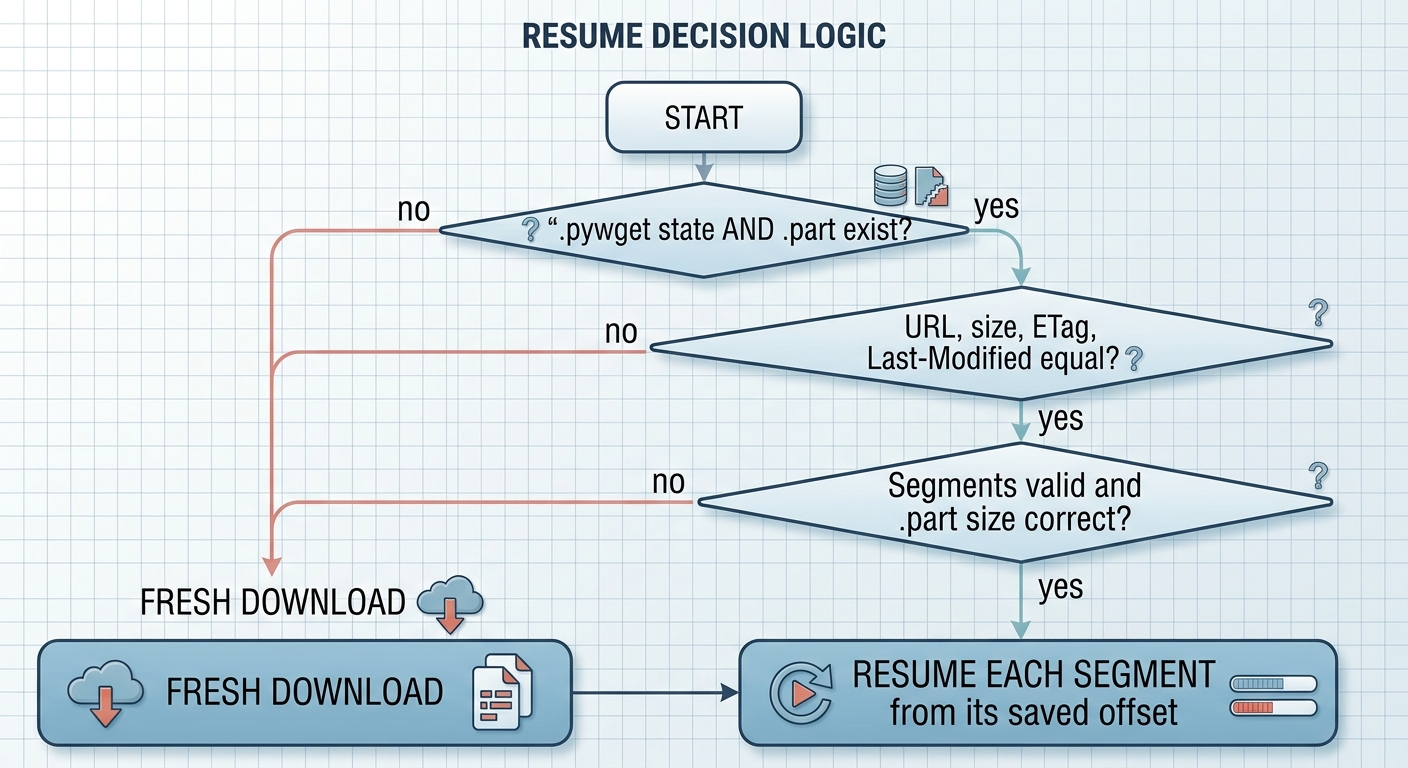
Resume decision
flowchart TD
    A["Start"] --> B{".pywget state<br/>and .part exist?"}
    B -- no --> N["Fresh download"]
    B -- yes --> C{"URL, size, ETag,<br/>Last-Modified equal?"}
    C -- no --> N
    C -- yes --> D{"Segments valid and<br/>.part size correct?"}
    D -- no --> N
    D -- yes --> R["Resume each segment<br/>from its saved offset"]
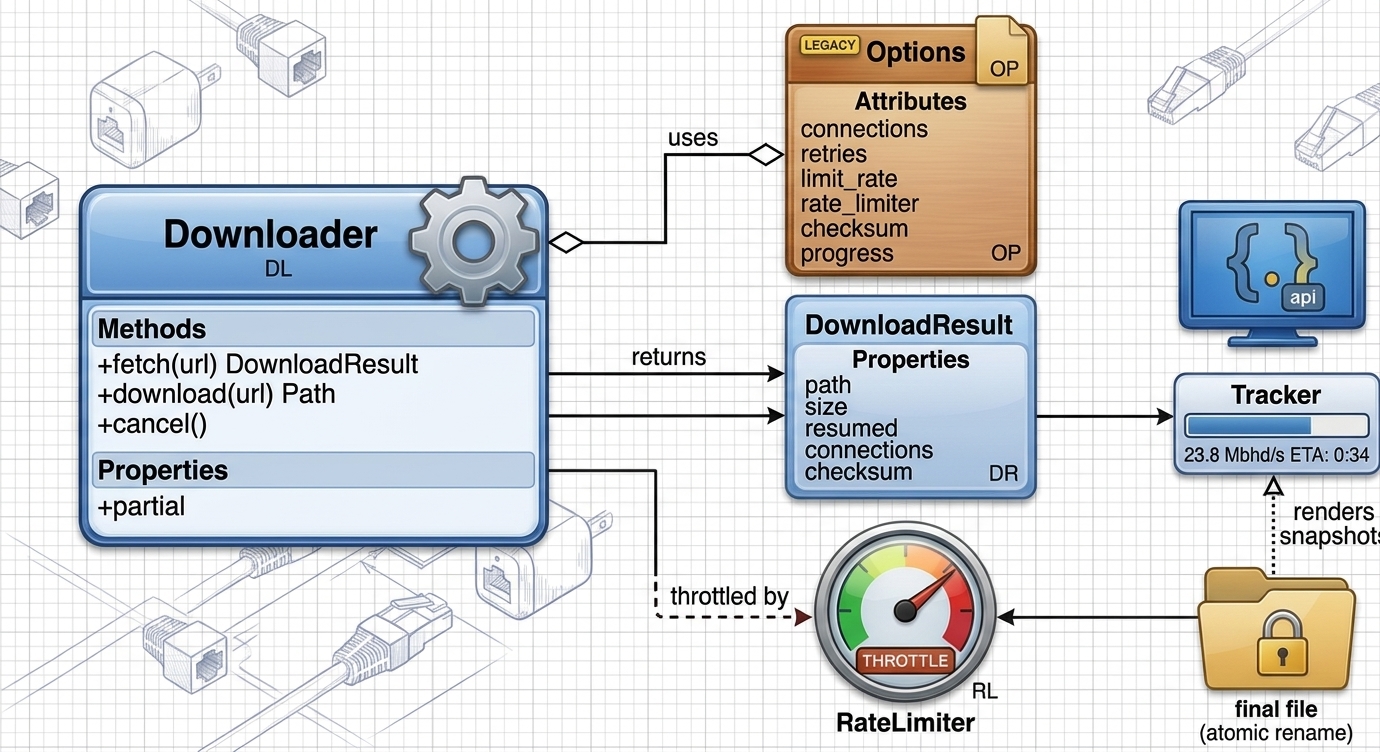
Main types - engine
classDiagram
    class Downloader {
        +fetch(url) DownloadResult
        +download(url) Path
        +cancel()
        +partial
    }
    class Options {
        connections
        retries
        limit_rate
        rate_limiter
        checksum
        progress
    }
    class DownloadResult {
        path
        size
        resumed
        connections
        checksum
    }
    class Tracker
    class ProgressBar
    class RateLimiter
    Downloader o-- Options
    Downloader --> DownloadResult
    Downloader --> Tracker
    Downloader --> RateLimiter
    ProgressBar ..> Tracker : renders snapshots
Main types - server and agent
classDiagram
    class ServerHandle {
        +start()
        +close()
        +url
    }
    class PywgetHTTPServer
    class ApiHandler {
        auth, Host check
        routes /api/v1/*
    }
    class JobManager {
        +add(spec) Job
        +pause(id)
        +resume(id)
        +cancel(id)
        +retry(id)
        +remove(id)
    }
    class Job
    class JobStore
    class EventBus
    class LocalExecutor
    class RelayExecutor
    class ServerClient
    class ServerConfig
    ServerHandle --> PywgetHTTPServer
    ServerHandle --> JobManager
    PywgetHTTPServer --> ApiHandler
    ApiHandler --> JobManager
    JobManager o-- Job
    JobManager --> JobStore : persists
    JobManager --> EventBus : SSE
    JobManager --> LocalExecutor : server mode
    JobManager --> RelayExecutor : agent mode
    LocalExecutor --> Downloader
    RelayExecutor --> ServerClient : forwards to upstream
    ServerHandle o-- ServerConfig

Module map
| Module | Role |
|---|---|
pywget.core |
Download engine (Downloader, Options) |
pywget.progress, pywget.utils, pywget.errors |
Progress bar, helpers, exceptions and exit codes |
pywget.cli |
CLI: direct download, serve, agent, send, jobs |
pywget.server |
HTTP API, SSE, web UI hosting (ServerHandle, run_server) |
pywget.jobs |
Job, JobManager, persistence, LocalExecutor / RelayExecutor |
pywget.client |
ServerClient: submit, control, wait / wait_all / watch (polling), events (SSE) |
pywget.config |
Config file, token file and validation, ServerConfig |
pywget.clipboard |
c input: clipboard and URL extraction |
pywget.webui |
Embedded single-page web UI |
pywget.wget |
Backward-compatible wget.download() |
Behaviour details
- Probing: one
Range: bytes=0-0request yields size, range support, ETag,Last-ModifiedandContent-Disposition. - Segments: a file is split into
min(connections, size / 2 MiB)parts; small files use one connection. - Rate-limited servers: on HTTP 429 the number of simultaneous segment requests is reduced automatically (down to 1) instead of failing the job; failed jobs keep partial data, so
pywget jobs retry IDresumes. - Output hygiene: messages and job lists show
host/../fileonly - query strings (often signed tokens) are never printed. - Existing file: same size means skipped; different size is saved as
name.1(wget style) unless--overwrite. - Partial files: stored as
name.part+name.pywget; removed on success. Changed remote file (size/ETag/mtime) restarts cleanly. - Redirects: only http/https;
Authorization/Cookieare dropped when the origin changes. - Server jobs: persisted in
jobs.json; a job running at shutdown is re-queued and resumes from its.partdata. - Not supported (by design): FTP, recursive mirroring, POST-body downloads.
Development
git clone https://github.com/cumulus13/pywget && cd pywget
pip install -e ".[dev]"
pytest --cov=pywget
ruff check pywget tests && mypy pywget
python -m build
License
Author


1 maintainer

Metadata
1 maintainer
Release files for pywget 2.0.12
For a detailed explanation of source distributions (sdists) and built distributions (wheels), please see the package formats documentation.
Source distribution (sdist)
| File | Size | Uploaded | Provenance | Actions |
|---|---|---|---|---|
| pywget-2.0.12.tar.gz | 68.5 kB | With provenance | Details for pywget-2.0.12.tar.gz |
Built distribution (wheel)
| File | Interpreter | ABI | Platform | Actions Reset |
|---|---|---|---|---|
| pywget-2.0.12-py3-none-any.whl | Python 3 | none | any | Details for pywget-2.0.12-py3-none-any.whl |
Total release size: 125.7 kB
Release files / pywget-2.0.12.tar.gz
| Download URL | pywget-2.0.12.tar.gz |
|---|---|
| Size | 68.5 kB |
| Tags | Source |
|
SHA-256 checksum How to use checksums |
44fe66647460e5e9998b812e3f7776c83ad1b4ddabc79a35ffd06e6dcbd618e4
|
|
BLAKE2b-256 checksum How to use checksums |
4f2b4429541f7c02827f0c6ecd3a410529471b705230cf183e527ec4bc11fa49
|
| Upload date | |
|
Uploaded using Trusted Publishing? What is trusted publishing? |
Yes |
| Uploaded via |
twine/7.0.0 CPython/3.13.16
|
Provenance
Provenance describes where a file came from. On PyPI, provenance is shared via attestations, which provide a verifiable record of the build or publishing details. View details, limitations and caveats.


PyPI Publish Attestation
PyPI verified that this artifact, at this checksum, originated from the publisher listed below.
Signed by GitHub Actions, verified by PyPI on Oct 27, 2026.
Transparency logRelease files / pywget-2.0.12-py3-none-any.whl
| Download URL | pywget-2.0.12-py3-none-any.whl |
|---|---|
| Size | 57.3 kB |
| Tags | Python 3 |
|
SHA-256 checksum How to use checksums |
10ef5adc05865bea479e7cb8709371f5b6570d712be8f19bb6d0240015bd4b94
|
|
BLAKE2b-256 checksum How to use checksums |
31ee5d33dc9ec5f33890202e72e6d5c5546bcce8546ce3f7dd5679fa91d6de2a
|
| Upload date | |
|
Uploaded using Trusted Publishing? What is trusted publishing? |
Yes |
| Uploaded via |
twine/7.0.0 CPython/3.13.16
|
Provenance
Provenance describes where a file came from. On PyPI, provenance is shared via attestations, which provide a verifiable record of the build or publishing details. View details, limitations and caveats.
PyPI Publish Attestation
PyPI verified that this artifact, at this checksum, originated from the publisher listed below.
Signed by GitHub Actions, verified by PyPI on Oct 27, 2026.
Transparency logSecurity for pywget 2.0.12
Provenance
Provenance describes where a file came from. On PyPI, provenance is shared via attestations, which provide a verifiable record of the build or publishing details. View details, limitations and caveats.
Full provenance
Both files in this release have been uploaded with provenance metadata.
Attestation for pywget-2.0.12.tar.gz
PyPI Publish Attestation
PyPI verified that this artifact, at this checksum, originated from the publisher listed below.
Signed by GitHub Actions, verified by PyPI on Oct 27, 2026.
Transparency logA note on package security
PyPI is a repository for distributing packages, not a service for auditing them. While third-party security researchers and our staff do their best to detect and remove malicious packages, PyPI cannot guarantee the quality, security or suitability of any given package.
To learn more about protecting yourself from malicious actors, visit our package security documentation.














