
pywget




A robust, resumable, multi-connection command-line downloader and Python library.
A drop-in-style wget alternative with zero third-party dependencies.
Features
| Area | What you get |
|---|---|
| Speed | Parallel segmented download (-n 1..32), automatic single-stream fallback |
| Reliability | Crash-safe resume, retries with exponential backoff + jitter, Retry-After, atomic rename |
| Integrity | --checksum sha256:..., size verification, disk-space pre-check |
| Security | http/https only, credentials stripped on cross-origin redirects, path-traversal-proof filenames, TLS verification on by default |
| Control | Bandwidth limit, custom headers, basic auth, proxy, custom CA, timeouts |
| Automation | Batch input (-i), --json output, stable exit codes, SIGINT/SIGTERM-safe |
| Library | Typed API, progress callbacks, cancel support, legacy wget.download() kept |
| Portability | Python 3.8+, Windows / Linux / macOS, no dependencies |
Installation
pip install pywget
v2 note: Python 2 is no longer supported. Python 3.8+ is required. The CLI and
wget.download(url, dir)keep working as before.
Quick start
# simple download into a directory (same as before)
pywget "https://example.com/file.iso" -p ~/Downloads

# 8 parallel connections, 2 MiB/s cap, verify checksum
pywget https://example.com/file.iso -n 8 --limit-rate 2M --checksum sha256:<hex>

# many URLs from a file (or stdin with -i -), JSON report
pywget -i urls.txt -p downloads --json

# auth + custom header
pywget https://api.example.com/export.zip --user me -H "Accept: application/zip"
Interrupted (Ctrl+C, crash, network loss)? Run the same command again - it resumes.
CLI reference
| Option | Description |
|---|---|
URL ... |
One or more http(s) URLs |
-i, --input-file FILE |
Read URLs from file (- = stdin); # comments allowed |
-p, -P, --path DIR |
Download directory (default .) |
-O, --output NAME |
Output file name (single URL) |
-n, --connections N |
Parallel connections per file, 1-32 (default 4) |
-r, --retries N |
Retries per request/segment (default 5) |
-T, --timeout SEC |
Network timeout (default 30) |
--limit-rate RATE |
Total speed cap, e.g. 500k, 2M |
-H, --header 'K: V' |
Extra header (repeatable) |
-U, --user-agent UA |
Custom User-Agent |
--user, --password |
Basic auth (password also from PYWGET_PASSWORD or prompt) |
--proxy URL |
Proxy (default: environment) |
--no-check-certificate |
Disable TLS verification (not recommended) |
--ca-cert FILE |
Custom CA bundle |
--checksum ALGO:HEX |
Verify result (md5, sha1, sha256, sha512, ...) |
--overwrite |
Replace existing file and restart |
--no-resume |
Never resume partial files |
--no-mtime |
Do not copy Last-Modified to the file |
-q, -v |
Quiet / debug logging |
--json |
Machine-readable results on stdout |
-c |
Accepted for wget compatibility (resume is default) |
Exit codes
| Code | Meaning |
|---|---|
| 0 | Success |
| 1 | Unexpected error |
| 2 | Bad usage / invalid URL |
| 3 | Network error |
| 4 | HTTP error status (404, 403, ...) |
| 5 | Checksum mismatch |
| 6 | Storage / I/O error (disk full, permissions) |
| 130 | Interrupted (partial data kept for resume) |
Python API
import pywget

path = pywget.download(
    "https://example.com/file.iso",
    "/data/downloads",
    progress=True,          # terminal bar
    connections=8,
    limit_rate="5M",
    checksum="sha256:ab12...",
)
print(path)
Full control:
from pywget import Downloader, Options, ProgressInfo

def on_progress(p: ProgressInfo) -> None:
    print(f"{p.filename}: {p.percent or 0:.1f}%  {p.speed/1e6:.1f} MB/s  ETA {p.eta}")

dl = Downloader(Options(output_dir="out", retries=8, progress=on_progress,
                        headers={"Authorization": "Bearer TOKEN"}))
result = dl.fetch("https://example.com/big.bin")
print(result.path, result.size, result.resumed, result.connections)

# from another thread: dl.cancel()  -> partial state is kept for resume
Legacy API (unchanged):
from pywget import wget

wget.download("http://www.test.com/test.tar.gz", "/home/root/Downloads")
Errors derive from pywget.PywgetError (InvalidURLError, NetworkError,
HTTPStatusError, ChecksumError, StorageError, DownloadCancelled).
A Downloader runs one download at a time - use one instance per thread.
How it works
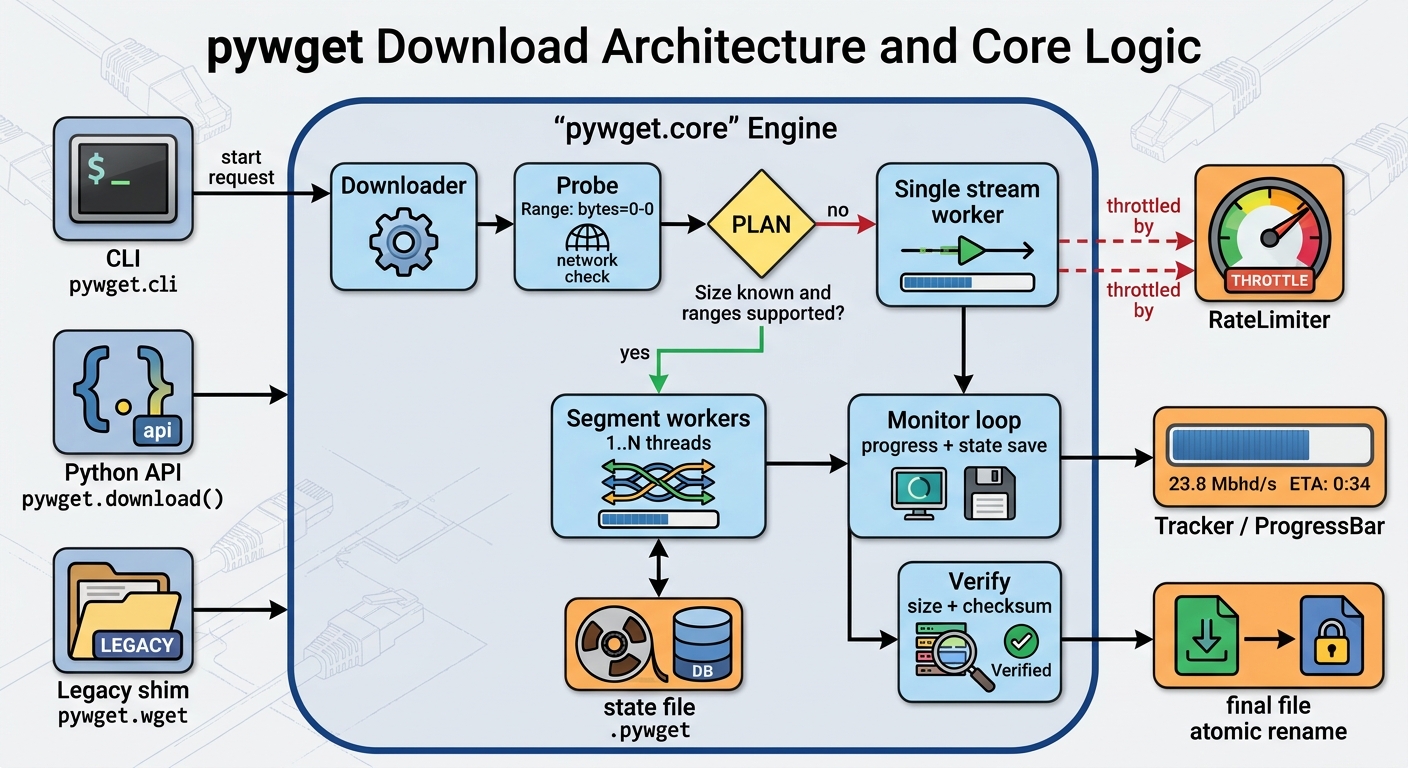
Architecture
flowchart LR
    CLI["CLI<br/>pywget.cli"] --> DL
    API["Python API<br/>pywget.download()"] --> DL
    LEG["Legacy shim<br/>pywget.wget"] --> DL

    subgraph Engine["pywget.core"]
        DL["Downloader"] --> PROBE["Probe<br/>Range: bytes=0-0"]
        PROBE --> PLAN{"Size known and<br/>ranges supported?"}
        PLAN -- yes --> SEG["Segment workers<br/>1..N threads"]
        PLAN -- no --> STR["Single stream<br/>worker"]
        SEG --> MON["Monitor loop<br/>progress + state save"]
        STR --> MON
        MON --> VER["Verify<br/>size + checksum"]
    end

    SEG -. throttled by .-> RL["RateLimiter"]
    STR -. throttled by .-> RL
    MON --> TR["Tracker / ProgressBar"]
    SEG <--> ST[("state file<br/>.pywget")]
    VER --> OUT[("final file<br/>atomic rename")]
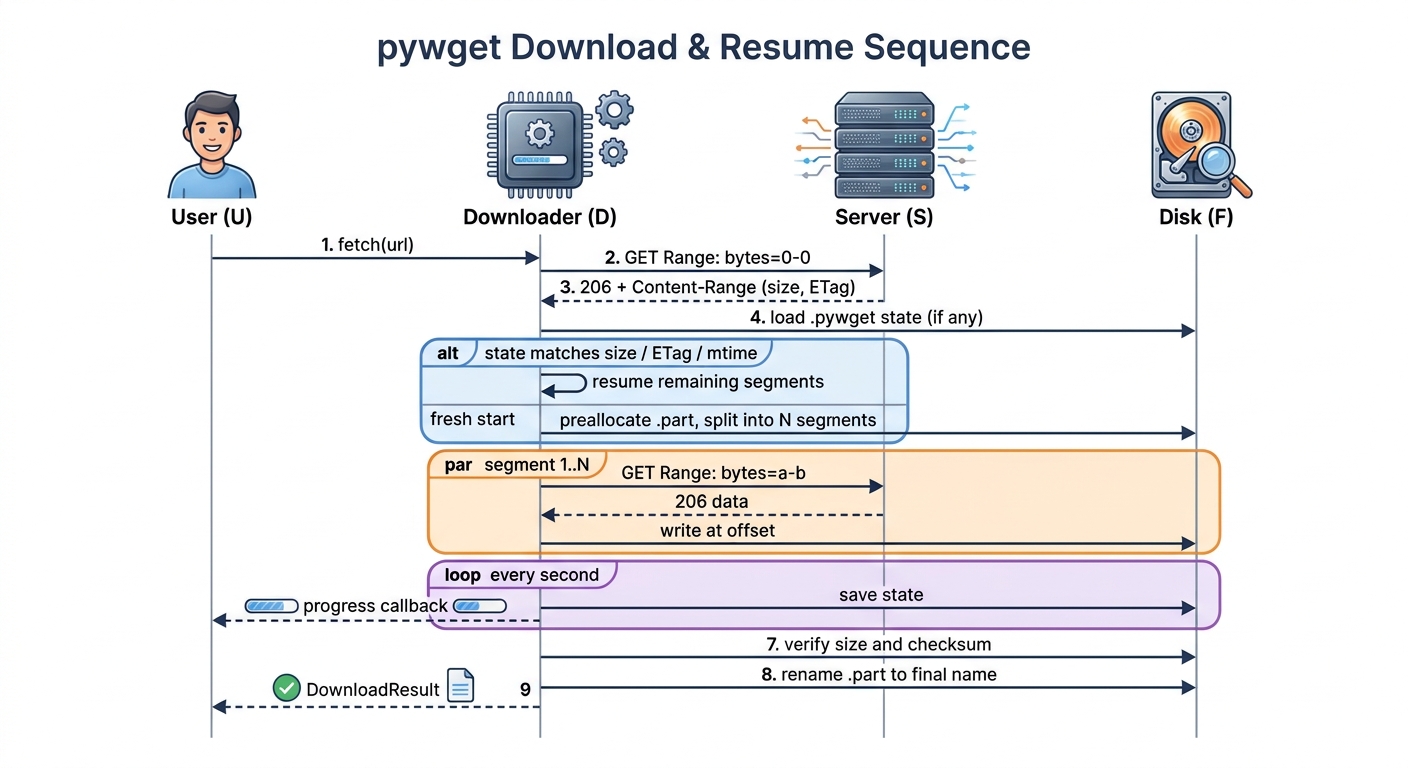
Download sequence
sequenceDiagram
    autonumber
    actor U as User
    participant D as Downloader
    participant S as Server
    participant F as Disk

    U->>D: fetch(url)
    D->>S: GET Range: bytes=0-0
    S-->>D: 206 + Content-Range (size, ETag)
    D->>F: load .pywget state (if any)
    alt state matches size / ETag / mtime
        D->>D: resume remaining segments
    else fresh start
        D->>F: preallocate .part, split into N segments
    end
    par segment 1..N
        D->>S: GET Range: bytes=a-b
        S-->>D: 206 data
        D->>F: write at offset
    end
    loop every second
        D->>F: save state
        D-->>U: progress callback
    end
    D->>F: verify size and checksum
    D->>F: rename .part to final name
    D-->>U: DownloadResult
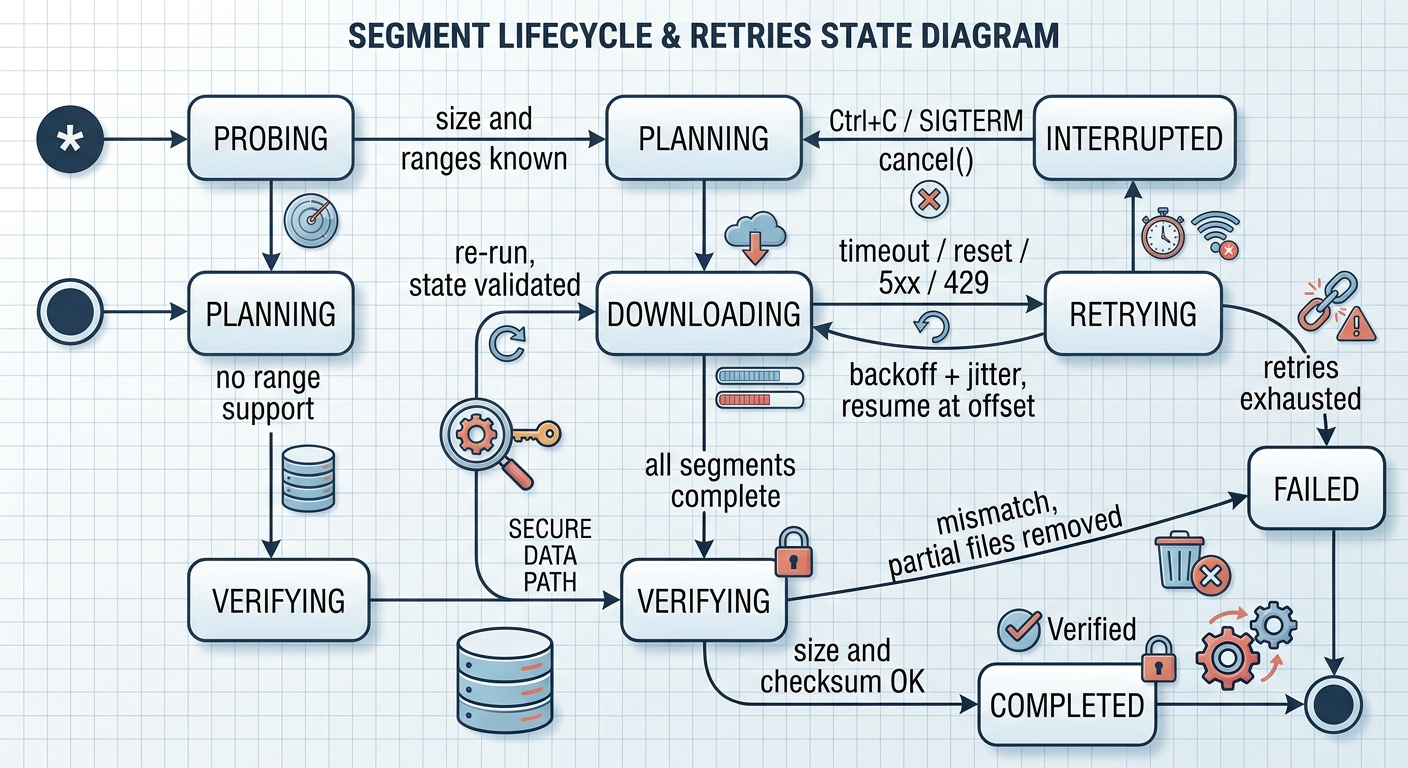
Segment lifecycle and retries
stateDiagram-v2
    [*] --> Probing
    Probing --> Planning: size and ranges known
    Probing --> Streaming: no range support
    Planning --> Downloading
    Streaming --> Verifying
    Downloading --> Retrying: timeout / reset / 5xx / 429
    Retrying --> Downloading: backoff + jitter, resume at offset
    Retrying --> Failed: retries exhausted
    Downloading --> Interrupted: Ctrl+C / SIGTERM / cancel()
    Interrupted --> Planning: re-run, state validated
    Downloading --> Verifying: all segments complete
    Verifying --> Completed: size and checksum OK
    Verifying --> Failed: mismatch, partial files removed
    Completed --> [*]
    Failed --> [*]
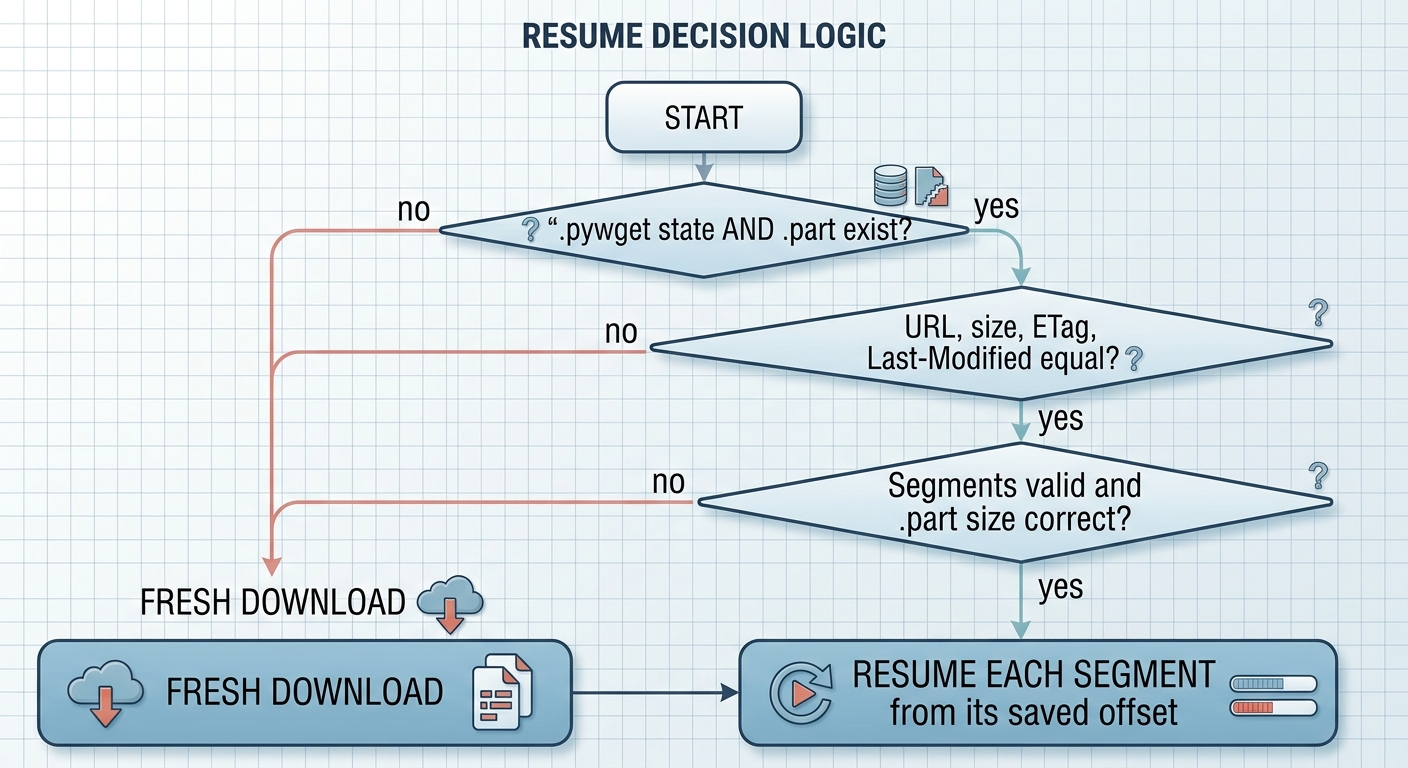
Resume decision
flowchart TD
    A["Start"] --> B{".pywget state<br/>and .part exist?"}
    B -- no --> N["Fresh download"]
    B -- yes --> C{"URL, size, ETag,<br/>Last-Modified equal?"}
    C -- no --> N
    C -- yes --> D{"Segments valid and<br/>.part size correct?"}
    D -- no --> N
    D -- yes --> R["Resume each segment<br/>from its saved offset"]
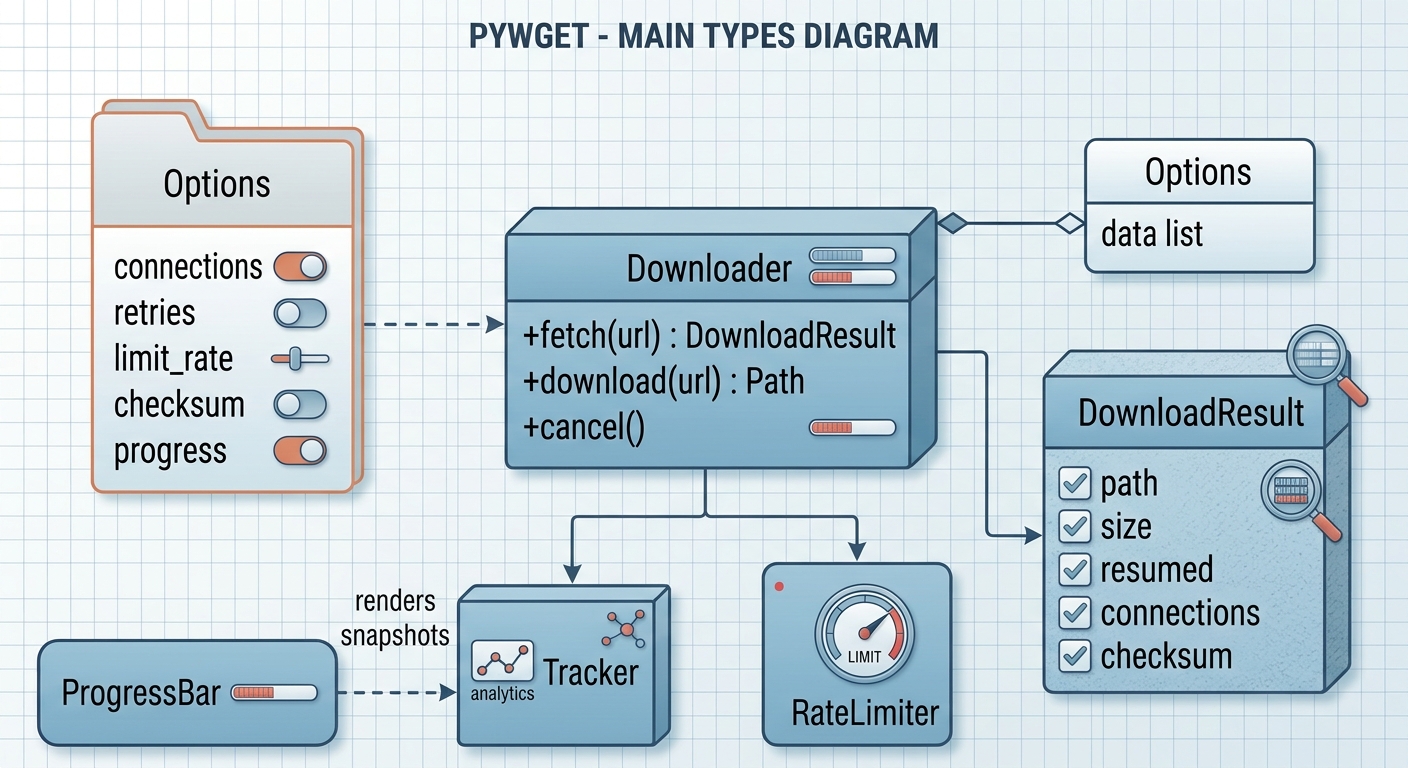
Main types
classDiagram
    class Downloader {
        +fetch(url) DownloadResult
        +download(url) Path
        +cancel()
    }
    class Options {
        connections
        retries
        limit_rate
        checksum
        progress
    }
    class DownloadResult {
        path
        size
        resumed
        connections
        checksum
    }
    class Tracker
    class ProgressBar
    class RateLimiter
    Downloader o-- Options
    Downloader --> DownloadResult
    Downloader --> Tracker
    Downloader --> RateLimiter
    ProgressBar ..> Tracker : renders snapshots
Behaviour details
- Probing: one
Range: bytes=0-0request yields size, range support, ETag,Last-ModifiedandContent-Disposition. - Segments: a file is split into
min(connections, size / 2 MiB)parts; small files use one connection. - Existing file: same size means skipped; different size is saved as
name.1(wget style) unless--overwrite. - Partial files: stored as
name.part+name.pywget; removed on success. Changed remote file (size/ETag/mtime) restarts cleanly. - Redirects: only http/https;
Authorization/Cookieare dropped when the origin changes. - Not supported (by design): FTP, recursive mirroring.
Development
git clone https://github.com/cumulus13/pywget && cd pywget
pip install -e ".[dev]"
pytest --cov=pywget
ruff check pywget tests && mypy pywget
python -m build
License
Author


1 maintainer

Metadata
1 maintainer
Release files for pywget 2.0.2
For a detailed explanation of source distributions (sdists) and built distributions (wheels), please see the package formats documentation.
Source distribution (sdist)
| File | Size | Uploaded | Provenance | Actions |
|---|---|---|---|---|
| pywget-2.0.2.tar.gz | 30.0 kB | Without provenance | Details for pywget-2.0.2.tar.gz |
Built distribution (wheel)
| File | Interpreter | ABI | Platform | Actions Reset |
|---|---|---|---|---|
| pywget-2.0.2-py3-none-any.whl | Python 3 | none | any | Details for pywget-2.0.2-py3-none-any.whl |
Total release size: 55.8 kB
Release files / pywget-2.0.2.tar.gz
| Download URL | pywget-2.0.2.tar.gz |
|---|---|
| Size | 30.0 kB |
| Tags | Source |
|
SHA-256 checksum How to use checksums |
90d2ca097983fd53fb06f16aa2d3c76ac6b5b6478bd656997300317493cd84b0
|
|
BLAKE2b-256 checksum How to use checksums |
187b9d6452532478def9cd9409b715519243f0761dd4dde2fa5fcc57821a0cda
|
| Upload date | |
|
Uploaded using Trusted Publishing? What is trusted publishing? |
No |
| Uploaded via |
twine/4.0.2 CPython/3.11.4
|
Release files / pywget-2.0.2-py3-none-any.whl
| Download URL | pywget-2.0.2-py3-none-any.whl |
|---|---|
| Size | 25.8 kB |
| Tags | Python 3 |
|
SHA-256 checksum How to use checksums |
6f481e6d9d6d3382e96dda655e7d8560463b9844a710d6244ea35b8b81641220
|
|
BLAKE2b-256 checksum How to use checksums |
5541bd0b4521f1ead914f8511244837186948f6f2d986d4ba99e606bb9b30bfd
|
| Upload date | |
|
Uploaded using Trusted Publishing? What is trusted publishing? |
No |
| Uploaded via |
twine/4.0.2 CPython/3.11.4
|
Security for pywget 2.0.2
Provenance
Provenance describes where a file came from. On PyPI, provenance is shared via attestations, which provide a verifiable record of the build or publishing details. View details, limitations and caveats.
No provenance found
None of the files in this release were uploaded with provenance metadata.
A note on package security
PyPI is a repository for distributing packages, not a service for auditing them. While third-party security researchers and our staff do their best to detect and remove malicious packages, PyPI cannot guarantee the quality, security or suitability of any given package.
To learn more about protecting yourself from malicious actors, visit our package security documentation.














