
Common tools for workforce management, queuing, scheduling, rostering and optimization problems
Verified details
These details have been verified by PyPIProject links
GitHub Statistics
Maintainers

Project description




pyworkforce
Tools for workforce management problems such as queue staffing, shift scheduling, rostering, and operations research optimization. It is geared toward call / contact centers, but the same techniques apply to hospitals, retail, logistics, network capacity planning and any operation that has to match a variable demand with a finite number of resources.
📖 Full documentation and tutorials: rodrigo-arenas.github.io/pyworkforce
Installation
pyworkforce supports Python 3.12, 3.13, and 3.14.
pip
pip install pyworkforce
conda (via conda-forge)
conda install -c conda-forge pyworkforce
For runnable examples, see the examples folder.
Features
pyworkforce is organized around three planning steps — how many resources do I need? → how many per shift? → who works when? — plus helpers that tie them together:
- Queuing
ErlangC— the classic M/M/c queue (infinite patience).ErlangA— the M/M/c+M queue with customer abandonment (patience), computed exactly from the birth–death stationary distribution.ErlangB— the M/M/c/c loss queue (no waiting room): blocked calls are shed. Use this for trunk / SIP channel sizing.MultiErlangC/MultiErlangA/MultiErlangB— evaluate many scenarios from a parameter grid in parallel, scikit-learn style.
- Shift coverage helpers (
pyworkforce.shifts) — build theshifts_coveragearrays the schedulers expect from clock hours, spans or explicit periods, instead of hand-writing 0/1 arrays. - Scheduling (
pyworkforce.scheduling) —MinAbsDifferenceandMinRequiredResourcesdecide how many people to place on each shift, built on OR-Tools. - Rostering (
pyworkforce.rostering) —MinHoursRosterassigns named people to days and shifts while respecting banned shifts, rest days, minimum hours, non-sequential shifts and preferences. - Break scheduling (
pyworkforce.breaks) —BreakSchedulerassigns break start times to agent slots within each shift, preventing overlapping breaks and guaranteeing that breaks never drop coverage below the required minimum. - A scikit-learn-friendly API — consistent constructors with clear validation
messages,
get_params()and readablerepr()on every estimator, the last result stored assolution_, andresults_to_dataframeto turn grid results into tidypandasDataFrames.
A brief introduction to the queuing and scheduling ideas can be found in these posts: workforce planning and scheduling.
Queuing
Estimate how many resources are required to handle incoming work, for example calls arriving at a call center.
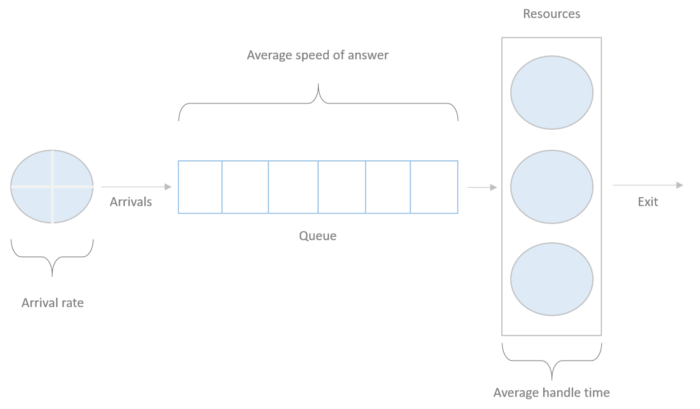
Erlang C
from pyworkforce.queuing import ErlangC

erlang = ErlangC(transactions=100, asa=20/60, aht=3, interval=30, shrinkage=0.3)

positions_requirements = erlang.required_positions(service_level=0.8, max_occupancy=0.85)
print("positions_requirements: ", positions_requirements)
Output:
>> positions_requirements:  {'raw_positions': 14,
                             'positions': 20,
                             'service_level': 0.8883500191794669,
                             'occupancy': 0.7142857142857143,
                             'waiting_probability': 0.1741319335950498}
Erlang A (modeling abandonment)
Real customers hang up if they wait too long. ErlangA adds a patience
parameter and reports the abandonment probability, typically requiring fewer
agents than Erlang C:
from pyworkforce.queuing import ErlangA

erlang = ErlangA(transactions=100, asa=20/60, aht=3, interval=30, patience=5, shrinkage=0.3)

requirements = erlang.required_positions(service_level=0.8, max_occupancy=0.85, max_abandonment=0.05)
print("requirements: ", requirements)
Output:
>> requirements:  {'raw_positions': 13,
                   'positions': 19,
                   'service_level': 0.858...,
                   'occupancy': 0.750...,
                   'abandonment_probability': 0.025...,
                   'waiting_probability': 0.226...,
                   'average_speed_of_answer': 0.125...}
Many scenarios at once
MultiErlangC / MultiErlangA evaluate a parameter grid in parallel, and
results_to_dataframe turns the results into a tidy table:
from pyworkforce.queuing import MultiErlangC
from pyworkforce.utils import results_to_dataframe

param_grid = {"transactions": [100], "aht": [3], "interval": [30], "asa": [20 / 60], "shrinkage": [0.3]}
multi_erlang = MultiErlangC(param_grid=param_grid, n_jobs=-1)

scenarios = {"service_level": [0.8, 0.85, 0.9], "max_occupancy": [0.8]}
results = multi_erlang.required_positions(scenarios)

df = results_to_dataframe(results, multi_erlang.required_positions_params)
print(df[["service_level", "positions", "service_level_result", "occupancy"]].round(4).to_string(index=False))
Output:
 service_level  positions  service_level_result  occupancy
          0.80         20                0.8884     0.7143
          0.85         20                0.8884     0.7143
          0.90         22                0.9415     0.6667
The input target stays under service_level; the achieved value is kept as
service_level_result.
Shift coverage helpers
Describe shifts by their clock hours instead of writing 0/1 arrays. Overnight shifts wrap past midnight:
from pyworkforce.shifts import shift_coverage_from_hours

shifts_coverage = shift_coverage_from_hours({
    "Morning":   (6, 14),
    "Afternoon": (14, 22),
    "Night":     (22, 6),
}, num_periods=24)
The output plugs straight into the schedulers below. See also
shift_coverage_from_spans, shift_coverage_from_periods,
validate_shift_coverage and coverage_to_dataframe.
Scheduling
Given the required resources per period, decide how many people to place on each predefined shift.
from pyworkforce.scheduling import MinAbsDifference, MinRequiredResources

# Rows are days. Each value is the number of required positions for one hour of the day.
required_resources = [
    [9, 11, 17, 9, 7, 12, 5, 11, 8, 9, 18, 17, 8, 12, 16, 8, 7, 12, 11, 10, 13, 19, 16, 7],
    [13, 13, 12, 15, 18, 20, 13, 16, 17, 8, 13, 11, 6, 19, 11, 20, 19, 17, 10, 13, 14, 23, 16, 8]
]

# Each shift has 24 entries, one per hour. Use 1 if the shift covers that hour, otherwise 0.
shifts_coverage = {"Morning": [0, 0, 0, 0, 0, 1, 1, 1, 1, 1, 1, 1, 1, 0, 0, 0, 0, 0, 0, 0, 0, 0, 0, 0],
                   "Afternoon": [0, 0, 0, 0, 0, 0, 0, 0, 0, 0, 0, 0, 0, 1, 1, 1, 1, 1, 1, 1, 1, 0, 0, 0],
                   "Night": [1, 1, 1, 1, 1, 0, 0, 0, 0, 0, 0, 0, 0, 0, 0, 0, 0, 0, 0, 0, 0, 1, 1, 1],
                   "Mixed": [0, 0, 0, 0, 0, 0, 0, 0, 0, 1, 1, 1, 1, 1, 1, 1, 1, 0, 0, 0, 0, 0, 0, 0]}

# Minimize the absolute difference between required and scheduled resources
difference_scheduler = MinAbsDifference(num_days=2,
                                        periods=24,
                                        shifts_coverage=shifts_coverage,
                                        required_resources=required_resources,
                                        max_period_concurrency=27,
                                        max_shift_concurrency=25)
difference_solution = difference_scheduler.solve()

# Minimize the (optionally weighted) number of scheduled resources while covering every period
requirements_scheduler = MinRequiredResources(num_days=2,
                                              periods=24,
                                              shifts_coverage=shifts_coverage,
                                              required_resources=required_resources,
                                              max_period_concurrency=27,
                                              max_shift_concurrency=25)
requirements_solution = requirements_scheduler.solve()

print("difference_solution :", difference_solution["status"], difference_solution["cost"])
print("requirements_solution :", requirements_solution["status"], requirements_solution["cost"])
Output:
>> difference_solution: {'status': 'OPTIMAL',
                          'cost': 157.0,
                          'resources_shifts': [{'day': 0, 'shift': 'Morning', 'resources': 8},
                                               {'day': 0, 'shift': 'Afternoon', 'resources': 11},
                                               {'day': 0, 'shift': 'Night', 'resources': 9},
                                               {'day': 0, 'shift': 'Mixed', 'resources': 1},
                                               ... ]}

>> requirements_solution: {'status': 'OPTIMAL',
                           'cost': 113.0,
                           'resources_shifts': [{'day': 0, 'shift': 'Morning', 'resources': 15},
                                                {'day': 0, 'shift': 'Afternoon', 'resources': 13},
                                                ... ]}
MinRequiredResources also accepts a cost_dict to weight shifts differently
(for example, more expensive night shifts).
Rostering
Assign named people to days and shifts while respecting individual rules and preferences.
from pyworkforce.rostering import MinHoursRoster

roster = MinHoursRoster(
    num_days=2,
    resources=["ana@co", "ben@co", "cara@co", "dan@co", "eve@co"],
    shifts=["Morning", "Night"],
    shifts_hours=[8, 8],
    min_working_hours=8,
    max_resting=1,
    required_resources={"Morning": [2, 2], "Night": [1, 1]},
    banned_shifts=[{"resource": "ana@co", "shift": "Night", "day": 0}],
    resources_preferences=[{"resource": "ana@co", "shift": "Morning"}],
)

solution = roster.solve()
print(solution["status"], solution["resource_shifts"][:2])
Output:
OPTIMAL [{'resource': 'ana@co', 'day': 0, 'shift': 'Morning'},
         {'resource': 'ana@co', 'day': 1, 'shift': 'Morning'}]
ana@co is given her preferred Morning shift and never Night on day 0,
exactly as configured.
Documentation and tutorials
The documentation site includes narrative guides, a full API reference, and self-contained, notebook-style tutorials with real outputs:
- End-to-end planning — demand → required positions → shift coverage → schedule → roster.
- Comparing scenarios — grids and DataFrames.
Contributing
Contributions are very welcome! See CONTRIBUTING.md for the local development setup, how to run the tests and linter, and the pull-request workflow.
License
pyworkforce is released under the MIT License.
Project details
Verified details
These details have been verified by PyPIProject links
GitHub Statistics
Maintainers
Release history Release notifications | RSS feed


Download files
Download the file for your platform. If you're not sure which to choose, learn more about installing packages.
Source Distribution
Built Distribution
Filter files by name, interpreter, ABI, and platform.
If you're not sure about the file name format, learn more about wheel file names.
Copy a direct link to the current filters
File details
Details for the file pyworkforce-0.5.3.tar.gz.
File metadata
- Download URL: pyworkforce-0.5.3.tar.gz
- Upload date:
- Size: 53.3 kB
- Tags: Source
- Uploaded using Trusted Publishing? Yes
- Uploaded via: twine/6.1.0 CPython/3.13.12
File hashes
| Algorithm | Hash digest | |
|---|---|---|
| SHA256 |
c947f9fcb0d1d87b0346b25a7f082301bee95b5214dc2dcb752ddad8b1f6b759
|
|
| MD5 |
a1c80c7e9c1ba150c362a677038fc64d
|
|
| BLAKE2b-256 |
898b7cf2bec591305cdc330061cb917d87a8120ae3193d242e3a94279ef54793
|
Provenance
The following attestation bundles were made for pyworkforce-0.5.3.tar.gz:
Publisher:
publish.yml on rodrigo-arenas/pyworkforce
-
Statement:
-
Statement type:
https://in-toto.io/Statement/v1 -
Predicate type:
https://docs.pypi.org/attestations/publish/v1 -
Subject name:
pyworkforce-0.5.3.tar.gz -
Subject digest:
c947f9fcb0d1d87b0346b25a7f082301bee95b5214dc2dcb752ddad8b1f6b759 - Sigstore transparency entry: 1969776592
- Sigstore integration time:
-
Permalink:
rodrigo-arenas/pyworkforce@0185ab84c55c218265b8d8ca3274d7db38fad79e -
Branch / Tag:
refs/tags/0.5.3 - Owner: https://github.com/rodrigo-arenas
-
Access:
public
-
Token Issuer:
https://token.actions.githubusercontent.com -
Runner Environment:
github-hosted -
Publication workflow:
publish.yml@0185ab84c55c218265b8d8ca3274d7db38fad79e -
Trigger Event:
push
-
Statement type:
File details
Details for the file pyworkforce-0.5.3-py3-none-any.whl.
File metadata
- Download URL: pyworkforce-0.5.3-py3-none-any.whl
- Upload date:
- Size: 65.3 kB
- Tags: Python 3
- Uploaded using Trusted Publishing? Yes
- Uploaded via: twine/6.1.0 CPython/3.13.12
File hashes
| Algorithm | Hash digest | |
|---|---|---|
| SHA256 |
49c1c7c06c2d97584db0e5455bc921cfa13271e17aac8d30232e29d1fcf1a1bf
|
|
| MD5 |
f98616f2f9d734b2449eb87ec9906fbc
|
|
| BLAKE2b-256 |
6988f3dedc69ffcdba730bcdc032a6c349e721ecca1c9998ef9868ea48b883e6
|
Provenance
The following attestation bundles were made for pyworkforce-0.5.3-py3-none-any.whl:
Publisher:
publish.yml on rodrigo-arenas/pyworkforce
-
Statement:
-
Statement type:
https://in-toto.io/Statement/v1 -
Predicate type:
https://docs.pypi.org/attestations/publish/v1 -
Subject name:
pyworkforce-0.5.3-py3-none-any.whl -
Subject digest:
49c1c7c06c2d97584db0e5455bc921cfa13271e17aac8d30232e29d1fcf1a1bf - Sigstore transparency entry: 1969776695
- Sigstore integration time:
-
Permalink:
rodrigo-arenas/pyworkforce@0185ab84c55c218265b8d8ca3274d7db38fad79e -
Branch / Tag:
refs/tags/0.5.3 - Owner: https://github.com/rodrigo-arenas
-
Access:
public
-
Token Issuer:
https://token.actions.githubusercontent.com -
Runner Environment:
github-hosted -
Publication workflow:
publish.yml@0185ab84c55c218265b8d8ca3274d7db38fad79e -
Trigger Event:
push
-
Statement type:






