
Common tools for workforce management, queuing, scheduling, rostering and optimization problems
Verified details
These details have been verified by PyPIProject links
GitHub Statistics
Maintainers

Project description





pyworkforce
Workforce management, made practical. Covers the full planning pipeline from queue staffing to named rosters and break scheduling — built on Erlang queuing theory and OR-Tools constraint programming, with a scikit-learn-style API.
Geared toward contact / call centres, but the same techniques apply to hospitals, retail, logistics and any operation matching variable demand to finite resources.
📖 Full documentation: pyworkforce.rodrigo-arenas.com
Installation
pip install pyworkforce
Requires Python 3.12 – 3.14. conda-forge support is pending an update to the
ortools-python feedstock for Python 3.12.
The planning workflow
pyworkforce covers five sequential planning steps:
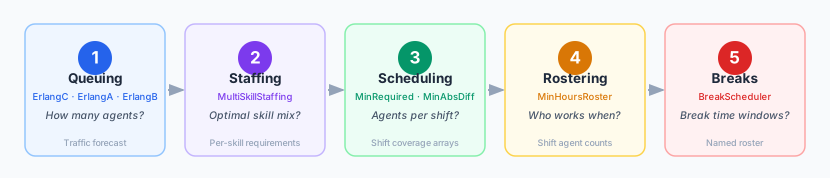
| Step | Module | Key classes | Question answered |
|---|---|---|---|
| 1 | pyworkforce.queuing |
ErlangC, ErlangA, ErlangB |
How many agents / channels are needed? |
| 2 | pyworkforce.staffing |
MultiSkillStaffing |
What is the optimal skill-profile mix? |
| 3 | pyworkforce.scheduling |
MinRequiredResources, MinAbsDifference |
How many agents per shift? |
| 4 | pyworkforce.rostering |
MinHoursRoster |
Who works on which day and shift? |
| 5 | pyworkforce.breaks |
BreakScheduler |
When do individual breaks happen? |
1 — Queuing
Estimate the number of agents (or channels) needed to meet a service target given an incoming demand.
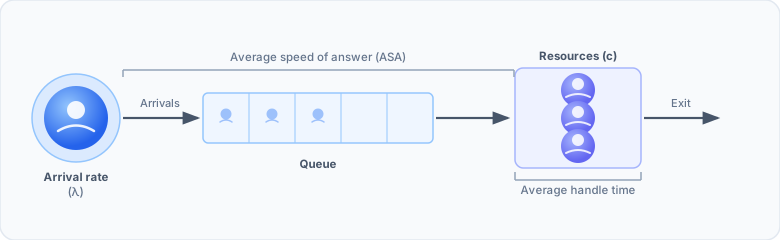
Erlang C — infinite patience
The classic M/M/c queue: Poisson arrivals, exponential handling times, unlimited waiting room.
from pyworkforce.queuing import ErlangC

erlang = ErlangC(transactions=100, aht=3, asa=20/60, interval=30, shrinkage=0.3)

result = erlang.required_positions(service_level=0.8, max_occupancy=0.85)
print(result)
{'raw_positions': 14,
 'positions': 20,
 'service_level': 0.8884,
 'occupancy': 0.7143,
 'waiting_probability': 0.1741}
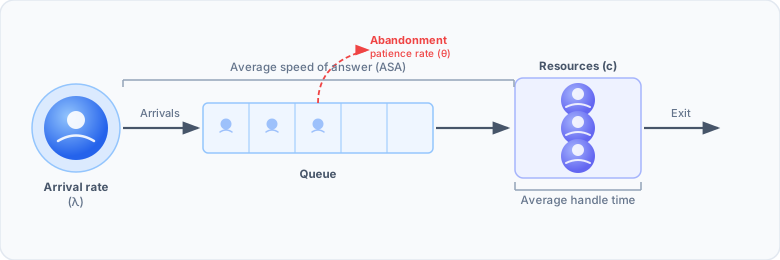
Erlang A — finite patience (abandonment)
Adds a patience parameter: callers who wait too long hang up.
Typically requires fewer agents than Erlang C.
from pyworkforce.queuing import ErlangA

erlang = ErlangA(transactions=100, aht=3, asa=20/60, interval=30,
                 patience=5, shrinkage=0.3)

result = erlang.required_positions(service_level=0.8, max_occupancy=0.85,
                                   max_abandonment=0.05)
print(result)
{'raw_positions': 13,
 'positions': 19,
 'service_level': 0.8584,
 'occupancy': 0.7500,
 'abandonment_probability': 0.0253,
 'waiting_probability': 0.2265,
 'average_speed_of_answer': 0.1258}
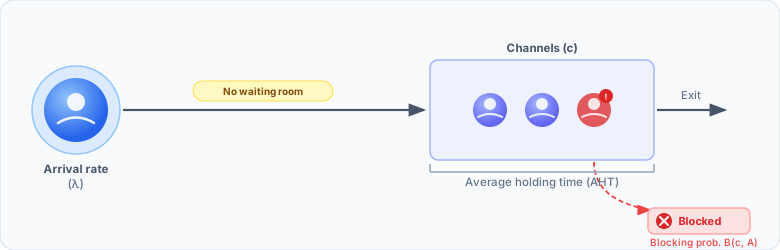
Erlang B — pure loss (no waiting room)
M/M/c/c queue: blocked calls are shed immediately. Use this for SIP trunk sizing, IVR channel capacity and overflow links.
from pyworkforce.queuing import ErlangB

erlang = ErlangB(transactions=100, aht=3, interval=30, shrinkage=0.3)

result = erlang.required_positions(max_blocking=0.02)
print(result)
{'raw_positions': 17,
 'positions': 25,
 'blocking_probability': 0.0183,
 'occupancy': 0.9375}
Running many scenarios at once
MultiErlangC, MultiErlangA and MultiErlangB sweep a parameter grid in
parallel (scikit-learn style) and results_to_dataframe turns the output into a
tidy table:
from pyworkforce.queuing import MultiErlangC
from pyworkforce.utils import results_to_dataframe

param_grid = {"transactions": [100], "aht": [3], "interval": [30],
              "asa": [20/60], "shrinkage": [0.3]}
multi = MultiErlangC(param_grid=param_grid, n_jobs=-1)

results = multi.required_positions({"service_level": [0.80, 0.85, 0.90],
                                    "max_occupancy": [0.85]})

df = results_to_dataframe(results, multi.required_positions_params)
print(df[["service_level", "positions", "occupancy"]].round(4).to_string(index=False))
 service_level  positions  occupancy
          0.80         20     0.7143
          0.85         20     0.7143
          0.90         22     0.6667
2 — Multi-skill staffing
When agents handle multiple contact types (e.g. English, Billing, Technical),
MultiSkillStaffing finds the cheapest mix of skill profiles that meets every
skill's coverage requirement. Flexible (multi-skilled) agents count towards all
skills they hold.
from pyworkforce.staffing import MultiSkillStaffing

skills   = ["Billing", "Technical"]
profiles = [
    {"name": "Billing_only",   "skills": ["Billing"],              "cost": 1.0},
    {"name": "Technical_only", "skills": ["Technical"],            "cost": 1.0},
    {"name": "Flexible",       "skills": ["Billing", "Technical"], "cost": 1.5},
]
required = {"Billing": 5, "Technical": 3}

ms = MultiSkillStaffing(skills=skills, profiles=profiles, required_positions=required)
result = ms.solve()

print(f"status={result['status']}  total={result['total_agents']}  cost={result['cost']}")
for entry in result["agents_per_profile"]:
    print(f"  {entry['profile']:18s}: {entry['agents']}")
status=OPTIMAL  total=5  cost=6.5
  Billing_only      : 2
  Technical_only    : 0
  Flexible          : 3
3 flexible + 2 billing-only = cost 6.5, vs 8.0 for pure dedicated agents.
3 — Shift coverage helpers
Build the shifts_coverage arrays the schedulers expect from clock hours instead
of writing 0/1 arrays by hand:
from pyworkforce.shifts import shift_coverage_from_hours

shifts_coverage = shift_coverage_from_hours({
    "Morning":   (6, 14),
    "Afternoon": (14, 22),
    "Night":     (22, 6),   # wraps past midnight
}, num_periods=24)
See also shift_coverage_from_spans, shift_coverage_from_periods,
validate_shift_coverage and coverage_to_dataframe.
4 — Scheduling
Given the required resources per period, decide how many agents to place on each shift using constraint programming (OR-Tools):
from pyworkforce.scheduling import MinRequiredResources

# One row per day; each value = required agents for that hour
required_resources = [
    [9, 11, 17, 9, 7, 12, 5, 11, 8, 9, 18, 17, 8, 12, 16, 8, 7, 12, 11, 10, 13, 19, 16, 7],
    [13, 13, 12, 15, 18, 20, 13, 16, 17, 8, 13, 11, 6, 19, 11, 20, 19, 17, 10, 13, 14, 23, 16, 8],
]
shifts_coverage = {
    "Morning":   [0,0,0,0,0,1,1,1,1,1,1,1,1,0,0,0,0,0,0,0,0,0,0,0],
    "Afternoon": [0,0,0,0,0,0,0,0,0,0,0,0,0,1,1,1,1,1,1,1,1,0,0,0],
    "Night":     [1,1,1,1,1,0,0,0,0,0,0,0,0,0,0,0,0,0,0,0,0,1,1,1],
    "Mixed":     [0,0,0,0,0,0,0,0,0,1,1,1,1,1,1,1,1,0,0,0,0,0,0,0],
}

scheduler = MinRequiredResources(
    num_days=2, periods=24,
    shifts_coverage=shifts_coverage,
    required_resources=required_resources,
    max_period_concurrency=27, max_shift_concurrency=25,
)
solution = scheduler.solve()
print(solution["status"], solution["cost"])
OPTIMAL 113.0
MinAbsDifference minimises the absolute difference between required and
scheduled; MinRequiredResources minimises total agents (optionally weighted by
shift cost).
5 — Rostering
Assign named people to days and shifts while respecting individual rules:
from pyworkforce.rostering import MinHoursRoster

roster = MinHoursRoster(
    num_days=2,
    resources=["ana@co", "ben@co", "cara@co", "dan@co", "eve@co"],
    shifts=["Morning", "Night"],
    shifts_hours=[8, 8],
    min_working_hours=8,
    max_resting=1,
    required_resources={"Morning": [2, 2], "Night": [1, 1]},
    banned_shifts=[{"resource": "ana@co", "shift": "Night", "day": 0}],
    resources_preferences=[{"resource": "ana@co", "shift": "Morning"}],
)

solution = roster.solve()
print(solution["status"])
for a in solution["resource_shifts"][:3]:
    print(a)
OPTIMAL
{'resource': 'ana@co', 'day': 0, 'shift': 'Morning'}
{'resource': 'ana@co', 'day': 1, 'shift': 'Morning'}
{'resource': 'ben@co', 'day': 0, 'shift': 'Night'}
ana@co is assigned her preferred shift and never Night on day 0, exactly
as configured.
6 — Break scheduling
Assign break start times to agent slots within each shift, ensuring that simultaneous breaks never drop coverage below the required minimum:
from pyworkforce.breaks import BreakScheduler

shifts_coverage     = {"Morning": [1,1,1,1,1,1,1,1,0,0,0,0,0,0,0,0],
                       "Afternoon": [0,0,0,0,0,0,0,0,1,1,1,1,1,1,1,1]}
scheduled_resources = {"Morning": [3], "Afternoon": [2]}
breaks = [{"name": "Lunch", "duration_periods": 2,
           "min_start_after": 2, "max_end_before": 2}]
min_coverage = [[2,2,2,2,2,2,2,2,1,1,1,1,1,1,1,1]]

scheduler = BreakScheduler(
    num_days=1, periods=16,
    shifts_coverage=shifts_coverage,
    scheduled_resources=scheduled_resources,
    breaks=breaks, min_coverage=min_coverage,
)
result = scheduler.solve()
print(result["status"])
for entry in result["break_schedule"]:
    print(entry)
OPTIMAL
{'shift': 'Morning',   'day': 0, 'slot': 0, 'break_name': 'Lunch', 'start_period': 2, 'end_period': 4}
{'shift': 'Morning',   'day': 0, 'slot': 1, 'break_name': 'Lunch', 'start_period': 4, 'end_period': 6}
{'shift': 'Morning',   'day': 0, 'slot': 2, 'break_name': 'Lunch', 'start_period': 2, 'end_period': 4}
{'shift': 'Afternoon', 'day': 0, 'slot': 0, 'break_name': 'Lunch', 'start_period': 10, 'end_period': 12}
{'shift': 'Afternoon', 'day': 0, 'slot': 1, 'break_name': 'Lunch', 'start_period': 12, 'end_period': 14}
Documentation
The documentation site includes narrative guides, a full API reference, and self-contained tutorials with real outputs:
- End-to-end tutorial — demand forecast → queuing → staffing mix → shift coverage → schedule → roster
- Comparing scenarios — grids, DataFrames, and service-level sweeps
- API reference
Background reading on the underlying techniques: workforce planning and scheduling.
Contributing
Contributions are very welcome! See CONTRIBUTING.md for the local development setup, how to run the tests and linter, and the pull-request workflow.
License
pyworkforce is released under the MIT License.
Project details
Verified details
These details have been verified by PyPIProject links
GitHub Statistics
Maintainers
Release history Release notifications | RSS feed


Download files
Download the file for your platform. If you're not sure which to choose, learn more about installing packages.
Source Distribution
Built Distribution
Filter files by name, interpreter, ABI, and platform.
If you're not sure about the file name format, learn more about wheel file names.
Copy a direct link to the current filters
File details
Details for the file pyworkforce-0.5.4.tar.gz.
File metadata
- Download URL: pyworkforce-0.5.4.tar.gz
- Upload date:
- Size: 53.6 kB
- Tags: Source
- Uploaded using Trusted Publishing? Yes
- Uploaded via: twine/6.1.0 CPython/3.13.12
File hashes
| Algorithm | Hash digest | |
|---|---|---|
| SHA256 |
28b055dccd1f6f5d0b6e6cb3c7b0c1cc8af827a54914cca7c09024f556f31ada
|
|
| MD5 |
a6fa0a6b322b217b506a8719bd344d59
|
|
| BLAKE2b-256 |
c0ddfdcbee5d444664669d5e11c06e331bd5da9e23a30e55f8c0fe100b6d124e
|
Provenance
The following attestation bundles were made for pyworkforce-0.5.4.tar.gz:
Publisher:
publish.yml on rodrigo-arenas/pyworkforce
-
Statement:
-
Statement type:
https://in-toto.io/Statement/v1 -
Predicate type:
https://docs.pypi.org/attestations/publish/v1 -
Subject name:
pyworkforce-0.5.4.tar.gz -
Subject digest:
28b055dccd1f6f5d0b6e6cb3c7b0c1cc8af827a54914cca7c09024f556f31ada - Sigstore transparency entry: 1970801436
- Sigstore integration time:
-
Permalink:
rodrigo-arenas/pyworkforce@6b85094c1bbaadbb808b86cedd3931946fbdbce2 -
Branch / Tag:
refs/tags/0.5.4 - Owner: https://github.com/rodrigo-arenas
-
Access:
public
-
Token Issuer:
https://token.actions.githubusercontent.com -
Runner Environment:
github-hosted -
Publication workflow:
publish.yml@6b85094c1bbaadbb808b86cedd3931946fbdbce2 -
Trigger Event:
push
-
Statement type:
File details
Details for the file pyworkforce-0.5.4-py3-none-any.whl.
File metadata
- Download URL: pyworkforce-0.5.4-py3-none-any.whl
- Upload date:
- Size: 65.5 kB
- Tags: Python 3
- Uploaded using Trusted Publishing? Yes
- Uploaded via: twine/6.1.0 CPython/3.13.12
File hashes
| Algorithm | Hash digest | |
|---|---|---|
| SHA256 |
f88e46b56ea7d8c2eb2beae92edea19ca1841c6ffe76ab3b6cc622281b2e43dd
|
|
| MD5 |
8fd248296a97c969a066fac4deab4996
|
|
| BLAKE2b-256 |
e62882dda8ba8f3c34280e55bc5c89bb57b51d43e615ff8dc8e3d5f28898866d
|
Provenance
The following attestation bundles were made for pyworkforce-0.5.4-py3-none-any.whl:
Publisher:
publish.yml on rodrigo-arenas/pyworkforce
-
Statement:
-
Statement type:
https://in-toto.io/Statement/v1 -
Predicate type:
https://docs.pypi.org/attestations/publish/v1 -
Subject name:
pyworkforce-0.5.4-py3-none-any.whl -
Subject digest:
f88e46b56ea7d8c2eb2beae92edea19ca1841c6ffe76ab3b6cc622281b2e43dd - Sigstore transparency entry: 1970801588
- Sigstore integration time:
-
Permalink:
rodrigo-arenas/pyworkforce@6b85094c1bbaadbb808b86cedd3931946fbdbce2 -
Branch / Tag:
refs/tags/0.5.4 - Owner: https://github.com/rodrigo-arenas
-
Access:
public
-
Token Issuer:
https://token.actions.githubusercontent.com -
Runner Environment:
github-hosted -
Publication workflow:
publish.yml@6b85094c1bbaadbb808b86cedd3931946fbdbce2 -
Trigger Event:
push
-
Statement type:






