
pywrit
The Writ CLI — the gate before the write.
pip install pywrit
writ key --email you@company.com
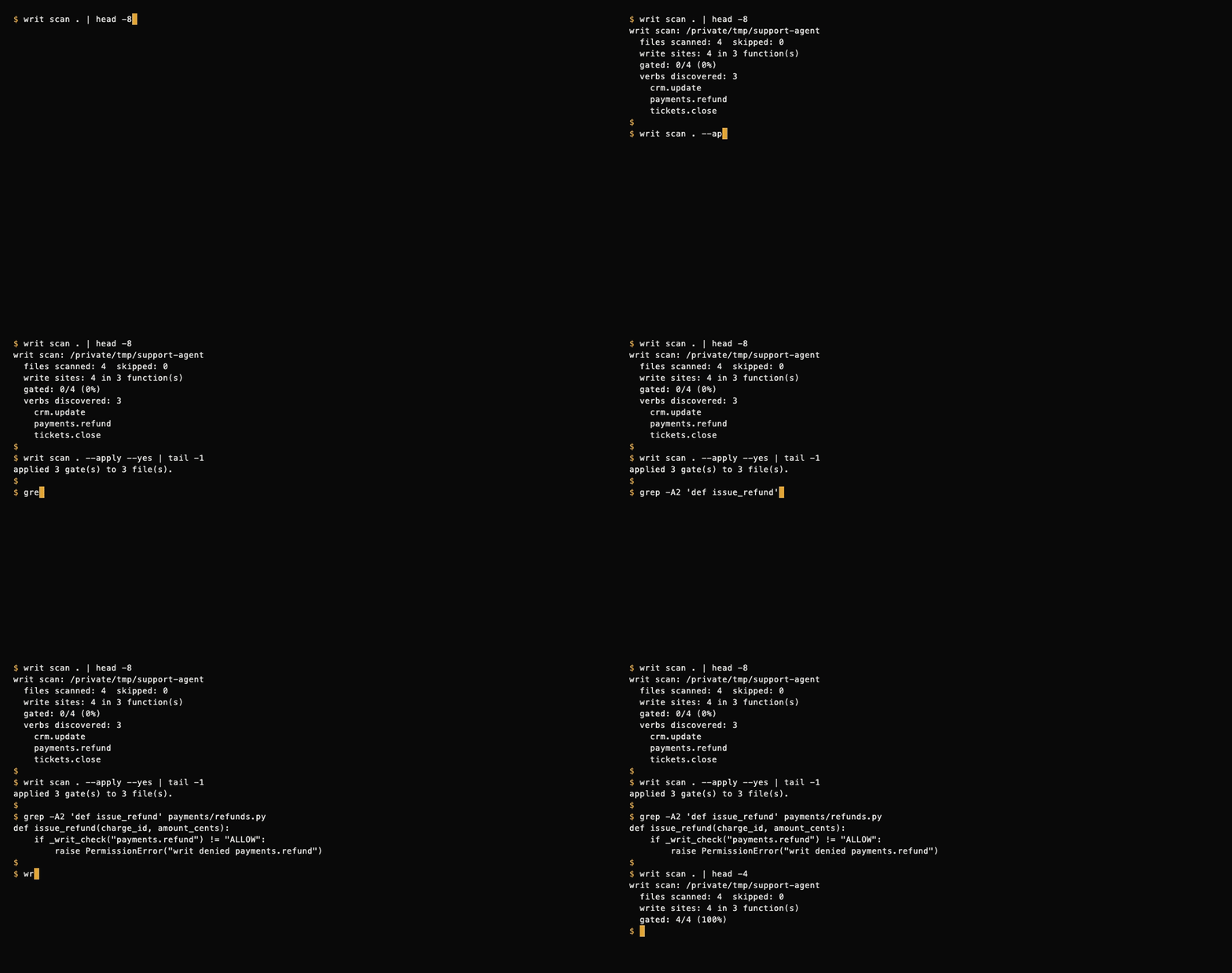
Find the consequential writes your agents can perform. writ scan . is a
free, local scan (no API key) that lists the writes it finds in your agent code. Then gate
them: Writ is an allow/deny gate you put in front of your agent's writes, and each check
writes a tamper-evident receipt to your audit log. No more wondering who called what, or when.
What it does
writ key— Get a free API key (1,000 receipts/month, no card)writ check— Ask the gate before a write (ALLOW or DENY)writ revoke— Kill switch: revoke a principal's tokens in one clickwrit receipts— See your audit logwrit scan— Find writes in your repo (Python: scan + instrument; TS/JS: scan only)
Scanning a repo
writ scan ./my-repo                       # report writes, print the diff, write writ-policy.json
writ scan ./my-repo --apply               # prompt, then insert gates (Python files only)
pip install 'pywrit[polyglot]'            # optional: also scan TypeScript / JavaScript

- Python (
.py): parsed with the stdlibast, no extra dependencies. Finds DB calls, HTTP clients, file writes, email, queues, and AWS SDK writes.writ scan --applyinserts a_writ_check(...)gate at the top of each writing function. - TypeScript / JavaScript (
.ts .tsx .js .jsx .mjs .cjs): scan only, never rewritten, and needs thepolyglotextra (tree-sitter). Without it,writ scanprints a one-line install hint and keeps scanning Python. Each finding is listed asfile:line [category] rule function(): snippet, and its verb goes intowrit-policy.jsonlike a Python finding. Detected:- HTTP:
fetch/axios/got/ky/superagentwith a literalPOST/PUT/PATCH/DELETEmethod,axios.post|put|patch|delete,http(s).requestwith a write method - Files:
fs.writeFile,appendFile,unlink,rm,rename,mkdir, … plusSyncandfs/promisesvariants - SQL: literal
INSERT/UPDATE/DELETE/DROP/ALTER/… strings passed toquery/execute/raw(including tagged templates such asprisma.$executeRaw) - SDKs: Stripe
create|update|del(e.g.stripe.refunds.create), Prismacreate|update|upsert|delete|deleteMany|updateMany, knex/db buildersinsert|update|del,child_processexec/spawn - A function that already calls
writCheck(...)/writ_check(...)counts as gated.
- HTTP:
- Skipped:
node_modules,dist,build, hidden dirs such as.gitand.next, virtualenvs, and test files. TS/JS scanning also skipsvendor,*.d.ts,*.min.js, and files over 1 MB, and respects.gitignorewhen the repo is a git checkout. - TS/JS limitations: calls are matched by name, so HTTP methods, SQL strings,
or options held in variables (
fetch(url, opts),db.query(sql)) are not detected, and route definitions likerouter.post(...)are deliberately not flagged. The Writ Score grades Python findings only; thets/js gated: N/Mline is the TS/JS coverage number.
Docs
Full docs at docs.withwrit.com. Quickstart at docs.withwrit.com/quickstart.
Packaging notes (for maintainers)
Installable distribution of the Writ CLI. pip install pywrit gives you the
writ command — no curl + chmod dance.
Layout
pyproject.toml— package metadata,writconsole-script entry pointwrit_cli/__init__.py— versionwrit_cli/cli.py— the CLI itself (stdlib-only: argparse, json, urllib; TS/JS scanning imports tree-sitter only when thepolyglotextra is installed)tests/— scanner tests:python -m unittest discover -s tests- Demo GIFs: recorded with VHS from
docs/tapes/*.tape(repo root:docs/tapes/render.sh)
Relationship to gate/web/writ
gate/web/writ is the self-contained single-file script served by the Lambda
at /writ (the curl -fsSL ... -o writ download path). It must stay a single
file with no install step.
writ_cli/cli.py is the PyPI package source. The two files are currently
byte-identical by copy. If you change CLI behavior, update both and keep
them in sync — the download path and the pip path must behave the same.
Build & test locally
cd cli
python -m build                    # needs `pip install build`
pip install -e .                   # editable install, creates the `writ` command
writ --help
Publish
cd cli
python -m build
twine upload dist/*
1 maintainer

Metadata
1 maintainer
Release files for pywrit 0.1.5
For a detailed explanation of source distributions (sdists) and built distributions (wheels), please see the package formats documentation.
Source distribution (sdist)
| File | Size | Uploaded | Provenance | Actions |
|---|---|---|---|---|
| pywrit-0.1.5.tar.gz | 89.1 kB | Without provenance | Details for pywrit-0.1.5.tar.gz |
Built distribution (wheel)
| File | Interpreter | ABI | Platform | Actions Reset |
|---|---|---|---|---|
| pywrit-0.1.5-py3-none-any.whl | Python 3 | none | any | Details for pywrit-0.1.5-py3-none-any.whl |
Total release size: 175.8 kB
Release files / pywrit-0.1.5.tar.gz
| Download URL | pywrit-0.1.5.tar.gz |
|---|---|
| Size | 89.1 kB |
| Tags | Source |
|
SHA-256 checksum How to use checksums |
ad859a2c3abfebbb6b5ab6d197cc013abea0a34500caee126edbb864fbf09918
|
|
BLAKE2b-256 checksum How to use checksums |
427f2532abe7fccb17ab7544c2c797dee20d844dde0bab3e82740f1cfc63f8c9
|
| Upload date | |
|
Uploaded using Trusted Publishing? What is trusted publishing? |
No |
| Uploaded via |
twine/7.0.0 CPython/3.11.17
|
Release files / pywrit-0.1.5-py3-none-any.whl
| Download URL | pywrit-0.1.5-py3-none-any.whl |
|---|---|
| Size | 86.8 kB |
| Tags | Python 3 |
|
SHA-256 checksum How to use checksums |
191b6f472ab663eebab18b8f8993152735148b9ce450aa6c7de2066069839e47
|
|
BLAKE2b-256 checksum How to use checksums |
a52e5baab0ce5818d4d20425c5faa1c2fa598d044b0c748cf632d612bb5238ed
|
| Upload date | |
|
Uploaded using Trusted Publishing? What is trusted publishing? |
No |
| Uploaded via |
twine/7.0.0 CPython/3.11.17
|
Security for pywrit 0.1.5
Provenance
Provenance describes where a file came from. On PyPI, provenance is shared via attestations, which provide a verifiable record of the build or publishing details. View details, limitations and caveats.
No provenance found
None of the files in this release were uploaded with provenance metadata.
A note on package security
PyPI is a repository for distributing packages, not a service for auditing them. While third-party security researchers and our staff do their best to detect and remove malicious packages, PyPI cannot guarantee the quality, security or suitability of any given package.
To learn more about protecting yourself from malicious actors, visit our package security documentation.














