
pywrit
Find the dangerous writes in your Python agent's code, then gate it. pywrit is the Python
client and writ CLI for Writ: an allow/deny gate that sits
in front of your agent's consequential writes (database, HTTP, files, email, queues,
AWS) and records a hash-chained receipt for every decision.

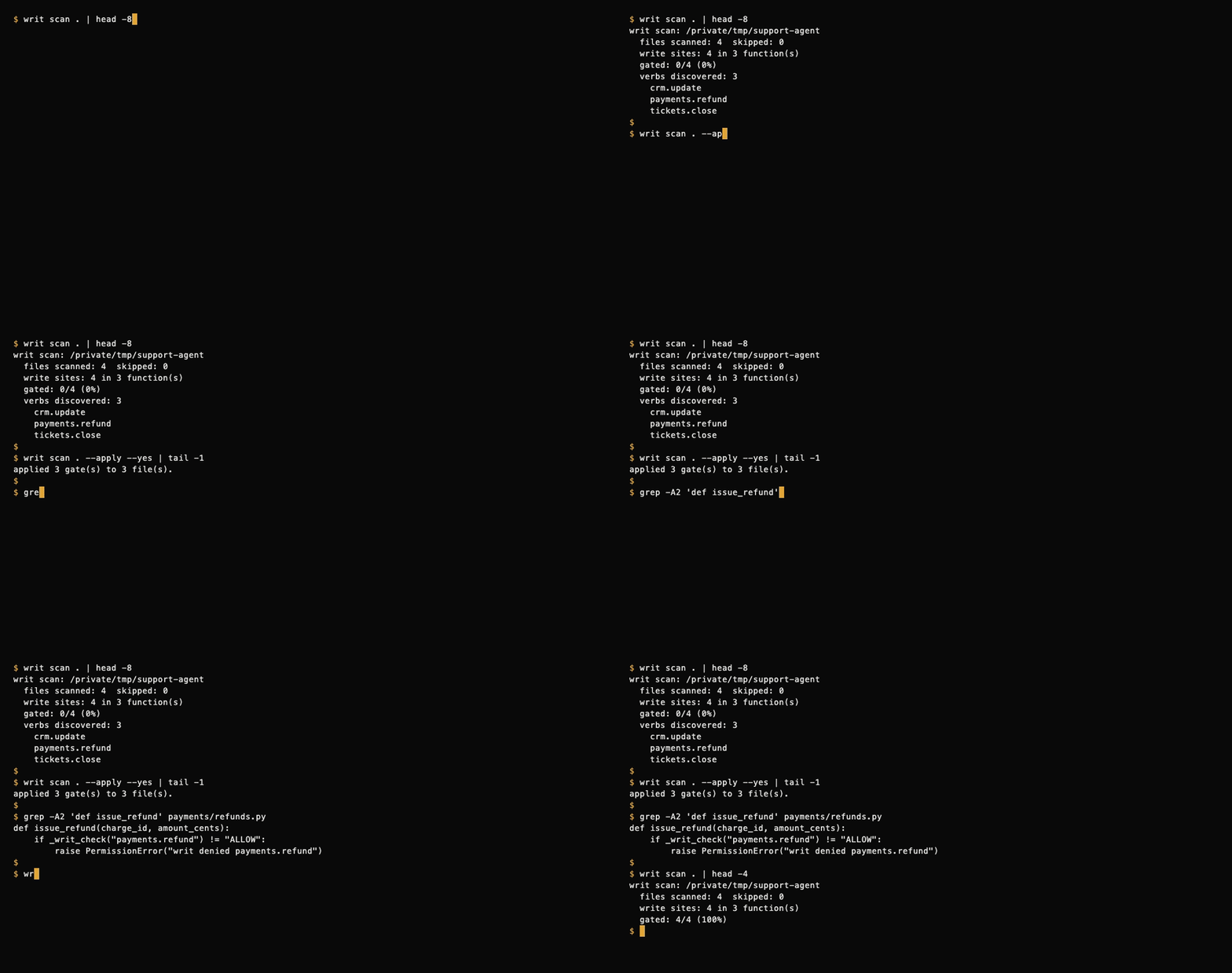
writ scan is local, deterministic, and free: it parses your code with Python's
ast module, makes no network calls, and needs no API key.
Install
pip install pywrit
Requires Python 3.9+. Installs the writ command and the pywrit Python client.
JavaScript/TypeScript devs: run the scanner with no Python setup via npm:
npx writ-scan .
The writ-scan package wraps the same scanner (including TS/JS support). On
first run it installs pywrit[polyglot] from PyPI using your Python 3.9+
(one-time); afterwards it starts instantly. See npm/ for details,
environment overrides (WRIT_PYTHON, WRIT_SCAN_NO_INSTALL), and the
install test.
60-second quickstart: scan → wrap → gate
1. Scan. See which functions write, and how many of them are gated.
writ scan .
writ scan: /path/to/support-agent
  files scanned: 4  skipped: 0
  write sites: 4 in 3 function(s)
  gated: 0/4 (0%)
  verbs discovered: 3
    crm.update
    payments.refund
    tickets.close
It also prints a risk report (0-100, weighted by risk tier), writes the discovered
verbs to writ-policy.json, and shows the instrumentation it would add as a unified
diff. Nothing in your code changes yet. writ scan . --score prints just the risk report.
2. Wrap. One command takes the repo from unwrapped to wrapped: scan, show the diff, ask for explicit approval, apply the gates, and report before/after coverage.
writ wrap .        # interactive approval
writ wrap . --yes  # no prompt (e.g. in CI)
--dry-run previews the plan and exits before prompting; --diff-only prints the
unified diff for review tools. Each gated function now asks Writ before it writes, and
fails closed:
def issue_refund(charge_id, amount_cents):
    if _writ_check("payments.refund") != "ALLOW":
        raise PermissionError("writ denied payments.refund")
    ...
writ scan . --apply is still available as the manual alternative. Re-run writ scan .
and you'll see gated: 4/4 (100%).
3. Gate. Get a free API key, load the discovered policy, and run your agent.
writ key --email you@example.com                  # free API key + tenant
export WRIT_API_KEY=writ_...                      # read by the inserted gate
export WRIT_SPONSOR=acme WRIT_AGENT=support-agent # optional: who is acting
writ scan . --push-policy --key "$WRIT_API_KEY"   # upload the discovered verb policy
Every gated write now gets ALLOW, DENY, or STEP_UP (a human sponsor must
approve), and every decision is written to your tenant's tamper-evident audit log:
writ receipts --key "$WRIT_API_KEY"       # latest receipts
writ verify-chain --key "$WRIT_API_KEY"   # verify the receipt hash chain
writ stream --key "$WRIT_API_KEY"         # tail decisions live
writ report --key "$WRIT_API_KEY"         # Agent Action Report
What writ scan detects
Python (.py) files, parsed with the stdlib ast (no extra dependencies):
| Category | Examples |
|---|---|
| Database | cursor.execute(...) / executemany / executescript (write SQL only; SELECT/WITH/... skipped), session.add / commit / delete / merge / flush |
| HTTP | requests.post / put / patch, client.delete(...), session.request(...) |
| Files | open(..., "w"/"a"/"x"/"+"), Path.write_text / write_bytes / unlink / rename, os.remove / rename / makedirs, shutil.rmtree / move / copy |
sendmail, send_message, send_email |
|
| Queues | publish, produce, enqueue, queue.send(...) |
| AWS SDK | put_object, put_item, delete_item, upload_file, send_message, start_execution, ... |
- Each write is mapped to a verb such as
payments.refundorcrm.update, inferred from the file path and function name. - A function that already calls
writ_check(...)/_writ_check(...)counts as gated. - Skipped: tests, hidden directories, virtualenvs,
node_modules,dist,build. Use--exclude SUBSTR(repeatable) to skip more. - Not covered (review by hand): writes behind dynamically built SQL, third-party SDK
calls such as
stripe.Refund.create(...), deferred task queues, or shared clients several layers down. The risk report lists these gaps every time.
TypeScript / JavaScript (scan-only)
writ scan also finds write sites in TypeScript and JavaScript. It needs the
optional extra (tree-sitter based):
pip install 'pywrit[polyglot]'
writ scan .
Without the extra, the scanner prints a one-line hint and keeps going — Python scanning never needs it.
Findings from non-product paths (docs/, scripts/, sandbox/, examples/,
benchmark/, demo/, and build-tooling files such as gulpfile.js or
webpack.config.*) are suppressed by default: the report counts them per
class and names every suppressed path instead of listing them as findings.
Pass --include-non-product to report them like any other finding.
Every scan report ends with a one-line pointer to the Writ GitHub App
(install: https://github.com/apps/writ-scanner, guide:
https://docs.withwrit.com/git-hub-app), which runs the scan on every push
and pull request; the JSON report (--format json) carries the same
pointer under github_app.
TS/JS is scan-only: findings are listed with verbs for your policy file,
but writ scan --apply never rewrites TS/JS files — gate those by hand.
Covered patterns: fetch/axios writes, fs writes, SQL through knex-style
clients, Prisma writes, JS SDK calls such as stripe.refunds.create(...), and
generated REST resource clients: create / update / patch / remove
methods (plus their ...WithHttpInfo variants) that build request options
with an explicit write HTTP method and route them through the client request
pipeline (twilio-style generated clients, e.g. twilio-node).
(Still not covered: the Python SDK equivalents like stripe.Refund.create(...)
— see "Not covered" above.)

GitHub Action
Scan every pull request for ungated write sites. Findings land as check
annotations on the exact file and line, plus a Markdown risk report in the
job summary. The check fails when an ungated finding meets your
fail-on-risk threshold (default: high).
- uses: actions/checkout@v4
- uses: withwrit/pywrit@v0
  with:
    fail-on-risk: high   # high | medium | low | never
No API key needed. Full reference: docs/github-action.md · example workflow: examples/github-action/writ-scan.yml
GitHub App
Install the Writ GitHub App on selected repositories: every push and pull request is scanned for ungated write-sites, with results as a check run on the PR and in the portal, where you manage policy, keys, and the audit log. Setup and data handling: GitHub App docs.
MCP server (writ-mcp)
Give any MCP-compatible agent point-of-action policy checks. writ-mcp is a
Model Context Protocol server (stdio transport,
built on the MCP Python SDK) that exposes the Writ gate as 17 MCP tools:
the agent calls writ_check before a consequential write and gets back ALLOW,
DENY, or STEP_UP — with a tamper-evident, hash-chained audit receipt for
every decision.
uvx writ-mcp            # no install — runs on demand
# or
pip install writ-mcp   # then run `writ-mcp`
| Tool | What it does |
|---|---|
writ_check |
The gate: ALLOW / DENY / STEP_UP for a proposed write |
writ_verify_token |
Validate an ALLOW auth token (catches purpose drift) |
writ_grant |
Human-sponsor approval for the STEP_UP path |
writ_revoke / writ_reinstate |
The kill switch |
writ_receipts |
Read the tenant's audit log |
writ_policy |
Manage the verb policy |
writ_sandbox |
Keyless 90-second demo grant — no API key needed |
writ_github_installations |
List connected GitHub App installations |
writ_github_set_threshold |
Set the check-run fail threshold per install |
writ_github_toggle_pr_comments |
Enable/disable the PR-comment bot |
writ_manifests |
List repos with risk profiles or fetch one manifest |
writ_explain_receipt |
Explain a receipt in plain language |
writ_tenant_notify |
Get or update step-up notification settings |
writ_principals |
List the tenant's principals |
writ_verbs |
List the tenant's verb vocabulary |
writ_keys |
List API key metadata |
The gate tools need a free Writ API key (WRIT_API_KEY): 10,000 receipts/month
free, no credit card. writ_sandbox works with no key at all.
The server implementation lives in mcp/ (MIT). Also published on the
official MCP Registry as io.github.withwrit/writ and listed on
Glama.
Python client
from pywrit import WritClient

client = WritClient(api_key="writ_...")

result = client.check(
    sponsor_id="acme",
    agent_id="agent-7",
    verb="db.write",
    target="prod.customers",
    purpose="backfill region field",
)

if result.decision == "ALLOW":
    # result.auth_token is a short-lived token bound to this exact write
    perform_write(...)
elif result.decision == "STEP_UP":
    # a human sponsor must approve first: client.grant(...), then re-check
    ...
else:
    # DENY
    ...
No API key yet? Try the keyless sandbox:
client = WritClient()
client.sandbox({
    "sponsorId": "acme",
    "agentId": "agent-7",
    "verb": "demo_write",       # sandbox only allows demo_write ...
    "target": "demo-customers", # ... on targets starting with demo-
    "purpose": "trying the gate",
})
What's covered:
check(...): the gate.ALLOW/DENY/STEP_UP, plus a receipt every timeverify_token(...): validate anALLOWauth token (catches purpose drift)grant(...): human-sponsor approval for theSTEP_UPpathget_policy()/set_policy(...): manage the tenant policyrevoke(...)/reinstate(...)/revoked(): the kill switchreceipts()/receipt(id)/verify_chain()/stream_receipts(): the audit logsandbox(...): keyless trial, no API key required
CLI reference
writ wrap .                         # scan, diff, approve, apply, verify coverage
writ wrap . --dry-run               # preview only
writ wrap . --yes                   # non-interactive CI mode
writ check --key writ_... --sponsor acme --agent agent-7 \
  --verb db.write --target prod.customers --purpose "backfill region field"
writ policy --key writ_... --set payments.refund require_grant
writ revoke --sponsor acme --agent agent-7 --reason "runaway loop"   # kill switch (sponsor token)
writ grant --sponsor acme --agent agent-7 --verb payments.refund \
  --target ch_123 --purpose "approved refund"                        # STEP_UP approval (sponsor token)
Sponsor-token commands (revoke, reinstate, revoked, grant) read
--sponsor-token or WRIT_SPONSOR_TOKEN. Run writ --help for the full command list.
README badge
Show that your agent's writes are gated by Writ. Two flavors:
Static (works today, no API key) — same design, no live count:
[](https://withwrit.com)
Dynamic (live 30-day gated-write count from your audit log) — mint a badge token, then embed the snippet the API returns:
curl -s https://api.withwrit.com/v1/badge/tokens \
  -H "Authorization: Bearer writ_..." \
  -H "Content-Type: application/json" \
  -d '{}'
The dynamic endpoint ships with the gate — until it's live, POST /v1/badge/tokens
returns 404 and the static badge above is the one to use.
See badge/ for embed docs and the verification model (what the
badge proves — and what it doesn't).
Docs
Full docs: docs.withwrit.com · Quickstart: docs.withwrit.com/quickstart · Site: withwrit.com
License
MIT
1 maintainer

Metadata
1 maintainer
Release files for pywrit 0.2.11
For a detailed explanation of source distributions (sdists) and built distributions (wheels), please see the package formats documentation.
Source distribution (sdist)
| File | Size | Uploaded | Provenance | Actions |
|---|---|---|---|---|
| pywrit-0.2.11.tar.gz | 52.1 kB | Without provenance | Details for pywrit-0.2.11.tar.gz |
Built distribution (wheel)
| File | Interpreter | ABI | Platform | Actions Reset |
|---|---|---|---|---|
| pywrit-0.2.11-py3-none-any.whl | Python 3 | none | any | Details for pywrit-0.2.11-py3-none-any.whl |
Total release size: 90.4 kB
Release files / pywrit-0.2.11.tar.gz
| Download URL | pywrit-0.2.11.tar.gz |
|---|---|
| Size | 52.1 kB |
| Tags | Source |
|
SHA-256 checksum How to use checksums |
edb9622f760e8dab97e518b81f67f1c7f5b52cbfec42a54a0a19519989218247
|
|
BLAKE2b-256 checksum How to use checksums |
db30aca607845083172502071dd619e276333f784c2c8e072248480578155e88
|
| Upload date | |
|
Uploaded using Trusted Publishing? What is trusted publishing? |
No |
| Uploaded via |
twine/7.0.0 CPython/3.15.2
|
Release files / pywrit-0.2.11-py3-none-any.whl
| Download URL | pywrit-0.2.11-py3-none-any.whl |
|---|---|
| Size | 38.3 kB |
| Tags | Python 3 |
|
SHA-256 checksum How to use checksums |
5b957ebf04fc823b26a9dafb11270c2125368738027bd18428459f46df561652
|
|
BLAKE2b-256 checksum How to use checksums |
9c88ad7395a1dd55b78257242e118b3181e0536ee04852a0e234e18cc41d6a83
|
| Upload date | |
|
Uploaded using Trusted Publishing? What is trusted publishing? |
No |
| Uploaded via |
twine/7.0.0 CPython/3.15.2
|
Security for pywrit 0.2.11
Provenance
Provenance describes where a file came from. On PyPI, provenance is shared via attestations, which provide a verifiable record of the build or publishing details. View details, limitations and caveats.
No provenance found
None of the files in this release were uploaded with provenance metadata.
A note on package security
PyPI is a repository for distributing packages, not a service for auditing them. While third-party security researchers and our staff do their best to detect and remove malicious packages, PyPI cannot guarantee the quality, security or suitability of any given package.
To learn more about protecting yourself from malicious actors, visit our package security documentation.














