
Pyzed
Interfaces modernas y rápidas en Python, renderizadas por Iced (Rust). Incluye componentes listos para usar inspirados en el editor Zed.
📖 Documentación: albakore.github.io/pyzed · Novedades
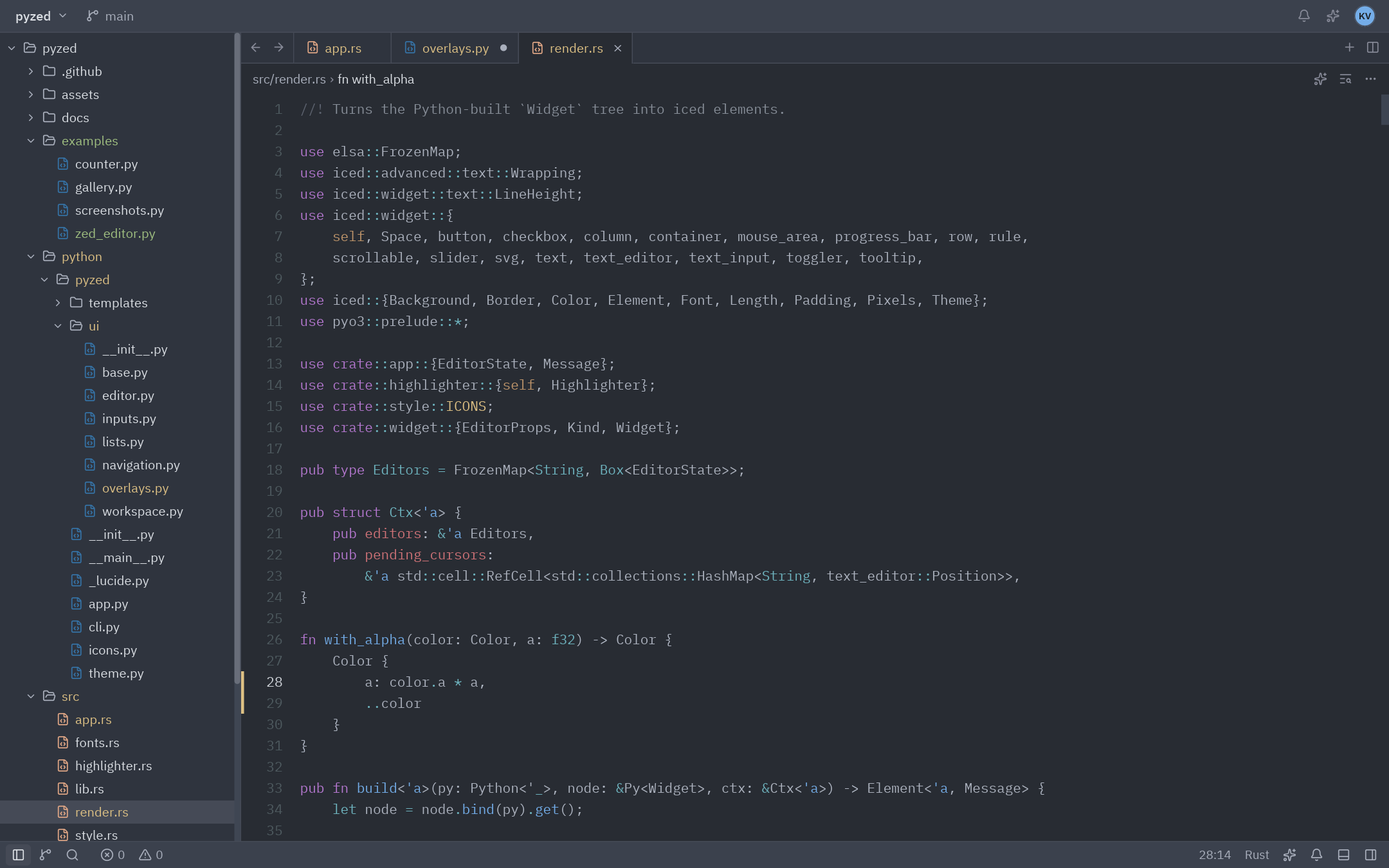
Esta captura es una app de Python (
examples/zed_editor.py): panel de proyecto, pestañas, editor con resaltado de sintaxis, marcadores de git, barra de estado, paleta de comandos y temas. Todo se dibuja con Iced.
Por qué Pyzed
- Rendimiento nativo. Python solo describe la interfaz. El layout, el texto y el dibujado (wgpu, con tiny-skia como respaldo por software) los hace Iced 0.14 en Rust, mediante PyO3.
- Sencillo. Sigue la arquitectura Elm de Iced (estado,
updateyview). Un botón puede llamar directamente a un método:on_press=self.guardar. - Componentes listos. Unos 40 componentes al estilo Zed (botones, pestañas, árbol de archivos, paleta de comandos, editor de código, terminal, menús, notificaciones…), todos personalizables.
- Temas. Incluye las familias One, Ayu y Gruvbox importadas de Zed, puede leer cualquier tema de Zed, generar uno a partir de tres colores y seguir el modo claro/oscuro del sistema.
- Async y varias ventanas.
async def, generadores y streams enupdate, temporizadores conpz.everyy tantas ventanas como quieras conpz.Window. - Multiplataforma. Linux, macOS y Windows. Las fuentes (IBM Plex) y los iconos (Lucide, ~2000) van incluidos.
- Capturas sin ventana.
app.screenshot("ui.png")renderiza fuera de pantalla, sin GPU ni display. Sirve para tests y documentación (así se generaron todas estas imágenes).
Instalación
Por ahora se instala desde el código fuente. Necesitas Rust estable y Python 3.9 o superior.
pip install git+https://github.com/albakore/pyzed
Para desarrollar:
git clone https://github.com/albakore/pyzed && cd pyzed
python -m venv .venv && source .venv/bin/activate
pip install maturin
maturin develop --release   # usa --release: la build debug es mucho más lenta
Inicio rápido
import pyzed as pz
from pyzed import ui


class Counter(pz.App):
    title = "Counter"
    size = (360, 220)

    def __init__(self):
        self.count = 0

    def update(self, message):          # los mensajes pueden ser cualquier valor de Python
        if message == "increment":
            self.count += 1
        elif message == "decrement":
            self.count -= 1

    def view(self):
        return pz.center(
            pz.column([
                ui.heading(str(self.count)),
                pz.row([
                    ui.button("-1", "decrement", icon="minus"),
                    ui.button("+1", "increment", icon="plus", variant="solid"),
                    # ...o un callable, que se llama directamente
                    ui.icon_button("rotate-ccw", lambda: setattr(self, "count", 0), tooltip="Reset"),
                ], spacing=8),
            ], spacing=16, align="center"),
            bg=self.theme.editor,
        )


pz.run(Counter)
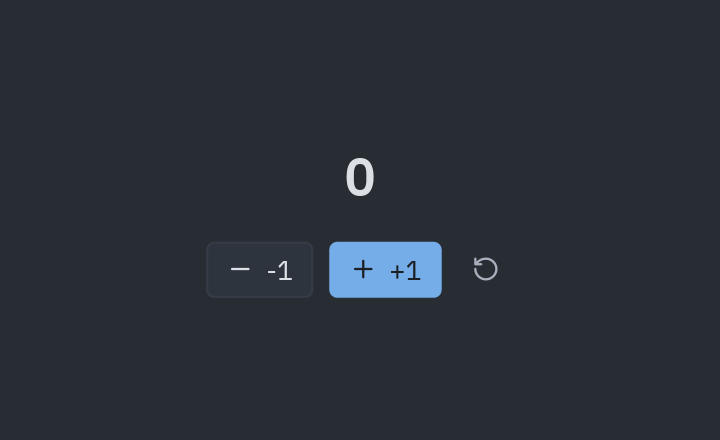
Crear un proyecto nuevo
pyzed new mi-app      # crea mi-app/main.py con barra de título, sidebar, estado y paleta de comandos
cd mi-app && python main.py
pyzed icons folder    # busca nombres de iconos
Hot reload
pyzed dev main.py # como `python main.py`, pero cada vez que guardas se actualiza la ventana
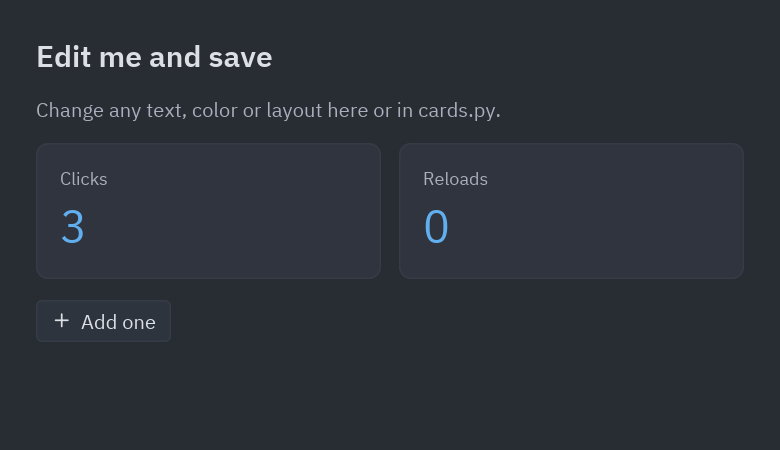
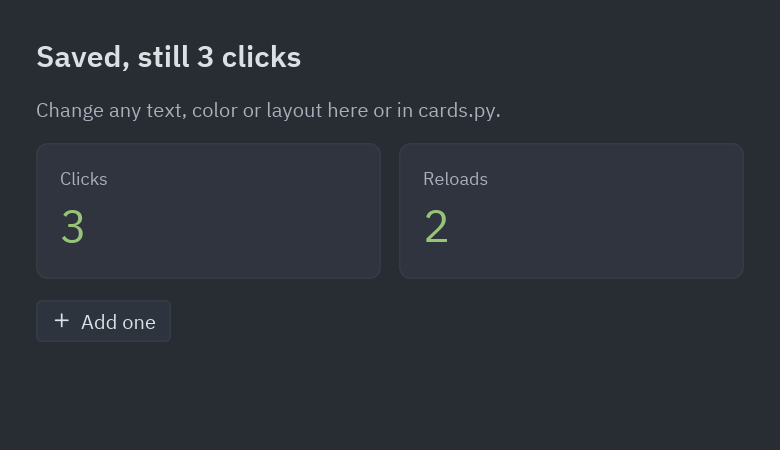
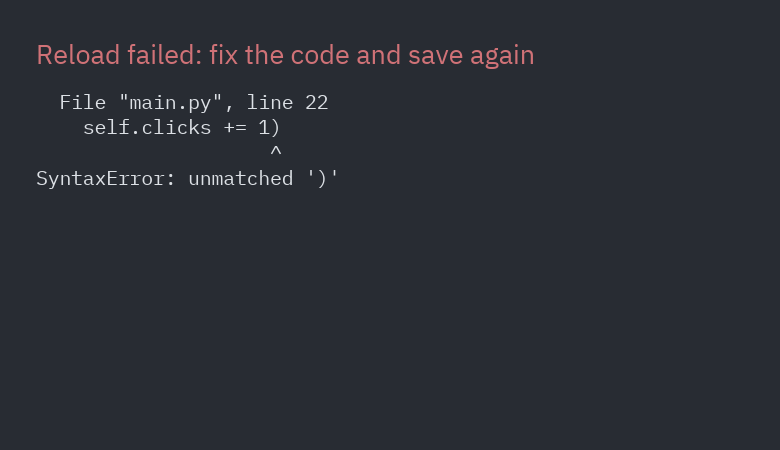
También con pz.run(MiApp, reload=True) o la variable PYZED_RELOAD=1. Al guardar cualquier
.py del proyecto, la ventana muestra el cambio sin reiniciarse y conserva el estado (los
atributos de tu app). Si el código nuevo tiene un error, la ventana lo muestra hasta que guardas
la corrección.
| Antes | Después de guardar | Con un error |
|---|---|---|
 |
 |
 |
sequenceDiagram
    participant Editor as Tu editor
    participant Watcher as Hilo vigilante
    participant UI as Hilo de la UI (Iced)
    participant App as Tu App
    Editor->>Watcher: guardas cards.py
    Watcher->>UI: pz.post(recargar)
    UI->>UI: re-ejecuta cards.py y los módulos que lo importan
    UI->>App: obj.__class__ = clase nueva (mismo estado)
    UI->>App: on_reload() si existe
    UI->>App: view()
    App-->>UI: árbol de widgets nuevo
Los atributos que crea __init__ no se vuelven a crear: dale un valor por defecto de clase a los
atributos nuevos, o define on_reload(self) para migrar el estado. Ver
examples/hot_reload/ y pyzed.hot_reload para vigilar otros archivos
(Reloader.watch(ruta, callback)).
Conceptos
| Concepto | Cómo funciona |
|---|---|
App |
Tu estado vive en el objeto. view() devuelve widgets y update(msg) cambia el estado. |
| Mensajes | on_press=valor envía valor a update. Si es un callable (lambda, método), se llama directamente. Lo que devuelva, si no es None, se envía a update. |
| Callbacks con datos | on_input, on_toggle, on_change… reciben el valor nuevo: on_input=lambda t: setattr(self, "query", t). |
Command |
Efectos que devuelve update o un callback: Command.focus("id"), Command.exit(), Command.set_editor_text(id, txt), Command.set_editor_cursor(id, línea, col), Command.scroll_to(id, x, y), Command.copy(txt), Command.batch([...]) y Command.perform(fn, then), que ejecuta fn (normal o async def) en segundo plano y entrega el resultado a then. |
| Async | update y los callbacks pueden devolver una corrutina, un generador o un generador async: cada resultado vuelve a update. Todo corre en un único loop de asyncio. |
| Suscripciones | subscriptions() devuelve pz.every(segundos, msg) (temporizador) y pz.listen(gen) (streams). Solo existen mientras las devuelves. |
| Ventanas | class Ajustes(pz.Window) con su propio view(), título, tamaño y tema; se abre con return Ajustes().open(). Ganchos: on_open, on_close, on_resize. |
| Atajos | on_key(self, combo) recibe cada tecla al estilo Zed: "ctrl-shift-p", "escape", "up"… |
| Hilos | pz.post(mensaje) envía un mensaje a la app desde cualquier hilo. |
| Inicio | on_start() se ejecuta una vez y puede devolver un Command o una corrutina. |
| Errores | Si view() lanza una excepción, la ventana muestra el traceback en vez de cerrarse. |
Widgets base (pyzed)
text, column, row, container, center, button, text_input, scrollable, space,
hspace, vspace, rule, mouse_area, stack, opaque, hover, tooltip, checkbox,
toggler, slider, vertical_slider, progress_bar, code_editor, svg, icon,
image e image_viewer (PNG, JPEG… o píxeles RGBA), canvas (dibujo 2D con pyzed.draw),
markdown, rich_text + span, qr_code, pick_list, radio, split, grid, pin y
responsive. Los contenedores aceptan gradient=(ángulo, [colores]).
Los tamaños aceptan píxeles, "fill", "shrink" o "fill:2" (proporción). El padding acepta
8, (v, h) o (arriba, derecha, abajo, izquierda). Los colores aceptan "#rrggbb[aa]" o
tuplas (r, g, b[, a]).
Componentes (pyzed.ui)
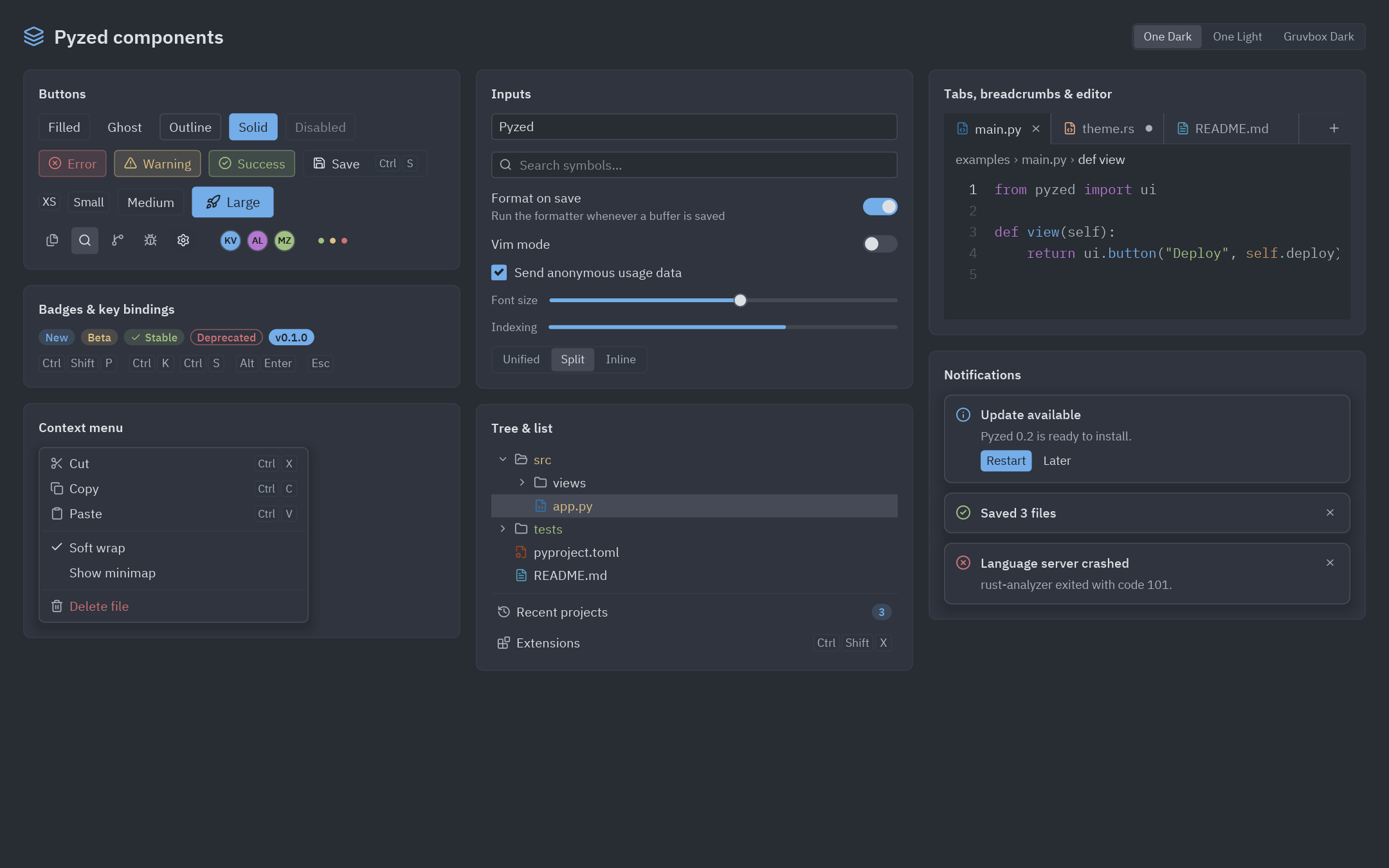
| Grupo | Componentes |
|---|---|
| Básicos | label, muted, heading, button (filled, ghost, outline, solid, error/warning/success; tamaños xs a lg; atajo opcional), icon_button, badge, indicator, kbd, avatar, tooltip, divider, card |
| Formularios | input, search_input, switch, checkbox, slider, progress, segmented, field, select, radio_group, number_field, split_button, toggle_group, chip, disclosure |
| Datos y feedback | table + Column (orden y selección), callout, count_badge, facepile, diff_stat, keybinding_hint, empty_state, settings_group, stat, sparkline, bar_chart, donut, spinner, markdown, split |
| Listas | list_item, list_header, tree + TreeNode.from_paths(...) (panel de proyecto con estados de git), menu + MenuItem |
| Navegación | tab_bar + Tab.for_file(...) (sucia, vista previa, estado git, cierre al pasar el ratón), breadcrumbs, toolbar |
| Workspace | workspace (layout con docks izquierdo, derecho e inferior), title_bar, title_button, status_bar, status_item, panel, panel_header |
| Overlays | layer (capa con fondo y cierre al hacer clic fuera), modal, popover (menús contextuales), picker, command_palette + PaletteItem, fuzzy_filter, toast, toasts |
| Código | editor (resaltado de sintaxis, números de línea, marcadores de git, scroll horizontal con números fijos, ajuste de línea, on_change y on_cursor), terminal (con colores ANSI), ansi |
Todos leen sus colores del tema actual y aceptan theme= u otros parámetros para cambiarlos.
Diseñador visual
Un editor de formularios al estilo Visual Basic / Qt Designer, hecho con Pyzed: arrastras componentes a una grilla de puntos con snapping, los alineas, editas sus propiedades y haces doble clic para escribir el código de cada evento. F5 ejecuta el formulario con toda su lógica.
pyzed design login.pzform   # abre el diseñador
pyzed run login.pzform      # ejecuta el formulario
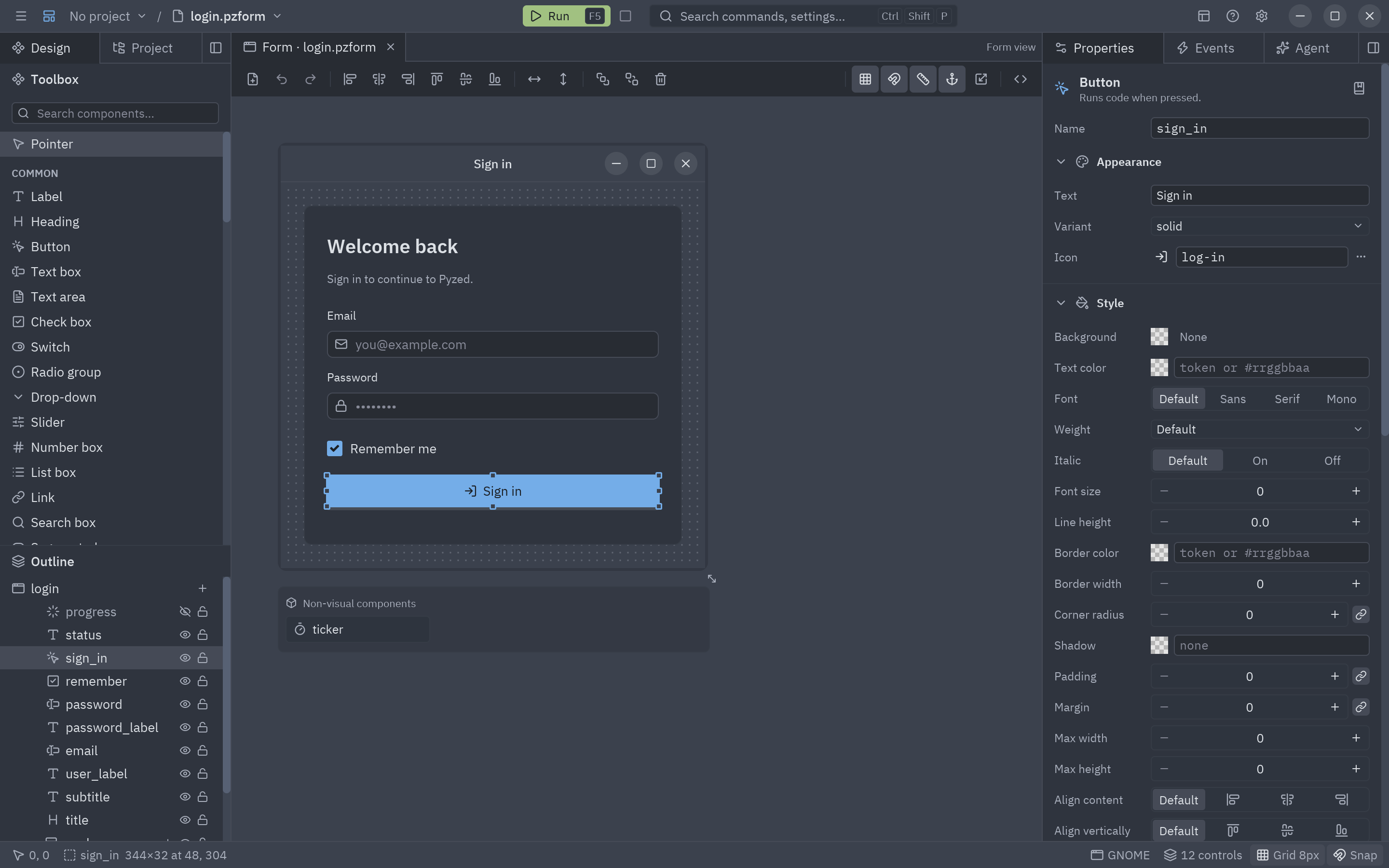
Cada formulario son dos archivos: login.pzform (diseño en JSON) y login.py (handlers en Python). Ejemplo en
examples/designer; guía completa en docs/src/content/docs/guides/designer.md.
Temas
class MiApp(pz.App):
    theme = "Ayu Dark"                     # cualquier nombre de pz.themes.names()
    # theme = pz.themes.auto("One Light", "One Dark")   # sigue al sistema

oceano = pz.themes.ONE_DARK.derive(name="Océano", syntax={"keyword": "#ff79c6"}).with_accent("#4fb3ff")
propio = pz.Theme.generate("Propio", background="#1b1d23", text="#e6e6e6", accent="#ff8a65")
de_zed = pz.Theme.from_zed("catppuccin.json", name="Catppuccin Mocha")   # temas de Zed
Cambiar self.theme en update cambia el estilo de toda la interfaz al momento.
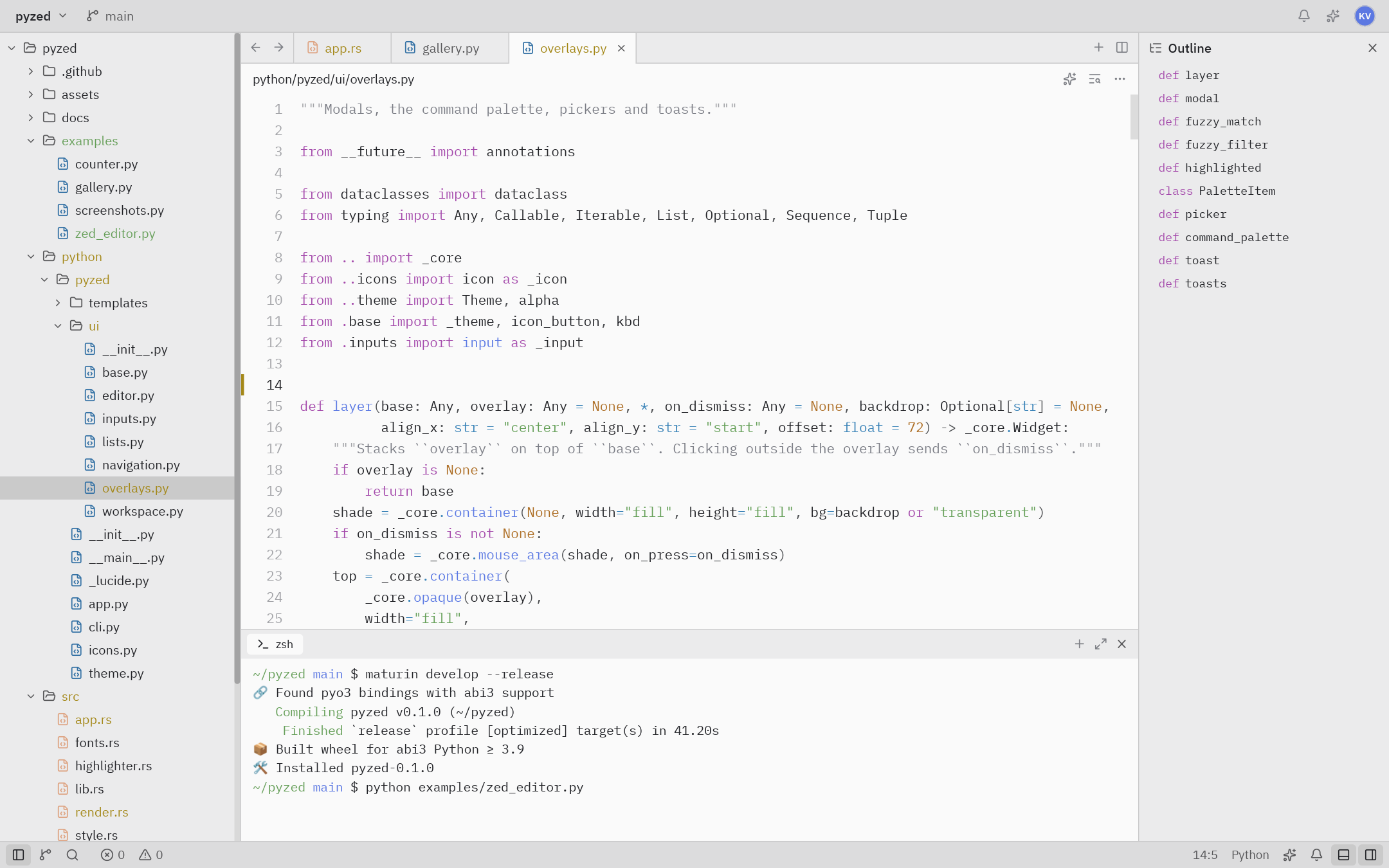
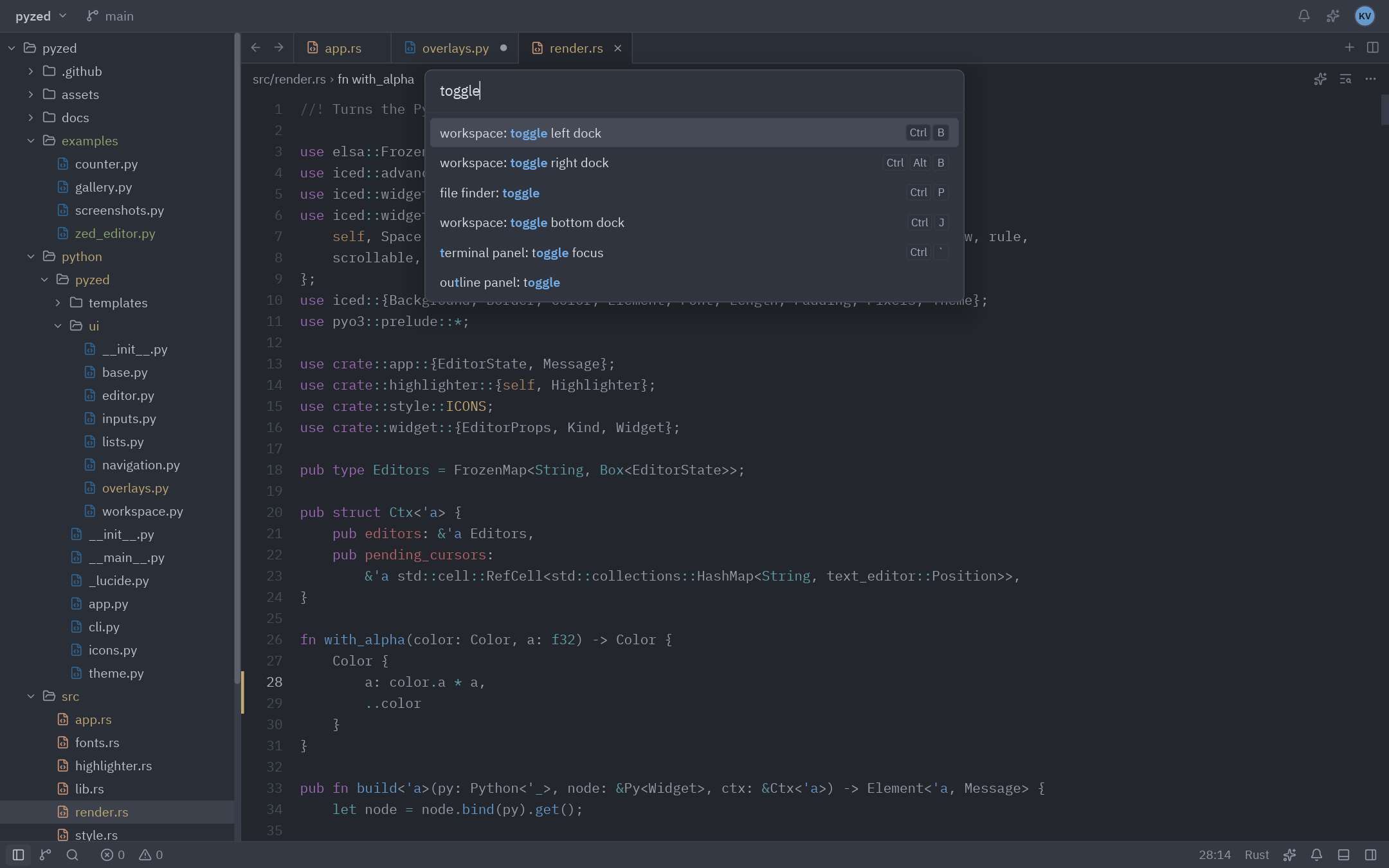
| One Light + terminal + outline | Paleta de comandos |
|---|---|
 |
 |
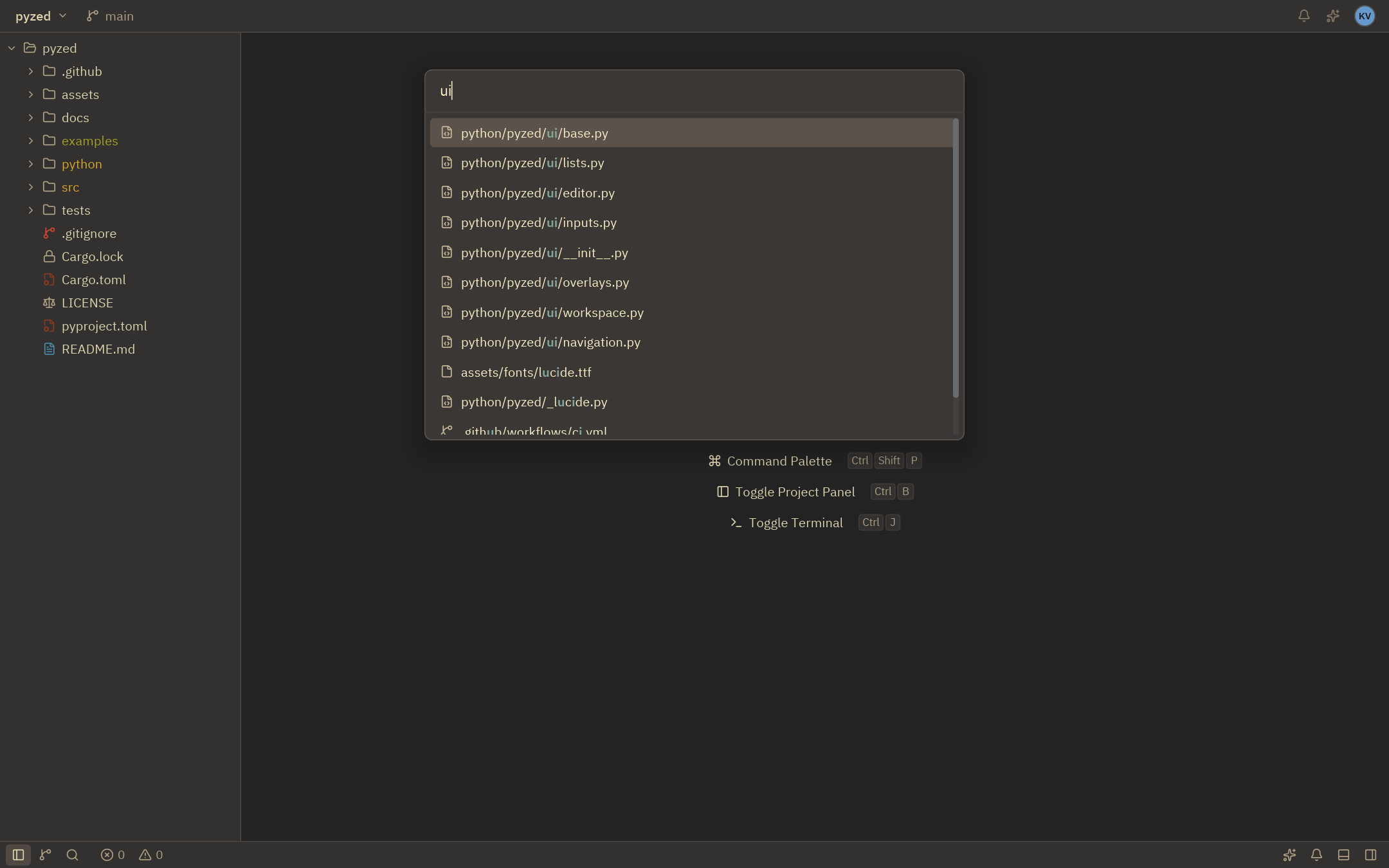
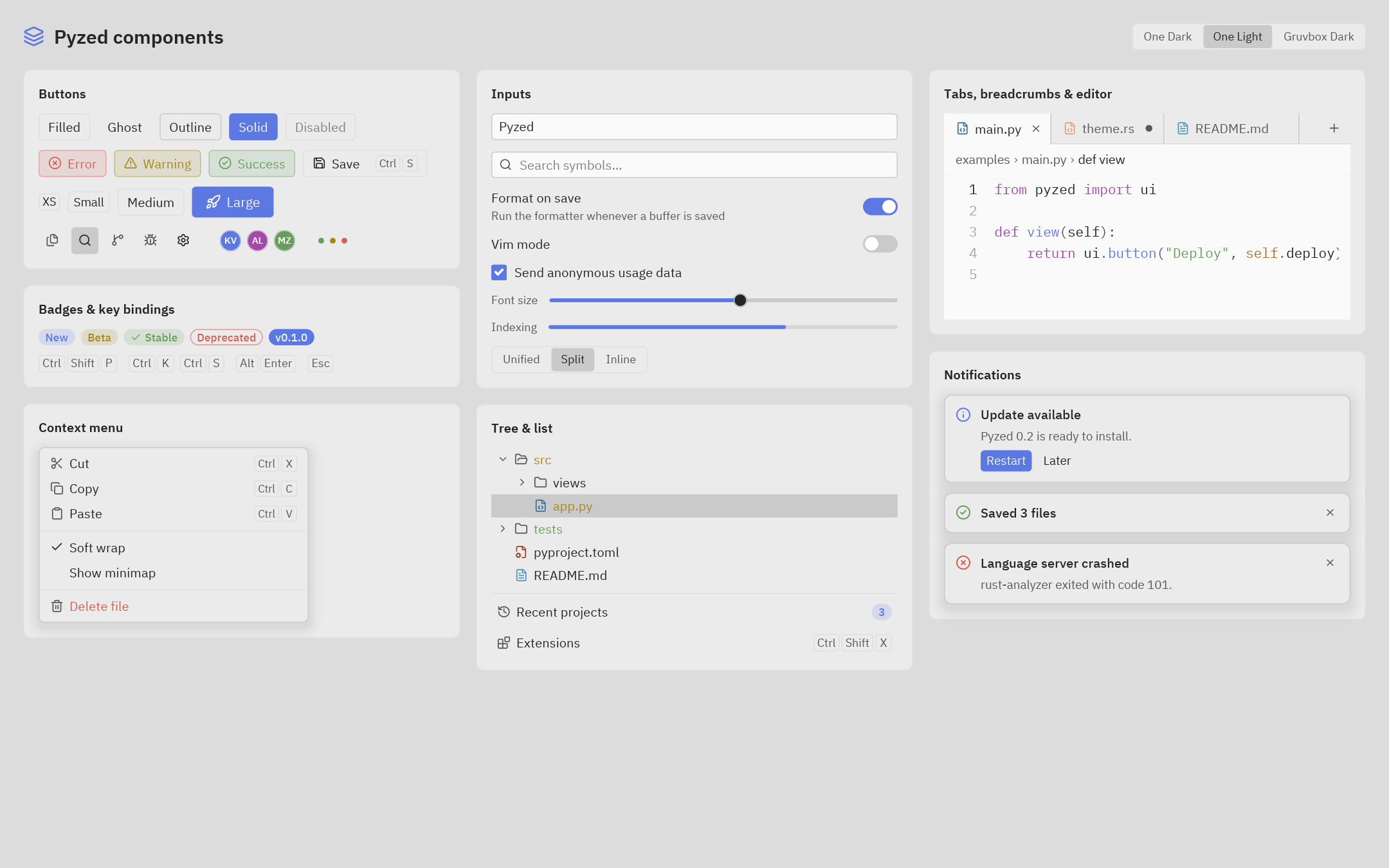
| Buscador de archivos (Gruvbox) | Componentes (One Light) |
 |
 |
Ejemplos
| Archivo | Qué muestra |
|---|---|
examples/counter.py |
Lo mínimo: estado, mensajes y callables. |
examples/todo.py |
Lista de tareas: formularios, listas, filtros, foco y atajos. |
examples/downloads.py |
Trabajo en segundo plano con Command.perform y pz.post, progreso y notificaciones. |
examples/mini_editor.py |
Un editor tipo Zed en ~150 líneas (árbol, pestañas, editor, paleta). |
examples/gallery.py |
Todos los componentes, interactivos, con selector de tema. |
examples/zed_editor.py |
Un editor tipo Zed sobre una carpeta real: abrir, editar y guardar (ctrl-s), paleta (ctrl-shift-p), buscador (ctrl-p), docks (ctrl-b, ctrl-j, ctrl-alt-b) y temas. El panel de terminal muestra una salida de ejemplo; no ejecuta una shell. |
examples/hot_reload/ |
Hot reload con dos módulos: ejecútalo con pyzed dev examples/hot_reload/main.py y edítalo. |
examples/tutorial/ |
Tutorial en cinco pasos, de una ventana vacía a una app de notas. |
examples/todos.py |
Lista de tareas con edición, filtros y guardado (demo todos de Iced). |
examples/game_of_life.py |
Juego de la vida en un canvas con pz.every. |
examples/clock.py, stopwatch.py |
Reloj analógico y cronómetro con vueltas. |
examples/download_progress.py |
Descargas concurrentes con generadores async. |
examples/websocket_stream.py |
Datos en vivo con pz.listen. |
examples/multi_window.py |
Varias ventanas con estado compartido y temas distintos. |
examples/image_viewer.py |
image e image_viewer con zoom y desplazamiento. |
examples/markdown_viewer.py |
Editor de Markdown con vista previa en un split. |
examples/styling.py |
Selector de temas, tema del sistema y temas generados. |
examples/context_menu.py, panes.py, qr_code.py |
Menú contextual, paneles redimensionables y códigos QR. |
examples/screenshots.py |
Regenera las imágenes de docs/screenshots. |
Cómo funciona
Python                         Rust (pyzed._core, PyO3)                 Iced 0.14
App.view() ──► árbol de Widget ──► render.rs: Widget → iced::Element ──► layout + wgpu/tiny-skia
App.update() ◄── mensajes ◄────── app.rs: Message, Command → Task ◄──── eventos (ratón, teclado)
- Los nodos
Widgetson objetos inmutables de Rust, así que construir la vista desde Python es barato. - El estado interno de cada editor (texto, cursor, deshacer) vive en Rust y se identifica por
id. - El resaltado usa syntect (gramáticas de
two-face) con los colores del tema de Pyzed. - El GIL se libera mientras corre el bucle de eventos, así que otros hilos de Python siguen funcionando.
Estado y limitaciones
Es la versión 0.2. Limitaciones conocidas:
pz.run()solo puede llamarse una vez por proceso (limitación de winit); usapz.Windowpara más ventanas.- Con
wrap=True, el editor numera la primera fila de cada línea ajustada, como Zed.
Licencia
MIT. Las fuentes incluidas son IBM Plex (SIL Open Font License) y Lucide (ISC); sus
licencias están en assets/fonts. Los temas One, Ayu y Gruvbox vienen del
repositorio de Zed (MIT); ver python/pyzed/zed_themes/LICENSE.
1 maintainer

Metadata
1 maintainer
Release files for pyzed-ui 0.3.1
For a detailed explanation of source distributions (sdists) and built distributions (wheels), please see the package formats documentation.
Source distribution (sdist)
| File | Size | Uploaded | Provenance | |
|---|---|---|---|---|
| pyzed_ui-0.3.1.tar.gz | 8.6 MB | With provenance | Details |
Built distributions (wheels)
| File | Reset | |||
|---|---|---|---|---|
| pyzed_ui-0.3.1-cp39-abi3-win_amd64.whl | CPython 3.9 | abi3 | Windows x86-64 | Details |
| pyzed_ui-0.3.1-cp39-abi3-manylinux_2_28_x86_64.whl | CPython 3.9 | abi3 | Linux glibc 2.28+ x86-64 | Details |
| pyzed_ui-0.3.1-cp39-abi3-manylinux_2_28_aarch64.whl | CPython 3.9 | abi3 | Linux glibc 2.28+ ARM64 | Details |
| pyzed_ui-0.3.1-cp39-abi3-macosx_11_0_arm64.whl | CPython 3.9 | abi3 | macOS 11.0+ ARM64 | Details |
| pyzed_ui-0.3.1-cp39-abi3-macosx_10_12_x86_64.whl | CPython 3.9 | abi3 | macOS 10.12+ x86-64 | Details |
Total release size: 62.1 MB
Release files / pyzed_ui-0.3.1.tar.gz
| Download URL | pyzed_ui-0.3.1.tar.gz |
|---|---|
| Size | 8.6 MB |
| Tags | Source |
|
SHA-256 checksum How to use checksums |
79f457db0b7836ae30befa8f03b5b77cc91d943c7c1406f7983d459e0c5a6505
|
|
BLAKE2b-256 checksum How to use checksums |
417304c154dd77e4a8a9403815f43d1ecdd4bfd02273e95d13500d89a5ccdaf1
|
| Upload date | |
|
Uploaded using Trusted Publishing? What is trusted publishing? |
Yes |
| Uploaded via |
twine/7.0.0 CPython/3.13.14
|
Provenance
Provenance describes where a file came from. On PyPI, provenance is shared via attestations, which provide a verifiable record of the build or publishing details. View details, limitations and caveats.


PyPI Publish Attestation
PyPI verified that this artifact, at this checksum, originated from the publisher listed below.
Signed by GitHub Actions, verified by PyPI on Oct 18, 2026.
Transparency logRelease files / pyzed_ui-0.3.1-cp39-abi3-win_amd64.whl
| Download URL | pyzed_ui-0.3.1-cp39-abi3-win_amd64.whl |
|---|---|
| Size | 10.5 MB |
| Tags | CPython 3.9 Windows x86-64 abi3 |
|
SHA-256 checksum How to use checksums |
bc016a5c6e9fb6fcd6d2ee8e716a55d2a8e1f879613df164bc93fe537fe65e38
|
|
BLAKE2b-256 checksum How to use checksums |
863aee5feeabf34b40f9e57b7745a98c304f71c3ef5448d33a1a9ca0d0925ede
|
| Upload date | |
|
Uploaded using Trusted Publishing? What is trusted publishing? |
Yes |
| Uploaded via |
twine/7.0.0 CPython/3.13.14
|
Provenance
Provenance describes where a file came from. On PyPI, provenance is shared via attestations, which provide a verifiable record of the build or publishing details. View details, limitations and caveats.
PyPI Publish Attestation
PyPI verified that this artifact, at this checksum, originated from the publisher listed below.
Signed by GitHub Actions, verified by PyPI on Oct 18, 2026.
Transparency logRelease files / pyzed_ui-0.3.1-cp39-abi3-manylinux_2_28_x86_64.whl
| Download URL | pyzed_ui-0.3.1-cp39-abi3-manylinux_2_28_x86_64.whl |
|---|---|
| Size | 12.3 MB |
| Tags | CPython 3.9 Linux glibc 2.28+ x86-64 abi3 |
|
SHA-256 checksum How to use checksums |
12f1f1c0b8d3006101402b48641a15db62f1ad4f9022079dc2a4337cb8e9eaab
|
|
BLAKE2b-256 checksum How to use checksums |
b432fbf6f7f3cf02c5eb7ae88b52b0a5b07280fb86ea02e1bfdd5a492918b612
|
| Upload date | |
|
Uploaded using Trusted Publishing? What is trusted publishing? |
Yes |
| Uploaded via |
twine/7.0.0 CPython/3.13.14
|
Provenance
Provenance describes where a file came from. On PyPI, provenance is shared via attestations, which provide a verifiable record of the build or publishing details. View details, limitations and caveats.
PyPI Publish Attestation
PyPI verified that this artifact, at this checksum, originated from the publisher listed below.
Signed by GitHub Actions, verified by PyPI on Oct 18, 2026.
Transparency logRelease files / pyzed_ui-0.3.1-cp39-abi3-manylinux_2_28_aarch64.whl
| Download URL | pyzed_ui-0.3.1-cp39-abi3-manylinux_2_28_aarch64.whl |
|---|---|
| Size | 11.9 MB |
| Tags | CPython 3.9 Linux glibc 2.28+ ARM64 abi3 |
|
SHA-256 checksum How to use checksums |
d14f01ecb90fd2d408a63aed694d63417014135183779bf00bf71f18d762df6f
|
|
BLAKE2b-256 checksum How to use checksums |
f94190d36aa93d0fb45886dc8c135d4ab39ae82fb35cf9a863c42810535032a9
|
| Upload date | |
|
Uploaded using Trusted Publishing? What is trusted publishing? |
Yes |
| Uploaded via |
twine/7.0.0 CPython/3.13.14
|
Provenance
Provenance describes where a file came from. On PyPI, provenance is shared via attestations, which provide a verifiable record of the build or publishing details. View details, limitations and caveats.
PyPI Publish Attestation
PyPI verified that this artifact, at this checksum, originated from the publisher listed below.
Signed by GitHub Actions, verified by PyPI on Oct 18, 2026.
Transparency logRelease files / pyzed_ui-0.3.1-cp39-abi3-macosx_11_0_arm64.whl
| Download URL | pyzed_ui-0.3.1-cp39-abi3-macosx_11_0_arm64.whl |
|---|---|
| Size | 9.2 MB |
| Tags | CPython 3.9 abi3 macOS 11.0+ ARM64 |
|
SHA-256 checksum How to use checksums |
b256cbb5f7062d43e2d6c5aad575ca2d49cd85c5ad53d1781162570b5b60710d
|
|
BLAKE2b-256 checksum How to use checksums |
5c9862c6d0446b20e0359bd39bf656e9c1ca0586893874c3778f3abc75d5fc77
|
| Upload date | |
|
Uploaded using Trusted Publishing? What is trusted publishing? |
Yes |
| Uploaded via |
twine/7.0.0 CPython/3.13.14
|
Provenance
Provenance describes where a file came from. On PyPI, provenance is shared via attestations, which provide a verifiable record of the build or publishing details. View details, limitations and caveats.
PyPI Publish Attestation
PyPI verified that this artifact, at this checksum, originated from the publisher listed below.
Signed by GitHub Actions, verified by PyPI on Oct 18, 2026.
Transparency logRelease files / pyzed_ui-0.3.1-cp39-abi3-macosx_10_12_x86_64.whl
| Download URL | pyzed_ui-0.3.1-cp39-abi3-macosx_10_12_x86_64.whl |
|---|---|
| Size | 9.5 MB |
| Tags | CPython 3.9 abi3 macOS 10.12+ x86-64 |
|
SHA-256 checksum How to use checksums |
0c760ebee9ddf40328b8e78927682a15dacbb3a06fbac9177704dd52e6f48df3
|
|
BLAKE2b-256 checksum How to use checksums |
6480624d52f734596004bffd0a5942ba270d9e697a6bfb0344316be6686cbf42
|
| Upload date | |
|
Uploaded using Trusted Publishing? What is trusted publishing? |
Yes |
| Uploaded via |
twine/7.0.0 CPython/3.13.14
|
Provenance
Provenance describes where a file came from. On PyPI, provenance is shared via attestations, which provide a verifiable record of the build or publishing details. View details, limitations and caveats.
PyPI Publish Attestation
PyPI verified that this artifact, at this checksum, originated from the publisher listed below.
Signed by GitHub Actions, verified by PyPI on Oct 18, 2026.
Transparency logSecurity for pyzed-ui 0.3.1
Provenance
Provenance describes where a file came from. On PyPI, provenance is shared via attestations, which provide a verifiable record of the build or publishing details. View details, limitations and caveats.
Full provenance
All 6 files in this release have been uploaded with provenance metadata.
Attestation for pyzed_ui-0.3.1.tar.gz
PyPI Publish Attestation
PyPI verified that this artifact, at this checksum, originated from the publisher listed below.
Signed by GitHub Actions, verified by PyPI on Oct 18, 2026.
Transparency logA note on package security
PyPI is a repository for distributing packages, not a service for auditing them. While third-party security researchers and our staff do their best to detect and remove malicious packages, PyPI cannot guarantee the quality, security or suitability of any given package.














