
Pyzed
Interfaces de escritorio modernas y rápidas en Python, dibujadas por Iced (Rust). Componentes inspirados en el editor Zed, un diseñador visual al estilo de Godot y Unreal, shaders por nodos, animaciones, juegos y agentes de IA integrados.




📖 Documentación · ⬇️ Descargar Pyzed Design · 🧩 Biblioteca de componentes · 📰 Novedades
Qué es Pyzed
- Rendimiento nativo. Python describe la interfaz; el layout, el texto y el dibujado los hace Iced 0.14 en
Rust (wgpu en la GPU, tiny-skia por CPU como respaldo).
import pyzedtarda unos 35 ms. - Sencillo. Arquitectura Elm: estado,
updateyview. Un botón puede llamar directamente a un método (on_press=self.guardar), yupdateacepta corrutinas, generadores y streams. - Más de 90 componentes listos para usar: botones, formularios, tablas virtuales de cientos de miles de filas, árbol de archivos, pestañas, paleta de comandos, editor de código, terminal, marco de ventana propio, gráficos… Todos siguen el tema actual.
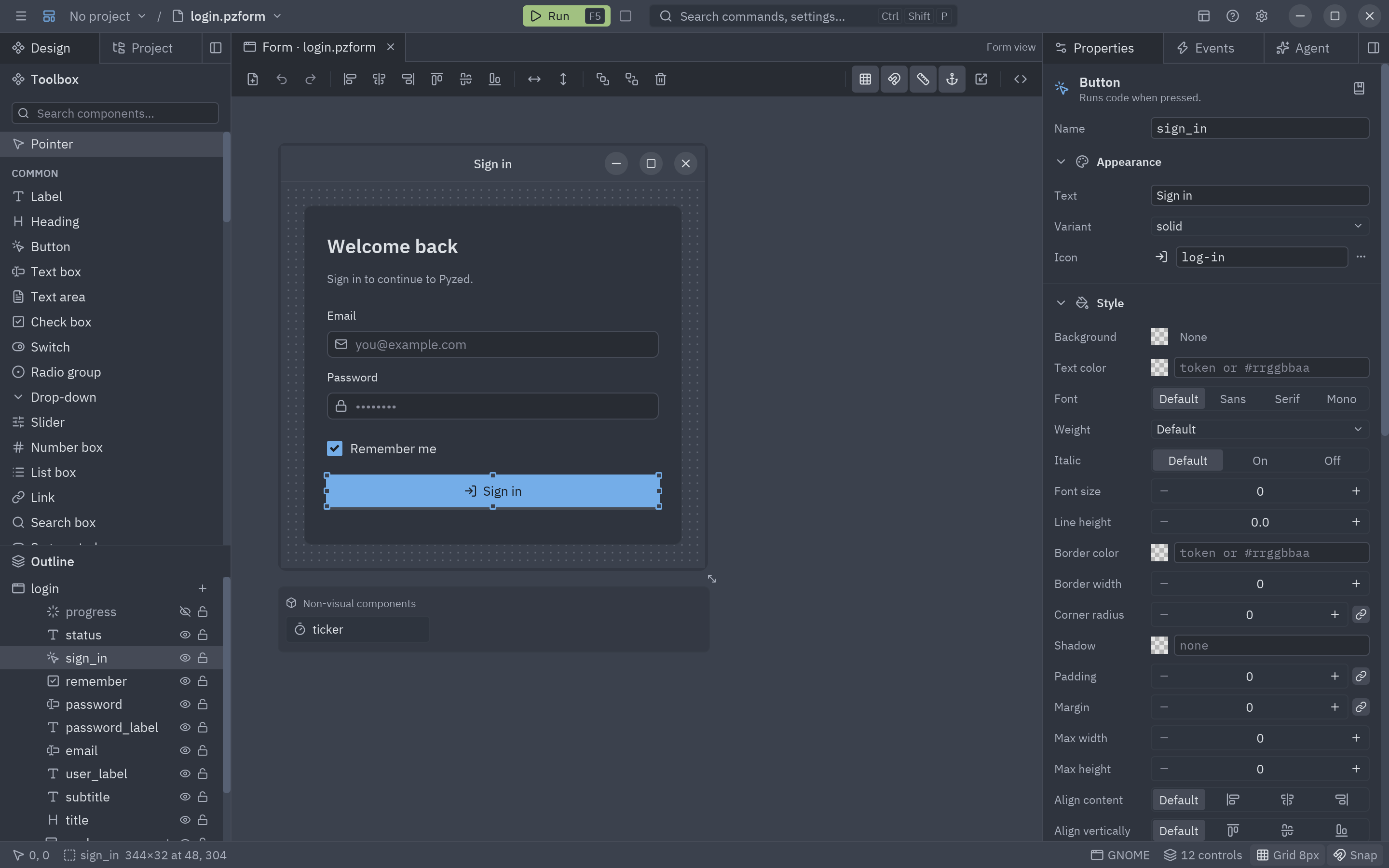
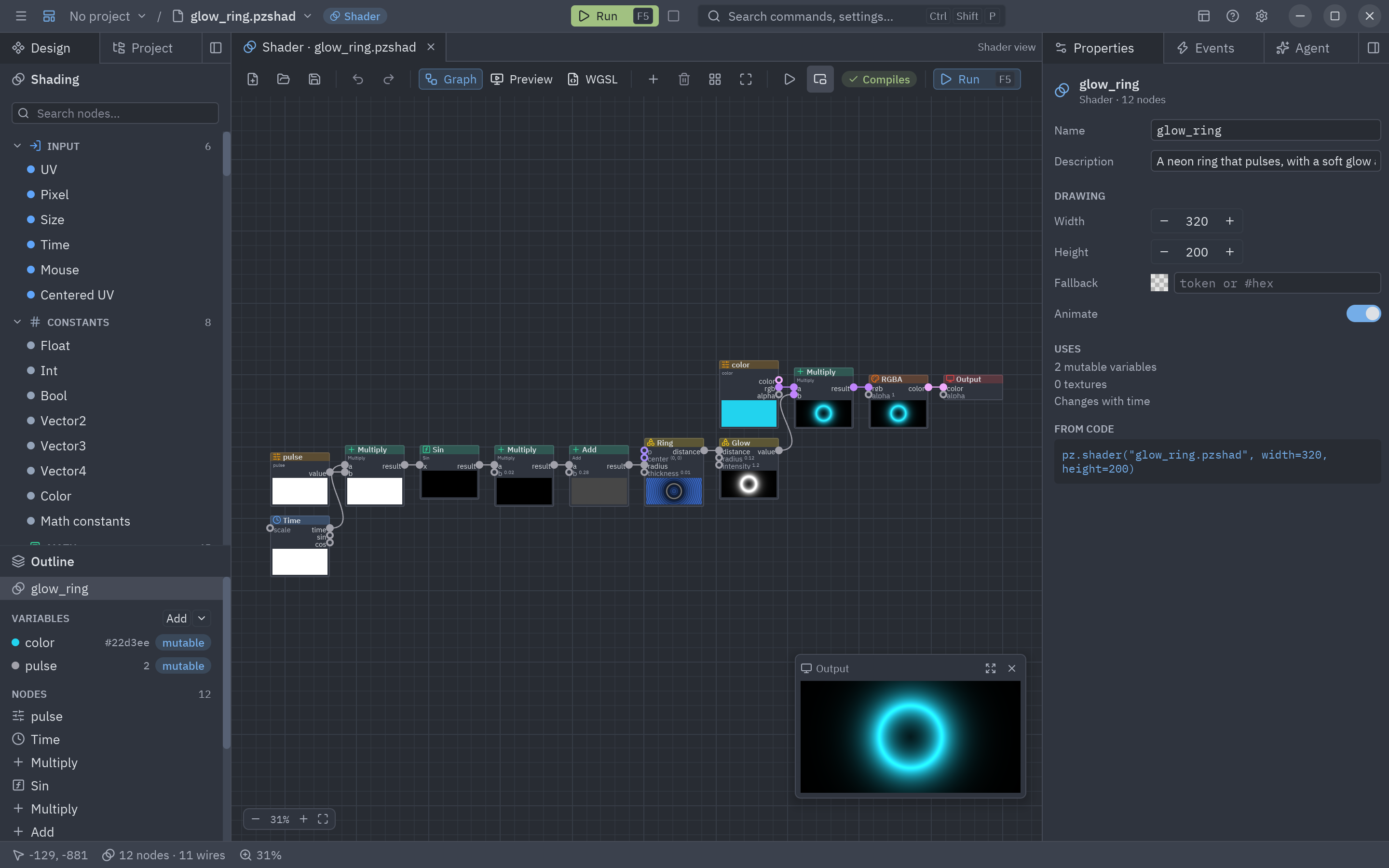
- Pyzed Design, un diseñador visual que se instala como una app: dibuja formularios y componentes, escribe su código con autocompletado y diagnósticos, crea shaders por nodos y ejecútalo todo con F5.
- Efectos y animaciones: anima cualquier propiedad, transiciones entre ventanas, glow, bloom, blur, cristal y
shaders WGSL con
pz.shader. - Juegos: bucle de juego (
pz.frames), teclas mantenidas, sprites y partículas conpyzed.game. - IA: un panel de agentes dentro de Pyzed Design (Claude, OpenAI, Gemini, Copilot, modelos locales…),
pyzed.agentspara tus apps y un servidor MCP para que cualquier agente construya apps con Pyzed. - Temas de Zed: One, Ayu y Gruvbox incluidos, cualquier tema de Zed, temas generados y modo claro/oscuro del sistema.
- Multiplataforma: Linux, macOS y Windows (x86-64 y ARM). Fuentes IBM Plex y unos 2000 iconos Lucide incluidos.
- Capturas sin ventana:
app.screenshot("ui.png")renderiza sin GPU ni pantalla, ideal para tests y docs.
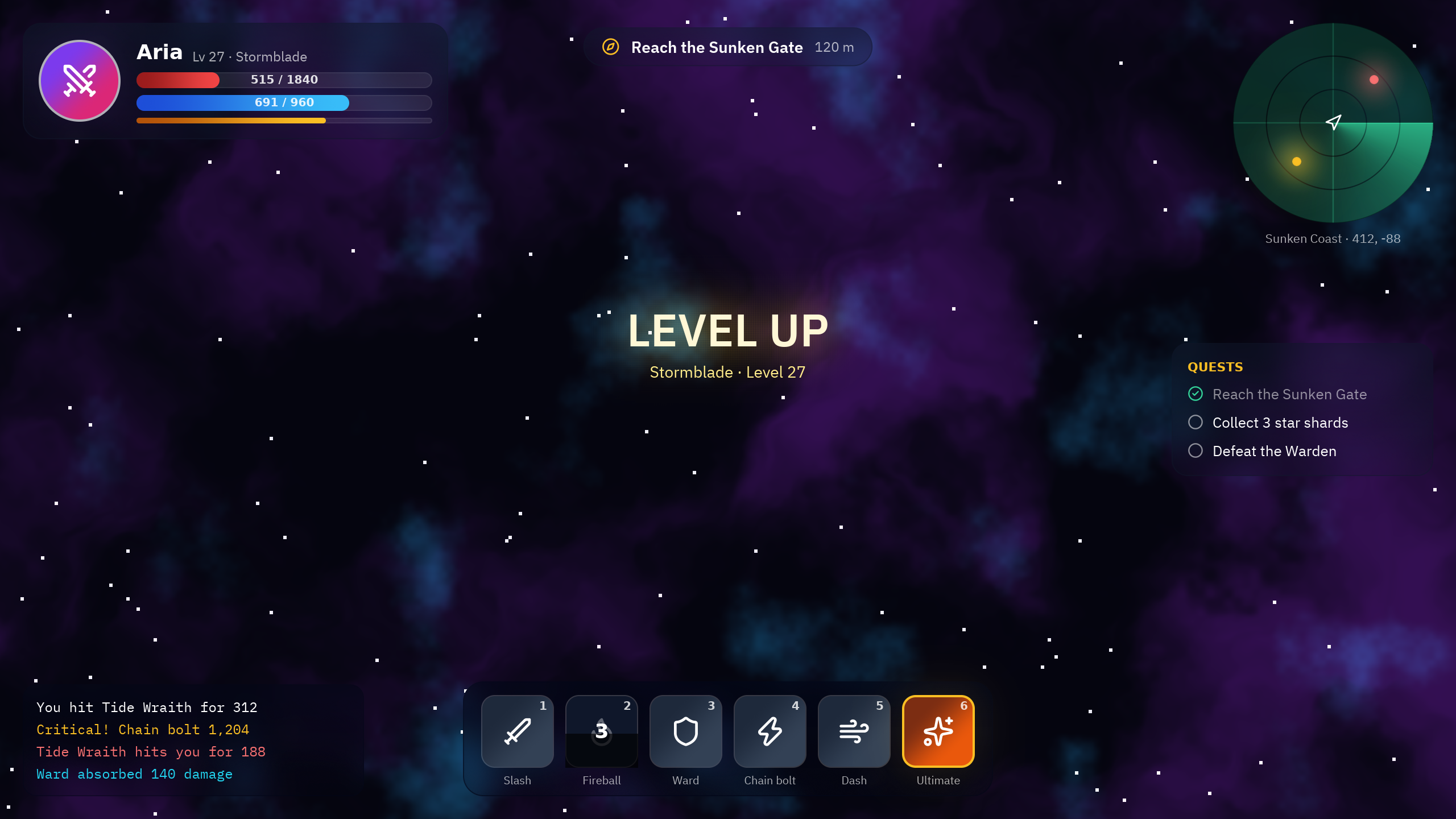
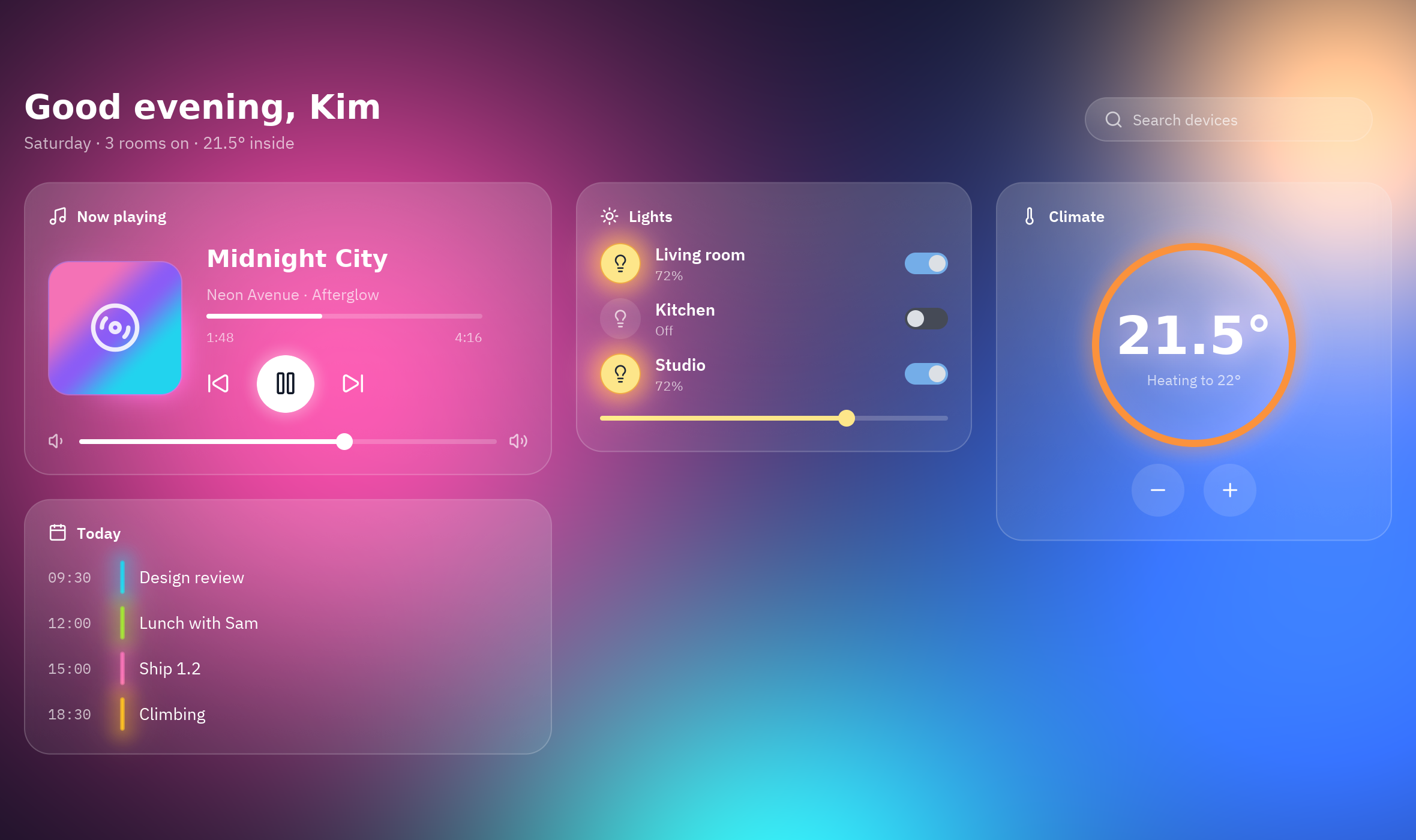
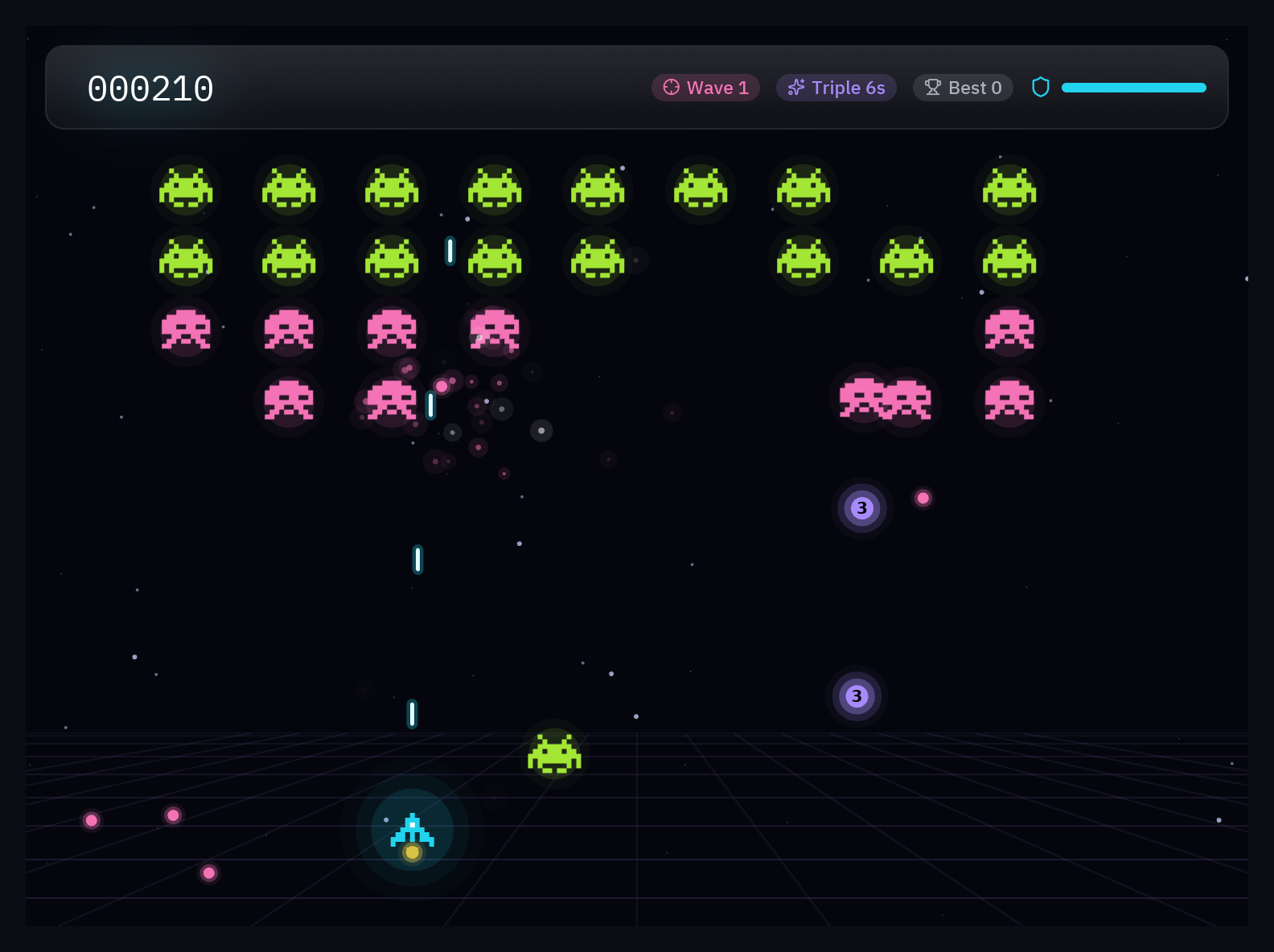
| Showcase: HUD de juego | Panel de cristal |
|---|---|
 |
 |
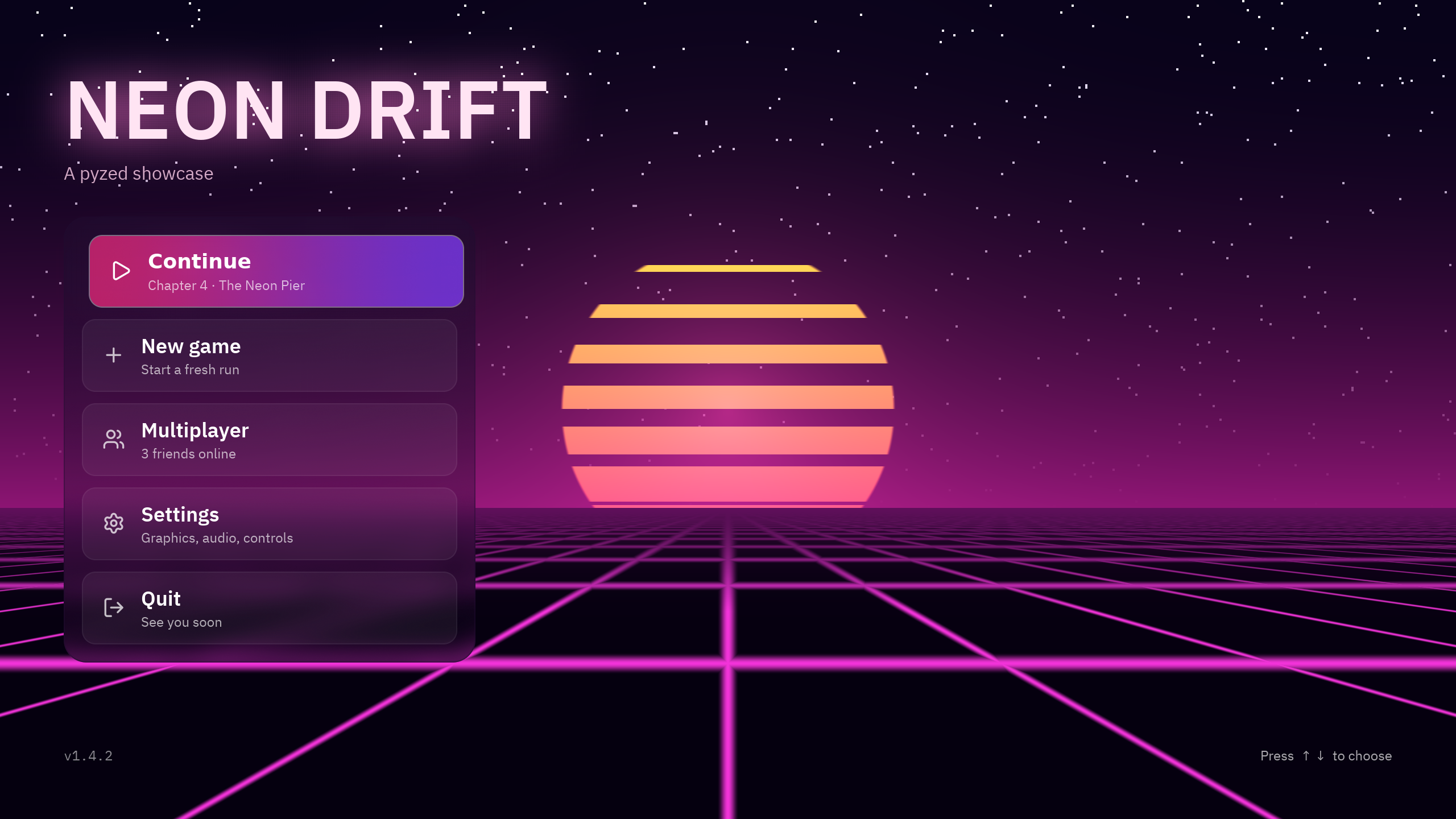
| Menú principal con shaders | Neon Invaders |
 |
 |
Instalación
Necesitas Python 3.10 o superior. Hay wheels para Linux (glibc y musl), macOS y Windows, así que no hace falta Rust.
uv add pyzed-ui                  # en un proyecto de uv
pip install pyzed-ui             # dentro de un entorno virtual activado
python3 -m pip install pyzed-ui  # con el Python del sistema (en Windows: py -m pip install pyzed-ui)
Extras opcionales: pyzed-ui[mcp] (servidor MCP) y pyzed-ui[agents] (agentes de IA en tus apps).
Pyzed Design se instala aparte como app, con instaladores para Windows y macOS y un script para Linux, y se actualiza solo: ver Descargar Pyzed Design.
Inicio rápido
import pyzed as pz
from pyzed import ui


class Counter(pz.App):
    title = "Counter"
    size = (360, 220)

    def __init__(self):
        self.count = 0

    def update(self, message):          # los mensajes pueden ser cualquier valor de Python
        if message == "increment":
            self.count += 1
        elif message == "decrement":
            self.count -= 1

    def view(self):
        return pz.center(
            pz.column([
                ui.heading(str(self.count)),
                pz.row([
                    ui.button("1", "decrement", icon="minus"),
                    ui.button("1", "increment", icon="plus", variant="solid"),
                    # ...o un callable, que se llama directamente
                    ui.icon_button("rotate-ccw", lambda: setattr(self, "count", 0), tooltip="Reset"),
                ], spacing=8),
            ], spacing=16, align="center"),
            bg=self.theme.editor,
        )


pz.run(Counter)
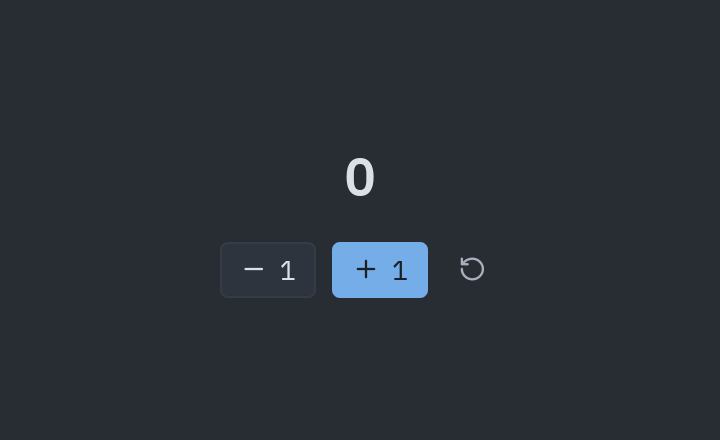
Sigue con el inicio rápido y los tutoriales básicos, intermedios y avanzados.
Un proyecto completo
pyzed new mi-app          # proyecto de uv: UI en ui/, backend en src/, ruff, ty y git
cd mi-app
uv run pyzed design       # abre Pyzed Design en el proyecto
uv run pyzed dev main.py  # hot reload: la ventana se actualiza al guardar y conserva el estado
uv run pyzed build        # ejecutable para esta plataforma
Más en Crear un proyecto y Distribuir.
Pyzed Design
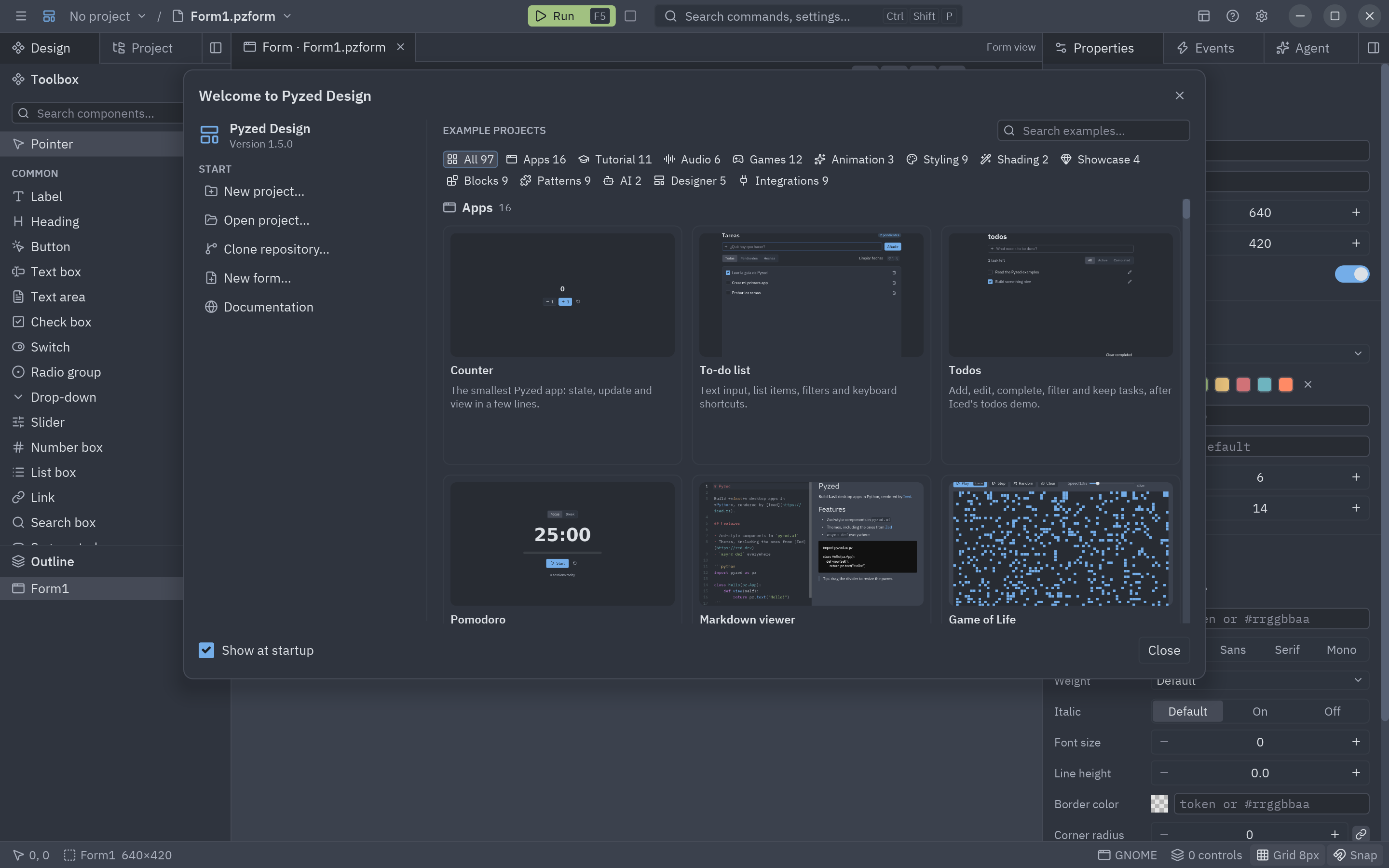
Un diseñador visual hecho con Pyzed, con la interfaz de Zed: arrastra componentes a una grilla con anclajes, edita sus propiedades y estilos, haz doble clic para escribir el código de cada evento y pulsa F5 para ejecutarlo.
| Pantalla de bienvenida con proyectos de ejemplo | Shaders por nodos, como en Godot |
|---|---|
 |
 |
- Vistas de formulario, componente, shader y código, con pestañas que se pueden sacar a su propia ventana.
- Editor de código de nivel Zed: autocompletado con ty, diagnósticos con ruff, varios cursores, buscar y reemplazar, plegado, minimapa, atajos configurables e IME.
- Proyecto: árbol de archivos con el menú de Zed, búsqueda de archivos, dependencias con uv y terminal.
- Componentes propios con propiedades tipadas, herencia, data binding y validación.
- Agente de IA integrado que lee el proyecto, crea formularios y apps completas y controla el editor a través del MCP de Pyzed.
- Se actualiza solo, como Zed, con una pestaña de novedades.
Manual completo en Diseñador y Shading.
Componentes
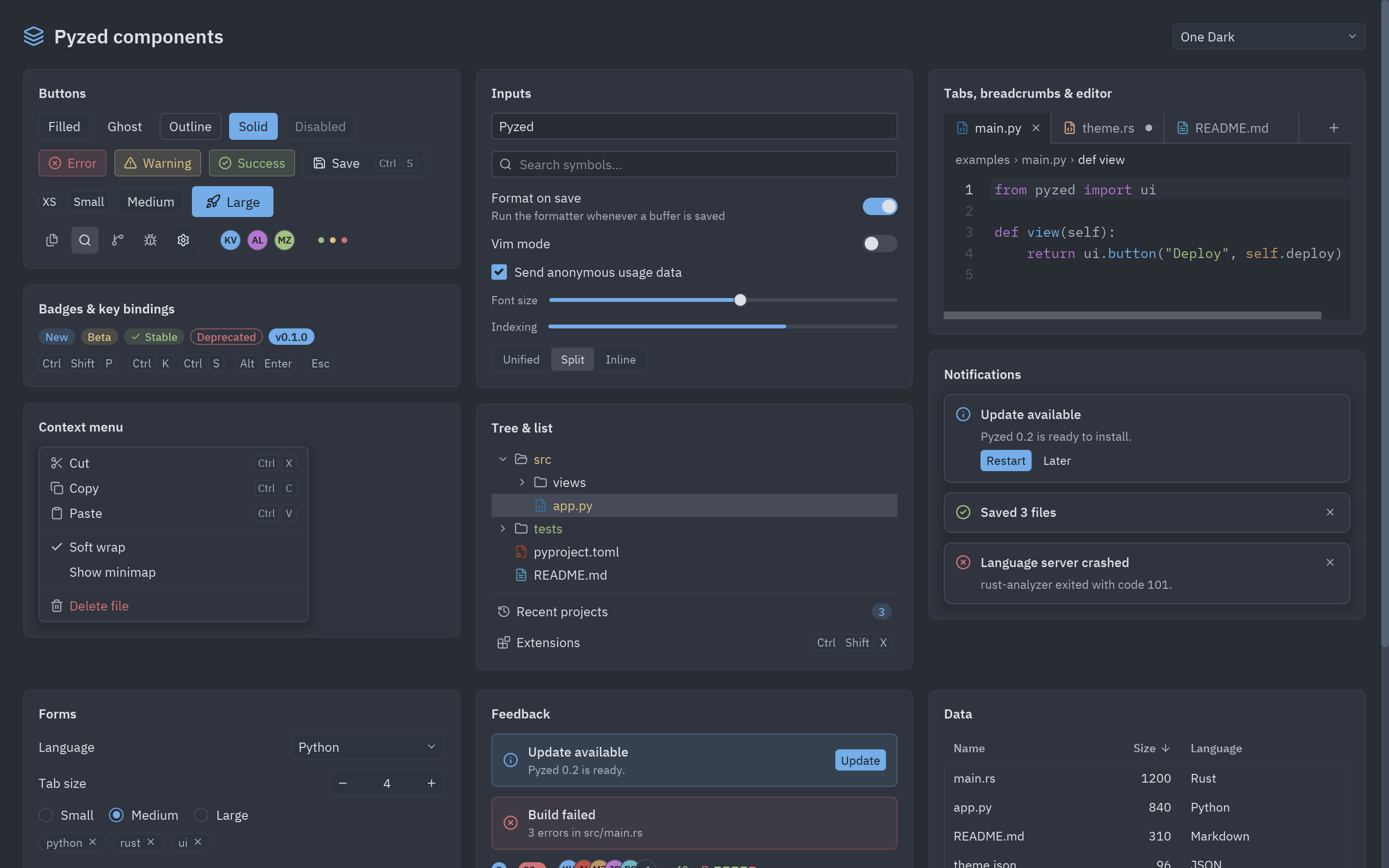
Cada componente tiene su página con todas sus variantes, ejemplos y API en la biblioteca. También hay bloques listos para copiar: pantallas de inicio de sesión, ajustes, paneles…
Cualquier widget tiene los eventos habituales de un editor gráfico (click, double_click, drag, key_down,
resize…), y los componentes propios son clases con props anotados, estado y eventos:
class Rating(pz.Component):
    value: int = 0
    events = {"change": "Se eligió una estrella"}

    def render(self):
        return pz.row([pz.text("★" if i <= self.value else "☆").on(click=lambda i=i: self.emit("change", i))
                       for i in range(1, 6)])
IA
-
Panel de agentes en Pyzed Design: inicia sesión en Claude por navegador o con tu suscripción, o usa OpenAI, Gemini, GitHub Copilot, Vertex AI, OpenRouter, Ollama y más. Adjunta imágenes, conecta servidores MCP externos o agentes ACP (Gemini CLI, Codex…).
-
Servidor MCP (
pyzed mcp): Claude, Cursor, VS Code y otros agentes consultan la API exacta, generan y comprueban apps y ven una captura del resultado.claude mcp add pyzed -- uvx --from "pyzed-ui[mcp]" pyzed mcp
-
pyzed.agentspara añadir un agente con herramientas a tus propias apps.
Ver IA.
Integraciones
Tutoriales y demos ejecutables con FastAPI, SQLAlchemy, SQLModel, Django, httpx y Pydantic:
dónde corre cada cosa (hilo de la UI, loop de asyncio, hilos de trabajo) y cómo mostrar errores de validación en
los formularios. El código está en examples/integrations.
¿Por qué Pyzed?
Comparativas con tkinter, Qt, Kivy, Flet, Dear PyGui y Toga, con
benchmarks medidos y reproducibles de arranque, memoria,
actualización y tamaño instalado (benchmarks/).
Ejemplos
| Carpeta o archivo | Qué muestra |
|---|---|
examples/counter.py, todo.py |
Lo mínimo: estado, mensajes, formularios y listas. |
examples/gallery.py |
Todos los componentes, interactivos, con selector de tema. |
examples/zed_editor.py |
Un editor de código completo sobre una carpeta real. |
examples/showcase/ |
HUD de juego, menú principal, inventario, panel de cristal y galería de shaders. |
examples/games/ |
Snake, Breakout y Neon Invaders. |
examples/integrations/ |
FastAPI, SQLAlchemy, SQLModel, Django, httpx, Pydantic y aiosqlite. |
examples/effects.py, animations.py |
Efectos visuales y animaciones. |
examples/window_frame.py |
Marco de ventana propio con menús y botones de cada plataforma. |
examples/ai_chat.py |
Un chat con un agente de IA. |
examples/designer/ |
Un formulario de Pyzed Design (.pzform + .py). |
examples/tutorial/, hot_reload/ |
Tutorial paso a paso y hot reload. |
Todos se ejecutan con python examples/<archivo>.py (o uv run). Más en
Ejemplos.
Cómo funciona
Python                         Rust (pyzed._core, PyO3)                 Iced 0.14
App.view() ──► árbol de Widget ──► render.rs: Widget → iced::Element ──► layout + wgpu/tiny-skia
App.update() ◄── mensajes ◄────── app.rs: Message, Command → Task ◄──── eventos (ratón, teclado)
Los widgets son objetos inmutables de Rust, así que construir la vista desde Python es barato. El estado interno de cada editor vive en Rust y el GIL se libera mientras corre el bucle de eventos. Más en Arquitectura.
Desarrollar Pyzed
git clone https://github.com/albakore/pyzed && cd pyzed
uv sync                     # compila el núcleo de Rust (1.88 o superior) e instala pyzed editable
uv run pytest tests
uv run python examples/gallery.py
Ver CONTRIBUTING.md. Pyzed sigue versionado semántico desde la 1.0; la política y las limitaciones conocidas están en Estabilidad.
Licencia
MIT. Las fuentes incluidas son IBM Plex (SIL Open Font License) y Lucide (ISC); sus licencias están en
assets/fonts. Los temas One, Ayu y Gruvbox vienen del repositorio de Zed (MIT); ver
python/pyzed/zed_themes/LICENSE.
1 maintainer

Metadata
1 maintainer
Release files for pyzed-ui 1.7.0
For a detailed explanation of source distributions (sdists) and built distributions (wheels), please see the package formats documentation.
Built distributions (wheels)
| File | Reset | |||
|---|---|---|---|---|
| pyzed_ui-1.7.0-cp310-abi3-win_arm64.whl | CPython 3.10 | abi3 | Windows ARM64 | Details |
| pyzed_ui-1.7.0-cp310-abi3-win_amd64.whl | CPython 3.10 | abi3 | Windows x86-64 | Details |
| pyzed_ui-1.7.0-cp310-abi3-musllinux_1_2_x86_64.whl | CPython 3.10 | abi3 | Linux musl 1.2+ x86-64 | Details |
| pyzed_ui-1.7.0-cp310-abi3-musllinux_1_2_aarch64.whl | CPython 3.10 | abi3 | Linux musl 1.2+ ARM64 | Details |
| pyzed_ui-1.7.0-cp310-abi3-manylinux_2_28_x86_64.whl | CPython 3.10 | abi3 | Linux glibc 2.28+ x86-64 | Details |
| pyzed_ui-1.7.0-cp310-abi3-manylinux_2_28_aarch64.whl | CPython 3.10 | abi3 | Linux glibc 2.28+ ARM64 | Details |
| pyzed_ui-1.7.0-cp310-abi3-macosx_11_0_arm64.whl | CPython 3.10 | abi3 | macOS 11.0+ ARM64 | Details |
| pyzed_ui-1.7.0-cp310-abi3-macosx_10_12_x86_64.whl | CPython 3.10 | abi3 | macOS 10.12+ x86-64 | Details |
Total release size: 120.0 MB
Release files / pyzed_ui-1.7.0-cp310-abi3-win_arm64.whl
| Download URL | pyzed_ui-1.7.0-cp310-abi3-win_arm64.whl |
|---|---|
| Size | 13.7 MB |
| Tags | CPython 3.10 Windows ARM64 abi3 |
|
SHA-256 checksum How to use checksums |
079bc66a02792305f8a5d15bf8394866093cf3a4679c797c6be071832629b357
|
|
BLAKE2b-256 checksum How to use checksums |
26e0cc0edf8d029f4a13704490d8b836a34eaa79ffa3b5ceb522291e5029e364
|
| Upload date | |
|
Uploaded using Trusted Publishing? What is trusted publishing? |
Yes |
| Uploaded via |
twine/7.0.0 CPython/3.13.16
|
Provenance
Provenance describes where a file came from. On PyPI, provenance is shared via attestations, which provide a verifiable record of the build or publishing details. View details, limitations and caveats.


PyPI Publish Attestation
PyPI verified that this artifact, at this checksum, originated from the publisher listed below.
Signed by GitHub Actions, verified by PyPI on Oct 22, 2026.
Transparency logRelease files / pyzed_ui-1.7.0-cp310-abi3-win_amd64.whl
| Download URL | pyzed_ui-1.7.0-cp310-abi3-win_amd64.whl |
|---|---|
| Size | 13.0 MB |
| Tags | CPython 3.10 Windows x86-64 abi3 |
|
SHA-256 checksum How to use checksums |
30338550fc4a5f34d951e768f4ec92c3d460e063f70170040ebf8e13ed38835a
|
|
BLAKE2b-256 checksum How to use checksums |
04237ed3d28a620dcf9c858d3b91624fe5fc80c69bb72cf3d186cd0ea7d240c8
|
| Upload date | |
|
Uploaded using Trusted Publishing? What is trusted publishing? |
Yes |
| Uploaded via |
twine/7.0.0 CPython/3.13.16
|
Provenance
Provenance describes where a file came from. On PyPI, provenance is shared via attestations, which provide a verifiable record of the build or publishing details. View details, limitations and caveats.
PyPI Publish Attestation
PyPI verified that this artifact, at this checksum, originated from the publisher listed below.
Signed by GitHub Actions, verified by PyPI on Oct 22, 2026.
Transparency logRelease files / pyzed_ui-1.7.0-cp310-abi3-musllinux_1_2_x86_64.whl
| Download URL | pyzed_ui-1.7.0-cp310-abi3-musllinux_1_2_x86_64.whl |
|---|---|
| Size | 17.1 MB |
| Tags | CPython 3.10 Linux musl 1.2+ x86-64 abi3 |
|
SHA-256 checksum How to use checksums |
c9429d48dbee0bdbf19ed93cc4dbefc3b6c9155f9c5dc842bcd2b4df2643a11c
|
|
BLAKE2b-256 checksum How to use checksums |
7e92ebfc9d97518b9e56a58b427cb96ab27136f06d96ffd14f6456f7518a1e9e
|
| Upload date | |
|
Uploaded using Trusted Publishing? What is trusted publishing? |
Yes |
| Uploaded via |
twine/7.0.0 CPython/3.13.16
|
Provenance
Provenance describes where a file came from. On PyPI, provenance is shared via attestations, which provide a verifiable record of the build or publishing details. View details, limitations and caveats.
PyPI Publish Attestation
PyPI verified that this artifact, at this checksum, originated from the publisher listed below.
Signed by GitHub Actions, verified by PyPI on Oct 22, 2026.
Transparency logRelease files / pyzed_ui-1.7.0-cp310-abi3-musllinux_1_2_aarch64.whl
| Download URL | pyzed_ui-1.7.0-cp310-abi3-musllinux_1_2_aarch64.whl |
|---|---|
| Size | 16.2 MB |
| Tags | CPython 3.10 Linux musl 1.2+ ARM64 abi3 |
|
SHA-256 checksum How to use checksums |
83ba4da703483255f4a6aadeb2de607375d248ff5e16556d96ca05c9dc314058
|
|
BLAKE2b-256 checksum How to use checksums |
d239e383f9e455e38b3ec219ca04fa681706e154b6a144d8d7b14b951c36ffe4
|
| Upload date | |
|
Uploaded using Trusted Publishing? What is trusted publishing? |
Yes |
| Uploaded via |
twine/7.0.0 CPython/3.13.16
|
Provenance
Provenance describes where a file came from. On PyPI, provenance is shared via attestations, which provide a verifiable record of the build or publishing details. View details, limitations and caveats.
PyPI Publish Attestation
PyPI verified that this artifact, at this checksum, originated from the publisher listed below.
Signed by GitHub Actions, verified by PyPI on Oct 22, 2026.
Transparency logRelease files / pyzed_ui-1.7.0-cp310-abi3-manylinux_2_28_x86_64.whl
| Download URL | pyzed_ui-1.7.0-cp310-abi3-manylinux_2_28_x86_64.whl |
|---|---|
| Size | 17.7 MB |
| Tags | CPython 3.10 Linux glibc 2.28+ x86-64 abi3 |
|
SHA-256 checksum How to use checksums |
e3b4f6d062c82e69609775e529daf5c4fcf71696151dc3cac229bdcd57a2f62c
|
|
BLAKE2b-256 checksum How to use checksums |
9f7847d966b903a8c218833feef24e4d484ccd24f445fc6994034ad5e4cb3200
|
| Upload date | |
|
Uploaded using Trusted Publishing? What is trusted publishing? |
Yes |
| Uploaded via |
twine/7.0.0 CPython/3.13.16
|
Provenance
Provenance describes where a file came from. On PyPI, provenance is shared via attestations, which provide a verifiable record of the build or publishing details. View details, limitations and caveats.
PyPI Publish Attestation
PyPI verified that this artifact, at this checksum, originated from the publisher listed below.
Signed by GitHub Actions, verified by PyPI on Oct 22, 2026.
Transparency logRelease files / pyzed_ui-1.7.0-cp310-abi3-manylinux_2_28_aarch64.whl
| Download URL | pyzed_ui-1.7.0-cp310-abi3-manylinux_2_28_aarch64.whl |
|---|---|
| Size | 16.9 MB |
| Tags | CPython 3.10 Linux glibc 2.28+ ARM64 abi3 |
|
SHA-256 checksum How to use checksums |
df14725e523cf7237bbe619081104815e2f04fc31ccf6aada157b7f6991f181a
|
|
BLAKE2b-256 checksum How to use checksums |
5f10e163147ade0f7ef5c8e4c769272003d41b211a6967e3a36a63d5fb53f7a5
|
| Upload date | |
|
Uploaded using Trusted Publishing? What is trusted publishing? |
Yes |
| Uploaded via |
twine/7.0.0 CPython/3.13.16
|
Provenance
Provenance describes where a file came from. On PyPI, provenance is shared via attestations, which provide a verifiable record of the build or publishing details. View details, limitations and caveats.
PyPI Publish Attestation
PyPI verified that this artifact, at this checksum, originated from the publisher listed below.
Signed by GitHub Actions, verified by PyPI on Oct 22, 2026.
Transparency logRelease files / pyzed_ui-1.7.0-cp310-abi3-macosx_11_0_arm64.whl
| Download URL | pyzed_ui-1.7.0-cp310-abi3-macosx_11_0_arm64.whl |
|---|---|
| Size | 13.1 MB |
| Tags | CPython 3.10 abi3 macOS 11.0+ ARM64 |
|
SHA-256 checksum How to use checksums |
12285e3065af9192be007676da215a433d196091cb8e21aec9008e7a33114cc2
|
|
BLAKE2b-256 checksum How to use checksums |
54c901164f5824584c2d12962d88b97a2f5bee35590bf388f5b3ccbb8cbaf946
|
| Upload date | |
|
Uploaded using Trusted Publishing? What is trusted publishing? |
Yes |
| Uploaded via |
twine/7.0.0 CPython/3.13.16
|
Provenance
Provenance describes where a file came from. On PyPI, provenance is shared via attestations, which provide a verifiable record of the build or publishing details. View details, limitations and caveats.
PyPI Publish Attestation
PyPI verified that this artifact, at this checksum, originated from the publisher listed below.
Signed by GitHub Actions, verified by PyPI on Oct 22, 2026.
Transparency logRelease files / pyzed_ui-1.7.0-cp310-abi3-macosx_10_12_x86_64.whl
| Download URL | pyzed_ui-1.7.0-cp310-abi3-macosx_10_12_x86_64.whl |
|---|---|
| Size | 12.3 MB |
| Tags | CPython 3.10 abi3 macOS 10.12+ x86-64 |
|
SHA-256 checksum How to use checksums |
f71b524c0574917f406b7c948662873fde7da847138c2c81d572da3119239bca
|
|
BLAKE2b-256 checksum How to use checksums |
1f9ea1b159bffe8c6b39300a24790b5276b40ee786ccbba2d204d94e00d25f9c
|
| Upload date | |
|
Uploaded using Trusted Publishing? What is trusted publishing? |
Yes |
| Uploaded via |
twine/7.0.0 CPython/3.13.16
|
Provenance
Provenance describes where a file came from. On PyPI, provenance is shared via attestations, which provide a verifiable record of the build or publishing details. View details, limitations and caveats.
PyPI Publish Attestation
PyPI verified that this artifact, at this checksum, originated from the publisher listed below.
Signed by GitHub Actions, verified by PyPI on Oct 22, 2026.
Transparency logSecurity for pyzed-ui 1.7.0
Provenance
Provenance describes where a file came from. On PyPI, provenance is shared via attestations, which provide a verifiable record of the build or publishing details. View details, limitations and caveats.
Full provenance
All 8 files in this release have been uploaded with provenance metadata.
Attestation for pyzed_ui-1.7.0-cp310-abi3-win_arm64.whl
PyPI Publish Attestation
PyPI verified that this artifact, at this checksum, originated from the publisher listed below.
Signed by GitHub Actions, verified by PyPI on Oct 22, 2026.
Transparency logA note on package security
PyPI is a repository for distributing packages, not a service for auditing them. While third-party security researchers and our staff do their best to detect and remove malicious packages, PyPI cannot guarantee the quality, security or suitability of any given package.














