
The light Python GUI builder (currently based on PyQt6)
Simplifying the creation of common GUI applications
Description
q2gui is a lightweight Python GUI builder designed to simplify the creation of desktop applications using PyQt6. It provides a high-level API for building forms, menus, toolbars, tabbed interfaces, and various widgets with minimal code. Features include:
- Dynamic menu and toolbar creation with shortcuts and icons
- Form builder supporting labels, inputs, combo boxes, radio buttons, checkboxes, date/time pickers, and more
- Tabbed and split layouts, frames, and groupings
- Sheet/grid controls with customizable headers, sizes, and actions
- Built-in support for color modes (light/dark)
- Status bar, tool buttons, and message dialogs
- Easy event handling and validation logic
- Demo applications showcasing usage patterns
How to start
With PyPI package:
poetry new project_01 && cd project_01 && poetry shell
poetry add q2gui
cd project_01
python -m q2gui > example_app.py && python example_app.py
Explore sources:
git clone https://github.com/AndreiPuchko/q2gui.git
cd q2gui
pip3 install poetry
poetry shell
poetry install
python3 demo/demo_00.py     # All demo launcher
python3 demo/demo_01.py     # basic: main menu, form & widgets
python3 demo/demo_02.py     # forms and forms in form
python3 demo/demo_03.py     # grid form (CSV data), automatic creation of forms based on data
python3 demo/demo_04.py     # progressbar, data loading, sorting and filtering
python3 demo/demo_05.py     # nonmodal form
python3 demo/demo_06.py     # code editor
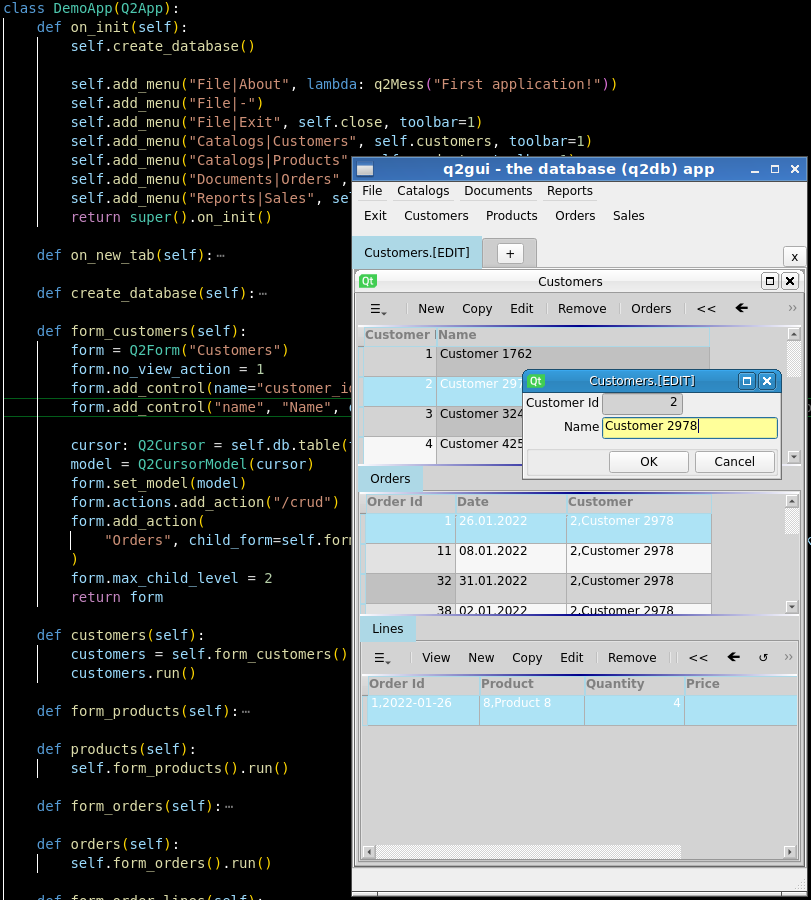
python3 demo/demo_07.py     # database app (4 tables, mock data loading) - requires a q2db package
python3 demo/demo_08.py     # database app, requires a q2db package, autoschema
demo/demo_07.py screenshot
=======
Build standalone executable
(The resulting executable file will appear in the folder dist/)
One file
pyinstaller -F demo/demo.py
One directory
pyinstaller -D demo/demo.py
1 maintainer

Metadata
1 maintainer
Release files for q2gui 0.1.234
For a detailed explanation of source distributions (sdists) and built distributions (wheels), please see the package formats documentation.
Source distribution (sdist)
| File | Size | Uploaded | |
|---|---|---|---|
| q2gui-0.1.234.tar.gz | 100.7 kB | Details |
Built distribution (wheel)
| File | Interpreter | ABI | Platform | Reset |
|---|---|---|---|---|
| q2gui-0.1.234-py3-none-any.whl | Python 3 | none | any | Details |
Total release size: 236.9 kB
Release files / q2gui-0.1.234.tar.gz
| Download URL | q2gui-0.1.234.tar.gz |
|---|---|
| Size | 100.7 kB |
| Tags | Source |
|
SHA-256 checksum How to use checksums |
6130624031887a87e70546c6b9589ee9e11f6dd0d5398ba4e1702560c0df2da3
|
|
BLAKE2b-256 checksum How to use checksums |
aa189e9bc2807c0cac1c0238b33f2535fe05d3014ccf776953e6ced6789108a4
|
| Upload date | |
|
Uploaded using Trusted Publishing? What is trusted publishing? |
No |
| Uploaded via |
poetry/1.5.0 CPython/3.11.7 Windows/10
|
Release files / q2gui-0.1.234-py3-none-any.whl
| Download URL | q2gui-0.1.234-py3-none-any.whl |
|---|---|
| Size | 136.2 kB |
| Tags | Python 3 |
|
SHA-256 checksum How to use checksums |
d1b937270e1b3376489a7ec4a5c05735ffd038be8a2af1a7b6e4e6bceca5a062
|
|
BLAKE2b-256 checksum How to use checksums |
7a54d4429816c3eabf3353e633717503650dfd3e8a89a3fd79c228f7334351f4
|
| Upload date | |
|
Uploaded using Trusted Publishing? What is trusted publishing? |
No |
| Uploaded via |
poetry/1.5.0 CPython/3.11.7 Windows/10
|














