
A simple script to monitor Qbit and communicate with Radarr and Sonarr

Project description









A simple script to monitor Qbit and communicate with Radarr and Sonarr
Join the Official Discord Server for help.
Features
- Monitor qBit for Stalled/bad entries and delete them then blacklist them on Arrs (Option to also trigger a re-search action).
- Monitor qBit for completed entries and tell the appropriate Arr instance to import it ( 'DownloadedMoviesScan' or 'DownloadedEpisodesScan' commands).
- Skip files in qBit entries by extension, folder or regex.
- Monitor completed folder and cleans it up.
- Uses ffprobe to ensure downloaded entries are valid media.
- Trigger periodic Rss Syncs on the appropriate Arr instances.
- Trigger Queue update on appropriate Arr instances.
- Search requests from Overseerr or Ombi.
This section requires the Arr databases to be locally available.
- Monitor Arr's databases to trigger missing episode searches.
- Customizable year range to search for (at a later point will add more option here, for example search whole series/season instead of individual episodes, search by name, category etc).
Important mentions
Some things to know before using it.
-
- You need to run the
qbitrr --gen-configmove the generated file to~/.config/qBitManager/config.toml(~ is your home directory, i.eC:\Users\{User})
- You need to run the
-
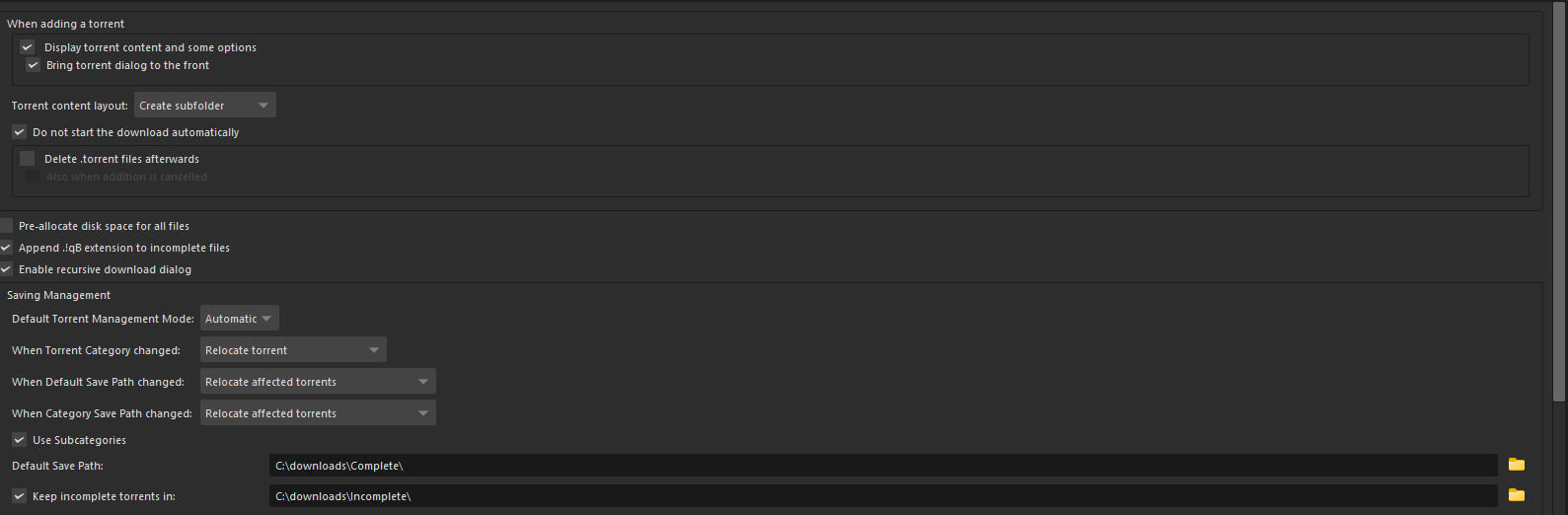
- I have qBit setup to have to create sub-folder for downloads and for the download folder to use subcategories.
-
- Make sure to have
ffprobeadded to your PATH.
- Make sure to have
Install the requirements run
python -m pip install qBitrr(I would recommend in a dedicated venv but that's out of scope.
Run the script
- Make sure to update the settings in
~/.config/qBitManager/config.toml - Activate your venv
- Run
qbitrr
How to update the script
- Activate your venv
- Run
python -m pip install -U qBitrr
Contributions
- I'm happy with any PRs and suggested changes to the logic I just put it together dirty for my own use case.
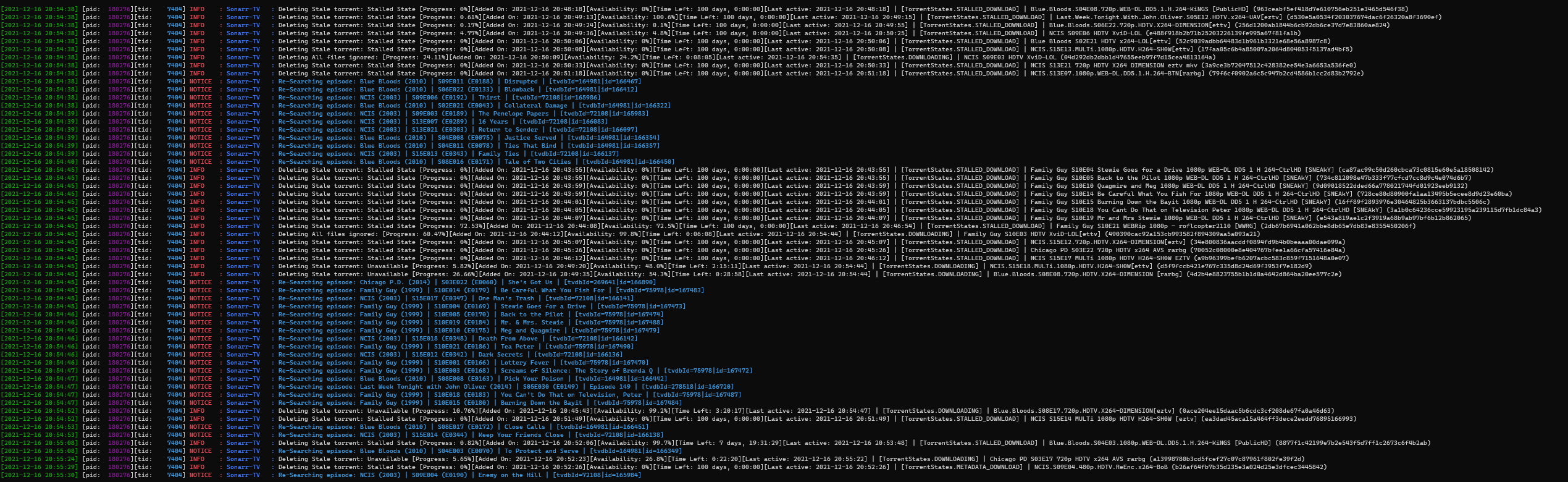
Example behaviour
Release history Release notifications | RSS feed


Download files
Download the file for your platform. If you're not sure which to choose, learn more about installing packages.
Source Distribution
qBitrr-2.1.1.tar.gz
(39.5 kB
view details)
Built Distribution
Filter files by name, interpreter, ABI, and platform.
If you're not sure about the file name format, learn more about wheel file names.
Copy a direct link to the current filters
qBitrr-2.1.1-py3-none-any.whl
(40.5 kB
view details)
File details
Details for the file qBitrr-2.1.1.tar.gz.
File metadata
- Download URL: qBitrr-2.1.1.tar.gz
- Upload date:
- Size: 39.5 kB
- Tags: Source
- Uploaded using Trusted Publishing? No
- Uploaded via: twine/3.7.1 importlib_metadata/4.9.0 pkginfo/1.8.2 requests/2.26.0 requests-toolbelt/0.9.1 tqdm/4.62.3 CPython/3.9.9
File hashes
| Algorithm | Hash digest | |
|---|---|---|
| SHA256 |
92a746628d8ac62d386f0280d2f9a0a64b76d790b2a4c53dbba751d42ba38ab9
|
|
| MD5 |
833a4ef0b94369fbfc1413ac1ec69750
|
|
| BLAKE2b-256 |
59796a7305d994b0e7bcfe75528c300c3bc9f57ef1b50b5d773b73ea0b914e0d
|
File details
Details for the file qBitrr-2.1.1-py3-none-any.whl.
File metadata
- Download URL: qBitrr-2.1.1-py3-none-any.whl
- Upload date:
- Size: 40.5 kB
- Tags: Python 3
- Uploaded using Trusted Publishing? No
- Uploaded via: twine/3.7.1 importlib_metadata/4.9.0 pkginfo/1.8.2 requests/2.26.0 requests-toolbelt/0.9.1 tqdm/4.62.3 CPython/3.9.9
File hashes
| Algorithm | Hash digest | |
|---|---|---|
| SHA256 |
83fd4840f62bdac7ccf7918be6cdf3e5bcd8f921f528370e10ce934bb1b3933a
|
|
| MD5 |
2bf80de064e5d9cbf386d33054b65495
|
|
| BLAKE2b-256 |
ff1360d4c951fd10f3935ca02ed137ec6a8a1e54c9754b52da29f71d22f95ad6
|






