
🚀 qCradle





🛠️ qcradle is a command line tool to create repos based on a group of templates. It has been created to speed up, simplify, and to harmonize the development of experiments and quantitative strategies.
Assuming the presence of uvx you can start the tool with
uvx qcradle
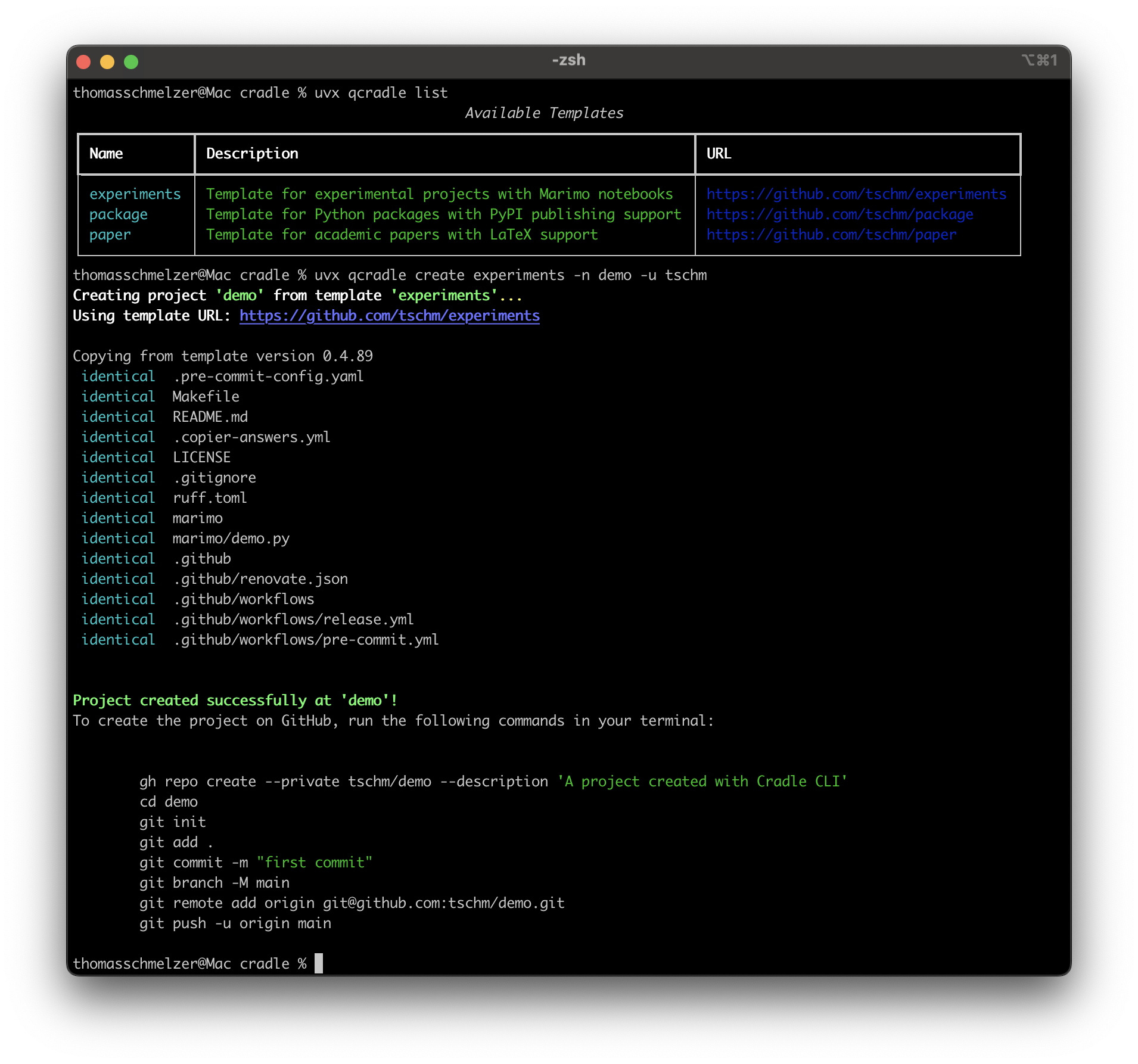
qcradle is a tool inspired by Cookiecutter, but more biased towards quants, researchers, and academics.
Whether you're building entire Python packages or financial models, running simulations, or writing academic papers, qcradle helps you hit the ground running with a structured and efficient setup following the most recent standards set in 2025.
We use uv, hatch, marimo and Tectonic. We support Renovate and take full advantage of GitHub Workflows.
Each template comes with curated pre-commit hooks. We collect test reports, API documentation, and notebooks.
Let’s make project setup as rigorous as your research!
📚 Examples
Users can interact with qcradle by either creating templates or by using existing templates to create projects. We would be delighted to list your public work here:
🏆 User projects
We would like to encourage our users to point to public repositories created with the qcradle. We start with
- cvxball. We created badges for you
🧩 User templates
Please share your templates with the world!
🔄 Install uv and uvx
🚀 uv is a modern, high-performance Python package manager and installer written in Rust. It serves as a drop-in replacement for traditional tools like pip and pipx. For macOS and Linux:
curl -LsSf https://astral.sh/uv/install.sh | sh
For Windows follow the official instructions
🧠 Understanding uvx
🔍 uvx is a command provided by uv to run tools published as Python packages without installing them permanently. It creates temporary, isolated environments for these tools:
uvx qcradle
This command will:
- Resolve and install the qcradle package in a temporary environment.
- Execute the qcradle command.
Note: If you plan to use a tool frequently, consider installing it permanently using uv:
uv tool install qcradle
Once the tool is permanently installed it is enough to start it with
qcradle
📝 Templates
✨ You could create your own templates and standardize project structures across your team or organization. It's essentially a project scaffolding tool that helps maintain consistency in Python projects.
We currently offer $3$ standard templates out of the box
- 📄 The document template
- 🧪 The experiments template
- 📦 The package template
🌟 Standard Templates
We follow the one template, one repository policy. You are encouraged to create your own templates and we give $4$ examples that may serve as inspiration
📄 The document template
The template supports the fast creation of repositories of LaTeX documents. The repo can compile your LaTeX documents with every commit and put them on a dedicated branch.
🧪 The experiments template
Here we support the creation of notebooks without the ambition to release software. The repo is not minimalistic but comes with a curated set of pre-commit hooks and follows modern and established guidelines. The notebooks are based on Marimo.
📦 The package template
The package template is most useful when the final goal is the release of software to a registry, e.g. pypi. It offers full uv support and compiles documentation into a Jupyter Book.
🔒 Proprietary templates
🛠️ Creation
You can create your very own templates and we recommend to start with forking the dedicated repo for the job.
Templates rely on Jinja. At the root level the repo needs a 'copier.yml' file and a 'template' folder.
🚀 Usage
We essentially expose the copier interface directly with minor modifications, e.g. if the user is not submitting a source template we offer to choose one of the standard templates.
Any cradle template could be used directly as the first 'template' argument
uvx qcradle --template=git@github.com:tschm/paper.git
By default, Copier (and hence the cradle) will copy from the last release found in template Git tags, sorted as PEP 440.
🔄 Update existing projects
Templates are moving targets in most professional setups. It is possible to update projects created with the help of the qcradle by specifying an existing path instead of a template.
uvx qcradle --dst_path=/Users/thomasschmelzer/projects/my_marimo_experiments
The tool expects a full path. Your repo should contain your previous answers in a file '.copier-answers.yml' which serve as default arguments for the questions you have been asked before. All standard templates create the file.
🔄 GitHub Actions
⚙️ This repository provides a collection of reusable
GitHub Actions that can be used by other repositories.
These actions are defined in the actions directory and
can be referenced in your workflows.
🛠️ Available Actions
- 📚 book: Builds and publishes a Jupyter Book
- 📦 build: Builds a Python package and uploads artifacts
- 📊 coverage: Generates and uploads code coverage reports
- 🔍 deptry: Checks for dependency issues using deptry
- 🐳 docker: Builds and pushes Docker images
- 🔧 environment: Sets up Python environment with dependencies
- 📄 latex: Compiles LaTeX documents
- 📝 pdoc: Generates API documentation using pdoc
- ✅ pre-commit: Runs pre-commit hooks
- 🏷️ tag: Bumps version, creates a tag, and publishes a release
- 🧪 test: Runs tests with pytest
📋 How to Use These Actions
You can use these actions in your GitHub workflows
by referencing them with the uses keyword. For example:
jobs:
  tag:
    runs-on: ubuntu-latest
    steps:
      - name: Checkout
        uses: actions/checkout@v4

      - name: Generate Tag
        uses: tschm/cradle/actions/tag@main
        with:
          github_token: ${{ secrets.GITHUB_TOKEN }}
Each action has its own inputs and outputs defined in
its action.yml file. You can find more details by
examining these files in the repository.
:warning: Private repositories
Using workflows in private repos will eat into your monthly GitHub bill. You may want to restrict the workflow to operate only when merging on the main branch while operating on a different branch or deactivate the flow.
1 maintainer

Metadata
1 maintainer
Release files for qCradle 0.4.2
For a detailed explanation of source distributions (sdists) and built distributions (wheels), please see the package formats documentation.
Source distribution (sdist)
| File | Size | Uploaded | |
|---|---|---|---|
| qcradle-0.4.2.tar.gz | 744.6 kB | Details |
Built distribution (wheel)
| File | Interpreter | ABI | Platform | Reset |
|---|---|---|---|---|
| qcradle-0.4.2-py3-none-any.whl | Python 3 | none | any | Details |
Total release size: 752.7 kB
Release files / qcradle-0.4.2.tar.gz
| Download URL | qcradle-0.4.2.tar.gz |
|---|---|
| Size | 744.6 kB |
| Tags | Source |
|
SHA-256 checksum How to use checksums |
20eff3a46febf3a04d170aa4015f8640f5cc38ddb4cd7fb154f29f10abbbc4f2
|
|
BLAKE2b-256 checksum How to use checksums |
f8bedb53c363a3bad72af2dfcca49607d001dddf428f9e57ca17aac08431e967
|
| Upload date | |
|
Uploaded using Trusted Publishing? What is trusted publishing? |
Yes |
| Uploaded via |
twine/6.1.0 CPython/3.13.7
|
Provenance
Provenance describes where a file came from. On PyPI, provenance is shared via attestations, which provide a verifiable record of the build or publishing details. View details, limitations and caveats.


PyPI Publish Attestation
PyPI verified that this artifact, at this checksum, originated from the publisher listed below.
Signed by GitHub Actions, verified by PyPI on Feb 27, 2026.
Transparency logRelease files / qcradle-0.4.2-py3-none-any.whl
| Download URL | qcradle-0.4.2-py3-none-any.whl |
|---|---|
| Size | 8.1 kB |
| Tags | Python 3 |
|
SHA-256 checksum How to use checksums |
249f3376789fda1a57048ebc3cb2a0dba8fd039db554d575963308da8c208311
|
|
BLAKE2b-256 checksum How to use checksums |
7be1f36d927f3e77e250d20468036d804e8d1fdf5db555775c8a5f3b16a2e611
|
| Upload date | |
|
Uploaded using Trusted Publishing? What is trusted publishing? |
Yes |
| Uploaded via |
twine/6.1.0 CPython/3.13.7
|
Provenance
Provenance describes where a file came from. On PyPI, provenance is shared via attestations, which provide a verifiable record of the build or publishing details. View details, limitations and caveats.
PyPI Publish Attestation
PyPI verified that this artifact, at this checksum, originated from the publisher listed below.
Signed by GitHub Actions, verified by PyPI on Feb 27, 2026.
Transparency log













