
CLI to create repos
Verified details
These details have been verified by PyPIProject links
GitHub Statistics
Maintainers

Project description
🚀 qCradle





🛠️ qcradle is a command line tool to create repos based on a group of templates. It has been created to accelerate, simplify and harmonize the development of experiments and quantitative strategies.
Assuming the presence of gh, uvx and a valid ssh-connection with GitHub you can start the tool with
uvx qcradle
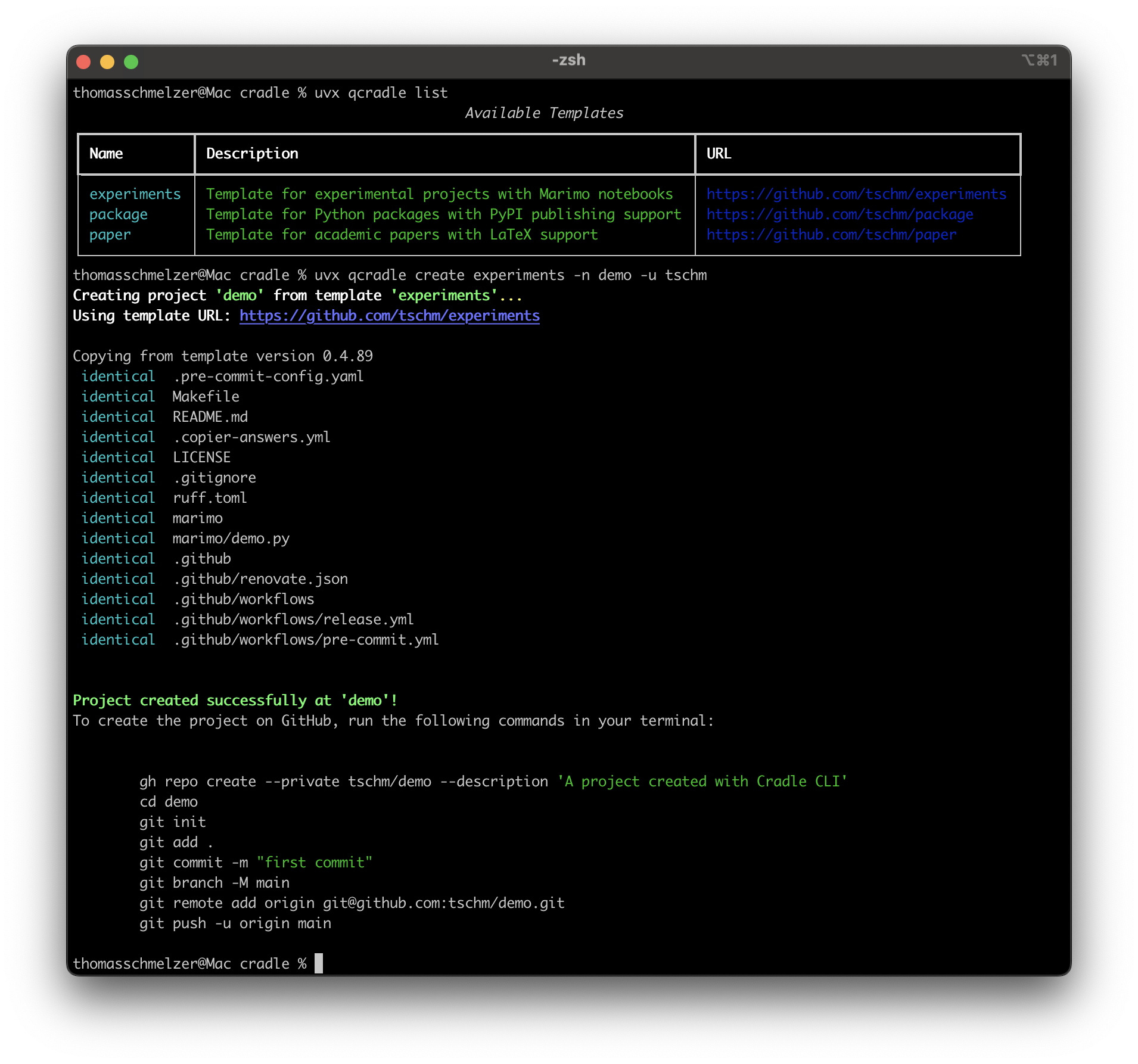
qcradle is a tool inspired by Cookiecutter, but more biased towards quants, researchers, and academics.
Whether you're building entire Python packages or financial models, running simulations, or writing academic papers, qcradle helps you hit the ground running with a structured and efficient setup following the most recent standards set in 2025.
We use uv, hatch, marimo and Tectonic. Supporting DevContainers, Renovate, and Dependabot, we take full advantage of GitHub Workflows.
Each template comes with curated pre-commit hooks. We compile Jupyter Books to collect test reports, API documentation, and notebooks.
Let’s make project setup as rigorous as your research!
📚 Examples
Users can interact with qcradle by either creating templates or by using existing templates to create projects. We would be delighted to list your public work here:
🏆 User projects
We would like to encourage our users to point to public repositories created with the qcradle. We start with
- cvxball. We created badges for you
🧩 User templates
Please share your templates with the world!
🔧 Install gh
Please install GitHub's official command line tool gh. This tool is used to create GitHub repos from the command line.
Verify the existence of the tool and a valid SSH connection with
ssh -T git@github.com
gh --version
Documentation to establish a new ssh keypair.
🔄 Install uv and uvx
🚀 uv is a modern, high-performance Python package manager and installer written in Rust. It serves as a drop-in replacement for traditional tools like pip and pipx. For macOS and Linux:
curl -LsSf https://astral.sh/uv/install.sh | sh
For Windows follow the official instructions
🧠 Understanding uvx
🔍 uvx is a command provided by uv to run tools published as Python packages without installing them permanently. It creates temporary, isolated environments for these tools:
uvx qcradle
This command will:
- Resolve and install the qcradle package in a temporary environment.
- Execute the qcradle command.
Note: If you plan to use a tool frequently, consider installing it permanently using uv:
uv tool install qcradle
Once the tool is permanently installed it is enough to start it with
qcradle
📝 Templates
✨ You could create your own templates and standardize project structures across your team or organization. It's essentially a project scaffolding tool that helps maintain consistency in Python projects.
We currently offer $4$ standard templates out of the box
- 📄 The document template
- 🧪 The experiments template
- 📦 The package template
- 📊 The R template
🌟 Standard Templates
We follow the one template, one repository policy. You are encouraged to create your own templates and we give $4$ examples that may serve as inspiration
📄 The document template
The template supports the fast creation of repositories of LaTeX documents. The repo can compile your LaTeX documents with every commit and put them on a dedicated branch.
🧪 The experiments template
Here we support the creation of notebooks without the ambition to release software. The repo is not minimalistic but comes with a curated set of pre-commit hooks and follows modern and established guidelines. The notebooks are based on Marimo.
📦 The package template
The package template is most useful when the final goal is the release of software to a registry, e.g. pypi. It offers full uv support and compiles documentation into a Jupyter Book.
📊 The R template
Here we expose R Studio in a devcontainer.
🔒 Proprietary templates
🛠️ Creation
You can create your very own templates and we recommend to start with forking the dedicated repo for the job.
Templates rely on Jinja. At the root level the repo needs a 'copier.yml' file and a 'template' folder.
Each template is tested using act, e.g. we render the project template and test the workflows of the created project. This helps to avoid creating projects starting their life in a broken state.
🚀 Usage
We essentially expose the copier interface directly with minor modifications, e.g. if the user is not submitting a source template we offer to choose one of the standard templates.
Any cradle template could be used directly as the first 'template' argument
uvx qcradle --template=git@github.com:tschm/paper.git
By default, Copier (and hence the repo-launcher) will copy from the last release found in template Git tags, sorted as PEP 440.
🔄 Update existing projects
Templates are moving targets in most professional setups. It is possible to update projects created with the help of the qcradle by specifying an existing path instead of a template.
uvx qcradle --dst_path=/Users/thomasschmelzer/projects/my_marimo_experiments
The tool expects a full path. Your repo should contain your previous answers in a file '.copier-answers.yml' which serve as default arguments for the questions you have been asked before. All standard templates create the file.
🔄 GitHub Actions
⚙️ This repository provides a collection of reusable
GitHub Actions that can be used by other repositories.
These actions are defined in the actions directory and
can be referenced in your workflows.
🛠️ Available Actions
- 🔐 age: Encrypts and decrypts files using age
- 📚 book: Builds and publishes a Jupyter Book
- 📦 build: Builds a Python package and uploads artifacts
- 📊 coverage: Generates and uploads code coverage reports
- 🚀 cradle: Runs the qCradle tool
- 🔍 deptry: Checks for dependency issues using deptry
- 🐳 docker: Builds and pushes Docker images
- 🔧 environment: Sets up Python environment with dependencies
- ⚙️ flow: Tests GitHub workflows using act
- 📓 jupyter: Runs Jupyter notebooks
- 📄 latex: Compiles LaTeX documents
- 🧪 marimo: Runs marimo notebooks
- 📝 pdoc: Generates API documentation using pdoc
- ✅ pre-commit: Runs pre-commit hooks
- 🏷️ tag: Bumps version, creates a tag, and publishes a release
- 🧪 test: Runs tests with pytest
📋 How to Use These Actions
You can use these actions in your GitHub workflows
by referencing them with the uses keyword. For example:
jobs:
  tag:
    runs-on: ubuntu-latest
    steps:
      - name: Checkout
        uses: actions/checkout@v4

      - name: Generate Tag
        uses: tschm/cradle/actions/tag@main
        with:
          github_token: ${{ secrets.GITHUB_TOKEN }}
Replace tschm/cradle with the appropriate repository
owner and name, and @main with the branch, tag, or commit SHA you want to use.
Each action has its own inputs and outputs defined in
its action.yml file. You can find more details by
examining these files in the repository.
:warning: Private repositories
Using workflows in private repos will eat into your monthly GitHub bill. You may want to restrict the workflow to operate only when merging on the main branch while operating on a different branch or deactivate the flow.
Project details
Verified details
These details have been verified by PyPIProject links
GitHub Statistics
Maintainers
Release history Release notifications | RSS feed


Download files
Download the file for your platform. If you're not sure which to choose, learn more about installing packages.
Source Distribution
Built Distribution
Filter files by name, interpreter, ABI, and platform.
If you're not sure about the file name format, learn more about wheel file names.
Copy a direct link to the current filters
File details
Details for the file qcradle-0.1.75.tar.gz.
File metadata
- Download URL: qcradle-0.1.75.tar.gz
- Upload date:
- Size: 817.1 kB
- Tags: Source
- Uploaded using Trusted Publishing? Yes
- Uploaded via: twine/6.1.0 CPython/3.12.9
File hashes
| Algorithm | Hash digest | |
|---|---|---|
| SHA256 |
7dd68453261cb8c93ea1c87cbdfb4a815c356848942e19cffa6d37c8c72514a9
|
|
| MD5 |
498133218055ed52a1299d15e50ce380
|
|
| BLAKE2b-256 |
26fd8e1682f6a2f9ca3be20726d0968e3f93ac32ae46c2967d34d726acdbed1f
|
Provenance
The following attestation bundles were made for qcradle-0.1.75.tar.gz:
Publisher:
release.yml on tschm/cradle
-
Statement:
-
Statement type:
https://in-toto.io/Statement/v1 -
Predicate type:
https://docs.pypi.org/attestations/publish/v1 -
Subject name:
qcradle-0.1.75.tar.gz -
Subject digest:
7dd68453261cb8c93ea1c87cbdfb4a815c356848942e19cffa6d37c8c72514a9 - Sigstore transparency entry: 259091769
- Sigstore integration time:
-
Permalink:
tschm/cradle@1c12d9d646698a523db4421e52af0f920f4773dd -
Branch / Tag:
refs/heads/main - Owner: https://github.com/tschm
-
Access:
public
-
Token Issuer:
https://token.actions.githubusercontent.com -
Runner Environment:
github-hosted -
Publication workflow:
release.yml@1c12d9d646698a523db4421e52af0f920f4773dd -
Trigger Event:
workflow_dispatch
-
Statement type:
File details
Details for the file qcradle-0.1.75-py3-none-any.whl.
File metadata
- Download URL: qcradle-0.1.75-py3-none-any.whl
- Upload date:
- Size: 14.0 kB
- Tags: Python 3
- Uploaded using Trusted Publishing? Yes
- Uploaded via: twine/6.1.0 CPython/3.12.9
File hashes
| Algorithm | Hash digest | |
|---|---|---|
| SHA256 |
93aa2f05272d5796cc50f82e5a5b1e8ef56f76e353aaa52b174ff953fbf3c7ab
|
|
| MD5 |
464eb8275537682571d9d3d52eeb5fc9
|
|
| BLAKE2b-256 |
88ed8791bdc24304cc55be1603267f60b4fa234b4db12d718a6f1f5a35805ad8
|
Provenance
The following attestation bundles were made for qcradle-0.1.75-py3-none-any.whl:
Publisher:
release.yml on tschm/cradle
-
Statement:
-
Statement type:
https://in-toto.io/Statement/v1 -
Predicate type:
https://docs.pypi.org/attestations/publish/v1 -
Subject name:
qcradle-0.1.75-py3-none-any.whl -
Subject digest:
93aa2f05272d5796cc50f82e5a5b1e8ef56f76e353aaa52b174ff953fbf3c7ab - Sigstore transparency entry: 259091779
- Sigstore integration time:
-
Permalink:
tschm/cradle@1c12d9d646698a523db4421e52af0f920f4773dd -
Branch / Tag:
refs/heads/main - Owner: https://github.com/tschm
-
Access:
public
-
Token Issuer:
https://token.actions.githubusercontent.com -
Runner Environment:
github-hosted -
Publication workflow:
release.yml@1c12d9d646698a523db4421e52af0f920f4773dd -
Trigger Event:
workflow_dispatch
-
Statement type:






