

QAlprit (qalprit)
Mobile QA. Bugs caught with proof.



QAlprit tests Android and iOS apps automatically. You write plain steps like tap and type in Markdown files, QAlprit clicks through the app on a real phone or emulator, blacks out passwords and credit cards before saving screenshots, and saves a report showing every step.
No AI guessing runs during your tests—every run follows your exact steps.
Prerequisites
Make sure these are installed on your computer before running tests:
- Python 3.10+
- Node.js + Appium 2:
npm install -g appium
appium driver install uiautomator2   # for Android
appium driver install xcuitest       # for iOS (macOS only)
- Phone / Emulator tools:
- Android: Android Studio (ADB + an Android Virtual Device, or a USB phone)
- iOS (macOS only): Xcode + iOS Simulator
Install
pip install qalprit
Or run from a local clone of this repo:
git clone https://github.com/vattitude-me/QAlprit.git
cd QAlprit
python3 -m venv .venv
source .venv/bin/activate
pip install -e ".[dev]"
How to Run
Option A: Let an AI Agent Run It (Recommended)
You do not have to run every command or debug screen XML by hand. Put your app in apps/ (cp config/env.example .env), open your AI coding assistant (Antigravity, Claude Code, Codex, Cursor, or Copilot), and paste:
Follow Agent Instructions to run QAlprit against
apps/<your-app.apk-or-.app>on<android|ios>. Fix any broken locators or keyboard issues without hiding real app bugs, and open my finalreport.html.
Option B: Run Manually from the Terminal
-
Copy the sample secrets file (stays local, ignored by git):
cp config/env.example .env
-
Add an app to test inside
apps/:- For the included demo suite, download
mda-2.3.0-27.apkfrom Sauce Labs My Demo App and save it atapps/mda-2.3.0-27.apk.
- For the included demo suite, download
-
Check your tools and connected phones/emulators:
qalprit doctor
qalprit devices
-
Check your test files before launching an app:
qalprit validate --suite mda --env mda
-
Run the tests:
qalprit run --platform android --device android_emulator --app apps/mda-2.3.0-27.apk --env mda --suite mda
-
Browse past runs locally (optional):
qalprit ui
What Comes Out
Every run creates a folder under results/<run-id>/ with your proof:
report.html— Open in any browser to see pass/fail results, failure categories, and step screenshots.summary.md&junit.xml— Markdown results table for pull requests plus JUnit XML for CI pipelines.screenshots/— Step screenshots with passwords and sensitive boxes blacked out in memory before saving.results.json&appium.log— Structured test data (schema_version: 1.1) and scrubbed Appium logs.
Real Sample Output (Sauce Labs My Demo App)
See all 5 passing Android tests in the Live Sample Report or examples/mda-sample-run:
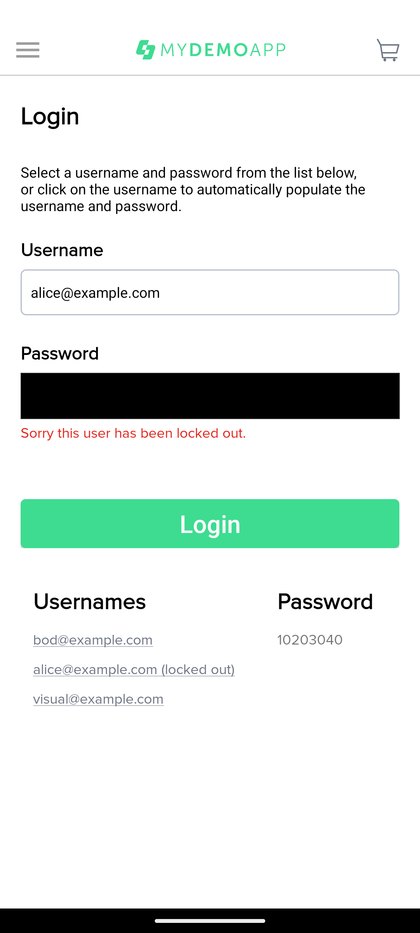 MDA-002: Password blacked out; error message verified. |
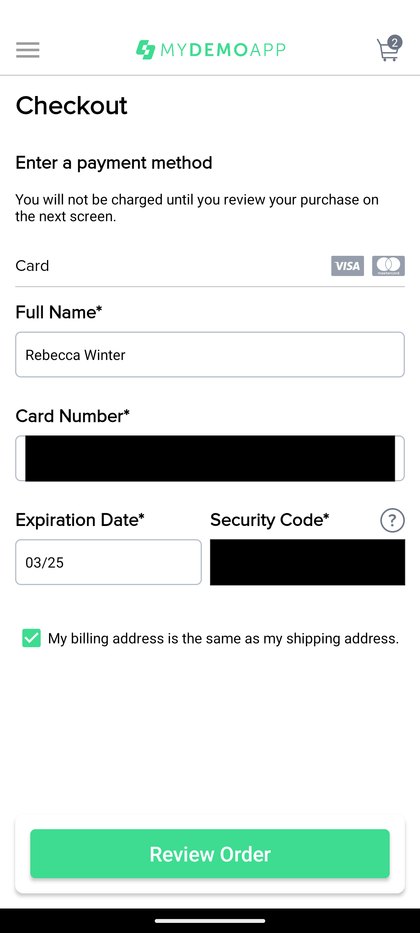 MDA-004: Card number and CVV blacked out in memory. |
Technical Documentation
Event Flow Diagram
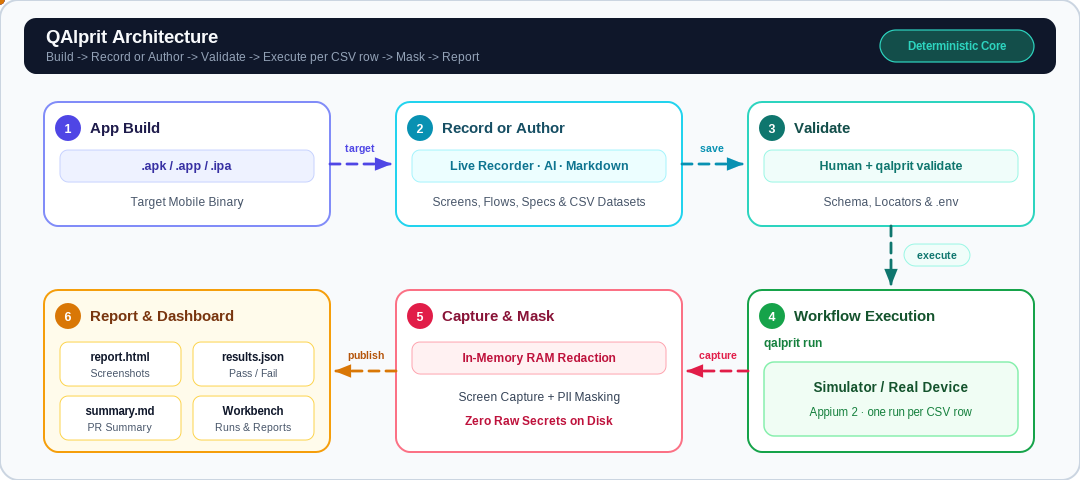
- App Build: Package the target mobile binary (
.apk,.app, or.ipa). - AI Authoring: Generate screen locators (
screens/screens.yaml), reusable flows (flows/*.md), and test specs (specs/*.md). - Validate: Review with human +
qalprit validateto catch schema, locator, and.envissues before execution. - Workflow Execution: Run each workflow deterministically via Appium 2 on a simulator/emulator or real USB device.
- Capture & Mask: Capture screen frames and mask sensitive fields/PII in memory before saving (
secure_evidence: true). - Report & Dashboard: Generate
report.html,summary.md,junit.xml,results.json, and explore or compare runs inqalprit ui.
CLI Reference
| Command | What it does |
|---|---|
qalprit doctor |
Checks Python, Node, Appium 2, and Android/iOS tools |
qalprit devices |
Lists connected phones, emulators, and simulators |
qalprit list [--suite <name>] |
Lists test specs, reusable flows, and screen locators (--json-output supported) |
qalprit inspect --platform android|ios |
Reads the current app screen and ranks suggested locators (--export-json supported) |
qalprit validate --suite <name> --env <name> |
Checks specs, flows, locators, and .env without a phone (--app optional) |
qalprit run --platform android|ios --device <name> --app <path> |
Runs tests (--id, --exclude-tags, --rerun-failed, --dry-run, --update-baselines) |
qalprit report <results-dir> |
Rebuilds report.html, summary.md, and junit.xml from results.json |
qalprit ui |
Opens a local web dashboard to browse and compare runs |
More Docs
- AI Agent Instructions — Prompt and runbook so an AI coding agent can run & maintain QAlprit for you
- Authoring Guide — Step vocabulary, reusable flows, and iOS reset tips
- Editable Diagram (Draw.io)
- Contributing · Security · MIT License
pytest -v # run unit tests
QAlprit (qalprit.vattitude.ca) — Managed by vattitude.ca
1 maintainer

Metadata
1 maintainer
Release files for qalprit 0.1.30
For a detailed explanation of source distributions (sdists) and built distributions (wheels), please see the package formats documentation.
Source distribution (sdist)
| File | Size | Uploaded | Provenance | Actions |
|---|---|---|---|---|
| qalprit-0.1.30.tar.gz | 211.7 kB | Without provenance | Details for qalprit-0.1.30.tar.gz |
Built distribution (wheel)
| File | Interpreter | ABI | Platform | Actions Reset |
|---|---|---|---|---|
| qalprit-0.1.30-py3-none-any.whl | Python 3 | none | any | Details for qalprit-0.1.30-py3-none-any.whl |
Total release size: 397.2 kB
Release files / qalprit-0.1.30.tar.gz
| Download URL | qalprit-0.1.30.tar.gz |
|---|---|
| Size | 211.7 kB |
| Tags | Source |
|
SHA-256 checksum How to use checksums |
5058c7d9771339fc6b1b9025acb73b5280ff0566a35f2493e668ecb8030795b8
|
|
BLAKE2b-256 checksum How to use checksums |
b1202f1c8ae3f2457e85b5fb497b1fd8cdafe13d61a400948e1f43953c3cfb3c
|
| Upload date | |
|
Uploaded using Trusted Publishing? What is trusted publishing? |
No |
| Uploaded via |
twine/7.0.0 CPython/3.11.15
|
Release files / qalprit-0.1.30-py3-none-any.whl
| Download URL | qalprit-0.1.30-py3-none-any.whl |
|---|---|
| Size | 185.5 kB |
| Tags | Python 3 |
|
SHA-256 checksum How to use checksums |
8fbec076fcfd0ffe120c1c0fcdae4895673561b45d270f8032b0831693381219
|
|
BLAKE2b-256 checksum How to use checksums |
2cadc7a2158bf988ad3e6eaf8a8bb83d1fbfc215249a8dc41246be0a827a2a9f
|
| Upload date | |
|
Uploaded using Trusted Publishing? What is trusted publishing? |
No |
| Uploaded via |
twine/7.0.0 CPython/3.11.15
|
Security for qalprit 0.1.30
Provenance
Provenance describes where a file came from. On PyPI, provenance is shared via attestations, which provide a verifiable record of the build or publishing details. View details, limitations and caveats.
No provenance found
None of the files in this release were uploaded with provenance metadata.
A note on package security
PyPI is a repository for distributing packages, not a service for auditing them. While third-party security researchers and our staff do their best to detect and remove malicious packages, PyPI cannot guarantee the quality, security or suitability of any given package.
To learn more about protecting yourself from malicious actors, visit our package security documentation.














