











A simple script to monitor Qbit and communicate with Radarr and Sonarr
Join the Official Discord Server for help.
Features
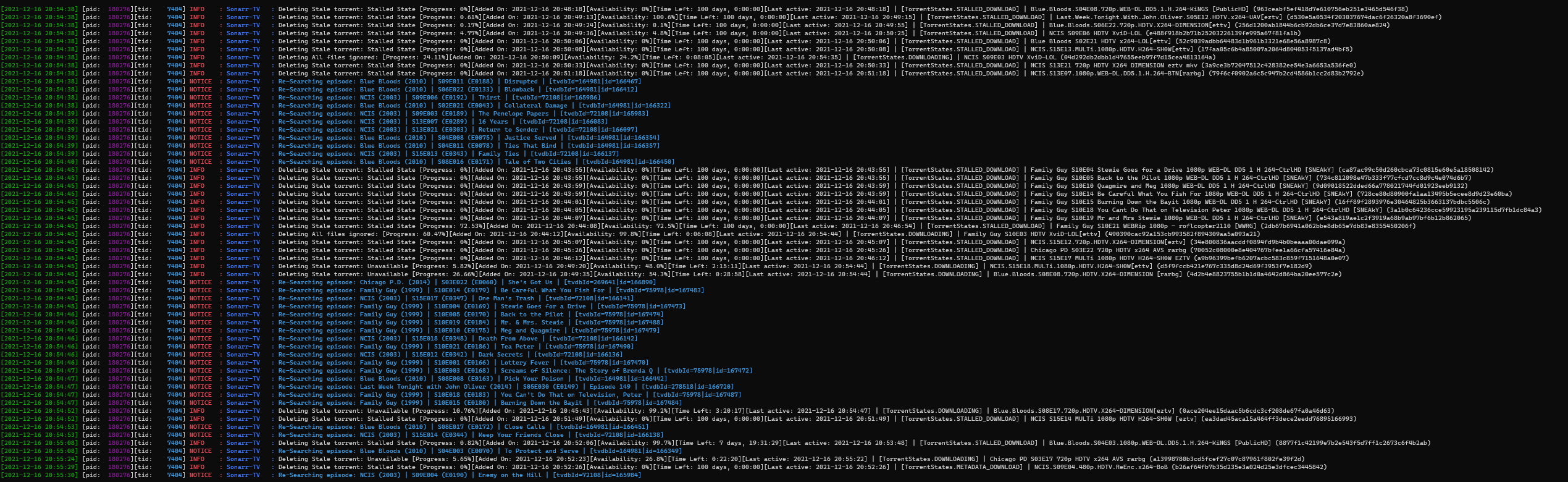
- Monitor qBit for Stalled/bad entries and delete them then blacklist them on Arrs (Option to also trigger a re-search action).
- Monitor qBit for completed entries and tell the appropriate Arr instance to import it ( 'DownloadedMoviesScan' or 'DownloadedEpisodesScan' commands).
- Skip files in qBit entries by extension, folder or regex.
- Monitor completed folder and cleans it up.
- Uses ffprobe to ensure downloaded entries are valid media.
- Trigger periodic Rss Syncs on the appropriate Arr instances.
- Trigger Queue update on appropriate Arr instances.
- Search requests from Overseerr or Ombi.
- Auto add/remove trackers
- Set per tracker values
This section requires the Arr databases to be locally available.
- Monitor Arr's databases to trigger missing episode searches.
- Customizable year range to search for (at a later point will add more option here, for example search whole series/season instead of individual episodes, search by name, category etc).
Important mentions
Some things to know before using it.
-
- Qbitrr works best with qBittorrent 4.3.9
-
- You need to run the
qbitrr --gen-configmove the generated file to~/.config/qBitManager/config.toml(~ is your home directory, i.eC:\Users\{User})
- You need to run the
-
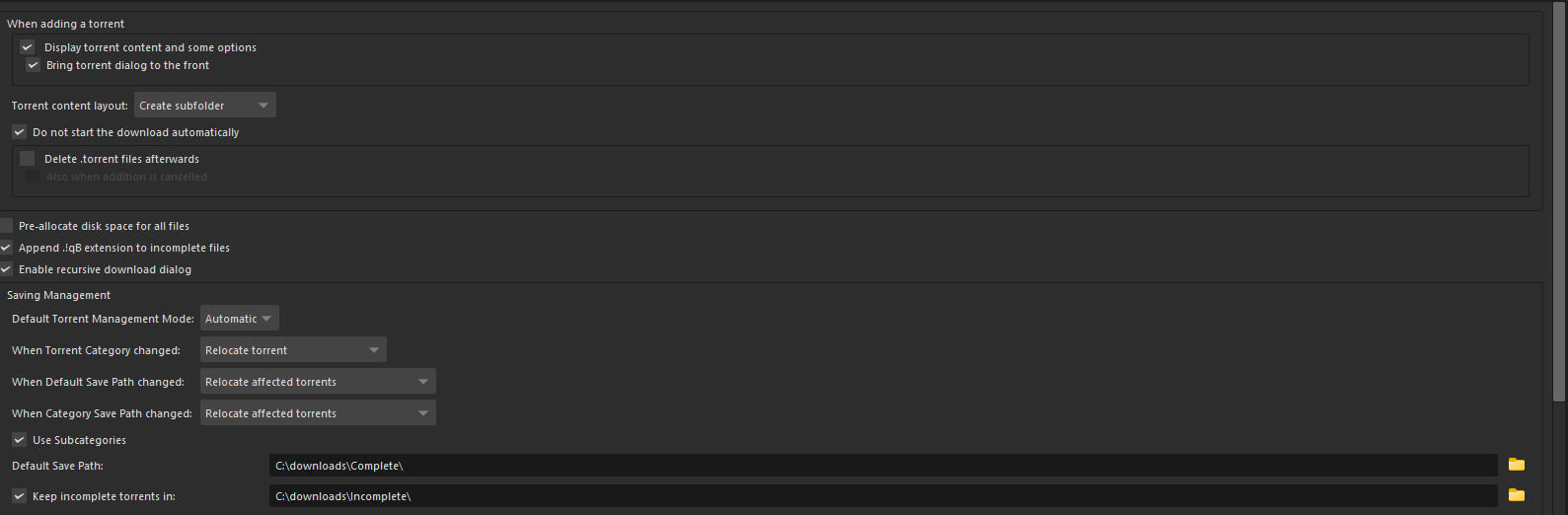
- I have qBit setup to have to create sub-folder for downloads and for the download folder to use subcategories.
Install the requirements run
python -m pip install qBitrr(I would recommend in a dedicated venv but that's out of scope.
Alternatively:
- Download on the latest release
Run the script
- Make sure to update the settings in
~/.config/qBitManager/config.toml - Activate your venv
- Run
qbitrr
Alternatively:
- Unzip the downloaded release and run it
How to update the script
- Activate your venv
- Run
python -m pip install -U qBitrr
Alternatively:
- Download on the latest release
Contributions
- I'm happy with any PRs and suggested changes to the logic I just put it together dirty for my own use case.
Example behaviour
Docker Image
- The docker image can be found here
Docker Compose
version: "3"
services:
  qbitrr:
    image: qbitrr
    user: 1000:1000 # Required to ensure teh container is run as the user who has perms to see the 2 mount points and the ability to write to the CompletedDownloadFolder mount
    tty: true # Ensure the output of docker-compose logs qbitrr are properly colored.
    restart: unless-stopped
    # networks: This container MUST share a network with your Sonarr/Radarr instances
    enviroment:
      TZ: Europe/London
    volumes:
      - /etc/localtime:/etc/localtime:ro
      - /path/to/appdata/qbitrr:/config  # All qbitrr files are stored in the `/config` folder when using a docker container
      - /path/to/sonarr/db:/sonarr.db/path/in/container:ro # This is only needed if you want episode search handling :ro means it is only ever mounted as a read-only folder, the script never needs more than read access
      - /path/to/radarr/db:/radarr.db/path/in/container:ro # This is only needed if you want movie search handling, :ro means it is only ever mounted as a read-only folder, the script never needs more than read access
      - /path/to/completed/downloads/folder:/completed_downloads/folder/in/container:rw # The script will ALWAYS require write permission in this folder if mounted, this folder is used to monitor completed downloads and if not present will cause the script to ignore downloaded file monitoring.
      # Now just to make sure it is clean, when using this script in a docker you will need to ensure you config.toml values reflect the mounted folders.#
      # For example, for your Sonarr.DatabaseFile value using the values above you'd add
      # DatabaseFile = /sonarr.db/path/in/container/sonarr.db
      # Because this is where you mounted it to
      # The same would apply to Settings.CompletedDownloadFolder
      # e.g CompletedDownloadFolder = /completed_downloads/folder/in/container

    logging: # this script will generate a LOT of logs - so it is up to you to decide how much of it you want to store
      driver: "json-file"
      options:
        max-size: "50m"
        max-file: 3
    depends_on: # Not needed but this ensures qBitrr only starts if the dependencies are up and running
      - qbittorrent
      - radarr-1080p
      - sonarr-1080p
      - animarr-1080p
      - overseerr
Important mentions for docker
- The script will always expect a completed config.toml file
- When you first start the container a "config.rename_me.toml" will be added to
/path/to/appdata/qbitrr- Make sure to rename it to 'config.toml' then edit it to your desired values
1 maintainer

Metadata
1 maintainer
Release files for qBitrr 2.6.0
For a detailed explanation of source distributions (sdists) and built distributions (wheels), please see the package formats documentation.
Source distribution (sdist)
| File | Size | Uploaded | |
|---|---|---|---|
| qBitrr-2.6.0.tar.gz | 47.2 kB | Details |
Built distribution (wheel)
| File | Interpreter | ABI | Platform | Reset |
|---|---|---|---|---|
| qBitrr-2.6.0-py3-none-any.whl | Python 3 | none | any | Details |
Total release size: 95.2 kB
Release files / qBitrr-2.6.0.tar.gz
| Download URL | qBitrr-2.6.0.tar.gz |
|---|---|
| Size | 47.2 kB |
| Tags | Source |
|
SHA-256 checksum How to use checksums |
20b140e5cb09e1bbeb5e93d5a8aa956c48e97688dbf11cc01c329a9192eae4e6
|
|
BLAKE2b-256 checksum How to use checksums |
a34d63ccafde67dde316b7ce6e60a43dd1a916b26d7f7a59a836f3d7668a1006
|
| Upload date | |
|
Uploaded using Trusted Publishing? What is trusted publishing? |
No |
| Uploaded via |
twine/4.0.1 CPython/3.9.14
|
Release files / qBitrr-2.6.0-py3-none-any.whl
| Download URL | qBitrr-2.6.0-py3-none-any.whl |
|---|---|
| Size | 48.0 kB |
| Tags | Python 3 |
|
SHA-256 checksum How to use checksums |
60d373c56011ddd7457a224a3ae0594d2d70c2546229c928a6e72ffbf0dd0b41
|
|
BLAKE2b-256 checksum How to use checksums |
94990300fdd14382ba9d309fe9c0085f51a66e0f80088136b842e8b09b0cbe88
|
| Upload date | |
|
Uploaded using Trusted Publishing? What is trusted publishing? |
No |
| Uploaded via |
twine/4.0.1 CPython/3.9.14
|














