
qccompute
A package for running Quantum Chemistry programs using qcdata standardized data structures. Built-in support for TeraChem, ORCA, CREST, xTB, and geomeTRIC, and any program you define a qccodec.Codec for.





qccompute works in harmony with a suite of other quantum chemistry tools for fast, structured, and interoperable quantum chemistry.
The QC Suite of Programs
The QC Suite works in harmony to provide fast, structured, and interoperable quantum chemistry tools.
- qcconst - Physical constants, conversion factors, and a periodic table with clear source information for every value.
- qcdata - Elegant and intuitive data structures for quantum chemistry, featuring seamless Jupyter Notebook visualizations. Documentation
- qcinf - Cheminformatics algorithms and structure utilities using standardized qcdata data structures.
- qccodec - A package for translating between standardized qcdata data structures and native QC program inputs and outputs.
- qccompute - A package for operating quantum chemistry programs using standardized qcdata data structures. Compatible with
TeraChem,psi4,QChem,NWChem,ORCA,Molpro,geomeTRICand many more. - BigChem - A distributed application for running quantum chemistry calculations at scale across clusters of computers or the cloud. Bring multi-node scaling to your favorite quantum chemistry program.
ChemCloud- A web application and associated Python client for exposing a BigChem cluster securely over the internet.
Installation
python -m pip install qccompute
Quickstart
qccompute uses the qcdata data structures to drive quantum chemistry programs in a standardized way. This allows for a simple and consistent interface to a wide variety of quantum chemistry programs. See the qcdata library for documentation on the input and output data structures.
The compute function is the main entry point for the library and is used to run a calculation.
from qcdata import Structure, ProgramInput
from qccompute import compute
from qccompute.exceptions import ExternalProgramError

# Create the Structure
h2o = Structure.open("h2o.xyz")

# Define the program input
prog_input = ProgramInput(
    program="terachem",
    structure=h2o,
    calctype="energy",
    model={"method": "hf", "basis": "sto-3g"},
    keywords={"purify": "no", "restricted": False},
)

# Run the calculation; will return a ProgramOutput or raise an exception
try:
    prog_output = compute(prog_input, collect_files=True)
except ExternalProgramError as e:
    # External QQ program failed in some way
    prog_output = e.prog_output
    prog_output.input_data # Input data used by the QC program
    prog_output.success # Will be False
    prog_output.results # Any half-computed results before the failure
    prog_output.logs # Logs from the calculation
    prog_output.plogs # Shortcut to print out the logs in human readable format
    prog_output.traceback # Stack trace from the calculation
    prog_output.ptraceback # Shortcut to print out the traceback in human readable format
    raise e
else:
    # Calculation succeeded
    prog_output.input_data # Input data used by the QC program
    prog_output.success # Will be True
    prog_output.results # All structured data and files from the calculation
    prog_output.results.files # Any files returned by the calculation
    prog_output.logs # Logs from the calculation
    prog_output.plogs # Shortcut to print out the logs in human readable format
    prog_output.results.provenance # Provenance information about the calculation
    prog_output.extras # Any extra information not in the schema
One may also call compute(..., raise_exc=False) to return a ProgramOutput object rather than raising an exception when a calculation fails. This may allow easier handling of failures in some cases.
from qcdata import Structure, ProgramInput
from qccompute import compute
from qccompute.exceptions import ExternalProgramError
# Create the Structure
h2o = Structure.open("h2o.xyz")

# Define the program input
prog_input = ProgramInput(
    program="terachem",
    structure=h2o,
    calctype="energy",
    model={"method": "hf", "basis": "sto-3g"},
    keywords={"purify": "no", "restricted": False},
)

# Run the calculation; will return a ProgramOutput object
prog_output = compute(prog_input, collect_files=True, raise_exc=False)
if not prog_output.success:
    # Same as except block above

else:
    # Same as else block above
Alternatively, the compute_args function can be used to run a calculation with the input data structures passed in as arguments rather than as a single ProgramInput object.
from qcdata import Structure
from qccompute import compute_args
# Create the Structure
h2o = Structure.open("h2o.xyz")

# Run the calculation
prog_output = compute_args(
    "terachem",
    h2o,
    calctype="energy",
    model={"method": "hf", "basis": "sto-3g"},
    keywords={"purify": "no", "restricted": False},
    files={...},
    collect_files=True
)
The behavior of compute() and compute_args() can be tuned by passing in keyword arguments like collect_files shown above. Arguments can modify which scratch directory location to use, whether to delete or keep the scratch files after a calculation completes, what files to collect from a calculation, whether to stream the program logs in real time as the program executes, and whether to propagate a wavefunction through a series of calculations. Arguments also include hooks for passing in update functions that can be called as a program executes in real time. See the qccompute.compute docstring for details.
See the /examples directory for more examples.
✨ Visualization ✨
Visualize all your results with a single line of code!
First install the visualization module:
python -m pip install qcdata[view]
or if your shell requires '' around arguments with brackets:
python -m pip install 'qcdata[view]'
Then in a Jupyter notebook import the qcdata view module and call view.view(...) passing it one or any number of qcdata objects you want to visualize, including Structure objects or any ProgramOutput object. You may also pass arrays of titles and/or subtitles to add additional information to the molecular structure display. If no titles are passed, qcdata will look for Structure identifiers such as a name or SMILES to label the Structure.
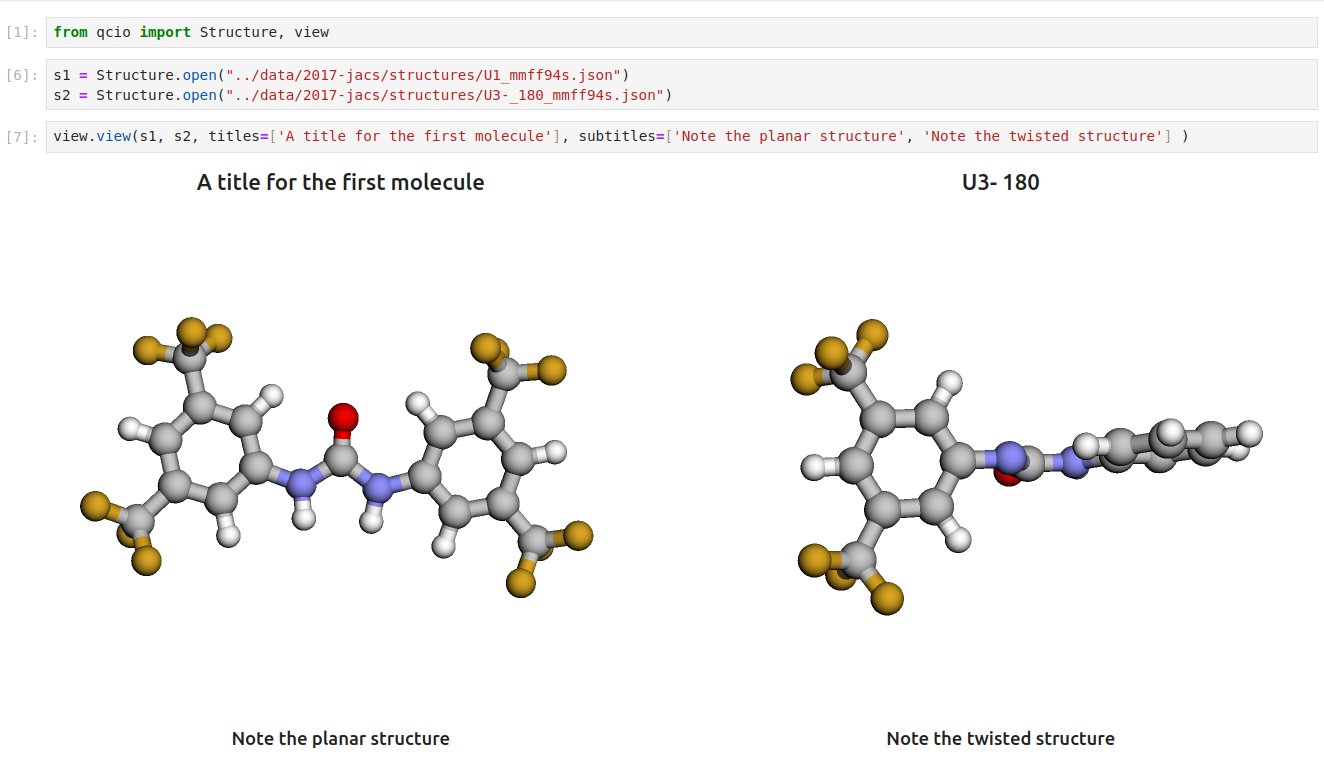
Seamless visualizations for ProgramOutput objects make results analysis easy!

Single point calculations display their results in a table.

If you want to use the HTML generated by the viewer to build your own dashboards, use the functions inside qcdata.view.py that begin with generate_ to create HTML you can insert into any dashboard.
Support
If you have any issues with qccompute or would like to request a feature, please open an issue.
Custom programs
qccompute only executes; everything program-specific comes from a
qccodec Codec. When a program is not
built in, define one in your script and pass it to compute, or register it so it is
found by name (including as a geomeTRIC gradient child):
from qcdata import CalcType, ProgramInput
from qccodec import Codec, SubprocessInput, re_search
import qccodec, qccompute

codec = Codec("myprog", calctypes={CalcType.energy})

@codec.encoder
def encode(inp: ProgramInput) -> SubprocessInput:
    return SubprocessInput(("myprog", "run.inp"), files={"run.inp": inp.structure.to_xyz()})

@codec.parser(target="energy", calctypes=[CalcType.energy])
def parse_energy(stdout: str) -> float:
    return float(re_search(r"Total energy:\s+(-?\d+\.\d+)", stdout).group(1))

output = qccompute.compute(prog_input, codec=codec)   # explicit
qccodec.register(codec)
output = qccompute.compute(prog_input)                # by program name
Program-specific decode options are passed with options=; each codec declares the
options it accepts in codec.options and unknown names are rejected:
compute(prog_input, options={"collect_rotamers": True}) # CREST
Development
qccompute requires qcdata>=0.20.0 and qccodec>=0.13.0. Run
uv sync --all-groups --locked to install the project and development dependencies.
How a calculation runs
compute()resolves a codec: thecodec=argument, a codec registered withqccodec.register, a built-in, or one installed by another package.codec.encode(input_data)returns aSubprocessInput(command + files) or aPythonInput(callable + arguments). Encoding never executes anything.- qccompute creates the scratch directory, stages the files, and runs
run_subprocessorrun_python. Both merge stdout and stderr into one log; Python capture includes native writes to the stdout/stderr file descriptors and the loggers the codec names. codec.decode(input_data, native_output)is always called, even after an execution failure, so partial results are recovered. Exceptions carrying.datakeep it.- Requested files and wavefunctions are collected, the directory is removed if
rm_scratch_diris True, and theProgramOutputis built. On failure, the exception's.prog_outputholds the complete failed output.
Environment: invocation defaults from the codec override inherited values, and
environment= overrides both. Subprocess overrides are local to the child. Python
execution temporarily changes the process environment, working directory, and output
streams under a reentrant lock, so use separate processes for independent concurrent
Python calculations. xTB defaults to OMP_NUM_THREADS=1 before its library import,
and CREST receives the same setting in its child environment.
Timeouts: compute(..., timeout=3600) kills any program that runs longer, together
with every process it started, and raises ProgramTimeoutError with partial results
attached. The limit applies to each program run, including geomeTRIC's child
gradients; Python callables themselves are not interrupted.
Logs: subprocess callbacks stream (all_logs, new_logs) with a final callback for
remaining output; update_interval is a minimum spacing. Python callbacks receive the
captured log once after invocation. Logs remain attached on failure even with
collect_logs=False.
Child calculations: geomeTRIC drives gradients through an injected callback, with a
separate workspace and ProgramOutput for each child. Child codecs are resolved by
program name. propagate_wfn=True keeps each child's wavefunction files and calls the
child codec's propagate_wfn(output, input_data) so the next step starts from them.
Exceptions: CodecNotFoundError, InputError, ProgramNotFoundError, and
ExternalProgramError all derive from QCComputeBaseError and carry .prog_output.
The older AdapterNotFoundError/AdapterInputError names remain as aliases for one
release.
TeraChem FE/PBS dependency
The optional FE/PBS codecs require a separate tcpb migration. Published
tcpb==0.16.0 constructs the old qcdata models internally, so requests report an
explicit dependency error (or return a failed ProgramOutput when raise_exc=False).
Standard TeraChem subprocess execution is independent of this limitation.
1 maintainer

Metadata
1 maintainer
Release files for qccompute 0.15.0
For a detailed explanation of source distributions (sdists) and built distributions (wheels), please see the package formats documentation.
Source distribution (sdist)
| File | Size | Uploaded | |
|---|---|---|---|
| qccompute-0.15.0.tar.gz | 519.8 kB | Details |
Built distribution (wheel)
| File | Interpreter | ABI | Platform | Reset |
|---|---|---|---|---|
| qccompute-0.15.0-py3-none-any.whl | Python 3 | none | any | Details |
Total release size: 540.7 kB
Release files / qccompute-0.15.0.tar.gz
| Download URL | qccompute-0.15.0.tar.gz |
|---|---|
| Size | 519.8 kB |
| Tags | Source |
|
SHA-256 checksum How to use checksums |
1af271670b44f3b6994633bc215b9cc1e42106dfb193e22224c8da6266716363
|
|
BLAKE2b-256 checksum How to use checksums |
8342f46f17a01df6040dc324820c6d9d06184376653e3bfd9a7f3a1f270c1323
|
| Upload date | |
|
Uploaded using Trusted Publishing? What is trusted publishing? |
Yes |
| Uploaded via |
twine/7.0.0 CPython/3.13.14
|
Provenance
Provenance describes where a file came from. On PyPI, provenance is shared via attestations, which provide a verifiable record of the build or publishing details. View details, limitations and caveats.


PyPI Publish Attestation
PyPI verified that this artifact, at this checksum, originated from the publisher listed below.
Signed by GitHub Actions, verified by PyPI on Oct 15, 2026.
Transparency logRelease files / qccompute-0.15.0-py3-none-any.whl
| Download URL | qccompute-0.15.0-py3-none-any.whl |
|---|---|
| Size | 20.9 kB |
| Tags | Python 3 |
|
SHA-256 checksum How to use checksums |
842dc786e5d5963ffb5b73f454782a392336f5b98aae4d3a410e7a5a28b873bb
|
|
BLAKE2b-256 checksum How to use checksums |
51e019795ca89dac6068111e76bb016b9692028f028d6824b3d9e6e91363bb5b
|
| Upload date | |
|
Uploaded using Trusted Publishing? What is trusted publishing? |
Yes |
| Uploaded via |
twine/7.0.0 CPython/3.13.14
|
Provenance
Provenance describes where a file came from. On PyPI, provenance is shared via attestations, which provide a verifiable record of the build or publishing details. View details, limitations and caveats.
PyPI Publish Attestation
PyPI verified that this artifact, at this checksum, originated from the publisher listed below.
Signed by GitHub Actions, verified by PyPI on Oct 15, 2026.
Transparency log













