
Client library for the Qdrant vector search engine

Project description

Python Client library for the Qdrant vector search engine.





Python Qdrant Client
Client library and SDK for the Qdrant vector search engine.
Library contains type definitions for all Qdrant API and allows to make both Sync and Async requests.
Client allows calls for all Qdrant API methods directly. It also provides some additional helper methods for frequently required operations, e.g. initial collection uploading.
See QuickStart for more details!
Installation
pip install qdrant-client
Features
- Type hints for all API methods
- Local mode - use same API without running server
- REST and gRPC support
- Minimal dependencies
Local mode
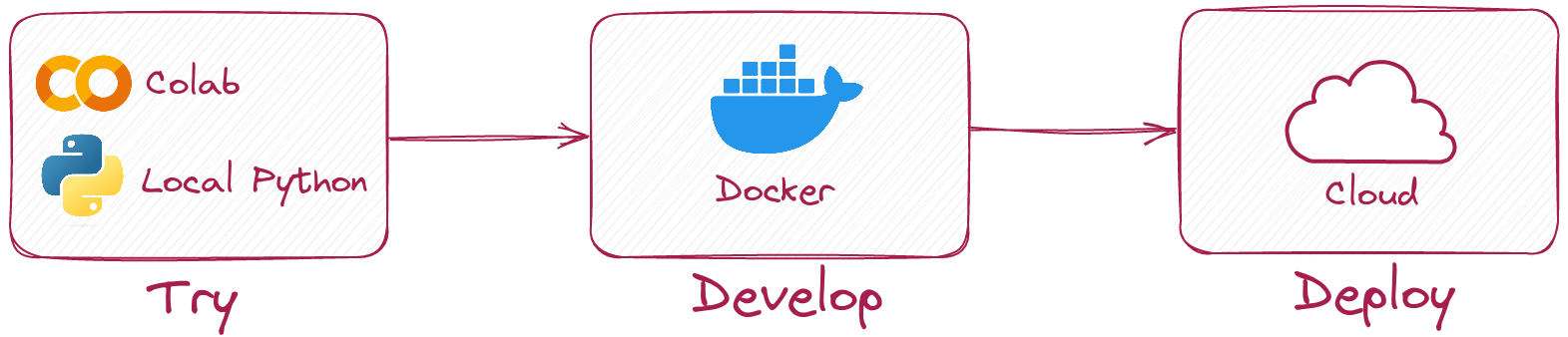
Python client allows you to run same code in local mode without running Qdrant server.
Simply initialize client like this:
from qdrant_client import QdrantClient

client = QdrantClient(":memory:")
# or
client = QdrantClient(path="path/to/db")  # Persists changes to disk
Local mode is useful for development, prototyping and testing.
- You can use it to run tests in your CI/CD pipeline.
- Run it in Colab or Jupyter Notebook, no extra dependencies required. See an example
- When you need to scale, simply switch to server mode.
How it works?
We just implemented Qdrant API in pure Python. We covered it with tests extensively to be sure it works the same as the server version.
Connect to Qdrant server
To connect to Qdrant server, simply specify host and port:
from qdrant_client import QdrantClient

client = QdrantClient(host="localhost", port=6333)
# or
client = QdrantClient(url="http://localhost:6333")
You can run Qdrant server locally with docker:
docker run -p 6333:6333 qdrant/qdrant:latest
See more launch options in Qdrant repository.
Connect to Qdrant cloud
You can register and use Qdrant Cloud to get a free tier account with 1GB RAM.
Once you have your cluster and API key, you can connect to it like this:
from qdrant_client import QdrantClient

qdrant_client = QdrantClient(
    url="https://xxxxxx-xxxxx-xxxxx-xxxx-xxxxxxxxx.us-east.aws.cloud.qdrant.io:6333",
    api_key="<your-api-key>",
)
Examples
Create a new collection
from qdrant_client.models import Distance, VectorParams

client.recreate_collection(
    collection_name="my_collection",
    vectors_config=VectorParams(size=100, distance=Distance.COSINE),
)
Insert vectors into a collection
import numpy as np
from qdrant_client.models import PointStruct

vectors = np.random.rand(100, 100)
client.upsert(
    collection_name="my_collection",
    points=[
        PointStruct(
            id=idx,
            vector=vector.tolist(),
            payload={"color": "red", "rand_number": idx % 10}
        )
        for idx, vector in enumerate(vectors)
    ]
)
Search for similar vectors
query_vector = np.random.rand(100)
hits = client.search(
    collection_name="my_collection",
    query_vector=query_vector,
    limit=5  # Return 5 closest points
)
Search for similar vectors with filtering condition
from qdrant_client.models import Filter, FieldCondition, Range

hits = client.search(
    collection_name="my_collection",
    query_vector=query_vector,
    query_filter=Filter(
        must=[  # These conditions are required for search results
            FieldCondition(
                key='rand_number',  # Condition based on values of `rand_number` field.
                range=Range(
                    gte=3  # Select only those results where `rand_number` >= 3
                )
            )
        ]
    ),
    limit=5  # Return 5 closest points
)
See more examples in our Documentation!
gRPC
To enable (typically, much faster) collection uploading with gRPC, use the following initialization:
from qdrant_client import QdrantClient

client = QdrantClient(host="localhost", grpc_port=6334, prefer_grpc=True)
Async client
Async methods are available in raw autogenerated clients. Usually, you don't need to use them directly, but if you need extra performance, you can access them directly.
Async gRPC
Example of using raw async gRPC client:
from qdrant_client import QdrantClient, grpc

client = QdrantClient(prefer_grpc=True, timeout=3.0)

grpc_collections = client.async_grpc_collections

res = await grpc_collections.List(grpc.ListCollectionsRequest(), timeout=1.0)
More examples can be found here.
Development
This project uses git hooks to run code formatters.
Install pre-commit with pip3 install pre-commit and set up hooks with pre-commit install.
pre-commit requires python>=3.8
Release history Release notifications | RSS feed


Download files
Download the file for your platform. If you're not sure which to choose, learn more about installing packages.
Source Distribution
Built Distribution
Filter files by name, interpreter, ABI, and platform.
If you're not sure about the file name format, learn more about wheel file names.
Copy a direct link to the current filters
File details
Details for the file qdrant_client-1.2.0.tar.gz.
File metadata
- Download URL: qdrant_client-1.2.0.tar.gz
- Upload date:
- Size: 107.4 kB
- Tags: Source
- Uploaded using Trusted Publishing? No
- Uploaded via: twine/4.0.2 CPython/3.9.16
File hashes
| Algorithm | Hash digest | |
|---|---|---|
| SHA256 |
5a3d9f89adce392a2ba619cfd5b9f7afb13e5146c49e88ed80469993f0fadbf0
|
|
| MD5 |
8fe4a92c9b003bb34982ca7f5235054c
|
|
| BLAKE2b-256 |
26dd61d571b9d0b27b7da542a73006da511d4ea5adb4c7070235d2cc2c59e20d
|
File details
Details for the file qdrant_client-1.2.0-py3-none-any.whl.
File metadata
- Download URL: qdrant_client-1.2.0-py3-none-any.whl
- Upload date:
- Size: 129.9 kB
- Tags: Python 3
- Uploaded using Trusted Publishing? No
- Uploaded via: twine/4.0.2 CPython/3.9.16
File hashes
| Algorithm | Hash digest | |
|---|---|---|
| SHA256 |
e84e43bee529e27990aa5bad487bab4204eb20bda0414916498d8bb80ce601e6
|
|
| MD5 |
250c0e5f81a862c11fd6ff74c722f482
|
|
| BLAKE2b-256 |
70ac4575e2ca8d215d8dcb0ca2ef0c1c809b5c4504c883a26095f4ef88fe9a2f
|






