
AI vision-driven GUI automation across browsers, mobile, desktop, and games
Verified details
These details have been verified by PyPIProject links
GitHub Statistics
Maintainers

Project description
Qirabot Python SDK
English | 简体中文
Cross-platform GUI automation, driven by multimodal AI vision. Drive browsers, mobile apps, full desktops, and games through pixels — no DOM, no selectors — reaching what frameworks like Playwright, Selenium, and Appium cannot.
Run it standalone (bot.open() launches a browser for you; Android / iOS / Windows-window backends are built in with zero extra dependencies), bolt it onto your existing Playwright / Selenium / Appium / pyautogui session, drop it into a pytest suite, or bind by HWND to drive a Unity / Unreal / native desktop game. Same API across all of them.
📖 Full documentation: qirabot.com/docs (中文)
See it work
https://github.com/user-attachments/assets/649ea80c-63e7-4c85-9ee8-3c8fe17e5ef4
Play an MMORPG from zero to level 15, hands-free — iOS real device. The entire task prompt is one sentence: "This is Fantasy Westward Journey mobile. Create a character, then complete the new-player flow; skip whatever can be skipped." Highlights cut from a single unedited run: full 5:50 video · script
More real, unedited runs — the AI sees only pixels. Click a poster to watch (all demos →):
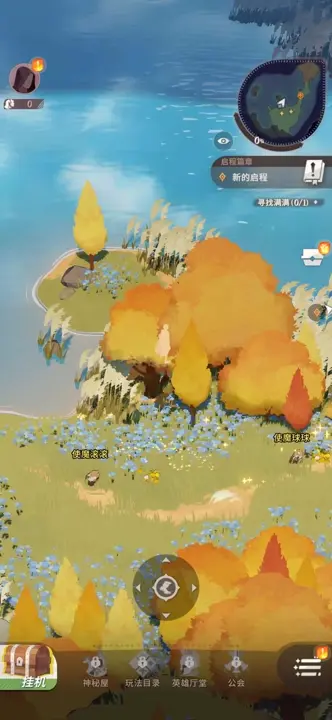
Clear AFK Journey's tutorial and reach the open world — iOS real device |
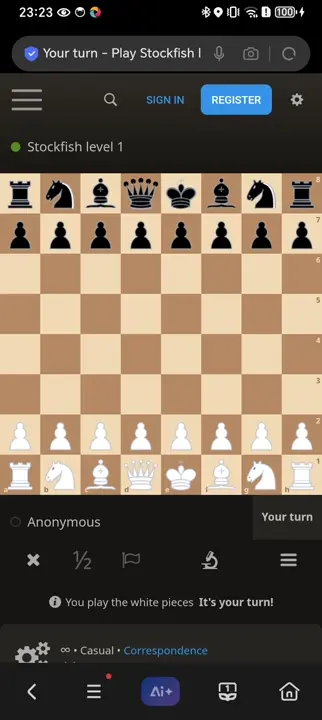
Play chess on lichess.org — Android real device |
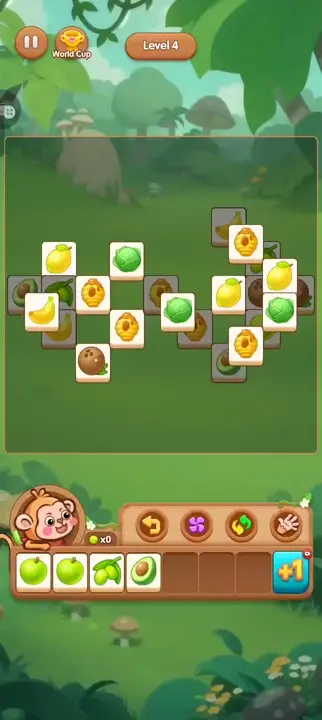
Beat a fruit tile-match game on its own — Android real device |
Installation
One line — installs uv, qirabot (isolated, never touches your system Python), and Chromium. No pre-installed Python required:
# macOS / Linux
curl -LsSf https://qirabot.com/install | sh

# Windows (PowerShell)
powershell -ExecutionPolicy ByPass -c "irm https://qirabot.com/install.ps1 | iex"
Driving a device instead of a browser? The Android (adb), iOS (WDA), and Windows single-window backends are built into the core package:
uv tool install qirabot # Android + iOS + Windows window; zero extras
pip, virtualenvs, per-framework extras, and troubleshooting:
Installation guide.
Whichever path you took, qirabot doctor reports what is installed, what is
missing (with the exact fix), and whether your API key reaches the server.
Quick Start
Log in once — this opens your browser to authorize the CLI and saves an
API key locally (on a headless server, open the printed URL from any device;
--paste enters a key from your dashboard manually):
qirabot login
Then hand the AI a task. Real, unedited output:
$ qirabot browser "Search for SpaceX and get the first sentence of the article" --url wikipedia.org
Task: 6237d4ff-b96b-4c7d-addb-30d8a0334970
[1/20] type_text  ← "SpaceX"
        └ Type 'SpaceX' into the Wikipedia search bar and press enter to search.
Done: Space Exploration Technologies Corp., doing business as SpaceX, is an
      American spaceflight, telecommunications, and artificial intelligence
      company headquartered at the Starbase development site in Starbase, Texas.
Every run writes an HTML report with per-step screenshots; --record
captures a video of the whole run.
For sites that need an account, log in once by hand — no API key, no tokens — and every later run that reuses the profile starts already signed in:
qirabot open-browser --user-data-dir ~/.automation --url news.ycombinator.com/login
# log in in the window, close it, then:
qirabot browser "Upvote the top story about Rust" --user-data-dir ~/.automation
Python SDK
The CLI is powered by the same engine. Call bot.ai() from Python and the AI
likewise looks at the screen, decides the next action, and loops until the
task is done — except the result lands directly in your code, with an
on_step callback streaming each action as it happens:
from qirabot import Qirabot, StepResult

bot = Qirabot()
page = bot.open("https://www.wikipedia.org")

def on_step(step: StepResult) -> None:
    label = "done" if step.finished else step.action_type
    print(f"  step {step.step}: {label} {step.params}")

result = bot.ai(page, "Search for SpaceX and get the first sentence of the article", on_step=on_step)
print(f"Success: {result.success}")
print(f"Result: {result.output}")

bot.close()
Prefer to drive each step yourself? The same natural-language targeting works
as single-step calls — bot.click(page, "Login button"),
bot.extract(...), bot.verify(...) — with your code in control. Need just
the coordinates? x, y = bot.locate(page, "the OK button") resolves an
element without acting, so you can feed them to your own framework calls.
Bolt onto your existing stack
No rewrite: pass your existing page / driver / device object and mix AI
steps with the selectors you already have. Add AI where selectors hurt —
visual assertions, dynamic widgets, and flows too tedious to script:
import pytest
from qirabot import Qirabot

@pytest.fixture(scope="session")
def bot():
    with Qirabot(task_name="test-checkout") as bot:   # one task per run
        yield bot

def test_checkout(page, bot):     # `page` is your pytest-playwright fixture
    page.goto("https://shop.example.com")
    page.fill("#username", "test_user")             # your selectors, as-is
    page.click("#login-btn")

    # Visual assertion — survives markup rewrites and CSS refactors
    assert bot.verify(page, "the product grid shows items with prices and no error banner")

    # One line replaces a page of brittle selector steps
    result = bot.ai(page, "Complete checkout, name John Doe zip 10001", max_steps=8)
    assert result.success
Works the same for Selenium, Appium, pyautogui, and the built-in device
backends (AdbDevice, WdaClient, Window) — and anything else via a
7-primitive custom adapter.
Domain knowledge: teach the AI your rules
The model knows how to drive a UI — not your game's item names or your team's
business terms. Mount reference text for the task and the AI consults it at
every step. From the CLI, -k takes a file and repeats, 32KB total:
qirabot browser "Buy 10 stamina potions in the shop" -k game-rules.md -k gm-policy.md
From Python, knowledge takes literal text, a UTF-8 file, or a list mixing both:
result = bot.ai(
    device,
    "Complete every daily quest",
    knowledge=[Path("game-rules.md"), "GM commands may be used once per match"],
)
Knowledge is mounted per call: the next bot.ai() starts clean, so each stage
of a long flow carries only what it needs. Two deliberate limits: no URLs —
fetch remote sources yourself, so auth and failures stay in your code — and
knowledge guides decisions; hard rules like "once per match" belong in
custom-tool code (next section), where they can actually be enforced.
Custom tools: let the AI call your code
Mid-task, the AI isn't limited to clicking and typing. custom_tools
registers plain Python functions the model can invoke as it works — hit an
internal API, query a database, fetch an OTP from your mail server, seed test
data, or pause for a human at a CAPTCHA. Name, description, and parameters are
introspected from the function itself:
def gm_command(command: str) -> str:
    """Send a command to the game's GM backend and return its reply.
    Available commands: add_energy <amount>, add_gold <amount>"""
    return requests.post(GM_URL, json={"cmd": command}, timeout=10).text

result = bot.ai(
    device,
    "Complete every daily quest. If an out-of-energy popup appears, "
    "use gm_command to add 100 energy and continue",
    custom_tools=[gm_command],
)
The tool runs locally on your machine — the server never sees your endpoints or credentials — and its return value becomes the model's next observation. One instruction now spans systems that used to take a page of glue code: UI steps, backend calls, and human handoffs in a single flow. Details (schemas, error handling, pruning built-in tools): AI Tasks & Custom Tools. Runnable examples: custom_tool_gm.py · 06_human_in_the_loop.py.
Progress overlay
Every CLI task command shows a small always-on-top window in the screen's
bottom-right corner: the running instruction, each step's action and
reasoning, and the final ✓/✗ outcome. The window is excluded from screen
capture (macOS NSWindowSharingNone, Windows WDA_EXCLUDEFROMCAPTURE) and
click-through, so it never appears in the bot's own screenshots and never
intercepts a click meant for the app below. Turn it off with --no-overlay.
When a task drives the machine's real mouse and keyboard (the desktop
backends: Window, pyautogui), a slow-breathing amber glow additionally
lines the screen edges for the duration of the run — the "machine is being
controlled, hands off" signal, the same visual language as a screen-sharing
border. Remote-protocol targets (browser, Android, iOS) don't light it: your
mouse stays yours there. The glow is capture-excluded like the window; on
Windows versions where exclusion isn't available it simply never shows —
glowing bars in every screenshot would blind the bot. --no-overlay turns
it off together with the window.
It isn't just bot.ai(): single-step calls (bot.click, bot.press_key,
bot.type_text, …) on desktop backends inject real input too, so they
light the glow as well — it comes on with the first call and fades a few
seconds after the last, so a scripted burst reads as one controlled
stretch rather than a flicker.
While the glow is on, a small pill at the top of the screen reads
"Hold ESC to stop · 长按 ESC 中止" — hold ESC for about a second to abort
the run: the
bot stops at the next step boundary (a step may take a few seconds),
releases every key and mouse button it was holding, and bot.ai() raises a
user_abort error; the task is recorded as cancelled, not failed, so
deliberate aborts stay out of your failure metrics. The abort is sticky:
every later bot.ai() on the same client raises immediately (no glow, no
input), so a try/except around one run can't re-take the machine you just
reclaimed — continuing requires an explicit bot.clear_user_abort().
Single-step calls stay available for cleanup. Short ESC taps — yours or the
bot's own — never trigger it. The kill switch rides the overlay, so it's off when the overlay is off;
on the pyautogui backend, slamming the mouse into a screen corner and
leaving it there also aborts (pyautogui's built-in failsafe), overlay or
not. On macOS the ESC listener needs the Accessibility permission — the
same one desktop control already requires.
In the SDK, one flag covers the common case — the bot runs the window for
you: the instruction as the headline with a running-state dot and elapsed
clock, each step as step 3/20 · click · "…" plus the model's reasoning,
and the final ✓/✗ outcome:
bot = Qirabot(overlay=True) # every bot.ai() run reports to the window
When your script is more than one bot.ai() call, hold the window yourself:
a standalone Overlay displays whatever you tell it, whenever — your own
phases included — and ov.step feeds it bot steps for just the AI part:
from qirabot import Overlay

with Overlay() as ov:
    ov.begin("phase 1/3: downloading data…")
    data = download_from_api()                    # your own code, no bot

    ov.begin("phase 2/3: filling in the report system…",
             edge_glow=True)                      # real mouse/keyboard ahead
    bot.ai(pyautogui, "Import the data into the report system",
           on_step=ov.step)                       # bot steps go to the window

    ov.begin("phase 3/3: sending the summary mail…")
    send_email(data)
(Already have an on_step callback of your own? on_step=ov.wrap(my_cb)
chains both.)
Platform notes: macOS support installs automatically with qirabot (pyobjc); Windows uses the standard library's tkinter — full capture exclusion needs Windows 10 2004+, older versions show a black box in captures instead of the window content. Everywhere else (Linux, CI, missing GUI) the overlay is a silent no-op: it can never break a run. Runnable example: overlay_progress.py.
Documentation
| Topic | |
|---|---|
| Getting started | Installation · Quick Start · CLI Reference |
| Platforms | Browser · Android (adb, no Appium) · iOS (WDA, no Appium) · Windows & Games (DirectInput) · Desktop · Custom Adapters |
| Integrations | Playwright · Selenium · Appium · pytest |
| Advanced | AI Tasks & Custom Tools · Reports & Recording · Configuration · Error Handling |
| Reference | API — Actions & Platform Matrix |
Examples
Runnable examples live in examples/, in three styles:
- Bolt onto your existing tests (pytest) — playwright/, selenium/, appium/, desktop/
- Standalone automation (plain scripts) — scraping / RPA / agents: automation/
- Drive a game — Windows desktop games (bind by HWND) and the iOS MMORPG script behind the demo video: game/
See examples/README.md for which to pick.
Agent Skill
plugins/qirabot/skills/qirabot/ is a pre-built agent skill: an AI agent
(Claude Code, Cursor, …) loads it and handles setup, scripting, and
verification from a natural-language automation goal. Install in Claude Code:
/plugin marketplace add qirabot/claude-plugins
/plugin install qirabot@qirabot
The skill's reference and templates are drift-tested against the live SDK in
CI (tests/test_skill.py). Details: plugins/qirabot/README.md.
Migrating from 1.x (airtest)
2.0 removed the airtest integration; the built-in backends are drop-in
replacements (AdbDevice / WdaClient / Window), and a copyable adapter
keeps existing airtest scripts running unchanged. Guide:
Custom Adapters — Migrating from Airtest.
The 1.x series lives on the 1.x branch
in maintenance mode — pip install "qirabot<2" always resolves to the newest
1.9.x patch.
License
MIT
Project details
Verified details
These details have been verified by PyPIProject links
GitHub Statistics
Maintainers
Release history Release notifications | RSS feed


Download files
Download the file for your platform. If you're not sure which to choose, learn more about installing packages.
Source Distribution
Built Distribution
Filter files by name, interpreter, ABI, and platform.
If you're not sure about the file name format, learn more about wheel file names.
Copy a direct link to the current filters
File details
Details for the file qirabot-2.4.2.tar.gz.
File metadata
- Download URL: qirabot-2.4.2.tar.gz
- Upload date:
- Size: 263.8 kB
- Tags: Source
- Uploaded using Trusted Publishing? Yes
- Uploaded via: twine/6.1.0 CPython/3.13.14
File hashes
| Algorithm | Hash digest | |
|---|---|---|
| SHA256 |
70f94411569796967536ba7968234aebf7103343237f4e003515ccb71599c5c2
|
|
| MD5 |
3a49cac551f94afa97f76c78d0f98a0e
|
|
| BLAKE2b-256 |
171fa6a99eb8cd75d0a45aaa6faa83f98aa39f21fc7b224a621d69b005fd6653
|
Provenance
The following attestation bundles were made for qirabot-2.4.2.tar.gz:
Publisher:
publish.yml on qirabot/qirabot-python
-
Statement:
-
Statement type:
https://in-toto.io/Statement/v1 -
Predicate type:
https://docs.pypi.org/attestations/publish/v1 -
Subject name:
qirabot-2.4.2.tar.gz -
Subject digest:
70f94411569796967536ba7968234aebf7103343237f4e003515ccb71599c5c2 - Sigstore transparency entry: 2211355308
- Sigstore integration time:
-
Permalink:
qirabot/qirabot-python@483b613256bb9590c0ec065a07913dddecd39a76 -
Branch / Tag:
refs/tags/v2.4.2 - Owner: https://github.com/qirabot
-
Access:
public
-
Token Issuer:
https://token.actions.githubusercontent.com -
Runner Environment:
github-hosted -
Publication workflow:
publish.yml@483b613256bb9590c0ec065a07913dddecd39a76 -
Trigger Event:
push
-
Statement type:
File details
Details for the file qirabot-2.4.2-py3-none-any.whl.
File metadata
- Download URL: qirabot-2.4.2-py3-none-any.whl
- Upload date:
- Size: 189.8 kB
- Tags: Python 3
- Uploaded using Trusted Publishing? Yes
- Uploaded via: twine/6.1.0 CPython/3.13.14
File hashes
| Algorithm | Hash digest | |
|---|---|---|
| SHA256 |
3898e24c258af1bc0eafc1b66b2ef62f2dc02d1a3e83f65dd3b25c99b89ec0bd
|
|
| MD5 |
1b53586eafedcc5f6839d43347746846
|
|
| BLAKE2b-256 |
b669566423c397442da36f97e2a84b9cc8e00ed950a0d11bdf1b7a9cec0206a3
|
Provenance
The following attestation bundles were made for qirabot-2.4.2-py3-none-any.whl:
Publisher:
publish.yml on qirabot/qirabot-python
-
Statement:
-
Statement type:
https://in-toto.io/Statement/v1 -
Predicate type:
https://docs.pypi.org/attestations/publish/v1 -
Subject name:
qirabot-2.4.2-py3-none-any.whl -
Subject digest:
3898e24c258af1bc0eafc1b66b2ef62f2dc02d1a3e83f65dd3b25c99b89ec0bd - Sigstore transparency entry: 2211355327
- Sigstore integration time:
-
Permalink:
qirabot/qirabot-python@483b613256bb9590c0ec065a07913dddecd39a76 -
Branch / Tag:
refs/tags/v2.4.2 - Owner: https://github.com/qirabot
-
Access:
public
-
Token Issuer:
https://token.actions.githubusercontent.com -
Runner Environment:
github-hosted -
Publication workflow:
publish.yml@483b613256bb9590c0ec065a07913dddecd39a76 -
Trigger Event:
push
-
Statement type:






