
QP solvers benchmark




Benchmark for quadratic programming (QP) solvers available in Python.
The objective is to compare and select the best QP solvers for given use cases. The benchmarking methodology is open to discussions. Standard and community test sets are available: all of them can be processed using the qpbenchmark command-line tool, resulting in standardized reports evaluating all metrics across all QP solvers available on the test machine.
Test sets
The benchmark comes with standard and community test sets to represent different use cases for QP solvers:
- Free-for-all: community-built test set, new problems welcome!
- Maros-Meszaros: a standard test set with problems designed to be difficult.
- Model predictive control: model predictive control problems arising e.g. in robotics.
New test sets are welcome! The qpbenchmark tool is designed to make it easy to wrap up a new test set without re-implementing the benchmark methodology. Check out the contribution guidelines to get started.
Solvers
The benchmark includes the following solvers:
| Solver | Keyword | Algorithm | Matrices | License |
|---|---|---|---|---|
| Clarabel | clarabel |
Interior point | Sparse | Apache-2.0 |
| CVXOPT | cvxopt |
Interior point | Dense | GPL-3.0 |
| DAQP | daqp |
Active set | Dense | MIT |
| ECOS | ecos |
Interior point | Sparse | GPL-3.0 |
| Gurobi | gurobi |
Interior point | Sparse | Commercial |
| HiGHS | highs |
Active set | Sparse | MIT |
| HPIPM | hpipm |
Interior point | Dense | BSD-2-Clause |
| jaxopt.OSQP | jaxopt_osqp |
Augmented Lagrangian | Dense | Apache-2.0 |
| KVXOPT | kvxopt |
Interior point | Dense & Sparse | GPL-3.0 |
| MOSEK | mosek |
Interior point | Sparse | Commercial |
| NPPro | nppro |
Active set | Dense | Commercial |
| OSQP | osqp |
Douglas–Rachford | Sparse | Apache-2.0 |
| PIQP | piqp |
Proximal Interior Point | Dense & Sparse | BSD-2-Clause |
| ProxQP | proxqp |
Augmented Lagrangian | Dense & Sparse | BSD-2-Clause |
| QPALM | qpalm |
Augmented Lagrangian | Sparse | LGPL-3.0 |
| qpax | qpax |
Interior point | Dense | MIT |
| qpOASES | qpoases |
Active set | Dense | LGPL-2.1 |
| qpSWIFT | qpswift |
Interior point | Sparse | GPL-3.0 |
| quadprog | quadprog |
Goldfarb-Idnani | Dense | GPL-2.0 |
| SCS | scs |
Douglas–Rachford | Sparse | MIT |
| SIP | sip |
Augmented Barrier Lagrangian | Sparse | MIT |
Solvers are interfaced via qpsolvers and configured in solver_settings.py.
Metrics
We evaluate QP solvers based on the following metrics:
- Success rate: percentage of problems a solver is able to solve on a given test set.
- Computation time: time a solver takes to solve a given problem.
- Optimality conditions: we evaluate all three optimality conditions:
- Primal residual: maximum error on equality and inequality constraints at the returned solution.
- Dual residual: maximum error on the dual feasibility condition at the returned solution.
- Duality gap: value of the duality gap at the returned solution.
Shifted geometric mean
Each metric (computation time, primal and dual residuals, duality gap) produces a different ranking of solvers for each problem. To aggregate those rankings into a single metric over the whole test set, we use the shifted geometric mean (shm), which is a standard to aggregate computation times in benchmarks for optimization software. This mean has the advantage of being compromised by neither large outliers (as opposed to the arithmetic mean) nor by small outliers (in contrast to the geometric geometric mean). Check out the references below for further details.
Intuitively, a solver with a shifted-geometric-mean runtime of $Y$ is $Y$ times slower than the best solver over the test set. Similarly, a solver with a shifted-geometric-mean primal residual $R$ is $R$ times less accurate on equality and inequality constraints than the best solver over the test set.
Results
The outcome from running a test set is a standardized report comparing solvers against the different metrics. Here are the results for the various qpbenchmark test sets:
You can check out results from a variety of machines, and share the reports produced by running the benchmark on your own machine, in the Results category of the discussions forum of each test set.
Limitations
Here are some known areas of improvement for this benchmark:
- Cold start only: we don't evaluate warm-start performance for now.
- CPU thermal throttling: the benchmark currently does not check the status of CPU thermal throttling.
- Adding this feature is a good way to start contributing to the benchmark.
- QPAX evaluation: currently we evaluate QPAX against a duality-gap tolerance but the solver check is based on KKT residuals.
- Wrapper times included: solver runtimes include a sliver of wrapper runtime as well.
Check out the issue tracker for ongoing works and future improvements.
Installation
We recommend installing the benchmark in its own environment using conda:
conda install qpbenchmark
Alternatively, you can install the benchmarking tool individually by pip install qpbenchmark. In that case, the benchmark will run on all supported solvers it can import.
Usage
The benchmark works by running qpbenchmark on a Python script describing the test set. For instance:
qpbenchmark my_test_set.py run
The test-set script is followed by a benchmark command, such as "run" here. We can add optional arguments to run a specific solver, problem, or solver settings:
qpbenchmark my_test_set.py run --solver proxqp --settings default
Check out qpbenchmark --help for a list of available commands and arguments.
Plots
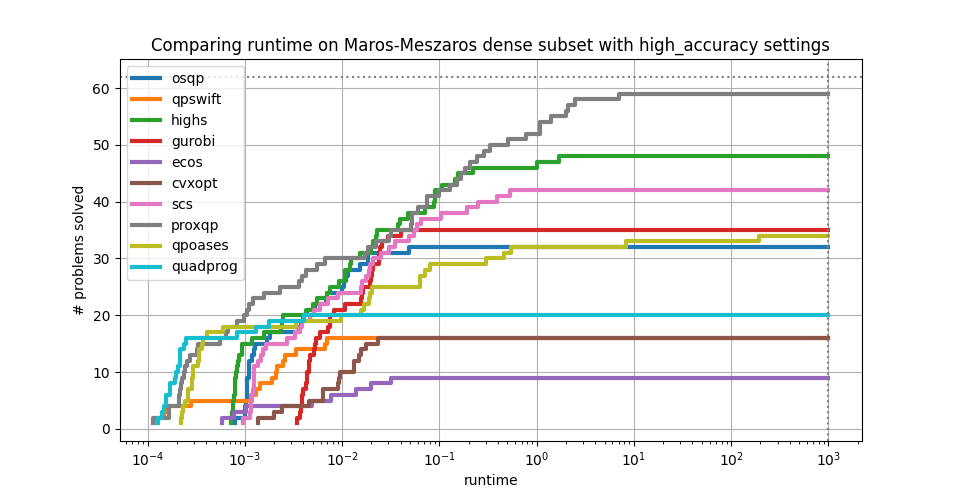
The command line ships a plot command to compare solver performances over a test set for a specific metric. For instance, run:
qpbenchmark maros_meszaros_dense.py plot runtime high_accuracy
To generate the following plot:
Contributing
Contributions to improving this benchmark are welcome. You can for instance propose new problems, or share the runtimes you obtain on your machine. Check out the contribution guidelines for details.
Citation
If you use qpbenchmark in your works, please cite all its contributors as follows:
@software{qpbenchmark,
  title = {{qpbenchmark: Benchmark for quadratic programming solvers available in Python}},
  author = {Caron, Stéphane and Zaki, Akram and Otta, Pavel and Arnström, Daniel and Carpentier, Justin and Yang, Fengyu and Leziart, Pierre-Alexandre and Sousa Pinto, João},
  url = {https://github.com/qpsolvers/qpbenchmark},
  license = {Apache-2.0},
  version = {2.7.1},
  year = {2026}
}
Don't forget to add yourself to the BibTeX above and to CITATION.cff if you contribute to this repository.
See also
References
- How not to lie with statistics: the correct way to summarize benchmark results: why geometric means should always be used to summarize normalized results.
- Optimality conditions and numerical tolerances in QP solvers: note written while figuring out the
high_accuracysettings of this benchmark.
Other benchmarks
- BenchOpt: a benchmarking suite tailored for machine learning workflows.
- Benchmarks for optimization software by Hans Mittelmann, which includes reports on the Maros-Meszaros test set.
- jrl-qp/benchmarks: benchmark of QP solvers available in C++.
- osqp_benchmarks: benchmark examples for the OSQP solver.
- proxqp_benchmark: benchmark examples for the ProxQP solver.
- qpmad_benchmark: benchmark examples for the qpmad solver.
1 maintainer

Metadata
1 maintainer
Release files for qpbenchmark 2.7.1
For a detailed explanation of source distributions (sdists) and built distributions (wheels), please see the package formats documentation.
Source distribution (sdist)
| File | Size | Uploaded | |
|---|---|---|---|
| qpbenchmark-2.7.1.tar.gz | 36.3 kB | Details |
Built distribution (wheel)
| File | Interpreter | ABI | Platform | Reset |
|---|---|---|---|---|
| qpbenchmark-2.7.1-py3-none-any.whl | Python 3 | none | any | Details |
Total release size: 73.1 kB
Release files / qpbenchmark-2.7.1.tar.gz
| Download URL | qpbenchmark-2.7.1.tar.gz |
|---|---|
| Size | 36.3 kB |
| Tags | Source |
|
SHA-256 checksum How to use checksums |
e49abecfc9293da021722b7e6c82d93ecb2566cfac4e203620e63a6a730e2218
|
|
BLAKE2b-256 checksum How to use checksums |
b7a8d5a36d45fc4318a520485a489161ad8bcd3dfc2590de213dbe063790168e
|
| Upload date | |
|
Uploaded using Trusted Publishing? What is trusted publishing? |
No |
| Uploaded via |
python-requests/2.32.4
|
Release files / qpbenchmark-2.7.1-py3-none-any.whl
| Download URL | qpbenchmark-2.7.1-py3-none-any.whl |
|---|---|
| Size | 36.8 kB |
| Tags | Python 3 |
|
SHA-256 checksum How to use checksums |
c2e1b01fb874768516f655907a2a5e70320dc9c07673d464f05ee34ef5ef8b7d
|
|
BLAKE2b-256 checksum How to use checksums |
87658f74d6c40fdc92ce5f7be1ae60f16c0f35f7aed54ef49645696da912756e
|
| Upload date | |
|
Uploaded using Trusted Publishing? What is trusted publishing? |
No |
| Uploaded via |
python-requests/2.32.4
|














