
Qt Custom UI Log for Maya/Houdini

Project description



QtLog
Custom Python Log with colored message display for Maya/Houdini/Nuke
PySide6/Python 3.9+
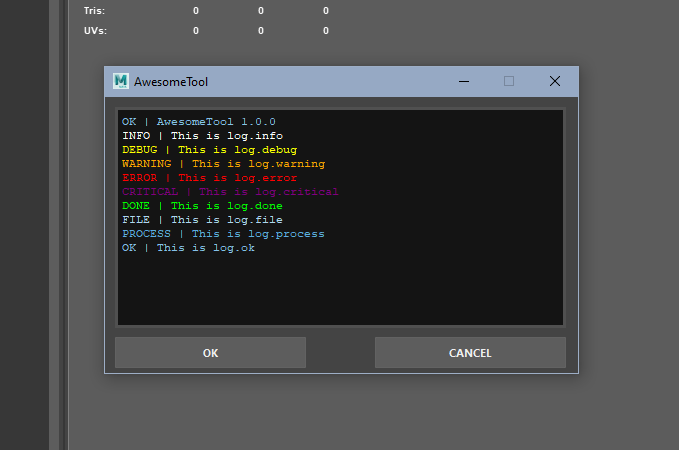
Message Levels
    log = get_stream_logger('my_log')

    log.info('test info')  # white
    log.warning('test warning')  # orange
    log.error('test error')  # red
    log.critical('test critical')  # purple
    log.debug('test debug')  # yellow
    log.ok('test ok')  # sky blue
    log.file('test file')  # super light blue
    log.process('test process')  # light blue
    log.done('test done')  # green
    log.hint('hint to the user')  # yellow
Usage
Import the logger and create a logger instance, you can create multiple loggers and output them into the same widget.
    from qtlog.stream_log import get_stream_logger

    log = get_stream_logger('MyToolLog')
    log_ext = get_stream_logger('SomeOtherExternalLog')
Import the QtUILogger widget and create an instance of the widget, passing the app, the layout widget and the loggers, a layout widget is required.
    from qtlog.qt_ui_logger import QtUILogger

    # inside your app
    self.loggers = QtUILogger(parent=self, layout_widget=self.ui.log_layout, loggers=[log, log_ext])
In you qt app, you can use the QtUILogger to display the log messages in a widget.
    log.info('Message')
    log.warning('Message')
    log.error('Message')
    log.critical('Message')
    log.debug('Message')
    log.ok('Message')
    log.file('Message')
    log.process('Message')
    log.done('Message')
    log.hint('Message')
Lastly, when you close the app, remove the loggers from the widget by overriding the closeEvent() method.
    def closeEvent(self, event):
        """Remove the widget from the loggers, call .close() on closeEvent()."""
        self.loggers.close()
        self.close()
See the full example tool in the examples folder.
Install
pip install qt-log


Download files
Download the file for your platform. If you're not sure which to choose, learn more about installing packages.
Source Distribution
Built Distribution
Filter files by name, interpreter, ABI, and platform.
If you're not sure about the file name format, learn more about wheel file names.
Copy a direct link to the current filters
File details
Details for the file qt_log-1.2.0.tar.gz.
File metadata
- Download URL: qt_log-1.2.0.tar.gz
- Upload date:
- Size: 35.3 kB
- Tags: Source
- Uploaded using Trusted Publishing? No
- Uploaded via: uv/0.11.9 {"installer":{"name":"uv","version":"0.11.9","subcommand":["publish"]},"python":null,"implementation":{"name":null,"version":null},"distro":null,"system":{"name":null,"release":null},"cpu":null,"openssl_version":null,"setuptools_version":null,"rustc_version":null,"ci":null}
File hashes
| Algorithm | Hash digest | |
|---|---|---|
| SHA256 |
35cc0117fec2cc6b8fedbf4497678b2fe80b0a068cc96ad5ed71030a864b8771
|
|
| MD5 |
35b655514b5c75514a3212c1c4f92e15
|
|
| BLAKE2b-256 |
6f9fa3e1937c84f959bb34aaa345fff753063328e3760177f1b944d2525f8083
|
File details
Details for the file qt_log-1.2.0-py3-none-any.whl.
File metadata
- Download URL: qt_log-1.2.0-py3-none-any.whl
- Upload date:
- Size: 5.7 kB
- Tags: Python 3
- Uploaded using Trusted Publishing? No
- Uploaded via: uv/0.11.9 {"installer":{"name":"uv","version":"0.11.9","subcommand":["publish"]},"python":null,"implementation":{"name":null,"version":null},"distro":null,"system":{"name":null,"release":null},"cpu":null,"openssl_version":null,"setuptools_version":null,"rustc_version":null,"ci":null}
File hashes
| Algorithm | Hash digest | |
|---|---|---|
| SHA256 |
9c36d2e5b1c3019c21995c615c98eb57aab20b68ddd826eef667cac61438f6ee
|
|
| MD5 |
8bf98f2d3e2d4cd350dc7c750da11376
|
|
| BLAKE2b-256 |
35922c611957d941ee6bf7a8b58e7b92fdf788d2057cd4c3b41709a41fa5e65c
|






