
Qt Custom UI Log for Maya/Houdini

Project description



QtLog
Custom Python Log with colored message display for Maya/Houdini/Nuke
PySide2/Python3 - Maya +2022, Houdini +19, Nuke +13
PySide6/Python3 - Maya +2025
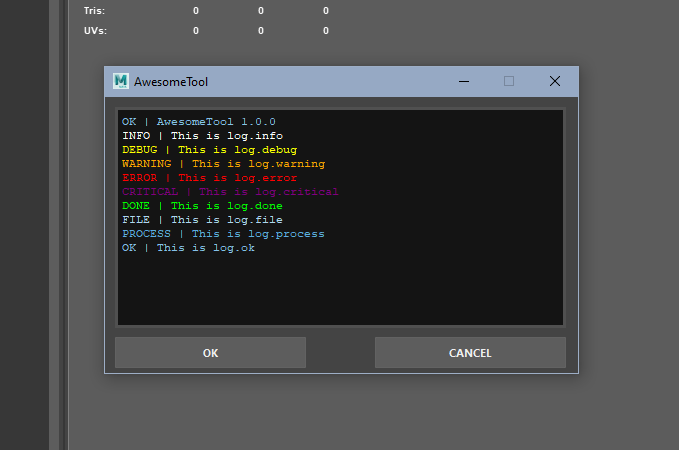
Message Levels
    log = get_stream_logger('my_log')

    log.info('test info')  # white
    log.warning('test warning')  # orange
    log.error('test error')  # red
    log.critical('test critical')  # purple
    log.debug('test debug')  # yellow
    log.ok('test ok')  # sky blue
    log.file('test file')  # super light blue
    log.process('test process')  # light blue
    log.done('test done')  # green
    log.hint('hint to the user')  # yellow
Usage
    # imports
    from qtlog.stream_log import get_stream_logger
    from qtlog.qt_ui_logger import QtUILogger

    # get loggers
    log = get_stream_logger('MyToolLog')
    log_ext = get_stream_logger('ExternalLog')

    # inside your qt app, you need a qtLayout to place the logger output widget.

    class MyTool(QMainWindow):
        def __init__(self, parent=get_maya_main_window()):
            ...

            # creating/storing loggers (self, QtLayout, loggers)
            self.loggers = QtUILogger(parent=self, layout_widget=self.ui.log_layout, loggers=[log, log_ext])
            self.ui.btn_ok.clicked.connect(self.show_messages)

        def closeEvent(self, event):
            # remove the widget from the loggers, call .close() on closeEvent()
            self.loggers.close()
            self.close()

    # sent messages are displayed in color on the ui widget and maya
    log.hint('Message')
Install
pip install qt-log


Download files
Download the file for your platform. If you're not sure which to choose, learn more about installing packages.
Source Distribution
qt_log-1.1.2.tar.gz
(4.1 kB
view details)
Built Distribution
Filter files by name, interpreter, ABI, and platform.
If you're not sure about the file name format, learn more about wheel file names.
Copy a direct link to the current filters
File details
Details for the file qt_log-1.1.2.tar.gz.
File metadata
- Download URL: qt_log-1.1.2.tar.gz
- Upload date:
- Size: 4.1 kB
- Tags: Source
- Uploaded using Trusted Publishing? No
- Uploaded via: poetry/1.8.4 CPython/3.11.6 Windows/10
File hashes
| Algorithm | Hash digest | |
|---|---|---|
| SHA256 |
ba8f096eee5505656c44d415ac09e7ebfc05074be6f663f0e1d3924f34c792b0
|
|
| MD5 |
4a426ec76220cbab208ed2ead6fcfc02
|
|
| BLAKE2b-256 |
340af6d24a1d34bcc85610e38194a31c38c0956bdc5421607e46574fc58bf841
|
File details
Details for the file qt_log-1.1.2-py3-none-any.whl.
File metadata
- Download URL: qt_log-1.1.2-py3-none-any.whl
- Upload date:
- Size: 4.9 kB
- Tags: Python 3
- Uploaded using Trusted Publishing? No
- Uploaded via: poetry/1.8.4 CPython/3.11.6 Windows/10
File hashes
| Algorithm | Hash digest | |
|---|---|---|
| SHA256 |
7dbf50ce99c77e6e69802d9ba20725ee89c5afdf684117eb9ab2d770f003ca5d
|
|
| MD5 |
528618b24ac5eee149bc2a8c5ec117b4
|
|
| BLAKE2b-256 |
77a6c98c1bc36688db5869da9e0ed4349ea428c8ea65182f8353f4cf12178e6a
|






