
quackd
One CLI for all your robots. Connect them, command them, and let them work together, each with an LLM for a brain.
quackd, pronounced “quacked”, began as the brain daemon the Microduck was missing, named like that robot's own robotd, mediad, padd and tofd. That is where the ducks come from: a task is a .duck file and a group of robots is a flock. Seven robots today, one of them driven on real hardware and the other six still in a simulator or a mock, and one of them a duck you can print and build yourself.
Register each robot once, by name. Then state a goal from a terminal or from a chat with Claude, to one robot or to a flock of them, and the same contract decides which of each robot's skills its model may use, how many steps it gets, and when it has to ask you first.






Hey, my name is Rok and this is why I built quackd 👋
I see quackd as a ChatGPT like moment for robotics. Let me explain what I mean.
LLMs existed long before ChatGPT. What ChatGPT actually did was take LLMs and hand them to ordinary people in a chat interface everyone already knew, like Facebook Messenger or Instagram. That was the real unlock.
Right now, in 2026, most people still think robots belong in science fiction movies or in a lab at Tesla. That is not true anymore. There are already open source robots you can build yourself for under $1000. And they actually work. They can go to your fridge, open it, grab a can of Coke, close the fridge and bring it to you.
The problem is they have a huge limitation. You can teach them dozens of moves, like "get a coke". But the robot itself is still dumb. It knows the moves, it just cannot connect them on its own. For robots to become truly useful, they need to become AI first and agentic. You give them a goal and they figure out the steps themselves.
To get there, robots need a brain. And here is the catch. Today's robots simply do not have enough hardware on board to think, reason and plan. Their skull is too small for the brain this kind of intelligence needs. So the brain has to live outside the robot, in the cloud or on your own computer, where it can grow as big as you need. The robot itself stays small and light while all the heavy thinking happens somewhere else. That is what quackd started as. A brain for one robot.
But here is what I think comes next. In the future everyone will have a flock of robots. At home, in the office, wherever. And they will not all be the same robot. Different types, different capabilities, even different companies. The first challenge is having all of them in ONE place to command. That is what quackd is now. You connect every robot you own to one CLI, and you command all of them from there, with an LLM as the brain of each one.
But even when you have them all in one place, that is still not enough. What you ask for will be complex, and robots will probably be very specialized. One can walk, one can grab, one can carry. For a bunch of different robots to be useful with as little of your involvement as possible, they need to start working together towards the goals you give them. Which means they need to communicate between each other. So that is the other half of quackd. You give the flock a goal, each robot's brain reads what the others can do, and they divide the work between themselves.
Imagine telling your robots "I want to eat and drink something". The one with wheels goes to the fridge, checks what is inside and tells the others what it found. The one with arms grabs a plate and some cutlery. One of them brings it all to you and asks what you would like, you choose, and they go back for the food and wish you a good meal. Sounds like science fiction, right? We are closer than you think!
That is basically what ChatGPT did for LLMs. It took something powerful and put it in one place everyone could reach. And that is why I see quackd as a ChatGPT like moment for robotics.
— Rok Benko, September 2026
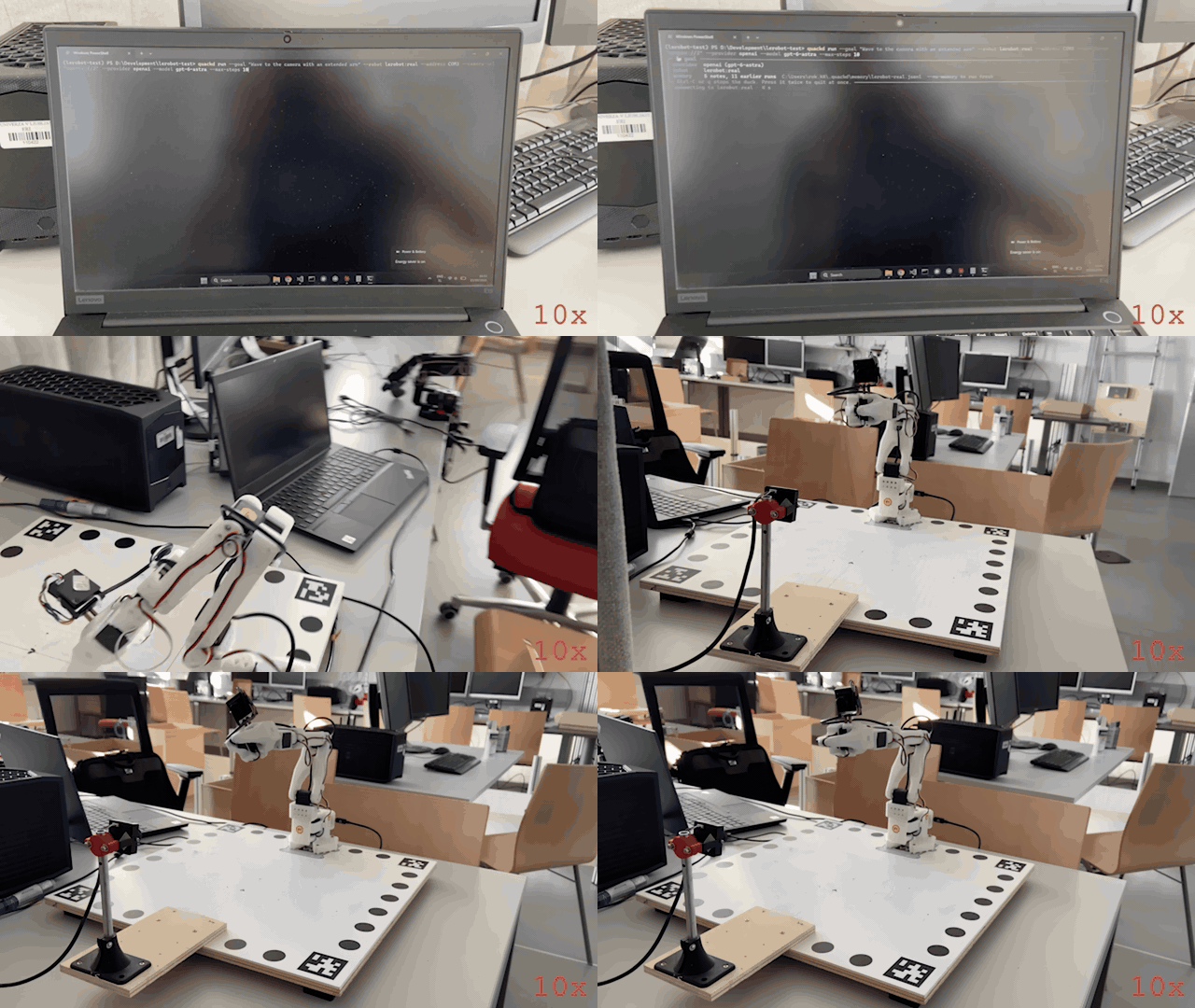
A real arm, a real model, one sentence. An SO-101 follower arm on 2026-09-15, piloted by OpenAI's gpt-6-astra through quackd run --goal "Wave to the camera with an extended arm". The model was handed the arm's five verbs and its datasheet and chose one call at a time: raise the shoulder and elbow, roll the wrist four times, return, stop. Nobody wrote a wave. The whole run at ten times speed, filmed on a phone: it opens on the command going into a terminal, watches the run scroll, then pans to the bench, and the wave itself is the part where the wrist rocks. What the model was told, all ten of its calls and what went wrong are in What happened in that run, and how every recording here was made is in docs/assets.
quackd is a command line for the robots you own. Each one joins through an adapter that declares, as a manifest, what the body is and what it can do, and you register it once by name with how to reach it. Give a robot a goal like "find the ball and kick it" and a large language model picks one skill at a time from the list that manifest declares, quackd runs it, looks at the camera, and asks again until the job is done or clearly impossible. Give the same goal to a flock and every robot in it gets a model of its own, and they divide the work by telling each other what they are going to do. A goal can arrive from a chat, a command line or a .duck task file, and whichever way it comes, quackd enforces a contract the model cannot talk its way out of: which skills are allowed, how many steps, when a human must say yes, when to abort. Claude, OpenAI, Gemini, Grok, Mistral, DeepSeek, Cohere, Qwen, Kimi, GLM and Meta work over their APIs, and so do the models OpenRouter routes to, behind one key of its own. Open source models work on your own machine through Ollama, vLLM, llama.cpp or LM Studio, with no key. A model is the pilot on every run. --decision-llm optionally puts something in front of it that is not a language model and cannot be used as one: a decision LLM generates no text at all, it scores a fixed set of options against a state and returns which one with a probability for each, so it answers the turns that are a choice among calls the robot already has and can no more write a joint angle than a thermometer can. TypeSafe's Jev was the first of them and is the hosted one, and the others quackd names are open servers you run yourself or a checkpoint loaded into this process, each with a page of its own. Off unless you name one, and --decision-mode shadow records what one would have chosen without letting it change a thing (docs/guides/decision-llms/README.md).
The first robot is the Microduck from Pollen Robotics: a 25 cm, 800 g biped with fifteen small servos, a camera in its head, a depth sensor, a speaker and an onboard computer, open source and about $399, which already knows how to walk, turn, kick, scoop something off the floor, look around and quack at 50 Hz on its own hardware. It is the robot quackd started on, independently and unofficially. Six more bodies follow it through adapters that declare what each can do: an Open Duck Mini v2 you can print and build yourself, an SO-101 class arm through LeRobot, any wheeled base over rosbridge, an XLeRobot dual-arm cart, an AlohaMini with two arms on a lift, and a ToddlerBot humanoid.
One of the seven bodies runs on real hardware, and the recording above is it. On 2026-09-15 an SO-101 follower arm ran quackd over lerobot:real through twelve --goal runs in one afternoon, piloted by OpenAI's gpt-6-astra from a Windows laptop with a USB webcam: it waved with its wrist, reached out with its shoulder and elbow, opened and closed its gripper, and once mimed a duck quacking with it. The GIF is the last of the twelve, and What happened in that run reads its transcript call by call. The honest half is there too. The arm fell at the end of every one of those runs, because LeRobot drops torque when it disconnects, which is what the rest pose was written afterwards to stop, and the camera framed the gripper and cropped the raised arm, so the model checked its own waves against joint readings rather than against the picture. On 2026-09-23 the same arm ran again, registered as arm-01 with a rest pose, through 26 runs on quackd 0.12.0, and 23 of them came from ten task files written for that afternoon, which now sit among the 223 in docs/examples/lerobot/. Its rest pose could not reach a fold that lay past the travel its calibration recorded, 19 of the 26 runs never moved the arm at a pilot's request, and what quackd changed in answer has not run on an arm yet. The other six bodies have not met hardware. Their real backends speak names read from upstream source at a pinned commit and have only ever talked to fakes, and for the Open Duck Mini and the ToddlerBot those fakes are the daemons quackd itself ships for the robot, exercised over loopback, so there only the body is untested. No flock has yet crossed from one machine to a second. Goals like "find my keys", handed to a flock that sorts out who does what, are where this is going, not what it does yet. The honest label for today is LLM driven, goal directed control of one real arm and six simulated or mocked bodies, alone or in flocks, and Which robots work says exactly how far each one has got.
No robot yet? You do not need one to try it. Two simulators for the duck, and they come from different places. The cartoon is the core's own arena, which is why the three other bodies that have a simulator use it too, along with every seeded sweep in CI: it starts in a second and downloads nothing, and quackd[microduck] is what gives it a duck to put in it. The physics one is quackd[mujoco], which puts the real Microduck in MuJoCo and runs alpha_walking.onnx, a walking policy Pollen trained for it before the velstand.onnx a robot on a current release walks on, so the duck walks instead of sliding and a command below its gait floor produces nothing at all. These goals succeed on 10 of 10 seeds with the scripted pilot and a ground truth check:
"Find the ball and kick it." · "Find the ball, walk up to it and say where it is." (an Open Duck Mini v2, which cannot kick) · "Split the search, the closest duck kicks." (a flock)
The first of those has passed 10 of 10 on the physics simulator too, with the duck on its own gait rather than a sprite on rails, though not on every run: that is test_find_and_kick_on_the_real_duck, which needs upstream's model in the cache, so a nightly job fetches it the way your first run would and CI's own gating job runs the stand-in. The Status section below says what that sweep actually returns. The rest are cartoon only. Of the other six bodies only the arm has a physics model here, and its simulator is for rehearsing an arm's own task files before they meet the arm.
Table of Contents
- Quickstart: a LeRobot SO-101 arm
- No robot yet? Try it in 60 seconds
- Why?
- How it works (the simple version)
- Example
- Status
- Which robots work
- Architecture
- Installation
- Usage
- Connect any robot
- Flock mode
- The browser demo
- Configuration
- Performance
- Limitations
- Roadmap
- Contributing
- Safety
- Acknowledgements
- Star history
- License
The rest of the documentation is in docs/, and docs/README.md is its map.
Quickstart: a LeRobot SO-101 arm
Two ways to drive the same arm, and the steps that set the arm up are shared between them. From the terminal is the path the recording at the top of this page took, in ten steps, with the arm calibrated, named and parked before anything you type can move it. From Claude, over MCP is the same arm reached from a chat instead, where the model you are already talking to is the pilot. Either way you need the arm and its serial port, a USB webcam, and Python 3.12 or newer, because LeRobot itself needs it. Only the terminal path needs a key for one cloud vendor, because only that one brings a model of its own.
From the terminal
-
Install the arm and a pilot into one environment. Below Python 3.12 the
lerobotextra resolves to nothing while the install still reports success, so pin the interpreter.uv venv --python 3.12 uv pip install "quackd[lerobot,openai]" # or anthropic, gemini, grok, and so on
-
Put the key where quackd reads it. One line in a
.envfile, in the folder you run from or in the venv root:OPENAI_API_KEY=sk-....quackd doctorprints the key it found for each provider, masked to its ends, which is the quickest way to see that the file was read at all. -
Find the port, then calibrate under the name you will register. Calibration is LeRobot's own tool and it asks you to move each joint through its range by hand. Take each one all the way into the fold you will rest the arm in, because the travel it records is written into the servos as limits they are never driven past, and a fold outside it is a pose the arm cannot be driven back to. quackd reads every joint limit out of the file it writes, and refuses an arm that has none.
lerobot-find-port
lerobot-calibrate --robot.type=so101_follower --robot.port=COM3 --robot.id=arm-01
-
First contact, which moves nothing. Connect, read the joints, temperatures and torque back, disconnect. Support the arm while it starts, because connecting releases torque for a moment. A spec on its own carries no name, so it reads the calibration saved as
arm-01whatever name you calibrated under. If you chose another, do step 5 first and runquackd doctor --robotwith that name instead, which reads the calibration kept under it.quackd doctor --robot lerobot:real --address COM3
-
Name it. The registry keeps the port, the camera and the pilot under one name, so every command after this is
--robot arm-01. Register it under the id you calibrated as.quackd robot add arm-01 lerobot:real --address COM3 --llm openai:gpt-6-astra
-
Fold the arm by hand, then record where it rests. An SO-101 has no brake and LeRobot releases torque when it disconnects, so without this the arm drops from wherever the run left it. With it, every run starts at this pose and returns to it before quackd lets go. This pose is where every run starts and ends unless the run itself says otherwise, and the one flag that says otherwise is just below step 10, where it changes the start and leaves the end alone. If it warns that a joint is recorded past what this calibration lets its servo be driven to, your fold lies outside the travel step 3 recorded: a run parks that joint at the edge of its travel and lets it settle from there, and calibrating again with the joint taken all the way into the fold, then recording the pose again, makes the fold itself reachable. Record the pose again after any new calibration too, because a calibration can move a joint's zero and the pose is kept as angles.
quackd robot rest-pose arm-01
-
The first task moves nothing either.
lerobot-lookoutallowsreport_stateandstopand nothing else: it reads the arm and says what it found. There is nothing to improvise, so the scripted pilot is enough and this costs no tokens.quackd run lerobot-lookout --robot arm-01 --llm fake
-
Add the webcam.
lerobot-find-cameras opencvprints the indices and saves a frame from each, so you can see which is which. Point it at the space the arm moves through rather than at the gripper, which is the mistake the run above made.quackd robot edit arm-01 --camera-url "opencv://2"
-
Rehearse it. With
--dry-runthe arm is connected and read, and not one command reaches it, so you see which verbs the model reaches for and with what numbers before a joint moves.quackd run --goal "Wave to the camera with an extended arm" --robot arm-01 --max-steps 10 --dry-run
-
Then let it move. A hand near the power switch, the arm's whole sweep clear, and the same sentence without the flag. This run starts at the rest pose you recorded in step 6 and folds back to it when it is over, which is the default and the first of the two choices below rather than the only way a run can begin. If the arm cannot get back to its rest pose at the end, the run says it is holding itself up and asks you to hold it and press Enter, which takes torque off where it stands. Leave it for 60 seconds and torque stays on, and
quackd robot release arm-01does the same release afterwards, while you hold the arm.quackd run --goal "Wave to the camera with an extended arm" --robot arm-01 --max-steps 10
Or start from a pose you set by hand. --by-hand gives you the arm before the pilot gets it. The arm is driven to the rest pose from step 6 first, torque comes off there, and quackd waits: lift the arm, put whatever the task needs into the gripper, close the gripper on it, hold the arm where the run should begin, and press Enter. Lift it out of its fold before you press Enter, even where the run should begin next to it, because a fold that lies past the travel step 3 recorded is let go of at the edge of that travel and is free to settle back past it. quackd writes the pose you left as the goal, puts torque back on, reads the joints again to check nothing sagged, and prints the angles it is now holding so you know you can let go. The pilot works from there. A joint outside its calibrated travel when you press Enter is the exception, whether you placed it there or never lifted it out of the fold: nothing can hold it where it is, so torque stays off, quackd names the joint and its travel, and the run ends with the arm limp, in your hands or still lying at its rest pose. Nothing moves the arm or puts torque on it after that, so the gripper does not open and the arm is not folded: take out whatever is in the gripper yourself. At the other end the arm is still holding whatever it ended on, so it is handed back to you before anything opens: take hold of what is in the gripper and press Enter, the gripper opens, and only then does the arm fold back to the rest pose. Leave it alone and it folds up with the gripper still shut. This needs the rest pose from step 6, because the rest pose is the one place quackd will drop torque and an arm released anywhere else falls, and it needs a terminal, because somebody has to press Enter.
quackd run --goal "draw a circle on the paper in front of you" --robot arm-01 --by-hand
Give it a picture. --image hands a file to the task itself, which is not the same thing as what the robot can see. The pilot gets each picture on its first turn, labelled with the file's own name, and keeps it in front of it for the whole run. That is what makes it different from a camera frame: a frame is perception, it arrives again every step and it shows the room as it is now, while a task picture never changes and is what the task is about. The flag repeats, so a run can carry several. It needs a pilot that takes images, quackd list-models marks the models that take no frames, and a local model needs --vision.
quackd run --goal "draw what is in the picture" --robot arm-01 --image sketch.png
Or put a stepper in front of the model. --decision-llm is optional, off unless you name one, and needs no change to any of the ten steps above. With --decision-mode shadow a run is exactly the run it would have been, and the transcript also records what the decision LLM would have chosen on each turn, which is how you find out whether it is worth switching on for your bench. With --decision-mode on it answers the turns whose answer is a choice among calls the arm already has, and every joint angle is still the model's. jev is TypeSafe's hosted one and wants quackd[decision] and TYPESAFE_API_KEY (docs/guides/decision-llms/jev.md), and every other name quackd knows, what it wants and where it runs, is one table in docs/guides/decision-llms/README.md, a page each.
quackd run arm-grip-check --robot arm-01 --by-hand --decision-llm jev --decision-mode shadow
Put the two together and you have the drawing case: you set the arm down holding a pen where the paper is, and the model is looking at the sketch it has to copy.
quackd run --goal "draw what is in the picture" --robot arm-01 --image sketch.png --by-hand
Or rehearse a task at home first. quackd[lerobot-sim] is the arm's simulator, lerobot:mujoco: the real backend's own code over the maker's model of the SO-101 in MuJoCo, and it installs on Python 3.11 with no LeRobot and no torch. quackd robot twin arm-01 registers arm-01-sim on the calibration file step 3 wrote, with the rest pose from step 6, the pilot and the cameras. quackd preflight then runs a task file on it seed after seed and says whether every run ended at its rest pose and did what the task's <task>.sim.yaml asks, and it refuses arm-01 itself before connecting to anything. It rehearses the code and the task, not the arm, and the arm's simulator says what it proves and what it does not.
uv pip install "quackd[lerobot-sim]"
quackd robot twin arm-01
quackd preflight lerobot-lookout --robot arm-01-sim --llm fake
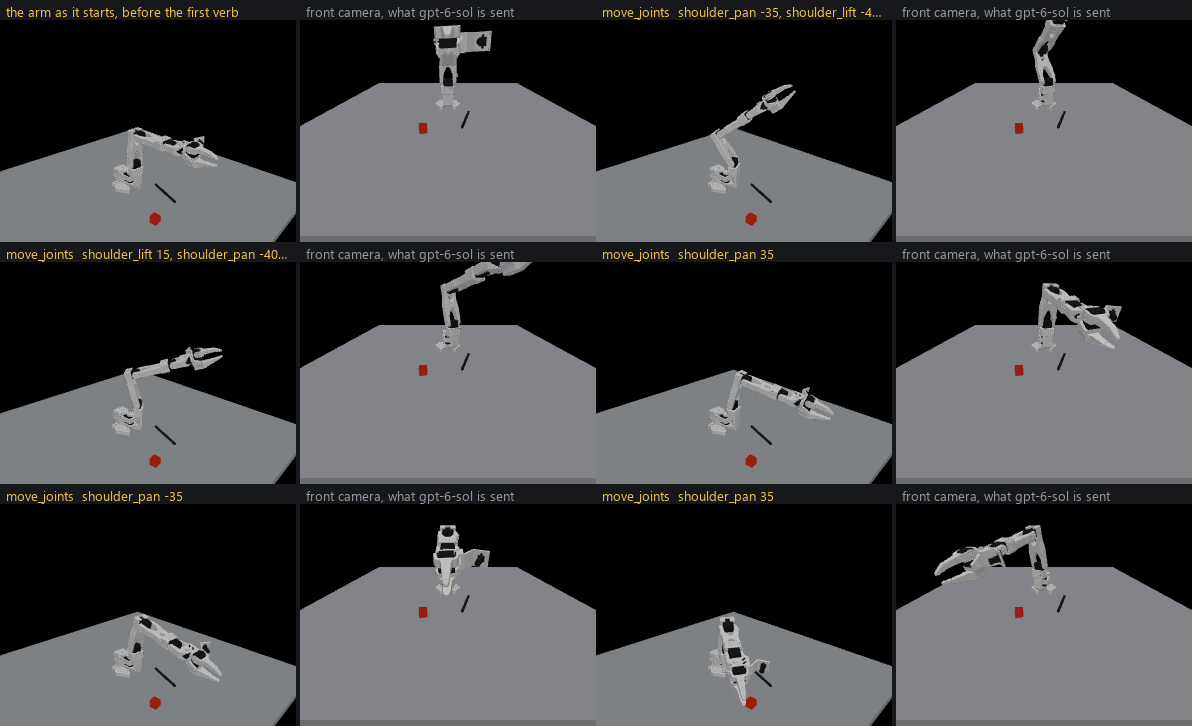
The hero's sentence on lerobot:mujoco, piloted by OpenAI's gpt-6-sol on 2026-09-28 in 7 steps, 9 model calls, 69 seconds and $0.05, and shown at twice the simulator's speed (how it was made).
Two of those steps were not taken in the recording at the top of this page. The run in that GIF was reached as --robot lerobot:real --address COM3, with no registered name and no rest pose. Step 5 existed that day and simply was not used. Step 6 did not exist at all: the rest pose was written after that afternoon, in answer to it. Both were taken on the same arm on 2026-09-23, and the rest pose could not be reached there, because the arm's calibration had never seen the shoulder folded all the way back and the fold lay past its travel. What quackd does with a fold like that now, and why step 3 asks you to calibrate folded, is A pose past the travel. That has been exercised against lerobot:mock and in the test suite, and not yet on the arm. The arm in the recording is held up by torque alone, which is why it fell when the run ended. The two options after step 10 postdate that afternoon as well, and --by-hand and --image have both been exercised against lerobot:mock and in the test suite, and not yet on a real arm. Walk all ten and you are the second person down this path, so what differs on your bench is the part worth writing down.
docs/adapters/lerobot/first-run.md is the long way round the same path: every refusal you can hit and what it means, the safety checks worth running before a wave, what the camera can and cannot see with each kind of pilot, and what to report afterwards. Nothing moves until step 10 of the hardware checklist.
From Claude, over MCP
Steps 3 to 8 above are the same whichever way you drive the arm, because they are about the body rather than about the pilot: find the port and calibrate, connect once, name it, record a rest pose, add the webcam. Two of the others change. Step 1 needs no pilot extra, so it is uv pip install "quackd[lerobot]" on its own, and step 2 goes away, because quackd picks no model in this mode and reads no key. The model you are already chatting with is the pilot, so there is no --llm here at all.
Steps 9 and 10 become one thing: point your client at the arm, then ask it in the chat. In Claude Code that is one command, and what it names is the quackd inside the venv from step 1, by its absolute path.
claude mcp add arm -- D:\Development\lerobot-test\.venv\Scripts\quackd.exe serve-mcp --robot arm-01
That path is a Windows one, and elsewhere it is the same venv's bin/quackd. Use the venv rather than uvx, which builds a second environment on whichever interpreter it picks: on a machine whose default Python is 3.11 the LeRobot half of that extra resolves to nothing, silently, and you get a server with no arm backend in it. Claude Desktop takes the same command and arguments in claude_desktop_config.json, under Settings, then Developer, then Edit Config, and wants a full restart of the app afterwards.
Either way nine robot_* tools appear, and behind them is the executor the rest of this page describes: the same allowlist, the same budgets, the same feasibility verdict before anything moves, and the same refusal for a joint goal outside the range your calibration recorded. What you gain over a --goal run is that you choose each verb and each number yourself, which is the only way to ask for one verb and stop, and the only way to ask a real arm for a camera frame on purpose.
Two things are worth knowing before the first session. Starting the server moves the arm, because connecting drives it to the rest pose from step 6 and refuses to start at all if it cannot get there, so nobody should be in reach when a client spawns it. And there is no Ctrl-C: between verbs the brake is asking for stop, and during one it is the power switch.
Part 2 of docs/adapters/lerobot/first-run.md is that path in fifteen steps, with both clients configured, what each tool answers, what every refusal means, and which moments move the arm without anybody asking. No MCP session has yet driven a real arm, so that half of the page is the half with the least behind it.
What happened in that run
The command, as it was typed on the laptop in the recording:
quackd run --goal "Wave to the camera with an extended arm" --robot lerobot:real --address COM3 --camera-url "opencv://2" --llm openai:gpt-6-astra --max-steps 10
No task file, no registered name, no rest pose. --goal writes a contract on the spot: the arm's own five verbs allowed, gripper, move_joints, place, report_state and stop, plus the four the loop always offers, assess_task, declare_success, declare_failure and remember. Exactly one of them per turn, and anything else refused. It was the last of twelve runs that afternoon, so the memory quackd keeps per robot handed it five notes and how the last five of the eleven before it had ended, which is the whole of what it carries.
What the model was told. About a third of the system prompt as it read that day, cut where marked, with the two lines that were wrong left in:
You are the brain of a six-joint desktop robot arm with a parallel gripper (an SO-101 class
arm driven by LeRobot), bolted to a table. You are a high-level pilot: you choose ONE verb per
turn; the robot's own controllers handle the motion. Do not micro-manage.

## Rules (enforced by the executor — not optional)
- Call exactly one tool per turn. Never zero, never two.
- Only these verbs are allowed: gripper, move_joints, place, report_state, stop. Anything else is refused.
- Budgets: 40 steps, 5 minutes, 40 LLM calls. The run stops when any is hit.
- Before the first verb that moves the body, call `assess_task` with your verdict on whether
  this body can do this task at all, judged against its datasheet below: `feasible`,
  `infeasible` (the run ends, nothing moves) or `uncertain` (a human is asked). [...]

## Your body: what it can and cannot do
- Height: 0.53 m (estimate: one vendor's listing; reaching straight up)
- Actuated joints: 6 (official: the LeRobot SO-101 docs; five joints and a gripper)
- Payload: 0.5 kg (estimate: one vendor's listing)
- Not published: mass, reach. Decline any task that hinges on any of them.
- Each joint's travel in degrees, read from its own calibration, and the only goals quackd
  will send: shoulder_pan -120 to 120, shoulder_lift -84.2 to 84.2, elbow_flex -96.5 to 96.5,
  wrist_flex -103.2 to 103.2, wrist_roll -180 to 180, gripper 0 to 100.
Whatever the task says, this body cannot:
- go anywhere: it is bolted to a table and has no base
- feel what it holds: nothing reports grip force, so holding is inferred from the gripper
  stopping short of shut, which an empty hand that binds also does
[...]

## What you remember from earlier runs on this robot
- [2026-09-15] An extended-pose gesture reached shoulder_lift −40°, elbow_flex 24°, and
  wrist_flex 1° before wrist-roll waving; the available camera view did not show the whole
  arm to verify extension visually.
- [2026-09-15] A wrist-roll wave commanded alternately at +30° and −30° reached reported
  angles of +26–27° and −26–27°.
[... three more notes, and how the last five runs ended ...]

## Task file: goal — Wave to the camera with an extended arm

# Task
Wave to the camera with an extended arm

## Strategy
Use the available verbs. Look before you act (`observe` or `search_scan`), prefer composite
verbs like `go_to`, verify with a fresh frame, then `remember` one fact and declare success.
The ten calls. Model seconds is how long the model took to answer. Arm seconds is how long the verb then took on the arm.
| Call | Tool | What it asked for | What the arm reached | Model s | Arm s |
|---|---|---|---|---|---|
| 1 | report_state |
a reading before anything moves | folded: shoulder_lift -38.2°, elbow_flex 85.1°, torque on, hottest servo 37 °C |
8.2 | 0.0 |
| 2 | assess_task |
feasible, for the reason below |
nothing moves on this call | 7.0 | |
| 3 | move_joints |
shoulder_lift -40°, elbow_flex 25°, wrist_flex 0° |
-38.6°, 30.0°, 0.4°, in 32 commands over 4.1 s | 8.0 | 4.1 |
| 4 | move_joints |
wrist_roll +30° |
28.0° | 6.9 | 1.2 |
| 5 | move_joints |
wrist_roll -30° |
-25.4° | 5.7 | 2.1 |
| 6 | move_joints |
wrist_roll +30° |
25.4° | 5.1 | 2.0 |
| 7 | move_joints |
wrist_roll -30° |
-25.3° | 3.3 | 1.9 |
| 8 | move_joints |
wrist_roll 0° |
-4.2° | 5.1 | 0.9 |
| 9 | stop |
hold it where it is | held | 5.8 | 0.0 |
| 10 | declare_success |
the reason below | 7.0 |
The numbers.
- 78.8 seconds of run, after 10.3 seconds to open the serial port.
- Ten model calls, 3.3 to 8.2 seconds each, 62.1 seconds in all, which is 79% of the run. The arm moved for 12.2 seconds, which is 15%.
- 49,096 tokens in, 491 out, 22 of them reasoning, and not one word of prose: the model's only sentences in the whole run are the two below.
- Eight verbs, 97 commands to the arm, every one accepted. No gate fired, nothing was clipped to a joint limit, and no servo read above 37 °C.
- No
remember, and rightly. Two of the five notes already in its prompt described this manoeuvre from earlier runs that afternoon, one giving the extended pose and one the wrist angles it would reach, and its last sentence says so.
In its own words. Both reasons, verbatim from the transcript:
assess_task, feasible: An unloaded extended-arm gesture and wrist wave need no target reach
or lifting. The visible arm is empty, and the planned shoulder_lift -40°, elbow_flex 25°,
wrist_flex 0° and wrist_roll ±30° are inside the calibrated travel limits.

declare_success: Completed the extended-pose wrist wave: shoulder_lift reached -39°,
elbow_flex 30°, wrist_flex 0°, and wrist_roll alternated +28°, -25°, +25°, -25°. Returned
wrist_roll to -4° and stopped. The fresh camera shows the raised arm, but crops its upper end,
so full extension is supported by joint state rather than fully verified visually. This
strategy is already recorded in memory.
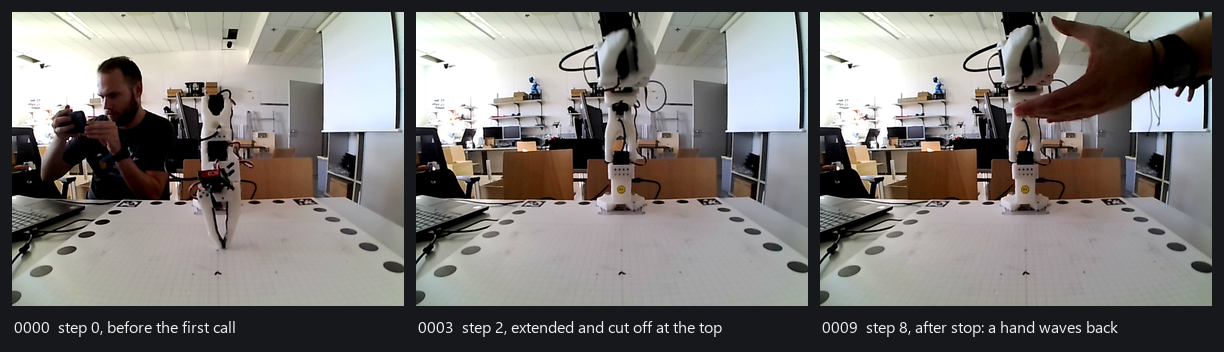
What the pilot saw. Three of the ten frames the model was sent, 640x480 from one USB webcam at table height behind a calibration mat. From the third frame on, the arm it had just raised runs off the top of the picture, which is exactly what it reported. The hand in the last frame reached the model as pixels and never as a word: the detector that turns a frame into text called a blue figurine on a shelf a person on eight of the ten steps, and never saw anybody actually in the room.
The honest half. Each frame was between 5.6 and 12.5 seconds old at the moment the model was handed it, about eight on average, and older still by the time the move it prompted had finished, so the model was always looking at where the arm had been. The colour detector that turns a frame into a line of text reported a ball that was not there on every step, called a small blue figurine on a shelf a person about 8.5 metres away on eight of the ten, and never once saw the actual people in the room. The model ignored all of it, and used the picture for exactly one thing: noticing that the raised arm ran off the top of the frame, and saying so rather than claiming a wave it could not see. It asked for elbow_flex 25° and the arm settled at 30°, and it reported the 30. The arm fell when the run ended, because this was before the rest pose existed. And reading this transcript to write this section turned up two bugs, both fixed alongside it: the prompt said Budgets: 40 steps while the command and every observation said ten, because it was built from the task file's own contract rather than from the one the run was enforcing, and the strategy paragraph told this arm to look with observe or search_scan and to prefer go_to, three verbs it does not have and the allowlist at the top of the same prompt did not list. The model worked around the second one by looking with report_state, which is not a thing to rely on.
Two more lines of that prompt read differently now, for reasons a later day on the bench found. Not published: mass, reach. Decline any task that hinges on any of them. forbids an arm whose reach nobody published to reach for anything, and on 2026-09-23 it was one of the lines a run with a pen ended on. The line now tells the pilot to answer uncertain and name the figure rather than decline, and the arm's sheet publishes a reach of 0.4 m, an estimate summed from the link lengths in the maker's URDF (docs/adapters/lerobot/README.md). And the travel line has a second sentence the model above never saw: a joint can read past its travel when it was folded or placed there with torque off, which is where a rest pose usually is, and goals are still limited to the travel. On 2026-09-23 the arm's recorded fold lay past the travel of its shoulder, and three pilots gave a reading there, against a travel that left it out, as a reason not to move the arm at all (A pose past the travel).
No robot yet? Try it in 60 seconds
uvx --from "quackd[mujoco]" quackd run --goal "walk in a square" --robot microduck:mujoco --llm fake   # the duck below: real physics, its own trained gait (first run fetches about 10 MB)
uvx --from "quackd[microduck]" quackd run find-and-kick --llm fake             # the cartoon: no download, done in a second
claude mcp add quackd -- uvx --from "quackd[microduck]" quackd serve-mcp --robot microduck:sim2d   # or just chat with it: "find the ball and kick it"
uvx --from "quackd[open_duck]" quackd run open-duck-scout --llm fake           # a duck you can build: it finds the ball and walks up, no kick
uvx --from "quackd[mujoco,anthropic]" quackd run find-and-kick --llm anthropic --robot microduck:mujoco   # a real model on the real gait, needs ANTHROPIC_API_KEY
uvx --from "quackd[microduck,openai]" quackd run find-and-kick --llm ollama:qwen3:8b   # local model, no key
open runs/*/run.gif                                                                 # a GIF in either simulator, a transcript every time
Every quackd line there names a body with --from, because quackd itself ships none: the core is the loop, the executor and the contract, and each robot is a package the extra of the same name pulls in (Installation).
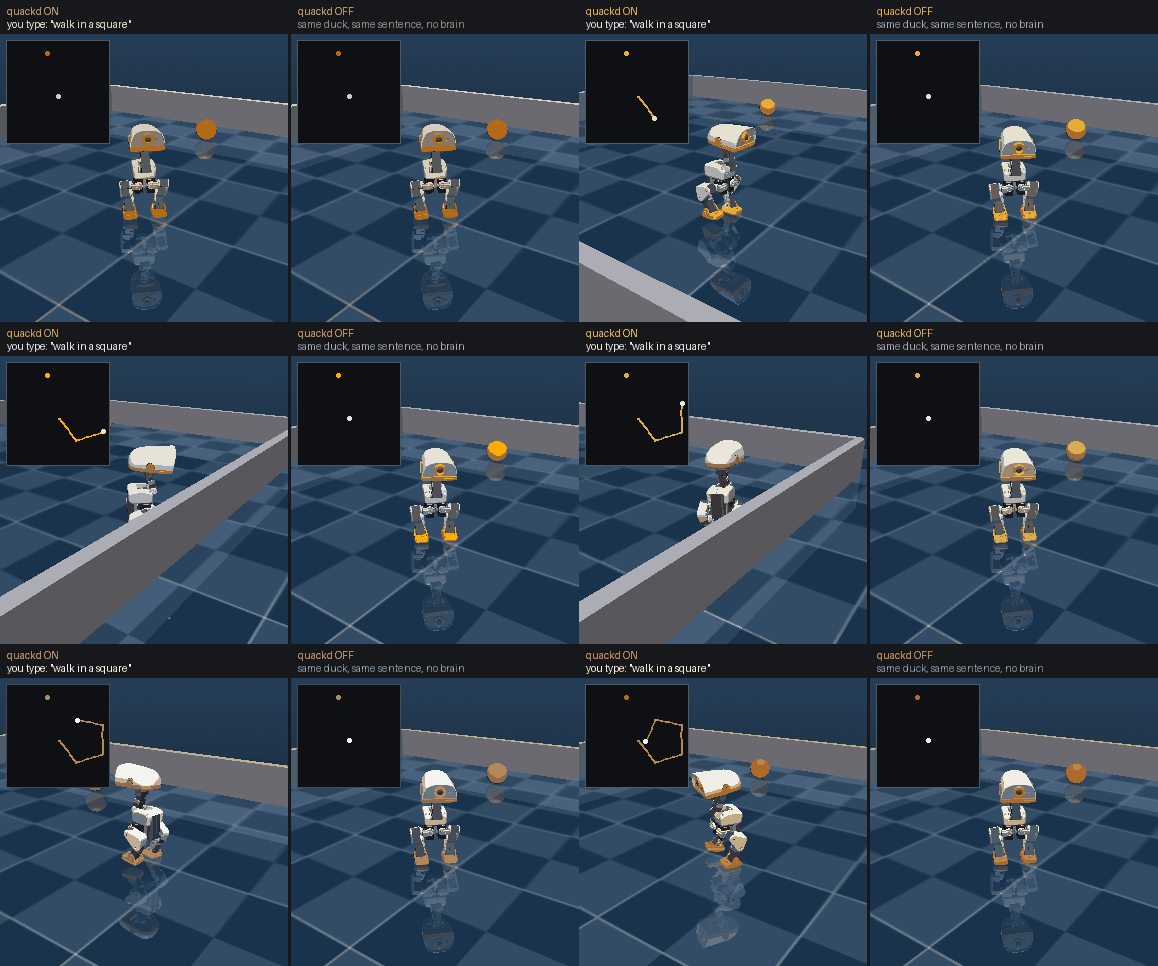
The first line above, with and without quackd. Left: you type walk in a square and a pilot picks the robot's own verbs one at a time, correcting as it reads the pose it actually reached. Nobody wrote a square. Right: the identical world, robot and walking policy, minus quackd. A Microduck takes a twist, which is three numbers, so an English sentence has nowhere to go and it stands there. The pilot here is scripted, so this needs no API key, and the duck is a render of Pollen's model under its CC BY-NC-SA terms. How it was made.
Or open the browser demo and install no quackd at all. It is live at https://www.quackd.org/simulator, with the same physics, the same two upstream policies, seven of the same verbs and a contract of its own, in a page. Type a sentence, paste your own API key or point it at Ollama, and watch what the model chose. The keyboard beside the box is live at the same time, so a key can take the duck off the model mid-run. The browser demo says what it does and how to run it from a checkout.
Put keys in the environment or in a .env file (copy .env.example), either in the folder you run the command in or in the venv root quackd is installed into. quackd doctor tells you what is missing. Needs Python 3.11 or newer and uv, nothing else.
Why?
A modern robot is not short of skills. The Microduck's onboard controllers already balance it, walk, kick, sit, stand up after a fall and scoop with its beak. An arm picks with its own learned policy, a wheeled base drives. Each is the robot's own skill, trained, written or recorded, and each works without any help from an AI model. What the robot lacks is any idea of what those skills are for.
Traditional control:   walk forward, turn left, walk, look down, scoop, ...   (you plan every step)
One robot:             "Pick up the ball."                                    (you state the goal)
A flock of them:       "Pick up the ball."                                    (they also settle who does it)
Low level skills and high level goals are different layers. The robot knows the words, but it cannot hold a conversation. quackd is an open source attempt to connect the two layers, with an LLM doing the planning and the robot's own controllers doing the moving.
The second gap opens with the second robot. Every body speaks its own protocol, the arm's SDK, the cart's ZeroMQ host, the base's ROS topics, and every body has a different set of skills, so the robots you own end up commanded from as many terminals as there are robots and none of them knows the others exist. quackd puts them behind one command line, under names you choose, and lets one goal go to several of them at once. Each robot's pilot is told what the others are and what they can do, so the work gets divided on data rather than on guesses.
How it works (the simple version)
flowchart TD
    YOU["You<br/>“find the ball and kick it”"]
    LLM["LLM<br/>looks at the camera, the robot's state and the last result<br/>picks ONE of the robot's own skills (a verb) and its parameters"]
    Q["quackd<br/>checks the rules: allowed? task judged possible? budget left? needs confirmation?<br/>then runs the verb"]
    R["Robot or simulator<br/>executes the skill with its own controllers<br/>(walking, grasping and looking are not the LLM's job)"]
    O["quackd observes the result<br/>new camera frame, new state"]
    YOU --> LLM --> Q --> R --> O
    O -- "next verb, until done or impossible" --> LLM
The verbs the model can pick from are the robot's real, existing capabilities and nothing more. They come from its manifest, and a verb that is not in the manifest does not exist:
| Kind | Verbs | What they are |
|---|---|---|
| Core | observe report_state stop say move go_to search_scan approach_and |
on any robot whose manifest satisfies their requirements (a camera, a twist intent, a sound intent) |
| Microduck | sit stand stand_up kick grab gaze quack |
one each per behaviour the robot ships with, each an intent the robot's own controllers execute |
| LeRobot arm | move_joints gripper place pick manipulate |
an SO-101 class arm. pick and manipulate are each one skill intent the arm's own learned policy executes, confirm gated and present when a run names a policy server with --policy-url, and always on the mock, which scripts its own. manipulate hands it one short subtask and never says the task is done |
| rosbridge base | introspect |
a wheeled base over ROS 2. It gets move, stop and report_state, plus observe, go_to, search_scan and approach_and once an image topic is configured. introspect asks the bridge what the body is: the topic list and the robot's own description, which is where its weight and its joint count come from |
| Open Duck Mini v2 | gaze express quack |
a 42 cm biped. No sit, no kick, no stand_up: its runtime has no such skill, so the verb does not exist rather than being refused |
| XLeRobot | move_joints gripper |
a dual-arm cart. The arm joints are a normalised -100..100 range, not degrees, and gripper takes a side because there are two of them |
| AlohaMini | lift move_joints gripper home_arms |
two arms on a motorised lift. The arm verbs refuse until quackd's own host wrapper is running on the robot, because upstream's leaves the arms limp |
| ToddlerBot | look stand perform grip |
a humanoid. look turns a two joint neck, stand slews to the safe pose and is not a way up from a fall, and perform plays only the keyframe motions the daemon actually loaded. grip appears on the gripper builds, which carry two more motors |
| Aliases | get_frame walk_to walk |
the 0.3 names of observe, go_to and move. They keep working in every .duck file |
| Learned | (none yet) | v2: policies trained from LLM written rewards, registered like any other verb. The arm's pick and manipulate do run a learned policy, and they are the arm's own verbs rather than these (docs/guides/policies.md) |
go_to (still spelled walk_to in the older starter files) is a small closed loop in plain Python that steers toward whatever the camera sees, ten times a second, without asking the model. The LLM says "go to the ball" and never "turn 4° left". The same code steers a duck, a cart and a wheeled base, clamped to each manifest's speed limits. On a body with no locomotion, such as the arm, go_to does not exist at all. On the ToddlerBot, which looks with a two joint neck, search_scan sweeps the head instead of turning the body.
A flock is that same loop once per robot, all at once, with a bus between the pilots so one can tell another what it is about to do (Flock mode).
Example
A find-and-kick run in the cartoon simulator, from its transcript (runs/<timestamp>-find-and-kick/transcript.jsonl). Every run opens the same way, with the pilot judging whether this body can do this task at all, because nothing that moves the duck runs until it has. This one is the scripted pilot, so model says so, the verdict says a rule has no judgement of a body, and usage is an estimate from character counts (no tokenizer). A real provider records the API's own counts and weighs the task against the datasheet in its prompt.
{"kind": "llm",  "step": 0, "tool_calls": [{"name": "assess_task", "arguments": {"verdict": "feasible", "reason": "scripted pilot: a rule has no judgement of the body, so it assumes the task fits"}}], "usage": {"input_tokens": 1602, "output_tokens": 16}}
{"kind": "assess", "step": 0, "verdict": "feasible", "reason": "scripted pilot: a rule has no judgement of the body, so it assumes the task fits"}
{"kind": "llm",  "step": 0, "tool_calls": [{"name": "search_scan", "arguments": {"target": "ball"}}]}
{"kind": "verb", "step": 1, "name": "search_scan", "ok": true, "summary": "ball found: ball at bearing 18° left ~0.58 m (after 4 turn steps)"}
{"kind": "llm",  "step": 1, "tool_calls": [{"name": "walk_to", "arguments": {"target": "ball", "stop_distance": 0.22}}]}
{"kind": "verb", "step": 2, "name": "walk_to", "canonical": "go_to", "ok": true, "summary": "reached the ball: ~0.22 m away, bearing +0°", "data": {"distance_m": 0.217, "ticks": 27}}
{"kind": "llm",  "step": 2, "tool_calls": [{"name": "kick", "arguments": {"leg": "right"}}]}
{"kind": "verb", "step": 3, "name": "kick", "ok": true, "summary": "kicked with right leg, ball moved 0.53 m"}
{"kind": "llm",  "step": 3, "tool_calls": [{"name": "quack", "arguments": {"text": "yay, got it!"}}]}
{"kind": "llm",  "step": 4, "tool_calls": [{"name": "declare_success", "arguments": {"reason": "ball displaced by the kick"}}]}
The same thing as a conversation, through MCP in Claude Code or Claude Desktop:
You: List the duck's verbs, then find the ball and kick it. Claude: (calls
robot_list_verbs,robot_observe,robot_assess_task("feasible"),robot_run_verb("search_scan"),robot_run_verb("go_to"),robot_run_verb("kick"),robot_say) Done. The ball moved about half a metre.
And the same shape with two robots instead of one, from the flock.jsonl of a flock-hello run: a simulated duck and a mock arm, one pilot each, on wall clock. Nothing here moves a joint on purpose, because this is the smallest honest test that two pilots in two different bodies can find each other and exchange a fact.
{"t": 0.102, "kind": "bus", "msg": {"src": "duck", "kind": "TALK", "to": null, "text": "duck here and ready; say hello back"}}
{"t": 0.106, "kind": "bus", "msg": {"src": "arm", "kind": "TALK", "to": null, "text": "arm here and ready; say hello back"}}
{"t": 0.123, "kind": "member_end", "duck": "duck", "outcome": "success", "reason": "said hello and heard back from arm", "llm_calls": 3}
{"t": 0.128, "kind": "member_end", "duck": "arm", "outcome": "success", "reason": "said hello and heard back from duck", "llm_calls": 3}
{"t": 0.128, "kind": "flock_end", "outcome": "success", "reason": "every member declared success: duck, arm", "messages": 2, "llm_calls": 6}
tell is what put those two lines on the bus. It moves nothing, costs no step, and arrives in the addressee's next observation. Each member then declared for itself, and the flock succeeds only when all of them did. This one is the scripted pilot again, so the sentences are a rule's and not a model's.
Status
Version 0.18, one real arm, three simulators and mocks for the rest. What has been built, and how far each piece has actually been exercised:
| Piece | Status |
|---|---|
sim2d cartoon simulator (the core's own arena) |
✅ 10 of 10 seeds on find-and-kick, GIF and transcript per run |
microduck:mujoco physics simulator (quackd[mujoco]) |
✅ 10 of 10 seeds on find-and-kick on the kinematic stand-in, which is what the gating job runs on every push. 🧪 On upstream's own trained policy the same sweep is not reliably 10 of 10. The nightly job had all ten on each of its first five runs and 9 of 10 on 2026-09-14, and by hand on the machine that cut 0.9.0 it is 9 of 10, seed 4 going in both. It clears the 8 the shipped test asks for every time and the 10 that QUACKD_STRICT_SEEDS=1 asks for only sometimes. Both sweeps are ground truth checked and both are named tests rather than remembered numbers. The model and the policy are fetched from upstream at a pinned commit and hash checked, never shipped |
lerobot:mujoco, the arm's simulator (quackd[lerobot-sim]), with quackd robot twin and quackd preflight |
✅ the arm's real backend, its own code, over the maker's model of the SO-101, fetched at a pinned commit and hash checked, never shipped. On that model a grasp driven through the real backend's own verbs lifts a cube on 10 of 10 seeds by the world's own truth, and quackd preflight passes the bundled lerobot-lookout on the generic arm, which has no rest pose to return to, and a grasp task whose close has to reach one, each on 10 of 10, by hand on 2026-09-27 and again on GitHub on 2026-09-29, when the nightly job that fetches the model for those sweeps was dispatched on main at the commit tagged v0.16.0 (run 36523568197). CI runs the rest of its tests on a stand-in arm on every push. 🧪 Nothing has compared it against the arm, so its dynamics, its joint signs and zeros and where its cameras stand are the model's and quackd's, not an SO-101's (docs/adapters/lerobot/README.md) |
Browser demo (web/) |
🧪 the same physics, the same two upstream policies, seven of the same verbs and the same allowlist-and-budget machinery in a static page, with the sentence box and the keyboard live on one duck at the same time. Bring your own key, or point it at Ollama. CI checks everything that can be checked without a browser, which tests/test_web.py lists. The page has been booted in a browser twice and a held W walks the duck, but a full model-driven run, a barge-in out of one and the recording have never been watched. Live at https://www.quackd.org/simulator |
Manifests and core verbs (quackd list-adapters, quackd list-verbs --robot) |
✅ seven adapters, eight core verbs that appear only where the manifest meets their requirements, speed limits from the manifest, manifest.schema.json generated and drift tested |
MCP server (quackd serve-mcp) |
✅ Claude Code and Claude Desktop, one robot or a flock with --robots or --flock NAME (nine robot_* tools, tested in process against the simulator and the mocks), no Claude Desktop session on record |
Memory between runs (quackd memory, remember) |
✅ one JSONL file per adapter:backend, or per registered robot name, notes and run outcomes into the next prompt, tested end to end offline, 🧪 the remember tool itself exercised by two local models on two machines, and by one cloud model on a real robot, gpt-6-astra calling it in seven of its twelve runs on the arm on 2026-09-15 for the five distinct notes that survive deduplication, with one published pair showing a note written by one run and read by the next (docs/guides/memory.md) |
| Providers: twelve cloud vendors, fake | ✅ implemented, tested offline against stubbed SDK clients, with one hand curated catalogue of 123 model ids that the half of --llm after the colon is checked against before any call (quackd list-models), and on OpenRouter an id the catalogue does not carry can be named too, checked against OpenRouter's public model list before the first paid call unless quackd refuses its spelling first, 🧪 two cloud models have driven a real robot, both OpenAI's and both on the SO-101 arm: gpt-6-astra on 2026-09-15, which is the recording at the top of this page, and both it and gpt-6-sol on 2026-09-23. gpt-6-sol has also been filmed flying the arm's simulator, on 2026-09-28, which is the simulator recording in the Quickstart, and no real model has yet been filmed in the duck's simulators. No OpenRouter model has answered a real quackd request: its chat requests have only reached a stand-in on 127.0.0.1, through the real openai SDK |
| Local models (Ollama, vLLM, llama.cpp, LM Studio, any OpenAI compatible server) | ✅ implemented and tested against the OpenAI wire format, 🧪 four live runs by contributors (Qwen 2.5 Coder 14B on LM Studio, seeds 5 and 6, and Qwen3-32B-AWQ on vLLM on an aarch64 NVIDIA GB10, seed 1, with and without thinking), never on this machine, transcripts in docs/assets/transcripts/, more welcome |
Registered robots and flocks (quackd robot, quackd flock) |
✅ both command groups over ~/.quackd/robots.json and ~/.quackd/flocks.json, so --robot NAME means the same thing in every command that takes a robot and --flock NAME in run and serve-mcp, tested offline, robot list --probe answered by the mocks, and pointed at hardware on 2026-09-23, when the SO-101 was registered as arm-01 with a rest pose and every run of the day named it (docs/guides/registry.md) |
Pilot flocks, several robots on one task (--flock NAME) |
✅ one whole pilot per body, any backend, same or different bodies, 2 to 8, each with its own executor, allowlist, budget, heartbeat, memory and verdict, dividing the work with tell over the bus, 🧪 experimental, exercised on mock and sim2d bodies with the scripted pilot, by no real model and on no hardware |
Coordinator flock, one referee instead (--flock N) |
✅ deterministic auction and bus, one planner LLM call at most, ground truth checked in tests, 🧪 experimental and sim2d Microducks only. Its capability aware role auction (spotter/kicker) is unit tested but has no bundled two-robot demo today |
LAN discovery (quackd discover, quackd announce, quackd[lan]) |
✅ record format and both commands on fakes in the suite, 🧪 real zeroconf exercised once on one machine, never between two (docs/guides/lan.md) |
MQTT flock bus (MqttBus, library only) |
✅ every message kind and a full flock run on a fake broker, 🧪 exercised once between two nodes through a local broker on one machine, never a flock across machines (no distributed clock yet) (docs/guides/lan.md) |
Discrete stepper (--decision-llm, quackd[decision], quackd[laya]) |
✅ implemented and tested offline against a stub SDK, with the classification of every verb of every shipped body frozen in a test, and seven decision LLMs quackd can name, each with a page of its own linked from its table, 🧪 the client has never been run against any decision LLM's real API, hosted or self-hosted, and never on hardware, so the speed and cost figures in its page are an estimate rather than a measurement, and of the four confidence floors two are numbers TypeSafe publish and two are quackd's own, all four shaped around Jev and inherited unmeasured by every other one. Off unless you name one. --decision-mode shadow exists to measure one before anybody switches it on (docs/guides/decision-llms/README.md) |
A learned policy as the arm's executor (manipulate, quackd policy serve, quackd[lerobot-vla]) |
✅ the policy loop, the server and its protocol, the checks the arm makes before any torque and --controller vla, tested against a fake arm and on the arm's simulator with scripted policies and a tiny random ACT served through the real server to the real client by a CI job on Python 3.12. A trained ACT from the Hub, served on a laptop's CPU, drove a twin of the lab's arm through two manipulate segments on the simulator over serve-mcp, and on 2026-09-29 through two more when OpenAI's gpt-6-sol flew the twin with quackd run --goal and declared failure on seeing no blue cap, which proves the plumbing and nothing about the task. 🧪 --controller vla and its judge prompt have never run with a trained checkpoint, --decision-mode shadow has run beside that ACT only with a stub decision LLM, by hand on 2026-09-28 and on the released code on 2026-09-29, so no real decision LLM has run beside a policy, SmolVLA loaded on that laptop and took minutes a chunk on its CPU, so it wants a GPU, pi05 has not run in the server, FLUX 3 Action is not served at all, and no policy has driven the arm, so how fast the loop runs on the real bus while the laptop infers is unmeasured (docs/guides/policies.md) |
| Learned verbs | 🗺️ v2, interface and docs only (docs/concepts/learned-verbs.md) |
Everything quackd assumes about each robot's API, and how sure we are: docs/adapters/status.md. quackd doctor prints the unverified ones for your machine.
Which robots work
Seven robots, and one table for how far each one has actually got. Each name links to that robot's own page. The distinction that matters is between code we have run and hardware we have not: exactly one of the seven has driven the real robot, an SO-101 arm on 2026-09-15 and again on 2026-09-23, and the other six have not, so for those six the honest question is still how much of the path to a first run is tested.
Each of the seven is its own package, pulled in by the extra that carries its name (quackd[microduck], quackd[lerobot] and so on, or quackd[robots] for all of them), so a build knows only the bodies you asked for. quackd list-adapters prints the whole table either way and marks the ones this machine cannot run, whether that is the adapter missing or the library its real backend needs.
| How far it has got | What that means |
|---|---|
| 🤖 hardware | The real robot has moved under quackd at least once, on a day and a build this table names, with what went wrong written down beside what worked. One body carries this mark |
| ✅ simulator | Runs a whole task in the bundled 2D simulator, with a seeded acceptance sweep in CI that checks the simulator's ground truth, not the model's claim |
| ✅ physics | Runs a whole task in MuJoCo on the body's own controller, checked against the physics world's ground truth rather than the model's claim. On the duck that is its trained gait, and on the arm, which has no gait, it is the real backend's own code over the maker's model. Needs quackd[mujoco] for the duck or quackd[lerobot-sim] for the arm: CI runs each on a stand-in body on every push, and a nightly job fetches upstream's model for the real one |
| ✅ mock | Every verb runs offline against a scripted double, in the test suite |
| 🧪 daemon | The wire protocol runs end to end against the real on-robot daemon over loopback in CI. Everything except the robot is exercised |
| 🧪 names | Every upstream name read from upstream source at a pinned commit, exercised against fakes. Never connected to anything real |
| ⏳ stub | Refuses with a link to what it would talk to, which upstream never shipped. The one left is deprecated and goes in 0.19.0 |
| Robot | --robot |
The body | How far it has got |
|---|---|---|---|
| Microduck | microduck:sim2d, mock |
a 25 cm biped from Pollen Robotics | ✅ simulator, ✅ mock |
microduck:mujoco |
the same robot in MuJoCo, on alpha_walking.onnx, which Pollen trained before the velstand.onnx a stock robot walks on |
✅ physics. find-and-kick 9 or 10 of 10 seeds while it really walks (test_find_and_kick_on_the_real_duck), run nightly because the model is fetched rather than shipped, with seed 4 the marginal one (ADR-0030) |
|
microduck:jsonrpc |
the real one, over robotd |
🧪 names. Early pre-orders arrive around Christmas 2026, later orders in four to six months (checklist) | |
microduck:websocket |
the agent gateway upstream planned and then dropped | ⏳ stub, deprecated and removed in 0.19.0. Use microduck:jsonrpc |
|
| Open Duck Mini v2 | open_duck:sim2d, mock |
a 42 cm 3D printed biped you can build yourself | ✅ simulator, ✅ mock |
open_duck:bridge |
the real one, through a daemon quackd ships for its Raspberry Pi | 🧪 daemon. The nearest of the six untouched bodies to a first run of its own, because the hardware is buildable today (checklist) | |
| LeRobot arm | lerobot:mock |
an SO-101 class desktop arm | ✅ mock |
lerobot:real |
the real one, through LeRobot | 🤖 hardware, on 2026-09-15 and again on 2026-09-23. The first time it was an SO-101 follower arm on Windows 11, Python 3.12.12, lerobot 0.6.1 and quackd 0.9.0, reached as --robot lerobot:real --address COM3 with no registered name, and piloted by OpenAI gpt-6-astra. lerobot-lookout ran, and twelve free-form --goal runs waved the wrist about ±27°, held extended poses at shoulder_lift -39 and elbow_flex 24 to 30, and opened and closed the gripper, once miming a duck quacking with it. The last of the twelve is the recording at the top of this page, and What happened in that run reads its transcript: ten model calls, eight verbs, 97 commands to the arm, every one accepted. The camera was a USB webcam at opencv://2, 640x480. The honest half: the arm fell at the end of every run that day, which is what the rest pose was written to stop (it first met that arm on 2026-09-23, and could not reach a fold that lay past the calibrated travel), one dry run aborted on a single heartbeat TimeoutError that never came back, another aborted because the pilot answered uncertain and the human said no, and the camera framed the gripper and cropped the raised arm, so the model checked its own waves against joint readings rather than against the picture. Nobody has yet measured whether the band that infers holding from a gripper stopping short is right, what a joint reads after ten minutes of work, whether a stall is caught on purpose, or whether 5° an action felt right in the room. On 2026-09-23 the same arm, registered as arm-01 with a rest pose recorded under it, took 26 runs on quackd 0.12.0, piloted by OpenAI gpt-6-sol and gpt-6-astra. Twenty-three of them ran ten of the task files now in docs/examples/lerobot/ and three were goals typed on the line, and 19 of the 26 never moved the arm at a pilot's request. None of what quackd changed in answer has run on the arm yet. Behind quackd[lerobot], Python 3.12 or newer (Quickstart, first run, checklist) |
|
lerobot:mujoco |
the same arm in MuJoCo, under the real backend's own code | ✅ physics. A grasp driven through the real backend's own verbs lifts a cube on 10 of 10 seeds on the maker's model, judged by the world's truth, and quackd preflight rehearses task files on it. Nothing has compared it against the arm, and it never raises the row above. Behind quackd[lerobot-sim], Python 3.11 or newer (the arm's simulator) |
|
| Any ROS base | rosbridge:mock |
any wheeled base that takes a Twist | ✅ mock |
rosbridge:ws |
the real one, over rosbridge_server |
🧪 names, behind quackd[rosbridge] |
|
| XLeRobot | xlerobot:mock |
a dual-arm mobile manipulator on an IKEA cart, about $660 to build | ✅ mock |
xlerobot:zmq |
the real one, over the ZeroMQ host it already ships | 🧪 names, behind quackd[xlerobot]. The whole wire format is exercised against a fake host over loopback (checklist) |
|
| AlohaMini | alohamini:mock, sim2d |
two arms on a lift, on a wheeled base | ✅ mock, ✅ simulator, alohamini-lookout 10 of 10 seeds |
alohamini:zmq |
the real one, over the ZeroMQ host it already ships | 🧪 names, behind quackd[alohamini]. The wire is exercised against a fake host over loopback. Its arms need quackd's own host on the robot, because upstream's leaves them limp (checklist) |
|
| ToddlerBot | toddlerbot:mock, sim2d |
a small open source humanoid you can build | ✅ mock, ✅ simulator, toddlerbot-lookout 10 of 10 seeds |
toddlerbot:bridge |
the real one, through a daemon quackd ships for it | 🧪 daemon: the protocol and the daemon's own safety machinery exercised against a fake body over loopback. It has no walk policy unless you stage one, and it cannot get up if it falls (checklist) |
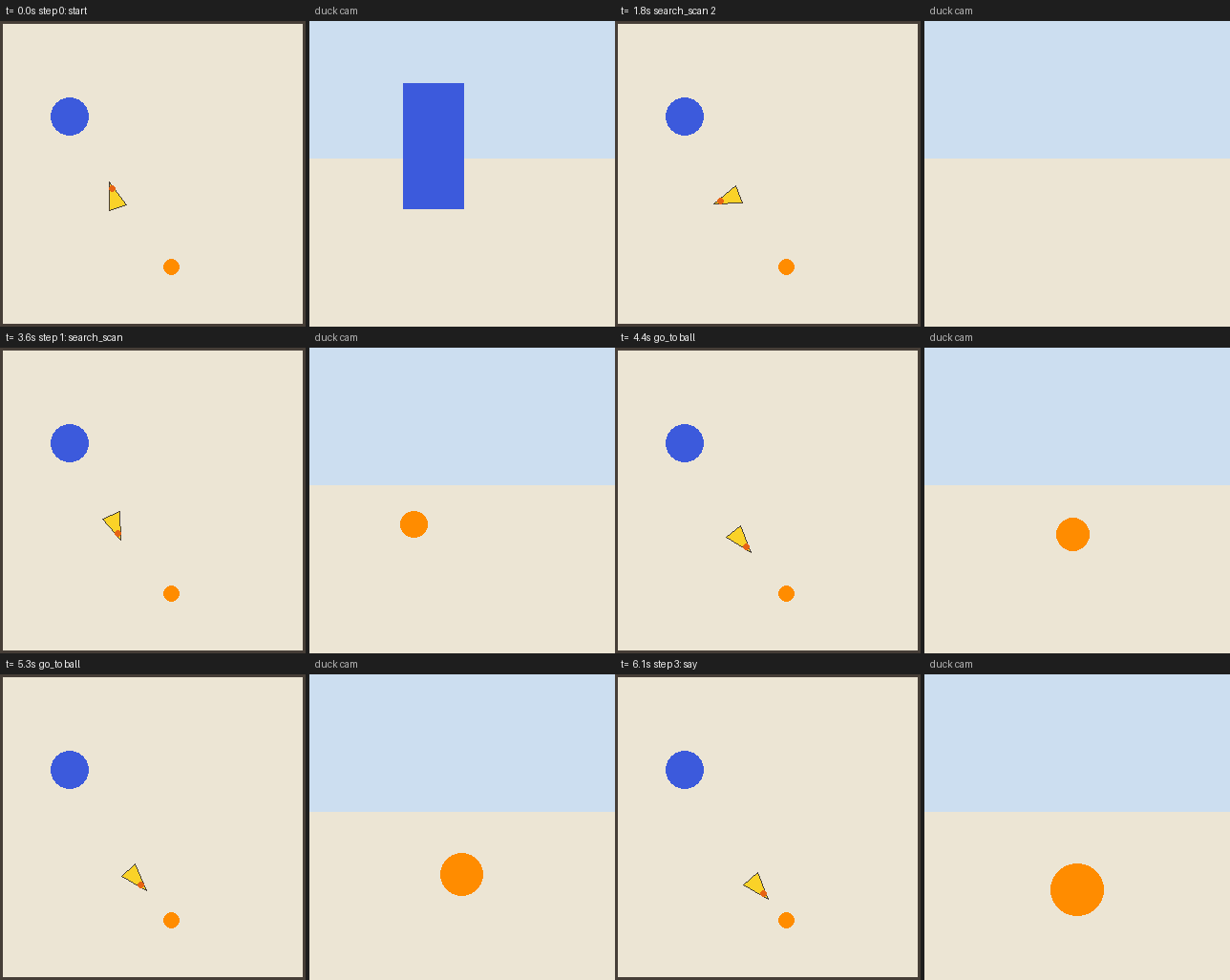
open-duck-scout on open_duck:sim2d, seed 3, driven by the scripted pilot. It finds the ball and walks up to it, because this duck has no kick.
If you own one of these, the Open Duck Mini is where help is worth the most. It is a body a stranger can build from scratch, the daemon and the protocol are already exercised against each other, and the only untested part left is the duck. docs/adapters/open_duck/hardware-checklist.md is the order to try it in, feet off the ground until step 10.
If you own an SO-101, the Quickstart at the top of this page is the path, ten steps from an empty laptop to the arm waving, because LeRobot is a pip install and quackd ships no daemon for the arm. docs/adapters/lerobot/README.md is written for someone who already drives this arm and wants to know what quackd adds to it, what it deliberately does not touch, and what to do when it refuses. docs/adapters/lerobot/first-run.md is the long way round the same ten steps, with every refusal you can hit and what to report afterwards. Nothing moves until step 10 of its checklist. It is the one path here somebody has walked to the end: the run in the table above followed it, on the machine that wrote it, before the registered name and the rest pose existed.
Architecture
Three loops, three rates, three owners. The LLM decides what, at 0.2 to 1 Hz. The steering loop decides how to get there, at 10 Hz, and never waits for the model. The robot's own controllers do the moving, at their own rate: balance on a biped, a pick policy on an arm, a gait policy on a humanoid, the driver on a wheeled base. The table with the rates and the owners is in docs/concepts/architecture.md.
The robot is an adapter that declares a manifest: what body it has, which intents and sensors, which verbs, what stops it. The registry, the tool list, the verbs a .duck may allow and the system prompt are built from that manifest when the robot connects. A verb that is not in it does not exist. All seven bodies go through the same loop, executor and contract (ADR-0017). Each adapter is also a distribution of its own, written in adapters/ here and installed beside the core as quackd_<name>, so the only robot code on your machine is the robot you own. A flock of pilots is that whole stack once per robot, side by side, with one bus between the pilots and one kill switch that reaches every executor.
flowchart LR
    HUMAN["Human<br/>goal in human language"]
    LLM["LLM<br/>Claude · OpenAI · Gemini · Grok · eight more cloud vendors · local (Ollama, vLLM, llama.cpp) · fake"]
    subgraph quackd
        LOOP["agent loop<br/>observe → think → enforce → act"]
        EXEC["safety executor<br/>allowlist · confirm gates · budgets · abort rules · heartbeat"]
        VERBS["verb registry<br/>built from the robot's manifest: core · the robot's own · aliases · learned (v2)"]
        PERC["perception<br/>frame → detections → “ball at bearing 18° left, ~0.6 m”"]
    end
    ADAPTER["robot adapter, a package of its own<br/>microduck · lerobot · rosbridge · open_duck · xlerobot · alohamini · toddlerbot<br/>installed beside the core and found through the quackd.adapters entry point, which is how an adapter nobody here wrote is found too<br/>returns a manifest (embodiment, intents, sensors, verbs, limits, safety authority)<br/>sends intents, never motor writes<br/>backends: sim2d ✅ · mujoco ✅ · mock ✅ · real 🤖 one arm, two afternoons · jsonrpc, ws, zmq, bridge 🧪 never run on a robot · websocket ⏳ deprecated"]
    ROBOT["Robot<br/>its own controllers: robotd at 50 Hz on a Microduck, the position controller and pick policy on an arm, the driver on a base"]
    SIM["simulators and mocks<br/>the cartoon arena and the mock transport are the core's, because every adapter draws its mock with them. The two MuJoCo worlds are in the duck's own package and the arm's<br/>duck cam and head cam, offline doubles for every adapter"]
    HUMAN --> LLM
    LLM -- "exactly one tool call per turn" --> LOOP
    LOOP --> EXEC --> VERBS --> ADAPTER
    ADAPTER -- "intents: twist, skill, gaze, sound, joint, pose, gripper" --> ROBOT
    ADAPTER --> SIM
    ADAPTER -- "frame and state" --> PERC --> LOOP
    LOOP -- "observation: text and image" --> LLM
Why predefined skills matter. The LLM never generates motor commands. Every verb is an intent the robot already understands: a velocity, a named skill (kick_left or ground_pick on the Microduck, pick as a LeRobot policy on the arm), a gaze target, a sound, a joint goal, a gripper command. The robot's own controllers do the physical part, on the Microduck policies trained in microduck_rl and exported to ONNX at 50 Hz, so a slow or confused model degrades the task, never the balance. Where a body has a deadman it stops itself when commands stall. The Microduck's robotd has one, on the Open Duck and the ToddlerBot the daemon quackd ships is the deadman, the XLeRobot's and the AlohaMini's hosts stop the wheels but not the arms, and on the arm and a rosbridge base quackd's heartbeat and stop are the only stop authority. The LLM names the skill, the body performs it.
Enforcement order. Every verb call passes Executor.run_verb, which applies the contract in a fixed order: abort flag, allowlist, the pilot's feasibility verdict, parameter validation, confirm gate, budgets, abort_when, preconditions, dry run, then execution with a timeout that races the abort, so a kill switch cancels the verb that is running. The preconditions are named by the manifest and supplied by the adapter, so a body's own rules are its own: not fallen on a duck, torque on and a cool servo for an arm, calibrated and not fallen on the humanoid. The full order and what each step means: docs/concepts/safety.md.
Prompts. The system prompt opens with the robot's own one line introduction from its manifest, then the contract in prose, what the robot remembers from earlier runs, and the .duck body verbatim. Tools are JSON schemas generated from each verb's parameter model, plus assess_task, declare_success and declare_failure, plus remember when memory is on and tell when the run is a flock of pilots, and the model must return exactly one tool call. Only the last two observations keep their images, and up to the last nine on Claude Opus 5.5 and Fable 5.1 on --llm anthropic, whose old frames are trimmed every eight exchanges rather than on every one. Local models get one extra line describing the JSON shape to answer with when native tool calling is unavailable. The system prompt and the tools that are not verbs are in quackd/agent/prompts.py.
An optional stepper in front of the model. --decision-llm lets a decision LLM take the turns whose answer is a choice among calls this body already has. It is a different kind of model rather than a cheaper one of the same kind: it emits no tokens, so where an LLM writes you a verb and quackd parses it, a decision LLM scores the verbs you gave it and hands back which one with a calibrated probability, and there is nowhere in that answer for a number to come from. TypeSafe's Jev was the first and gave the wire format its name (docs/guides/decision-llms/jev.md), and what the others share with it is that format rather than a vendor, so each is a row of data with a page of its own, and --decision-llm local --decision-url reaches anything else that answers POST /v1/systemone. The stepper sits inside think and nowhere else: no adapter knows about it, the executor is unchanged, and which verbs it may answer is computed from each tool's own JSON schema, so a verb with a number in it is never one of them. It is off unless a run names one, and a turn it answers never enters the model's history, because none of it is anything the model said. docs/guides/decision-llms/README.md and ADR-0040.
Perception: features, not frames. The default detector is an HSV colour threshold, about 1 ms per frame, no model download. Bearing comes from horizontal position through the camera's focal length. Distance comes from apparent size, so --fov-deg matters on a real camera. The simulator draws the ball in a known orange, so it works out of the box. For a real ball you tune one HSV range (FAQ). A YOLO detector is an optional extra, in this process with --detector yolo or on a Jetson's GPU with --detector host, and a real body run with --host uses the board's by default when that board can detect.
Talking to the robots. Each adapter speaks its body's own protocol and spells every upstream name in one upstream_api.py, tagged VERIFIED (read from upstream source at a pinned commit) or UNVERIFIED, and a test proves the unverified ones are only reachable from the experimental backends. Two bodies are reached through an installed SDK (the arm through LeRobot, the base through roslibpy), two by speaking the ZeroMQ host they already ship because neither is an installable package (the XLeRobot and the AlohaMini), and two through a daemon quackd ships for the robot because neither runtime has a network API at all (the Open Duck Mini and the ToddlerBot). The Microduck's robotd speaks JSON RPC 2.0 over a unix socket, and quackd re-sends robot.move every 100 ms while walking on purpose, because the robot zeroes its velocity when those stop. Each body's page under docs/adapters/ carries its VERIFIED and UNVERIFIED tables, and the traps that recur when you read a robot you cannot run are collected in docs/adapters/reading-robots.md.
Safety layer. Heartbeat failure, Ctrl+C and q all mean the same thing: stop, then abort. A verb that times out or raises stops the robot and comes back as a failed result, not an abort. --dry-run sends nothing. And stop always means stop, never collapse, on every body: quackd sends no robot's go limp call, ever. Session end is different on the arm, where LeRobot's own disconnect() releases torque by its default, which is what dropped the arm at the end of every run on the bench. So an arm with a rest pose recorded is driven back to it between the stop and the disconnect, on every exit path there is, and when it cannot get there quackd leaves torque on and says so rather than letting the arm fall. What actually stops each body when quackd goes quiet differs enough to be worth a table of its own, and each manifest declares its own answer in safety_authority: docs/concepts/safety.md.
The full map, with a "why it exists" line per module: docs/concepts/architecture.md. Decisions and their reasons: docs/adr/.
Installation
Requirements: Python 3.11 or newer and uv. Windows, macOS and Linux. No GPU needed: quackd's core touches none, and quackd never runs on an NVIDIA Jetson. It stays on your laptop and reaches the board's model server, camera and detector over the network with --host (docs/guides/jetson.md). The core is about 250 MB (OpenCV is most of it) and it is the loop, the executor, the contract and the cartoon arena, with no robot in it.
uv pip install quackd installs no robot. You choose the body next, and each of the seven is its own package on PyPI (quackd-microduck, quackd-lerobot and five more) that the extra of the same name pulls in. Until one of them is installed, every command that needs a body refuses and says what to install.
uvx quackd --version                                   # the core on its own: the loop, the executor, the contract
uv pip install "quackd[microduck]"                     # then a body: or lerobot, rosbridge, open_duck, xlerobot, alohamini, toddlerbot
uv pip install "quackd[robots]"                        # or all seven at once, each with the SDK its real backend needs
uv pip install "quackd[mujoco]"                        # the duck plus its physics simulator, and quackd[microduck-camera] is the duck plus its WebRTC camera
uv pip install "quackd[lerobot-sim]"                   # the arm's simulator: MuJoCo and no LeRobot, so Python 3.11 is enough
uv pip install "quackd[lerobot-vla]"                   # the arm's policy server: LeRobot, torch and transformers, Python 3.12
uv pip install "quackd[anthropic]"                     # the brain: or openai, gemini, grok, mistral, deepseek, cohere, qwen, kimi, glm, meta, openrouter, all
git clone https://github.com/rokbenko/quackd && cd quackd && uv sync --extra dev   # contributors: the core and all seven adapters, editable
The extras are independent and they compose, so a body and a brain are one install (uv pip install "quackd[microduck,anthropic]") or none at all (uvx --from "quackd[microduck,anthropic]" quackd run ...). quackd[lerobot] installs anywhere and reaches a real arm only on Python 3.12 or newer, because LeRobot itself does: below that floor the marker resolves to no SDK and you are left with lerobot:mock, which is why quackd doctor is where you check rather than the install output. quackd[lerobot-sim] is the arm's simulator, lerobot:mujoco, which needs neither LeRobot nor 3.12, and quackd[lerobot-vla] is the arm's policy server, quackd policy serve, which needs both and belongs wherever the policy runs rather than in the process that drives the arm (docs/guides/policies.md). And quackd[yolo], quackd[live] and quackd[lan] are the other detector, the live window and LAN discovery. quackd[decision] is the client for the optional discrete stepper and quackd[laya] is the one that runs in this process instead of behind a server. Both are off unless a run names a decision LLM, and neither is part of quackd[all], deliberately, because a stepper nobody asked for should never be installed by asking for everything (docs/guides/decision-llms/README.md). Which body a command means when you do not name one is in Configuration, and quackd doctor says what this machine has.
What a version promises. The eight packages always ship together, with one version. While quackd is 0.x, a patch, the third number, fixes what quackd did not do the way its docs or its own output said, and asks nothing of a setup that worked, except where a safety fix refuses something the docs never promised, which its note then says. A minor, the second number, may add, change or remove a command, a flag, a default or a file format, and its note says what to do. So a requirement that allows one minor takes every fix to it and nothing new. RELEASING.md has the whole rule.
Usage
# a goal in human language (the duck's cartoon simulator, scripted pilot, no key needed)
uvx --from "quackd[microduck]" quackd run --goal "find the ball and kick it" --llm fake

# the same goal with Claude
uvx --from "quackd[microduck,anthropic]" quackd run --goal "find the ball and kick it" --llm anthropic

# a task file (fifteen ship with the core, the starter table below lists them)
uvx --from "quackd[microduck]" quackd run find-and-kick --llm fake --seed 3
Every run writes runs/<timestamp>-<name>/ (--runs-dir replaces runs/, and --run-name "Example 1" adds your own label to the end of that directory, runs/20260921-155518-find-and-kick-example-1/) with transcript.jsonl (every prompt, tool call, gate, intent, result and token count, what each model call cost and what the run has cost so far, when the run started and when it ended, plus the robot's manifest in run_start), every frame quackd captured, summary.json, terminal.txt (everything that was on the terminal during the run, as plain text, opening with the command that started it and the version that ran it), and run.gif on a simulator, though the arm's simulator, lerobot:mujoco, writes none. quackd log replays any of it afterwards.
Cloud or local, same command.
| Provider | Extra | Key | Run |
|---|---|---|---|
| Claude | quackd[anthropic] |
ANTHROPIC_API_KEY |
uvx --from "quackd[microduck,anthropic]" quackd run find-and-kick --llm anthropic |
| OpenAI | quackd[openai] |
OPENAI_API_KEY |
uvx --from "quackd[microduck,openai]" quackd run find-and-kick --llm openai |
| Gemini | quackd[gemini] |
GEMINI_API_KEY |
uvx --from "quackd[microduck,gemini]" quackd run find-and-kick --llm gemini |
| Grok | quackd[grok] |
XAI_API_KEY |
uvx --from "quackd[microduck,grok]" quackd run find-and-kick --llm grok |
| Mistral | quackd[mistral] |
MISTRAL_API_KEY |
uvx --from "quackd[microduck,mistral]" quackd run find-and-kick --llm mistral |
| DeepSeek | quackd[deepseek] |
DEEPSEEK_API_KEY |
uvx --from "quackd[microduck,deepseek]" quackd run find-and-kick --llm deepseek |
| Cohere | quackd[cohere] |
COHERE_API_KEY |
uvx --from "quackd[microduck,cohere]" quackd run find-and-kick --llm cohere |
| Qwen | quackd[qwen] |
DASHSCOPE_API_KEY |
uvx --from "quackd[microduck,qwen]" quackd run find-and-kick --llm qwen |
| Kimi | quackd[kimi] |
MOONSHOT_API_KEY |
uvx --from "quackd[microduck,kimi]" quackd run find-and-kick --llm kimi |
| GLM | quackd[glm] |
ZAI_API_KEY |
uvx --from "quackd[microduck,glm]" quackd run find-and-kick --llm glm |
| Meta | quackd[meta] |
META_API_KEY |
uvx --from "quackd[microduck,meta]" quackd run find-and-kick --llm meta |
| OpenRouter | quackd[openrouter] |
OPENROUTER_API_KEY |
uvx --from "quackd[microduck,openrouter]" quackd run find-and-kick --llm openrouter |
| fake (scripted) | none | none | uvx --from "quackd[microduck]" quackd run find-and-kick --llm fake |
| Ollama (local) | quackd[openai] |
none | uvx --from "quackd[microduck,openai]" quackd run find-and-kick --llm ollama:qwen3:8b |
| vLLM (local) | quackd[openai] |
none | uvx --from "quackd[microduck,openai]" quackd run find-and-kick --llm vllm:Qwen/Qwen3-8B |
| llama.cpp (local) | quackd[openai] |
none | uvx --from "quackd[microduck,openai]" quackd run find-and-kick --llm llamacpp |
| LM Studio (local) | quackd[openai] |
none | uvx --from "quackd[microduck,openai]" quackd run find-and-kick --llm lmstudio |
| any OpenAI compatible server | quackd[openai] |
optional | uvx --from "quackd[microduck,openai]" quackd run find-and-kick --llm local --base-url http://host:8000/v1 |
Every row above runs the cartoon, because quackd[microduck] is the body those lines ask for and find-and-kick names no robot of its own. To put the same model on the physics simulator instead, swap that extra for quackd[mujoco], which is the same duck with MuJoCo behind it, and name the backend: uvx --from "quackd[mujoco,anthropic]" quackd run find-and-kick --llm anthropic --robot microduck:mujoco. The extras are independent, so quackd[anthropic] alone gives you a brain and no body at all. Nobody stands in the physics arena, so follow-me, whose whole task is to follow somebody, cannot succeed there and nothing stops you pointing it at that backend anyway.
A cloud model that takes an image sees the camera frame. Where a vendor does not document image input, quackd list-models marks that model no frames and quackd sends it the detections as text instead. An OpenRouter id quackd does not carry gets the frame when OpenRouter's model list says it takes images, and the detections as text when it does not. Local models get the text detections by default and the frame too with --vision, which also overrides a no frames mark. --no-vision is the other direction, for a vision model you would rather send text to. The scripted pilot only reads the detection summary. A body that reads several cameras sends every frame each step, each one labelled with the camera's own name, on Claude, both OpenAI APIs, Gemini and any OpenAI compatible local server with --vision on. That costs what it sounds like, because the last two exchanges keep their images: two cameras is four pictures in every request rather than two, and up to eighteen on Claude Opus 5.5 and Fable 5.1 on --llm anthropic, whose old frames are trimmed every eight exchanges rather than on every one. A local server or a model that takes one image per message needs a single --camera-url. Local setup, tool calling flags per server and what to expect from small models: docs/guides/local-llms.md.
Decision LLMs are not in that table on purpose. A decision LLM is not a provider and --llm does not take one: it answers typed questions about a state and writes nothing, so it cannot pilot a robot on its own. It sits in front of whichever provider you did pick, for the turns whose answer is a choice, it is named with --decision-llm instead, and it is off unless you name one (docs/guides/decision-llms/README.md).
| Command | What it does |
|---|---|
quackd run <duck> or quackd run --goal "..." |
Run a task. --llm picks the pilot as VENDOR[:MODEL], --robot the body (a spec or a registered name), --flock runs several at once, --dry-run sends nothing, --image hands the task a picture and repeats, --by-hand lets you place the arm where the run starts, --policy-url hands a LeRobot arm's pick and manipulate to a policy server (with --policy-token, and --accept-other-frame for a policy learned on an arm calibrated another way, whose goals are still clipped to this arm's travel), --controller vla flies that arm with a scripted pilot that tells its policy each instruction the task lists and then asks you whether the arm did it, --decision-llm puts an optional discrete stepper in front of the model (with --decision-url and --decision-mode), --run-name labels the run directory and is what quackd log finds it by afterwards, --price says what the model costs in USD per million tokens (in=3,out=15[,cache_read=0.3,cache_write=3.75]) when quackd has no published rate for it or yours is negotiated, --live opens a window, --no-log stops it narrating on stderr, and the run directory gets its log either way. quackd run --help has the rest, grouped. It exits 1 when a run does not succeed, and 3 when the pilot judged the task beyond this body and nothing moved |
quackd validate ducks/*.duck |
Check task files against the spec and a robot's manifest (--robot, a registered name or a spec, repeatable, --robots for a flock, or the file's own robots: if it has one). Exits 1 with field level errors such as requires kick, but arm-01 (lerobot-so101) does not provide it. --json prints one object per file and keeps the same exit code |
quackd preflight <duck>... --robot NAME --llm VENDOR[:MODEL] |
Rehearse task files on the arm's simulator before they meet the arm. Each file is checked against the robot as validate checks it, the simulator is connected and closed --connect-cycles times (3 unless you say, meeting the bus faults a --faults spec asks for, and a connect that retries and then gives up on them is noted rather than failed), and the task is run --seeds times (3 unless you say) with memory off. A <task>.sim.yaml beside the file lays out the table and says what has to be true when a run ends: at_rest, joint_moved, lifted and moved, read from the transcript and from the simulator's own truth, which the pilot never sees. A run passes when nothing escaped it, its close reached the rest pose where the robot has one and every check held. --policy-url, --policy-token and --accept-other-frame rehearse against a policy server as a run would. A robot that is not a simulator is refused before it is built, which is what quackd robot twin is for, and so is a pilot nobody named, since the scripted one runs only when typed as --llm fake. It prints a row per file and seed, the model's cost and the simulator's time step, --json prints the same, and it exits 1 unless every run passed |
quackd serve-mcp |
Expose a robot (--robot <adapter>:<backend> or a registered name), or a flock of them with --robots name=<adapter>:<backend>,... or --flock NAME for a stored one, as MCP tools over stdio. --duckfile starts with a contract loaded on the default robot, --yes allows confirm gated verbs, --policy-url and --policy-token hand one arm's pick and manipulate to a policy server, with --accept-other-frame as on run, which both need --yes (it refuses --controller, since over MCP the client is the pilot), --seed, --address, --dry-run, --no-memory, --memory-dir and --no-log, which drops the log block the four tools that reach the robot come back with as well as the same lines on stderr |
quackd policy serve|check |
A learned policy for the arm, in a process of its own, so no quackd command loads a checkpoint beside the arm's serial bus. The one thing in quackd that would is load_policy(), an older Python helper in the arm's backend that nothing in quackd calls (the LOAD_POLICY row in docs/adapters/lerobot/README.md). serve --policy OWNER/NAME@REVISION serves a LeRobot ACT, SmolVLA or pi05 checkpoint with quackd[lerobot-vla] on Python 3.12, refusing any processor step it has not read, any code the checkpoint names and any model it names inside itself that --pin REPO@REVISION does not fix, at --fps or the rate of the dataset it was trained on. serve --policy scripted:NAME serves a scripted one that needs no torch (scripted:hold holds the arm where it is, scripted:sweep swings its wrist). Either runs on 127.0.0.1:9875 until Ctrl+C, with a token it writes to ~/.quackd/policy.token the first time and a client that sends plain HTTP to loopback and nowhere else, and the arm checks at connect that the policy fits it before any motor is energised. check asks a running server what it serves (--policy-url, with --policy-token or QUACKD_POLICY_TOKEN), or serves --policy itself for the length of the check, and --bench streams synthetic observations at the policy's rate and says the rate it achieved, the ticks with nothing to send and the ones skipped while it waited, the round trip, and the --latency-s to declare, read at the 95th percentile of every step it timed, so bench again served with it. A tiny random ACT runs through it in CI, and a trained ACT from the Hub has run through it on a laptop's CPU. run --policy-url points the arm at a server. See docs/guides/policies.md and docs/adapters/lerobot/README.md |
quackd doctor |
Keys, extras, adapters, local LLM servers, and every upstream assumption on this machine, ending in one line saying whether anything can run here (--robot for one robot's manifest, --address to ask a real robot what it is running, --json for a script). A registered name with an address stored connects without --address. Before it connects the LeRobot arm it warns that connecting takes torque off every motor for a moment, and it returns the arm to its rest pose if one is recorded. It exits 1 when nothing here can run, so a setup script can branch on it |
quackd list-verbs |
The vocabulary with parameters and safety classes (--robot for another robot, --json for a script) |
quackd list-adapters |
The robot adapters this build knows, their backends and status (--json for a script) |
quackd list-models |
Every model this build knows for every cloud vendor: the id --llm takes after the colon, a label, one of five statuses (current, legacy, preview, specialised, open) and notes, which mark each vendor's default, the OpenAI models that need the Responses API, and the models quackd sends text detections to rather than a frame. --llm NAME prints one vendor, and it reads a whole spec or a bare model id for its vendor, so --llm claude-opus-5 prints Anthropic's rows. Local presets have no rows, because they take any id their server serves. OpenRouter's rows are the ones quackd carries, and --llm openrouter: can also name an id they leave out, checked against OpenRouter's model list when a run starts unless quackd refuses its spelling first. --json for a script |
quackd discover |
The quackd robots answering on the LAN (zeroconf, needs quackd[lan]). --timeout seconds to listen, --json one object per robot. See docs/guides/lan.md |
quackd announce --robot <adapter>:<backend> |
Advertise a robot's identity on the LAN (a static manifest, no robot connection). --name sets the manifest id, --for seconds to stay announced, default until Ctrl+C |
quackd memory show|add|clear |
What one robot remembers between runs: the notes a pilot saved and how recent runs ended. --robot picks the body by spec or by registered name, --raw prints the file, --memory-dir points elsewhere, clear --yes skips the prompt. See docs/guides/memory.md |
quackd robot add|list|show|edit|rest-pose|release|remove|twin |
The robots you have named: which body, where it is, its token and its camera or cameras, and optionally the --llm that pilots it. Kept in ~/.quackd/robots.json, so --robot NAME means the same thing in every command. list --probe connects to each and says whether it answered. rest-pose NAME records the folded pose an arm is driven to at both ends of a run, so it stops falling when the run ends, and --clear forgets it. release NAME takes torque off an arm wherever it stands while you hold it, for an arm a run left holding itself up: it says what connecting and releasing do, asks, and only then connects. twin SOURCE [NAME] registers a lerobot:mujoco simulator of a registered arm, SOURCE-sim unless you name it, on the calibration file the arm's runs read and with its rest pose, pilot and cameras, for quackd preflight to rehearse on. A robots.json holding one cannot be read by quackd 0.14 or earlier. --registry-dir points elsewhere. See docs/guides/registry.md |
quackd flock create|list|show|edit|delete |
Named groups of registered robots, for --flock NAME on run and serve-mcp. create with no --robot prints what you have registered, numbered, and asks which to include. Kept in ~/.quackd/flocks.json. Not the flock: block of a task file, which says how the work is shared out. See docs/guides/registry.md |
quackd record <duck> |
run pinned to microduck:sim2d (no --robot, so it wants quackd[microduck]) that always writes a GIF. --seed defaults to 0 and gated verbs are auto accepted, as with --yes. --no-log and --no-log-prompt work here too, and both are about what you watch rather than what is written |
quackd log [run] |
Replay a finished run from its transcript, on stdout, as the same lines it printed while it ran. No argument means the newest run under --runs-dir, and a task name, a timestamp prefix, the name you gave the run with --run-name (quackd log example-1, which beats a longer directory that merely contains the text) or a transcript file all work. --no-prompt, --thinking all|N, --from-step N, --frames. It was the trace until 0.11 and that spelling of it is gone, after the one release of grace it was promised. A run directory recorded before the rename replays unchanged |
Your robots, by name
Reaching a real robot takes a spec, an address, a token and a camera URL, and retyping them on every command puts that token in your shell history. quackd robot add keeps them instead: which body, where it is, its token and its cameras, the board it uses (--host), where an arm should be left when a run ends, and optionally the --llm that pilots it. A flock is a named list of those entries. Register once, and --robot NAME means the same thing in every command that takes a robot, --flock NAME in run and serve-mcp.
quackd robot add duck microduck:mock
quackd robot add arm lerobot:mock
quackd robot add scout open_duck:bridge --address tcp://10.0.0.5:9871 --token 8f2c...   # a real one, when you have it
quackd robot rest-pose arm                                   # fold the arm by hand first, then record where it rests
quackd robot list --probe                                    # who is actually answering
quackd flock create pair --robot duck --robot arm
quackd run flock-hello --flock pair --llm fake          # one pilot per member, talking
quackd serve-mcp --flock pair                                # the same flock behind one MCP server
--probe connects to every registered robot at once, asks how it is, and closes again, which is the nearest thing here to looking across your robots:
robots (--robot NAME)
+---------------------------------------------------------------------------------+
| name  | robot            | address             | flocks | reachable             |
|-------+------------------+---------------------+--------+-----------------------|
| arm   | lerobot:mock     |                     | pair   | + ok                  |
| duck  | microduck:mock   |                     | pair   | + ok, battery 88%     |
| scout | open_duck:bridge | tcp://10.0.0.5:9871 |        | x timed out after 5 s |
+---------------------------------------------------------------------------------+
The two mocks answer because a mock always answers. scout is a real robot's address with nothing at it, which is what a robot that is switched off looks like, and it makes the command exit 1 so a script can branch on it. Both files live under ~/.quackd/, --registry-dir or QUACKD_REGISTRY_DIR moves them, and tokens are stored there in plain text. What a name changes, and what happens when a flock's member goes missing: docs/guides/registry.md.
A name also carries where an arm should be left. A LeRobot arm goes limp the moment it is disconnected, because LeRobot's disconnect() disables torque by its own default, and a clean close with no rest pose recorded asks for exactly that. So on the bench the arm fell at the end of every run, and every run started from wherever the last one had left it. quackd robot rest-pose closes both ends. Fold the arm by hand, which you can do because nothing is connected to it and it is limp, then record the pose it is in:
$ quackd robot rest-pose arm-01 --yes     # without --yes it prints the joints and asks
arm-01 (lerobot:mock) is at
shoulder_pan   0.0
shoulder_lift  -90.0
elbow_flex     90.0
wrist_flex     0.0
wrist_roll     0.0
gripper        100.0
✓ recorded arm-01's rest pose (6 joints)
  quackd run <duck> --robot arm-01 starts from it and returns to it before letting go
Those joint numbers are the mock arm's, from lerobot:mock, and a real SO-101 reports its own. The pose is kept in ~/.quackd/robots.json beside the address and the cameras, quackd robot show NAME prints it back, and rest-pose NAME --clear forgets it, after which a run leaves the arm where it stands and torque drops there. What quackd does with a pose it has:
| When | What happens |
|---|---|
| The start of a run | The arm is driven to the pose before the pilot gets control, so what a model improvises from is the same arm every time. A run that cannot get there aborts before a single LLM call |
| The end of a run | Between the stop and the disconnect, on every exit path: success, failure, a task judged infeasible, a spent budget, an abort, an error and Ctrl+C |
| Letting go | Torque is released only where the arm is known to be at that pose, or as near it as its calibration lets the servos go. Where it is not, a run at a terminal first offers to release the arm into your hands, which is Enter while you hold it. Otherwise quackd turns LeRobot's own flag off, leaves the arm holding itself up, and prints one line: the arm is not at its rest pose (...), so torque was left on and it will not fall as it stands: hold it first, because connecting takes torque off every motor for a moment, then run quackd robot release NAME, or quackd doctor --robot NAME to park it, or cut its power, with the name you registered the arm under in place of NAME |
| The gripper | Recorded, never commanded, for the same reason stop leaves it alone: re-sending it would open a hand that is holding something. Only the five body joints are ever driven |
| A fold past the travel | A servo is never driven past the travel its calibration recorded, and a hand can still fold a joint past it. So every joint is driven clipped into its travel, a joint recorded past it counts as there at the edge of the travel or anywhere beyond it, torque is released there, and the run says once which joint is free to settle the rest of the way. stop writes no goal for a joint that reads past its travel, because the servo would haul it up to the edge. Calibrate with every joint taken all the way into the fold and the fold is inside the travel to begin with (A pose past the travel) |
--by-hand |
The arm is still driven to the pose, and torque comes off there as well as at the end, so you can lift the arm and set the start yourself. Where the run returns to, and how it lets go there, are unchanged, unless quackd refused to take hold of the arm you placed. Then nothing moves it or puts torque on it again: the gripper does not open, nothing folds it, no release is offered, and the run ends saying the arm is in your hands, or that it is already at its rest pose where it never left it |
--dry-run |
Nothing moves, at either end |
quackd doctor |
Returns a probed arm to its rest pose as well, and says so in a rest pose row. A doctor probe drops torque too, which is one of the ways the arm fell |
quackd robot list --probe |
Never drives the arm, but its connect takes torque off every motor for a moment, like any connect, and it gives no warning first: hold an arm that is holding itself up before you probe it. It says torque left on: not at its rest pose when it had to keep it |
| An MCP session | The same at both ends, and it refuses to start if it cannot get there |
A run can begin in either of two places, and the pose above is what both of them are measured from. By default the arm is driven to the recorded rest pose before the pilot is given control, so what a model improvises from is the same arm every time and two runs of one task are comparable. With --by-hand the arm is driven to that same pose, quackd takes torque off it there, and then it waits for you: you lift the arm, load the gripper, hold it where the work should start and press Enter, and quackd holds the pose you left before handing the arm to the pilot. The rest pose is what makes the second one possible rather than what it replaces, because it is the one place quackd will release an arm, and it is still where the arm folds back to at the end either way. The default start is the repeatable one. The hand placed start is how you put a pen in the gripper, or set the arm on the piece it has to work on, without teaching the model to find either first.
This changes what a probe and a dry run leave behind. On an arm that is away from its recorded rest pose, torque is now left ON where it used to be dropped: the arm holds itself up instead of sagging, and it stays that way until you hold it and then run quackd robot release NAME, let quackd doctor --robot NAME park it, or cut its power. Hold it whichever you choose, because both commands begin by connecting, and connecting takes torque off every motor for a moment.
Taking torque off is something only a person asks for. No verb and no MCP tool can do it. --by-hand releases the arm at its rest pose and nowhere else, for you to set the pose a run starts from. quackd robot release NAME releases it wherever it stands, for an arm a run could not fold. It tells you that connecting takes torque off every motor for a moment and that the release lets the arm fall, asks, and only then connects, releases and reads torque back off every motor, exiting 1 unless every one of them reads off. On 2026-09-23 the power switch was the only way to put down an arm a run had left holding itself up (The torque rule).
The rest pose met a real arm on 2026-09-23 and could not reach it. The fold lay about 20 degrees past the travel the arm's calibration recorded, runs aborted before their first model call, every run that got to its end kept torque on, and the stop at the end of a run hauled the folded shoulder up out of its fold. The fold past the travel row above is the answer to that, and it has been exercised against lerobot:mock and in the test suite and not yet on the arm (ADR-0045). The runs on 2026-09-15, the one at the top of this page among them, came before there was a rest pose at all, which is why that arm fell.
Only the LeRobot arm is parked today. Every other body refuses a rest pose rather than accepting one and quietly ignoring it:
$ quackd robot add duck microduck:mock && quackd robot rest-pose duck --yes
✗ error: duck (microduck:mock) has no joints, so there is no rest pose to record
  a rest pose is for an arm: quackd list-adapters

$ quackd robot add cart xlerobot:mock && quackd robot rest-pose cart --yes   # it HAS joints
✗ error: cart (xlerobot:mock) has joints, and quackd does not drive it to a rest pose yet: only the
LeRobot arm does today
The .duck file
A task file is a contract plus instructions, deliberately shaped like a SKILL.md. The YAML frontmatter is enforced by quackd. The Markdown body is read by the model.
---
duck: 0
name: find-and-kick
description: Search the area for a ball, walk to it, kick it.
verbs:
  allow: [search_scan, walk_to, kick, quack, get_frame, stop]
  confirm: []                       # verbs that ask a human y/N first
budgets: {max_steps: 40, max_minutes: 5, max_llm_calls: 40}
success:
  - Ball displaced more than 0.3 m in sim, or human confirms the kick landed.
abort_when: [Battery below 15%, Same verb fails 3 times in a row]
persona: Determined and cheerful. Quack once when you succeed.
---
# Task
Find the ball and kick it.
## Strategy
1. `search_scan`. 2. `walk_to` the ball, stop ~0.25 m away. 3. `kick`. 4. Verify, and retry if it did not move.
That is a duck: 0 file, the contract since 0.1, and every bundled v0 file still parses. A duck: 1 file can also say which body it is for and what it truly needs:
duck: 1
robots: microduck:sim2d                 # the default body, so `quackd run` needs no --robot (or one robot per flock member)
requires: [search_scan, walk_to, kick]  # the honest minimum a body must provide
quackd validate --robot checks requires against a robot's manifest before anything moves: quackd validate find-and-kick --robot lerobot:mock exits 1 with requires kick, but arm-01 (lerobot-so101) does not provide it. For a duck: 0 file the whole allowlist counts as required. Of the fifteen bundled starters, the six written before 0.4 keep their 0.3 spellings at duck: 0 and the nine written since are duck: 1. A duck: 2 file can also correct the robot's datasheet for the build in front of you with a datasheet: block, and the prompt labels those numbers as coming from the task file. A duck: 3 file can hold an arm's manipulate to the subtasks its policy: block lists, how long each segment of the learned policy runs and how long they run in all (docs/reference/duck-spec.md).
| Starter | Goal | Notes |
|---|---|---|
hello-world |
quack, one step forward, quack | the smoke test |
find-and-kick |
find the ball and kick it | the flagship, ground truth checked in tests |
patrol-and-quack |
wander, quack twice on a person or pet | the scripted pilot quacks at the sighting but hits its budget on seeds 0 to 9, no pilot has completed it yet. Nobody is in the physics arena, so on microduck:mujoco it is a patrol with nobody to announce |
follow-me |
keep a person in view and follow at 0.5 m | cartoon only, nobody stands in the physics arena and this task is to follow somebody, so it cannot succeed on microduck:mujoco. The scripted pilot has no strategy for it and declares success after two steps without a single walk_to, no real model run yet |
fetch |
scoop the ball up and bring it back | experimental, the scoop is open loop and fails about 40 % of the time in sim, by design, and the scripted pilot has no strategy for it either, no real model run yet |
flock-kick |
multiple ducks split the search, the closest one kicks | flock mode, cooperation over a bus and an auction |
flock-hello |
a duck and an arm introduce themselves to each other | pilot flock, one LLM per body, talking over the bus |
open-duck-scout |
find the ball, walk up to it, say where it is | Open Duck Mini v2 (--robot open_duck:sim2d is its default), the kick free shape of find-and-kick, ground truth checked on 10 of 10 seeds |
open-duck-lookout |
stand still, look around, say what you can see | Open Duck Mini v2, and the task to point at a real duck first: nothing in its allowlist moves a leg, and it works on a duck with no head at all |
microduck-lookout |
stand still, look around, say what you can see | the same idea for a Microduck: nothing in its allowlist moves a leg, it copes with having no camera, and it stops and says so if posture reads unknown, which is the one thing worth knowing before letting the duck walk |
xlerobot-lookout |
stand still and report what is in front of you | an XLeRobot, and the task to point at a real cart first: nothing in its allowlist moves a wheel or an arm. This robot has no head control and no voice, so a human aims it and it reports in text |
alohamini-lookout |
stand still and report what is in front of you | an AlohaMini, and the task to point at a real robot first: nothing in its allowlist moves a wheel, an arm or the lift. Like the XLeRobot it has no head and no voice, so a human aims it and it reports in text |
toddlerbot-lookout |
stand still, look around with the head, and report what you can see | a ToddlerBot, and the task to point at a real humanoid first: nothing in its allowlist moves a leg, an arm or the waist. Put it on its safety stand before you try it |
lerobot-lookout |
move nothing, read the arm back, and report what it says about itself | a LeRobot SO-101 arm, and the task to point at a real arm first: nothing in its allowlist moves a joint, and it asks for report_state rather than observe because a camera on this arm is one you chose to plug in. It is the one starter here that has been run on real hardware, on 2026-09-15, and it is step 7 of the Quickstart |
arm-grip-check |
say whether the arm is holding anything, prove it with the gripper, then let go | the same SO-101 arm, one step further: it reads, grips and releases, and authors no angle at all, because move_joints is deliberately not in its allowlist. It is the task that asks the question nobody has answered on hardware, whether the band that infers holding from a gripper stopping short of shut is right, and it is the worked example in docs/guides/decision-llms/README.md because every turn in it is a choice. Run it with --by-hand and put something in the gripper |
Full spec: docs/reference/duck-spec.md. Add yours to ducks/.
Pilot it from Claude (MCP)
claude mcp add quackd -- uvx --from "quackd[microduck]" quackd serve-mcp --robot microduck:sim2d
Then, in Claude Code or Claude Desktop: "List the duck's verbs, then find the ball and kick it." Before the first verb that moves the body, the model has to say whether this body can do the task at all, judged against the datasheet in its robot_list row, and robot_run_verb refuses anything that moves until it has. Without a .duck loaded the session runs on a default budget of 40 verb steps and five minutes. Load one with robot_load_duckfile, or start with --duckfile, and its allowlist and budgets apply instead. Pass --robots duck=microduck:sim2d,arm=lerobot:mock to front several robots at once, or --flock NAME to front a stored flock, with one executor, budget and heartbeat per robot. Simulated robots here each get their own world (a shared arena over MCP is future work), and this session is one model driving each of them in turn, so for robots that pilot themselves and divide the work use flock mode instead (quackd run <duck> --flock NAME). Config for both clients, the nine robot_* tools, and a two minute script: docs/guides/mcp.md.
What it remembers
A run does not start from nothing. Each robot has a small memory under ~/.quackd/memory/, keyed adapter:backend so the simulator and a real duck keep separate files, or by its name once you have registered it with quackd robot add, so two ducks of one kind do too. It holds: the notes the pilot saved with the remember tool, and one line per earlier run that quackd writes itself (outcome, reason, the last few verb results). The newest of both go into the system prompt at the next run, and remember costs no step. quackd memory show, add and clear manage it, and --no-memory runs fresh. Over MCP the same file sits behind robot_recall and robot_remember. In a flock the same rule applies, so two members of one kind share a file unless you have registered them, and what one needs another to know during a run it says with tell rather than writing it down. Details and what it is not (a learning loop, a search index): docs/guides/memory.md.
Connect any robot
Any robot with a way in can join: through its own SDK, through the protocol its host already speaks, or through a small daemon quackd puts on the robot when its runtime has no network API at all. Two of the seven are in that last category, and a third gets a host wrapper from quackd because the one upstream ships leaves its arms limp. A robot joins as an adapter that answers one question, what is this body and what can it do, as a manifest: its embodiment, the intents its controllers accept (a velocity, a named skill, a gaze, a sound, a joint goal, a pose, a gripper), its sensors, the limits its verbs clamp to, who stops it when quackd goes quiet, its verbs, and a datasheet of what it weighs, can carry and can reach, with a confidence and a source on every number. Everything else (the loop, the executor, the contract, the MCP server) is shared.
uvx quackd list-adapters                                                          # the seven, installed here or not
uvx --from "quackd[open_duck]" quackd list-verbs --robot open_duck:sim2d          # a buildable duck's vocabulary
uvx --from "quackd[open_duck]" quackd run open-duck-scout --llm fake         # it finds the ball and walks up, 10 of 10 seeds
uvx --from "quackd[open_duck]" quackd validate ducks/find-and-kick.duck --robot open_duck:mock   # exit 1: requires kick, but open-duck-01 (open-duck-mini-v2) does not provide it
uvx --from "quackd[microduck,lerobot]" quackd serve-mcp --robots duck=microduck:sim2d,arm=lerobot:mock   # a duck and an arm behind one MCP server
Each adapter is a package of its own, and the extra that carries its name is what installs it. quackd[lerobot] brings the arm's own SDK with it and quackd[rosbridge] brings roslibpy, quackd[xlerobot] and quackd[alohamini] bring a ZeroMQ client instead, because neither of those robots is an installable package, and quackd[microduck], quackd[open_duck] and quackd[toddlerbot] need no robot library at all. Each imports its library only on connect, spells every upstream name in one pinned upstream_api.py, and never uses a body's go limp call as stop. open_duck:bridge and toddlerbot:bridge ask nothing else of PyPI, because the part that touches the robot runs on the robot: quackd ships a daemon for the duck's Raspberry Pi and another for the ToddlerBot, since neither runtime has a network control API to talk to. Adding a body of your own takes a manifest and a mock, about a day: docs/adapters/writing-an-adapter.md, the fields in docs/reference/manifest-spec.md, what has and has not run in docs/adapters/status.md.
Your adapter does not have to live in this repository. An installed adapter announces itself through the quackd.adapters entry point group, one line from the robot's name to the module that builds it, and that is how quackd finds a body at all. So an adapter nobody here wrote can be a package on PyPI that depends on quackd, installing it is the whole integration, and quackd list-adapters then prints it beside the seven and --robot <name>:<backend> reaches it. The seven are the robots this project publishes and supports, which is not the same as the robots quackd can drive.
Flock mode
Several robots can work one task together, and every member gets its own LLM pilot: its own executor, allowlist, budgets, heartbeat, memory and feasibility verdict, all at once, on wall clock, on any backend. Same bodies or different ones, 2 to 8 of them.
uvx --from "quackd[microduck,lerobot]" quackd run flock-hello --llm fake             # the bundled demo: a duck and an arm, no key and no registry
uvx --from "quackd[microduck,lerobot,anthropic]" quackd run <duck> --flock pair --llm anthropic   # your own robots, from the registry, one extra per body
They divide the work with a tell tool that reaches the addressee in its next observation, and each pilot's prompt carries every peer's datasheet, so the work is divided on data rather than on guesses. Each one declares for itself and the flock succeeds only when all of them did, and one Ctrl+C reaches every executor.
Nothing about a member is a special case, so what a flock can do is what one pilot can do times the number of bodies. Each is handed the part of the contract its own body can answer for, so an arm in a walking flock is not turned away at the door for having no legs, while what the task requires is still checked against every body together before anything connects. Say which bodies with a stored flock, or with flock.members and robots: in a duck: 1 file and no registry at all, which is what flock-hello does.
The honest part: N simulated members are N separate worlds with no shared arena and no ground truth to check a claim against, it costs N budgets and N times the tokens, a seed does not make it reproducible, no flock of any kind has run on hardware, and tell has been exercised by the scripted pilot and by no real model. Details: docs/guides/flock.md.
The other kind of flock has one referee instead of N pilots, and it is the one that ships a choreography: the flock splits the search for a ball, holds a quick auction, and the closest duck takes the shot.
uvx --from "quackd[microduck]" quackd run flock-kick --llm fake --seed 3
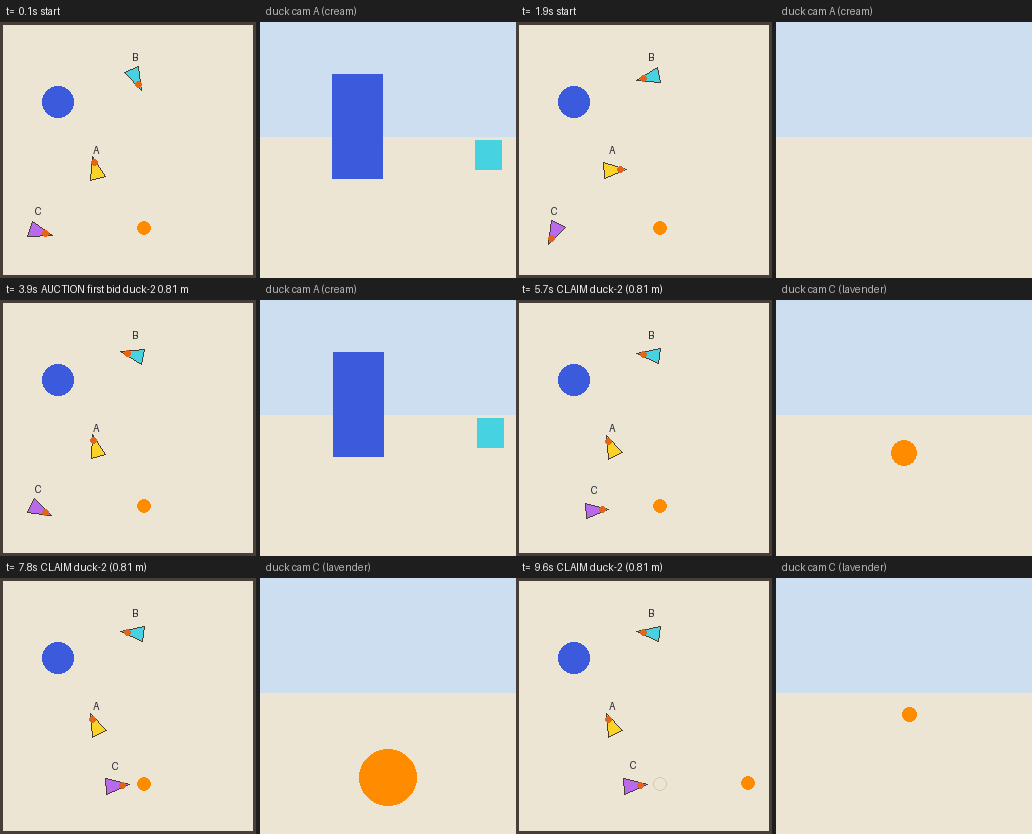
The first choreography: one flock, one auction, one kicker. Scripted planner, deterministic coordinator. Every message is in the transcript.
The interesting part is not the kick, it is the talking. The ducks coordinate over an in process bus with nine message kinds (TASK, BID, CLAIM, ROLE, HINT, VERDICT, HB, RESULT and TALK), the same bus tell uses, every one logged in flock.jsonl, and a deterministic Contract Net auction decides which duck acts, from each duck's own camera distance estimate. Every action goes through verbs the duck already has, so the machinery is task agnostic and what a flock can do is bounded by its skills, not by the ball. The LLM contributes at most one planning call per run, and each duck still enforces the .duck contract on itself. The outcome is judged from sim ground truth, not from a model's claim. Add a flock: block to any .duck or pass --flock N (2 to 4 ducks). This kind is simulator only (every member must be a sim2d Microduck) and its per duck pilots are deterministic rules, on purpose. Details: docs/guides/flock.md.
A coordinator flock can also assign roles by capability, not just split the same search. A duck: 1 file may declare flock.roles (spotter, kicker), and bids carry a capability term, so each robot bids only for a role its manifest can fill. A duck: 2 role can ask for a body rather than a vocabulary, enough payload or a gripper rather than a beak, matched against each robot's datasheet. This machinery is unit tested but has no bundled multi-role starter today: see docs/guides/flock.md.
The browser demo
web/ is the same duck with no quackd to install: a static page that loads MuJoCo compiled
to WebAssembly, the Microduck's own model and two of the policies Pollen trained, and re-implements
this repository's loop, verbs and executor in plain JavaScript modules with no build step.
You bring the key, or point it at Ollama and bring none. About 45 MB arrives the first time, the
libraries from jsDelivr and the model and the policies from upstream's own repositories at the same
pins Python uses, and the browser caches it afterwards. Nothing upstream is vendored here.
It is live at https://www.quackd.org/simulator, served there by quackd-web, a separate
repository, whose build fetches this directory at a pinned commit, so a change here reaches the
page on that project's next build. /simulator/source.json records which commit the deployed copy
came from. To run the same page from a checkout instead:
python web/serve.py                 # stdlib only, no dependencies, no build step
# then open http://localhost:8000/simulator/
A plain python -m http.server --directory web will not do, because the page is mounted at
/simulator rather than at a root: web/README.md says why that mount is not
a style choice.
Both ways of driving are live at once, and that is the argument the page is making. The
sentence box and the keyboard hold the same duck at the same time, with no mode to flip. A key
that would move the robot takes it mid-run: the run aborts, the request in flight to the model
aborts with it, and the transcript names the key that did it. A key that only reads never barges
in. There is deliberately no key for say, because a key carries a command and a sentence
needs something to read it, and the switch marked quackd is on removes that reading layer and
only that layer: the physics and the policies are identical either way.
The key map, the API key handling, and every way this differs from the Python backend (the arena,
perception, the missing hash check, what a seed means, the absent scripted pilot) are one list in
web/README.md. That list is the canonical one, and this section deliberately
does not keep a second copy of it.
It has been booted, and that is all. The page opened clean in a browser twice while it was
being built, and a held W walked the duck. Nobody has yet watched a full model-driven run, a
barge-in out of one, or the recording, on that machine or any other. tests/test_web.py holds
what can be checked without a browser and runs in the ordinary suite, which is a floor and not a
browser test.
Configuration
| What | How |
|---|---|
| API keys | ANTHROPIC_API_KEY, OPENAI_API_KEY, GEMINI_API_KEY, XAI_API_KEY, MISTRAL_API_KEY, DEEPSEEK_API_KEY, COHERE_API_KEY (or CO_API_KEY), DASHSCOPE_API_KEY, MOONSHOT_API_KEY, ZAI_API_KEY, META_API_KEY (or MODEL_API_KEY), OPENROUTER_API_KEY in the environment or a .env file (see .env.example). quackd reads a .env from the folder you run the command in, and one from beside its own install, which is why a file left in a uv venv root works. Neither overrides a variable already in your environment, and the first file to define a name wins. The name is case sensitive on macOS and Linux, where OPENAI_API_Key is not OPENAI_API_KEY, although Windows takes either |
| Model | --llm VENDOR[:MODEL] (-l) or QUACKD_LLM, one flag carrying the vendor and the model together, because a model id means nothing without its vendor. --llm anthropic is that vendor's default model, --llm openai:gpt-6-astra names one, and a catalogue id unique to its vendor is enough on its own, so --llm claude-opus-5 means Anthropic. The split is at the first colon and no other, so --llm ollama:llama3:8b is the ollama preset serving llama3:8b. An id a cloud vendor does not list is refused before any call, and the refusal prints the ids that vendor does take. OpenRouter is the one exception. An id quackd does not carry can be named there too: quackd refuses a few shapes of id on their spelling before a key is read, even where OpenRouter lists them, and looks any other up in OpenRouter's public model list, which needs no key, and takes it only if that list carries it with tool calling (docs/guides/openrouter.md). quackd list-models prints every id quackd carries. With no flag it is the registered robot's own llm, then QUACKD_LLM, then fake. The per vendor defaults are claude-opus-5-5, gpt-6-sol, gemini-3.8-flash, grok-4.7, mistral-medium-3-5, deepseek-flash, command-a-plus-05-2026, qwen3.8-max, kimi-k3, glm-5.3, muse-spark-1.3 and openai/gpt-6-sol |
| Claude reasoning effort | QUACKD_EFFORT (low to max, default medium). QUACKD_ANTHROPIC_FALLBACKS=0 disables server side refusal fallbacks. QUACKD_THINKING_DISPLAY=omitted stops Claude returning a summary of its reasoning, and QUACKD_GEMINI_THOUGHTS=0 does the same for Gemini |
| OpenAI API and effort | QUACKD_OPENAI_API=responses opens on the Responses API instead of Chat Completions, and QUACKD_OPENAI_REASONING_EFFORT sets the effort on either. Neither is usually needed: quackd already knows which models want Responses, and moves a run there by itself when one says so (FAQ). --llm openai with no --base-url goes where OPENAI_BASE_URL points, as OpenAI's SDK does. OPENAI_CUSTOM_HEADERS, OPENAI_ORG_ID and OPENAI_PROJECT_ID go as the SDK sends them to whatever address is reached that way and to OpenAI's own API, and to no other address, one given with --base-url included (SECURITY.md) |
| OpenRouter | --llm openrouter with OPENROUTER_API_KEY. Every request carries HTTP-Referer: https://github.com/rokbenko/quackd and X-OpenRouter-Title: quackd, which credit quackd on OpenRouter's public app rankings and say nothing about you, and {"provider": {"require_parameters": true}}, so OpenRouter routes only to an endpoint that honours every parameter sent. Routing and privacy preferences go through --extra-body '{"provider": {...}}', merged beside that one. A turn is costed at what OpenRouter says it billed, and its llm record says billed: true, though --price still wins. See docs/guides/openrouter.md |
| Local models | --llm ollama, vllm, llamacpp, lmstudio or local --base-url http://host:port/v1. No key. The half after the colon takes any id the server serves, as in --llm vllm:Qwen/Qwen3-8B, and without one quackd uses the first model the server lists. The catalogue is for cloud vendors only, so nothing here is refused for being unlisted. --vision sends frames. QUACKD_TOOL_CHOICE=auto, required or none for picky servers. --extra-body or QUACKD_EXTRA_BODY merges a JSON object into every request body, which is how Qwen3 is told not to think on vLLM, and it works on every vendor that speaks OpenAI's API. --host moves a preset's server to another machine and keeps the preset's own port, so --llm ollama --host jetson.local asks http://jetson.local:11434/v1. The address is the first of --base-url, the host --host or the registered robot names, QUACKD_BASE_URL, OPENAI_BASE_URL, QUACKD_HOST and the preset's own on localhost. A URL is used as given wherever it comes from, and a host only ever moves a preset, so local still needs a URL: --base-url, QUACKD_BASE_URL or OPENAI_BASE_URL. Ollama listens only on its own machine's loopback unless it is told otherwise, and so does quackd's daemon, so the usual way to reach a board from the laptop is an ssh tunnel and --host 127.0.0.1. A run with --host also refuses when quackd's daemon on the board does not answer, so for the model alone --base-url http://127.0.0.1:11434/v1 through the same tunnel is enough. See docs/guides/local-llms.md, and docs/guides/jetson.md for a model server on a Jetson |
| Robot | --robot <adapter>:<backend> or a name from quackd robot add, or a robots: line in the .duck, the flag wins. There is no built-in default any more, because the core installs no robot. With nothing installed, every command that needs a body refuses with no robot adapter is installed and the install line for each of the seven. With exactly one adapter installed, that one is the default, since a machine with one robot has no ambiguity to resolve. With several including the Microduck, microduck:sim2d stays the default, because the starter files that name no robot mean the cartoon and always have. With several and no Microduck among them, quackd lists what is installed and refuses to guess. Naming one that is not installed refuses too: adapter 'lerobot' needs an extra: uv pip install 'quackd[lerobot]'. quackd list-adapters lists the seven that ship, installed here or not, and quackd list-verbs --robot X what each can do |
| Host | --host HOST[:PORT] and --host-token, or QUACKD_HOST and QUACKD_HOST_TOKEN, on run, serve-mcp and doctor, and quackd robot add and edit keep them with a robot. The flags win, then what the registered robot keeps, then the variables. A host is a machine quackd uses and never runs on, such as an NVIDIA Jetson: its model server, and a camera on it, a detector on its GPU and its health through quackd's daemon on the board, which listens on 9874 unless you changed it, and only on the board's own loopback unless it is started with --bind. So the way in from the laptop is an ssh tunnel and --host 127.0.0.1, and --host jetson.local works only once the daemon is bound wide, with its token, on a network you trust. --robot still names the body. A run asks the daemon first and refuses before anything connects when it does not answer. The token goes in a header and never in a URL, and the run record keeps *** in its place. A flock is refused with --host, or with a host stored with a member, because a host is one camera and one detector. See docs/guides/jetson.md |
| Policy | --policy-url, --policy-token and --accept-other-frame on run, preflight and serve-mcp. The server a LeRobot arm hands its pick and manipulate segments to, quackd policy serve, as http://127.0.0.1:9875 on this machine or through ssh -L, or https:// behind TLS. Nothing but the flag names the address, so a policy drives the arm only on a command that says so. Without --policy-token the token is QUACKD_POLICY_TOKEN, then the file quackd policy serve wrote to ~/.quackd/policy.token. The server is asked what it serves before anything connects, the connect checks that the policy fits the arm before any torque, and --accept-other-frame lets one learned on an arm calibrated another way connect, with every goal still clipped to this arm's travel, so it changes what drives the arm and never where the arm may go. The run header, run_start and the policy block of summary.json name the server and its checkpoint, with what its segments counted and the round trip to it. A --goal run given one allows manipulate behind a confirm, so a person at a terminal is asked before each segment, and under --yes, or with a pipe or file on stdin, a segment starts without anybody being asked. A pilot with manipulate is told to hand the policy one short subtask at a time and judge each from a fresh look. --controller vla puts no model in charge at all: a scripted pilot tells the policy each of the task file's policy.instructions, or the --goal, one segment each, and then asks you whether the arm did it, and only your yes is a success. It needs a terminal to ask on and refuses --yes, --dry-run and a decision LLM. A flock, the mock and every body but lerobot:real and lerobot:mujoco refuse it, and over MCP both verbs need serve-mcp --yes. Setting a server up, on the laptop or on a rented GPU, and the policies' licences are in docs/guides/policies.md, and what the arm does with one in docs/adapters/lerobot/README.md |
| Detector | --detector color|host|yolo on run and serve-mcp. With no flag, a real body run with --host gets the board's YOLO, yolo@host, when the board's daemon can detect, and everything else gets the colour detector on this machine, a simulator and a mock included. color opts out of the board's, host asks for it by name, even on a simulator, and is refused before anything connects when the board cannot detect, and yolo runs YOLO in this process with quackd[yolo]. A run never changes detector once it starts: a board that stops answering means frames with no detections and a note in the transcript, never a quiet switch to another. The run header and run_start name the detector |
| Physics simulators | --robot microduck:mujoco, with quackd[mujoco]. The model and the policies are fetched once into ~/.quackd/cache, where QUACKD_CACHE_DIR moves them and QUACKD_MICRODUCK_ASSETS points at your own microduck_rl checkout instead. QUACKD_MUJOCO_BODY=puppet runs the kinematic stand-in, which downloads nothing and is the body the tests build. --robot lerobot:mujoco, or a name quackd robot twin registered, with quackd[lerobot-sim], is the arm's, whose model is fetched into the same cache and QUACKD_LEROBOT_SIM_ASSETS points at an SO-ARM100 checkout instead. --live opens MuJoCo's own viewer on either |
| Discrete stepper | --decision-llm NAME[:MODEL], --decision-url URL and --decision-mode off|shadow|on, or QUACKD_DECISION_LLM, QUACKD_DECISION_URL and QUACKD_DECISION_MODE, and the flags win. Off unless you name one, naming one makes the mode on, and a mode with no decision LLM named stops the run rather than doing nothing quietly. --decision-llm off is off, which is how one command opts out of a QUACKD_DECISION_LLM sitting in a .env. A mode that is not one of the three is a typo and stops the run too. The names are the rows of the table in docs/guides/decision-llms/README.md, each linking a page that says what that one wants: the hosted jev wants quackd[decision] and TYPESAFE_API_KEY (docs/guides/decision-llms/jev.md), every server you run yourself wants quackd[decision] and no key, local wants --decision-url as well, and laya wants quackd[laya] and no server. With the extra or the key missing the run says so once before connecting and carries on without the stepper, because the model is the pilot either way. shadow records what it would have chosen beside what the model did and changes nothing about the run. on lets it answer the turns whose answer is a choice among calls this body already has, and every pose, every sentence and every feasibility verdict stays the model's. The model is the half after the colon, and for jev TYPESAFE_DEFAULT_MODEL does the same, default jev-1.13.0. QUACKD_DECISION_PRICE prices a paid endpoint, and a server you run yourself is costed at the self-hosted rate, which is $0. See docs/guides/decision-llms/README.md |
| Determinism | --seed N makes a simulator run repeatable |
| Budgets | in the .duck. --max-steps overrides for one run |
| Human in the loop | verbs.confirm in the .duck prompts y/N, and so does a pilot that answers uncertain when it judges the task, where a no ends the run. --yes auto accepts both, and quackd record always passes it. MCP refuses gated verbs unless started with --yes |
| Dry run | --dry-run sends nothing, and the log shows every verb it would have run, with its parameters |
| Log | on by default, on stderr: the prompt, what the model thought and chose, every executor decision, every intent sent to the robot, every result, tokens and timings, a rule per step and a glyph per outcome. --no-log or QUACKD_LOG=0 turns off what you watch rather than what is kept, and leaves the one line status that says what the run is waiting on, --no-log-prompt or QUACKD_LOG_PROMPT=0 drops just the system prompt, QUACKD_LOG_THINKING caps the reasoning shown per turn (default 2000 characters, all for everything). The transcript keeps all of it either way. The spellings all of this had until 0.11, with TRACE where LOG is now, are gone after their one release of grace: an old flag is refused the way any unknown one is, and an old variable name still set is ignored and says so, once, above the header. See docs/concepts/architecture.md |
| Colour | on when the output is a terminal. quackd --no-color <command> or NO_COLOR=1 turns it off, FORCE_COLOR=1 keeps it in a pipe. --no-color belongs to quackd itself, so it goes before the command rather than after it. Glyphs fall back to ASCII on a codepage that cannot carry them |
| Machine readable | --json on validate, list-verbs, list-adapters, list-models, doctor and discover. One object per line on stdout, nothing else, and the exit code is unchanged |
| Memory | on by default, under ~/.quackd/memory/. --no-memory runs fresh, --memory-dir or QUACKD_MEMORY_DIR moves it |
| Registered robots | ~/.quackd/robots.json and ~/.quackd/flocks.json, written by quackd robot and quackd flock. --registry-dir or QUACKD_REGISTRY_DIR moves both. Tokens, a board's --host-token included, are stored in plain text there. See docs/guides/registry.md |
Real robots. Each needs --robot, --address and its own adapter package, which the extra in the last column installs. One of the seven has been run against its target, the LeRobot arm on 2026-09-15 and again on 2026-09-23, and the other six have not, so those six are still 🧪 (docs/adapters/status.md).
| Body | --robot ... --address ... |
Needs |
|---|---|---|
| Microduck | microduck:jsonrpc --address unix:///run/robotd.sock on the robot, or tcp://127.0.0.1:9870 after ssh -L 9870:/run/robotd.sock microduck@<robot>, as an account in the robot's robot group. For a picture, which robotd does not serve, --camera-url http://127.0.0.1:8080/frame after ssh -L 8080:127.0.0.1:8080 microduck@<robot>, mediad's own snapshot, or --camera-url webrtc://<robot>:8443 for its video track |
quackd[microduck], and quackd[microduck-camera] for the WebRTC camera |
| Open Duck Mini v2 | open_duck:bridge --address tcp://open-duck.local:9871 --camera-url http://open-duck.local:9872/snapshot.jpg --token <the bridge token> |
quackd[open_duck], and no robot library: the daemon runs on the robot |
| LeRobot arm | lerobot:real --address /dev/ttyACM0 (the arm's serial port, COM5 on Windows), and --camera-url opencv://N for a USB webcam (lerobot-find-cameras opencv prints the indices), which repeats, because this is the one body that reads more than one camera |
quackd[lerobot], Python 3.12 or newer, and quackd robot rest-pose NAME recorded for it, or the arm falls when the run ends |
| Any ROS base | rosbridge:ws --address "ws://robot.local:9090?cmd_vel=/cmd_vel&odom=/odom&image=/camera/image/compressed" |
quackd[rosbridge] |
| XLeRobot | xlerobot:zmq --address tcp://xlerobot.local:5555 (add ?variant=diff2 or ?variant=mecanum for a base other than the default three-omniwheel one, or ?swap_colour=0, if you need them) |
quackd[xlerobot] |
| AlohaMini | alohamini:zmq --address tcp://alohamini.local:5555 |
quackd[alohamini] |
| ToddlerBot | toddlerbot:bridge --address tcp://toddlerbot.local:9873 --token <the daemon token> |
quackd[toddlerbot], and no robot library: the daemon runs on the robot |
Several cameras, on the arm and nowhere else. --camera-url repeats, and the LeRobot arm is the only body that reads a second one, on the desk (lerobot:real) and in its simulator (lerobot:mujoco). Every other body refuses a second url, with a message naming who takes several.
quackd robot add arm-01 lerobot:real --address COM5 \
    --camera-url "opencv://1?name=top" --camera-url "opencv://2?name=side"
With several, every url has to carry ?name=, the names have to be unique and an index may not repeat, because that name is what the model, a pick policy's observation and frames/NNNN-<name>.png tell the views apart by. The first url is the primary: the camera --fov-deg describes, the one the camera: detections line reports, and the only one the verbs that steer by sight read, because those run at 10 Hz and fetching every camera there would blow the deadman window. A camera that stalls later costs its own picture and nothing else, and report_state and quackd doctor then say which one, in a camera <name> row each. When the primary is the one that died, the other frames still reach the model but the detections line reports nothing seen, because a bearing read off a different lens would point somewhere else. A second camera that will not open refuses before the arm is energised and lets go of the first. Two cameras also means two pictures a step, which is four in every request once the last two exchanges are counted, and up to eighteen on Claude Opus 5.5 and Fable 5.1 on --llm anthropic, whose old frames are trimmed every eight exchanges rather than on every one. robots.json keeps a string for one camera and a list for several, so a file written by 0.9 still loads.
Performance
On the simulator with the scripted pilot, find-and-kick takes 3 to 8 verb steps, one model call each plus one to declare success, and under a second of loop wall clock per run on a laptop. Interpreter start and GIF rendering add a few seconds to the whole command, and simulated time runs as fast as the CPU allows. With a real model each decision is one API call: the system prompt and the tool schemas are about 7 k characters (roughly 2 k tokens) with memory on, each observation a few hundred characters plus a 256 px PNG for vision models, and the transcript records each provider's own usage per turn. With --decision-mode on a turn whose answer is a choice among calls this body already has can be answered by a decision LLM instead of by the model, and every pose and every sentence is still one API call. TypeSafe publish 0.114 seconds and $0.042 per million input tokens for Jev, so against the 6.21 second mean model call measured on the arm above, one of those turns is roughly 54 times faster and costs roughly a two-thousandth as much, because the
stepper is both cheaper per token and asked a far smaller question than the model is. Those two figures are Jev's alone, and they are TypeSafe's published ones rather than anything quackd has timed: kev, von, openjev, opendecision and laya publish no rate because there is nobody to bill, they are costed at the self-hosted $0, and how fast they answer is whatever your own machine does with them. What a whole run saves is capped by how many of its turns are a choice rather than a number, which is a property of the task: roughly 1.2 times faster on the wave run above, where one turn in five qualifies, and roughly 2.9 times on arm-grip-check, where a measured run put four turns of six on the stepper. Those are estimates, not measurements, and docs/guides/decision-llms/README.md shows the workings, names every input and gives a recipe for replacing them with numbers from your own bench. Model latency never affects control, because the steering loop runs at 10 Hz and the robot's own controllers run regardless of how long the model thinks. That holds for local models too, right up until a model server or a detector shares one board with the robot's own control loop, which is what a ToddlerBot's Jetson invites when its daemon, a model server and quackd's host daemon all run on it. There they compete for CPU and memory bandwidth, the robot's own deadman is what protects it, and nobody has measured that contention on any board. quackd itself stays on the laptop either way. The board's detector is one network round trip per frame, made in a worker thread, so go_to holds its last twist for one deadman window (0.3 s) while it waits and then sends a zero one, and a board slower than that stops the body between frames. This project has not timed that round trip on a real board either. The core install is about 250 MB, needs no GPU, and the simulator renders at 256 px (--gif-size for prettier GIFs).
The duck's physics simulator costs what physics costs. Measured here on one Windows laptop with an integrated GPU, walk in a circle on microduck:mujoco took about 8 seconds of wall clock without a GIF and 15 with one, against under a second of loop time in the cartoon, and the first run downloads about 10 MB of model and policy into ~/.quackd/cache and leaves 23 MB on disk. Rendering is the cost rather than physics, which steps at roughly 24 times real time, so shadows are off unless QUACKD_MUJOCO_SHADOWS=1 asks for them and the recorder samples half as often as the cartoon's. The arena is upstream's own scene: the blue checker floor, the gradient sky and the lighting come from the scene*.xml wrappers in microduck_rl, so a duck here stands where a duck there stands. The head camera is the exception, and ADR-0030 says why. The arm's simulator costs the same way. Its first connect downloads about 16 MB of model into the same cache, and its physics steps several times faster than the wall on the same laptop with nothing rendering. Each connect loads the model and renders once, which took about 3 seconds there, and each camera renders again whenever it is read after the world has moved: quackd preflight of lerobot-lookout, three connect cycles and three runs with the scripted pilot, took about 15 seconds on a twin with no camera and under half a minute with a front and a wrist camera. On real hardware the model is the slow part and the arm is not: the run at the top of this page spent 62 of its 79 seconds waiting on gpt-6-astra and 12 moving, over ten calls that cost 49,096 input tokens and 491 output.
Limitations
- The default simulator is a cartoon on purpose. It tests the agent loop, not physics, and will not tell you whether a gait works.
microduck:mujocois the one that can, and only for the Microduck. The arm's simulator,lerobot:mujoco, runs the arm's real backend over a model of it, and its dynamics, joint signs, zeros and camera placement are the model's and quackd's until a bench compares them with an arm (ADR-0047). - The duck's physics simulator runs upstream's walking and standing policies and nothing else of theirs.
kickandgrabuse the cartoon's contact rules,sitis refused, and a fall is recovered by standing the model up, because upstream's episodic policies did nothing from a standing pose when they were tried. The gait floor, no step below about 0.23 m/s or 1.0 rad/s and roughly 0.38 of what is asked above it, was measured here on one machine with the model's own actuators and is tagged UNVERIFIED, because upstream deploys a different actuator model, and it moved once already when MuJoCo went from 3.12 to 3.13. All six are listed instate.extras.assumptions, so a transcript never implies more than happened. - One body has run on a real robot, the LeRobot arm on 2026-09-15 and again on 2026-09-23, and the other six have not. The arm fell at the end of every run on the first day, which is what the rest pose was written to stop, and on the second the rest pose could not reach a fold that lay past the arm's calibrated travel (ADR-0045). Nobody has measured on hardware yet whether the band that infers
holdingis right, what a joint reads after ten minutes of work, whether a stall is caught on purpose, or whether 5° an action felt right in the room. What each body cannot report or detect on hardware (posture inferred from a policy name on the Microduck,holdinginferred from the gripper stopping short on the arm, no verified deadman on a rosbridge base, no fall detection and no battery on an Open Duck) is spelled out in docs/adapters/status.md and the adapter pages. - The datasheets were read from the makers' pages, repositories and one paper on 2026-09-13. Nothing was measured here, which is what the confidence label on every number is for, and a body whose maker never published a figure says so rather than having one invented for it.
- Whether a task fits a body is the model's own judgement, recorded before anything moves and weighed against numbers that carry their own confidence. Every gate below it still applies: the allowlist, the budgets, the confirm gates and the robot's own safety authority.
- The hero GIF is a phone recording of one real run, and the pilot in it is a real model, OpenAI's
gpt-6-astra. It and the arm simulator's recording, OpenAI'sgpt-6-solonlerobot:mujoco, are the two recordings in this repository with a model in the loop: every other simulator recording here is the scripted pilot, made without an API key, and the rest of the real model code paths are tested against stubbed SDK clients. - Success is the model's own claim (
declare_success) on a solo run. In the simulator, tests also check ground truth, and a coordinator flock's success needs a member's kick report (or the spotter's verdict) and sim ground truth to agree. A pilot flock has no shared world to ask, so its success is every member's own claim and nothing vetoes it. On hardware, the.duckbodies insist on verifying with a fresh frame. - Memory between runs is a file, not a memory system: no embedding, no search, no sharing between bodies, and nothing the executor ever trusts. The scripted pilot never writes a note, so with
--llm fakeonly run outcomes accumulate. Notes have been exercised by two local models on two machines, and by one cloud model on a real robot, which called it in seven of the twelve runs on the arm on 2026-09-15. One published pair carries the whole loop, a note one run saved sitting in the next run's prompt (docs/guides/memory.md). - The optional discrete stepper is new, off unless a run names a decision LLM, and has never driven hardware. Nor has any of the seven names it offers been asked a single question by a real server or a real checkpoint: the client is tested against a stub, and of the four confidence floors it gates on two are numbers TypeSafe publish and two are quackd's own, all four shaped around Jev and inherited unmeasured by every other one. It is text only, so no camera frame reaches it, it authors no number and no sentence, and it cannot end a run or record a feasibility verdict. How much it saves depends entirely on how many of a task's turns are a choice rather than a number, which is a property of the task and the body rather than of the decision LLM: on the wave run at the top only two of the ten calls are the kind it can answer, and on
arm-grip-checka measured run put four turns of six on it. docs/guides/decision-llms/README.md works both out, says plainly that they are estimates, and carries a recipe for replacing them with measurements from your own bench, which is what--decision-mode shadowis for. - No robot here has text to speech. The Microduck has seven duck sounds, so
quack("hello")andsaypick a tone. The arm, the base, the XLeRobot, the AlohaMini and the ToddlerBot do not getsayat all. grabis open loop upstream and unreliable here on purpose.fetchsays so in its file.- No learned policy has driven the arm.
manipulate,pickthrough a policy server and--controller vlahave run in the test suite and on the arm's simulator, and the one trained checkpoint that has driven anything, an ACT from the Hub, drove the arm's twin on the simulator. SmolVLA took minutes a chunk on a laptop's CPU and wants a GPU. How fast the policy loop runs on the real bus while the same laptop infers is a number only a bench can give, since nothing timed on the simulator's lockstep clock is a rate, and what a policy does with the simulator's rendered frames says nothing about what it does with a real camera's. A decision LLM is shownmanipulateand never takes it (docs/guides/policies.md). - A manifest can be smaller than the robot. The LeRobot arm's
realbackend claims no camera until it connects. It claimspickandmanipulatebefore it connects when--policy-urlnames a policy server, and otherwise only once its connect finds a policy object injected in code. A rosbridge base overwshas no camera verbs unless the address names an image topic, and a ToddlerBot has nomoveunless a walk checkpoint is staged. - The model catalogue is hand curated. Every vendor but OpenRouter was read off its own documentation on 2026-09-12 and read again on 2026-09-23, and OpenRouter's six rows off OpenRouter's own model list on 2026-10-06, so it is a snapshot of those days, not a live list. A vendor can retire, rename or add an id between quackd releases, and this build would then refuse an id that is real and offer one that is gone.
quackd list-modelsprints exactly what this build knows, which is the only thing--llmaccepts after the colon for a cloud vendor, except on OpenRouter, where an id this build does not carry can also be named, and is taken only if OpenRouter's public model list carries it with tool calling on the day of the run. No OpenRouter model has answered a real quackd request. - Local model quality is unmeasured. The JSON text fallback and the one retry exist because small models often miss native tool calls. One contributor ran
find-and-kickagainst Qwen 2.5 Coder 14B through LM Studio on two seeds, both successes, one of them reading an earlier run's memory. Another ran it twice against Qwen3-32B-AWQ on vLLM on anaarch64NVIDIA GB10, same seed and same build, with--extra-bodyturning the model's thinking off in the second run only. On the five decisions both runs made it is 1,290 output tokens against 263, and neither run needed the text fallback. The four transcripts are indocs/assets/transcripts/and read in docs/guides/local-llms.md. - This project has not run the host daemon on an NVIDIA Jetson.
--host, the daemon inbridge/jetson/, the board's camera joining a body and the board's detector have been exercised in quackd's test suite, in process, against fakes and a board made of files. That proves the two halves read the same protocol and proves nothing about a board: not a CSI camera's frames, not ultralytics on JetPack's CUDA, not how long a detection takes over a robot's Wi-Fi insidego_to's 10 Hz loop, and not whether a model server and a detector can share a robot's own board with its control loop without the loop suffering, which on a humanoid is a fall. - The pilot flock takes any body and has run on
mockandsim2dones only: N simulated members are N separate worlds with no shared arena, it costs one budget and one model call per member per turn, andtellhas been exercised by the scripted pilot and by no real model. The coordinator flock is simulator only, ships one choreography and exactly two roles (spotter and kicker, unit tested but with no bundled multi-role starter), and knows only the Microduck. Separation uses sim ground truth, and two robots share no frame of reference on hardware. - LAN discovery and the MQTT bus have each been exercised once, on one machine. Nothing has crossed to a second machine, the MQTT bus is a library with no
--busflag, and a coordinator flock across machines also needs a clock across machines, which does not exist yet. A pilot flock needs no such clock and has simply never been tried across two.
Why a task can refuse a body, whether two robots can share a task, and more: docs/faq.md.
Non goals for now, on purpose: no RL training or reward generation (that is v2, and only the registry hook exists), no features that require hardware, and no vendoring of Pollen Robotics assets. No logo, mesh, policy or sound of theirs is committed here. The physics simulator and the browser demo fetch the model and the policies from upstream at run time, and the one exception in this repository is docs/assets/quackd-on-off.gif, the simulator recording under No robot yet?, which renders that model and carries its CC BY-NC-SA terms (docs/reference/licenses.md).
Roadmap
- Hardware: one of the seven has done it, the SO-101 arm on 2026-09-15 and again on 2026-09-23, and six have not. The Open Duck Mini v2 is the nearest of those six (its checklist). A rosbridge base, an XLeRobot, an AlohaMini and a ToddlerBot also exist today, so their backends can flip from 🧪 to 🤖 with one real run each. On the arm the next thing is a bench run of what changed after 2026-09-23, none of which has met the arm yet: parking at the edge of the travel,
quackd robot releaseand the Enter offer at the end of a run that missed its rest pose, amove_jointsthat takes theduration_sit is given, and the--by-handrefusal over a joint past its travel. The steps are in its checklist. After that comes the measuring nobody has done: the band that infersholding, what a joint reads after ten minutes of work, and whether a stall is caught on purpose. Then a learned policy on the arm, step 18 of the checklist, which is where the rate its loop runs at on the real bus gets measured (docs/guides/policies.md).microduck:jsonrpcwaits for a Microduck to arrive. Thewebsocketstub is deprecated and goes in 0.19.0, because upstream dropped the WebSocket surface it was waiting for. Open an issue withquackd doctoroutput and the first lines oftranscript.jsonl. - Flocks next: a pilot flock against a real model rather than the scripted one, then a pilot flock across two machines over the MQTT bus (docs/guides/lan.md), which needs a
--busflag and a run that proves it rather than a clock, and then hardware flocks. For the coordinator: more choreographies from the verbs the robots already have (a patrol that splits the area, a follow chain), a clock that crosses machines so that bus can carry one across a room instead of a process, and a second body so Open Ducks can join one. - More bodies: whichever robots people own. An adapter is a manifest and a mock, about a day, and it can be your own package on PyPI rather than a pull request here (docs/adapters/writing-an-adapter.md).
- Talk to it from anywhere: the MCP server speaks
stdiotoday, so it is a local subprocess of Claude Code or Claude Desktop. An HTTP or SSE transport would make it a remote connector, which is what a phone talks to. That needs a long lived process, a reachable address and auth the server does not have yet (docs/guides/mcp.md). - v1: a starter task on a real duck, on video, the way the arm has one at the top of this page. An Open Duck Mini can get there first, and a Microduck once it ships.
- v2, learned verbs. LLM written rewards (Eureka and DrEureka style) train new policies in
microduck_rlthat register as one more verb. The registry hook exists today. The training loop does not.
Help wanted: a recorded browser session with web/, because the page boots and a held W walks the duck but nobody has watched a model drive a whole run, a key barge in out of one, or the Record button work, on any machine but the one that wrote it, a real model recording in either of the duck's simulators, because both recordings here with a model in them are of the arm, one on the bench and one in its simulator (see docs/assets), a transcript from a local model run on any server, a run against any of the six bodies hardware has not touched yet (an Open Duck Mini is the most reachable, see its checklist), a pilot flock driven by a real model rather than the scripted one, with its transcripts, a first OpenRouter run on your own key, with its transcript and the charge OpenRouter's activity page shows for it, and new .duck files.
Contributing
Add your .duck to ducks/. PRs welcome. That is the community funnel and the number we actually care about. Adding a verb to a robot is one function plus one manifest entry. Both are described in CONTRIBUTING.md, and design decisions live in docs/adr/. Tests run with no network and no keys: uv sync --extra dev && uv run pytest, which installs the core and all seven adapters as editable workspace members and not one robot SDK.
Thank you to everyone who has sent quackd code. 0.6 was the first release built on other people's pull requests, and both of them changed the project: one gave every robot a memory between runs, the other closed a budget a slow model could walk straight through. A bug report or a .duck that mostly fails counts too, because that is data.

Safety
Run on the floor, not a table. Keep pets and kids clear of kick. quackd adds a heartbeat, a kill switch (Ctrl+C or q stops the robot, a second Ctrl+C quits), allowlists, confirmation gates and budgets, and stop always means stop rather than collapse, see docs/concepts/safety.md. Before a robot that cannot detect its own fall walks, quackd run asks once whether you are watching it, and no is the default (--yes skips the question). In a flock that one kill switch reaches every member's executor, so it stops every body rather than the one in front of you. Who stops the body when quackd goes quiet differs per robot, and each manifest says so honestly.
On a Microduck robotd is the safety authority, and a gamepad does not out-rank quackd: robotd walks on the newest twist from either, so letting go of a pad's sticks does not stop a walk quackd is sending, and quackd's own stop, Ctrl+C or q, does (docs/concepts/safety.md says what else does). On an Open Duck Mini it is quackd's own daemon, running on the robot and zeroing the velocity after 300 ms of silence, inside the loop rather than on a timer, so a dead laptop still stops the duck. That duck cannot get up if it falls, so work with it on a stand until you trust the link, and keep a hand near the power switch, which is its only e-stop. A ToddlerBot cannot get up either, and on that body torque off is a fall, so the daemon quackd ships for it answers silence by slewing to a safe pose and holding, never by letting go. The optional discrete stepper changes none of this: it goes through the same executor, so the allowlist, the budgets, the confirm gates and each robot's own safety authority bind it exactly as they bind the model, and it can neither invent a verb nor author a joint angle. You are responsible for your robot.
Acknowledgements
They built the duck, and quackd began as its brain. Thanks to Pollen Robotics for microduck (the onboard daemon stack and its JSON RPC contract) and microduck_rl (the training stack behind the policies the robot runs), to the MCP Python SDK, and to the authors of DrEureka for the idea behind learned verbs. Thanks to Antoine Pirrone and the Open Duck Mini project for designing a biped anyone can print and build, and for publishing the runtime that makes it walk. Community: the Pollen Robotics Discord linked from the upstream README.
quackd is an independent community project, not affiliated with or endorsed by Pollen Robotics, Hugging Face or the Open Duck Mini project. "Microduck" is used nominatively to describe compatibility. No Pollen Robotics or Open Duck Mini logo, mesh, ONNX policy or sound is distributed here. The physics simulator fetches the Microduck's model and its policies from upstream at run time and checks every file against a recorded hash. The browser demo fetches the same files at the same pin straight into the visitor's browser and hashes nothing. The simulator recording under No robot yet? renders that model, so it carries the model's own CC BY-NC-SA terms (docs/reference/licenses.md). The recording at the top of the page is a phone video of a real arm and is quackd's own.
Star history
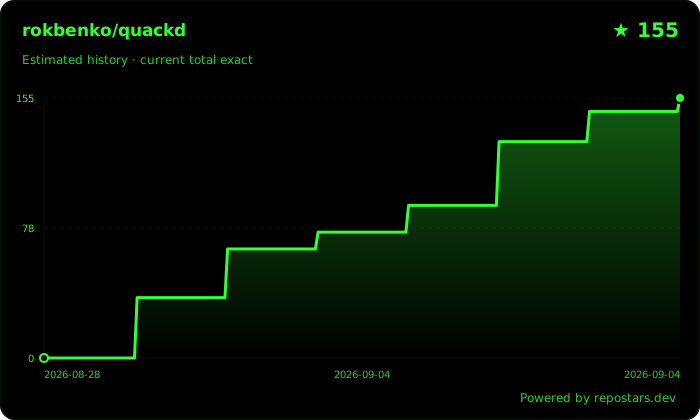
License
Apache 2.0. Third party and asset licenses (including why the robot's CC BY NC SA meshes are never vendored) are in docs/reference/licenses.md and NOTICE.
1 maintainer

Metadata
1 maintainer
Release files for quackd 0.18.0
For a detailed explanation of source distributions (sdists) and built distributions (wheels), please see the package formats documentation.
Source distribution (sdist)
| File | Size | Uploaded | |
|---|---|---|---|
| quackd-0.18.0.tar.gz | 3.0 MB | Details |
Built distribution (wheel)
| File | Interpreter | ABI | Platform | Reset |
|---|---|---|---|---|
| quackd-0.18.0-py3-none-any.whl | Python 3 | none | any | Details |
Total release size: 3.7 MB
Release files / quackd-0.18.0.tar.gz
| Download URL | quackd-0.18.0.tar.gz |
|---|---|
| Size | 3.0 MB |
| Tags | Source |
|
SHA-256 checksum How to use checksums |
7785845c2b8a8026f83ea70dbb7843ca0d02a953be9d1d6cae1a2d097f278be9
|
|
BLAKE2b-256 checksum How to use checksums |
a53471e1a1d8c8bb1b54f6d4a84b33fc7172c8ff2670af893eae1eef6ce7df81
|
| Upload date | |
|
Uploaded using Trusted Publishing? What is trusted publishing? |
No |
| Uploaded via |
uv/0.12.21 {"installer":{"name":"uv","version":"0.12.21","subcommand":["publish"]},"python":null,"implementation":{"name":null,"version":null},"distro":null,"system":{"name":null,"release":null},"cpu":null,"openssl_version":null,"setuptools_version":null,"rustc_version":null,"ci":null}
|
Release files / quackd-0.18.0-py3-none-any.whl
| Download URL | quackd-0.18.0-py3-none-any.whl |
|---|---|
| Size | 681.5 kB |
| Tags | Python 3 |
|
SHA-256 checksum How to use checksums |
3e73a1ed82dd1f615cda4cd6ecc123e52946d5fc357d58fd95b5786fcaa61615
|
|
BLAKE2b-256 checksum How to use checksums |
3a10469270129d4998e86028f0b9b07e909255ed9b5c32647d2dfdabc4ecc5bd
|
| Upload date | |
|
Uploaded using Trusted Publishing? What is trusted publishing? |
No |
| Uploaded via |
uv/0.12.21 {"installer":{"name":"uv","version":"0.12.21","subcommand":["publish"]},"python":null,"implementation":{"name":null,"version":null},"distro":null,"system":{"name":null,"release":null},"cpu":null,"openssl_version":null,"setuptools_version":null,"rustc_version":null,"ci":null}
|














