
Quarto Tech Memo
See the companion article for more background: G. Close, “Turning Your Notes into PDF Technical Memos and Data Science Reports,” Data Science Collective, Oct. 2025. Available: https://medium.com/data-science-collective/turning-your-notes-into-pdf-technical-memos-or-data-science-reports-ddd150273cc6
This is a quarto extension to create brief technical memos in PDF with the modern and ⚡fast Typst engine (built into Quarto). The memo style provides a professional single-column PDF layout with ample room for sidenotes and small figures in the margin. Inspired by Tufte handout style. The intended use is for brief technical memos and preprints of scientific articles. In addition, a 2-column compact variant and a 3-column A3 poster variants are provided. For reference, a legacy IEEE paper style is also included---using the LaTeX engine. Finally a slide deck variant using the Clean Slide Theme is provided.
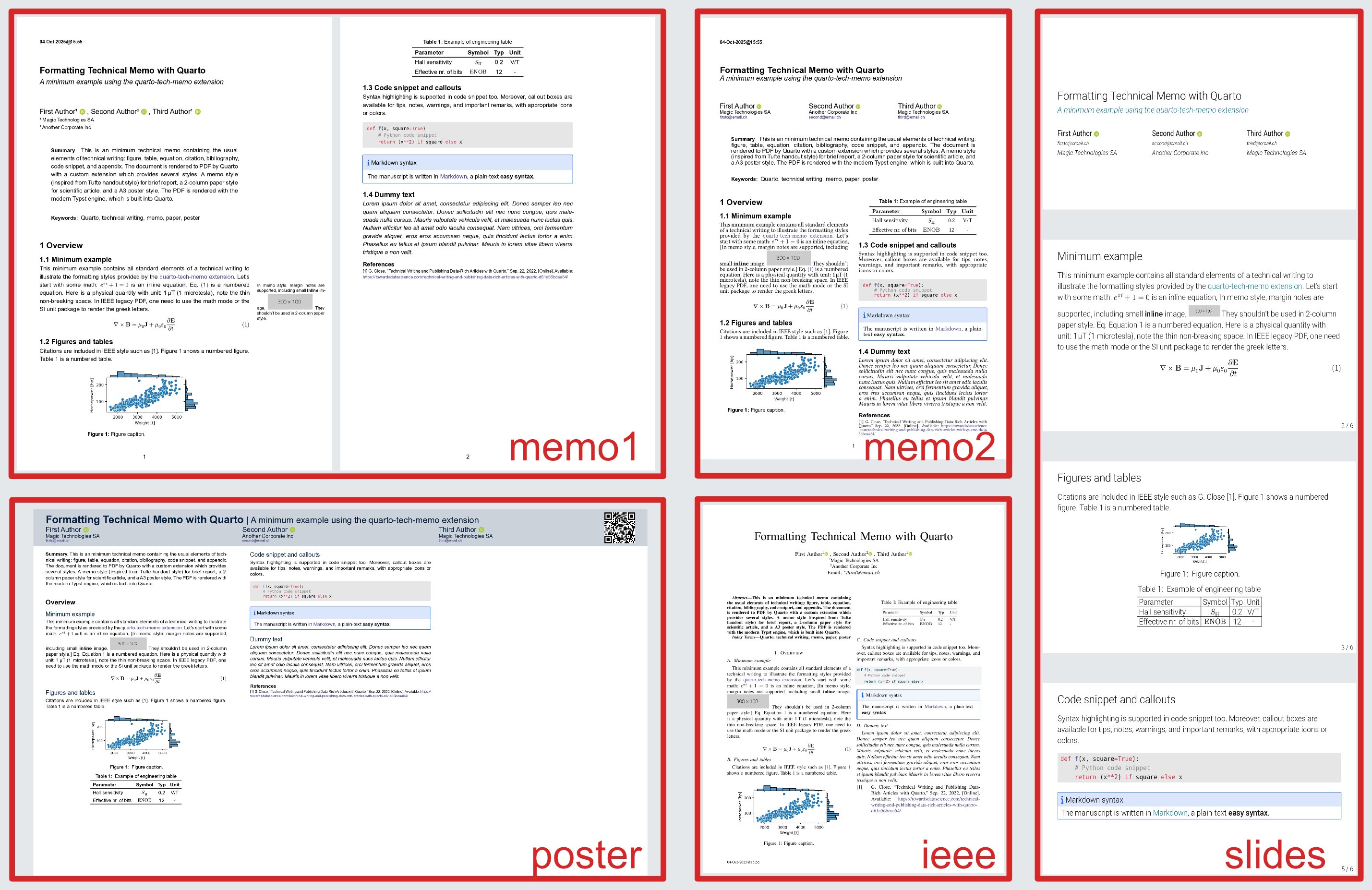
The following screenshot shows all variants of the same document. All are formatted from the same source in a few seconds (the IEEE style, with the legacy Latex engine, dominates the rendering time). All generated PDF files are included in the examples folder.
Usage as Python CLI tool
Install the quarto and the quarto-tech-memo tool with uv, and download the example:
uv tool install quarto-cli --with typst
uv tool install quarto-tech-memo
uvx cookiecutter -f gh:gael-close/quarto-tech-memo; cd new-dir;
To render the provided example, use the newly installed quarto-tech-memo command
to convert a markdown file to a polished PDF memo:
quarto-tech-memo new-tech-memo.md (--to memo1) (--preview)
For the variants, use one of the flags --to memo2, --to memo3, --to slides, --to poster, or --to ieee
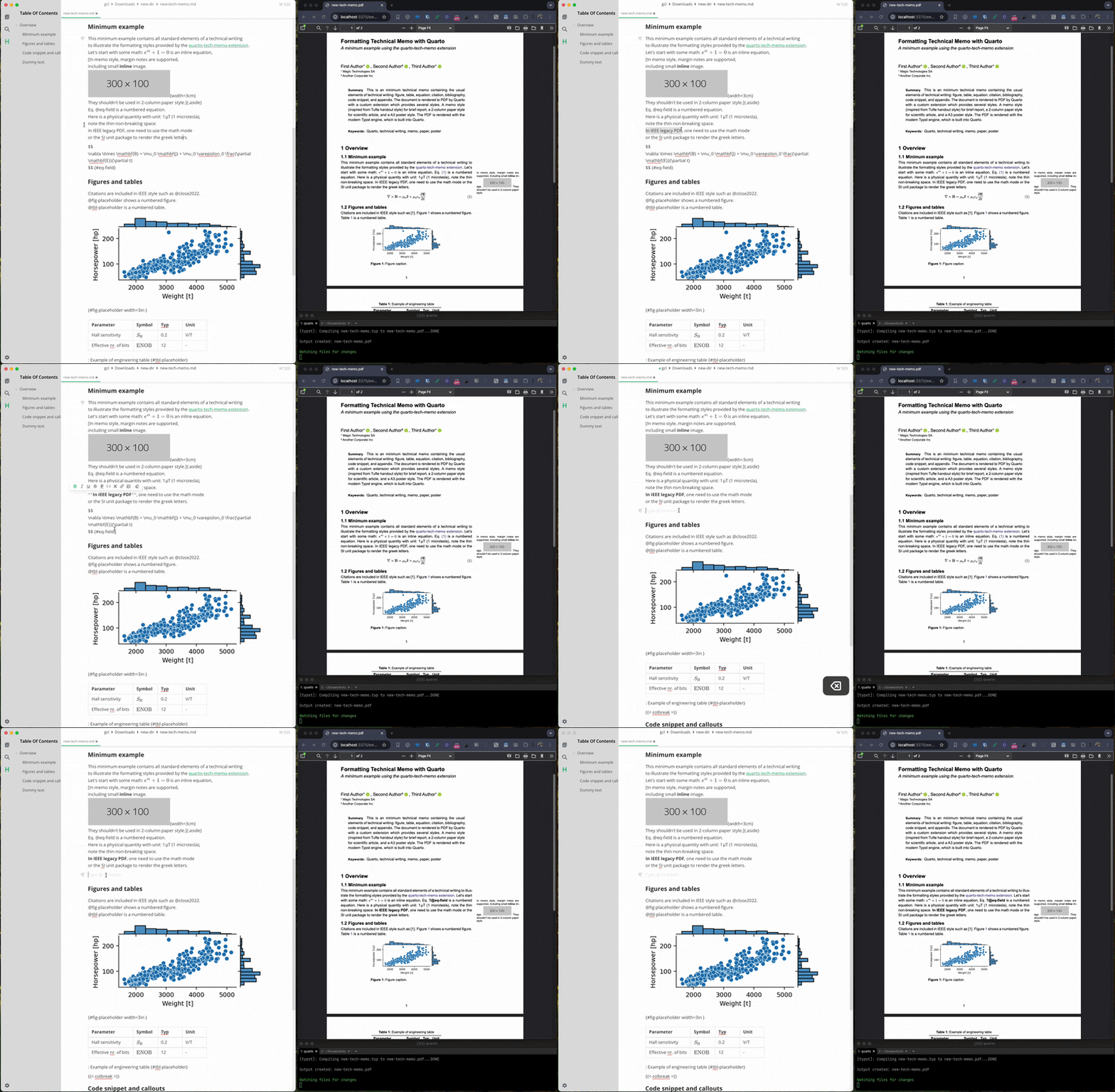
Edit new-tech-memo.md in your favorite editor and re-run the render command
or preview changes (one every save) live with:
quarto-tech-memo new-tech-memo.md --preview
Usage in an existing quarto project
To use in an existing Quarto project as an extension run:
# Install the extension (one time only)
quarto add gael-close/quarto-tech-memo

# render with:
quarto render your-file.md --to memo1-typst
Usage inside a data science project
See this repo https://github.com/gael-close/quarto-tech-paper for usage inside a data science project.
Details
- The memo template is based on: https://github.com/kazuyanagimoto/quarto-academic-typst.
- The margin notes are formatted by the marginalia package.
- In markdown, margin notes are should created with the
.asideclass: see https://quarto.org/docs/authoring/article-layout.html#asides. Note that this should be inline with the surrounding pargaraph (like a footnote). - Margin notes don't make sense in 2-column style. They are still included inline in the main paragraph nevertheless.
- The slides template is taken from https://typst.app/universe/package/touying-quarto-clean/.
- Custom Lua filters are included for various tweaks.
- To get the ORCID icon, download the fontawesome desktop variant.
Development
Run a test suite with Invoke. This will format the example memo in all variants.
invoke test (--gh) (--no-ieee)
The --gh flag uses the GitHub repo instead of a local copy of the extension.
The --no-ieee flag skips the legacy IEEE format which requires a LaTeX installation (install via: quarto install tinytex)
To extract the conversion time for a given format:
invoke conversion-time --format memo1-typst
Lua filters
To run the Lua filter standalone on a test file dev.md:
cd _extensions/meme1/lua-filters
quarto pandoc dev.md -t typst --lua-filter custom.lua
Run as uv tool
Install the tool from the local copy of the repo with:
z quarto-tech-memo
uv tool install . -e
Install tool from github
uv tool install git+https://github.com/gael-close/quarto-tech-memo --force
Upload to PyPI
Increment version number in pyproject.toml, then run:
rm -fr dist/*
uv build
uvx uv-publish
1 maintainer

Metadata
1 maintainer
Release files for quarto-tech-memo 0.3.1
For a detailed explanation of source distributions (sdists) and built distributions (wheels), please see the package formats documentation.
Source distribution (sdist)
| File | Size | Uploaded | |
|---|---|---|---|
| quarto_tech_memo-0.3.1.tar.gz | 5.2 kB | Details |
Built distribution (wheel)
| File | Interpreter | ABI | Platform | Reset |
|---|---|---|---|---|
| quarto_tech_memo-0.3.1-py3-none-any.whl | Python 3 | none | any | Details |
Total release size: 11.0 kB
Release files / quarto_tech_memo-0.3.1.tar.gz
| Download URL | quarto_tech_memo-0.3.1.tar.gz |
|---|---|
| Size | 5.2 kB |
| Tags | Source |
|
SHA-256 checksum How to use checksums |
a5310c9b88ba892cc27c17f124ecf45b806f6bfa6ce753163eee49ff8e921e27
|
|
BLAKE2b-256 checksum How to use checksums |
7ae138594ff6360a467c9dae6feb5607fe8a0a286504617675a3472dfc244c09
|
| Upload date | |
|
Uploaded using Trusted Publishing? What is trusted publishing? |
Yes |
| Uploaded via |
twine/6.1.0 CPython/3.13.7
|
Provenance
Provenance describes where a file came from. On PyPI, provenance is shared via attestations, which provide a verifiable record of the build or publishing details. View details, limitations and caveats.


PyPI Publish Attestation
PyPI verified that this artifact, at this checksum, originated from the publisher listed below.
Signed by GitHub Actions, verified by PyPI on Mar 3, 2026.
Transparency logRelease files / quarto_tech_memo-0.3.1-py3-none-any.whl
| Download URL | quarto_tech_memo-0.3.1-py3-none-any.whl |
|---|---|
| Size | 5.8 kB |
| Tags | Python 3 |
|
SHA-256 checksum How to use checksums |
bfa8daf976af713481bf7f596ed25b207a0770782ad173ee30b84d30575d0521
|
|
BLAKE2b-256 checksum How to use checksums |
f00e1e2dae487df7b12a903824adb5a1054af37ceccae67ce2a1ce1bce2f6db1
|
| Upload date | |
|
Uploaded using Trusted Publishing? What is trusted publishing? |
Yes |
| Uploaded via |
twine/6.1.0 CPython/3.13.7
|
Provenance
Provenance describes where a file came from. On PyPI, provenance is shared via attestations, which provide a verifiable record of the build or publishing details. View details, limitations and caveats.
PyPI Publish Attestation
PyPI verified that this artifact, at this checksum, originated from the publisher listed below.
Signed by GitHub Actions, verified by PyPI on Mar 3, 2026.
Transparency log













