
A CLI script to convert a markdown note to a polished PDF tech memo using Quarto.

Project description
Quarto Tech Memo
See the companion medium article for more background.
This is a quarto extension to create brief technical memos in PDF with the modern and ⚡fast Typst engine (built into Quarto). The memo style provides a professional single-column PDF layout with ample room for sidenotes and small figures in the margin. Inspired by Tufte handout style. The intended use is for brief technical memos and preprints of scientific articles. In addition, a 2-column compact variant and a 3-column A3 poster variants are provided. For reference, a legacy IEEE paper style is also included---using the LaTeX engine. Finally a slide deck variant using the Clean Slide Theme is provided.
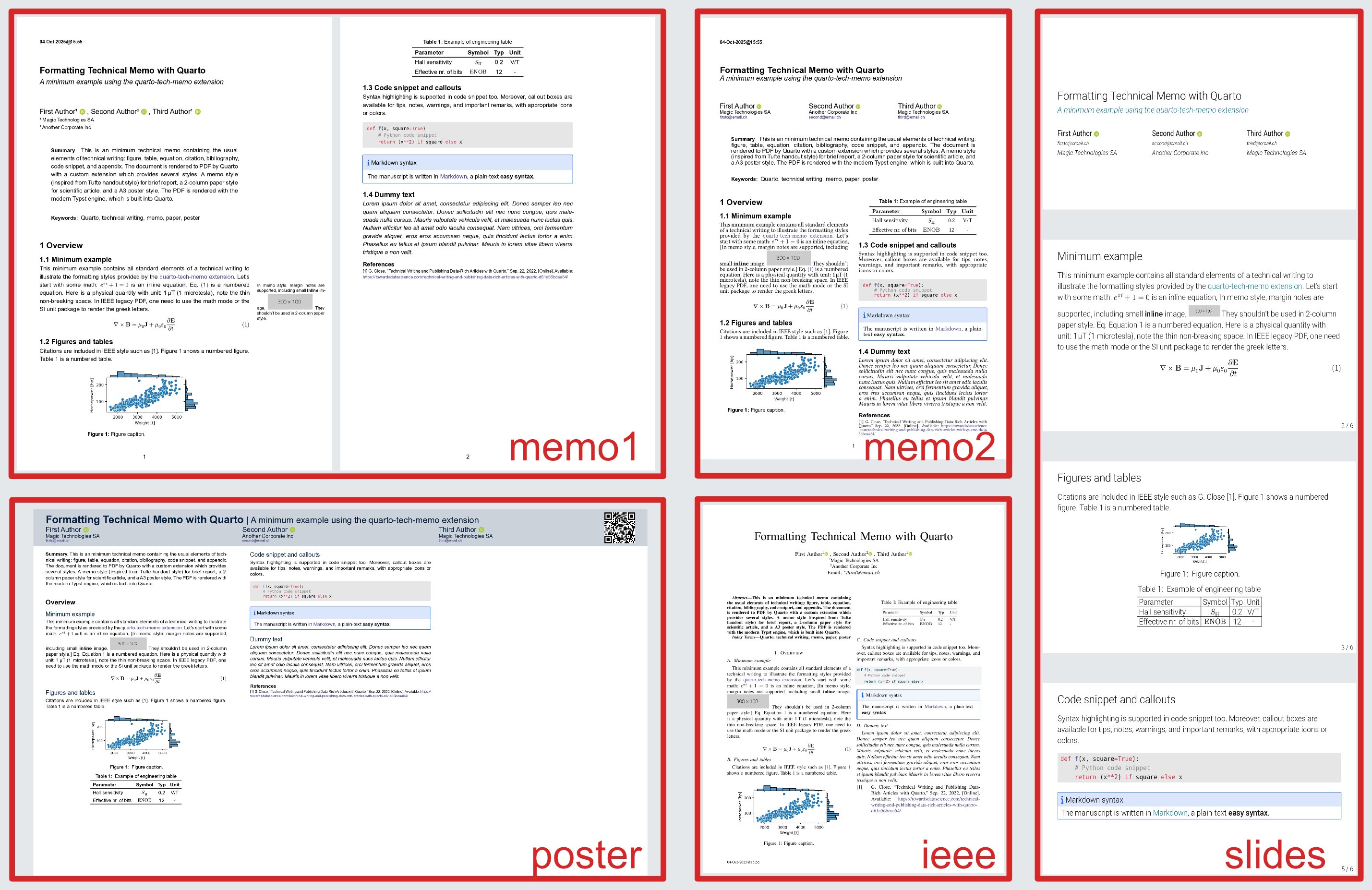
The following screenshot shows all variants of the same document. All are formatted from the same source in a few seconds (the IEEE style, with the legacy Latex engine, dominates the rendering time). All generated PDF files are included in the examples folder.
Usage as Python CLI tool
Install the tool, together with all dependencies, with:
pip install quarto-tech-memo

# preferably in a isolated environment with one of:
# pipx install quarto_tech_memo
# uv tool install quarto_tech_memo
Then use the quarto-tech-memo command to convert a markdown file to a polished PDF memo:
quarto-tech-memo you-file.md (--to memo1) (--preview)
Usage within the provided example
Install the dependencies with:
pip install cookiecutter quarto-tech-memo
To render the provided example:
cookiecutter -f gh:gael-close/quarto-tech-memo; cd new-dir;
quarto-tech-memo your-file.md
For the variants, use one of the flags --to memo2, --to memo3, --to slides, --to poster, or --to ieee
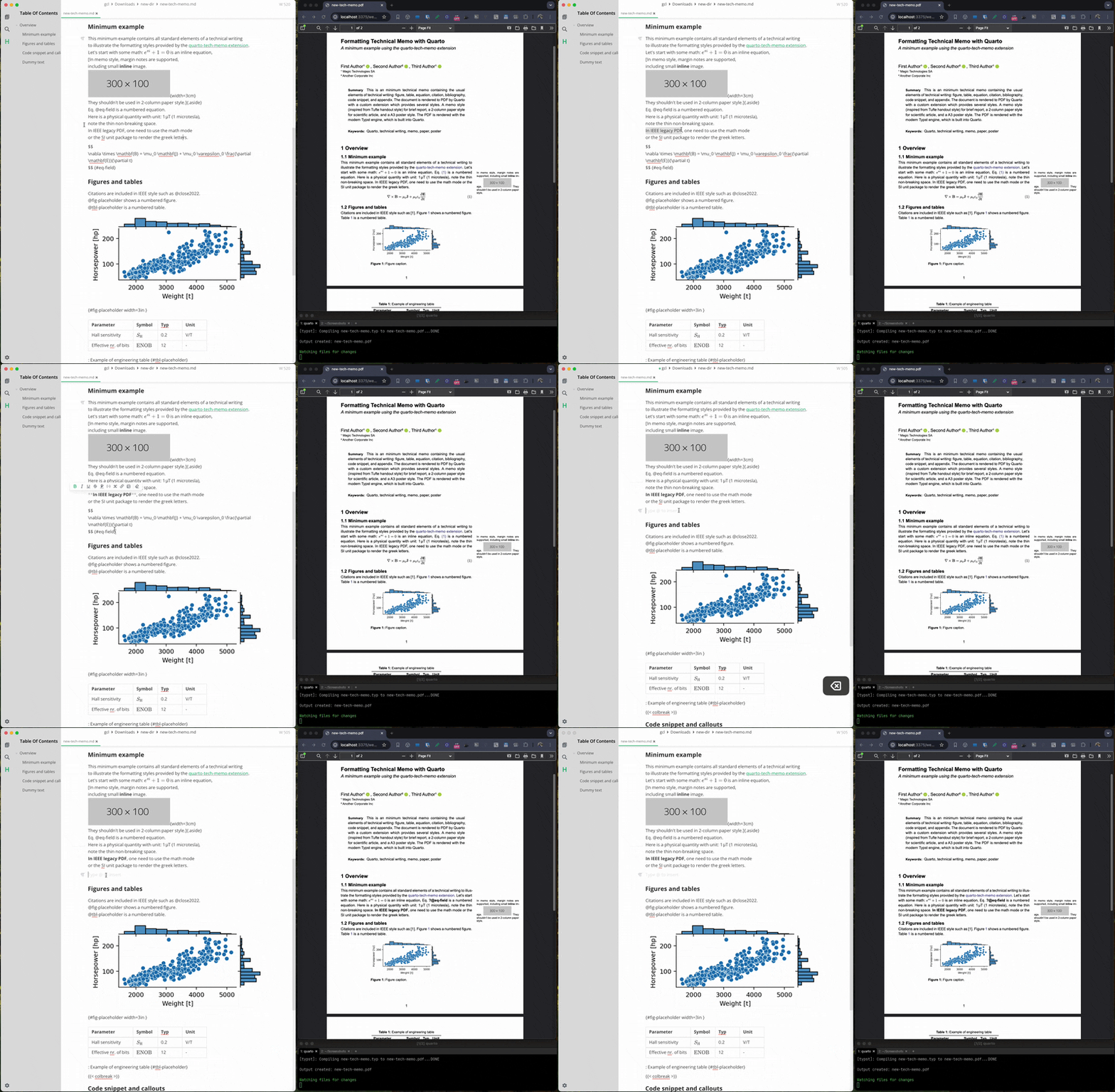
Edit new-tech-memo.md in your favorite editor and re-run the render command
or preview changes (one every save) live with:
quarto-tech-memo new-tech-memo.md --preview
Usage in an existing quarto project
To use in an existing Quarto project as an extension, run
# Install the extension (one time only)
quarto add gael-close/quarto-tech-memo

# render with:
quarto render your-file.md --to memo1-typst
Usage inside a data science project
See this repo https://github.com/gael-close/quarto-tech-paper for usage inside a data science project.
Details
- The memo template is based on: https://github.com/kazuyanagimoto/quarto-academic-typst.
- The margin notes are formatted by the marginalia package.
- In markdown, margin notes are should created with the
.asideclass: see https://quarto.org/docs/authoring/article-layout.html#asides. Note that this should be inline with the surrounding pargaraph (like a footnote). - Margin notes don't make sense in 2-column style. They are still included inline in the main paragraph nevertheless.
- The slides template is taken from https://typst.app/universe/package/touying-quarto-clean/.
- Custom Lua filters are included for various tweaks.
Development
Run a test suite with Invoke. This will format the example memo in all variants.
invoke test (--gh) (--no-ieee)
The --gh flag uses the GitHub repo instead of a local copy of the extension.
The --no-ieee flag skips the legacy IEEE format which requires a LaTeX installation (install via: quarto install tinytex)
To extract the conversion time for a given format:
invoke conversion-time --format memo1-typst
Lua filters
To run the Lua filter standalone on a test file dev.md:
cd _extensions/meme1/lua-filters
quarto pandoc dev.md -t typst --lua-filter custom.lua
Run as uv tool
Install the tool from the local copy of the repo with:
z quarto-tech-memo
uv tool install . -e
Upload to PyPI
rm -fr dist/*
uv build
uvx uv-publish


Download files
Download the file for your platform. If you're not sure which to choose, learn more about installing packages.
Source Distribution
Built Distribution
Filter files by name, interpreter, ABI, and platform.
If you're not sure about the file name format, learn more about wheel file names.
Copy a direct link to the current filters
File details
Details for the file quarto_tech_memo-0.2.0.tar.gz.
File metadata
- Download URL: quarto_tech_memo-0.2.0.tar.gz
- Upload date:
- Size: 5.2 kB
- Tags: Source
- Uploaded using Trusted Publishing? No
- Uploaded via: uv/0.8.19
File hashes
| Algorithm | Hash digest | |
|---|---|---|
| SHA256 |
fe874334fb47ba21ace699d2e9c89104d6a1cbeecedba5d35cf4bba420f54f17
|
|
| MD5 |
a0404f38b3ff5f3d72437d867571d9d9
|
|
| BLAKE2b-256 |
c22047d34e0353b9deeb5d60920b2df9775bc99579b83955bccf6e73b55fb6be
|
File details
Details for the file quarto_tech_memo-0.2.0-py3-none-any.whl.
File metadata
- Download URL: quarto_tech_memo-0.2.0-py3-none-any.whl
- Upload date:
- Size: 5.8 kB
- Tags: Python 3
- Uploaded using Trusted Publishing? No
- Uploaded via: uv/0.8.19
File hashes
| Algorithm | Hash digest | |
|---|---|---|
| SHA256 |
f19017cdd5d150d75ab846a339c6f1301cbd2430a0d87dee07d511f11cd686f8
|
|
| MD5 |
ffa5eca34f92627edf0b296f56d1d5cc
|
|
| BLAKE2b-256 |
2675872a4f9d8c2e41f0e9482d7d17b41c3f1ffc7555db79b662464de6746474
|






