
qucirc
A lightweight and extensible quantum circuit representation for Python and Rust.
| crates.io | docs.rs | Github | PyPI | Documentation |
Features
- Support for common quantum gates (H, X, Y, Z, CNOT, etc.) defined in OpenQASM 3.0 Standard Library
- Python API for easy integration
- Gates are represented using
Box<dyn Operation>. - Extendable circuit visualization using Typst
- DAG Representation of the circuit, easily exported to
petgraph. - Support for parameterized gates (RX, RY, RZ, U, etc.)
- Classical bit operations and measurements
- SVG visualization support
Installation
Python
pip install qucirc
Rust
cargo add qucirc
Usage
Basic Circuit Creation
from qucirc import Circuit, ops

# Create a new circuit with 2 qubits
circ = Circuit(2)

# Add some gates
circ += ops.H[0]  # Hadamard gate on qubit 0
circ += ops.CNOT[0, 1]  # CNOT gate with control=0, target=1

# Visualize the circuit
print(circ.to_typst())  # Typst representation
print(circ.to_svg())  # SVG visualization
Working with Gates
The library supports various quantum gates:
- Single-qubit gates: H, X, Y, Z, S, T
- Parameterized gates: RX(θ), RY(θ), RZ(θ), P(φ)
- Two-qubit gates: CNOT, CY, CZ, SWAP
- Controlled gates: CH, CP(φ), CRX(θ), CRY(θ), CRZ(θ), CU(θ,φ,λ)
Example with parameterized gates:
from qucirc import Circuit, ops
import math

circuit = Circuit(2)
circuit += ops.RX(math.pi/2)[0]  # Rotation around X axis
circuit += ops.CP(math.pi/4)[0, 1]  # Controlled phase gate

circ
Classical Bits and Measurements
from qucirc import Circuit, ops

circuit = Circuit(2)
# Add a classical bit
bit_index = circuit.new_bits(bitwidth=1, name="c0")
# Add measurement
circuit.add_gate(ops.Measure[0, bit_index])
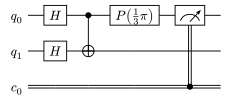
Circuit Visualization
The library provides multiple ways to visualize circuits:
- Typst visualization based on Quill:
# Using Jupyter Notebook
import math
import qucirc
from qucirc import ops

circ = qucirc.Circuit()

[q0, q1] = circ.new_qubits("q_0", "q_1")

circ += ops.H[q0]
circ += ops.H[q1]
circ += ops.CNOT[q0, q1]
circ += ops.P(math.pi / 3)[q0]

c0 = circ.new_bits()

circ += ops.Measure[q0, c0]

circ
- Exporting to Typst (for documentation):
print(circ.to_typst())
- String representation:
print(circ)
DAG-based Symbolic representation
The library uses a Directed Acyclic Graph (DAG) to represent quantum circuits symbolically. Every gates are represented as a node in a petgraph::DiGraph. Gates are symbolic and accuriate, all parameters are represented by rational number accurately. So that Eq between circuits are easily supported:
import math
import qucirc
from qucirc import ops

circ1 = qucirc.Circuit(2)
circ1 += ops.H[0]
circ1 += ops.P(1/3 * math.pi)[1]

circ2 = qucirc.Circuit(2)
circ2 += ops.P(1/3 * math.pi)[1]
circ2 += ops.H[0]

assert circ1 == circ2
Adding new gates or wires (Rust-only)
New gates
New gates can be easily added by implementing qucirc::ops::Operation:
pub trait Operation:
    std::fmt::Debug + std::fmt::Display + DynClone + DynEq + DynHash + Downcast + Send + Sync
{
    /// Validates the input wires against the operation-specific type requirements.
    fn type_check(&self, inputs: &[&dyn Wire]) -> Result<(), CircuitError>;

    // Function for visuallization using typst quill, with default implementation.
    fn add_quill_column(&self, gates: &[usize], table: &mut QuillTable) { ... }
}
Note that qucirc::ops::Operation is not associated with any qubits or classical bits. To add qucirc::ops::Operation into the circuit, wrap it with qucirc::circ::Gate:
pub struct Gate {
    pub operation: Box<dyn Operation>,
    pub inputs: Vec<usize>,
}
qucirc::circ::Gate can be directly add into the circuit using .push method.
New types of wire
Similarly, to add a new type of wire, the following trait need to be implemented:
pub trait Wire:
    std::fmt::Debug + std::fmt::Display + DynClone + DynEq + DynHash + Downcast + Send + Sync
{
    fn is_quantum(&self) -> bool;
    fn bitwidth(&self) -> Option<usize>;

    // Function for visuallization using typst quill, with default implementation.
    fn quill_wire_start(&self) -> Vec<String> {...}
}
Then add the wire to the circuit using new_wire method.
Contributing
Contributions are welcome! Please feel free to submit a Pull Request.
License
This project is licensed under the MIT License - see the LICENSE file for details.
1 maintainer

Release files for qucirc 0.1.3
For a detailed explanation of source distributions (sdists) and built distributions (wheels), please see the package formats documentation.
Source distribution (sdist)
| File | Size | Uploaded | |
|---|---|---|---|
| qucirc-0.1.3.tar.gz | 47.1 kB | Details |
Built distribution (wheel)
| File | Interpreter | ABI | Platform | Reset |
|---|---|---|---|---|
| qucirc-0.1.3-cp311-cp311-manylinux_2_31_x86_64.whl | CPython 3.11 | CPython 3.11 | Linux glibc 2.31+ x86-64 | Details |
Total release size: 11.8 MB
Release files / qucirc-0.1.3.tar.gz
| Download URL | qucirc-0.1.3.tar.gz |
|---|---|
| Size | 47.1 kB |
| Tags | Source |
|
SHA-256 checksum How to use checksums |
daae83264f8ac433f42530dac14b6242c3860458a646cbeb81c2ecc07edff607
|
|
BLAKE2b-256 checksum How to use checksums |
03779ea4d0441066e67d45cb51fb0a377ea65f87504e36dc4fc57f70b5db7a6f
|
| Upload date | |
|
Uploaded using Trusted Publishing? What is trusted publishing? |
No |
| Uploaded via |
maturin/1.8.4
|
Release files / qucirc-0.1.3-cp311-cp311-manylinux_2_31_x86_64.whl
| Download URL | qucirc-0.1.3-cp311-cp311-manylinux_2_31_x86_64.whl |
|---|---|
| Size | 11.7 MB |
| Tags | CPython 3.11 Linux glibc 2.31+ x86-64 |
|
SHA-256 checksum How to use checksums |
0221fbe4690aff54a0337b08250e3e2550295826a2faf88dbd6196c32db33e72
|
|
BLAKE2b-256 checksum How to use checksums |
0da28ec1b79a445839a1496ffc516b27b2312d228f7f8be38cb6c34f5126ebb9
|
| Upload date | |
|
Uploaded using Trusted Publishing? What is trusted publishing? |
No |
| Uploaded via |
maturin/1.8.4
|














