
A Python library for quantum circuit construction and manipulation. It is a Python wrapper for the Rust library `qucirc`.

Project description
qucirc
A lightweight and extensible quantum circuit representation for Python and Rust.
| crates.io | docs.rs | Github | PyPI | Documentation |
Features
- Support for common quantum gates (H, X, Y, Z, CNOT, etc.) defined in OpenQASM 3.0 Standard Library
- Python API for easy integration
- Gates are represented using
Box<dyn Operation>. - Extendable circuit visualization using Typst
- DAG Representation of the circuit, easily exported to
petgraph. - Support for parameterized gates (RX, RY, RZ, U, etc.)
- Classical bit operations and measurements
- SVG visualization support
Installation
Python
pip install qucirc
Rust
cargo add qucirc
Usage
Basic Circuit Creation
from qucirc import Circuit, ops

# Create a new circuit with 2 qubits
circ = Circuit(2)

# Add some gates
circ += ops.H[0]  # Hadamard gate on qubit 0
circ += ops.CNOT[0, 1]  # CNOT gate with control=0, target=1

# Visualize the circuit
print(circ.to_typst())  # Typst representation
print(circ.to_svg())  # SVG visualization
Working with Gates
The library supports various quantum gates:
- Single-qubit gates: H, X, Y, Z, S, T
- Parameterized gates: RX(θ), RY(θ), RZ(θ), P(φ)
- Two-qubit gates: CNOT, CY, CZ, SWAP
- Controlled gates: CH, CP(φ), CRX(θ), CRY(θ), CRZ(θ), CU(θ,φ,λ)
Example with parameterized gates:
from qucirc import Circuit, ops
import math

circuit = Circuit(2)
circuit += ops.RX(math.pi/2)[0]  # Rotation around X axis
circuit += ops.CP(math.pi/4)[0, 1]  # Controlled phase gate

circ
Classical Bits and Measurements
from qucirc import Circuit, ops

circuit = Circuit(2)
# Add a classical bit
bit_index = circuit.new_bits(bitwidth=1, name="c0")
# Add measurement
circuit.add_gate(ops.Measure[0, bit_index])
Circuit Visualization
The library provides multiple ways to visualize circuits:
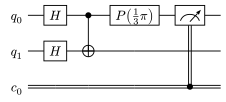
- Typst visualization based on Quill:
# Using Jupyter Notebook
import math
import qucirc
from qucirc import ops

circ = qucirc.Circuit()

[q0, q1] = circ.new_qubits("q_0", "q_1")

circ += ops.H[q0]
circ += ops.H[q1]
circ += ops.CNOT[q0, q1]
circ += ops.P(math.pi / 3)[q0]

c0 = circ.new_bits()

circ += ops.Measure[q0, c0]

circ
- Exporting to Typst (for documentation):
print(circ.to_typst())
- String representation:
print(circ)
DAG-based Symbolic representation
The library uses a Directed Acyclic Graph (DAG) to represent quantum circuits symbolically. Every gates are represented as a node in a petgraph::DiGraph. Gates are symbolic and accuriate, all parameters are represented by rational number accurately. So that Eq between circuits are easily supported:
import math
import qucirc
from qucirc import ops

circ1 = qucirc.Circuit(2)
circ1 += ops.H[0]
circ1 += ops.P(1/3 * math.pi)[1]

circ2 = qucirc.Circuit(2)
circ2 += ops.P(1/3 * math.pi)[1]
circ2 += ops.H[0]

assert circ1 == circ2
Adding new gates or wires (Rust-only)
New gates
New gates can be easily added by implementing qucirc::ops::Operation:
pub trait Operation:
    std::fmt::Debug + std::fmt::Display + DynClone + DynEq + DynHash + Downcast + Send + Sync
{
    /// Validates the input wires against the operation-specific type requirements.
    fn type_check(&self, inputs: &[&dyn Wire]) -> Result<(), CircuitError>;

    // Function for visuallization using typst quill, with default implementation.
    fn add_quill_column(&self, gates: &[usize], table: &mut QuillTable) { ... }
}
Note that qucirc::ops::Operation is not associated with any qubits or classical bits. To add qucirc::ops::Operation into the circuit, wrap it with qucirc::circ::Gate:
pub struct Gate {
    pub operation: Box<dyn Operation>,
    pub inputs: Vec<usize>,
}
qucirc::circ::Gate can be directly add into the circuit using .push method.
New types of wire
Similarly, to add a new type of wire, the following trait need to be implemented:
pub trait Wire:
    std::fmt::Debug + std::fmt::Display + DynClone + DynEq + DynHash + Downcast + Send + Sync
{
    fn is_quantum(&self) -> bool;
    fn bitwidth(&self) -> Option<usize>;

    // Function for visuallization using typst quill, with default implementation.
    fn quill_wire_start(&self) -> Vec<String> {...}
}
Then add the wire to the circuit using new_wire method.
Contributing
Contributions are welcome! Please feel free to submit a Pull Request.
License
This project is licensed under the MIT License - see the LICENSE file for details.
Release history Release notifications | RSS feed


Download files
Download the file for your platform. If you're not sure which to choose, learn more about installing packages.
Source Distribution
Built Distribution
Filter files by name, interpreter, ABI, and platform.
If you're not sure about the file name format, learn more about wheel file names.
Copy a direct link to the current filters
File details
Details for the file qucirc-0.0.1.tar.gz.
File metadata
- Download URL: qucirc-0.0.1.tar.gz
- Upload date:
- Size: 47.1 kB
- Tags: Source
- Uploaded using Trusted Publishing? No
- Uploaded via: maturin/1.8.4
File hashes
| Algorithm | Hash digest | |
|---|---|---|
| SHA256 |
f541d0ce49c0dd2e9f9c75602a287a8f340f59b77b304cd7279b494ef2e65f5d
|
|
| MD5 |
e9e55732321c7bb7d75eade4529e81c7
|
|
| BLAKE2b-256 |
ea5bb3b6be088226aebb3095a0023b88577cdb7d82325c280128cbdb847aa9da
|
File details
Details for the file qucirc-0.0.1-cp311-cp311-manylinux_2_5_x86_64.manylinux1_x86_64.whl.
File metadata
- Download URL: qucirc-0.0.1-cp311-cp311-manylinux_2_5_x86_64.manylinux1_x86_64.whl
- Upload date:
- Size: 8.8 kB
- Tags: CPython 3.11, manylinux: glibc 2.5+ x86-64
- Uploaded using Trusted Publishing? No
- Uploaded via: maturin/1.8.4
File hashes
| Algorithm | Hash digest | |
|---|---|---|
| SHA256 |
c2addb0d4c6376f8a8b3bc8c0a1c2c824a101bfc72ad91999383887bab8dd452
|
|
| MD5 |
21bb735c39f615c2c0955b3f2f1e2ab0
|
|
| BLAKE2b-256 |
ed09c90c14e67a3b206f9e96259ba9d88c1e09acb895e8130624b87d5bf13a18
|






