
Python Quick Colorpicker





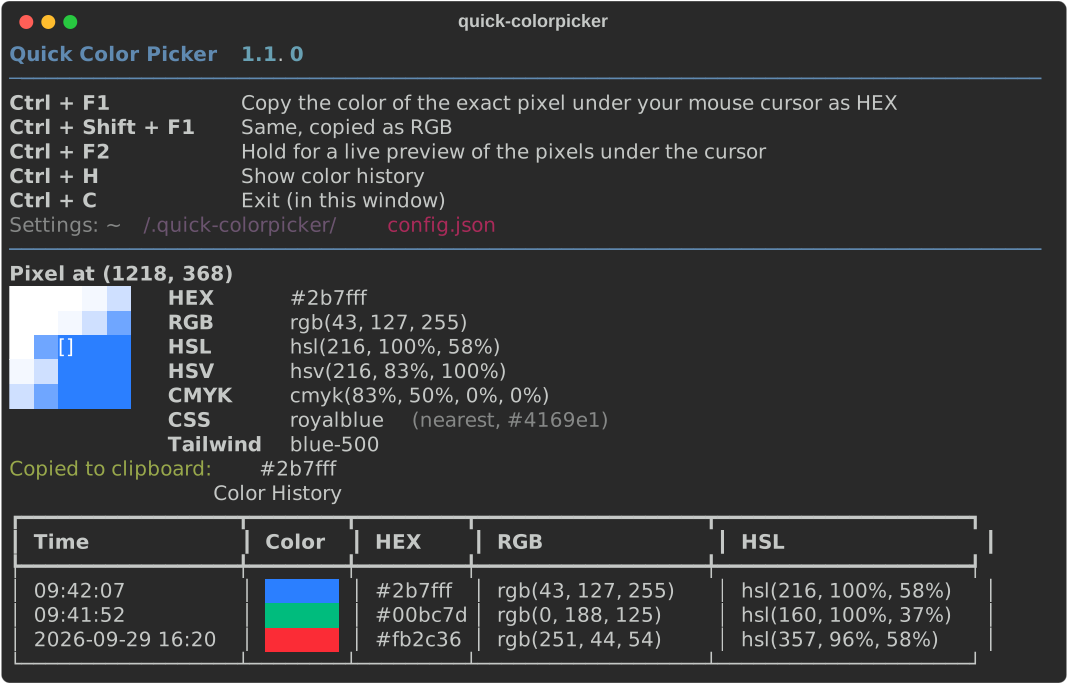
A cross-platform color picker that lives in your terminal. Point your mouse at anything on any screen, press Ctrl + F1, and the color of the exact pixel under the cursor is copied to your clipboard.
Features
- Ctrl + F1 reads the exact pixel under your mouse cursor and copies it (HEX by default)
- Ctrl + Shift + F1 copies the same pick in a second format (RGB by default)
- Ctrl + F2 (hold) shows a live preview of the pixels under the cursor while you aim
- 5x5 pixel zoom with every pick, so you see exactly which pixel was read
- HEX, RGB, HSL, HSV, CMYK, nearest CSS color name and nearest Tailwind CSS color
- Color history (Ctrl + H), kept between sessions, exportable to JSON, CSS or a GIMP palette
- Works on multiple monitors and on scaled (high-DPI) displays
- Windows, macOS and Linux (X11)
Installation
pip install quick-colorpicker
Or from source:
git clone https://github.com/Monstertov/Python-Quick-Colorpicker.git
cd Python-Quick-Colorpicker
pip install .
Needs Python 3.9 or newer. pip installs everything else for you:
- pynput: global hotkeys and the mouse position
- Pillow: reads the pixels from the screen
- pyperclip: copies the color to the clipboard
- rich: the colored terminal output
Usage
quick-colorpicker
Leave it running in a terminal and use the hotkeys from any application:
| Hotkey | Action |
|---|---|
| Ctrl + F1 | Copy the color of the exact pixel under your mouse cursor |
| Ctrl + Shift + F1 | Same, copied in the alternate format |
| Ctrl + F2 (hold) | Live preview of the pixels under the cursor; release to stop |
| Ctrl + H | Show color history |
| Ctrl + C | Exit (in the picker's own terminal window) |
Command-line options
| Option | Effect |
|---|---|
--format FORMAT |
Format copied by Ctrl + F1: hex, rgb, hsl, hsv, cmyk, css, tailwind |
--alt-format FORMAT |
Format copied by Ctrl + Shift + F1 |
--no-copy |
Show picks without copying them to the clipboard |
--no-loupe |
Show a plain swatch instead of the 5x5 pixel zoom |
--history-size N |
Number of colors to keep in history (default 10) |
--export FILE |
Write the history to FILE (.json, .css or .gpl) and exit |
--version |
Show the version |
Example: copy Tailwind class colors and keep the last 50 picks:
quick-colorpicker --format tailwind --history-size 50
Settings file
Create ~/.quick-colorpicker/config.json (on Windows C:\Users\<you>\.quick-colorpicker\config.json)
to change the defaults. Every key is optional, command-line options win over the file:
{
  "pick_hotkey": "ctrl+f1",
  "alt_pick_hotkey": "ctrl+shift+f1",
  "live_hotkey": "ctrl+f2",
  "history_hotkey": "ctrl+h",
  "format": "hex",
  "alt_format": "rgb",
  "auto_copy": true,
  "history_size": 10,
  "loupe": true
}
Hotkeys are modifiers (ctrl, shift, alt, cmd) plus one key joined with +. The key can be a
pynput key name
(f1, insert, space, ...), a single character, or a mouse button: left_click, right_click,
middle_click. Use "" to turn a hotkey off.
Export
quick-colorpicker --export colors.gpl   # GIMP, Inkscape, Krita palette
quick-colorpicker --export colors.css   # :root { --color-1: #2b7fff; ... }
quick-colorpicker --export colors.json
The newest pick comes first. History is stored in ~/.quick-colorpicker/color_history.json.
Platform notes
- macOS: allow your terminal app in System Settings > Privacy & Security > Accessibility (for the hotkeys) and Screen Recording (to read pixels), then restart the terminal.
- Linux: needs an X11 session (Xorg or XWayland apps). Global hotkeys do not work on pure Wayland.
Clipboard copy needs
xcliporxselinstalled. - Windows: works out of the box, including multi-monitor and mixed display scaling.
Development
pip install -e .
python -m unittest discover -s tests
Releases: bump __version__ in quick_colorpicker/__init__.py, add a section to CHANGELOG.md, push
the commit and a vX.Y.Z tag. CI tests, publishes to PyPI and creates the GitHub release.
Contributing
Bug reports, ideas and pull requests are welcome on GitHub.
License
MIT. See the changelog for release history.
Created by Monstertov
1 maintainer

Metadata
1 maintainer
Release files for quick-colorpicker 1.1.1
For a detailed explanation of source distributions (sdists) and built distributions (wheels), please see the package formats documentation.
Source distribution (sdist)
| File | Size | Uploaded | |
|---|---|---|---|
| quick_colorpicker-1.1.1.tar.gz | 20.2 kB | Details |
Built distribution (wheel)
| File | Interpreter | ABI | Platform | Reset |
|---|---|---|---|---|
| quick_colorpicker-1.1.1-py3-none-any.whl | Python 3 | none | any | Details |
Total release size: 38.4 kB
Release files / quick_colorpicker-1.1.1.tar.gz
| Download URL | quick_colorpicker-1.1.1.tar.gz |
|---|---|
| Size | 20.2 kB |
| Tags | Source |
|
SHA-256 checksum How to use checksums |
6d738b3229fdbd0095867f07750307501ff2d05cea2a588f6159ed9bb7cb1ef5
|
|
BLAKE2b-256 checksum How to use checksums |
41a68af820b49b5772306c98d5f32b733b6effc277dab35ae1631f77553865cb
|
| Upload date | |
|
Uploaded using Trusted Publishing? What is trusted publishing? |
No |
| Uploaded via |
twine/7.0.0 CPython/3.13.14
|
Release files / quick_colorpicker-1.1.1-py3-none-any.whl
| Download URL | quick_colorpicker-1.1.1-py3-none-any.whl |
|---|---|
| Size | 18.2 kB |
| Tags | Python 3 |
|
SHA-256 checksum How to use checksums |
ccb5ed3fc897f72bfb71949d5cfb0e4d5438fe59e0c2f821fb13f24f3c1e148a
|
|
BLAKE2b-256 checksum How to use checksums |
eb32a3e1fd52d9135316e66bb7f6492aec70b4fa93151058e0402c11efc4d61d
|
| Upload date | |
|
Uploaded using Trusted Publishing? What is trusted publishing? |
No |
| Uploaded via |
twine/7.0.0 CPython/3.13.14
|














