
A professional cross-platform color picking utility

Project description
Python Quick Colorpicker




A professional cross-platform color picking utility that lets you instantly grab colors from anywhere on your screen. Perfect for developers, designers, and digital artists who need quick access to color values.
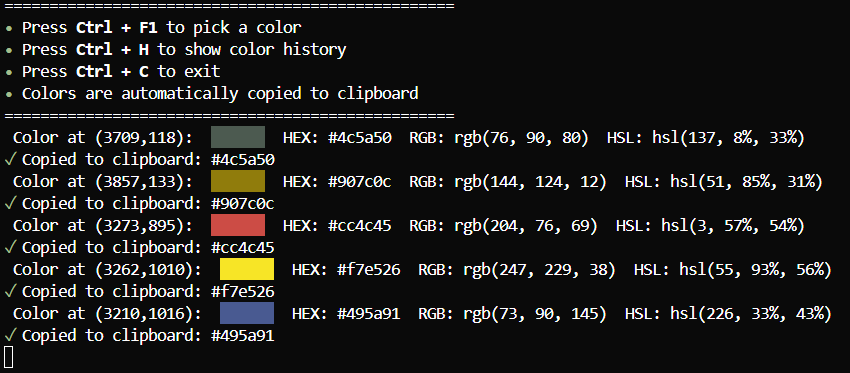
Features
- Pick colors anywhere on screen with Ctrl + F1
- Automatic clipboard copying of color values
- Multiple color formats supported (HEX, RGB, HSL)
- Color history with visual previews
- Cross-platform compatibility (Windows, macOS, Linux)
- Configurable hotkeys
- Beautiful terminal UI with color previews
- Lightweight and fast
Installation
Via pip (Recommended)
pip install quick-colorpicker
From source
git clone https://github.com/Monstertov/quick-colorpicker.git
cd quick-colorpicker
pip install -r requirements.txt
python setup.py install
Requirements
- Python 3.6 or higher
- Dependencies are automatically installed with pip:
- pynput
- pyautogui
- Pillow
- pyperclip
- rich
Usage
Quick Start
After installation, simply run:
quick-colorpicker
Keyboard Shortcuts
- Ctrl + F1: Pick color under cursor
- Ctrl + H: Show color history
- Ctrl + C: Exit application
Features in Detail
Color Formats
Colors are displayed in multiple formats:
- HEX:
#RRGGBB - RGB:
rgb(R, G, B) - HSL:
hsl(H, S%, L%)
Color History
- Automatically saves your last 10 picked colors
- Displays time of pick and all color formats
- Persists between sessions
Clipboard Integration
Colors are automatically copied to your clipboard in your preferred format (configurable in the script)
Configuration
You can customize the following settings in the script:
config = {
    "hotkey_modifiers": {keyboard.Key.ctrl},
    "hotkey_trigger": keyboard.Key.f1,
    "trigger_type": "keypress",
    "max_history": 10,
    "default_color_format": "hex",  # Options: hex, rgb, hsl
    "auto_copy": True
}
Contributing
Contributions are welcome! Feel free to:
- Report bugs
- Suggest new features
- Submit pull requests
License
This project is open source and available under the MIT License.
Created by Monstertov


Download files
Download the file for your platform. If you're not sure which to choose, learn more about installing packages.
Source Distribution
Built Distribution
Filter files by name, interpreter, ABI, and platform.
If you're not sure about the file name format, learn more about wheel file names.
Copy a direct link to the current filters
File details
Details for the file quick_colorpicker-1.0.3.tar.gz.
File metadata
- Download URL: quick_colorpicker-1.0.3.tar.gz
- Upload date:
- Size: 6.0 kB
- Tags: Source
- Uploaded using Trusted Publishing? No
- Uploaded via: twine/6.1.0 CPython/3.12.1
File hashes
| Algorithm | Hash digest | |
|---|---|---|
| SHA256 |
ad7c1783037ffac95a36248738619c3ffb5394729a2d0b75f6352bd5238cbf8b
|
|
| MD5 |
d8767a2e8b6d559e55ca4d658cff45b4
|
|
| BLAKE2b-256 |
f1bd6714eb0d08654a1294ee1cbfeba603cd48597de786a3c48757c6c18905e6
|
File details
Details for the file quick_colorpicker-1.0.3-py3-none-any.whl.
File metadata
- Download URL: quick_colorpicker-1.0.3-py3-none-any.whl
- Upload date:
- Size: 6.5 kB
- Tags: Python 3
- Uploaded using Trusted Publishing? No
- Uploaded via: twine/6.1.0 CPython/3.12.1
File hashes
| Algorithm | Hash digest | |
|---|---|---|
| SHA256 |
71421ec8cadc5de9422e473621cb7af6f97f9d554e50550bb0ca41a930882f61
|
|
| MD5 |
838cd27c3f16d014354a449374644ea2
|
|
| BLAKE2b-256 |
bc8da2d64efc2f1dede206f21b1cd9aeb5e9a2292db0819903a765a6ae30fa3b
|






