
Qwen-Reverse



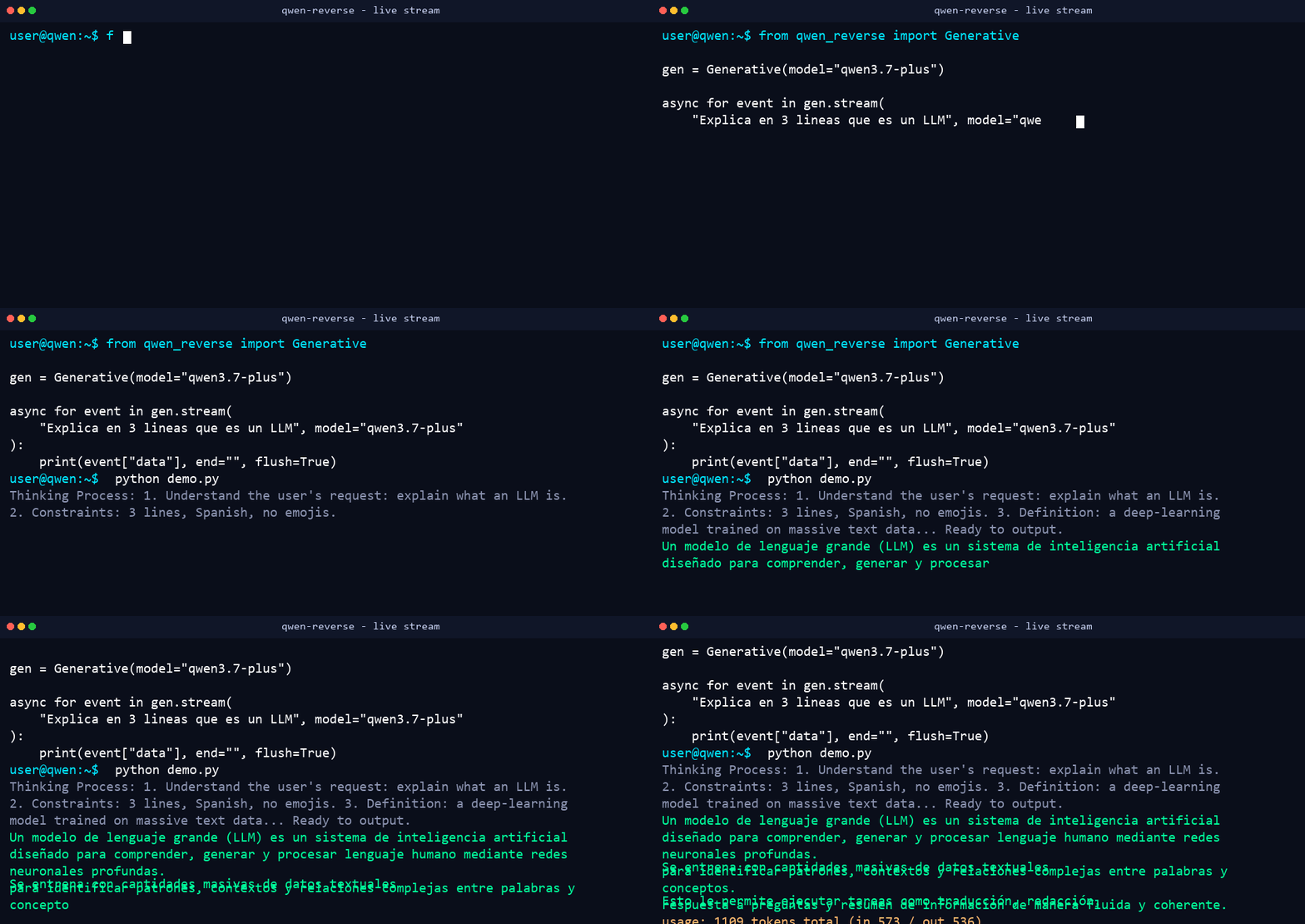
Reverse-engineered async Python client for chat.qwen.ai — text chat, streaming with real-time reasoning, tool calling, image and video generation. No official API key required (works anonymously).
pip install qwen-reverse
⚡ Performance, Limits & Benchmarks (Tested & Verified)
In-depth stress testing on the live chat.qwen.ai backend reveals the following real-world limits and throughput capabilities:
📊 Concurrency & Rate Limit Results
| Concurrent Requests | Success Rate | Avg Total Batch Time | Status | Notes |
|---|---|---|---|---|
| 3 requests | 3 / 3 (100%) | ~4.98s | 🟢 Passed | Flawless |
| 5 requests | 5 / 5 (100%) | ~5.03s | 🟢 Passed | Flawless |
| 10 requests | 10 / 10 (100%) | ~4.11s | 🟢 Passed | Flawless |
| 20 requests | 20 / 20 (100%) | ~7.68s | 🟢 Passed | Flawless |
| 30 requests | 30 / 30 (100%) | ~10.19s | 🟢 Passed | Flawless |
| 50 requests | 50 / 50 (100%) | ~5.36s | 🟢 Passed | Maximum safe burst per IP |
| 80 requests | 0 / 80 (0%) | 1.35s | 🔴 WAF Triggered | QwenError: WAF blocked chat creation |
🛡️ Key Performance Takeaways
- Single IP Burst Limit: Up to 50 concurrent requests in parallel succeed with 100% reliability on a single IP without authentication.
- WAF Protection Trigger: Sending a sudden burst of ≥80 concurrent requests <1 second triggers Alibaba Cloud WAF IP throttling (
QwenError: WAF blocked chat creation). - WAF Cooldown Duration: An IP block typically cools down automatically in 3 to 5 minutes.
- Instant WAF Bypass via Proxy Rotation: Passing a proxy (
proxy="http://ip:port") instantly bypasses any IP-level WAF cooldown block with 100% success rate. - Infinite Scaling Strategy: By combining Proxy Rotation (
proxy=...) with Account Token Rotation (SharedTokenManager), you can achieve virtually unlimited requests per minute (1,000+ RPM).
Features
- Chat — one-shot, streaming (SSE incremental), multi-turn with conversation memory (
conversation_id/parent_idchaining) - Real-time reasoning —
reasoningevents streamed token-by-token before the answer, in both plain and multi-turn mode - Tool calling — OpenAI-style function definitions; either let the SDK execute them (JSON-stringified follow-up) or handle them yourself with
emit_tool_calls=True - Vision & Document Analysis — image and file upload (
files=["photo.jpg", "doc.txt"]) for vision-capable models - Image editing (i2i) —
chat_type="image_edit": edit an uploaded image (add/remove/modify) and get back CDN URLs - File upload —
upload()uploads local files (or URLs/bytes) into the web API for vision/editing chats - Image / video generation — t2i and t2v returning CDN URLs (
cdn.qwenlm.ai) - Text-to-speech (TTS) —
TTS.synthesize()mirrors the web "read aloud" button: returns raw PCM16 audio (or a full WAV withwrap_wav=True);fetch_tts_config()lists the available voices/languages. Works anonymously. - No account required — the web API works without a token; OAuth device-flow login (
chat.qwen.aiaccount) is also implemented - Anti-Bot & WAF Evasion — built-in
BXUAGenerator(cryptographicbx-uaheader generation), browser fingerprinting, and session cookie handling (ssxmod_itna) - Large tool-result upload — when a tool returns a very long result it is uploaded as a text file and attached via
files(keeping the chat payload small); only a preview is sent inline. Threshold is configurable withmax_tool_result_chars(default 30 000; passNoneto disable). - Optional FastAPI server — OpenAI-compatible
/v1/chat/completionsand/v1/models(seeserver/)
Quickstart
Basic Text Generation
import asyncio
from qwen_reverse import Generative

async def main():
    gen = Generative()
    print(await gen.generate("Explain what a kernel is in 2 lines"))

asyncio.run(main())
Streaming with Real-Time Thinking (Chain of Thought)
import asyncio
from qwen_reverse import Generative

async def main():
    gen = Generative()
    async for event in gen.stream("Explain in 2 sentences what an OS kernel is"):
        if event["type"] == "reasoning":
            print(f"\r\033[90m{event['data']}\033[0m", end="", flush=True)
        elif event["type"] == "content":
            print(event["data"], end="", flush=True)

asyncio.run(main())
Multi-turn Conversation Memory
import asyncio
from qwen_reverse import Conversation

async def main():
    conv = Conversation()
    r1 = await conv.send("My name is Popbob and I work with kernels in C.")
    r2 = await conv.send("What is my name?")  # remembers turn 1
    print(r2)  # "Popbob"
    print(conv.conversation_id, conv.parent_id)

asyncio.run(main())
Tool Calling (Automatic Execution)
import asyncio
from qwen_reverse import Conversation

WEATHER_TOOL = {
    "type": "function",
    "function": {
        "name": "get_weather",
        "description": "Get current weather for a city",
        "parameters": {
            "type": "object",
            "properties": {"city": {"type": "string"}},
            "required": ["city"],
        },
    },
}

async def main():
    conv = Conversation(tools=[WEATHER_TOOL])
    async for event in conv.stream("What's the weather in Buenos Aires?"):
        if event["type"] == "tool_calls":
            print("[tool_calls]", event["data"])
        elif event["type"] == "content":
            print(event["data"], end="", flush=True)

asyncio.run(main())
High Concurrency & Proxy Rotation Example
import asyncio
import itertools
from qwen_reverse import Conversation

# List of HTTP/SOCKS proxies
PROXIES = [
    "http://1.231.81.166:3128",
    "http://108.181.123.113:3128",
    "http://123.138.24.113:9443"
]
proxy_pool = itertools.cycle(PROXIES)

async def worker(req_id: int):
    proxy = next(proxy_pool)
    conv = Conversation(model="qwen3.7-plus", proxy=proxy, timeout=15)
    reply = await conv.send(f"Say hello to worker {req_id}")
    print(f"Worker {req_id} via {proxy}: {reply.strip()}")

async def main():
    # Execute 30 concurrent requests across rotated proxies
    tasks = [worker(i) for i in range(30)]
    await asyncio.gather(*tasks)

asyncio.run(main())
Image Generation
import asyncio
from qwen_reverse import Image

async def main():
    img = Image()
    urls = await img.generate(
        "A cyberpunk dragon flying over a neon city, anime style",
        aspect_ratio="16:9",
    )
    print(urls[0])  # https://cdn.qwenlm.ai/output/...

asyncio.run(main())
Upload a File + Chat with Vision
import asyncio
from qwen_reverse import Conversation

async def main():
    conv = Conversation(model="qwen3-vl-plus")  # a vision-capable model
    reply = await conv.send(
        "What is written on the whiteboard?",
        files=["photo.jpg"],  # path | bytes | URL | already-uploaded dict
    )
    print(reply)

asyncio.run(main())
Text-to-Speech (Read Aloud)
import asyncio
from qwen_reverse import TTS

async def main():
    tts = TTS()
    cfg = await tts.fetch_config()
    print([s["speaker"] for s in cfg["audio_tts_speakers"]][:5])  # ['Cherry', 'Dylan', ...]

    audio = await tts.synthesize("Hello, this is a voice test", wrap_wav=True)
    with open("hello.wav", "wb") as fh:
        fh.write(audio)

asyncio.run(main())
Streaming TTS (play while synthesizing)
import asyncio
from qwen_reverse import TTS

async def main():
    tts = TTS()
    async for chunk in tts.stream("Real-time audio chunks"):
        # feed `chunk` to your audio player as it arrives (raw PCM16)
        play(chunk)

asyncio.run(main())
Async Context Manager & Helpers
import asyncio
from qwen_reverse import Conversation, alist

async def main():
    async with Conversation() as conv:          # auto-resets state on exit
        events = await alist(conv.stream("Hello"))
        # events is a list of all streamed dict events
asyncio.run(main())
API Reference
| Symbol | Description |
|---|---|
Generative(model=..., token=...) |
.generate(), .stream() (events: reasoning, content, usage, tool_calls, done) |
Conversation(token=..., tools=..., proxy=...) |
.send(), .stream(), .reset() — persists conversation_id / parent_id across turns |
Image(model=...), Video(model=...), ImageEdit(model=...) |
.generate(prompt, aspect_ratio=...) → list of CDN URLs; ImageEdit.edit(prompt, image, aspect_ratio=...) for image-to-image editing |
TTS(model=...) |
.synthesize(text, wrap_wav=False, sample_rate=24000) → raw PCM16 or WAV bytes; .stream(text) → yields audio chunks as they arrive; .fetch_config() → available voices/languages |
stream_audio(text, ...) |
low-level streaming TTS (base64 SSE chunks decoded to PCM16 bytes) |
alist(agen) |
collect an async iterator/generator into a list |
create_chat(model, messages, ...) |
low-level async generator; conversation_id / parent_id for multi-turn; reasoning_effort accepts none / low / medium / high; max_tool_result_chars uploads oversized tool results as files |
fetch_models() |
fetch available models (qwen3.8-max, qwen3.7-plus, qwen3-vl-plus, ...) |
upload(data, filename=...) |
upload a local path/bytes (or fetch+upload a URL) → file payload dict |
resolve_files(files) |
normalize a list of paths/bytes/URLs/dicts into upload-ready payload dicts |
start_device_login() / complete_device_login(...) |
OAuth device flow for authenticated accounts |
SharedTokenManager |
thread-safe token manager & token rotation across multiple accounts |
BXUAGenerator |
WAF anti-bot primitive generating bx-ua signatures |
Authentication
Anonymous mode works — no token required for most features. For higher limits or video generation, log in with a chat.qwen.ai account:
import asyncio
from qwen_reverse import start_device_login, complete_device_login

async def main():
    client, data = await start_device_login()
    print(data["verification_uri_complete"])  # open in a logged-in browser
    token = await complete_device_login(client, data)
    print("Logged in token:", token)

asyncio.run(main())
Running Tests
pip install -e ".[dev]"
pytest
Optional OpenAI + Anthropic-Compatible Server
A FastAPI server that exposes chat.qwen.ai through standard APIs, so existing tools (Claude Code, OpenAI SDKs, Cursor, Gemini CLI, etc.) can use Qwen models without changes.
pip install -e .            # server deps (fastapi, uvicorn) are included
qwen-reverse                # starts server, picks a free port, asks which agent to launch
qwen-reverse --claude       # starts server + launches Claude Code pointed at it
qwen-reverse --model qwen3.8-max-thinking   # model override for the launched agent
python run.py               # same as `qwen-reverse` (repo checkout)
The CLI (qwen-reverse) detects installed agents on your PATH and can launch them with the right env vars: --claude, --gemini, --cursor, --qwen, --opencode, --aider, plus --openai to print the OpenAI-compatible setup, --port, --host, --no-server.
Endpoints
| Endpoint | Protocol | Notes |
|---|---|---|
POST /v1/chat/completions |
OpenAI | streaming SSE + non-streaming, reasoning_content, tool calls |
POST /v1/completions |
OpenAI (legacy) | wraps chat completions with a plain prompt |
POST /v1/embeddings |
OpenAI | placeholder vectors (no real embedding backend) |
GET /v1/models |
OpenAI | base models + -search / -thinking / -web-dev / -deep-research / -artifacts / -slides variants |
POST /v1/messages |
Anthropic | streaming + non-streaming, translated to Anthropic SSE (thinking blocks) |
POST /v1/images/generations |
OpenAI | text-to-image → CDN URLs |
POST /v1/images/edits |
OpenAI | image editing (multipart or JSON) → CDN URLs |
GET /health |
— | liveness probe |
Anthropic model names are mapped automatically (claude-opus-4-6 → qwen3.8-max), and model suffixes select special modes: -thinking (reasoning_effort=high), -search, -web-dev, -deep-research, -artifacts, -slides, -image/-t2i, -video/-t2v.
# manual start (repo checkout):
uvicorn qwen_reverse.server.app:app --host 127.0.0.1 --port 8090
Using it with Claude Code
export ANTHROPIC_BASE_URL=http://127.0.0.1:8090
export ANTHROPIC_API_KEY=qwen-reverse
export ANTHROPIC_MODEL=claude-opus-4-6-thinking   # or any claude-* name, or qwen names with suffixes
claude
How It Works
The client replicates what the official web app does against chat.qwen.ai:
- Create a chat via
POST /api/v2/chats/new(gets achat_id) - Stream the response via
POST /api/v2/chat/completions?chat_id=...withversion: 2.1,incremental_outputandfeature_configenabling reasoning streaming - Multi-turn chaining uses the server's
response_id(assistant message fid) as the next turn'sparent_id - Anti-bot headers are regenerated per request:
ssxmod_itnacookies (custom LZW + custom base64),bx-umidtoken,bx-uasignatures, and browser fingerprinting
Disclaimer
This project is for educational and research purposes. It is not affiliated with or endorsed by Alibaba/Qwen. Use at your own risk — the endpoints may change or the service may rate-limit or block unofficial clients. MIT licensed; reverse-engineering references based on g4f (MIT).
1 maintainer

Release files for qwen-reverse 0.1.6
For a detailed explanation of source distributions (sdists) and built distributions (wheels), please see the package formats documentation.
Source distribution (sdist)
| File | Size | Uploaded | |
|---|---|---|---|
| qwen_reverse-0.1.6.tar.gz | 57.7 kB | Details |
Built distribution (wheel)
| File | Interpreter | ABI | Platform | Reset |
|---|---|---|---|---|
| qwen_reverse-0.1.6-py3-none-any.whl | Python 3 | none | any | Details |
Total release size: 102.7 kB
Release files / qwen_reverse-0.1.6.tar.gz
| Download URL | qwen_reverse-0.1.6.tar.gz |
|---|---|
| Size | 57.7 kB |
| Tags | Source |
|
SHA-256 checksum How to use checksums |
9b06cbb439546b1e635c64c548270ffc234e9a03654b07b100f39cc695b1fc28
|
|
BLAKE2b-256 checksum How to use checksums |
b8ab81cba54966bfb4d5cf5285e85b191e597201e4c87f9aaf8d95ee669ef007
|
| Upload date | |
|
Uploaded using Trusted Publishing? What is trusted publishing? |
No |
| Uploaded via |
twine/7.0.0 CPython/3.14.3
|
Release files / qwen_reverse-0.1.6-py3-none-any.whl
| Download URL | qwen_reverse-0.1.6-py3-none-any.whl |
|---|---|
| Size | 45.0 kB |
| Tags | Python 3 |
|
SHA-256 checksum How to use checksums |
65c56799a225c57c7373368da0233ba93eef65782a6dbdb42b710c4012b35188
|
|
BLAKE2b-256 checksum How to use checksums |
7667b2c2819f33117113328a03c2b4cfc53431d9fa0c0fca88615949e921e5c9
|
| Upload date | |
|
Uploaded using Trusted Publishing? What is trusted publishing? |
No |
| Uploaded via |
twine/7.0.0 CPython/3.14.3
|














