
Qwen-Reverse



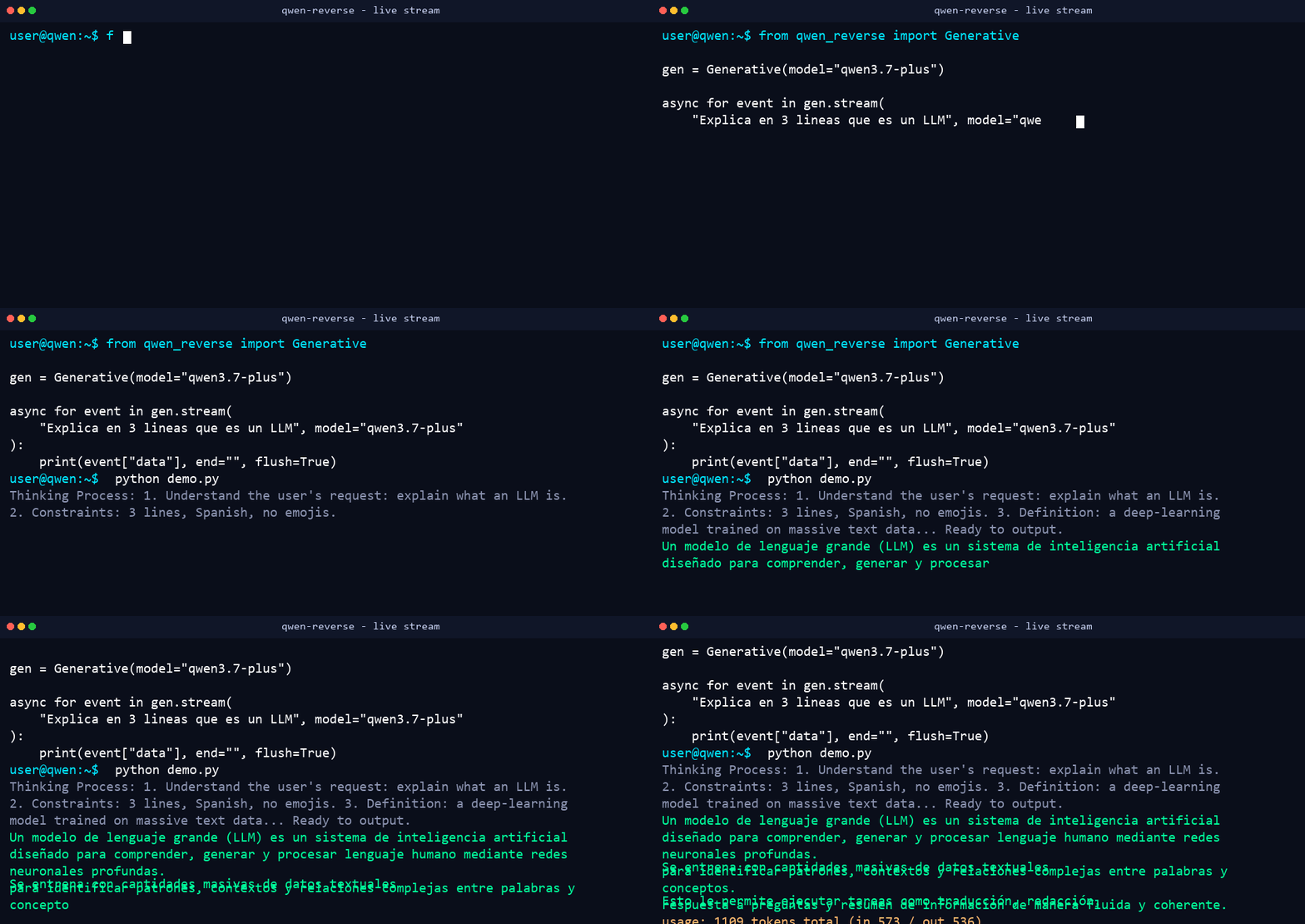
Reverse-engineered async Python client for chat.qwen.ai — text chat, streaming with real-time reasoning, tool calling, image and video generation. No official API key required (works anonymously).
pip install qwen-reverse
⚡ Performance, Limits & Benchmarks (Tested & Verified)
In-depth stress testing on the live chat.qwen.ai backend reveals the following real-world limits and throughput capabilities:
📊 Concurrency & Rate Limit Results
| Concurrent Requests | Success Rate | Avg Total Batch Time | Status | Notes |
|---|---|---|---|---|
| 3 requests | 3 / 3 (100%) | ~4.98s | 🟢 Passed | Flawless |
| 5 requests | 5 / 5 (100%) | ~5.03s | 🟢 Passed | Flawless |
| 10 requests | 10 / 10 (100%) | ~4.11s | 🟢 Passed | Flawless |
| 20 requests | 20 / 20 (100%) | ~7.68s | 🟢 Passed | Flawless |
| 30 requests | 30 / 30 (100%) | ~10.19s | 🟢 Passed | Flawless |
| 50 requests | 50 / 50 (100%) | ~5.36s | 🟢 Passed | Maximum safe burst per IP |
| 80 requests | 0 / 80 (0%) | 1.35s | 🔴 WAF Triggered | QwenError: WAF blocked chat creation |
🛡️ Key Performance Takeaways
- Single IP Burst Limit: Up to 50 concurrent requests in parallel succeed with 100% reliability on a single IP without authentication.
- WAF Protection Trigger: Sending a sudden burst of ≥80 concurrent requests <1 second triggers Alibaba Cloud WAF IP throttling (
QwenError: WAF blocked chat creation). - WAF Cooldown Duration: An IP block typically cools down automatically in 3 to 5 minutes.
- Instant WAF Bypass via Proxy Rotation: Passing a proxy (
proxy="http://ip:port") instantly bypasses any IP-level WAF cooldown block with 100% success rate. - Infinite Scaling Strategy: By combining Proxy Rotation (
proxy=...) with Account Token Rotation (SharedTokenManager), you can achieve virtually unlimited requests per minute (1,000+ RPM).
Features
- Chat — one-shot, streaming (SSE incremental), multi-turn with conversation memory (
conversation_id/parent_idchaining) - Real-time reasoning —
reasoningevents streamed token-by-token before the answer, in both plain and multi-turn mode - Tool calling — OpenAI-style function definitions; either let the SDK execute them (JSON-stringified follow-up) or handle them yourself with
emit_tool_calls=True - Vision & Document Analysis — image and file upload (
files=["photo.jpg", "doc.txt"]) for vision-capable models - Image editing (i2i) —
chat_type="image_edit": edit an uploaded image (add/remove/modify) and get back CDN URLs - File upload —
upload()uploads local files (or URLs/bytes) into the web API for vision/editing chats - Image / video generation — t2i and t2v returning CDN URLs (
cdn.qwenlm.ai) - No account required — the web API works without a token; OAuth device-flow login (
chat.qwen.aiaccount) is also implemented - Anti-Bot & WAF Evasion — built-in
BXUAGenerator(cryptographicbx-uaheader generation), browser fingerprinting, and session cookie handling (ssxmod_itna) - Optional FastAPI server — OpenAI-compatible
/v1/chat/completionsand/v1/models(seeserver/)
Quickstart
Basic Text Generation
import asyncio
from qwen_reverse import Generative

async def main():
    gen = Generative()
    print(await gen.generate("Explain what a kernel is in 2 lines"))

asyncio.run(main())
Streaming with Real-Time Thinking (Chain of Thought)
import asyncio
from qwen_reverse import Generative

async def main():
    gen = Generative()
    async for event in gen.stream("Explain in 2 sentences what an OS kernel is"):
        if event["type"] == "reasoning":
            print(f"\r\033[90m{event['data']}\033[0m", end="", flush=True)
        elif event["type"] == "content":
            print(event["data"], end="", flush=True)

asyncio.run(main())
Multi-turn Conversation Memory
import asyncio
from qwen_reverse import Conversation

async def main():
    conv = Conversation()
    r1 = await conv.send("My name is Popbob and I work with kernels in C.")
    r2 = await conv.send("What is my name?")  # remembers turn 1
    print(r2)  # "Popbob"
    print(conv.conversation_id, conv.parent_id)

asyncio.run(main())
Tool Calling (Automatic Execution)
import asyncio
from qwen_reverse import Conversation

WEATHER_TOOL = {
    "type": "function",
    "function": {
        "name": "get_weather",
        "description": "Get current weather for a city",
        "parameters": {
            "type": "object",
            "properties": {"city": {"type": "string"}},
            "required": ["city"],
        },
    },
}

async def main():
    conv = Conversation(tools=[WEATHER_TOOL])
    async for event in conv.stream("What's the weather in Buenos Aires?"):
        if event["type"] == "tool_calls":
            print("[tool_calls]", event["data"])
        elif event["type"] == "content":
            print(event["data"], end="", flush=True)

asyncio.run(main())
High Concurrency & Proxy Rotation Example
import asyncio
import itertools
from qwen_reverse import Conversation

# List of HTTP/SOCKS proxies
PROXIES = [
    "http://1.231.81.166:3128",
    "http://108.181.123.113:3128",
    "http://123.138.24.113:9443"
]
proxy_pool = itertools.cycle(PROXIES)

async def worker(req_id: int):
    proxy = next(proxy_pool)
    conv = Conversation(model="qwen3.7-plus", proxy=proxy, timeout=15)
    reply = await conv.send(f"Say hello to worker {req_id}")
    print(f"Worker {req_id} via {proxy}: {reply.strip()}")

async def main():
    # Execute 30 concurrent requests across rotated proxies
    tasks = [worker(i) for i in range(30)]
    await asyncio.gather(*tasks)

asyncio.run(main())
Image Generation
import asyncio
from qwen_reverse import Image

async def main():
    img = Image()
    urls = await img.generate(
        "A cyberpunk dragon flying over a neon city, anime style",
        aspect_ratio="16:9",
    )
    print(urls[0])  # https://cdn.qwenlm.ai/output/...

asyncio.run(main())
Upload a File + Chat with Vision
import asyncio
from qwen_reverse import Conversation

async def main():
    conv = Conversation(model="qwen3-vl-plus")  # a vision-capable model
    reply = await conv.send(
        "What is written on the whiteboard?",
        files=["photo.jpg"],  # path | bytes | URL | already-uploaded dict
    )
    print(reply)

asyncio.run(main())
API Reference
| Symbol | Description |
|---|---|
Generative(model=..., token=...) |
.generate(), .stream() (events: reasoning, content, usage, tool_calls, done) |
Conversation(token=..., tools=..., proxy=...) |
.send(), .stream(), .reset() — persists conversation_id / parent_id across turns |
Image(model=...), Video(model=...), ImageEdit(model=...) |
.generate(prompt, aspect_ratio=...) → list of CDN URLs; ImageEdit.edit(prompt, image, aspect_ratio=...) for image-to-image editing |
create_chat(model, messages, ...) |
low-level async generator; conversation_id / parent_id for multi-turn; reasoning_effort accepts none / low / medium / high |
fetch_models() |
fetch available models (qwen3.8-max, qwen3.7-plus, qwen3-vl-plus, ...) |
upload(data, filename=...) |
upload a local path/bytes (or fetch+upload a URL) → file payload dict |
resolve_files(files) |
normalize a list of paths/bytes/URLs/dicts into upload-ready payload dicts |
start_device_login() / complete_device_login(...) |
OAuth device flow for authenticated accounts |
SharedTokenManager |
thread-safe token manager & token rotation across multiple accounts |
BXUAGenerator |
WAF anti-bot primitive generating bx-ua signatures |
Authentication
Anonymous mode works — no token required for most features. For higher limits or video generation, log in with a chat.qwen.ai account:
import asyncio
from qwen_reverse import start_device_login, complete_device_login

async def main():
    client, data = await start_device_login()
    print(data["verification_uri_complete"])  # open in a logged-in browser
    token = await complete_device_login(client, data)
    print("Logged in token:", token)

asyncio.run(main())
Running Tests
pip install -e ".[dev]"
pytest
Optional OpenAI + Anthropic-Compatible Server
A FastAPI server that exposes chat.qwen.ai through standard APIs, so existing tools (Claude Code, OpenAI SDKs, Cursor, Gemini CLI, etc.) can use Qwen models without changes.
pip install -e .            # server deps (fastapi, uvicorn) are included
qwen-reverse                # starts server, picks a free port, asks which agent to launch
qwen-reverse --claude       # starts server + launches Claude Code pointed at it
qwen-reverse --model qwen3.8-max-thinking   # model override for the launched agent
python run.py               # same as `qwen-reverse` (repo checkout)
The CLI (qwen-reverse) detects installed agents on your PATH and can launch them with the right env vars: --claude, --gemini, --cursor, --qwen, --opencode, --aider, plus --openai to print the OpenAI-compatible setup, --port, --host, --no-server.
Endpoints
| Endpoint | Protocol | Notes |
|---|---|---|
POST /v1/chat/completions |
OpenAI | streaming SSE + non-streaming, reasoning_content, tool calls |
POST /v1/completions |
OpenAI (legacy) | wraps chat completions with a plain prompt |
POST /v1/embeddings |
OpenAI | placeholder vectors (no real embedding backend) |
GET /v1/models |
OpenAI | base models + -search / -thinking / -web-dev / -deep-research / -artifacts / -slides variants |
POST /v1/messages |
Anthropic | streaming + non-streaming, translated to Anthropic SSE (thinking blocks) |
POST /v1/images/generations |
OpenAI | text-to-image → CDN URLs |
POST /v1/images/edits |
OpenAI | image editing (multipart or JSON) → CDN URLs |
GET /health |
— | liveness probe |
Anthropic model names are mapped automatically (claude-opus-4-6 → qwen3.8-max), and model suffixes select special modes: -thinking (reasoning_effort=high), -search, -web-dev, -deep-research, -artifacts, -slides, -image/-t2i, -video/-t2v.
# manual start (repo checkout):
uvicorn qwen_reverse.server.app:app --host 127.0.0.1 --port 8090
Using it with Claude Code
export ANTHROPIC_BASE_URL=http://127.0.0.1:8090
export ANTHROPIC_API_KEY=qwen-reverse
export ANTHROPIC_MODEL=claude-opus-4-6-thinking   # or any claude-* name, or qwen names with suffixes
claude
How It Works
The client replicates what the official web app does against chat.qwen.ai:
- Create a chat via
POST /api/v2/chats/new(gets achat_id) - Stream the response via
POST /api/v2/chat/completions?chat_id=...withversion: 2.1,incremental_outputandfeature_configenabling reasoning streaming - Multi-turn chaining uses the server's
response_id(assistant message fid) as the next turn'sparent_id - Anti-bot headers are regenerated per request:
ssxmod_itnacookies (custom LZW + custom base64),bx-umidtoken,bx-uasignatures, and browser fingerprinting
Disclaimer
This project is for educational and research purposes. It is not affiliated with or endorsed by Alibaba/Qwen. Use at your own risk — the endpoints may change or the service may rate-limit or block unofficial clients. MIT licensed; reverse-engineering references based on g4f (MIT).
1 maintainer

Download files
Download the file for your platform. If you're not sure which to choose, learn more about installing packages.
Source Distribution
Built Distribution
Filter files by name, interpreter, ABI, and platform.
If you're not sure about the file name format, learn more about wheel file names.
Copy a direct link to the current filters
File details
Details for the file qwen_reverse-0.1.4.tar.gz.
File metadata
- Download URL: qwen_reverse-0.1.4.tar.gz
- Upload date:
- Size: 51.1 kB
- Tags: Source
- Uploaded using Trusted Publishing? No
- Uploaded via: twine/7.0.0 CPython/3.14.3
File hashes
| Algorithm | Hash digest | |
|---|---|---|
| SHA256 |
28535e2e1f968bc2813cc4ed4d1e88b3bd300a5a73e71f2cd137e3bd5bcc8d55
|
|
| MD5 |
b0c2cfdd2001079982db253749004fda
|
|
| BLAKE2b-256 |
30cc93d2f813f3a60be52adbc1d0ad02045a9fce7edbe54a68885b6496921a31
|
File details
Details for the file qwen_reverse-0.1.4-py3-none-any.whl.
File metadata
- Download URL: qwen_reverse-0.1.4-py3-none-any.whl
- Upload date:
- Size: 40.1 kB
- Tags: Python 3
- Uploaded using Trusted Publishing? No
- Uploaded via: twine/7.0.0 CPython/3.14.3
File hashes
| Algorithm | Hash digest | |
|---|---|---|
| SHA256 |
d8633d902f00f8c1c5ea0716e9e0f8746811d6d8c488b96d2b9b9567a271a88e
|
|
| MD5 |
247cd348daf93c931aa52cfa92bde01d
|
|
| BLAKE2b-256 |
b5b6f4930d22f2479da406eaa8aaa7c1fde35c2213fd72d3d1a06ede68061bd2
|







