
Raccoon robotics library (formerly libstp)

Project description

RaccoonLib
The core robotics library powering RaccoonOS for Botball.
PID motion control · Kinematics · Odometry · Step-based missions · Python bindings







📖 Full documentation at raccoon-docs.pages.dev
RaccoonLib is the heart of RaccoonOS — a full robotics platform built for Botball competition. It gives your robot a solid foundation: reliable motion, clean sensor abstractions, and a step-based mission system that makes autonomous code readable and maintainable.
Built from years of competition experience at HTL St. Pölten, it's designed so that new teams don't have to start from zero.
What's Inside
| Module | What it does |
|---|---|
| Motion Control | PID-controlled drive_forward, turn_right, drive_strafe with feedforward compensation |
| Calibration | Auto-tune feedforward (kS, kV, kA) and PID via relay-feedback — no guessing |
| Kinematics | Differential and mecanum drivetrains — forward & inverse |
| Odometry | Real-time position and heading from wheel encoders + IMU fusion |
| Step Framework | seq(), parallel(), .until() — write missions like a readable recipe |
| Sensors & Actuators | IR sensors, buttons, servos — clean, consistent API |
| Python Bindings | Full Python API via pybind11 — same power, less boilerplate |
Getting Started
RaccoonLib runs on the KIPR Wombat controller (Raspberry Pi, ARM64). Local installs without a mock platform are not supported — deploy directly to the Pi.
1. Clone
git clone https://github.com/htl-stp-ecer/raccoon-lib.git --recurse-submodules
cd raccoon-lib
2. Build & deploy to your Pi in one step
RPI_HOST=<your-pi-ip> bash deploy.sh
This cross-compiles for ARM64 via Docker and installs the wheel on your Pi over SSH. No local toolchain setup needed.
| Variable | Default | Description |
|---|---|---|
RPI_HOST |
(required) | Raspberry Pi IP address |
RPI_USER |
pi |
SSH username |
RPI_DIR |
/home/pi/python-libs |
Install directory |
BUILD_TYPE |
Release |
CMake build type |
Starting a new robot project? Use
raccoon-cli—raccoon create project MyRobotruns a hardware wizard and generates your robot config, project structure, and deploy scripts automatically.
How It Works
You write missions. RaccoonLib handles the math.
Missions are Python classes with a sequence() method — describe what the robot does step by step:
from libstp import *

class M01NavigateToZone(Mission):
    def sequence(self) -> Sequential:
        return seq([
            mark_heading_reference(),       # lock current heading as 0°

            parallel(
                drive_forward(cm=40),       # drive while lowering arm
                seq([
                    wait_until_distance(7),
                    Defs.arm_servo.hold(),
                ]),
            ),

            turn_right(degrees=90),

            # drive until both IR sensors see black tape
            drive_forward().until(
                on_black(Defs.front.left) & on_black(Defs.front.right)
            ),

            drive_backward(cm=3),
        ])
The robot hardware config (motors, sensors, PID gains) is generated by raccoon-cli's hardware wizard — see raccoon-example for a fully commented reference.
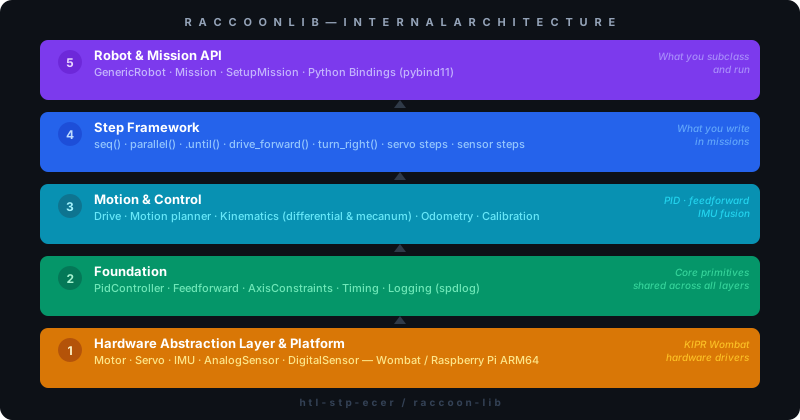
Architecture
Requirements
- CMake >= 3.15
- C++20 compatible compiler
- Python >= 3.11
- Docker (for ARM64 cross-compilation)
C++ dependencies: Eigen3 3.4.0 · LCM 1.5.0 · spdlog 1.14.1 · pybind11 2.13.6
Python dependencies: pyyaml · aiosqlite
Testing
# C++ tests
cmake -B build -DBUILD_TESTING=ON
cmake --build build
ctest --test-dir build

# Python tests
pytest tests/
Part of RaccoonOS
RaccoonLib is one piece of the full platform:
| Repository | What it is |
|---|---|
| raccoon-cli | Dev toolchain — scaffolding, hardware wizard, raccoon run |
| raccoon-example | Reference robot — start here if you're new |
| raccoon-transport | LCM messaging layer (C++, Python, Dart) |
| documentation | Full platform docs |
Contributing
See CONTRIBUTING.md for how to add modules, steps, run tests, and follow code style.
License
Copyright (C) 2026 Tobias Madlberger
Licensed under the GNU General Public License v3.0 — see LICENSE for details.
Release history Release notifications | RSS feed


Download files
Download the file for your platform. If you're not sure which to choose, learn more about installing packages.
Source Distributions
Built Distributions
Filter files by name, interpreter, ABI, and platform.
If you're not sure about the file name format, learn more about wheel file names.
Copy a direct link to the current filters
File details
Details for the file raccoon_library-1.0.139-cp313-cp313-win_amd64.whl.
File metadata
- Download URL: raccoon_library-1.0.139-cp313-cp313-win_amd64.whl
- Upload date:
- Size: 6.0 MB
- Tags: CPython 3.13, Windows x86-64
- Uploaded using Trusted Publishing? Yes
- Uploaded via: twine/6.1.0 CPython/3.13.12
File hashes
| Algorithm | Hash digest | |
|---|---|---|
| SHA256 |
8c84eeca4b4a7ac5ab79b49447c79a28da9a8887968a98656bffe221b35132f1
|
|
| MD5 |
5c52899a664988843b86f6bdf0d2ce98
|
|
| BLAKE2b-256 |
deafb290442832175fa3044217f69263ede48bb5f44b3ed3b4df6dd8cf337dce
|
Provenance
The following attestation bundles were made for raccoon_library-1.0.139-cp313-cp313-win_amd64.whl:
Publisher:
ci.yml on htl-stp-ecer/raccoon-lib
-
Statement:
-
Statement type:
https://in-toto.io/Statement/v1 -
Predicate type:
https://docs.pypi.org/attestations/publish/v1 -
Subject name:
raccoon_library-1.0.139-cp313-cp313-win_amd64.whl -
Subject digest:
8c84eeca4b4a7ac5ab79b49447c79a28da9a8887968a98656bffe221b35132f1 - Sigstore transparency entry: 2071249186
- Sigstore integration time:
-
Permalink:
htl-stp-ecer/raccoon-lib@d52f1e1617cccd3eafba08b400410abdf5f65730 -
Branch / Tag:
refs/heads/main - Owner: https://github.com/htl-stp-ecer
-
Access:
public
-
Token Issuer:
https://token.actions.githubusercontent.com -
Runner Environment:
github-hosted -
Publication workflow:
ci.yml@d52f1e1617cccd3eafba08b400410abdf5f65730 -
Trigger Event:
push
-
Statement type:
File details
Details for the file raccoon_library-1.0.139-cp313-cp313-manylinux_2_27_x86_64.manylinux_2_28_x86_64.whl.
File metadata
- Download URL: raccoon_library-1.0.139-cp313-cp313-manylinux_2_27_x86_64.manylinux_2_28_x86_64.whl
- Upload date:
- Size: 7.3 MB
- Tags: CPython 3.13, manylinux: glibc 2.27+ x86-64, manylinux: glibc 2.28+ x86-64
- Uploaded using Trusted Publishing? Yes
- Uploaded via: twine/6.1.0 CPython/3.13.12
File hashes
| Algorithm | Hash digest | |
|---|---|---|
| SHA256 |
0facdfcb27c1f2b998ccd3523f6d9d6b9c24485367e91a9734298d2cefdd98be
|
|
| MD5 |
417dd604b68e659ab7d25a039d418c19
|
|
| BLAKE2b-256 |
ae5caaf9726d4d200d5c6ec34f5f2ba8b79a82939d18406288fe483eceb4de8e
|
Provenance
The following attestation bundles were made for raccoon_library-1.0.139-cp313-cp313-manylinux_2_27_x86_64.manylinux_2_28_x86_64.whl:
Publisher:
ci.yml on htl-stp-ecer/raccoon-lib
-
Statement:
-
Statement type:
https://in-toto.io/Statement/v1 -
Predicate type:
https://docs.pypi.org/attestations/publish/v1 -
Subject name:
raccoon_library-1.0.139-cp313-cp313-manylinux_2_27_x86_64.manylinux_2_28_x86_64.whl -
Subject digest:
0facdfcb27c1f2b998ccd3523f6d9d6b9c24485367e91a9734298d2cefdd98be - Sigstore transparency entry: 2071249196
- Sigstore integration time:
-
Permalink:
htl-stp-ecer/raccoon-lib@d52f1e1617cccd3eafba08b400410abdf5f65730 -
Branch / Tag:
refs/heads/main - Owner: https://github.com/htl-stp-ecer
-
Access:
public
-
Token Issuer:
https://token.actions.githubusercontent.com -
Runner Environment:
github-hosted -
Publication workflow:
ci.yml@d52f1e1617cccd3eafba08b400410abdf5f65730 -
Trigger Event:
push
-
Statement type:
File details
Details for the file raccoon_library-1.0.139-cp313-cp313-manylinux_2_27_aarch64.manylinux_2_28_aarch64.whl.
File metadata
- Download URL: raccoon_library-1.0.139-cp313-cp313-manylinux_2_27_aarch64.manylinux_2_28_aarch64.whl
- Upload date:
- Size: 6.9 MB
- Tags: CPython 3.13, manylinux: glibc 2.27+ ARM64, manylinux: glibc 2.28+ ARM64
- Uploaded using Trusted Publishing? Yes
- Uploaded via: twine/6.1.0 CPython/3.13.12
File hashes
| Algorithm | Hash digest | |
|---|---|---|
| SHA256 |
4ad57420efe2cc2c931439c426f693251edcff83e52a9e8f2f218ba188dc9e06
|
|
| MD5 |
8c651b9d1da4a5d5fe19e1264f3766f9
|
|
| BLAKE2b-256 |
f580e7509ad594b5855af00adff43f13814aa8f085e4f03763b1e9f8b7fb2d6a
|
Provenance
The following attestation bundles were made for raccoon_library-1.0.139-cp313-cp313-manylinux_2_27_aarch64.manylinux_2_28_aarch64.whl:
Publisher:
ci.yml on htl-stp-ecer/raccoon-lib
-
Statement:
-
Statement type:
https://in-toto.io/Statement/v1 -
Predicate type:
https://docs.pypi.org/attestations/publish/v1 -
Subject name:
raccoon_library-1.0.139-cp313-cp313-manylinux_2_27_aarch64.manylinux_2_28_aarch64.whl -
Subject digest:
4ad57420efe2cc2c931439c426f693251edcff83e52a9e8f2f218ba188dc9e06 - Sigstore transparency entry: 2071249178
- Sigstore integration time:
-
Permalink:
htl-stp-ecer/raccoon-lib@d52f1e1617cccd3eafba08b400410abdf5f65730 -
Branch / Tag:
refs/heads/main - Owner: https://github.com/htl-stp-ecer
-
Access:
public
-
Token Issuer:
https://token.actions.githubusercontent.com -
Runner Environment:
github-hosted -
Publication workflow:
ci.yml@d52f1e1617cccd3eafba08b400410abdf5f65730 -
Trigger Event:
push
-
Statement type:
File details
Details for the file raccoon_library-1.0.139-cp313-cp313-macosx_14_0_universal2.whl.
File metadata
- Download URL: raccoon_library-1.0.139-cp313-cp313-macosx_14_0_universal2.whl
- Upload date:
- Size: 9.3 MB
- Tags: CPython 3.13, macOS 14.0+ universal2 (ARM64, x86-64)
- Uploaded using Trusted Publishing? Yes
- Uploaded via: twine/6.1.0 CPython/3.13.12
File hashes
| Algorithm | Hash digest | |
|---|---|---|
| SHA256 |
abc5d3406c9ad5d9bfb40dc39d9523aa958af78f5d6874423435bd9725bbb846
|
|
| MD5 |
fa8d1e3b23984e48824b58b2a317a7c6
|
|
| BLAKE2b-256 |
b0dbad1b3900d5ab5ce020860fe96fbb5b2cab99366b2403033779bd5b5d8ccd
|
Provenance
The following attestation bundles were made for raccoon_library-1.0.139-cp313-cp313-macosx_14_0_universal2.whl:
Publisher:
ci.yml on htl-stp-ecer/raccoon-lib
-
Statement:
-
Statement type:
https://in-toto.io/Statement/v1 -
Predicate type:
https://docs.pypi.org/attestations/publish/v1 -
Subject name:
raccoon_library-1.0.139-cp313-cp313-macosx_14_0_universal2.whl -
Subject digest:
abc5d3406c9ad5d9bfb40dc39d9523aa958af78f5d6874423435bd9725bbb846 - Sigstore transparency entry: 2071249169
- Sigstore integration time:
-
Permalink:
htl-stp-ecer/raccoon-lib@d52f1e1617cccd3eafba08b400410abdf5f65730 -
Branch / Tag:
refs/heads/main - Owner: https://github.com/htl-stp-ecer
-
Access:
public
-
Token Issuer:
https://token.actions.githubusercontent.com -
Runner Environment:
github-hosted -
Publication workflow:
ci.yml@d52f1e1617cccd3eafba08b400410abdf5f65730 -
Trigger Event:
push
-
Statement type:






