
Raggie: Latent Space Trainer, Retriever, and Visualizer









Raggie is a Python-based project for training, retrieving, and visualizing sentence embeddings. It provides tools to train a model on paired text data, retrieve relevant documents based on queries, evaluate retrieval performance, and visualize embeddings using t-SNE.
Features
- Latent Space Trainer: Train a Sentence Transformer model with positive and negative pairs of text data.
- Negative Sampling: Automatically generate negative samples to improve training.
- Latent Retriever: Retrieve the most relevant documents for a given query using FAISS for efficient similarity search.
- Evaluation: Evaluate retrieval performance using rank-based metrics.
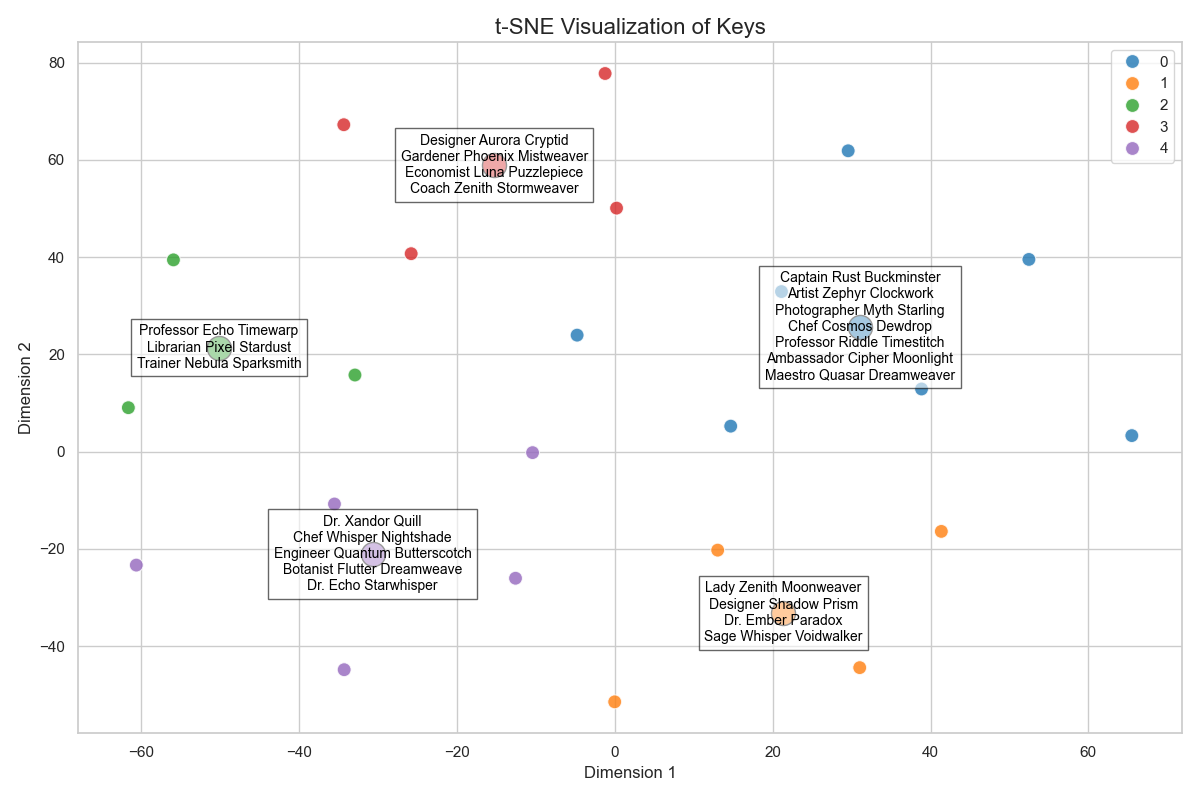
- t-SNE Visualization: Visualize embeddings in 2D space with clustering and annotation support.
- Customized Data Handling: Extend or customize data handling by using the abstract classes.
Visit the Raggie API Documentation for more detailed information.
Project Structure
├── raggie/
│   ├── data.py              # Abstract and default data handling
│   ├── model.py             # Model training logic
│   ├── main.py              # Retrieval and evaluation logic
│   ├── utils.py             # Plotting capabilities and t-SNE visualization
│   ├── __init__.py          # High-level API
├── examples/
│   ├── user.py              # Example usage of Raggie
├── data/
│   ├── user_train.jsonl     # Training data in JSONL format
│   ├── user_test.jsonl      # Evaluation data in JSONL format
├── output/                  # Directory for saving trained models and configurations
├── requirements.txt         # Python dependencies
├── pyproject.toml           # Project metadata
├── uv.lock                  # Dependency lock file
├── README.md                # Project documentation
Installation
Recommended: Using uv
-
Install
uvpackage manager:# On Unix-like systems (Linux, macOS) curl -LsSf https://astral.sh/uv/install.sh | sh # On Windows PowerShell powershell -c "irm https://astral.sh/uv/install.ps1 | iex"
For other installation methods, visit uv documentation.
For end-users
-
Install the package from PyPI:
uv pip install raggie
-
Test the installation by running the example script:
import raggie
print(raggie)
For developers
-
Clone the repository:
git clone https://github.com/yamaceay/raggie.git
cd raggie
-
Test the example script examples/user.py:
uv run examples/user.py
Basic Usage
Here's a step-by-step guide to using Raggie for training, retrieving, and visualizing embeddings:
-
Create a script with command line arguments:
import argparse
from raggie import Raggie, RaggieModel, RaggieDataLoader
from raggie.utils import RaggiePlotter

parser = argparse.ArgumentParser(description="Train and evaluate a latent space model.")
parser.add_argument("-d", "--data_dir", type=str, default="data/user", help="Path to data directory.")
parser.add_argument("-o", "--output_dir", type=str, default="output/user", help="Path to output directory.")
args = parser.parse_args()
-
Initialize components and train:
dataloader = RaggieDataLoader(data_dir=args.data_dir)
train_data, val_data = dataloader.train, dataloader.val
model = RaggieModel(output_dir=args.output_dir)
model.train(train_data, val_data)

raggie = Raggie(model, val_data)
-
Set up example query and key:
key = "Dr. Xandor Quill"
query = "I am looking for a librarian who has specialized in underwater chess mostly played by dolphins"
-
Perform different types of retrievals:
# Retrieve keys based on query
results = raggie.retrieve([query], return_all_scores=True)
print(f"Retrieved keys by '{query}':")
for result in results[0]:
    name, score = result
    print(f"Key: {name}, Score: {score}")

# Find similar keys
results = raggie.most_similar(keys=[key], return_all_scores=True)
print(f"Retrieved keys by '{key}':")
for result in results[0]:
    name, score = result
    print(f"Key: {name}, Score: {score}")

# Find similar documents
results = raggie.most_similar(queries=[query], return_all_scores=True)
print(f"Retrieved documents by '{query}':")
for result in results[0]:
    doc, score = result
    print(f"Document: {doc}, Score: {score}")
-
Evaluate and visualize:
# Check retrieval performance
rank = raggie.evaluate_rank(query, key)
print(f"Rank of document '{query}' for key '{key}': {rank}")

# Visualize embeddings
plotter = RaggiePlotter(model)
keys = [pair[0] for pair in train_data.data]
plotter.plot(keys, n_clusters=5)
Extending Data Handling
The current implementation uses abstract classes for allowing custom functionality in data handling, model training and visualization. You can extend the functionality by implementing your own logic by respecting the interfaces provided in each file.
The types can be imported as follows:
from raggie.types import RaggieDataClass, RaggieModelClass, RaggiePlotterClass
The API specification is available in Raggie API Documentation.
Data Preparation
The current project includes example training and evaluation data in the data directory:
data/user_train.jsonl: Training data with paired topics and texts.data/user_test.jsonl: Evaluation data for testing retrieval performance.
Here's how you can bring your own training and evaluation data for your use case:
-
Example JSONL format:
{"key": "topic1", "value": "This is the text for topic 1."}
{"key": "topic2", "value": "This is the text for topic 2."}
-
Example CSV format:
key,value
topic1,This is the text for topic 1.
topic2,This is the text for topic 2.
-
Example JSON format:
[
    {"key": "topic1", "value": "This is the text for topic 1."},
    {"key": "topic2", "value": "This is the text for topic 2."}
]
Store the data in a directory like data/<use_case> so that you'll be able to pass the directory path to the data loader class later.
The default data loader automatically detects the files with _train.<ext>, _test.<ext>, and _val.<ext> suffixes, where <ext> can be csv, jsonl or json.
Output Logging
The trained model and related configurations are saved per default in the output directory. This includes:
- Model weights (
model.safetensors) - Tokenizer configuration (
tokenizer.json,vocab.txt) - Additional metadata files.
Since the data files are expected to be large, the output directory is not included in the source repository.
Dependencies
The project requires the following Python libraries:
faiss_cpunumpysentence_transformerstorchdatasetsacceleratematplotlibseabornscikit-learn
All dependencies are managed using uv and listed in requirements.txt and uv.lock.
Python Version
This project requires Python 3.12. Ensure you have the correct version installed.
Contributing
Contributions are welcome! Feel free to open issues or submit pull requests.
License
This project is licensed under the MIT License. See the LICENSE file for details.
Acknowledgments
This project uses the Sentence Transformers library for training and embedding generation, and FAISS for efficient similarity search.
Thank you for using Raggie!
1 maintainer

Release files for raggie 0.2.0
For a detailed explanation of source distributions (sdists) and built distributions (wheels), please see the package formats documentation.
Source distribution (sdist)
| File | Size | Uploaded | |
|---|---|---|---|
| raggie-0.2.0.tar.gz | 15.2 kB | Details |
Built distribution (wheel)
| File | Interpreter | ABI | Platform | Reset |
|---|---|---|---|---|
| raggie-0.2.0-py3-none-any.whl | Python 3 | none | any | Details |
Total release size: 28.7 kB
Release files / raggie-0.2.0.tar.gz
| Download URL | raggie-0.2.0.tar.gz |
|---|---|
| Size | 15.2 kB |
| Tags | Source |
|
SHA-256 checksum How to use checksums |
9bac19d75ac2367433fcb395951c0d41e6d1ad8b93a8e8ac3ad82b39c7a595be
|
|
BLAKE2b-256 checksum How to use checksums |
db917329160f1692e18298e5ce36e086dc40e234a78cebe834ee0654f1ff0b83
|
| Upload date | |
|
Uploaded using Trusted Publishing? What is trusted publishing? |
No |
| Uploaded via |
twine/6.1.0 CPython/3.12.7
|
Release files / raggie-0.2.0-py3-none-any.whl
| Download URL | raggie-0.2.0-py3-none-any.whl |
|---|---|
| Size | 13.6 kB |
| Tags | Python 3 |
|
SHA-256 checksum How to use checksums |
7693d60a9241e11413b39436aa5272497ac298510d9f27bda9ac2e1fca9d95ab
|
|
BLAKE2b-256 checksum How to use checksums |
ee48a8c61cf893c384866d2a8a79a62ba4ecee3a6307115385f2deecdd386f09
|
| Upload date | |
|
Uploaded using Trusted Publishing? What is trusted publishing? |
No |
| Uploaded via |
twine/6.1.0 CPython/3.12.7
|














